TELNET JP
• TELNET is an abbreviation for terminal network.
• It is a standard TCP/IP protocol for virtual terminal
service.
• It is a general purpose client/server application
program.
2
• TELNET enables the establishment of a connection to
a remote system in such a way that the local terminal
appears to be a terminal at the remote system.
• In other words, it allows the user to log on to a remote
computer. After logging on, user can use the services
available on the remote computer and transfer the
results back to the local computer.
3
LOGGINGLOGGING
• To access the system, user logs into the system with
user-id. The system also includes password
checking to prevent an unauthorized user accessing
the resources.
• Logging process can be local logging or remote
logging.
4
• When the user logs into
a local timesharing
system, it is called local
log-in.
• When the user wants to
access an application
program or utility
located on a remote
machine, it is called
remote log-in.
5
LOCAL LOG-IN 6
Figure- 1
• When the user types at the terminal, the keystrokes
are accepted by the terminal driver.
• The terminal driver passes the characters to the
operating system.
• The operating system interprets the combination of
characters and invokes the desired application
program.
7
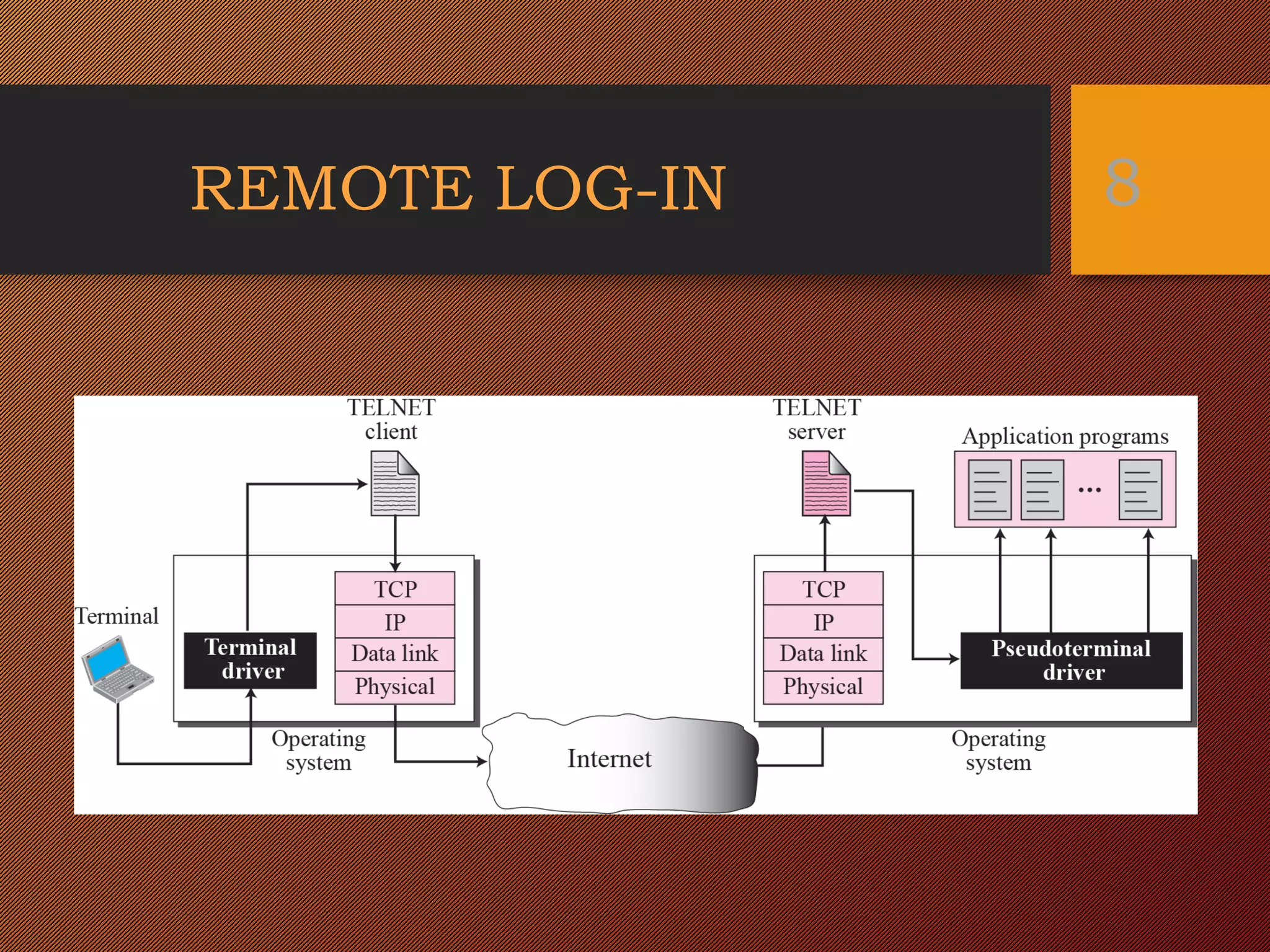
REMOTE LOG-IN 8
Figure- 1
Figure- 2
• The user sends the keystrokes to the terminal driver,
where the local operating system accepts the
characters but does not interpret them.
• The characters are sent to the TELNET client, which
transforms the characters to a universal character set
called network virtual terminal(NVT) characters and
delivers them to the local TCP/IP protocol stack.
9
• The text in NVT form travel through the internet and
arrive at the TCP/IP stack at the remote machine.
• The characters are delivered to the operating system
and passed to the TELNET server which changes the
characters to the corresponding characters
understandable by the remote computer.
10
• However, the characters cannot be passed directly to the
operating system because the remote operating system is not
designed to receive characters from a TELNET server.
• It is designed to receive characters from a terminal driver.
• A software called a pseudo terminal driver is added which
pretends that the characters are coming from a terminal.
11
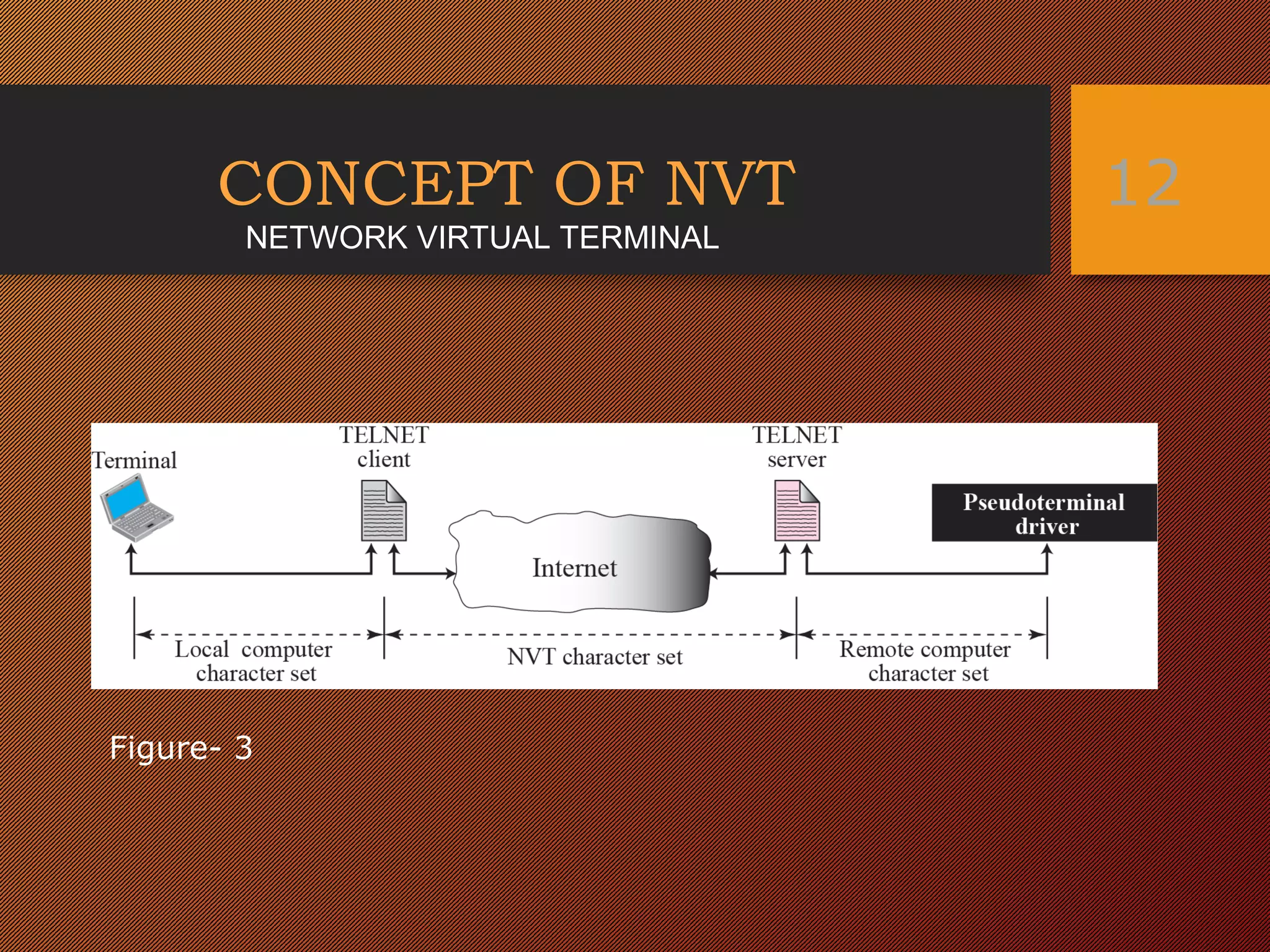
CONCEPT OF NVT 12
Figure- 3
NETWORK VIRTUAL TERMINAL
• The client telnet translates characters that come from
local terminal into NVT form and delivers them to the
network.
• The server telnet translates data and commands from
NVT form into the form acceptable by the remote
computer.
13
NVT CHARACTER SET
It uses two sets of characters one for data and other
for control.
14
Figure- 4
EMBEDDING
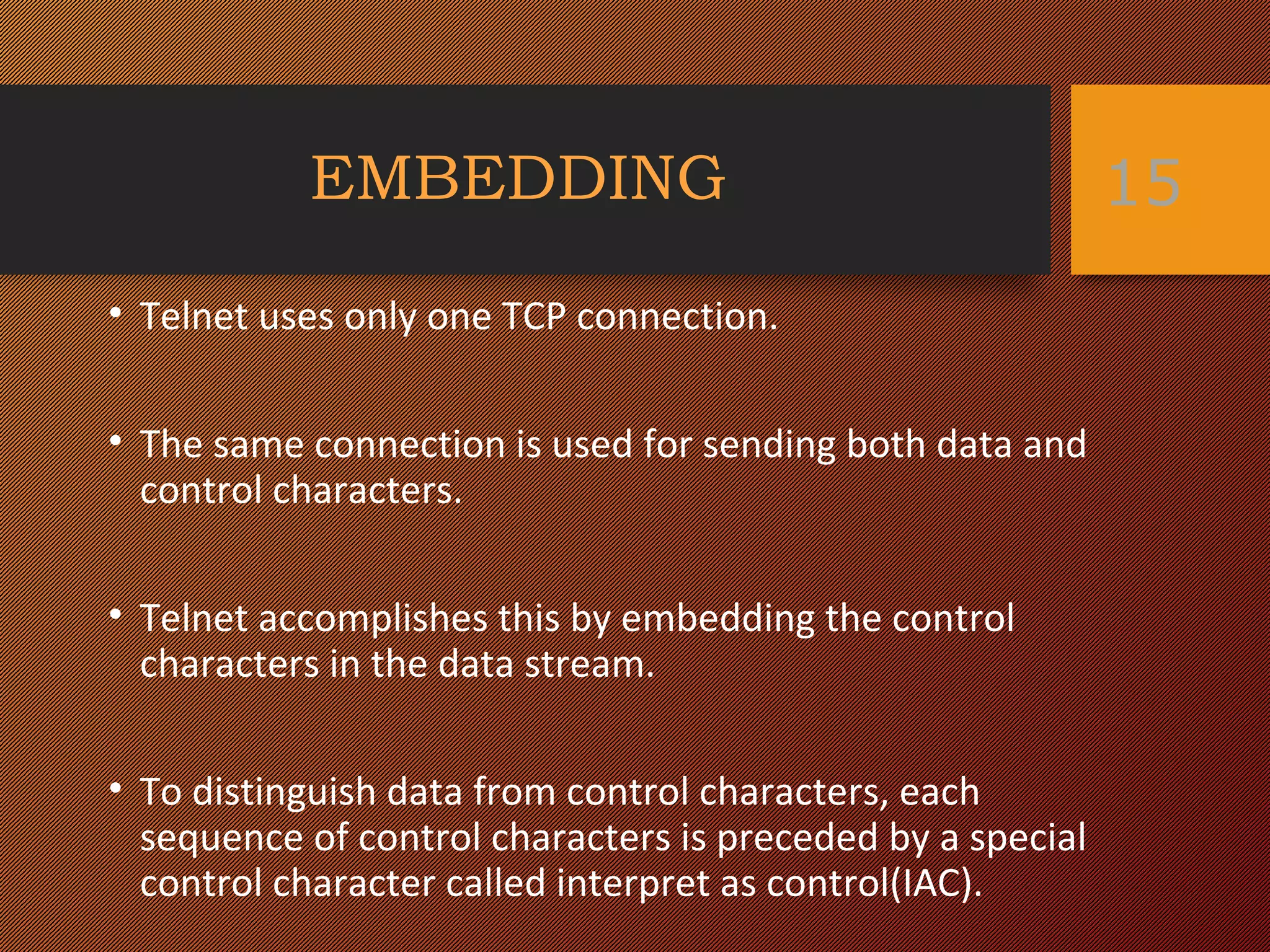
• Telnet uses only one TCP connection.
• The same connection is used for sending both data and
control characters.
• Telnet accomplishes this by embedding the control
characters in the data stream.
• To distinguish data from control characters, each
sequence of control characters is preceded by a special
control character called interpret as control(IAC).
15
OPTIONS
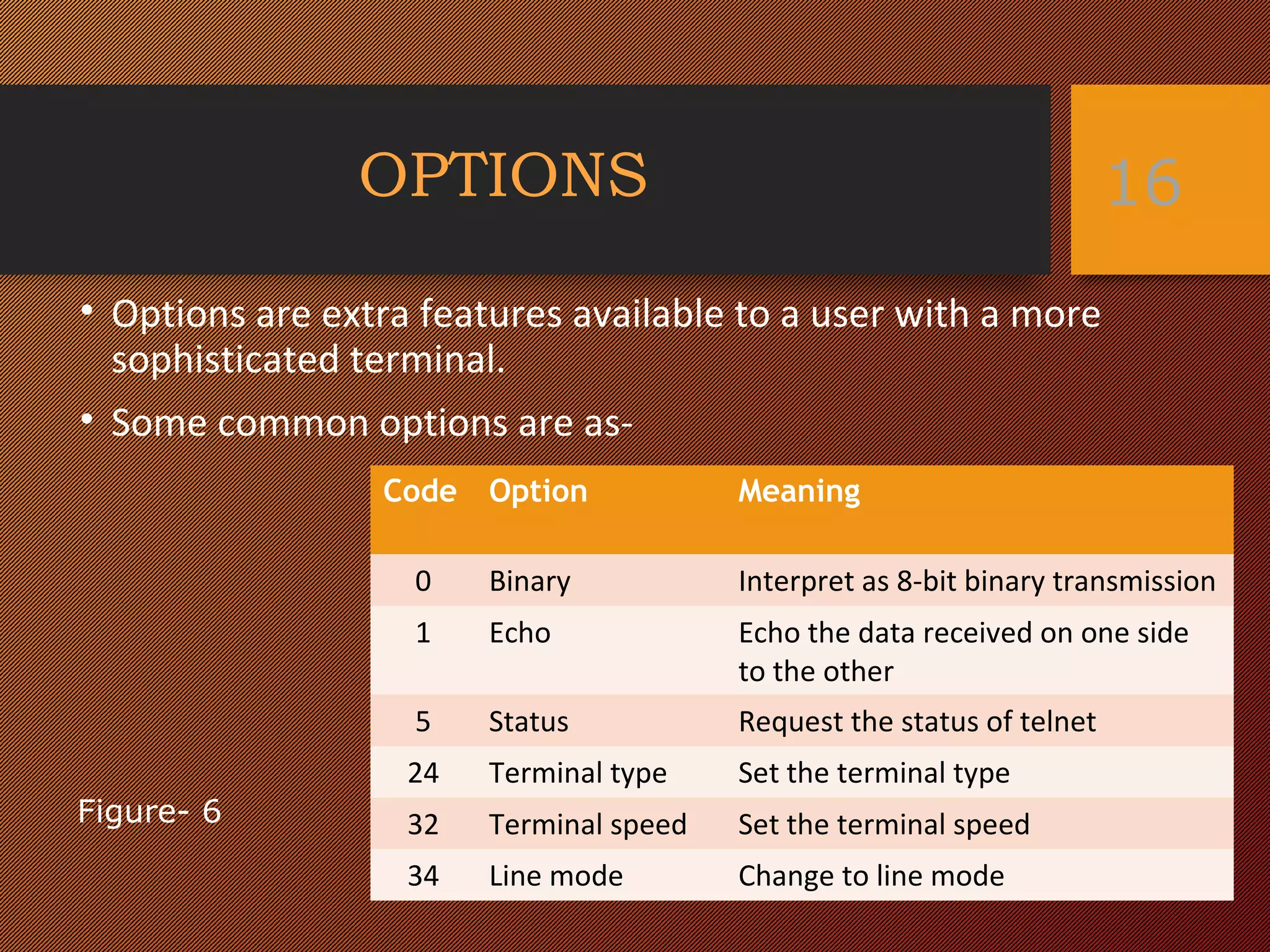
• Options are extra features available to a user with a more
sophisticated terminal.
• Some common options are as-
16
Code Option Meaning
0 Binary Interpret as 8-bit binary transmission
1 Echo Echo the data received on one side
to the other
5 Status Request the status of telnet
24 Terminal type Set the terminal type
32 Terminal speed Set the terminal speed
34 Line mode Change to line mode
Figure- 6
OPTION NEGOTIATION
• Telnet lets the client and server negotiate options
before or during the use of the service.
• Four control characters are used for this purpose-
17
Meaning
WILL 1. Offering to enable
2. Accepting a request to enable
WONT 1. 1.Rejecting a request to enable
2. 2.Offering to disable
3. 3.Accepting a request to disable
DO 1. 1.Approving an offer to enable
2. 2.Requesting to enable
DONT 1. 1.Dispproving an offer to enable
2. 2.Approving an offer to disable
3. 3.Requesting to disable
These control characters are as-
Figure- 7
18
WILL
Will I enable the option?
DO or DONT
Do (or don’t) enable the option
Offer to enable the option
Figure- 8
19
DO
Do enable the option
I will (won’t) enable the option
WILL or WONT
Request to enable an option
Figure- 9
20
WONT
I won’t use the option any more
DONT
Don’t use it
Offer to disable an option
Figure- 10
21
DONT
Don’t use the option any more
WONT
I won’t
Request to disable an option
Figure- 11
22
Example of option ‘Echo’Example of option ‘Echo’ 23
Do enable the echo option
IACDOECHO1
I will enable the echo option
IAC WILL ECHO 22
Figure- 12
MODE OF OPERATION
Most Telnet implementation operate in one of three
modes-
• Default mode
• Character mode
• Line mode
24
DEFAULT MODE
• This mode is used if no other modes are invoked
through option negotiation
• Echoing is done by the client.
• The user types the character , client echoes the
character but does not send it until a whole line is
completed.
25
CHARACTER MODE
• Each character typed is sent by the client to the
server.
• The server echoes the character back to be
displayed on the client screen.
• Echoing of the character can be displayed if the
transmission time is long.
26
LINE MODE
• It is proposed to compensate for the deficiencies of
default mode and character mode.
• In this line echoing is done by the client.
• The client then sends the whole line to the server.
27
28
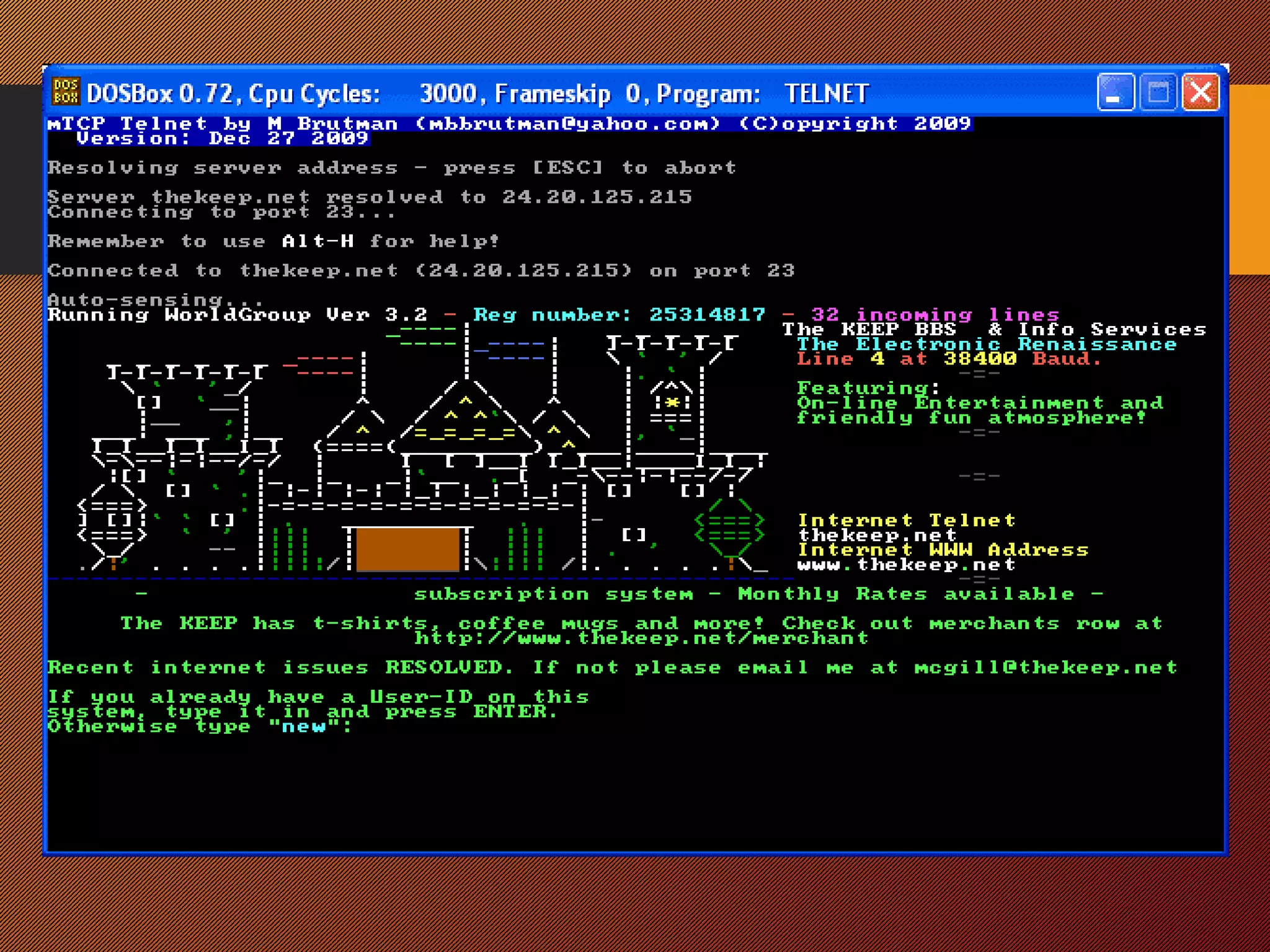
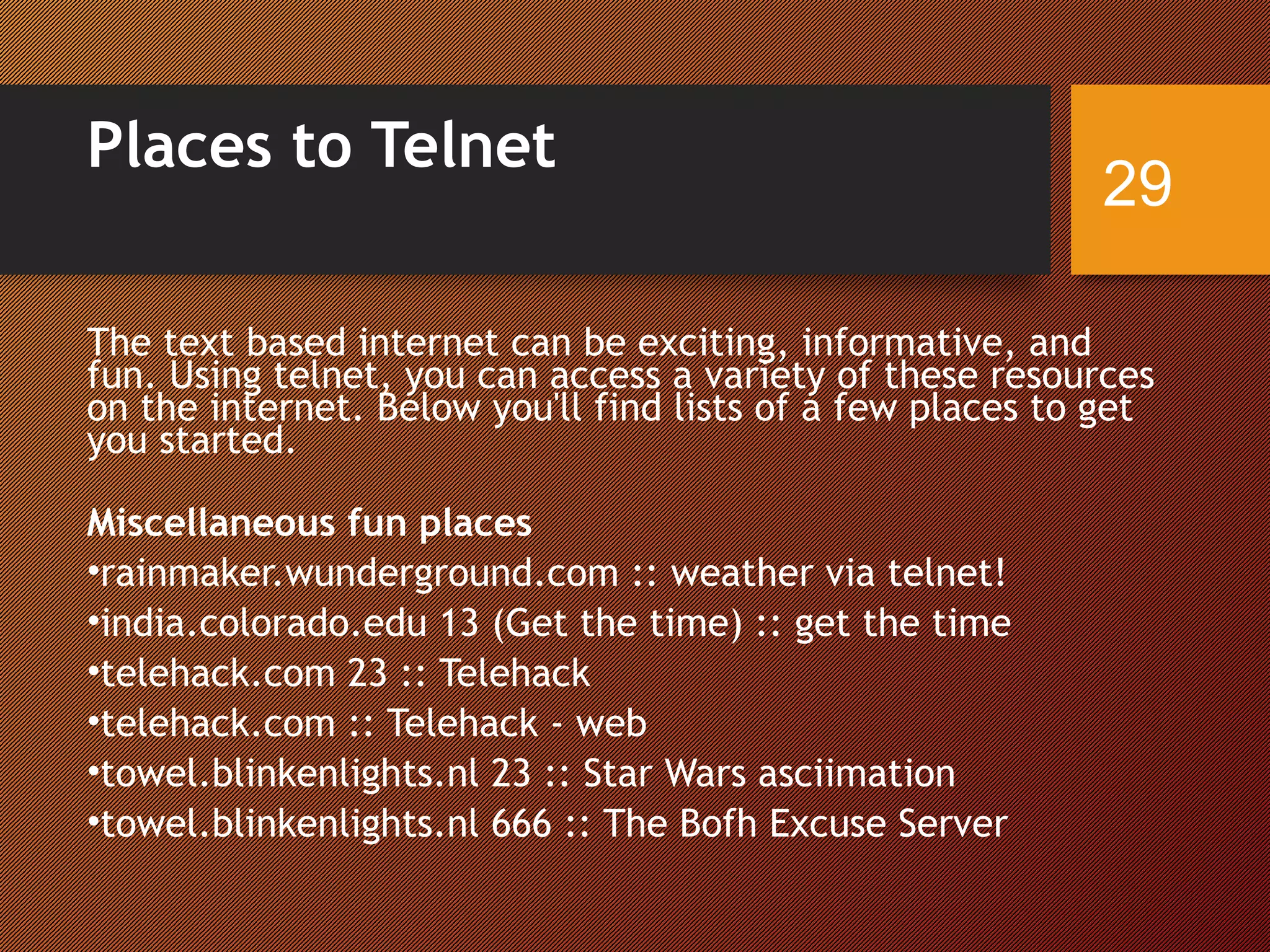
Places to Telnet
The text based internet can be exciting, informative, and
fun. Using telnet, you can access a variety of these resources
on the internet. Below you'll find lists of a few places to get
you started.
Miscellaneous fun places
•rainmaker.wunderground.com :: weather via telnet!
•india.colorado.edu 13 (Get the time) :: get the time
•telehack.com 23 :: Telehack
•telehack.com :: Telehack - web
•towel.blinkenlights.nl 23 :: Star Wars asciimation
•towel.blinkenlights.nl 666 :: The Bofh Excuse Server
29

Telnet

  • 1.
  • 2.
    • TELNET isan abbreviation for terminal network. • It is a standard TCP/IP protocol for virtual terminal service. • It is a general purpose client/server application program. 2
  • 3.
    • TELNET enablesthe establishment of a connection to a remote system in such a way that the local terminal appears to be a terminal at the remote system. • In other words, it allows the user to log on to a remote computer. After logging on, user can use the services available on the remote computer and transfer the results back to the local computer. 3
  • 4.
    LOGGINGLOGGING • To accessthe system, user logs into the system with user-id. The system also includes password checking to prevent an unauthorized user accessing the resources. • Logging process can be local logging or remote logging. 4
  • 5.
    • When theuser logs into a local timesharing system, it is called local log-in. • When the user wants to access an application program or utility located on a remote machine, it is called remote log-in. 5
  • 6.
  • 7.
    • When theuser types at the terminal, the keystrokes are accepted by the terminal driver. • The terminal driver passes the characters to the operating system. • The operating system interprets the combination of characters and invokes the desired application program. 7
  • 8.
  • 9.
    • The usersends the keystrokes to the terminal driver, where the local operating system accepts the characters but does not interpret them. • The characters are sent to the TELNET client, which transforms the characters to a universal character set called network virtual terminal(NVT) characters and delivers them to the local TCP/IP protocol stack. 9
  • 10.
    • The textin NVT form travel through the internet and arrive at the TCP/IP stack at the remote machine. • The characters are delivered to the operating system and passed to the TELNET server which changes the characters to the corresponding characters understandable by the remote computer. 10
  • 11.
    • However, thecharacters cannot be passed directly to the operating system because the remote operating system is not designed to receive characters from a TELNET server. • It is designed to receive characters from a terminal driver. • A software called a pseudo terminal driver is added which pretends that the characters are coming from a terminal. 11
  • 12.
    CONCEPT OF NVT12 Figure- 3 NETWORK VIRTUAL TERMINAL
  • 13.
    • The clienttelnet translates characters that come from local terminal into NVT form and delivers them to the network. • The server telnet translates data and commands from NVT form into the form acceptable by the remote computer. 13
  • 14.
    NVT CHARACTER SET Ituses two sets of characters one for data and other for control. 14 Figure- 4
  • 15.
    EMBEDDING • Telnet usesonly one TCP connection. • The same connection is used for sending both data and control characters. • Telnet accomplishes this by embedding the control characters in the data stream. • To distinguish data from control characters, each sequence of control characters is preceded by a special control character called interpret as control(IAC). 15
  • 16.
    OPTIONS • Options areextra features available to a user with a more sophisticated terminal. • Some common options are as- 16 Code Option Meaning 0 Binary Interpret as 8-bit binary transmission 1 Echo Echo the data received on one side to the other 5 Status Request the status of telnet 24 Terminal type Set the terminal type 32 Terminal speed Set the terminal speed 34 Line mode Change to line mode Figure- 6
  • 17.
    OPTION NEGOTIATION • Telnetlets the client and server negotiate options before or during the use of the service. • Four control characters are used for this purpose- 17
  • 18.
    Meaning WILL 1. Offeringto enable 2. Accepting a request to enable WONT 1. 1.Rejecting a request to enable 2. 2.Offering to disable 3. 3.Accepting a request to disable DO 1. 1.Approving an offer to enable 2. 2.Requesting to enable DONT 1. 1.Dispproving an offer to enable 2. 2.Approving an offer to disable 3. 3.Requesting to disable These control characters are as- Figure- 7 18
  • 19.
    WILL Will I enablethe option? DO or DONT Do (or don’t) enable the option Offer to enable the option Figure- 8 19
  • 20.
    DO Do enable theoption I will (won’t) enable the option WILL or WONT Request to enable an option Figure- 9 20
  • 21.
    WONT I won’t usethe option any more DONT Don’t use it Offer to disable an option Figure- 10 21
  • 22.
    DONT Don’t use theoption any more WONT I won’t Request to disable an option Figure- 11 22
  • 23.
    Example of option‘Echo’Example of option ‘Echo’ 23 Do enable the echo option IACDOECHO1 I will enable the echo option IAC WILL ECHO 22 Figure- 12
  • 24.
    MODE OF OPERATION MostTelnet implementation operate in one of three modes- • Default mode • Character mode • Line mode 24
  • 25.
    DEFAULT MODE • Thismode is used if no other modes are invoked through option negotiation • Echoing is done by the client. • The user types the character , client echoes the character but does not send it until a whole line is completed. 25
  • 26.
    CHARACTER MODE • Eachcharacter typed is sent by the client to the server. • The server echoes the character back to be displayed on the client screen. • Echoing of the character can be displayed if the transmission time is long. 26
  • 27.
    LINE MODE • Itis proposed to compensate for the deficiencies of default mode and character mode. • In this line echoing is done by the client. • The client then sends the whole line to the server. 27
  • 28.
  • 29.
    Places to Telnet Thetext based internet can be exciting, informative, and fun. Using telnet, you can access a variety of these resources on the internet. Below you'll find lists of a few places to get you started. Miscellaneous fun places •rainmaker.wunderground.com :: weather via telnet! •india.colorado.edu 13 (Get the time) :: get the time •telehack.com 23 :: Telehack •telehack.com :: Telehack - web •towel.blinkenlights.nl 23 :: Star Wars asciimation •towel.blinkenlights.nl 666 :: The Bofh Excuse Server 29

Editor's Notes

  • #3 The text based internet. A terminal emulation that enables a user to connect to a remote host or device using a telnet client, usually over port23.
  • #4 Telnet is an application protocol used on the Internet or local area networks to provide a bidirectional interactive text-oriented communication facility using a virtualterminal connection. User data is interspersed in-band with Telnet control information in an 8-bit byte oriented data connection over the Transmission Control Protocol(TCP).
  • #24 Intrepret as command
  • #28 Has more advantages over other two modes. Here also echoing is done by client. Whole line