Intro to Excel
Using M&M’s….
Lets get started….
What is Excel?
A microsoft office program used to
organize numbers and data
This program also helps add, subtract,
divide and multiply numbers easily
Spreadsheet
Lets Explore….
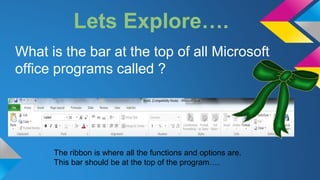
What is the bar at the top of all Microsoft
office programs called ?
The ribbon is where all the functions and options are.
This bar should be at the top of the program….
Cells, Columns, and rows ….
This is Cell B1
Lets Create and M&M chart...
Enter Chart title starting in Cell A1….
Change the Font size and Color
Of your title ….
**Look for the options on
the ribbon under the home
tab….
Merge and Center Title ….
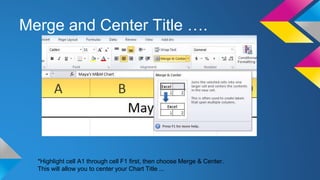
*Highlight cell A1 through cell F1 first, then choose Merge & Center.
This will allow you to center your Chart Title ...
Before and After Merge….
Before..
After ...
Graphing M&M data….
All the colors of M&M’s allow the
pie graph to calculate the
percentages of each color.
Entering Data into Cells…
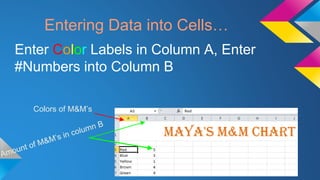
Colors of M&M’s
Enter Color Labels in Column A, Enter
#Numbers into Column B
HIGHLIGHT….
Highlight cells A3-B7
Click and highlight all colors
and Numbers added...
Create a Pie Chart…
On the Ribbon click the insert Tab
Next choose the Pie Chart …
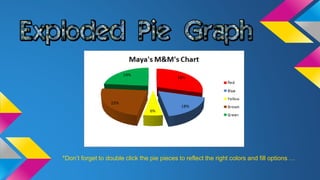
1. Insert Tab 2.) Pie Chart 3. ) Choose Exploded Chart
*Don’t forget to double click the pie pieces to reflect the right colors and fill options …

Excel for kids

  • 1.
  • 2.
    Lets get started…. Whatis Excel? A microsoft office program used to organize numbers and data This program also helps add, subtract, divide and multiply numbers easily Spreadsheet
  • 3.
    Lets Explore…. What isthe bar at the top of all Microsoft office programs called ? The ribbon is where all the functions and options are. This bar should be at the top of the program….
  • 4.
    Cells, Columns, androws …. This is Cell B1
  • 5.
    Lets Create andM&M chart... Enter Chart title starting in Cell A1….
  • 6.
    Change the Fontsize and Color Of your title …. **Look for the options on the ribbon under the home tab….
  • 7.
    Merge and CenterTitle …. *Highlight cell A1 through cell F1 first, then choose Merge & Center. This will allow you to center your Chart Title ...
  • 8.
    Before and AfterMerge…. Before.. After ...
  • 9.
    Graphing M&M data…. Allthe colors of M&M’s allow the pie graph to calculate the percentages of each color.
  • 10.
    Entering Data intoCells… Colors of M&M’s Enter Color Labels in Column A, Enter #Numbers into Column B
  • 11.
    HIGHLIGHT…. Highlight cells A3-B7 Clickand highlight all colors and Numbers added...
  • 12.
    Create a PieChart… On the Ribbon click the insert Tab Next choose the Pie Chart … 1. Insert Tab 2.) Pie Chart 3. ) Choose Exploded Chart
  • 13.
    *Don’t forget todouble click the pie pieces to reflect the right colors and fill options …