What is Microsoft Office?
•Microsoft Office is an office suite of
interrelated desktop applications,
servers and services for the Microsoft
Windows and Mac OS X operating
systems.
•This was introduced by Microsoft in
1989.
Microsoft Office Versions
The Microsoft Office for Windows 1.0
The Microsoft Office for Windows 1.5
The Microsoft Office for Windows 1.6
The Microsoft Office for Windows 3.0
Microsoft Office 4.0
Microsoft Office 95
Microsoft Office 97
Microsoft Office 2000
Microsoft Office XP
Microsoft Office 2003
Microsoft Office 2007
Microsoft Office 2010
Microsoft Office 2013
Microsoft Office 2016
MICROSOFT OFFICE PROGRAMS
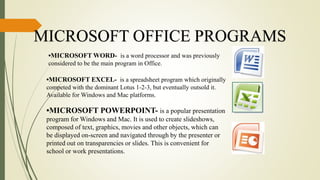
•MICROSOFT WORD- is a word processor and was previously
considered to be the main program in Office.
•MICROSOFT EXCEL- is a spreadsheet program which originally
competed with the dominant Lotus 1-2-3, but eventually outsold it.
Available for Windows and Mac platforms.
•MICROSOFT POWERPOINT- is a popular presentation
program for Windows and Mac. It is used to create slideshows,
composed of text, graphics, movies and other objects, which can
be displayed on-screen and navigated through by the presenter or
printed out on transparencies or slides. This is convenient for
school or work presentations.
02-03-2017
MS EXCEL
4
MICROSOFT WORD 2016
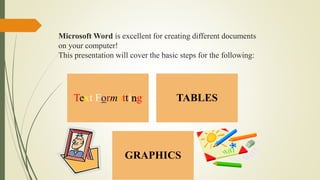
Microsoft Word is excellent for creating different documents
on your computer!
This presentation will cover the basic steps for the following:
Text Formatting TABLES
GRAPHICS
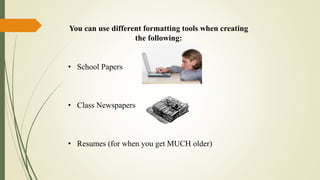
You can use different formatting tools when creating
the following:
• School Papers
• Class Newspapers
• Resumes (for when you get MUCH older)
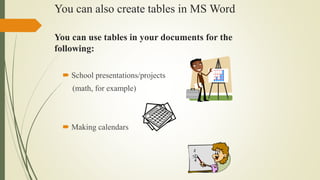
You can use tables in your documents for the
following:
 School presentations/projects
(math, for example)
 Making calendars
You can also create tables in MS Word
You could also insert pictures, photos and clip art into
your documents…
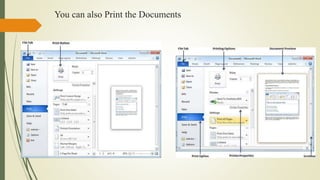
You can also Print the Documents
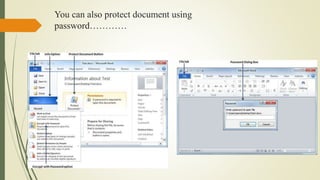
You can also protect document using
password…………
11
MICROSOFT EXCEL 2016
 Excel is a computer program used to create electronic
spreadsheets.
 Within excel user can organize data ,create chart and perform
calculations.
 Excel is a convenient program because it allow user to create
large spreadsheets, reference information, and it allows for
better storage of information.
 Excels operates like other Microsoft(MS) office programs and
has many of the same functions and shortcuts of other MS
programs.
12
INTRODUCTION TO MS-EXCEL
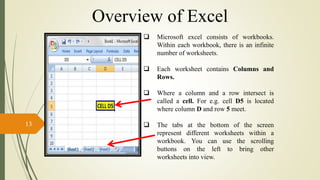
 Microsoft excel consists of workbooks.
Within each workbook, there is an infinite
number of worksheets.
 Each worksheet contains Columns and
Rows.
 Where a column and a row intersect is
called a cell. For e.g. cell D5 is located
where column D and row 5 meet.
 The tabs at the bottom of the screen
represent different worksheets within a
workbook. You can use the scrolling
buttons on the left to bring other
worksheets into view.
13
Overview of Excel
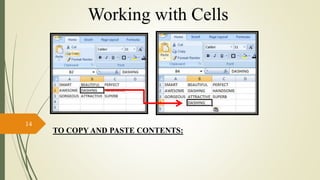
TO COPY AND PASTE CONTENTS:
14
Working with Cells
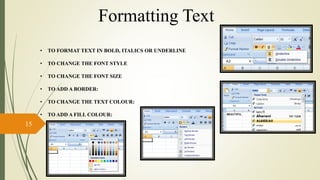
• TO FORMAT TEXT IN BOLD, ITALICS OR UNDERLINE
• TO CHANGE THE FONT STYLE
• TO CHANGE THE FONT SIZE
• TO ADD A BORDER:
• TO CHANGE THE TEXT COLOUR:
• TO ADD A FILL COLOUR:
15
Formatting Text
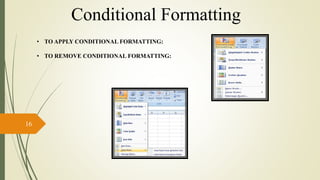
• TO APPLY CONDITIONAL FORMATTING:
• TO REMOVE CONDITIONAL FORMATTING:
16
Conditional Formatting
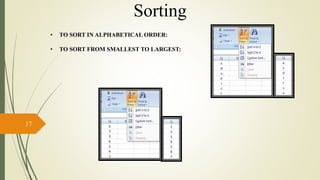
• TO SORT IN ALPHABETICAL ORDER:
• TO SORT FROM SMALLEST TO LARGEST:
17
Sorting
=
=
=
=
=
=
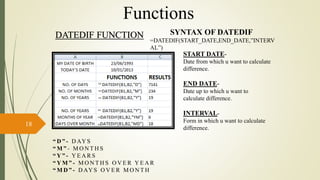
DATEDIF FUNCTION SYNTAX OF DATEDIF
=DATEDIF(START_DATE,END_DATE,”INTERV
AL”)
START DATE-
Date from which u want to calculate
difference.
END DATE-
Date up to which u want to
calculate difference.
INTERVAL-
Form in which u want to calculate
difference.
“ D ” - D AY S
“ M ” - M O N T H S
“ Y ” - Y E A R S
“ Y M ” - M O N T H S O V E R Y E A R
“ M D ” - D AY S O V E R M O N T H
18
Functions
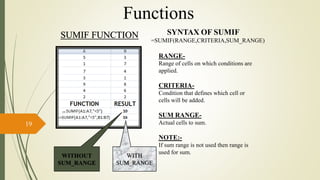
SUMIF FUNCTION SYNTAX OF SUMIF
=SUMIF(RANGE,CRITERIA,SUM_RANGE)
RANGE-
Range of cells on which conditions are
applied.
CRITERIA-
Condition that defines which cell or
cells will be added.
SUM RANGE-
Actual cells to sum.
NOTE:-
If sum range is not used then range is
used for sum.
WITHOUT
SUM_RANGE
=
=
19
Functions
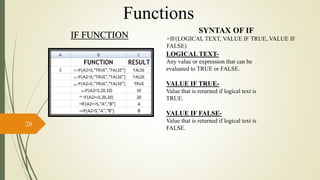
IF FUNCTION
SYNTAX OF IF
=IF(LOGICAL TEXT, VALUE IF TRUE, VALUE IF
FALSE)
LOGICAL TEXT-
Any value or expression that can be
evaluated to TRUE or FALSE.
VALUE IF TRUE-
Value that is returned if logical text is
TRUE.
VALUE IF FALSE-
Value that is returned if logical text is
FALSE.
=
=
=
=
=
=
=
20
Functions
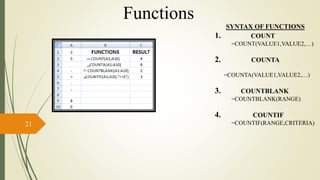
SYNTAX OF FUNCTIONS
1. COUNT
=COUNT(VALUE1,VALUE2,…)
2. COUNTA
=COUNTA(VALUE1,VALUE2,…)
3. COUNTBLANK
=COUNTBLANK(RANGE)
4. COUNTIF
=COUNTIF(RANGE,CRITERIA)
=
=
=
=
21
Functions
MS EXCEL
22
=
=
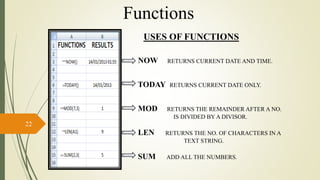
NOW RETURNS CURRENT DATE AND TIME.
TODAY RETURNS CURRENT DATE ONLY.
MOD RETURNS THE REMAINDER AFTER A NO.
IS DIVIDED BY A DIVISOR.
LEN RETURNS THE NO. OF CHARACTERS IN A
TEXT STRING.
SUM ADD ALL THE NUMBERS.
USES OF FUNCTIONS
=
=
=
Functions
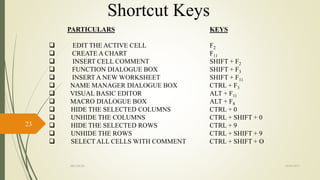
PARTICULARS
 EDIT THE ACTIVE CELL
 CREATE A CHART
 INSERT CELL COMMENT
 FUNCTION DIALOGUE BOX
 INSERT A NEW WORKSHEET
 NAME MANAGER DIALOGUE BOX
 VISUAL BASIC EDITOR
 MACRO DIALOGUE BOX
 HIDE THE SELECTED COLUMNS
 UNHIDE THE COLUMNS
 HIDE THE SELECTED ROWS
 UNHIDE THE ROWS
 SELECT ALL CELLS WITH COMMENT
KEYS
F2
F11
SHIFT + F2
SHIFT + F3
SHIFT + F11
CTRL + F3
ALT + F11
ALT + F8
CTRL + 0
CTRL + SHIFT + 0
CTRL + 9
CTRL + SHIFT + 9
CTRL + SHIFT + O
02-03-2017MS EXCEL
23
Shortcut Keys
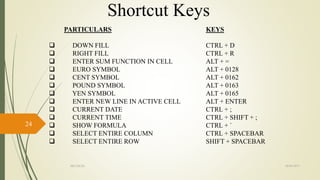
PARTICULARS
 DOWN FILL
 RIGHT FILL
 ENTER SUM FUNCTION IN CELL
 EURO SYMBOL
 CENT SYMBOL
 POUND SYMBOL
 YEN SYMBOL
 ENTER NEW LINE IN ACTIVE CELL
 CURRENT DATE
 CURRENT TIME
 SHOW FORMULA
 SELECT ENTIRE COLUMN
 SELECT ENTIRE ROW
KEYS
CTRL + D
CTRL + R
ALT + =
ALT + 0128
ALT + 0162
ALT + 0163
ALT + 0165
ALT + ENTER
CTRL + ;
CTRL + SHIFT + ;
CTRL + `
CTRL + SPACEBAR
SHIFT + SPACEBAR
02-03-2017MS EXCEL
24
Shortcut Keys
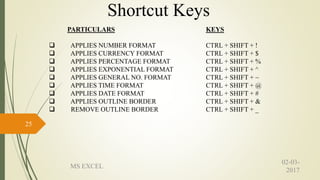
PARTICULARS
 APPLIES NUMBER FORMAT
 APPLIES CURRENCY FORMAT
 APPLIES PERCENTAGE FORMAT
 APPLIES EXPONENTIAL FORMAT
 APPLIES GENERAL NO. FORMAT
 APPLIES TIME FORMAT
 APPLIES DATE FORMAT
 APPLIES OUTLINE BORDER
 REMOVE OUTLINE BORDER
KEYS
CTRL + SHIFT + !
CTRL + SHIFT + $
CTRL + SHIFT + %
CTRL + SHIFT + ^
CTRL + SHIFT + ~
CTRL + SHIFT + @
CTRL + SHIFT + #
CTRL + SHIFT + &
CTRL + SHIFT + _
02-03-
2017
MS EXCEL
25
Shortcut Keys
26
MICROSOFT POWERPOINT 2016
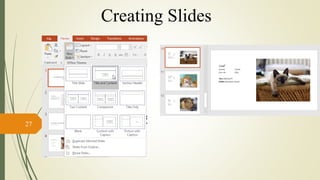
27
Creating Slides
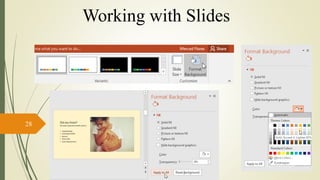
28
Working with Slides
29
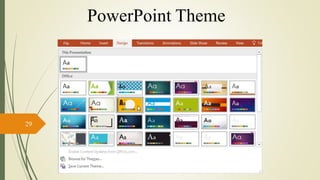
PowerPoint Theme
30
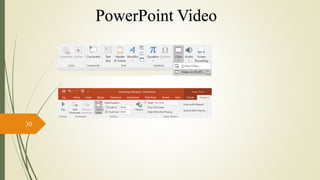
PowerPoint Video
31
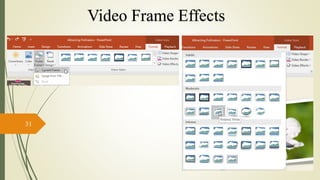
Video Frame Effects
32
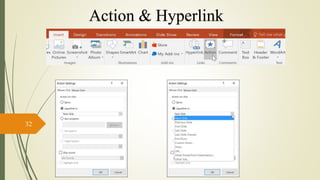
Action & Hyperlink
33
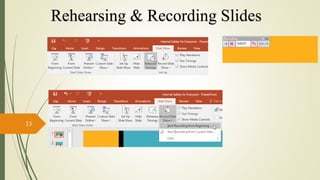
Rehearsing & Recording Slides

Msoffice introduction

  • 1.
    What is MicrosoftOffice? •Microsoft Office is an office suite of interrelated desktop applications, servers and services for the Microsoft Windows and Mac OS X operating systems. •This was introduced by Microsoft in 1989.
  • 2.
    Microsoft Office Versions TheMicrosoft Office for Windows 1.0 The Microsoft Office for Windows 1.5 The Microsoft Office for Windows 1.6 The Microsoft Office for Windows 3.0 Microsoft Office 4.0 Microsoft Office 95 Microsoft Office 97 Microsoft Office 2000 Microsoft Office XP Microsoft Office 2003 Microsoft Office 2007 Microsoft Office 2010 Microsoft Office 2013 Microsoft Office 2016
  • 3.
    MICROSOFT OFFICE PROGRAMS •MICROSOFTWORD- is a word processor and was previously considered to be the main program in Office. •MICROSOFT EXCEL- is a spreadsheet program which originally competed with the dominant Lotus 1-2-3, but eventually outsold it. Available for Windows and Mac platforms. •MICROSOFT POWERPOINT- is a popular presentation program for Windows and Mac. It is used to create slideshows, composed of text, graphics, movies and other objects, which can be displayed on-screen and navigated through by the presenter or printed out on transparencies or slides. This is convenient for school or work presentations.
  • 4.
  • 5.
    Microsoft Word isexcellent for creating different documents on your computer! This presentation will cover the basic steps for the following: Text Formatting TABLES GRAPHICS
  • 6.
    You can usedifferent formatting tools when creating the following: • School Papers • Class Newspapers • Resumes (for when you get MUCH older)
  • 7.
    You can usetables in your documents for the following:  School presentations/projects (math, for example)  Making calendars You can also create tables in MS Word
  • 8.
    You could alsoinsert pictures, photos and clip art into your documents…
  • 9.
    You can alsoPrint the Documents
  • 10.
    You can alsoprotect document using password…………
  • 11.
  • 12.
     Excel isa computer program used to create electronic spreadsheets.  Within excel user can organize data ,create chart and perform calculations.  Excel is a convenient program because it allow user to create large spreadsheets, reference information, and it allows for better storage of information.  Excels operates like other Microsoft(MS) office programs and has many of the same functions and shortcuts of other MS programs. 12 INTRODUCTION TO MS-EXCEL
  • 13.
     Microsoft excelconsists of workbooks. Within each workbook, there is an infinite number of worksheets.  Each worksheet contains Columns and Rows.  Where a column and a row intersect is called a cell. For e.g. cell D5 is located where column D and row 5 meet.  The tabs at the bottom of the screen represent different worksheets within a workbook. You can use the scrolling buttons on the left to bring other worksheets into view. 13 Overview of Excel
  • 14.
    TO COPY ANDPASTE CONTENTS: 14 Working with Cells
  • 15.
    • TO FORMATTEXT IN BOLD, ITALICS OR UNDERLINE • TO CHANGE THE FONT STYLE • TO CHANGE THE FONT SIZE • TO ADD A BORDER: • TO CHANGE THE TEXT COLOUR: • TO ADD A FILL COLOUR: 15 Formatting Text
  • 16.
    • TO APPLYCONDITIONAL FORMATTING: • TO REMOVE CONDITIONAL FORMATTING: 16 Conditional Formatting
  • 17.
    • TO SORTIN ALPHABETICAL ORDER: • TO SORT FROM SMALLEST TO LARGEST: 17 Sorting
  • 18.
    = = = = = = DATEDIF FUNCTION SYNTAXOF DATEDIF =DATEDIF(START_DATE,END_DATE,”INTERV AL”) START DATE- Date from which u want to calculate difference. END DATE- Date up to which u want to calculate difference. INTERVAL- Form in which u want to calculate difference. “ D ” - D AY S “ M ” - M O N T H S “ Y ” - Y E A R S “ Y M ” - M O N T H S O V E R Y E A R “ M D ” - D AY S O V E R M O N T H 18 Functions
  • 19.
    SUMIF FUNCTION SYNTAXOF SUMIF =SUMIF(RANGE,CRITERIA,SUM_RANGE) RANGE- Range of cells on which conditions are applied. CRITERIA- Condition that defines which cell or cells will be added. SUM RANGE- Actual cells to sum. NOTE:- If sum range is not used then range is used for sum. WITHOUT SUM_RANGE = = 19 Functions
  • 20.
    IF FUNCTION SYNTAX OFIF =IF(LOGICAL TEXT, VALUE IF TRUE, VALUE IF FALSE) LOGICAL TEXT- Any value or expression that can be evaluated to TRUE or FALSE. VALUE IF TRUE- Value that is returned if logical text is TRUE. VALUE IF FALSE- Value that is returned if logical text is FALSE. = = = = = = = 20 Functions
  • 21.
    SYNTAX OF FUNCTIONS 1.COUNT =COUNT(VALUE1,VALUE2,…) 2. COUNTA =COUNTA(VALUE1,VALUE2,…) 3. COUNTBLANK =COUNTBLANK(RANGE) 4. COUNTIF =COUNTIF(RANGE,CRITERIA) = = = = 21 Functions
  • 22.
    MS EXCEL 22 = = NOW RETURNSCURRENT DATE AND TIME. TODAY RETURNS CURRENT DATE ONLY. MOD RETURNS THE REMAINDER AFTER A NO. IS DIVIDED BY A DIVISOR. LEN RETURNS THE NO. OF CHARACTERS IN A TEXT STRING. SUM ADD ALL THE NUMBERS. USES OF FUNCTIONS = = = Functions
  • 23.
    PARTICULARS  EDIT THEACTIVE CELL  CREATE A CHART  INSERT CELL COMMENT  FUNCTION DIALOGUE BOX  INSERT A NEW WORKSHEET  NAME MANAGER DIALOGUE BOX  VISUAL BASIC EDITOR  MACRO DIALOGUE BOX  HIDE THE SELECTED COLUMNS  UNHIDE THE COLUMNS  HIDE THE SELECTED ROWS  UNHIDE THE ROWS  SELECT ALL CELLS WITH COMMENT KEYS F2 F11 SHIFT + F2 SHIFT + F3 SHIFT + F11 CTRL + F3 ALT + F11 ALT + F8 CTRL + 0 CTRL + SHIFT + 0 CTRL + 9 CTRL + SHIFT + 9 CTRL + SHIFT + O 02-03-2017MS EXCEL 23 Shortcut Keys
  • 24.
    PARTICULARS  DOWN FILL RIGHT FILL  ENTER SUM FUNCTION IN CELL  EURO SYMBOL  CENT SYMBOL  POUND SYMBOL  YEN SYMBOL  ENTER NEW LINE IN ACTIVE CELL  CURRENT DATE  CURRENT TIME  SHOW FORMULA  SELECT ENTIRE COLUMN  SELECT ENTIRE ROW KEYS CTRL + D CTRL + R ALT + = ALT + 0128 ALT + 0162 ALT + 0163 ALT + 0165 ALT + ENTER CTRL + ; CTRL + SHIFT + ; CTRL + ` CTRL + SPACEBAR SHIFT + SPACEBAR 02-03-2017MS EXCEL 24 Shortcut Keys
  • 25.
    PARTICULARS  APPLIES NUMBERFORMAT  APPLIES CURRENCY FORMAT  APPLIES PERCENTAGE FORMAT  APPLIES EXPONENTIAL FORMAT  APPLIES GENERAL NO. FORMAT  APPLIES TIME FORMAT  APPLIES DATE FORMAT  APPLIES OUTLINE BORDER  REMOVE OUTLINE BORDER KEYS CTRL + SHIFT + ! CTRL + SHIFT + $ CTRL + SHIFT + % CTRL + SHIFT + ^ CTRL + SHIFT + ~ CTRL + SHIFT + @ CTRL + SHIFT + # CTRL + SHIFT + & CTRL + SHIFT + _ 02-03- 2017 MS EXCEL 25 Shortcut Keys
  • 26.
  • 27.
  • 28.
  • 29.
  • 30.
  • 31.
  • 32.
  • 33.