13.1
Wired LANs: Ethernet
Copyright © The McGraw-Hill Companies, Inc. Permission required for reproduction or display.
13.2
IEEE STANDARDSIEEE STANDARDS
In 1985, the Computer Society of the IEEE started aIn 1985, the Computer Society of the IEEE started a
project, called Project 802, to set standards to enableproject, called Project 802, to set standards to enable
intercommunication among equipment from a varietyintercommunication among equipment from a variety
of manufacturers. Project 802 is a way of specifyingof manufacturers. Project 802 is a way of specifying
functions of the physical layer and the data link layerfunctions of the physical layer and the data link layer
of major LAN protocols.of major LAN protocols.
Data Link Layer
Physical Layer
Topics discussed in this section:Topics discussed in this section:
13.3
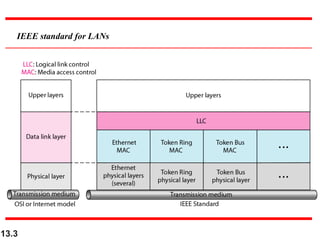
IEEE standard for LANs
13.4
STANDARD ETHERNETSTANDARD ETHERNET
The original Ethernet was created in 1976 at Xerox’sThe original Ethernet was created in 1976 at Xerox’s
Palo Alto Research Center (PARC). Since then, it hasPalo Alto Research Center (PARC). Since then, it has
gone through four generations. We briefly discuss thegone through four generations. We briefly discuss the
Standard (or traditional) EthernetStandard (or traditional) Ethernet in this section.in this section.
MAC Sublayer
Physical Layer
Topics discussed in this section:Topics discussed in this section:
13.5
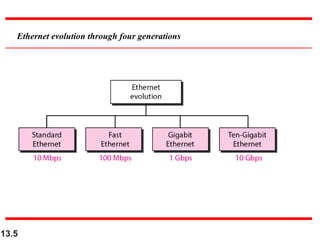
Ethernet evolution through four generations
13.6
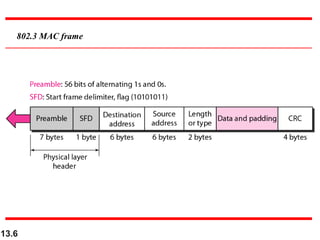
802.3 MAC frame
13.7
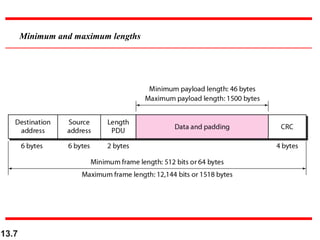
Minimum and maximum lengths
13.8
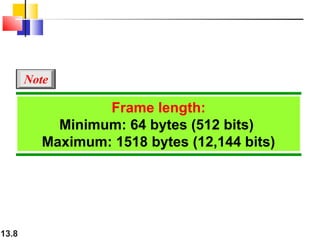
Frame length:
Minimum: 64 bytes (512 bits)
Maximum: 1518 bytes (12,144 bits)
Note
13.9
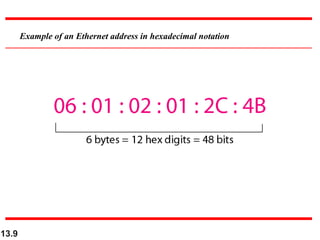
Example of an Ethernet address in hexadecimal notation
13.10
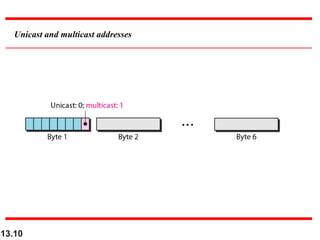
Unicast and multicast addresses
13.11
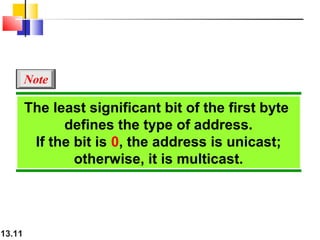
The least significant bit of the first byte
defines the type of address.
If the bit is 0, the address is unicast;
otherwise, it is multicast.
Note
13.12
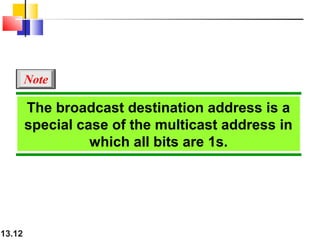
The broadcast destination address is a
special case of the multicast address in
which all bits are 1s.
Note
13.13
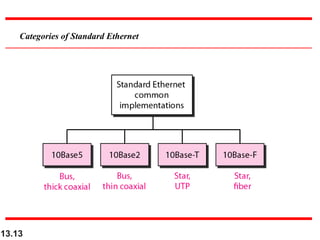
Categories of Standard Ethernet
13.14
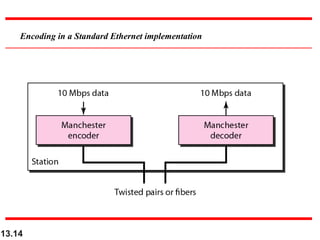
Encoding in a Standard Ethernet implementation
13.15
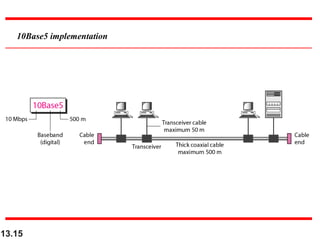
10Base5 implementation
13.16
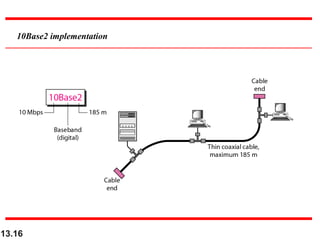
10Base2 implementation
13.17
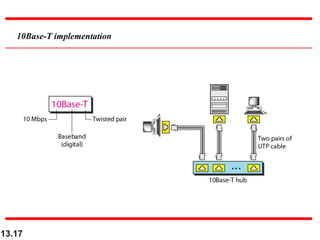
10Base-T implementation
13.18
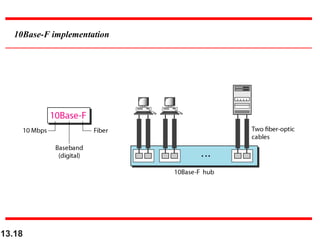
10Base-F implementation
13.19
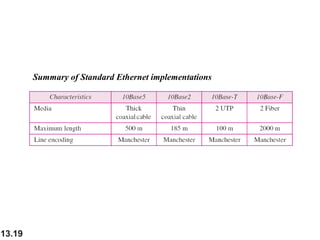
Summary of Standard Ethernet implementations
13.20
CHANGES IN THE STANDARDCHANGES IN THE STANDARD
The 10-Mbps Standard Ethernet has gone throughThe 10-Mbps Standard Ethernet has gone through
several changes before moving to the higher dataseveral changes before moving to the higher data
rates. These changes actually opened the road to therates. These changes actually opened the road to the
evolution of the Ethernet to become compatible withevolution of the Ethernet to become compatible with
other high-data-rate LANs.other high-data-rate LANs.
Bridged Ethernet
Switched Ethernet
Full-Duplex Ethernet
Topics discussed in this section:Topics discussed in this section:
13.21
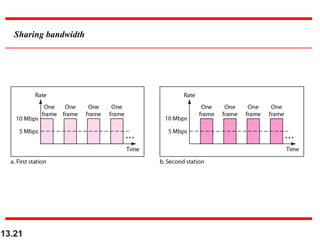
Sharing bandwidth
13.22
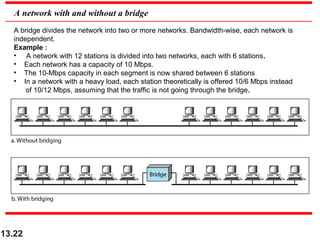
A network with and without a bridge
A bridge divides the network into two or more networks. Bandwidth-wise, each network is
independent.
Example :
• A network with 12 stations is divided into two networks, each with 6 stations.
• Each network has a capacity of 10 Mbps.
• The 10-Mbps capacity in each segment is now shared between 6 stations
• In a network with a heavy load, each station theoretically is offered 10/6 Mbps instead
of 10/12 Mbps, assuming that the traffic is not going through the bridge.
13.23
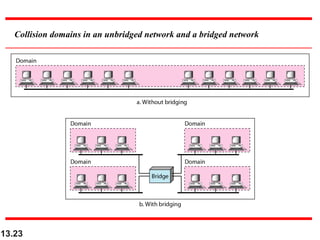
Collision domains in an unbridged network and a bridged network
13.24
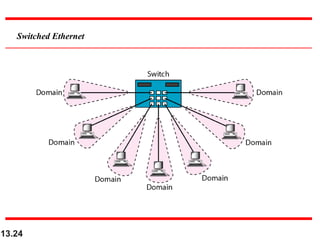
Switched Ethernet
13.25
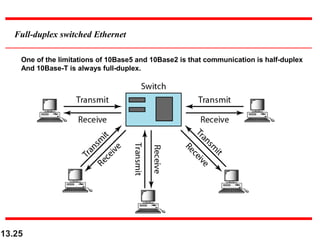
Full-duplex switched Ethernet
One of the limitations of 10Base5 and 10Base2 is that communication is half-duplex
And 10Base-T is always full-duplex.
FAST ETHERNETFAST ETHERNET
Fast Ethernet was designed to compete with LANFast Ethernet was designed to compete with LAN
protocols such as FDDI or Fiber Channel. IEEEprotocols such as FDDI or Fiber Channel. IEEE
created Fast Ethernet under the name 802.3u. Fastcreated Fast Ethernet under the name 802.3u. Fast
Ethernet is backward-compatible with StandardEthernet is backward-compatible with Standard
Ethernet, but it can transmit data 10 times faster at aEthernet, but it can transmit data 10 times faster at a
rate of 100 Mbps.rate of 100 Mbps.
1. Upgrade the data rate to 100 Mbps.
2. Make it compatible with Standard Ethernet
3. Keep the same 48-bit address
4. Keep the same frame format
5. Keep the same Min and Max frame length
The goal of Fast EthernetThe goal of Fast Ethernet
Autonegotiation
A new feature added Fast Ethernet is called autonegotiation. It allow two
devices to negotiate the mode Or data rate of operation.
It was designed particularly for the following purposes:
1.To allow incompatible devices to connect to one another.
2.To allow one devices to have multiple capabilities.
3.To allow a station to check a hub’s capabilities.
13.28
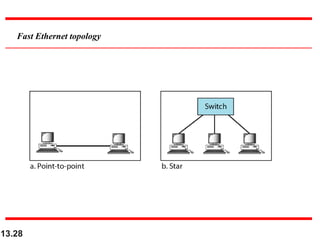
Fast Ethernet topology
13.29
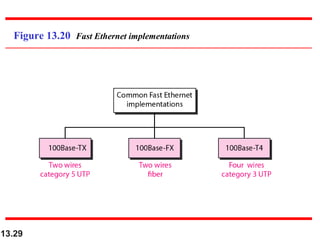
Figure 13.20 Fast Ethernet implementations
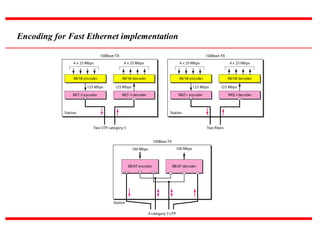
Encoding for Fast Ethernet implementation
13.31
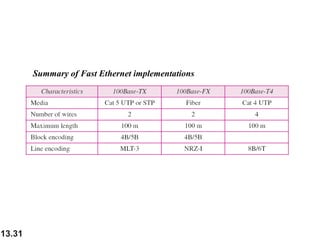
Summary of Fast Ethernet implementations
13.32
13-5 GIGABIT ETHERNET13-5 GIGABIT ETHERNET
The need for an even higher data rate resulted in theThe need for an even higher data rate resulted in the
design of the Gigabit Ethernet protocol (1000 Mbps).design of the Gigabit Ethernet protocol (1000 Mbps).
The IEEE committee calls the standard 802.3z.The IEEE committee calls the standard 802.3z.
MAC Sublayer
Physical Layer
Ten-Gigabit Ethernet
Topics discussed in this section:Topics discussed in this section:
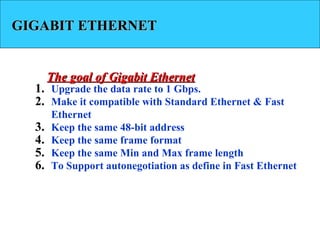
GIGABIT ETHERNETGIGABIT ETHERNET
1. Upgrade the data rate to 1 Gbps.
2. Make it compatible with Standard Ethernet & Fast
Ethernet
3. Keep the same 48-bit address
4. Keep the same frame format
5. Keep the same Min and Max frame length
6. To Support autonegotiation as define in Fast Ethernet
The goal of Gigabit EthernetThe goal of Gigabit Ethernet
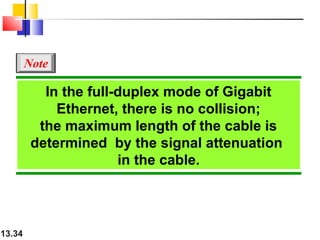
13.34
In the full-duplex mode of Gigabit
Ethernet, there is no collision;
the maximum length of the cable is
determined by the signal attenuation
in the cable.
Note
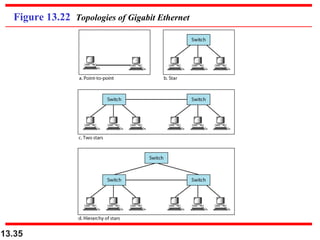
13.35
Figure 13.22 Topologies of Gigabit Ethernet
13.36
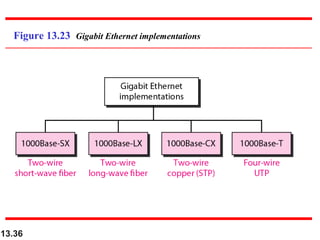
Figure 13.23 Gigabit Ethernet implementations
13.37
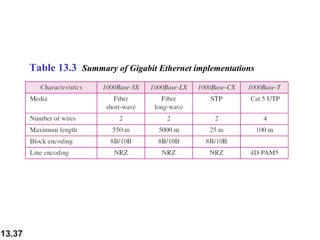
Table 13.3 Summary of Gigabit Ethernet implementations
13.38
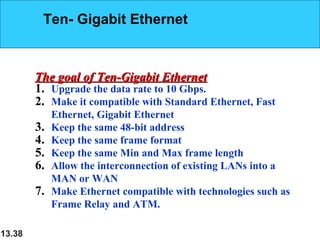
1. Upgrade the data rate to 10 Gbps.
2. Make it compatible with Standard Ethernet, Fast
Ethernet, Gigabit Ethernet
3. Keep the same 48-bit address
4. Keep the same frame format
5. Keep the same Min and Max frame length
6. Allow the interconnection of existing LANs into a
MAN or WAN
7. Make Ethernet compatible with technologies such as
Frame Relay and ATM.
The goal of Ten-Gigabit EthernetThe goal of Ten-Gigabit Ethernet
Ten- Gigabit Ethernet
13.39
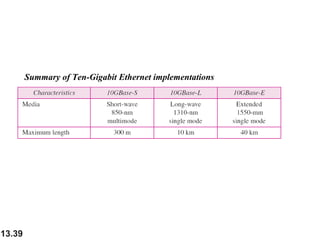
Summary of Ten-Gigabit Ethernet implementations

ETHERNET

  • 1.
    13.1 Wired LANs: Ethernet Copyright© The McGraw-Hill Companies, Inc. Permission required for reproduction or display.
  • 2.
    13.2 IEEE STANDARDSIEEE STANDARDS In1985, the Computer Society of the IEEE started aIn 1985, the Computer Society of the IEEE started a project, called Project 802, to set standards to enableproject, called Project 802, to set standards to enable intercommunication among equipment from a varietyintercommunication among equipment from a variety of manufacturers. Project 802 is a way of specifyingof manufacturers. Project 802 is a way of specifying functions of the physical layer and the data link layerfunctions of the physical layer and the data link layer of major LAN protocols.of major LAN protocols. Data Link Layer Physical Layer Topics discussed in this section:Topics discussed in this section:
  • 3.
  • 4.
    13.4 STANDARD ETHERNETSTANDARD ETHERNET Theoriginal Ethernet was created in 1976 at Xerox’sThe original Ethernet was created in 1976 at Xerox’s Palo Alto Research Center (PARC). Since then, it hasPalo Alto Research Center (PARC). Since then, it has gone through four generations. We briefly discuss thegone through four generations. We briefly discuss the Standard (or traditional) EthernetStandard (or traditional) Ethernet in this section.in this section. MAC Sublayer Physical Layer Topics discussed in this section:Topics discussed in this section:
  • 5.
  • 6.
  • 7.
  • 8.
    13.8 Frame length: Minimum: 64bytes (512 bits) Maximum: 1518 bytes (12,144 bits) Note
  • 9.
    13.9 Example of anEthernet address in hexadecimal notation
  • 10.
  • 11.
    13.11 The least significantbit of the first byte defines the type of address. If the bit is 0, the address is unicast; otherwise, it is multicast. Note
  • 12.
    13.12 The broadcast destinationaddress is a special case of the multicast address in which all bits are 1s. Note
  • 13.
  • 14.
    13.14 Encoding in aStandard Ethernet implementation
  • 15.
  • 16.
  • 17.
  • 18.
  • 19.
    13.19 Summary of StandardEthernet implementations
  • 20.
    13.20 CHANGES IN THESTANDARDCHANGES IN THE STANDARD The 10-Mbps Standard Ethernet has gone throughThe 10-Mbps Standard Ethernet has gone through several changes before moving to the higher dataseveral changes before moving to the higher data rates. These changes actually opened the road to therates. These changes actually opened the road to the evolution of the Ethernet to become compatible withevolution of the Ethernet to become compatible with other high-data-rate LANs.other high-data-rate LANs. Bridged Ethernet Switched Ethernet Full-Duplex Ethernet Topics discussed in this section:Topics discussed in this section:
  • 21.
  • 22.
    13.22 A network withand without a bridge A bridge divides the network into two or more networks. Bandwidth-wise, each network is independent. Example : • A network with 12 stations is divided into two networks, each with 6 stations. • Each network has a capacity of 10 Mbps. • The 10-Mbps capacity in each segment is now shared between 6 stations • In a network with a heavy load, each station theoretically is offered 10/6 Mbps instead of 10/12 Mbps, assuming that the traffic is not going through the bridge.
  • 23.
    13.23 Collision domains inan unbridged network and a bridged network
  • 24.
  • 25.
    13.25 Full-duplex switched Ethernet Oneof the limitations of 10Base5 and 10Base2 is that communication is half-duplex And 10Base-T is always full-duplex.
  • 26.
    FAST ETHERNETFAST ETHERNET FastEthernet was designed to compete with LANFast Ethernet was designed to compete with LAN protocols such as FDDI or Fiber Channel. IEEEprotocols such as FDDI or Fiber Channel. IEEE created Fast Ethernet under the name 802.3u. Fastcreated Fast Ethernet under the name 802.3u. Fast Ethernet is backward-compatible with StandardEthernet is backward-compatible with Standard Ethernet, but it can transmit data 10 times faster at aEthernet, but it can transmit data 10 times faster at a rate of 100 Mbps.rate of 100 Mbps. 1. Upgrade the data rate to 100 Mbps. 2. Make it compatible with Standard Ethernet 3. Keep the same 48-bit address 4. Keep the same frame format 5. Keep the same Min and Max frame length The goal of Fast EthernetThe goal of Fast Ethernet
  • 27.
    Autonegotiation A new featureadded Fast Ethernet is called autonegotiation. It allow two devices to negotiate the mode Or data rate of operation. It was designed particularly for the following purposes: 1.To allow incompatible devices to connect to one another. 2.To allow one devices to have multiple capabilities. 3.To allow a station to check a hub’s capabilities.
  • 28.
  • 29.
    13.29 Figure 13.20 FastEthernet implementations
  • 30.
    Encoding for FastEthernet implementation
  • 31.
    13.31 Summary of FastEthernet implementations
  • 32.
    13.32 13-5 GIGABIT ETHERNET13-5GIGABIT ETHERNET The need for an even higher data rate resulted in theThe need for an even higher data rate resulted in the design of the Gigabit Ethernet protocol (1000 Mbps).design of the Gigabit Ethernet protocol (1000 Mbps). The IEEE committee calls the standard 802.3z.The IEEE committee calls the standard 802.3z. MAC Sublayer Physical Layer Ten-Gigabit Ethernet Topics discussed in this section:Topics discussed in this section:
  • 33.
    GIGABIT ETHERNETGIGABIT ETHERNET 1.Upgrade the data rate to 1 Gbps. 2. Make it compatible with Standard Ethernet & Fast Ethernet 3. Keep the same 48-bit address 4. Keep the same frame format 5. Keep the same Min and Max frame length 6. To Support autonegotiation as define in Fast Ethernet The goal of Gigabit EthernetThe goal of Gigabit Ethernet
  • 34.
    13.34 In the full-duplexmode of Gigabit Ethernet, there is no collision; the maximum length of the cable is determined by the signal attenuation in the cable. Note
  • 35.
    13.35 Figure 13.22 Topologiesof Gigabit Ethernet
  • 36.
    13.36 Figure 13.23 GigabitEthernet implementations
  • 37.
    13.37 Table 13.3 Summaryof Gigabit Ethernet implementations
  • 38.
    13.38 1. Upgrade thedata rate to 10 Gbps. 2. Make it compatible with Standard Ethernet, Fast Ethernet, Gigabit Ethernet 3. Keep the same 48-bit address 4. Keep the same frame format 5. Keep the same Min and Max frame length 6. Allow the interconnection of existing LANs into a MAN or WAN 7. Make Ethernet compatible with technologies such as Frame Relay and ATM. The goal of Ten-Gigabit EthernetThe goal of Ten-Gigabit Ethernet Ten- Gigabit Ethernet
  • 39.
    13.39 Summary of Ten-GigabitEthernet implementations