Three Ways to Supercharge Enterprise Productivity using SharePoint Email Integration, Biz Process Automation & Content Organization in SP 2010
Agenda Significance of Email Boosting Productivity Through Email Integration Significance of Collaboration and Content  Simplifying Collaboration, Content Management and Search Significance of Business Processes Improvement Automating Business Processes 09/30/11
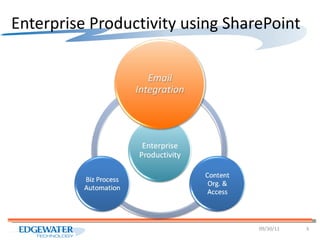
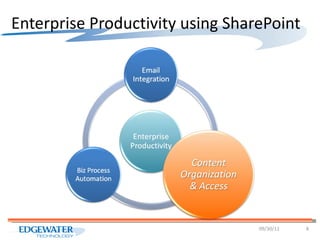
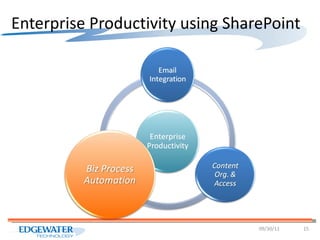
Enterprise Productivity using SharePoint 09/30/11
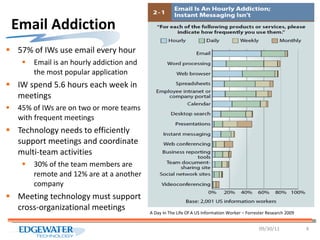
Email Addiction 57% of IWs use email every hour Email is an hourly addiction and the most popular application IW spend 5.6 hours each week in meetings  45% of IWs are on two or more teams with frequent meetings  Technology needs to efficiently support meetings and coordinate multi-team activities 30% of the team members are remote and 12% are at a another company Meeting technology must support cross-organizational meetings 09/30/11 A Day In The Life Of A US Information Worker – Forrester Research 2009
Email Productivity Email still remains as the hub of IW’s activities Emails are primarily used for communication but a strong secondary use is document sharing 12% of emails have at least one attachment Overloading of email functionality is a cause of significant productivity and IT capacity issues Searching for content, old versions, manual collab. Wasted bandwidth and storage capacity 09/30/11
Email Productivity Can Email remain a hub for IW’s activity and still improve enterprise productivity? Can integration with SharePoint help? How can we make it easy to share content via Email without using attachments? How can SharePoint ease the problem of content search, collaboration and IT resource waste? 09/30/11
Email Productivity Demo Outlook to SharePoint Synchronized Document Library, Instant Search Synchronized Task List, Contact List, Calendar, External List Meeting Workspace Integration Discussion Forum Integration SharePoint to Outlook Mailbox, Calendar, Contacts, Task Web Parts Harmon.ie 09/30/11
Enterprise Productivity using SharePoint 09/30/11
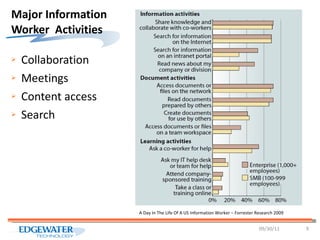
Major Information Worker  Activities Collaboration Meetings Content access Search 09/30/11 A Day In The Life Of A US Information Worker – Forrester Research 2009
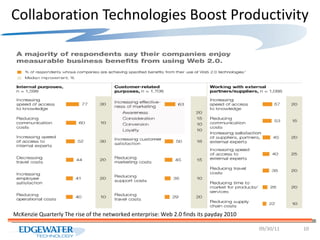
Collaboration Technologies Boost Productivity 09/30/11 McKenzie Quarterly The rise of the networked enterprise: Web 2.0 finds its payday 2010
Document Management & Collaboration Paper-Based Document Filing  (Gartner Group, Laserfiche, eCopy stats) $30 to file a document $120 to find a misfiled document $220 to reproduce a lost document 7.5% of all documents get lost 20%-40% of the IWs time is spent looking for documents 35% of the time is spent reading documents Average document get copied 19 times 09/30/11
Document Management & Collaboration Only 20% of the data is held in structured systems Bulk of the 80% unstructured data is not managed Data is growing at a conservative estimate of 36% annually Content and media are proliferating but without management and governance Discovery & compliance demands are increasing rapidly in number and in scope 09/30/11
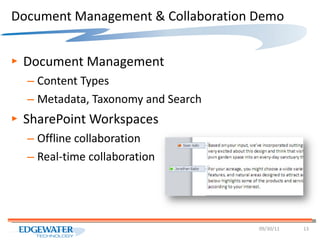
Document Management & Collaboration Demo Document Management Content Types Metadata, Taxonomy and Search SharePoint Workspaces Offline collaboration Real-time collaboration 09/30/11
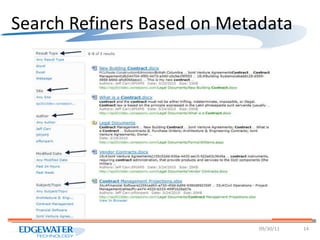
Search Refiners Based on Metadata  09/30/11
Enterprise Productivity using SharePoint 09/30/11
Benefits of Process Automation Streamline & Standardize your business process  Enforce accountability and compliance Take actions faster and remove bottlenecks Create an automatic audit trail Increase insight into processes  Ease of use Reduce errors and omissions Efficiency, Accountability, Control & Visibility 09/30/11
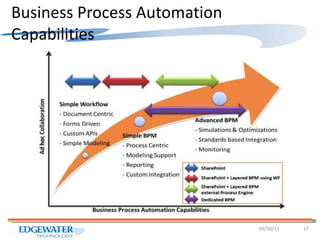
Business Process Automation Capabilities 09/30/11
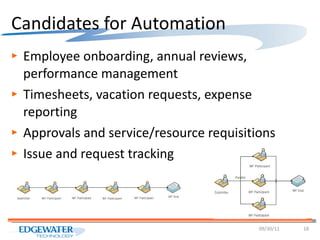
Candidates for Automation Employee onboarding, annual reviews, performance management Timesheets, vacation requests, expense reporting Approvals and service/resource requisitions Issue and request tracking 09/30/11
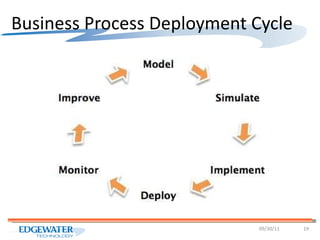
Business Process Deployment Cycle 09/30/11
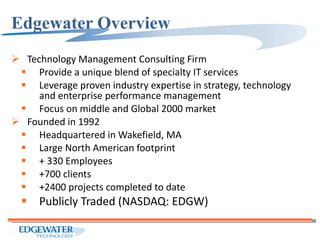
Edgewater Overview Technology Management Consulting Firm  Provide a unique blend of specialty IT services  Leverage proven industry expertise in strategy, technology and enterprise performance management Focus on middle and Global 2000 market Founded in 1992 Headquartered in Wakefield, MA Large North American footprint + 330 Employees +700 clients +2400 projects completed to date Publicly Traded (NASDAQ: EDGW)
Contact Us To learn more about Edgewater Technology & SharePoint expertise, contact: Ahmed Hafeez 781-224-9015 [email_address] http://edgewatertech.wordpress.com

Enterprise Productivity Using SharePoint

  • 1.
    Three Ways toSupercharge Enterprise Productivity using SharePoint Email Integration, Biz Process Automation & Content Organization in SP 2010
  • 2.
    Agenda Significance ofEmail Boosting Productivity Through Email Integration Significance of Collaboration and Content Simplifying Collaboration, Content Management and Search Significance of Business Processes Improvement Automating Business Processes 09/30/11
  • 3.
    Enterprise Productivity usingSharePoint 09/30/11
  • 4.
    Email Addiction 57%of IWs use email every hour Email is an hourly addiction and the most popular application IW spend 5.6 hours each week in meetings 45% of IWs are on two or more teams with frequent meetings Technology needs to efficiently support meetings and coordinate multi-team activities 30% of the team members are remote and 12% are at a another company Meeting technology must support cross-organizational meetings 09/30/11 A Day In The Life Of A US Information Worker – Forrester Research 2009
  • 5.
    Email Productivity Emailstill remains as the hub of IW’s activities Emails are primarily used for communication but a strong secondary use is document sharing 12% of emails have at least one attachment Overloading of email functionality is a cause of significant productivity and IT capacity issues Searching for content, old versions, manual collab. Wasted bandwidth and storage capacity 09/30/11
  • 6.
    Email Productivity CanEmail remain a hub for IW’s activity and still improve enterprise productivity? Can integration with SharePoint help? How can we make it easy to share content via Email without using attachments? How can SharePoint ease the problem of content search, collaboration and IT resource waste? 09/30/11
  • 7.
    Email Productivity DemoOutlook to SharePoint Synchronized Document Library, Instant Search Synchronized Task List, Contact List, Calendar, External List Meeting Workspace Integration Discussion Forum Integration SharePoint to Outlook Mailbox, Calendar, Contacts, Task Web Parts Harmon.ie 09/30/11
  • 8.
    Enterprise Productivity usingSharePoint 09/30/11
  • 9.
    Major Information Worker Activities Collaboration Meetings Content access Search 09/30/11 A Day In The Life Of A US Information Worker – Forrester Research 2009
  • 10.
    Collaboration Technologies BoostProductivity 09/30/11 McKenzie Quarterly The rise of the networked enterprise: Web 2.0 finds its payday 2010
  • 11.
    Document Management &Collaboration Paper-Based Document Filing (Gartner Group, Laserfiche, eCopy stats) $30 to file a document $120 to find a misfiled document $220 to reproduce a lost document 7.5% of all documents get lost 20%-40% of the IWs time is spent looking for documents 35% of the time is spent reading documents Average document get copied 19 times 09/30/11
  • 12.
    Document Management &Collaboration Only 20% of the data is held in structured systems Bulk of the 80% unstructured data is not managed Data is growing at a conservative estimate of 36% annually Content and media are proliferating but without management and governance Discovery & compliance demands are increasing rapidly in number and in scope 09/30/11
  • 13.
    Document Management &Collaboration Demo Document Management Content Types Metadata, Taxonomy and Search SharePoint Workspaces Offline collaboration Real-time collaboration 09/30/11
  • 14.
    Search Refiners Basedon Metadata 09/30/11
  • 15.
    Enterprise Productivity usingSharePoint 09/30/11
  • 16.
    Benefits of ProcessAutomation Streamline & Standardize your business process Enforce accountability and compliance Take actions faster and remove bottlenecks Create an automatic audit trail Increase insight into processes Ease of use Reduce errors and omissions Efficiency, Accountability, Control & Visibility 09/30/11
  • 17.
    Business Process AutomationCapabilities 09/30/11
  • 18.
    Candidates for AutomationEmployee onboarding, annual reviews, performance management Timesheets, vacation requests, expense reporting Approvals and service/resource requisitions Issue and request tracking 09/30/11
  • 19.
  • 20.
    Edgewater Overview TechnologyManagement Consulting Firm Provide a unique blend of specialty IT services Leverage proven industry expertise in strategy, technology and enterprise performance management Focus on middle and Global 2000 market Founded in 1992 Headquartered in Wakefield, MA Large North American footprint + 330 Employees +700 clients +2400 projects completed to date Publicly Traded (NASDAQ: EDGW)
  • 21.
    Contact Us Tolearn more about Edgewater Technology & SharePoint expertise, contact: Ahmed Hafeez 781-224-9015 [email_address] http://edgewatertech.wordpress.com

Editor's Notes

  • #17 Streamline your business processes. By doing so, you are able to create a process and stick to it. It reduces the urge to circumvent the process which has been put in place and could throw off future steps therefore making it a more lengthy process in the end. Memory is unreliable. These days where our inbox is constantly filling up with requests and where your office line and cell phone could ring simultaneously, there is a chance that a request can slip through the cracks. With a workflow in place, you will now be able to receive automated reminders or status views of all outstanding requests, by doing this, you will have reminder or a double check if something passed you by the first time around. Eliminates bottlenecks. By breaking down and automating the task process, everyone can treat their portions simultaneously therefore reducing the number of roadblocks within a particular task. Treating urgent issues. Credit holds are a popular one, with a workflow you can see it and treat it right away, decreasing the issues where, in the past, there would be lags if someone was out of the office and needed to approve something manually. Enforces accountability and compliance. This allows you to better manage your information by protecting it and following processes put in place based on your role within your organization. User satisfaction Typing errors and misinterpretations are reduced, processing times are shortened, users can monitor progress at all times and overall processing quality is increased. The users find immediate satisfaction and the adoption of the WorkflowGen workflow software comes naturally. Productivity gains Thanks to computerized and automated procedures, employees save time on processing paper documents and can focus on the important issues. Critical Success Factors A successful SharePoint workflow project begins with a clear understanding of the final solution. This entails clearly defining a functional specification, what the solution will and won’t do, how it fits into your governance plan, to whom the solution is targeted, and how it solves the stated business need. Obviously, executive support and sponsorship is paramount. An ounce of planning effort spent will save a pound of implementation and testing! Benefits Leveraging workflows in SharePoint can provide five key benefits: Having control of information and the flow of information within the organization should support an organization’s principles. Whether it’s capturing historical information or complying with regulatory mandates, controlling information is critical to modern businesses. Accountability Tracking the status of an action item, process step, or key document allows accountability of people and processes. Workflows support and enable integrity of work for the organization. Efficiency Arguably the benefit with the most positive impact to profitability for an organization is the realization of efficiency improvements. Automating workflows can reduce effort and time spent by employees performing workflow steps manually, enabling them to be more productive. Insight One benefit that many organizations may not immediately consider is the enhanced insight into a business process workflow. Knowing at which stage a particular process is or where the next step needs to be taken can help identify bottlenecks and reduce delays. This allows deeper insight into the business by key decision makers and provides important data needed to help steer the business. Ease of Use A critical factor to success will be making the solution easy to use for your audience. A difficult to use form, or one that allows incorrect data to be entered, will lead to a quick abandonment of the solution by the users. The solution should be intuitive to use and not require a large training effort. Ultimately, every organization has internal processes that are used for delivering products or services to their clients. Using SharePoint to make these processes easier to use, easier to control, and more efficient, while providing better insight, and accountability can help you gain the competitive edge.