


Underwritten by:
#AIIMYour Digital Transformation Begins with
Intelligent Information Management
Webinar Title
Presented DATE
Improving your Organization’s Collaborative and
Case-centric Processes with Office 365
An AIIM Webinar presented
7th June, 2018
Underwritten by:
Alan McMillen
CEO
Repstor
Theresa Resek, CIP
Director, Market Intelligence
AIIM
Today’s Speakers
Underwritten by:
Agenda
 The benefits of bringing together email and
document management systems
 The importance of user adoption of in-house
systems
 Making the most of SharePoint and Office 365
for case management
Underwritten by:
Agenda
 The benefits of bringing together email and
document management systems
 The importance of user adoption of in-house
systems
 Making the most of SharePoint and Office 365
for case management
Underwritten by:
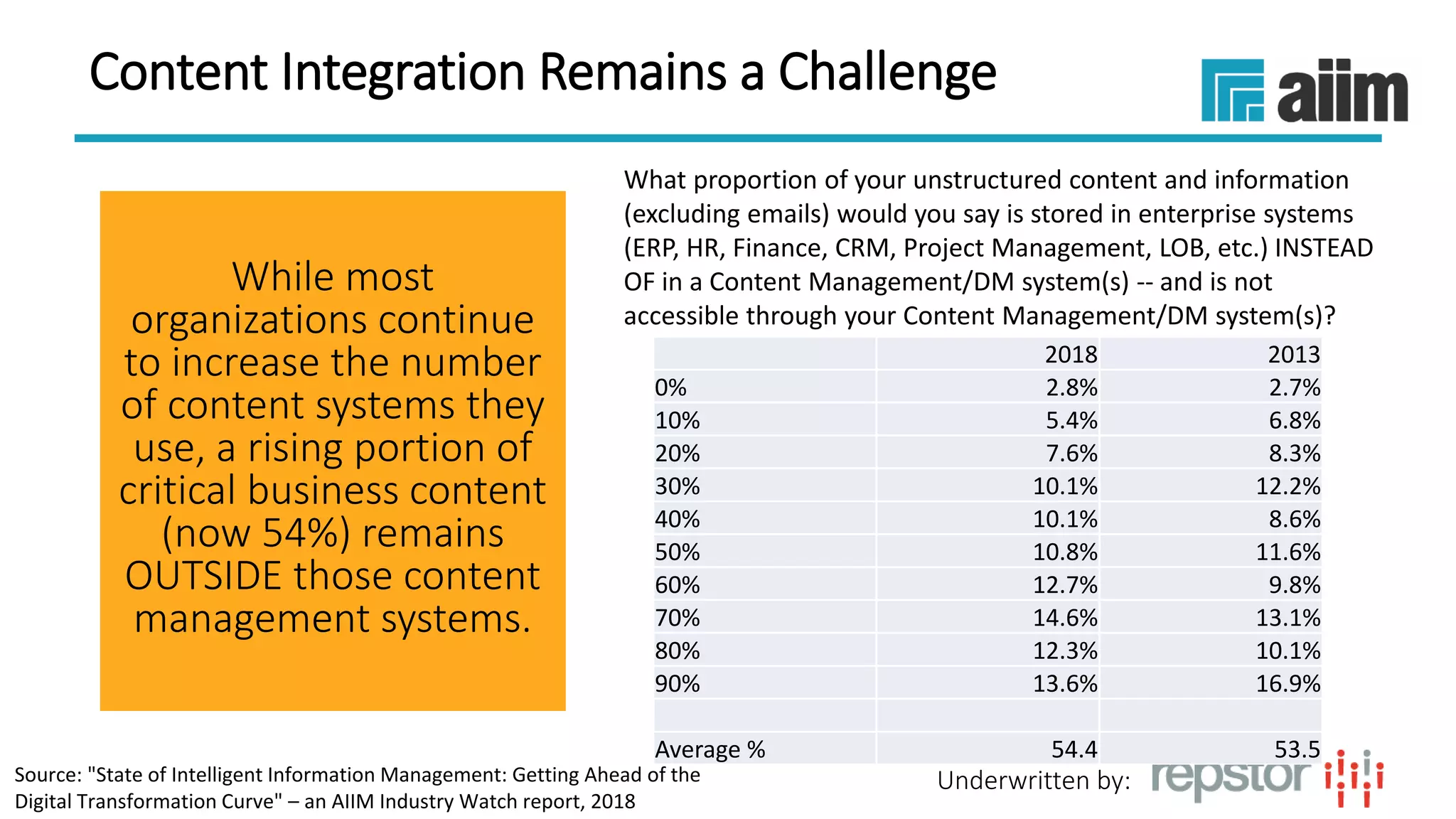
Content Integration Remains a Challenge
While most
organizations continue
to increase the number
of content systems they
use, a rising portion of
critical business content
(now 54%) remains
OUTSIDE those content
management systems.
2018 2013
0% 2.8% 2.7%
10% 5.4% 6.8%
20% 7.6% 8.3%
30% 10.1% 12.2%
40% 10.1% 8.6%
50% 10.8% 11.6%
60% 12.7% 9.8%
70% 14.6% 13.1%
80% 12.3% 10.1%
90% 13.6% 16.9%
Average % 54.4 53.5
What proportion of your unstructured content and information
(excluding emails) would you say is stored in enterprise systems
(ERP, HR, Finance, CRM, Project Management, LOB, etc.) INSTEAD
OF in a Content Management/DM system(s) -- and is not
accessible through your Content Management/DM system(s)?
Source: "State of Intelligent Information Management: Getting Ahead of the
Digital Transformation Curve" – an AIIM Industry Watch report, 2018
Underwritten by:
Underwritten by:
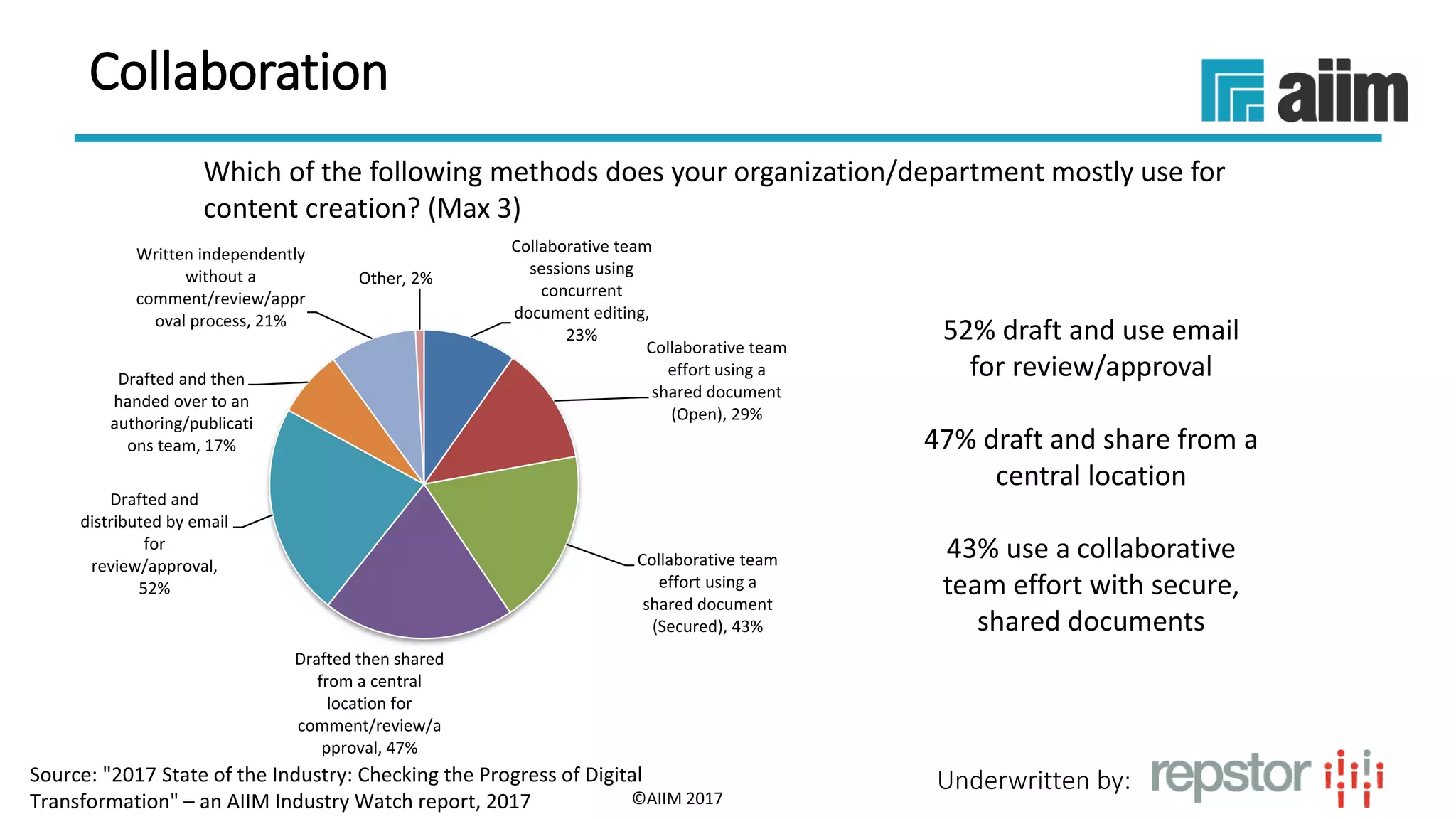
Which of the following methods does your organization/department mostly use for
content creation? (Max 3)
52% draft and use email
for review/approval
47% draft and share from a
central location
43% use a collaborative
team effort with secure,
shared documents
©AIIM 2017
Collaborative team
sessions using
concurrent
document editing,
23%
Collaborative team
effort using a
shared document
(Open), 29%
Collaborative team
effort using a
shared document
(Secured), 43%
Drafted then shared
from a central
location for
comment/review/a
pproval, 47%
Drafted and
distributed by email
for
review/approval,
52%
Drafted and then
handed over to an
authoring/publicati
ons team, 17%
Written independently
without a
comment/review/appr
oval process, 21%
Other, 2%
Collaboration
Source: "2017 State of the Industry: Checking the Progress of Digital
Transformation" – an AIIM Industry Watch report, 2017
Underwritten by:
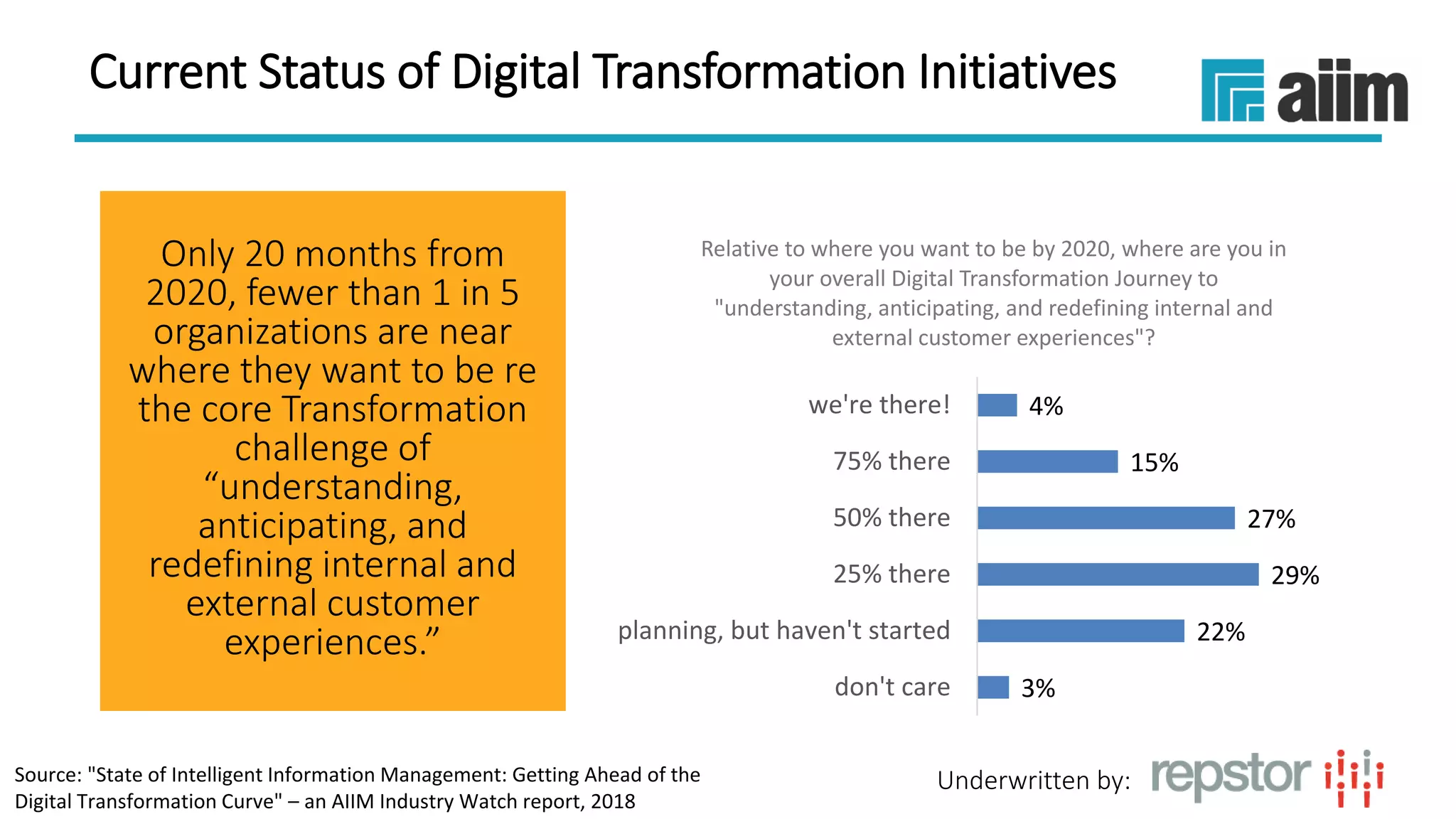
Current Status of Digital Transformation Initiatives
Only 20 months from
2020, fewer than 1 in 5
organizations are near
where they want to be re
the core Transformation
challenge of
“understanding,
anticipating, and
redefining internal and
external customer
experiences.”
3%
22%
29%
27%
15%
4%
don't care
planning, but haven't started
25% there
50% there
75% there
we're there!
Relative to where you want to be by 2020, where are you in
your overall Digital Transformation Journey to
"understanding, anticipating, and redefining internal and
external customer experiences"?
Source: "State of Intelligent Information Management: Getting Ahead of the
Digital Transformation Curve" – an AIIM Industry Watch report, 2018
Underwritten by:
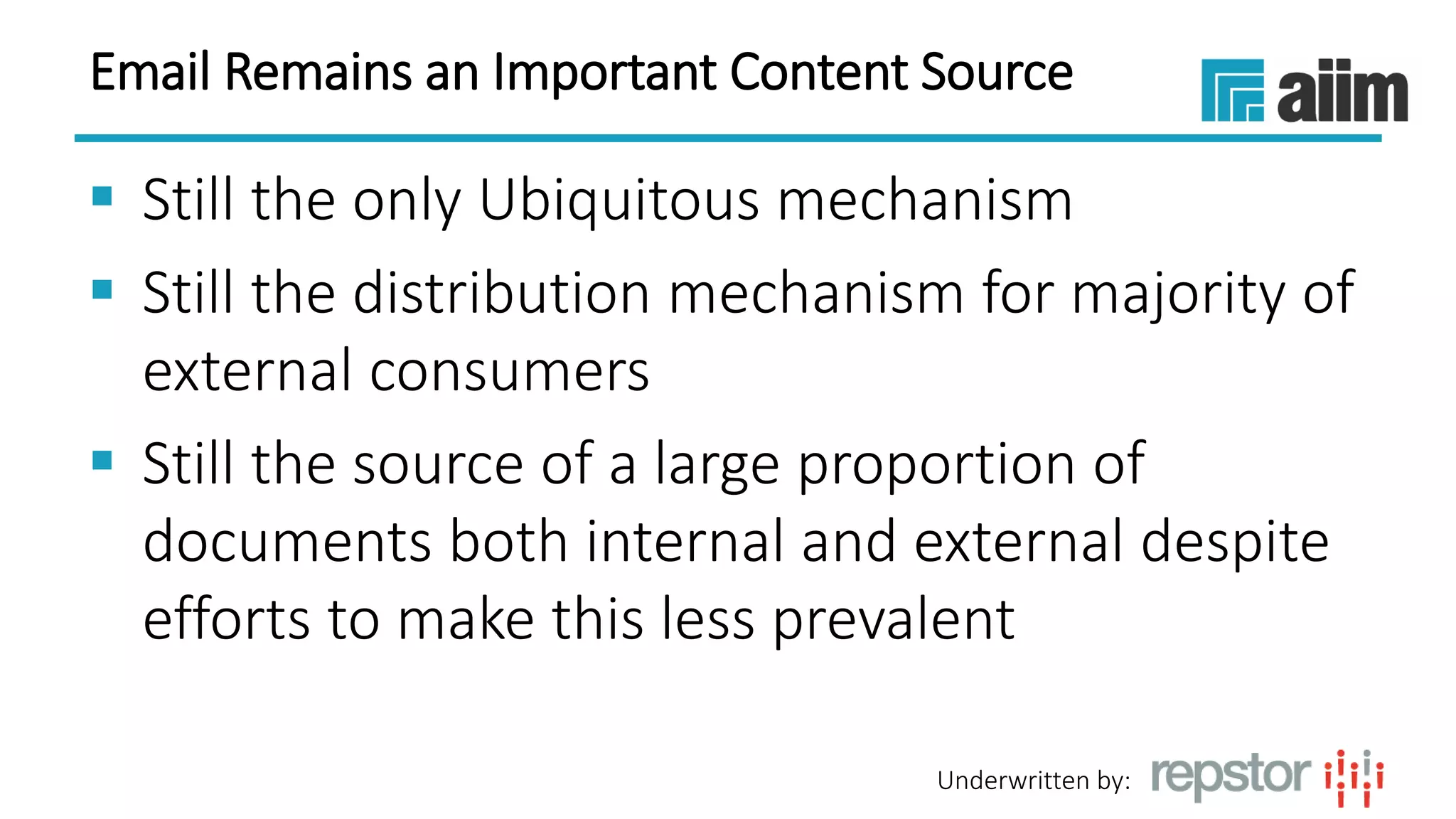
Email Remains an Important Content Source
 Still the only Ubiquitous mechanism
 Still the distribution mechanism for majority of
external consumers
 Still the source of a large proportion of
documents both internal and external despite
efforts to make this less prevalent
Underwritten by:
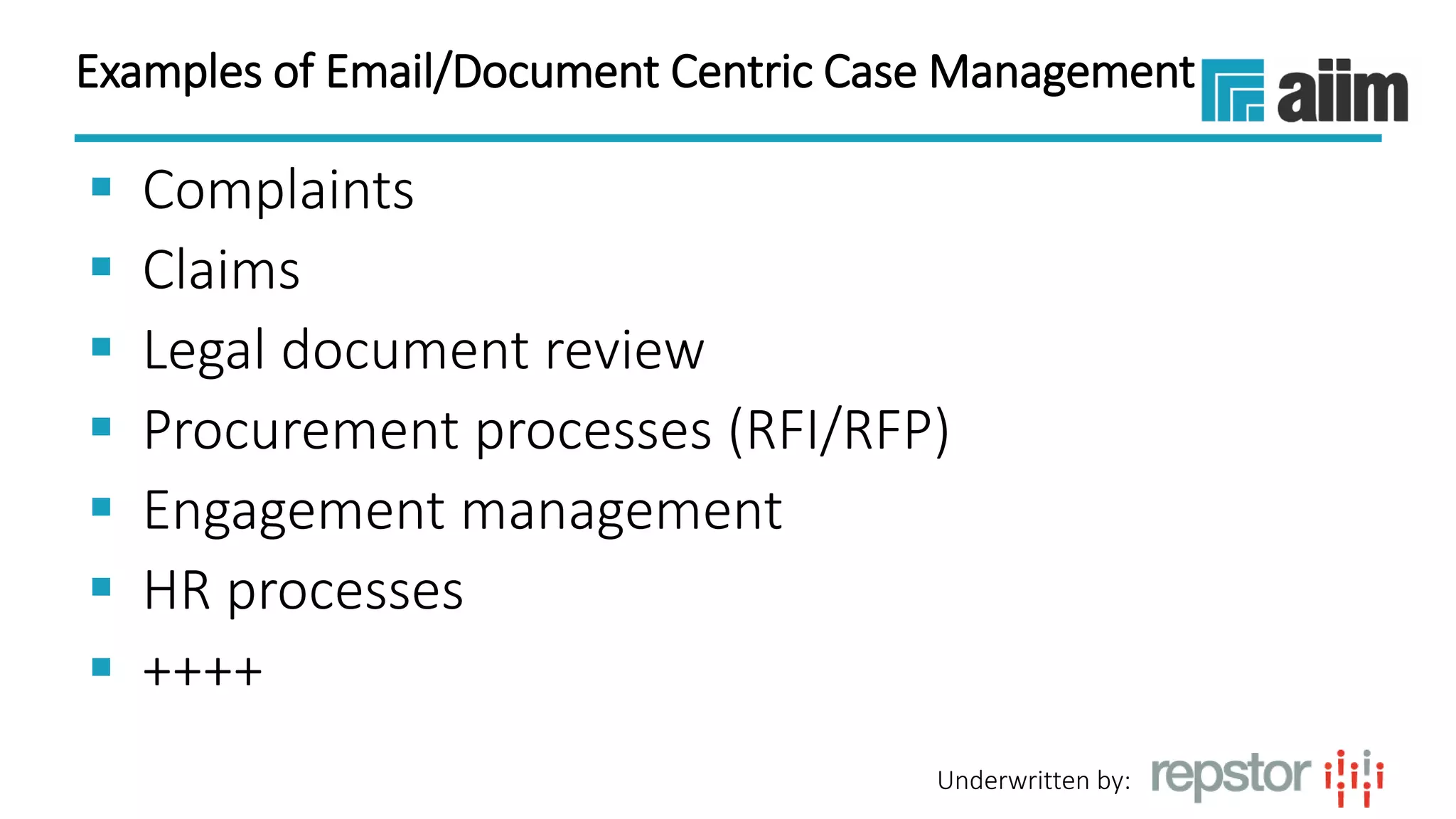
Examples of Email/Document Centric Case Management
 Complaints
 Claims
 Legal document review
 Procurement processes (RFI/RFP)
 Engagement management
 HR processes
 ++++
Underwritten by:
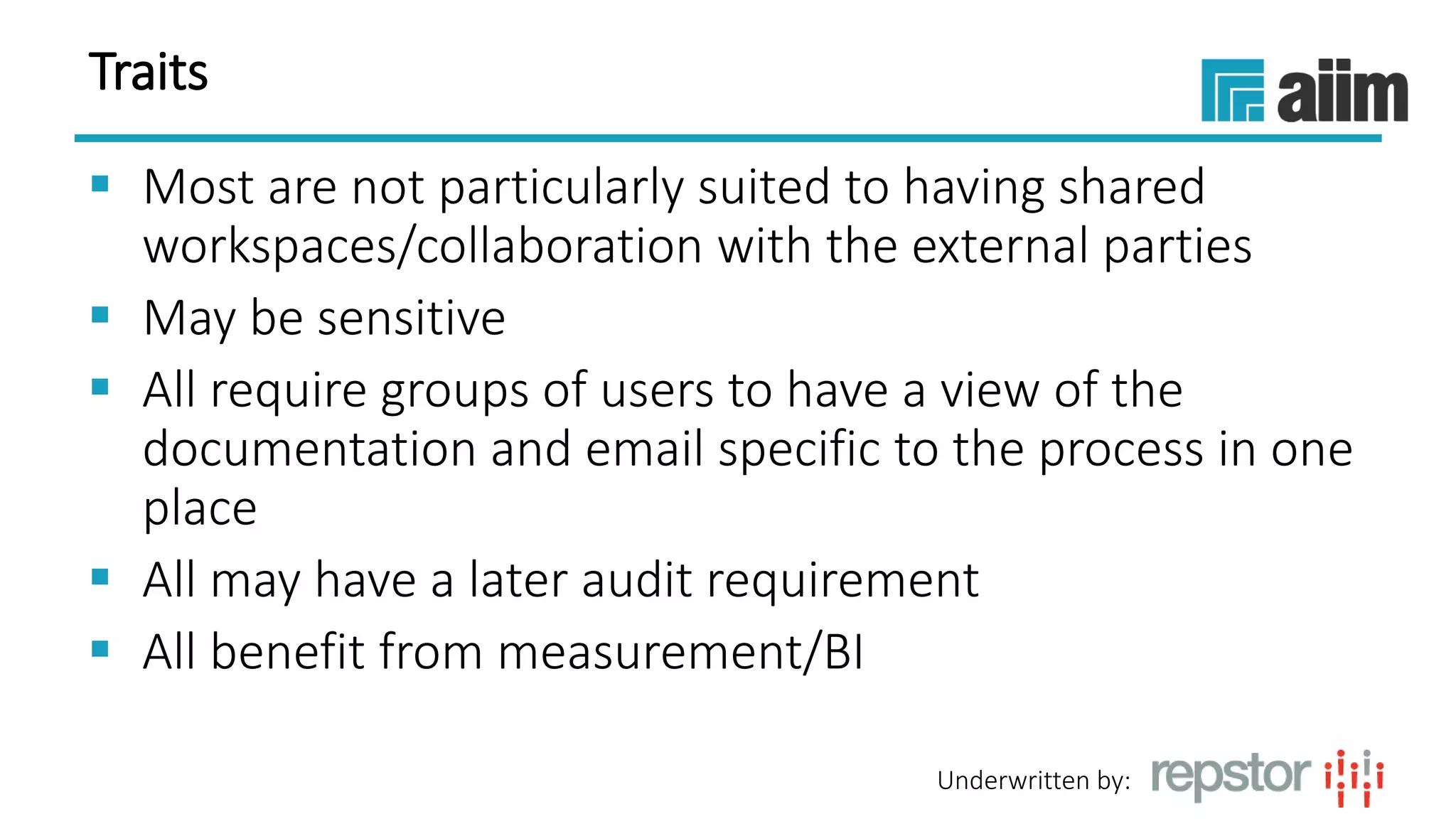
Traits
 Most are not particularly suited to having shared
workspaces/collaboration with the external parties
 May be sensitive
 All require groups of users to have a view of the
documentation and email specific to the process in one
place
 All may have a later audit requirement
 All benefit from measurement/BI
Underwritten by:
Agenda
 The benefits of bringing together email and
document management systems
 The importance of user adoption of in-house
systems
 Making the most of SharePoint and Office 365
for case management
Underwritten by:
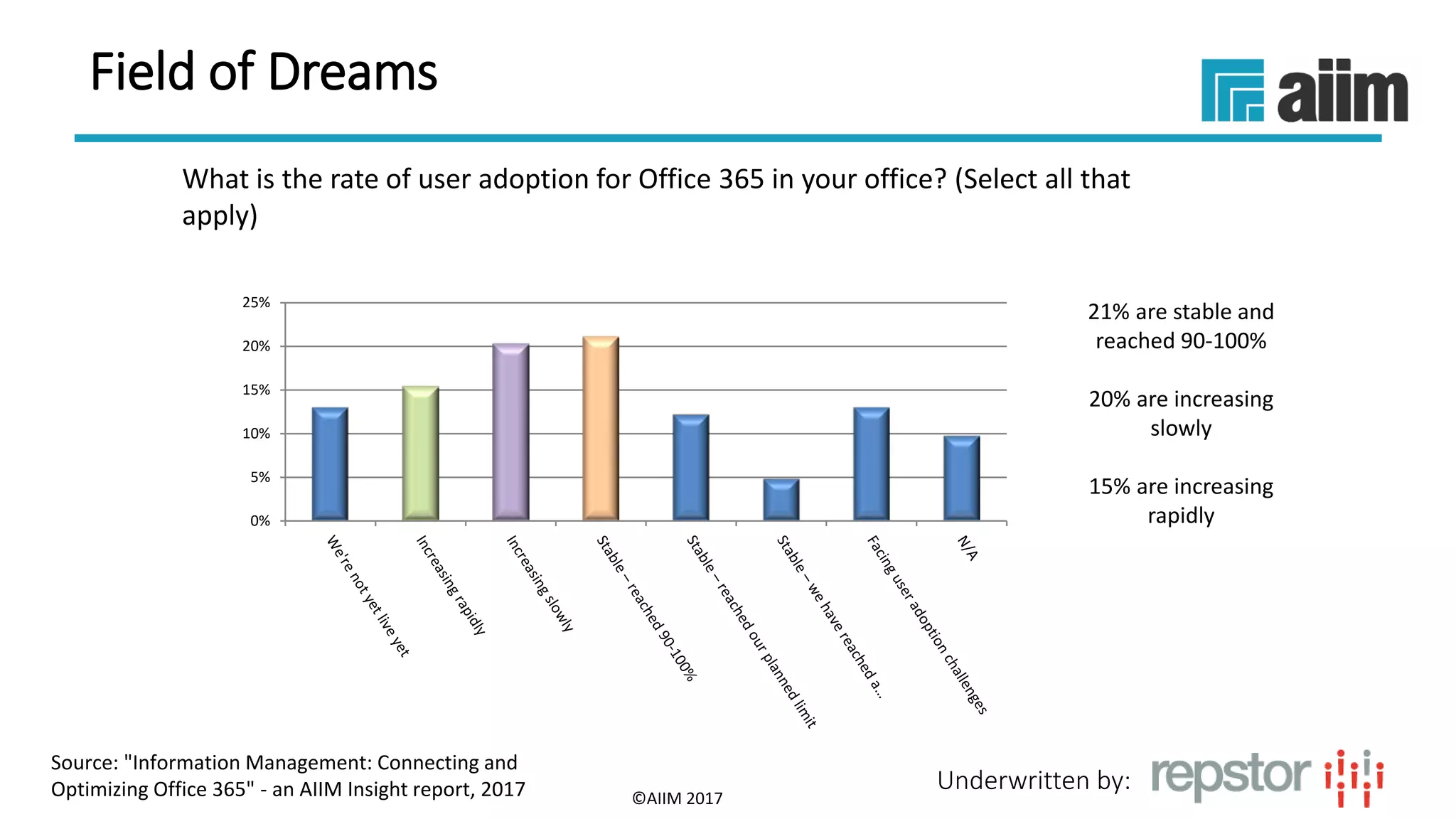
What is the rate of user adoption for Office 365 in your office? (Select all that
apply)
21% are stable and
reached 90-100%
20% are increasing
slowly
15% are increasing
rapidly
©AIIM 2017
0%
5%
10%
15%
20%
25%
Source: "Information Management: Connecting and
Optimizing Office 365" - an AIIM Insight report, 2017
Field of Dreams
Underwritten by:
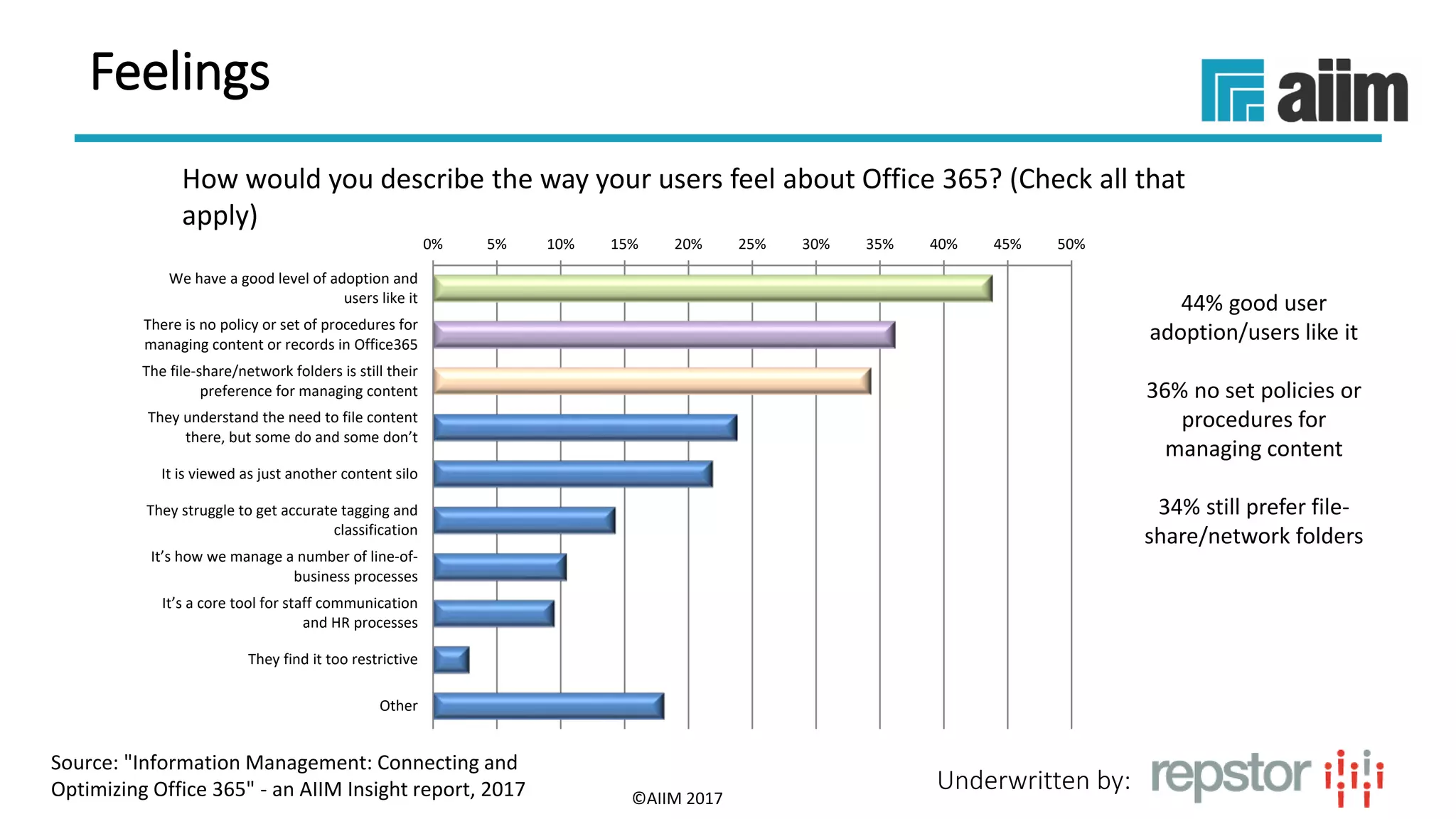
How would you describe the way your users feel about Office 365? (Check all that
apply)
44% good user
adoption/users like it
36% no set policies or
procedures for
managing content
34% still prefer file-
share/network folders
©AIIM 2017
0% 5% 10% 15% 20% 25% 30% 35% 40% 45% 50%
We have a good level of adoption and
users like it
There is no policy or set of procedures for
managing content or records in Office365
The file-share/network folders is still their
preference for managing content
They understand the need to file content
there, but some do and some don’t
It is viewed as just another content silo
They struggle to get accurate tagging and
classification
It’s how we manage a number of line-of-
business processes
It’s a core tool for staff communication
and HR processes
They find it too restrictive
Other
Source: "Information Management: Connecting and
Optimizing Office 365" - an AIIM Insight report, 2017
Feelings
Underwritten by:
Rising Content Sprawl
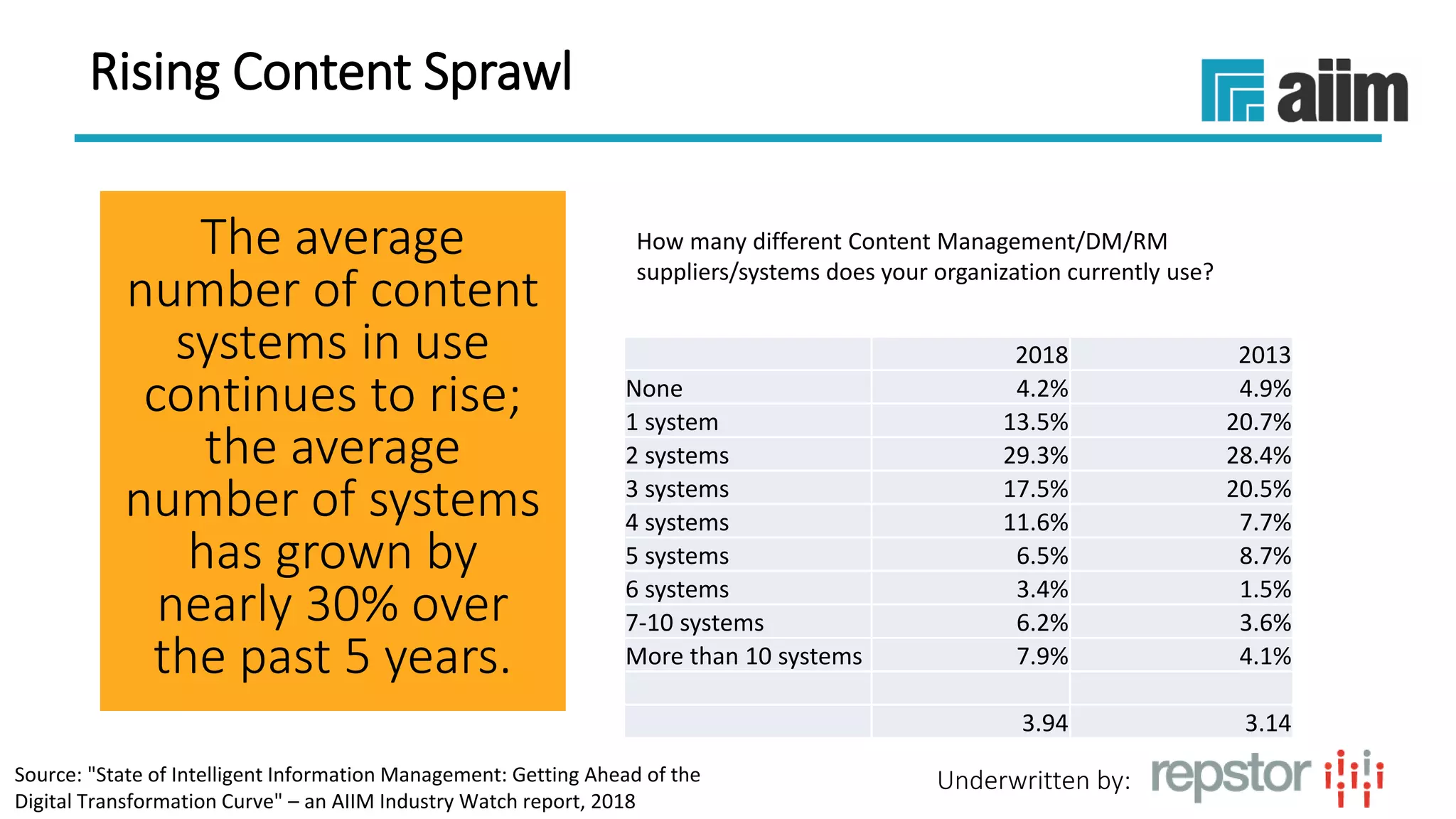
The average
number of content
systems in use
continues to rise;
the average
number of systems
has grown by
nearly 30% over
the past 5 years.
2018 2013
None 4.2% 4.9%
1 system 13.5% 20.7%
2 systems 29.3% 28.4%
3 systems 17.5% 20.5%
4 systems 11.6% 7.7%
5 systems 6.5% 8.7%
6 systems 3.4% 1.5%
7-10 systems 6.2% 3.6%
More than 10 systems 7.9% 4.1%
3.94 3.14
How many different Content Management/DM/RM
suppliers/systems does your organization currently use?
6/7/201815
Source: "State of Intelligent Information Management: Getting Ahead of the
Digital Transformation Curve" – an AIIM Industry Watch report, 2018
Underwritten by:
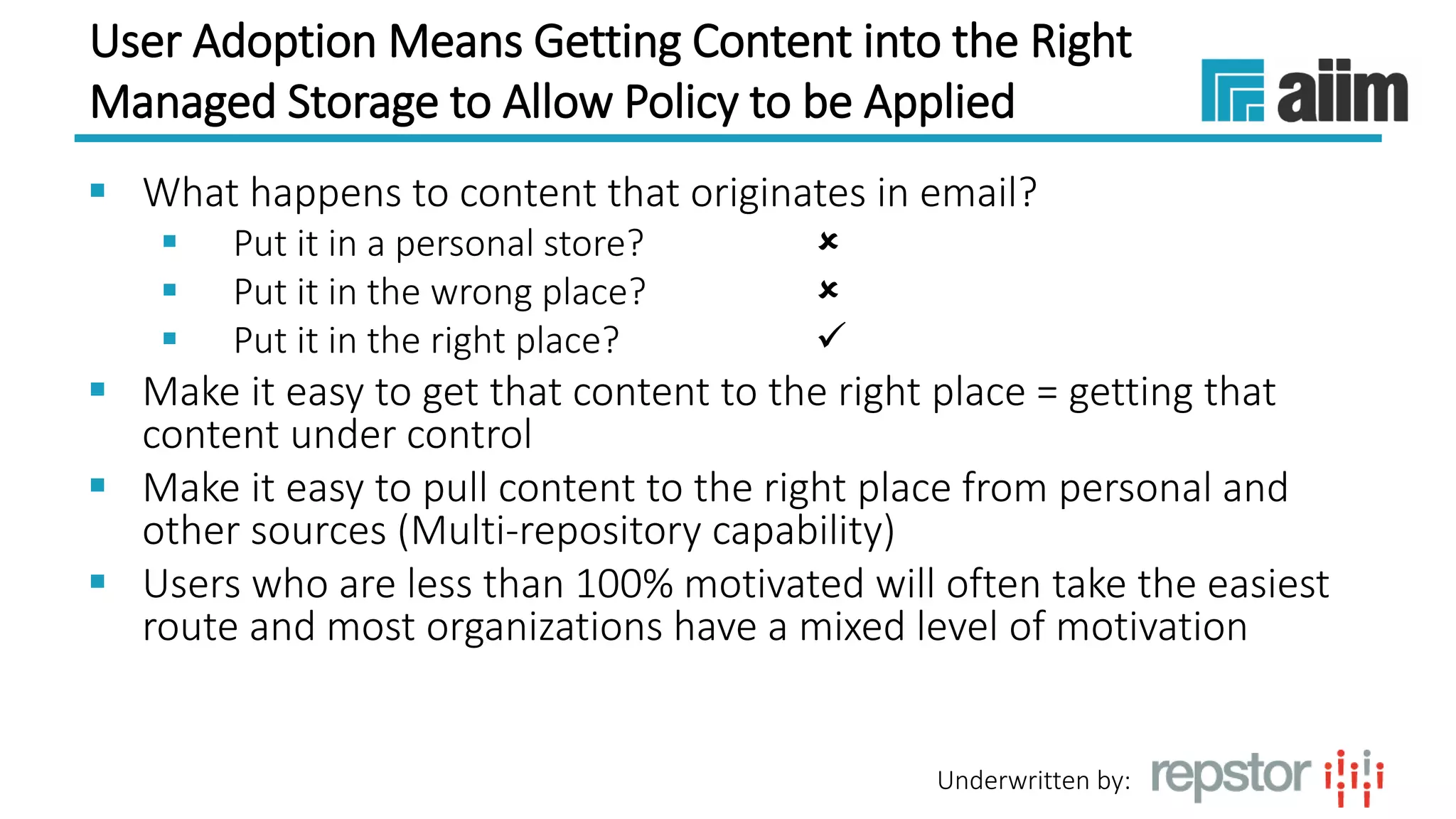
User Adoption Means Getting Content into the Right
Managed Storage to Allow Policy to be Applied
 What happens to content that originates in email?
 Put it in a personal store? 
 Put it in the wrong place? 
 Put it in the right place? 
 Make it easy to get that content to the right place = getting that
content under control
 Make it easy to pull content to the right place from personal and
other sources (Multi-repository capability)
 Users who are less than 100% motivated will often take the easiest
route and most organizations have a mixed level of motivation
Underwritten by:
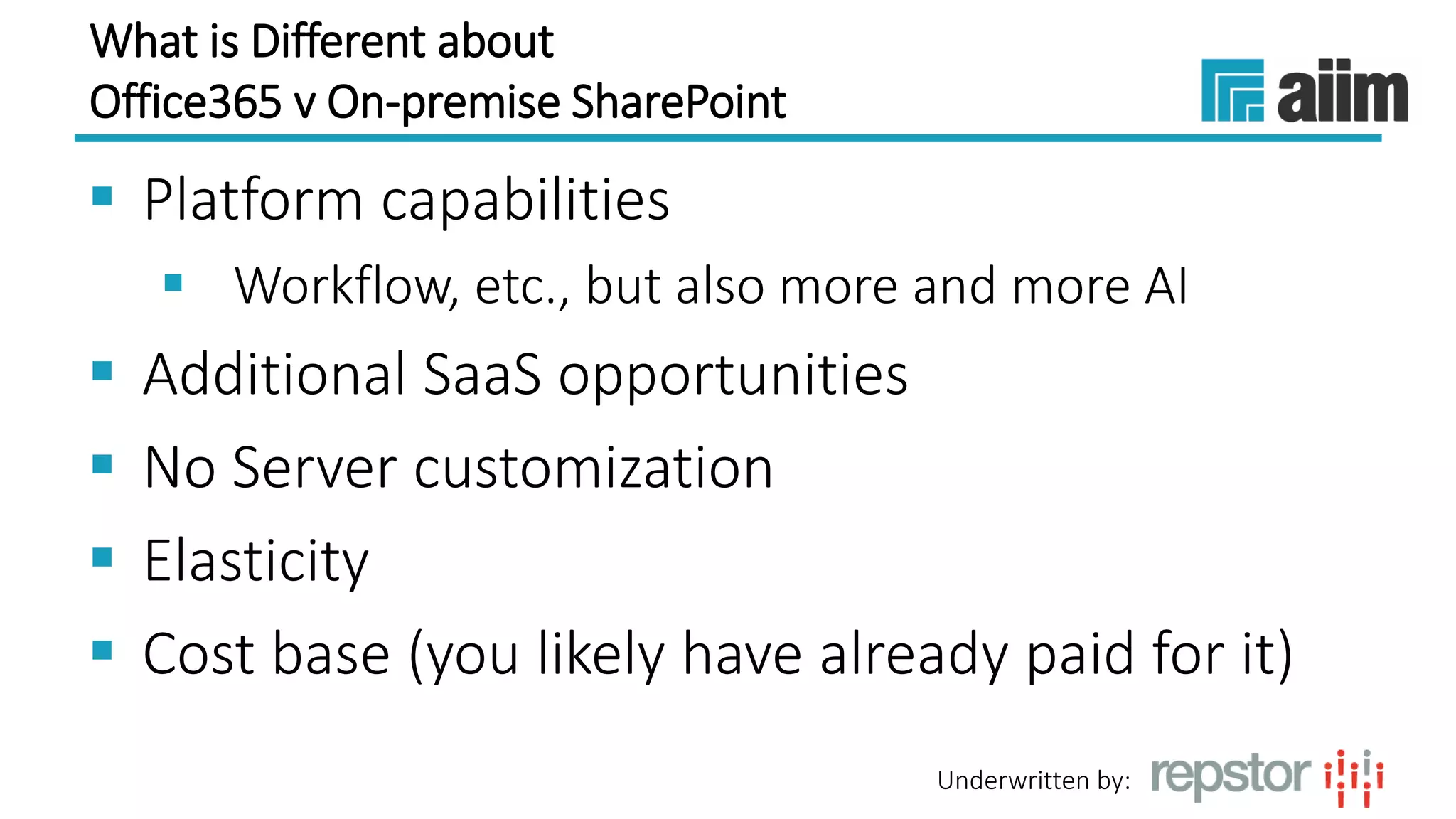
What is Different about
Office365 v On-premise SharePoint
 Platform capabilities
 Workflow, etc., but also more and more AI
 Additional SaaS opportunities
 No Server customization
 Elasticity
 Cost base (you likely have already paid for it)
Underwritten by:
Agenda
 The benefits of bringing together email and
document management systems
 The importance of user adoption of in-house
systems
 Making the most of SharePoint and Office 365
for case management
Underwritten by:
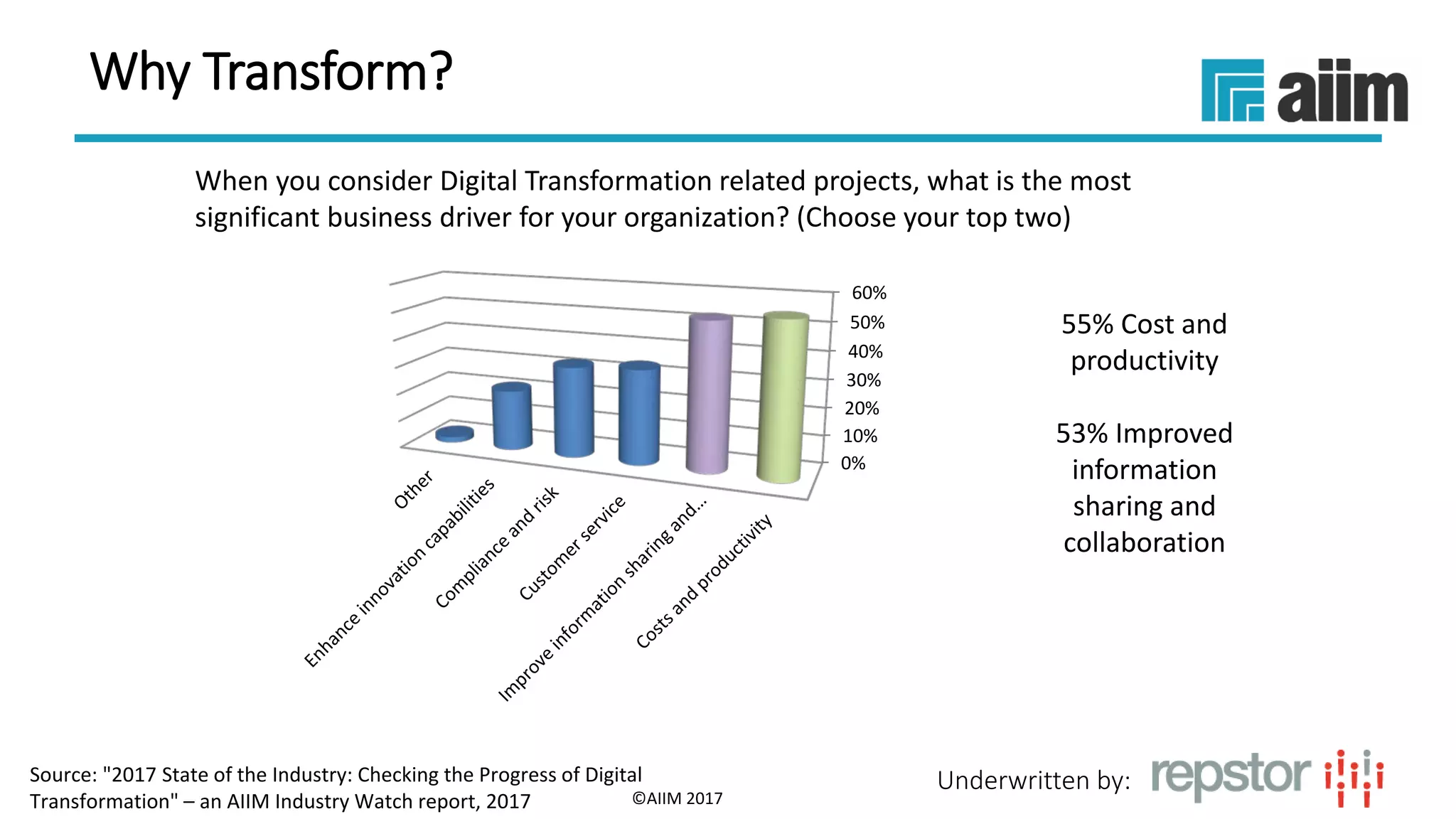
When you consider Digital Transformation related projects, what is the most
significant business driver for your organization? (Choose your top two)
55% Cost and
productivity
53% Improved
information
sharing and
collaboration
©AIIM 2017
0%
10%
20%
30%
40%
50%
60%
Why Transform?
Source: "2017 State of the Industry: Checking the Progress of Digital
Transformation" – an AIIM Industry Watch report, 2017
Underwritten by:
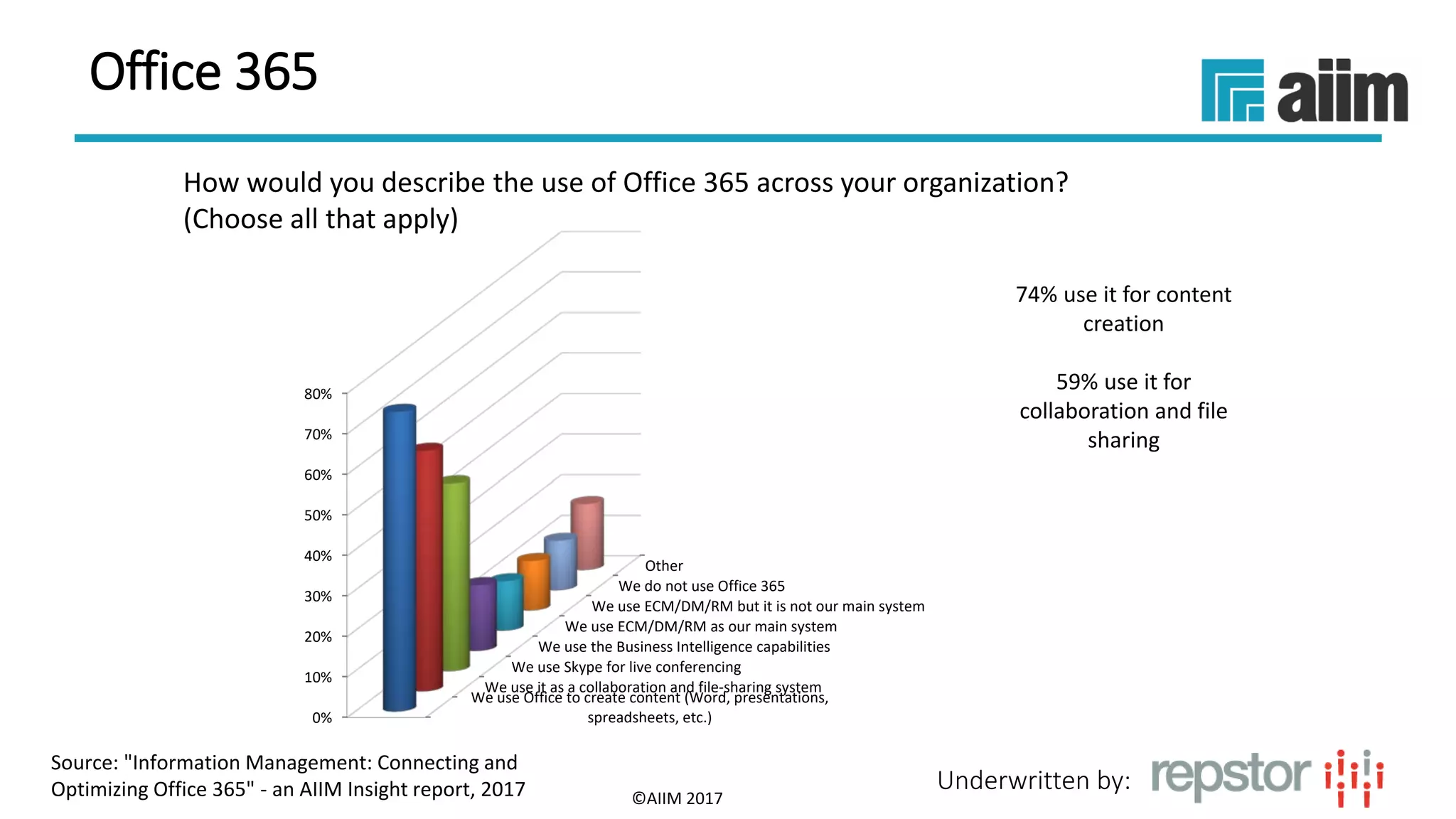
How would you describe the use of Office 365 across your organization?
(Choose all that apply)
74% use it for content
creation
59% use it for
collaboration and file
sharing
©AIIM 2017
We use Office to create content (Word, presentations,
spreadsheets, etc.)
We use it as a collaboration and file-sharing system
We use Skype for live conferencing
We use the Business Intelligence capabilities
We use ECM/DM/RM as our main system
We use ECM/DM/RM but it is not our main system
We do not use Office 365
Other
0%
10%
20%
30%
40%
50%
60%
70%
80%
Source: "Information Management: Connecting and
Optimizing Office 365" - an AIIM Insight report, 2017
Office 365
Underwritten by:
Exploiting SharePoint on Office365 for Case
Management (Email/Document Centric)
 Platform is broad and future proofed
 Opportunities for external collaboration
 Visibility/Audit/GDPR
 Cost and Productivity
 Having a case management system to deal with these types of processes can transform
costs and productivity
 Time to find relevant documents and email
 Being able to rapidly prototype and deploy
 Avoid development
 Effective ongoing maintenance and re-use
 OOB capabilities that need bolstering
 Outlook integration
 Surfacing relevant case/other content?
 No easy way to provision consistently for case management
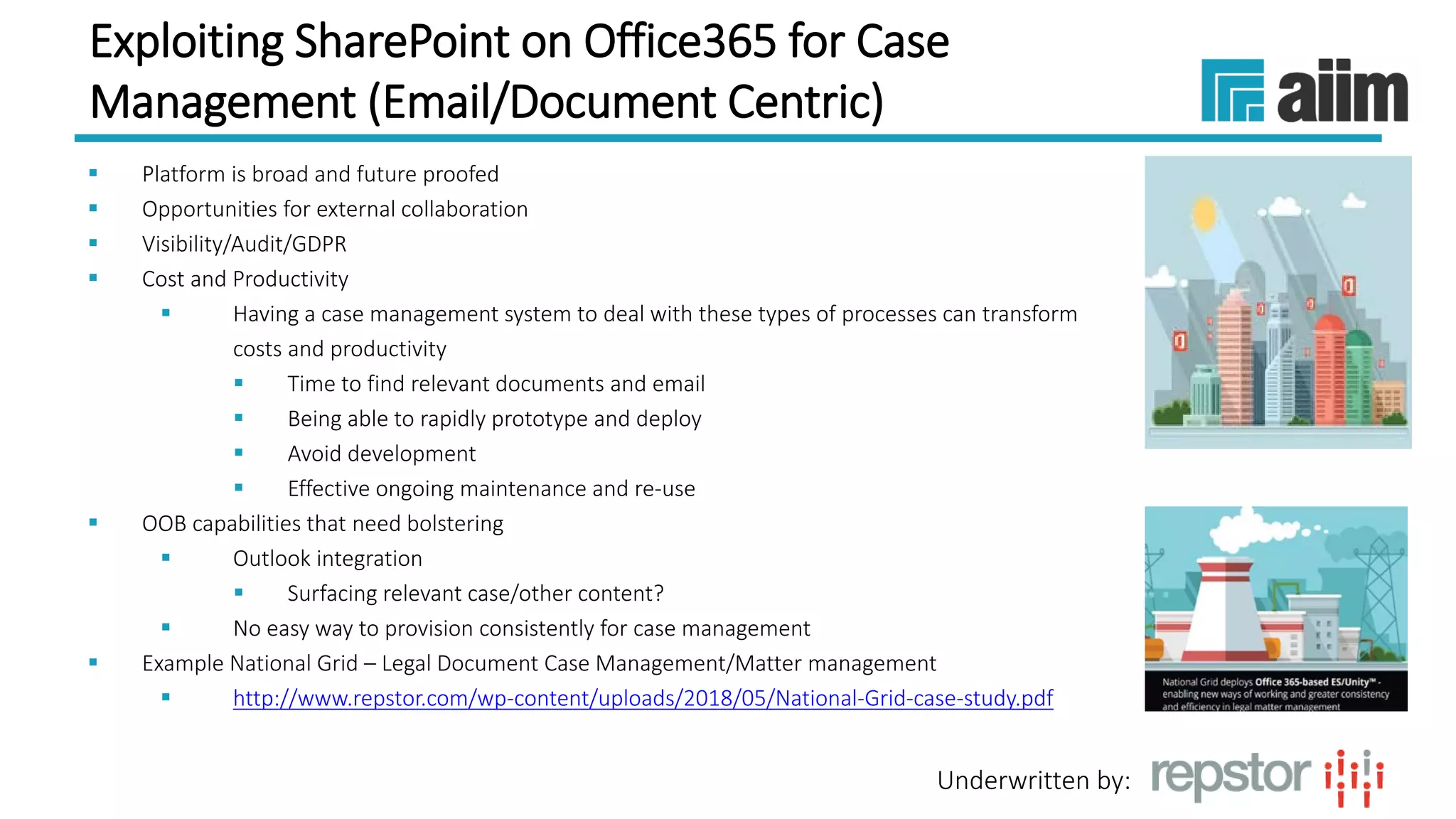
 Example National Grid – Legal Document Case Management/Matter management
 http://www.repstor.com/wp-content/uploads/2018/05/National-Grid-case-study.pdf
Underwritten by:
Things to Consider
 Leverage existing infrastructure, especially the systems that
have high support and helpful updates from their sources
 Look for opportunities to manage your processes, especially in
a case-centric way
 Consider how using a case management approach in your
organization can benefit your own client base for better
customer engagement and service
 Seek assistance from your professional associations, suppliers,
or consultants, for those areas where you need additional
expertise and guidance
Underwritten by:
Questions?
E: alan.mcmillen@Repstor.com
Get in touch today!
Visit our website:
W: www.repstor.com
For case studies, white papers, product information and
more:
O365 for case management White Paper
http://www.repstor.com/resources/whitepaper/enjoy-latest-white-paper-10-important-benefits-
standardising-office-365-case-management
Want to see the Repstor software in action?
E: contact@repstor.com
[Webinar Slides] Improving your Organization’s Collaborative and Case-Centric Processes with Office 365

[Webinar Slides] Improving your Organization’s Collaborative and Case-Centric Processes with Office 365

  • 1.
    Underwritten by: #AIIMYour DigitalTransformation Begins with Intelligent Information Management Webinar Title Presented DATE Improving your Organization’s Collaborative and Case-centric Processes with Office 365 An AIIM Webinar presented 7th June, 2018
  • 2.
    Underwritten by: Alan McMillen CEO Repstor TheresaResek, CIP Director, Market Intelligence AIIM Today’s Speakers
  • 3.
    Underwritten by: Agenda  Thebenefits of bringing together email and document management systems  The importance of user adoption of in-house systems  Making the most of SharePoint and Office 365 for case management
  • 4.
    Underwritten by: Agenda  Thebenefits of bringing together email and document management systems  The importance of user adoption of in-house systems  Making the most of SharePoint and Office 365 for case management
  • 5.
    Underwritten by: Content IntegrationRemains a Challenge While most organizations continue to increase the number of content systems they use, a rising portion of critical business content (now 54%) remains OUTSIDE those content management systems. 2018 2013 0% 2.8% 2.7% 10% 5.4% 6.8% 20% 7.6% 8.3% 30% 10.1% 12.2% 40% 10.1% 8.6% 50% 10.8% 11.6% 60% 12.7% 9.8% 70% 14.6% 13.1% 80% 12.3% 10.1% 90% 13.6% 16.9% Average % 54.4 53.5 What proportion of your unstructured content and information (excluding emails) would you say is stored in enterprise systems (ERP, HR, Finance, CRM, Project Management, LOB, etc.) INSTEAD OF in a Content Management/DM system(s) -- and is not accessible through your Content Management/DM system(s)? Source: "State of Intelligent Information Management: Getting Ahead of the Digital Transformation Curve" – an AIIM Industry Watch report, 2018
  • 6.
  • 7.
    Underwritten by: Which ofthe following methods does your organization/department mostly use for content creation? (Max 3) 52% draft and use email for review/approval 47% draft and share from a central location 43% use a collaborative team effort with secure, shared documents ©AIIM 2017 Collaborative team sessions using concurrent document editing, 23% Collaborative team effort using a shared document (Open), 29% Collaborative team effort using a shared document (Secured), 43% Drafted then shared from a central location for comment/review/a pproval, 47% Drafted and distributed by email for review/approval, 52% Drafted and then handed over to an authoring/publicati ons team, 17% Written independently without a comment/review/appr oval process, 21% Other, 2% Collaboration Source: "2017 State of the Industry: Checking the Progress of Digital Transformation" – an AIIM Industry Watch report, 2017
  • 8.
    Underwritten by: Current Statusof Digital Transformation Initiatives Only 20 months from 2020, fewer than 1 in 5 organizations are near where they want to be re the core Transformation challenge of “understanding, anticipating, and redefining internal and external customer experiences.” 3% 22% 29% 27% 15% 4% don't care planning, but haven't started 25% there 50% there 75% there we're there! Relative to where you want to be by 2020, where are you in your overall Digital Transformation Journey to "understanding, anticipating, and redefining internal and external customer experiences"? Source: "State of Intelligent Information Management: Getting Ahead of the Digital Transformation Curve" – an AIIM Industry Watch report, 2018
  • 9.
    Underwritten by: Email Remainsan Important Content Source  Still the only Ubiquitous mechanism  Still the distribution mechanism for majority of external consumers  Still the source of a large proportion of documents both internal and external despite efforts to make this less prevalent
  • 10.
    Underwritten by: Examples ofEmail/Document Centric Case Management  Complaints  Claims  Legal document review  Procurement processes (RFI/RFP)  Engagement management  HR processes  ++++
  • 11.
    Underwritten by: Traits  Mostare not particularly suited to having shared workspaces/collaboration with the external parties  May be sensitive  All require groups of users to have a view of the documentation and email specific to the process in one place  All may have a later audit requirement  All benefit from measurement/BI
  • 12.
    Underwritten by: Agenda  Thebenefits of bringing together email and document management systems  The importance of user adoption of in-house systems  Making the most of SharePoint and Office 365 for case management
  • 13.
    Underwritten by: What isthe rate of user adoption for Office 365 in your office? (Select all that apply) 21% are stable and reached 90-100% 20% are increasing slowly 15% are increasing rapidly ©AIIM 2017 0% 5% 10% 15% 20% 25% Source: "Information Management: Connecting and Optimizing Office 365" - an AIIM Insight report, 2017 Field of Dreams
  • 14.
    Underwritten by: How wouldyou describe the way your users feel about Office 365? (Check all that apply) 44% good user adoption/users like it 36% no set policies or procedures for managing content 34% still prefer file- share/network folders ©AIIM 2017 0% 5% 10% 15% 20% 25% 30% 35% 40% 45% 50% We have a good level of adoption and users like it There is no policy or set of procedures for managing content or records in Office365 The file-share/network folders is still their preference for managing content They understand the need to file content there, but some do and some don’t It is viewed as just another content silo They struggle to get accurate tagging and classification It’s how we manage a number of line-of- business processes It’s a core tool for staff communication and HR processes They find it too restrictive Other Source: "Information Management: Connecting and Optimizing Office 365" - an AIIM Insight report, 2017 Feelings
  • 15.
    Underwritten by: Rising ContentSprawl The average number of content systems in use continues to rise; the average number of systems has grown by nearly 30% over the past 5 years. 2018 2013 None 4.2% 4.9% 1 system 13.5% 20.7% 2 systems 29.3% 28.4% 3 systems 17.5% 20.5% 4 systems 11.6% 7.7% 5 systems 6.5% 8.7% 6 systems 3.4% 1.5% 7-10 systems 6.2% 3.6% More than 10 systems 7.9% 4.1% 3.94 3.14 How many different Content Management/DM/RM suppliers/systems does your organization currently use? 6/7/201815 Source: "State of Intelligent Information Management: Getting Ahead of the Digital Transformation Curve" – an AIIM Industry Watch report, 2018
  • 16.
    Underwritten by: User AdoptionMeans Getting Content into the Right Managed Storage to Allow Policy to be Applied  What happens to content that originates in email?  Put it in a personal store?   Put it in the wrong place?   Put it in the right place?   Make it easy to get that content to the right place = getting that content under control  Make it easy to pull content to the right place from personal and other sources (Multi-repository capability)  Users who are less than 100% motivated will often take the easiest route and most organizations have a mixed level of motivation
  • 17.
    Underwritten by: What isDifferent about Office365 v On-premise SharePoint  Platform capabilities  Workflow, etc., but also more and more AI  Additional SaaS opportunities  No Server customization  Elasticity  Cost base (you likely have already paid for it)
  • 18.
    Underwritten by: Agenda  Thebenefits of bringing together email and document management systems  The importance of user adoption of in-house systems  Making the most of SharePoint and Office 365 for case management
  • 19.
    Underwritten by: When youconsider Digital Transformation related projects, what is the most significant business driver for your organization? (Choose your top two) 55% Cost and productivity 53% Improved information sharing and collaboration ©AIIM 2017 0% 10% 20% 30% 40% 50% 60% Why Transform? Source: "2017 State of the Industry: Checking the Progress of Digital Transformation" – an AIIM Industry Watch report, 2017
  • 20.
    Underwritten by: How wouldyou describe the use of Office 365 across your organization? (Choose all that apply) 74% use it for content creation 59% use it for collaboration and file sharing ©AIIM 2017 We use Office to create content (Word, presentations, spreadsheets, etc.) We use it as a collaboration and file-sharing system We use Skype for live conferencing We use the Business Intelligence capabilities We use ECM/DM/RM as our main system We use ECM/DM/RM but it is not our main system We do not use Office 365 Other 0% 10% 20% 30% 40% 50% 60% 70% 80% Source: "Information Management: Connecting and Optimizing Office 365" - an AIIM Insight report, 2017 Office 365
  • 21.
    Underwritten by: Exploiting SharePointon Office365 for Case Management (Email/Document Centric)  Platform is broad and future proofed  Opportunities for external collaboration  Visibility/Audit/GDPR  Cost and Productivity  Having a case management system to deal with these types of processes can transform costs and productivity  Time to find relevant documents and email  Being able to rapidly prototype and deploy  Avoid development  Effective ongoing maintenance and re-use  OOB capabilities that need bolstering  Outlook integration  Surfacing relevant case/other content?  No easy way to provision consistently for case management  Example National Grid – Legal Document Case Management/Matter management  http://www.repstor.com/wp-content/uploads/2018/05/National-Grid-case-study.pdf
  • 22.
    Underwritten by: Things toConsider  Leverage existing infrastructure, especially the systems that have high support and helpful updates from their sources  Look for opportunities to manage your processes, especially in a case-centric way  Consider how using a case management approach in your organization can benefit your own client base for better customer engagement and service  Seek assistance from your professional associations, suppliers, or consultants, for those areas where you need additional expertise and guidance
  • 23.
    Underwritten by: Questions? E: alan.mcmillen@Repstor.com Getin touch today! Visit our website: W: www.repstor.com For case studies, white papers, product information and more: O365 for case management White Paper http://www.repstor.com/resources/whitepaper/enjoy-latest-white-paper-10-important-benefits- standardising-office-365-case-management Want to see the Repstor software in action? E: contact@repstor.com