
Ori Fishler
Director, Web Solutions
Edgewater
ofishler@Edgewater.com
Social Quandary
To Yammer or Not to Yammer?
► So what do we mean by “Social”
► What Microsoft included in SP2013
► Why Microsoft bought Yammer
► How Yammer and SP Compare?
► The Microsoft Roadmap for Social
► Guidelines for making a decision
► If a decision is delayed, what to do in the interim?
► Integration options
► Resources
In this talk
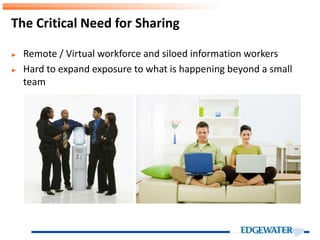
► Remote / Virtual workforce and siloed information workers
► Hard to expand exposure to what is happening beyond a small
team
The Critical Need for Sharing
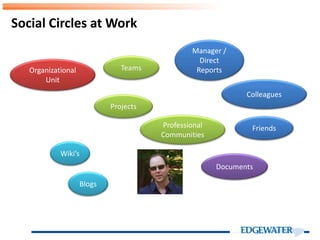
Social Circles at Work
Teams
Projects
Professional
Communities
Organizational
Unit
Friends
Manager /
Direct
Reports
Colleagues
Documents
Blogs
Wiki’s
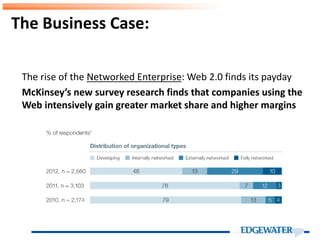
The Business Case:
The rise of the Networked Enterprise: Web 2.0 finds its payday
McKinsey’s new survey research finds that companies using the
Web intensively gain greater market share and higher margins
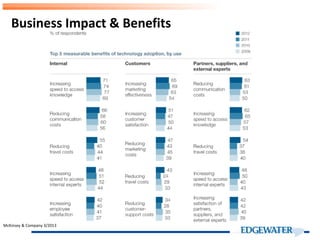
Business Impact & Benefits
McKinsey & Company 3/2013
Microsoft SharePoint 2013:
Social Collaboration Enabler
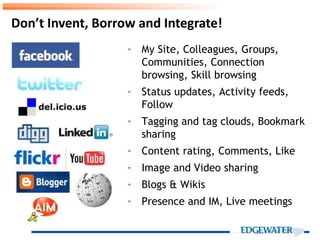
Don’t Invent, Borrow and Integrate!
‣ My Site, Colleagues, Groups,
Communities, Connection
browsing, Skill browsing
‣ Status updates, Activity feeds,
Follow
‣ Tagging and tag clouds, Bookmark
sharing
‣ Content rating, Comments, Like
‣ Image and Video sharing
‣ Blogs & Wikis
‣ Presence and IM, Live meetings
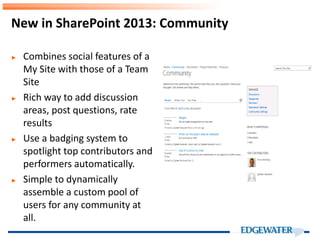
New in SharePoint 2013: Community
► Combines social features of a
My Site with those of a Team
Site
► Rich way to add discussion
areas, post questions, rate
results
► Use a badging system to
spotlight top contributors and
performers automatically.
► Simple to dynamically
assemble a custom pool of
users for any community at
all.
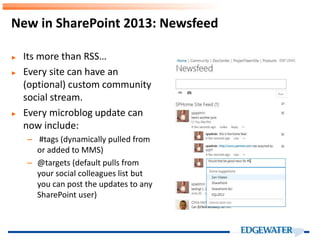
New in SharePoint 2013: Newsfeed
► Its more than RSS…
► Every site can have an
(optional) custom community
social stream.
► Every microblog update can
now include:
– #tags (dynamically pulled from
or added to MMS)
– @targets (default pulls from
your social colleagues list but
you can post the updates to any
SharePoint user)
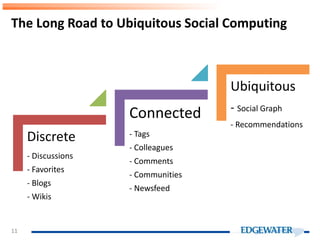
The Long Road to Ubiquitous Social Computing
11
Discrete
- Discussions
- Favorites
- Blogs
- Wikis
Connected
- Tags
- Colleagues
- Comments
- Communities
- Newsfeed
Ubiquitous
- Social Graph
- Recommendations
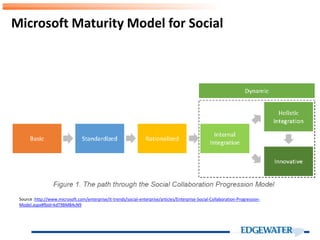
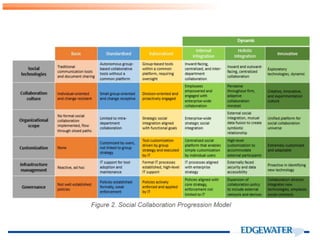
Microsoft Maturity Model for Social
Source :http://www.microsoft.com/enterprise/it-trends/social-enterprise/articles/Enterprise-Social-Collaboration-Progression-
Model.aspx#fbid=kdT9BMB4cN9
► Buying a market leader, 8M registered users.
► Expertise in Freemium models
► Acknowledgment of social weakness, especially in the cloud.
Microsoft Acquisition of Yammer
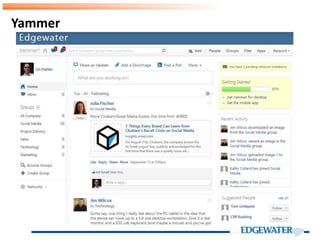
Yammer
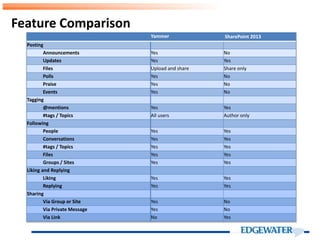
Feature Comparison
Yammer SharePoint 2013
Posting
Announcements Yes No
Updates Yes Yes
Files Upload and share Share only
Polls Yes No
Praise Yes No
Events Yes No
Tagging
@mentions Yes Yes
#tags / Topics All users Author only
Following
People Yes Yes
Conversations Yes Yes
#tags / Topics Yes Yes
Files Yes Yes
Groups / Sites Yes Yes
Liking and Replying
Liking Yes Yes
Replying Yes Yes
Sharing
Via Group or Site Yes No
Via Private Message Yes No
Via Link No Yes
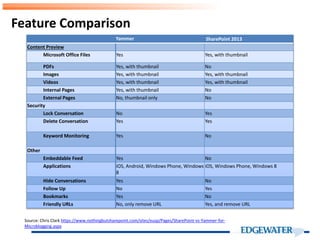
Feature Comparison
Yammer SharePoint 2013
Content Preview
Microsoft Office Files Yes Yes, with thumbnail
PDFs Yes, with thumbnail No
Images Yes, with thumbnail Yes, with thumbnail
Videos Yes, with thumbnail Yes, with thumbnail
Internal Pages Yes, with thumbnail No
External Pages No, thumbnail only No
Security
Lock Conversation No Yes
Delete Conversation Yes Yes
Keyword Monitoring Yes No
Other
Embeddable Feed Yes No
Applications iOS, Android, Windows Phone, Windows
8
iOS, Windows Phone, Windows 8
Hide Conversations Yes No
Follow Up No Yes
Bookmarks Yes No
Friendly URLs No, only remove URL Yes, and remove URL
Source: Chris Clark https://www.nothingbutsharepoint.com/sites/eusp/Pages/SharePoint-vs-Yammer-for-
Microblogging.aspx
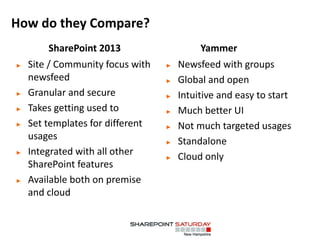
How do they Compare?
► Newsfeed with groups
► Global and open
► Intuitive and easy to start
► Much better UI
► Not much targeted usages
► Standalone
► Cloud only
► Site / Community focus with
newsfeed
► Granular and secure
► Takes getting used to
► Set templates for different
usages
► Integrated with all other
SharePoint features
► Available both on premise
and cloud
SharePoint 2013 Yammer
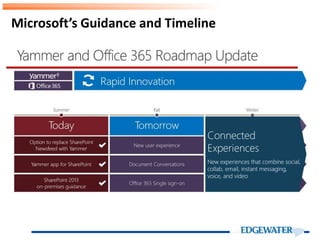
Microsoft’s Guidance and Timeline
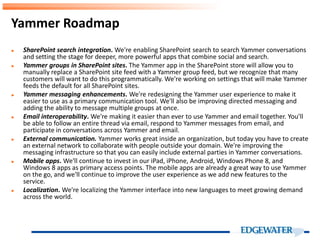
► SharePoint search integration. We're enabling SharePoint search to search Yammer conversations
and setting the stage for deeper, more powerful apps that combine social and search.
► Yammer groups in SharePoint sites. The Yammer app in the SharePoint store will allow you to
manually replace a SharePoint site feed with a Yammer group feed, but we recognize that many
customers will want to do this programmatically. We're working on settings that will make Yammer
feeds the default for all SharePoint sites.
► Yammer messaging enhancements. We're redesigning the Yammer user experience to make it
easier to use as a primary communication tool. We'll also be improving directed messaging and
adding the ability to message multiple groups at once.
► Email interoperability. We're making it easier than ever to use Yammer and email together. You'll
be able to follow an entire thread via email, respond to Yammer messages from email, and
participate in conversations across Yammer and email.
► External communication. Yammer works great inside an organization, but today you have to create
an external network to collaborate with people outside your domain. We're improving the
messaging infrastructure so that you can easily include external parties in Yammer conversations.
► Mobile apps. We'll continue to invest in our iPad, iPhone, Android, Windows Phone 8, and
Windows 8 apps as primary access points. The mobile apps are already a great way to use Yammer
on the go, and we'll continue to improve the user experience as we add new features to the
service.
► Localization. We're localizing the Yammer interface into new languages to meet growing demand
across the world.
Yammer Roadmap
► Social in SP 2013 is definitely better but still basic and will require
effort and diligence to get good adoption
► Yammer is cool and sleek but limited in governance and true
integration with SharePoint
► A “Best of both worlds” integrated approach is at least a year
away, maybe not until the next SharePoint release for on prem.
► Microsoft is pushing Yammer as the solution but it does not
always fit.
The Yammer Conundrum
► Is my company OK with having confidential information in
MultiTenant Cloud?
► What are the plans as to Office 365 use?
► Is SharePoint staying on Prem or moving to the cloud version?
► How comfortable are the users with SharePoint?
► Timeline in upgrading to SharePoint 2013
► Are all users on the same email domain?
Key Questions to Consider
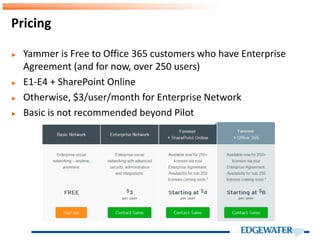
► Yammer is Free to Office 365 customers who have Enterprise
Agreement (and for now, over 250 users)
► E1-E4 + SharePoint Online
► Otherwise, $3/user/month for Enterprise Network
► Basic is not recommended beyond Pilot
Pricing
Decision Guidelines
SP Newsfeed Yammer
► Not ok with Multitenant
► On or moving to SP2013 on
prem and SP is well used.
► Not on office 365 & EA and
want to save $$
► Need a controlled, cohesive
env.
► Need cross domain access
► OK with Multitenant
► Office 365 + EA
► On SharePoint Online
► On SP 2010 with no
immediate upgrade plans
► OK with evolving,
somewhat fragmented
experience
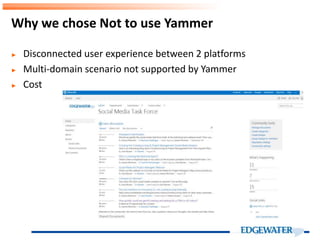
► Disconnected user experience between 2 platforms
► Multi-domain scenario not supported by Yammer
► Cost
Why we chose Not to use Yammer
Integration Modes
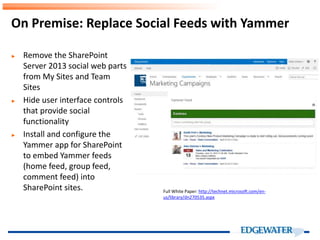
On Premise: Replace Social Feeds with Yammer
► Remove the SharePoint
Server 2013 social web parts
from My Sites and Team
Sites
► Hide user interface controls
that provide social
functionality
► Install and configure the
Yammer app for SharePoint
to embed Yammer feeds
(home feed, group feed,
comment feed) into
SharePoint sites. Full White Paper: http://technet.microsoft.com/en-
us/library/dn270535.aspx
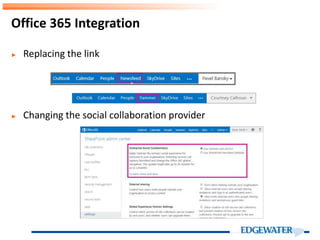
► Replacing the link
► Changing the social collaboration provider
Office 365 Integration
► Building a process to ensure people fill their profile and add
colleagues
– Small group training sessions
– Part of onboarding
► Executive buy in and participation
► Updating status – chore or fun?
► Use as channel for news, announcements etc. to get people used
to getting information this way
► Assign local champions
Implementing Social Networks
► Very specific to the current and planned situation of each
company
► On Prem – SharePoint Social unless the organization is already on
Yammer
► Cloud: Try yammer on a smaller scale and see how it works if you
have EA.
Conclusions & Questions
► Why we picked SharePoint 2013 social over Yammer social for
right now (Jeremy Thake)
► Yammer Roadmap
► O365 – picking a social network – howto
► Everything you need to know about SharePoint Social – Richard
Harbridge
► Integrate Yammer with on-premises SharePoint 2013
environments (white paper)
Useful Links
► Ori Fishler, Director, Web Solutions, Edgewater Technology Inc.
OFishler@edgewater.com
Contact

SharePoint 2013 Social - Yammer

  • 1.
    Ori Fishler Director, WebSolutions Edgewater ofishler@Edgewater.com Social Quandary To Yammer or Not to Yammer?
  • 2.
    ► So whatdo we mean by “Social” ► What Microsoft included in SP2013 ► Why Microsoft bought Yammer ► How Yammer and SP Compare? ► The Microsoft Roadmap for Social ► Guidelines for making a decision ► If a decision is delayed, what to do in the interim? ► Integration options ► Resources In this talk
  • 3.
    ► Remote /Virtual workforce and siloed information workers ► Hard to expand exposure to what is happening beyond a small team The Critical Need for Sharing
  • 4.
    Social Circles atWork Teams Projects Professional Communities Organizational Unit Friends Manager / Direct Reports Colleagues Documents Blogs Wiki’s
  • 5.
    The Business Case: Therise of the Networked Enterprise: Web 2.0 finds its payday McKinsey’s new survey research finds that companies using the Web intensively gain greater market share and higher margins
  • 6.
    Business Impact &Benefits McKinsey & Company 3/2013
  • 7.
    Microsoft SharePoint 2013: SocialCollaboration Enabler
  • 8.
    Don’t Invent, Borrowand Integrate! ‣ My Site, Colleagues, Groups, Communities, Connection browsing, Skill browsing ‣ Status updates, Activity feeds, Follow ‣ Tagging and tag clouds, Bookmark sharing ‣ Content rating, Comments, Like ‣ Image and Video sharing ‣ Blogs & Wikis ‣ Presence and IM, Live meetings
  • 9.
    New in SharePoint2013: Community ► Combines social features of a My Site with those of a Team Site ► Rich way to add discussion areas, post questions, rate results ► Use a badging system to spotlight top contributors and performers automatically. ► Simple to dynamically assemble a custom pool of users for any community at all.
  • 10.
    New in SharePoint2013: Newsfeed ► Its more than RSS… ► Every site can have an (optional) custom community social stream. ► Every microblog update can now include: – #tags (dynamically pulled from or added to MMS) – @targets (default pulls from your social colleagues list but you can post the updates to any SharePoint user)
  • 11.
    The Long Roadto Ubiquitous Social Computing 11 Discrete - Discussions - Favorites - Blogs - Wikis Connected - Tags - Colleagues - Comments - Communities - Newsfeed Ubiquitous - Social Graph - Recommendations
  • 12.
    Microsoft Maturity Modelfor Social Source :http://www.microsoft.com/enterprise/it-trends/social-enterprise/articles/Enterprise-Social-Collaboration-Progression- Model.aspx#fbid=kdT9BMB4cN9
  • 14.
    ► Buying amarket leader, 8M registered users. ► Expertise in Freemium models ► Acknowledgment of social weakness, especially in the cloud. Microsoft Acquisition of Yammer
  • 15.
  • 16.
    Feature Comparison Yammer SharePoint2013 Posting Announcements Yes No Updates Yes Yes Files Upload and share Share only Polls Yes No Praise Yes No Events Yes No Tagging @mentions Yes Yes #tags / Topics All users Author only Following People Yes Yes Conversations Yes Yes #tags / Topics Yes Yes Files Yes Yes Groups / Sites Yes Yes Liking and Replying Liking Yes Yes Replying Yes Yes Sharing Via Group or Site Yes No Via Private Message Yes No Via Link No Yes
  • 17.
    Feature Comparison Yammer SharePoint2013 Content Preview Microsoft Office Files Yes Yes, with thumbnail PDFs Yes, with thumbnail No Images Yes, with thumbnail Yes, with thumbnail Videos Yes, with thumbnail Yes, with thumbnail Internal Pages Yes, with thumbnail No External Pages No, thumbnail only No Security Lock Conversation No Yes Delete Conversation Yes Yes Keyword Monitoring Yes No Other Embeddable Feed Yes No Applications iOS, Android, Windows Phone, Windows 8 iOS, Windows Phone, Windows 8 Hide Conversations Yes No Follow Up No Yes Bookmarks Yes No Friendly URLs No, only remove URL Yes, and remove URL Source: Chris Clark https://www.nothingbutsharepoint.com/sites/eusp/Pages/SharePoint-vs-Yammer-for- Microblogging.aspx
  • 18.
    How do theyCompare? ► Newsfeed with groups ► Global and open ► Intuitive and easy to start ► Much better UI ► Not much targeted usages ► Standalone ► Cloud only ► Site / Community focus with newsfeed ► Granular and secure ► Takes getting used to ► Set templates for different usages ► Integrated with all other SharePoint features ► Available both on premise and cloud SharePoint 2013 Yammer
  • 19.
  • 20.
    ► SharePoint searchintegration. We're enabling SharePoint search to search Yammer conversations and setting the stage for deeper, more powerful apps that combine social and search. ► Yammer groups in SharePoint sites. The Yammer app in the SharePoint store will allow you to manually replace a SharePoint site feed with a Yammer group feed, but we recognize that many customers will want to do this programmatically. We're working on settings that will make Yammer feeds the default for all SharePoint sites. ► Yammer messaging enhancements. We're redesigning the Yammer user experience to make it easier to use as a primary communication tool. We'll also be improving directed messaging and adding the ability to message multiple groups at once. ► Email interoperability. We're making it easier than ever to use Yammer and email together. You'll be able to follow an entire thread via email, respond to Yammer messages from email, and participate in conversations across Yammer and email. ► External communication. Yammer works great inside an organization, but today you have to create an external network to collaborate with people outside your domain. We're improving the messaging infrastructure so that you can easily include external parties in Yammer conversations. ► Mobile apps. We'll continue to invest in our iPad, iPhone, Android, Windows Phone 8, and Windows 8 apps as primary access points. The mobile apps are already a great way to use Yammer on the go, and we'll continue to improve the user experience as we add new features to the service. ► Localization. We're localizing the Yammer interface into new languages to meet growing demand across the world. Yammer Roadmap
  • 21.
    ► Social inSP 2013 is definitely better but still basic and will require effort and diligence to get good adoption ► Yammer is cool and sleek but limited in governance and true integration with SharePoint ► A “Best of both worlds” integrated approach is at least a year away, maybe not until the next SharePoint release for on prem. ► Microsoft is pushing Yammer as the solution but it does not always fit. The Yammer Conundrum
  • 22.
    ► Is mycompany OK with having confidential information in MultiTenant Cloud? ► What are the plans as to Office 365 use? ► Is SharePoint staying on Prem or moving to the cloud version? ► How comfortable are the users with SharePoint? ► Timeline in upgrading to SharePoint 2013 ► Are all users on the same email domain? Key Questions to Consider
  • 23.
    ► Yammer isFree to Office 365 customers who have Enterprise Agreement (and for now, over 250 users) ► E1-E4 + SharePoint Online ► Otherwise, $3/user/month for Enterprise Network ► Basic is not recommended beyond Pilot Pricing
  • 24.
    Decision Guidelines SP NewsfeedYammer ► Not ok with Multitenant ► On or moving to SP2013 on prem and SP is well used. ► Not on office 365 & EA and want to save $$ ► Need a controlled, cohesive env. ► Need cross domain access ► OK with Multitenant ► Office 365 + EA ► On SharePoint Online ► On SP 2010 with no immediate upgrade plans ► OK with evolving, somewhat fragmented experience
  • 25.
    ► Disconnected userexperience between 2 platforms ► Multi-domain scenario not supported by Yammer ► Cost Why we chose Not to use Yammer
  • 26.
  • 27.
    On Premise: ReplaceSocial Feeds with Yammer ► Remove the SharePoint Server 2013 social web parts from My Sites and Team Sites ► Hide user interface controls that provide social functionality ► Install and configure the Yammer app for SharePoint to embed Yammer feeds (home feed, group feed, comment feed) into SharePoint sites. Full White Paper: http://technet.microsoft.com/en- us/library/dn270535.aspx
  • 28.
    ► Replacing thelink ► Changing the social collaboration provider Office 365 Integration
  • 29.
    ► Building aprocess to ensure people fill their profile and add colleagues – Small group training sessions – Part of onboarding ► Executive buy in and participation ► Updating status – chore or fun? ► Use as channel for news, announcements etc. to get people used to getting information this way ► Assign local champions Implementing Social Networks
  • 30.
    ► Very specificto the current and planned situation of each company ► On Prem – SharePoint Social unless the organization is already on Yammer ► Cloud: Try yammer on a smaller scale and see how it works if you have EA. Conclusions & Questions
  • 31.
    ► Why wepicked SharePoint 2013 social over Yammer social for right now (Jeremy Thake) ► Yammer Roadmap ► O365 – picking a social network – howto ► Everything you need to know about SharePoint Social – Richard Harbridge ► Integrate Yammer with on-premises SharePoint 2013 environments (white paper) Useful Links
  • 32.
    ► Ori Fishler,Director, Web Solutions, Edgewater Technology Inc. OFishler@edgewater.com Contact