Ignite Your Intranet with OneWindow Workplace
Daniel Cohen-Dumani & Val Orekhov
Housekeeping
 Webinar is being recorded
 45 minute session
 15 minute Q&A session at the end
 Slides and recording will be available after the session
 Send in your questions!
 Type your questions in the Go-to-Webinar Question Box on the
right side
 We will answer live at the end of the presentation
Daniel Cohen-Dumani
FOUNDER AND CEO, PORTAL SOLUTIONS
@dcohendumani
Blogger: SME for Portal Solutions
Digital Workplace Today Blog
Areas of Interest:
Portals and Collaboration,
Productivity and Efficiencies
“A Passion for Simplicity and Speed to Market”
Our Speakers
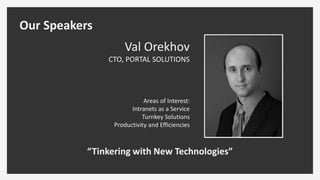
Val Orekhov
CTO, PORTAL SOLUTIONS
Areas of Interest:
Intranets as a Service
Turnkey Solutions
Productivity and Efficiencies
“Tinkering with New Technologies”
Our Speakers
Session Learning
Objectives
 What are Turnkey Intranets?
 Turnkey vs. Custom
Intranets: What are the
differences?
 Key Features and Benefits of
OneWindow Workplace
 Is a Turnkey Intranet Right
for Your Organization?
Poll: What Is The State Of Your Intranet?
 Custom but mostly out of the box
 Custom with some customizations
 Custom with heavy customizations
 We have a turnkey solution with no/minor customization
 Not sure
What are Turnkey Intranets?
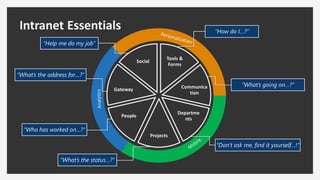
Intranet Essentials “How do I…?”
“What’s going on…?”
“Don’t ask me, find it yourself…!”
“What’s the status…?”
“Who has worked on…?”
“What’s the address for…?”
“Help me do my job”
Tools &
Forms
Communica
tion
Departme
nts
Projects
People
Gateway
Social
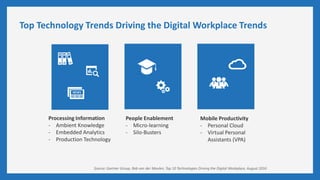
Top Technology Trends Driving the Digital Workplace Trends
Processing Information
- Ambient Knowledge
- Embedded Analytics
- Production Technology
People Enablement
- Micro-learning
- Silo-Busters
Mobile Productivity
- Personal Cloud
- Virtual Personal
Assistants (VPA)
Source: Gartner Group, Rob van der Meulen, Top 10 Technologies Driving the Digital Workplace, August 2016
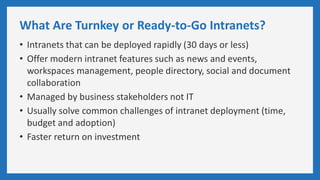
What Are Turnkey or Ready-to-Go Intranets?
• Intranets that can be deployed rapidly (30 days or less)
• Offer modern intranet features such as news and events,
workspaces management, people directory, social and document
collaboration
• Managed by business stakeholders not IT
• Usually solve common challenges of intranet deployment (time,
budget and adoption)
• Faster return on investment
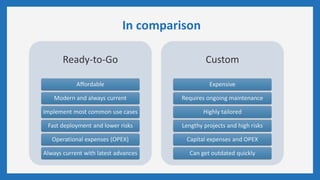
In comparison
Ready-to-Go
Affordable
Modern and always current
Implement most common use cases
Fast deployment and lower risks
Operational expenses (OPEX)
Always current with latest advances
Custom
Expensive
Requires ongoing maintenance
Highly tailored
Lengthy projects and high risks
Capital expenses and OPEX
Can get outdated quickly
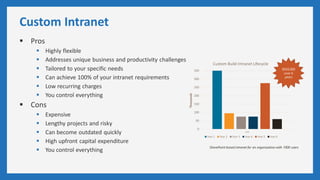
Custom Intranet
 Pros
 Highly flexible
 Addresses unique business and productivity challenges
 Tailored to your specific needs
 Can achieve 100% of your intranet requirements
 Low recurring charges
 You control everything
 Cons
 Expensive
 Lengthy projects and risky
 Can become outdated quickly
 High upfront capital expenditure
 You control everything
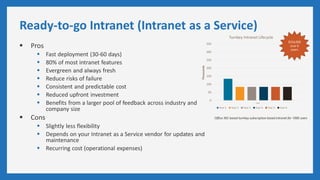
Ready-to-go Intranet (Intranet as a Service)
 Pros
 Fast deployment (30-60 days)
 80% of most intranet features
 Evergreen and always fresh
 Reduce risks of failure
 Consistent and predictable cost
 Reduced upfront investment
 Benefits from a larger pool of feedback across industry and
company size
 Cons
 Slightly less flexibility
 Depends on your Intranet as a Service vendor for updates and
maintenance
 Recurring cost (operational expenses)
Poll: What platform do you see your next intranet on?
 Office 365/cloud-hybrid
 SharePoint on premise
 Waiting to get clarity on Microsoft roadmap
 Third party Intranet as a Service
 Not sure
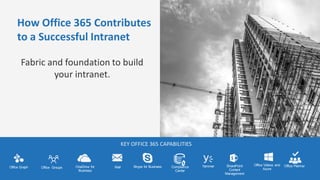
How Office 365 Contributes
to a Successful Intranet
Fabric and foundation to build
your intranet.
KEY OFFICE 365 CAPABILITIES
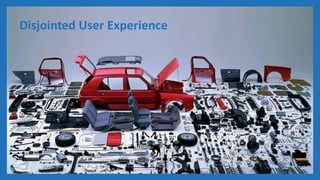
What is the Current Problem?
Disjointed User Experience
Our Solution:
OneWindow Workplace
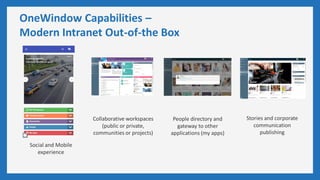
OneWindow Capabilities –
Modern Intranet Out-of-the Box
Social and Mobile
experience
Collaborative workspaces
(public or private,
communities or projects)
People directory and
gateway to other
applications (my apps)
Stories and corporate
communication
publishing
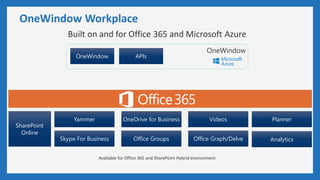
OneWindow Workplace
Built on and for Office 365 and Microsoft Azure
Available for Office 365 and SharePoint Hybrid environment
OneWindow
Yammer
SharePoint
Online
Skype For Business Office Groups Office Graph/Delve
VideosOneDrive for Business
OneWindow APIs
Planner
Analytics
Quick Tour
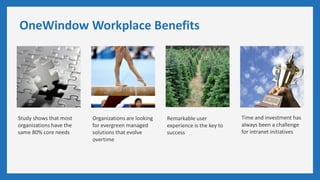
OneWindow Workplace Benefits
Study shows that most
organizations have the
same 80% core needs
Organizations are looking
for evergreen managed
solutions that evolve
overtime
Remarkable user
experience is the key to
success
Time and investment has
always been a challenge
for intranet initiatives
Is a Ready-to-Go Intranet Right for Your
Organization?
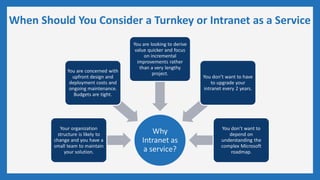
When Should You Consider a Turnkey or Intranet as a Service
Why
Intranet as
a service?
Your organization
structure is likely to
change and you have a
small team to maintain
your solution.
You are concerned with
upfront design and
deployment costs and
ongoing maintenance.
Budgets are tight.
You are looking to derive
value quicker and focus
on incremental
improvements rather
than a very lengthy
project.
You don’t want to have
to upgrade your
intranet every 2 years.
You don’t want to
depend on
understanding the
complex Microsoft
roadmap.
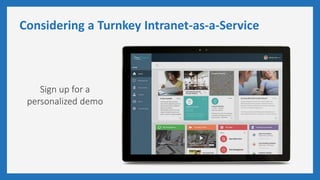
Considering a Turnkey Intranet-as-a-Service
Sign up for a
personalized demo
Next steps: Evaluate OneWindow Intranet
Questions?
Contact Sasha Tchulkova
sasha@portalsolutions.net or
schedule your demo

Webinar: Ignite Your Intranet with OneWindow Workplace

  • 1.
    Ignite Your Intranetwith OneWindow Workplace Daniel Cohen-Dumani & Val Orekhov
  • 2.
    Housekeeping  Webinar isbeing recorded  45 minute session  15 minute Q&A session at the end  Slides and recording will be available after the session  Send in your questions!  Type your questions in the Go-to-Webinar Question Box on the right side  We will answer live at the end of the presentation
  • 3.
    Daniel Cohen-Dumani FOUNDER ANDCEO, PORTAL SOLUTIONS @dcohendumani Blogger: SME for Portal Solutions Digital Workplace Today Blog Areas of Interest: Portals and Collaboration, Productivity and Efficiencies “A Passion for Simplicity and Speed to Market” Our Speakers
  • 4.
    Val Orekhov CTO, PORTALSOLUTIONS Areas of Interest: Intranets as a Service Turnkey Solutions Productivity and Efficiencies “Tinkering with New Technologies” Our Speakers
  • 5.
    Session Learning Objectives  Whatare Turnkey Intranets?  Turnkey vs. Custom Intranets: What are the differences?  Key Features and Benefits of OneWindow Workplace  Is a Turnkey Intranet Right for Your Organization?
  • 6.
    Poll: What IsThe State Of Your Intranet?  Custom but mostly out of the box  Custom with some customizations  Custom with heavy customizations  We have a turnkey solution with no/minor customization  Not sure
  • 7.
    What are TurnkeyIntranets?
  • 8.
    Intranet Essentials “Howdo I…?” “What’s going on…?” “Don’t ask me, find it yourself…!” “What’s the status…?” “Who has worked on…?” “What’s the address for…?” “Help me do my job” Tools & Forms Communica tion Departme nts Projects People Gateway Social
  • 9.
    Top Technology TrendsDriving the Digital Workplace Trends Processing Information - Ambient Knowledge - Embedded Analytics - Production Technology People Enablement - Micro-learning - Silo-Busters Mobile Productivity - Personal Cloud - Virtual Personal Assistants (VPA) Source: Gartner Group, Rob van der Meulen, Top 10 Technologies Driving the Digital Workplace, August 2016
  • 10.
    What Are Turnkeyor Ready-to-Go Intranets? • Intranets that can be deployed rapidly (30 days or less) • Offer modern intranet features such as news and events, workspaces management, people directory, social and document collaboration • Managed by business stakeholders not IT • Usually solve common challenges of intranet deployment (time, budget and adoption) • Faster return on investment
  • 11.
    In comparison Ready-to-Go Affordable Modern andalways current Implement most common use cases Fast deployment and lower risks Operational expenses (OPEX) Always current with latest advances Custom Expensive Requires ongoing maintenance Highly tailored Lengthy projects and high risks Capital expenses and OPEX Can get outdated quickly
  • 12.
    Custom Intranet  Pros Highly flexible  Addresses unique business and productivity challenges  Tailored to your specific needs  Can achieve 100% of your intranet requirements  Low recurring charges  You control everything  Cons  Expensive  Lengthy projects and risky  Can become outdated quickly  High upfront capital expenditure  You control everything
  • 13.
    Ready-to-go Intranet (Intranetas a Service)  Pros  Fast deployment (30-60 days)  80% of most intranet features  Evergreen and always fresh  Reduce risks of failure  Consistent and predictable cost  Reduced upfront investment  Benefits from a larger pool of feedback across industry and company size  Cons  Slightly less flexibility  Depends on your Intranet as a Service vendor for updates and maintenance  Recurring cost (operational expenses)
  • 14.
    Poll: What platformdo you see your next intranet on?  Office 365/cloud-hybrid  SharePoint on premise  Waiting to get clarity on Microsoft roadmap  Third party Intranet as a Service  Not sure
  • 15.
    How Office 365Contributes to a Successful Intranet Fabric and foundation to build your intranet. KEY OFFICE 365 CAPABILITIES
  • 16.
    What is theCurrent Problem?
  • 17.
  • 18.
  • 19.
    OneWindow Capabilities – ModernIntranet Out-of-the Box Social and Mobile experience Collaborative workspaces (public or private, communities or projects) People directory and gateway to other applications (my apps) Stories and corporate communication publishing
  • 20.
    OneWindow Workplace Built onand for Office 365 and Microsoft Azure Available for Office 365 and SharePoint Hybrid environment OneWindow Yammer SharePoint Online Skype For Business Office Groups Office Graph/Delve VideosOneDrive for Business OneWindow APIs Planner Analytics
  • 21.
  • 22.
    OneWindow Workplace Benefits Studyshows that most organizations have the same 80% core needs Organizations are looking for evergreen managed solutions that evolve overtime Remarkable user experience is the key to success Time and investment has always been a challenge for intranet initiatives
  • 23.
    Is a Ready-to-GoIntranet Right for Your Organization?
  • 24.
    When Should YouConsider a Turnkey or Intranet as a Service Why Intranet as a service? Your organization structure is likely to change and you have a small team to maintain your solution. You are concerned with upfront design and deployment costs and ongoing maintenance. Budgets are tight. You are looking to derive value quicker and focus on incremental improvements rather than a very lengthy project. You don’t want to have to upgrade your intranet every 2 years. You don’t want to depend on understanding the complex Microsoft roadmap.
  • 25.
    Considering a TurnkeyIntranet-as-a-Service Sign up for a personalized demo
  • 26.
    Next steps: EvaluateOneWindow Intranet Questions? Contact Sasha Tchulkova sasha@portalsolutions.net or schedule your demo