Email Etiquette
Disclaimer 
This is a training class and not a 
“LECTURE”. I hope you will interact 
with me and you will all bring forward 
your questions without feeling 
discomfort.
When is it appropriate to send an 
email? 
• When you need to relay a short amount of 
information quickly. 
• When the client isn’t responding to your 
calls 
• When you want to ensure a record of your 
conversation 
• When you need to set up an appointment, a 
meeting or request a finance approval
You “Must” Email.. Always!? 
In our times where memories are weak and 
search buttons are the saviours, we are 
encouraged to document all important 
conversations on email to be safe later. 
Always remember that this is a secret weapon 
used by the “Not So Lazy” others!
Writing Effective Emails 
• Keep it short 
• Keep it polite yet formal 
• Address the concerned 
• Use the right Subject 
• Make your email searchable 
• Highlight important deliverables 
• Use the Spell Check/Grammar Check button 
• Acknowledge your emails 
• We are consultants: try and make your emails 
“suggestive”
More on content.. 
• Get to the point 
• Be clear about the response you expect 
a) Answer to a question 
b) Arrange an appointment 
• Separate your promises from your requests 
• Do not write in CAPITALS 
• Use of Receipt Request 
• Attachments
Identifying the “Polite” 
in your email 
• Try to avoid Intonations and facial expressions 
• “Please” can help, but can sometimes sound 
pushy 
• Use expressions of possibility 
Examples: 
a) Could you please send me your comments? 
b) Would it be possible for you to send me your 
comments by tomorrow?
Attention! 
• Emails can be misunderstood 
• If you’re upset by an email, wait before 
responding 
• If you are writing a very important message, 
fill in the address LAST. That way, you can’t 
accidentally send the message before you’re 
ready. 
• Consider leaving the message in your “drafts” 
box for a day and then editing it again before 
sending
Activity 
Email 1: Requesting information
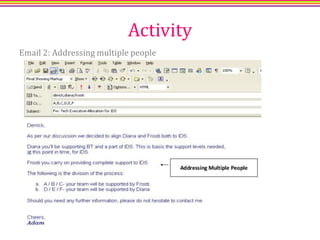
Activity 
Email 2: Addressing multiple people
Activity 
Email 3: Answering queries 
Addressing multiple requests.
Share with us an example of 
one email that you thought 
was difficult/rude/poorly 
written and tell us how you 
responded to that email.
“Your email etiquette will define your place in the 
corporate world. Keep it simple and practice to 
keep it original.”

Email Etiquette

  • 1.
  • 2.
    Disclaimer This isa training class and not a “LECTURE”. I hope you will interact with me and you will all bring forward your questions without feeling discomfort.
  • 3.
    When is itappropriate to send an email? • When you need to relay a short amount of information quickly. • When the client isn’t responding to your calls • When you want to ensure a record of your conversation • When you need to set up an appointment, a meeting or request a finance approval
  • 4.
    You “Must” Email..Always!? In our times where memories are weak and search buttons are the saviours, we are encouraged to document all important conversations on email to be safe later. Always remember that this is a secret weapon used by the “Not So Lazy” others!
  • 6.
    Writing Effective Emails • Keep it short • Keep it polite yet formal • Address the concerned • Use the right Subject • Make your email searchable • Highlight important deliverables • Use the Spell Check/Grammar Check button • Acknowledge your emails • We are consultants: try and make your emails “suggestive”
  • 7.
    More on content.. • Get to the point • Be clear about the response you expect a) Answer to a question b) Arrange an appointment • Separate your promises from your requests • Do not write in CAPITALS • Use of Receipt Request • Attachments
  • 8.
    Identifying the “Polite” in your email • Try to avoid Intonations and facial expressions • “Please” can help, but can sometimes sound pushy • Use expressions of possibility Examples: a) Could you please send me your comments? b) Would it be possible for you to send me your comments by tomorrow?
  • 9.
    Attention! • Emailscan be misunderstood • If you’re upset by an email, wait before responding • If you are writing a very important message, fill in the address LAST. That way, you can’t accidentally send the message before you’re ready. • Consider leaving the message in your “drafts” box for a day and then editing it again before sending
  • 10.
    Activity Email 1:Requesting information
  • 11.
    Activity Email 2:Addressing multiple people
  • 12.
    Activity Email 3:Answering queries Addressing multiple requests.
  • 13.
    Share with usan example of one email that you thought was difficult/rude/poorly written and tell us how you responded to that email.
  • 14.
    “Your email etiquettewill define your place in the corporate world. Keep it simple and practice to keep it original.”

Editor's Notes

  • #6 Quick Example
  • #8 ž
  • #10 Discuss emails can be misunderstood. Talk about different scenarios and mention use of big words
  • #11 We will conclude with an activity.