Effectiveness of Email Etiquettes

Presented by: HR Department

www.letsnurture.com | www.letsnurture.co.uk
Why do you need email etiquette?


A company needs to implement etiquette
rules for the following three reasons



Professionalism: by using proper email
language your company will convey a
professional image.



Efficiency: emails that get to the point are
much more effective than poorly worded
emails.



Protection from liability: employee
awareness of email risks will protect your
company from costly law suits.

www.letsnurture.com | www.letsnurture.co.uk
Contents


Use Smart Subject Lines



Proper Salutation is necessary



Think Before You Click



Importance of addressing



Importance of Signature



Quality Communications
Documents



Importance of Keeping Skype Communication in an Email for future
reference and authenticity



Usage of Cc, Bcc and To



Poor Usage Examples

by

briefing

in

detail

the

attached

www.letsnurture.com | www.letsnurture.co.uk
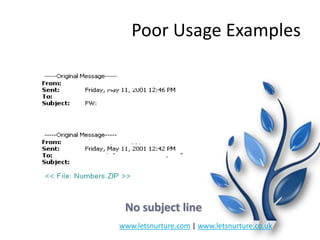
Poor Usage Examples

No subject line
www.letsnurture.com | www.letsnurture.co.uk
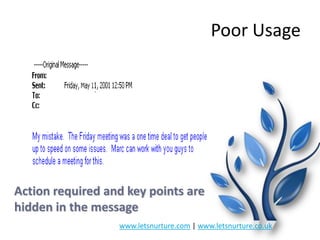
Poor Usage

Action required and key points are
hidden in the message
www.letsnurture.com | www.letsnurture.co.uk
From:
Sent:
To:
Subject:

XYZ
Monday, January 08, 2001 5:46 PM
ABC
Information

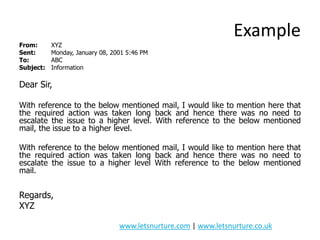
Example

Dear Sir,
With reference to the below mentioned mail, I would like to mention here that
the required action was taken long back and hence there was no need to
escalate the issue to a higher level. With reference to the below mentioned
mail, the issue to a higher level.
With reference to the below mentioned mail, I would like to mention here that
the required action was taken long back and hence there was no need to
escalate the issue to a higher level With reference to the below mentioned
mail.

Regards,
XYZ
www.letsnurture.com | www.letsnurture.co.uk
Use Smart Subject Lines


All messages should have clear and specific “Subject
Lines” that
 describes the message content
 specifies if there are any actions required & due dates
 mentions clearly who the message is for



Subject Line Template:
TAG description [actions] [due date] [(EOM)]



If you can type your entire message in the subject line
and don‟t need to write anything in the body of the
message - do so!



Type (EOM) at the end of the subject line. EOM means
“end of message”

www.letsnurture.com | www.letsnurture.co.uk
Think Before You Click


Don‟t automatically “REPLY TO ALL”.



Take one last look at your distribution list – is this email necessary
for all recipients.



Once the email discussion goes beyond 2-3 replies anyway, it‟s time
to pick up the phone

www.letsnurture.com | www.letsnurture.co.uk
Things to be taken care of
There are many etiquette guides and many different etiquette rules. Some
rules will differ according to the nature of your business and the corporate
culture. A list of 19 important email etiquette rules that can be applied to
nearly all companies has been explained subsequently.

www.letsnurture.com | www.letsnurture.co.uk
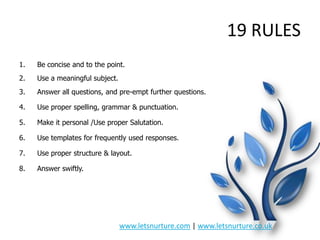
19 RULES
1.

Be concise and to the point.

2.

Use a meaningful subject.

3.

Answer all questions, and pre-empt further questions.

4.

Use proper spelling, grammar & punctuation.

5.

Make it personal /Use proper Salutation.

6.

Use templates for frequently used responses.

7.

Use proper structure & layout.

8.

Answer swiftly.

www.letsnurture.com | www.letsnurture.co.uk
Cont.
9. Use proper structure & layout.
10. Do not write in CAPITALS.
11. Don't leave out the message thread
12.Take care with abbreviations and emoticons.

13. Be careful with formatting.
14. Do not use email to discuss confidential information
15. Use active instead of passive

16. Take advantage of signatures and email templates

www.letsnurture.com | www.letsnurture.co.uk
Cont.
17. Check it twice before you send
18. Use cc: field sparingly.
19. Tone of communication

www.letsnurture.com | www.letsnurture.co.uk
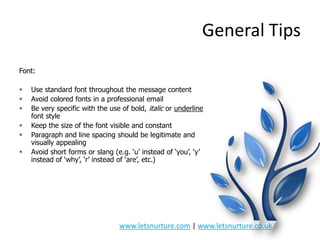
General Tips
Font:







Use standard font throughout the message content
Avoid colored fonts in a professional email
Be very specific with the use of bold, italic or underline
font style
Keep the size of the font visible and constant
Paragraph and line spacing should be legitimate and
visually appealing
Avoid short forms or slang (e.g. „u‟ instead of „you‟, „y‟
instead of „why‟, „r‟ instead of „are‟, etc.)

www.letsnurture.com | www.letsnurture.co.uk
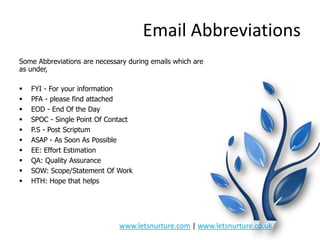
Email Abbreviations
Some Abbreviations are necessary during emails which are
as under,











FYI - For your information
PFA - please find attached
EOD - End Of the Day
SPOC - Single Point Of Contact
P.S - Post Scriptum
ASAP - As Soon As Possible
EE: Effort Estimation
QA: Quality Assurance
SOW: Scope/Statement Of Work
HTH: Hope that helps

www.letsnurture.com | www.letsnurture.co.uk
Thank You
Happy Mailing

www.letsnurture.com | www.letsnurture.co.uk

Presentation On Email Etiquettes

  • 1.
    Effectiveness of EmailEtiquettes Presented by: HR Department www.letsnurture.com | www.letsnurture.co.uk
  • 2.
    Why do youneed email etiquette?  A company needs to implement etiquette rules for the following three reasons  Professionalism: by using proper email language your company will convey a professional image.  Efficiency: emails that get to the point are much more effective than poorly worded emails.  Protection from liability: employee awareness of email risks will protect your company from costly law suits. www.letsnurture.com | www.letsnurture.co.uk
  • 3.
    Contents  Use Smart SubjectLines  Proper Salutation is necessary  Think Before You Click  Importance of addressing  Importance of Signature  Quality Communications Documents  Importance of Keeping Skype Communication in an Email for future reference and authenticity  Usage of Cc, Bcc and To  Poor Usage Examples by briefing in detail the attached www.letsnurture.com | www.letsnurture.co.uk
  • 4.
    Poor Usage Examples Nosubject line www.letsnurture.com | www.letsnurture.co.uk
  • 5.
    Poor Usage Action requiredand key points are hidden in the message www.letsnurture.com | www.letsnurture.co.uk
  • 6.
    From: Sent: To: Subject: XYZ Monday, January 08,2001 5:46 PM ABC Information Example Dear Sir, With reference to the below mentioned mail, I would like to mention here that the required action was taken long back and hence there was no need to escalate the issue to a higher level. With reference to the below mentioned mail, the issue to a higher level. With reference to the below mentioned mail, I would like to mention here that the required action was taken long back and hence there was no need to escalate the issue to a higher level With reference to the below mentioned mail. Regards, XYZ www.letsnurture.com | www.letsnurture.co.uk
  • 7.
    Use Smart SubjectLines  All messages should have clear and specific “Subject Lines” that  describes the message content  specifies if there are any actions required & due dates  mentions clearly who the message is for  Subject Line Template: TAG description [actions] [due date] [(EOM)]  If you can type your entire message in the subject line and don‟t need to write anything in the body of the message - do so!  Type (EOM) at the end of the subject line. EOM means “end of message” www.letsnurture.com | www.letsnurture.co.uk
  • 8.
    Think Before YouClick  Don‟t automatically “REPLY TO ALL”.  Take one last look at your distribution list – is this email necessary for all recipients.  Once the email discussion goes beyond 2-3 replies anyway, it‟s time to pick up the phone www.letsnurture.com | www.letsnurture.co.uk
  • 9.
    Things to betaken care of There are many etiquette guides and many different etiquette rules. Some rules will differ according to the nature of your business and the corporate culture. A list of 19 important email etiquette rules that can be applied to nearly all companies has been explained subsequently. www.letsnurture.com | www.letsnurture.co.uk
  • 10.
    19 RULES 1. Be conciseand to the point. 2. Use a meaningful subject. 3. Answer all questions, and pre-empt further questions. 4. Use proper spelling, grammar & punctuation. 5. Make it personal /Use proper Salutation. 6. Use templates for frequently used responses. 7. Use proper structure & layout. 8. Answer swiftly. www.letsnurture.com | www.letsnurture.co.uk
  • 11.
    Cont. 9. Use properstructure & layout. 10. Do not write in CAPITALS. 11. Don't leave out the message thread 12.Take care with abbreviations and emoticons. 13. Be careful with formatting. 14. Do not use email to discuss confidential information 15. Use active instead of passive 16. Take advantage of signatures and email templates www.letsnurture.com | www.letsnurture.co.uk
  • 12.
    Cont. 17. Check ittwice before you send 18. Use cc: field sparingly. 19. Tone of communication www.letsnurture.com | www.letsnurture.co.uk
  • 13.
    General Tips Font:       Use standardfont throughout the message content Avoid colored fonts in a professional email Be very specific with the use of bold, italic or underline font style Keep the size of the font visible and constant Paragraph and line spacing should be legitimate and visually appealing Avoid short forms or slang (e.g. „u‟ instead of „you‟, „y‟ instead of „why‟, „r‟ instead of „are‟, etc.) www.letsnurture.com | www.letsnurture.co.uk
  • 14.
    Email Abbreviations Some Abbreviationsare necessary during emails which are as under,           FYI - For your information PFA - please find attached EOD - End Of the Day SPOC - Single Point Of Contact P.S - Post Scriptum ASAP - As Soon As Possible EE: Effort Estimation QA: Quality Assurance SOW: Scope/Statement Of Work HTH: Hope that helps www.letsnurture.com | www.letsnurture.co.uk
  • 15.