Email
Etiquette
Because Better Communication
means Better Relationships
Why do you need to write better
Emails
– Improves Efficiency
– Conveys Professionalism
– Better Relationships
– Make a good Impression
Let’s Break it Down
1. TO – Recipient
2. SUBJECT
3. BODY - Message
4. SIGNATURE
5. ATTACHMENTS
TO – the Recipient
– Always Add at the End
– REPLY-ALL ONLY if needed
– CC and BCC only when Necessary
– Double/Triple Check Email addresses
SUBJECT
– Relevant and Descriptive
– Short and To the Point
– Avoid all CAPS
– Don’t add ? And ! In the same line
– Check Spelling, Grammar and Punctuation
– Incase of urgency, emphasize on the subject line
“Can we have a call now?” “Are you free for a quick
meeting?”
SUBJECT
– Bad Example
Subject: Meeting
– Good Example
Subject: Digital Design Project Meeting – 10 A.M Dec 15th, 2019
BODY – the Message
– Always add a Greeting (Hi/Hello/Dear ____,)
– Focus on the Topic
– Keep Sentences Short (Avoid too many And’s)
– Avoid All CAPS
– Check Spelling, Grammar and Punctuation
BODY – the Message
– Avoid too many Abbreviations and Exclamations (!!!!!)
– Use Single question marks only (??????)
– Avoid Slangs
– Mind your Manners - Don’t insult
– Don’t discuss Confidential information
BODY – the Message
– Use Active Voice
– Use the Right Tone - Confident
– Avoid words like – “I will Try”, “I’m not Sure”, “Just”,
“Probably”, “Maybe”, “I think”, “I Don’t know”, “It’s Not
our fault”
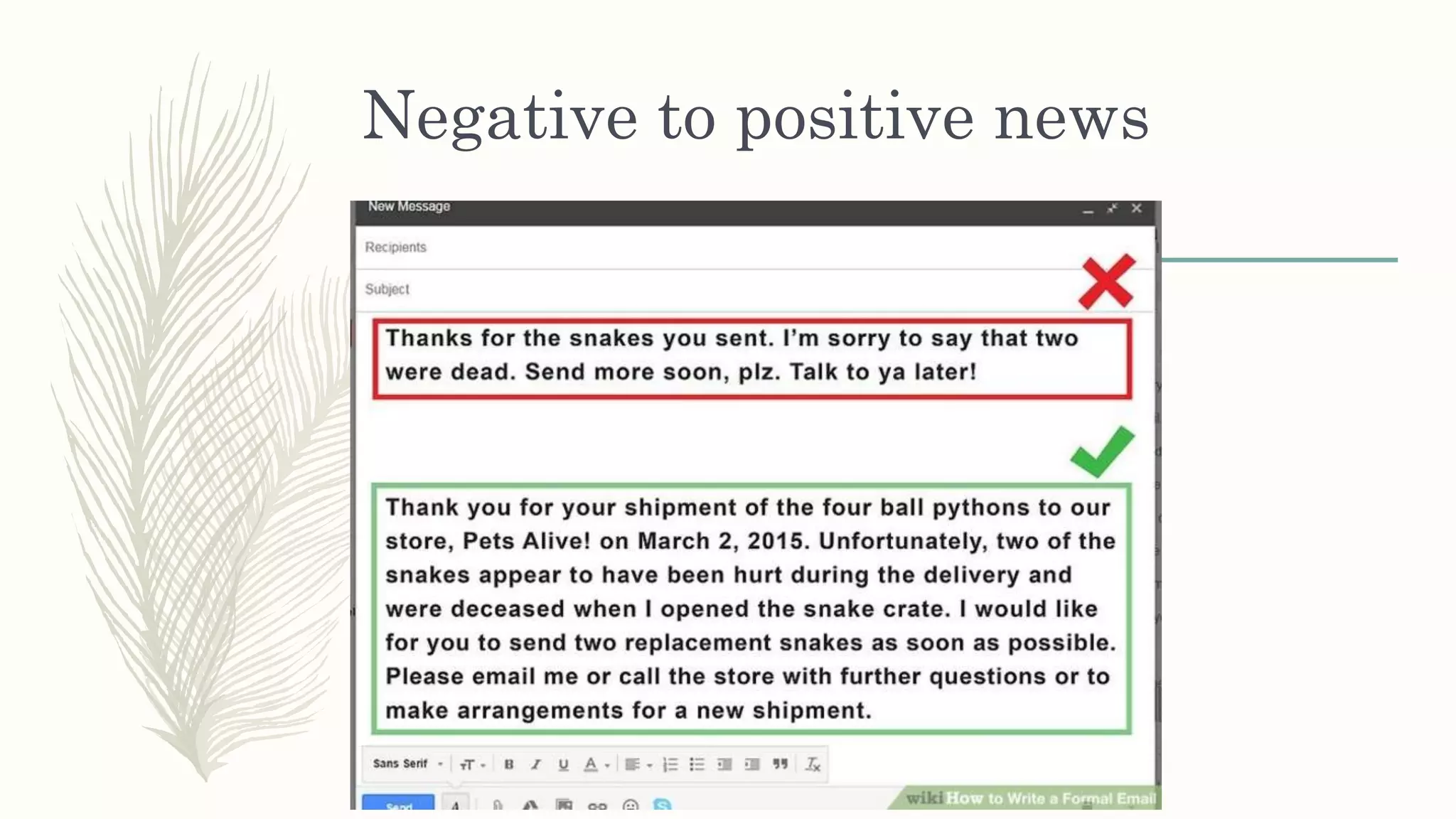
– Turn a negative statement into a positive one
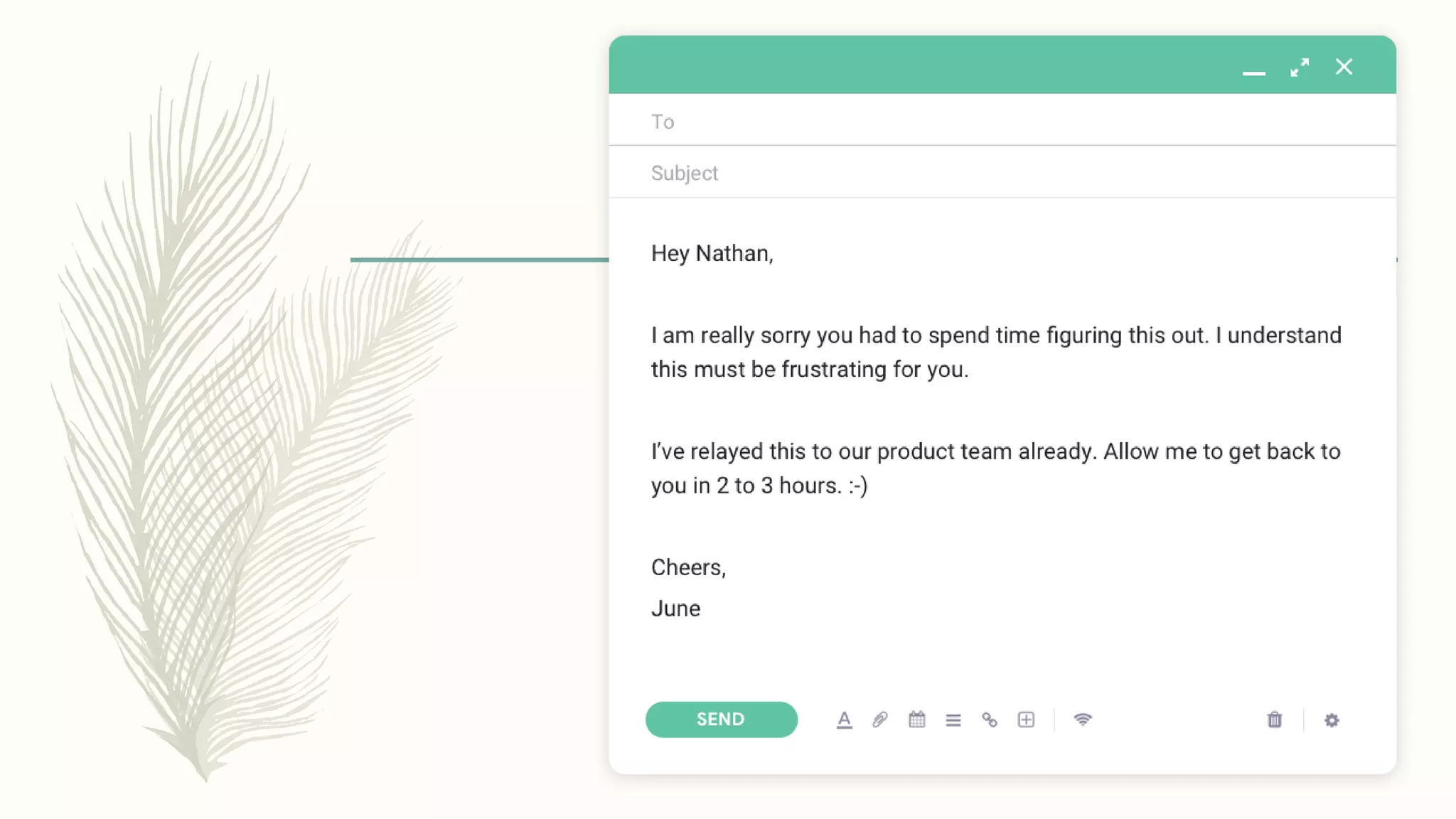
Conveying bad/difficult news /
inability to provide feature
– Always Positives First
– Empathize and Apologize and Convey the difficult message.
– Provide a solution.
– Explain and provide a reason why it happened.
– Provide the person with an opportunity to discuss the situation
with you.
– DO NOT play the blame game.
– Highlight a Problem ONLY when you have a solution for it.
Negative to positive news
Real-time Situations
– Website Down
– “Sorry about this. I’m looking at it right away”
– “Apologies for the inconvenience caused. We’re on top of this. We
have applied our best resources / This is how we intend to address
this issue – [suggest solution]. I will get back to you ASAP.”
Real-time Situations
– Problem Solved
– “The website is back up and running now.
[Reason behind the problem]
We are sorry this happened but we will ensure that this will not
happen again. [Measures you will take to ensure it will not
repeat]”
Real-time Situations
– Unclear Requirements
– “Hello [firstname],
Thank you for your email. Quick question - [concise question on
what you are unclear about]. [Arrange for a call if needed].
Looking forward to your response. ”
Closing the Email Message
– Closing Remarks
“If you have any questions or concerns, don’t hesitate to let me
know”
“I look forward to hearing from you”
– Closing Greetings –
“Thank you” ; “Regards” ; “Best”
– Use “Please” and “Thank you” Generously
Signature
– Avoid Long signatures
– Should contain –
Your Full Name
Designation
Organization
– Optional –
Company Logo and Link
– Contact Details (Tel No. , Email)
Address
Social Media Links
Photo
Attachments
– Don’t forget to ADD the Attachment
– Label them Appropriately
– If it is too big an attachment, upload on Google Drive and
share a link
Responding
– Always Respond to an email addressed to you.
– Always Re-read the email before replying.
– Always address the person with a Greeting (even if They
Don’t)
Do’s and Don’ts
– Use a clear Subject line when composing an email.
– Never REPLY-ALL unless necessary
– Always re-check (thrice) and re-read your email and
analyze from your recipient’s perspective.
– Check for grammar, spelling and punctuation errors.
– Use white spaces. Do not cramp up text.
Do’s and Don'ts
– Assume it is a public document – don’t get
personal/share personal/confidential details
– Always ask for feedback/responses/questions (based on
context)
– Use appropriate signature
Thank you!

Email Etiquette Share - How to Improve Business Email Writing Skills

  • 1.
  • 2.
    Why do youneed to write better Emails – Improves Efficiency – Conveys Professionalism – Better Relationships – Make a good Impression
  • 3.
    Let’s Break itDown 1. TO – Recipient 2. SUBJECT 3. BODY - Message 4. SIGNATURE 5. ATTACHMENTS
  • 4.
    TO – theRecipient – Always Add at the End – REPLY-ALL ONLY if needed – CC and BCC only when Necessary – Double/Triple Check Email addresses
  • 5.
    SUBJECT – Relevant andDescriptive – Short and To the Point – Avoid all CAPS – Don’t add ? And ! In the same line – Check Spelling, Grammar and Punctuation – Incase of urgency, emphasize on the subject line “Can we have a call now?” “Are you free for a quick meeting?”
  • 6.
    SUBJECT – Bad Example Subject:Meeting – Good Example Subject: Digital Design Project Meeting – 10 A.M Dec 15th, 2019
  • 7.
    BODY – theMessage – Always add a Greeting (Hi/Hello/Dear ____,) – Focus on the Topic – Keep Sentences Short (Avoid too many And’s) – Avoid All CAPS – Check Spelling, Grammar and Punctuation
  • 8.
    BODY – theMessage – Avoid too many Abbreviations and Exclamations (!!!!!) – Use Single question marks only (??????) – Avoid Slangs – Mind your Manners - Don’t insult – Don’t discuss Confidential information
  • 9.
    BODY – theMessage – Use Active Voice – Use the Right Tone - Confident – Avoid words like – “I will Try”, “I’m not Sure”, “Just”, “Probably”, “Maybe”, “I think”, “I Don’t know”, “It’s Not our fault” – Turn a negative statement into a positive one
  • 10.
    Conveying bad/difficult news/ inability to provide feature – Always Positives First – Empathize and Apologize and Convey the difficult message. – Provide a solution. – Explain and provide a reason why it happened. – Provide the person with an opportunity to discuss the situation with you. – DO NOT play the blame game. – Highlight a Problem ONLY when you have a solution for it.
  • 11.
  • 12.
    Real-time Situations – WebsiteDown – “Sorry about this. I’m looking at it right away” – “Apologies for the inconvenience caused. We’re on top of this. We have applied our best resources / This is how we intend to address this issue – [suggest solution]. I will get back to you ASAP.”
  • 14.
    Real-time Situations – ProblemSolved – “The website is back up and running now. [Reason behind the problem] We are sorry this happened but we will ensure that this will not happen again. [Measures you will take to ensure it will not repeat]”
  • 15.
    Real-time Situations – UnclearRequirements – “Hello [firstname], Thank you for your email. Quick question - [concise question on what you are unclear about]. [Arrange for a call if needed]. Looking forward to your response. ”
  • 16.
    Closing the EmailMessage – Closing Remarks “If you have any questions or concerns, don’t hesitate to let me know” “I look forward to hearing from you” – Closing Greetings – “Thank you” ; “Regards” ; “Best” – Use “Please” and “Thank you” Generously
  • 17.
    Signature – Avoid Longsignatures – Should contain – Your Full Name Designation Organization – Optional – Company Logo and Link – Contact Details (Tel No. , Email) Address Social Media Links Photo
  • 18.
    Attachments – Don’t forgetto ADD the Attachment – Label them Appropriately – If it is too big an attachment, upload on Google Drive and share a link
  • 19.
    Responding – Always Respondto an email addressed to you. – Always Re-read the email before replying. – Always address the person with a Greeting (even if They Don’t)
  • 20.
    Do’s and Don’ts –Use a clear Subject line when composing an email. – Never REPLY-ALL unless necessary – Always re-check (thrice) and re-read your email and analyze from your recipient’s perspective. – Check for grammar, spelling and punctuation errors. – Use white spaces. Do not cramp up text.
  • 21.
    Do’s and Don'ts –Assume it is a public document – don’t get personal/share personal/confidential details – Always ask for feedback/responses/questions (based on context) – Use appropriate signature
  • 22.