Business Process Management
Exercise n.4
1 - Create the use case diagram according to the following elevator control system
functional requirements:
1. The elevator control system shall allow the passenger to call the elevator and to select the destination
floor;
2. When the passenger pushes the external button (to call the elevator), or the internal button (to select the
destination floor), the central control system switches the button light on;
3. When the passenger calls the elevator or selects the destination floor, the central control system
opens/closes the elevator door;
4. When the passenger calls the elevator or selects the destination floor, the central control system
moves/stops the elevator to/at the passenger call floor or to/at the passenger destination floor.
5. When the passenger leaves the elevator, the central control system switches the button light off.
Also, describe the use case “Select Floor” by specifying:
• Use case name
• Participating actors
• Description
• Entry conditions
• Flow of events (see use case description at point 3. Pay attention: consider JUST the
interface events)
• Exit conditions
2 - Create the Class diagram of the elevator control system.
3 - According to the following description of the “Select Floor” use case, create the
1) Sequence, the 2) Collaboration and the 3) Activity diagram:
1. The passenger pushes the destination floor button (internal button);
2. The internal button sends the system the order to select the direction (up/down);
3. The system changes the elevator status (from idle to busy);
4.The system switches the floor button (internal button) light on;
5. The system closes the elevator door;
6. The system moves the elevator according to the destination floor direction (up/down);
7. The elevator sends the system the order to control if the floor that the elevator is going to get through is
the destination one;
8. The system stops the elevator at the destination floor;
9. The system opens the door at the destination floor;
10. The passenger moves outside the elevator;
11. The system switches the internal button off.
4 - Create the Statechart diagram of the object “Elevator”.
Business Process Management
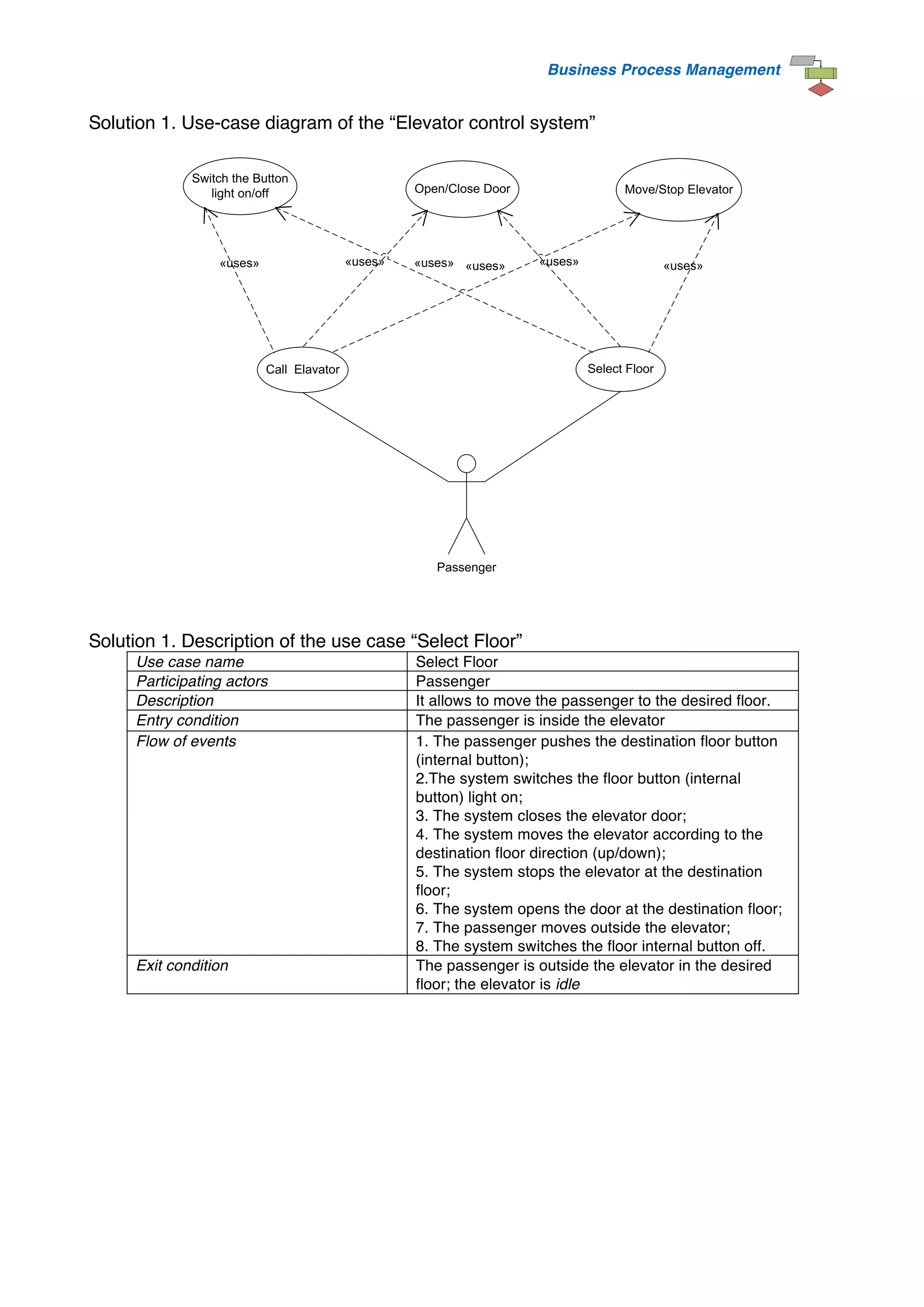
Solution 1. Use-case diagram of the “Elevator control system”
Passenger
Call Elavator Select Floor
Switch the Button
light on/off
«uses»
Open/Close Door Move/Stop Elevator
«uses»
«uses» «uses»
«uses»
«uses»
Solution 1. Description of the use case “Select Floor”
Use case name Select Floor
Participating actors Passenger
Description It allows to move the passenger to the desired floor.
Entry condition The passenger is inside the elevator
Flow of events 1. The passenger pushes the destination floor button
(internal button);
2.The system switches the floor button (internal
button) light on;
3. The system closes the elevator door;
4. The system moves the elevator according to the
destination floor direction (up/down);
5. The system stops the elevator at the destination
floor;
6. The system opens the door at the destination floor;
7. The passenger moves outside the elevator;
8. The system switches the floor internal button off.
Exit condition The passenger is outside the elevator in the desired
floor; the elevator is idle
Business Process Management
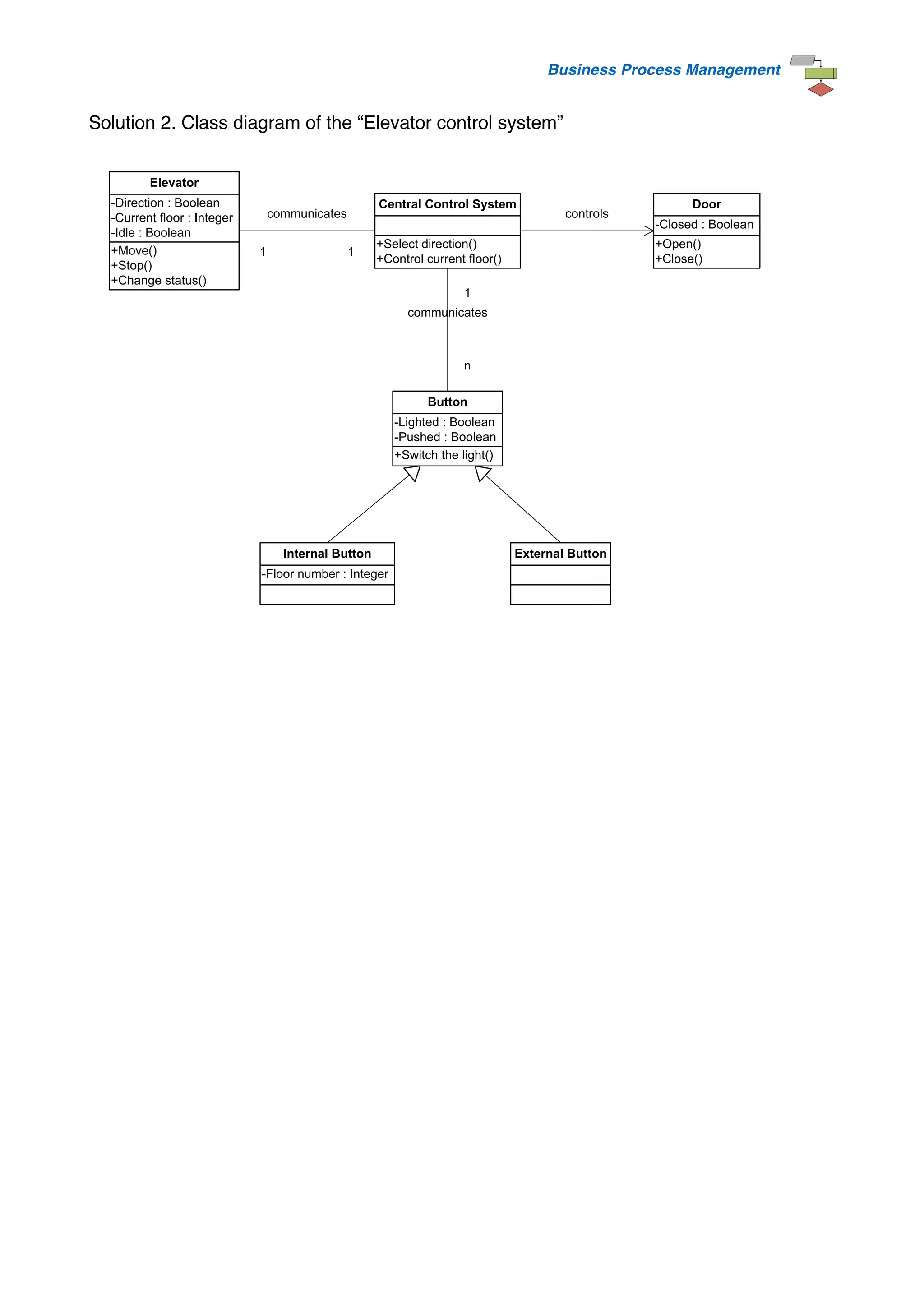
Solution 2. Class diagram of the “Elevator control system”
+Select direction()
+Control current floor()
Central Control System
+Switch the light()
-Lighted : Boolean
-Pushed : Boolean
Button
1
n
communicates
-Floor number : Integer
Internal Button External Button
+Move()
+Stop()
+Change status()
-Direction : Boolean
-Current floor : Integer
-Idle : Boolean
Elevator
+Open()
+Close()
-Closed : Boolean
Door
controls
1 1
communicates
Business Process Management
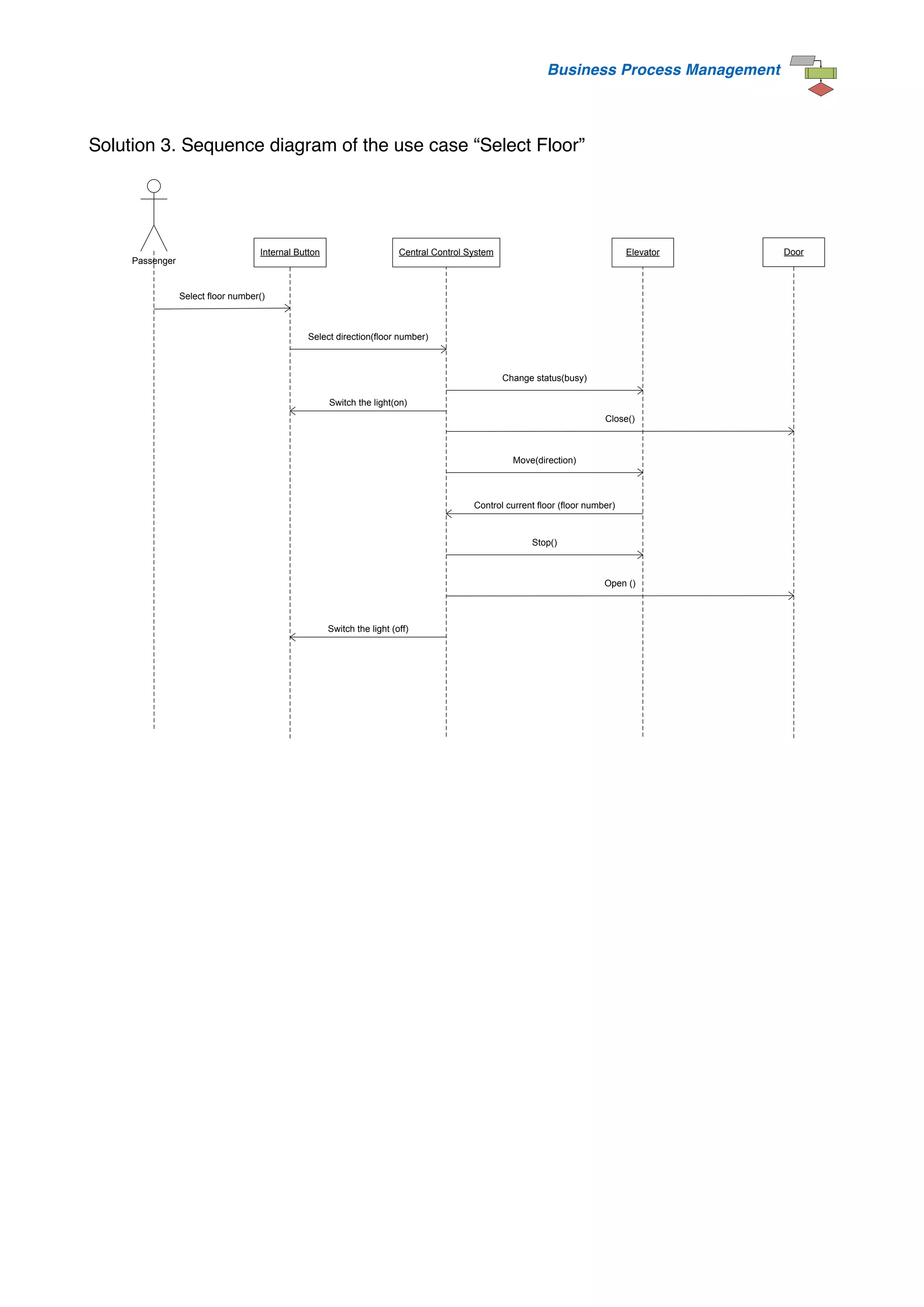
Solution 3. Sequence diagram of the use case “Select Floor”
Passenger
Internal Button Central Control System Elevator Door
Select floor number()
Switch the light(on)
Select direction(floor number)
Change status(busy)
Close()
Move(direction)
Control current floor (floor number)
Stop()
Open ()
Switch the light (off)
Business Process Management
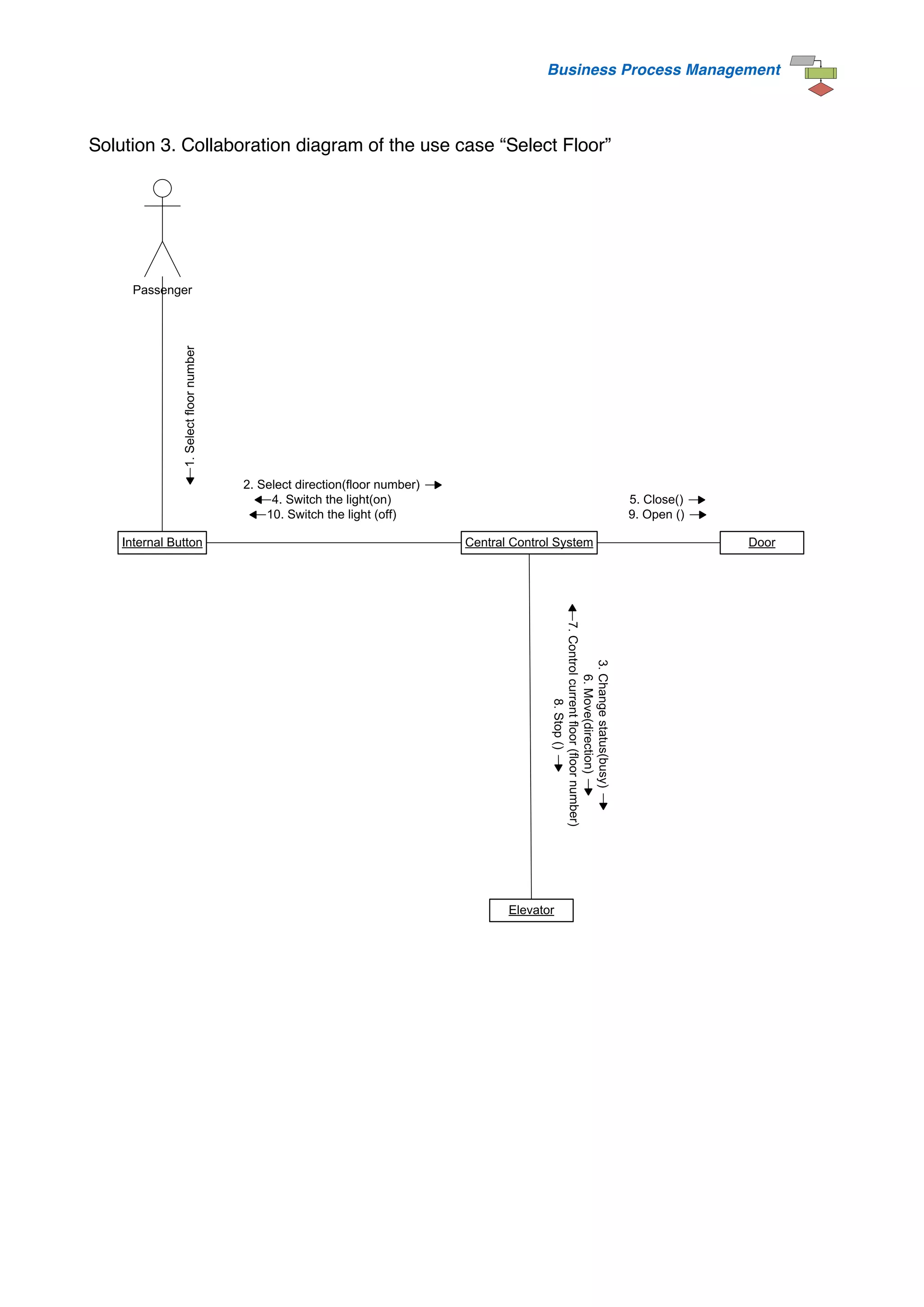
Solution 3. Collaboration diagram of the use case “Select Floor”
Elevator
Central Control System Door
Internal Button
Passenger
1.
Select
floor
number
2. Select direction(floor number)
4. Switch the light(on)
10. Switch the light (off)
3.
Change
status(busy)
6.
Move(direction)
7.
Control
current
floor
(floor
number)
8.
Stop
()
5. Close()
9. Open ()
Business Process Management
Solution 3. Activity diagram of the use case “Select Floor”
Elevator Control System
Passenger
Push destination floor button
Close door
Change elevator status(from idle to busy)
Move elevator to destination floor direction
Select destination floor direction (up/down)
Control current floor
Stop elavator at destination floor
Open door at destination floor
Move outside the elavator
Switch external button light off
[<Current floor
NOT=
Destination floor>]
[<Current floor = Destination floor>]
Switch internal button light on
Business Process Management
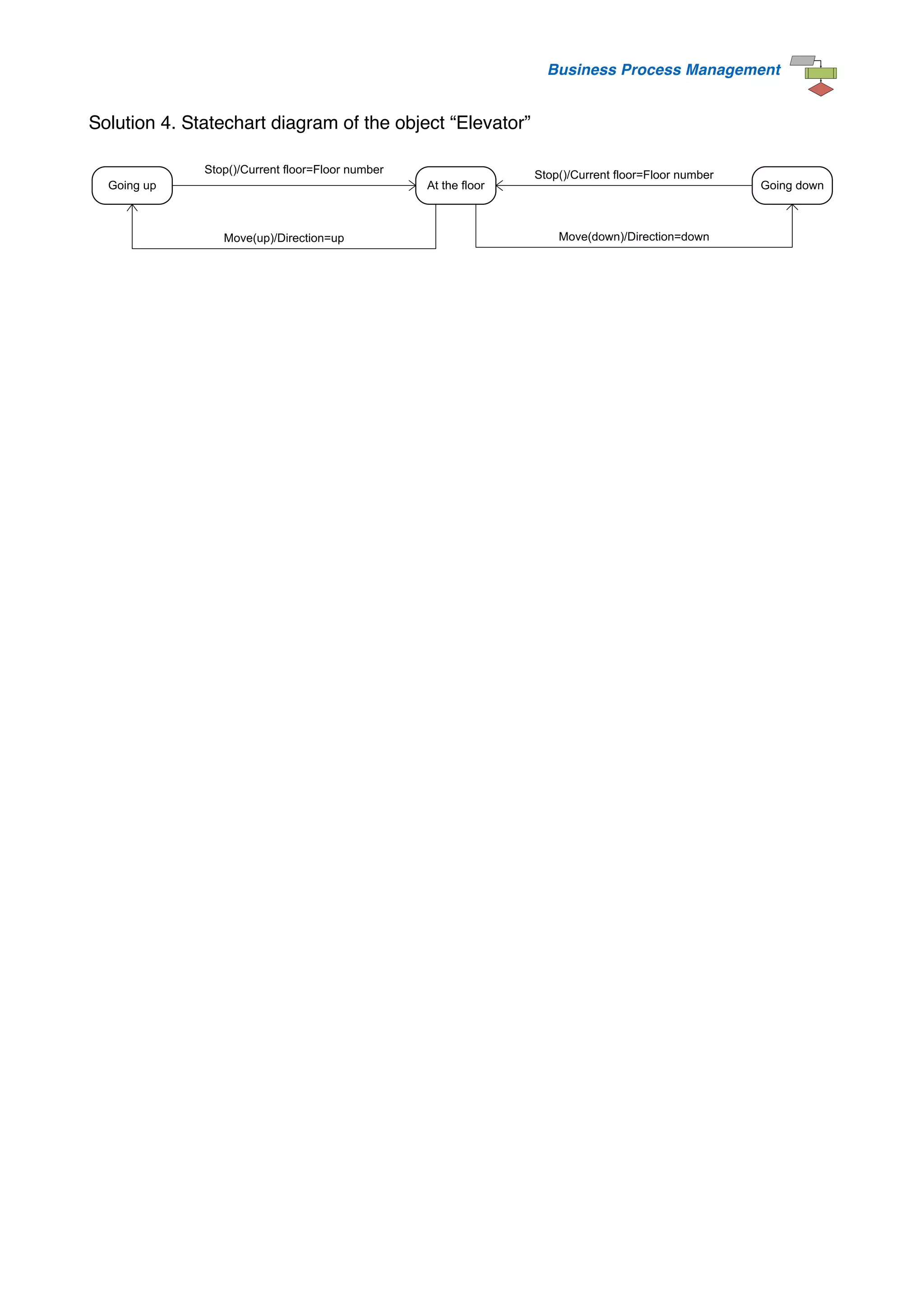
Solution 4. Statechart diagram of the object “Elevator”
Going up Going down
At the floor
Move(up)/Direction=up
Stop()/Current floor=Floor number Stop()/Current floor=Floor number
Move(down)/Direction=down

elevator problem.pdf

  • 1.
    Business Process Management Exercisen.4 1 - Create the use case diagram according to the following elevator control system functional requirements: 1. The elevator control system shall allow the passenger to call the elevator and to select the destination floor; 2. When the passenger pushes the external button (to call the elevator), or the internal button (to select the destination floor), the central control system switches the button light on; 3. When the passenger calls the elevator or selects the destination floor, the central control system opens/closes the elevator door; 4. When the passenger calls the elevator or selects the destination floor, the central control system moves/stops the elevator to/at the passenger call floor or to/at the passenger destination floor. 5. When the passenger leaves the elevator, the central control system switches the button light off. Also, describe the use case “Select Floor” by specifying: • Use case name • Participating actors • Description • Entry conditions • Flow of events (see use case description at point 3. Pay attention: consider JUST the interface events) • Exit conditions 2 - Create the Class diagram of the elevator control system. 3 - According to the following description of the “Select Floor” use case, create the 1) Sequence, the 2) Collaboration and the 3) Activity diagram: 1. The passenger pushes the destination floor button (internal button); 2. The internal button sends the system the order to select the direction (up/down); 3. The system changes the elevator status (from idle to busy); 4.The system switches the floor button (internal button) light on; 5. The system closes the elevator door; 6. The system moves the elevator according to the destination floor direction (up/down); 7. The elevator sends the system the order to control if the floor that the elevator is going to get through is the destination one; 8. The system stops the elevator at the destination floor; 9. The system opens the door at the destination floor; 10. The passenger moves outside the elevator; 11. The system switches the internal button off. 4 - Create the Statechart diagram of the object “Elevator”.
  • 2.
    Business Process Management Solution1. Use-case diagram of the “Elevator control system” Passenger Call Elavator Select Floor Switch the Button light on/off «uses» Open/Close Door Move/Stop Elevator «uses» «uses» «uses» «uses» «uses» Solution 1. Description of the use case “Select Floor” Use case name Select Floor Participating actors Passenger Description It allows to move the passenger to the desired floor. Entry condition The passenger is inside the elevator Flow of events 1. The passenger pushes the destination floor button (internal button); 2.The system switches the floor button (internal button) light on; 3. The system closes the elevator door; 4. The system moves the elevator according to the destination floor direction (up/down); 5. The system stops the elevator at the destination floor; 6. The system opens the door at the destination floor; 7. The passenger moves outside the elevator; 8. The system switches the floor internal button off. Exit condition The passenger is outside the elevator in the desired floor; the elevator is idle
  • 3.
    Business Process Management Solution2. Class diagram of the “Elevator control system” +Select direction() +Control current floor() Central Control System +Switch the light() -Lighted : Boolean -Pushed : Boolean Button 1 n communicates -Floor number : Integer Internal Button External Button +Move() +Stop() +Change status() -Direction : Boolean -Current floor : Integer -Idle : Boolean Elevator +Open() +Close() -Closed : Boolean Door controls 1 1 communicates
  • 4.
    Business Process Management Solution3. Sequence diagram of the use case “Select Floor” Passenger Internal Button Central Control System Elevator Door Select floor number() Switch the light(on) Select direction(floor number) Change status(busy) Close() Move(direction) Control current floor (floor number) Stop() Open () Switch the light (off)
  • 5.
    Business Process Management Solution3. Collaboration diagram of the use case “Select Floor” Elevator Central Control System Door Internal Button Passenger 1. Select floor number 2. Select direction(floor number) 4. Switch the light(on) 10. Switch the light (off) 3. Change status(busy) 6. Move(direction) 7. Control current floor (floor number) 8. Stop () 5. Close() 9. Open ()
  • 6.
    Business Process Management Solution3. Activity diagram of the use case “Select Floor” Elevator Control System Passenger Push destination floor button Close door Change elevator status(from idle to busy) Move elevator to destination floor direction Select destination floor direction (up/down) Control current floor Stop elavator at destination floor Open door at destination floor Move outside the elavator Switch external button light off [<Current floor NOT= Destination floor>] [<Current floor = Destination floor>] Switch internal button light on
  • 7.
    Business Process Management Solution4. Statechart diagram of the object “Elevator” Going up Going down At the floor Move(up)/Direction=up Stop()/Current floor=Floor number Stop()/Current floor=Floor number Move(down)/Direction=down