Acropolis Institute of Technology and
Research
Presentation On:
Activity Diagram
2/19/2015 1
Lokendra Prajapati (MCA) Acropolis
Institute of Technology & Research
What is UML Diagram…?
 UML stands for “Unified Modeling Language”.
 It is a industry-standard graphical language for specifying, visualizing,
constructing and documenting the artifacts of software system.
 The UML uses mostly graphical notation to express the ‘analysis’ and
‘design’ of software projects.
 The UML represent a collection of best engineering practices that are very
helpful in the modeling o large and complex system.
2/19/2015 2
Lokendra Prajapati (MCA) Acropolis
Institute of Technology & Research
Why UML for modeling..?
 It is mostly use for simplifies the complex process of software design.
 The UML is very important part of developing object oriented software and
the software development process.
 The UML helps project teams communicate, explore design and validate
the architectural design of the software.
2/19/2015 3
Lokendra Prajapati (MCA) Acropolis
Institute of Technology & Research
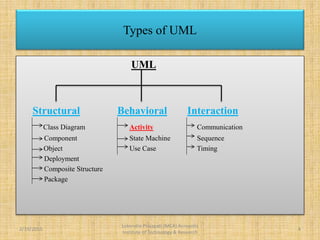
UML
Structural Behavioral Interaction
Class Diagram Activity Communication
Component State Machine Sequence
Object Use Case Timing
Deployment
Composite Structure
Package
Types of UML
2/19/2015 4
Lokendra Prajapati (MCA) Acropolis
Institute of Technology & Research
Activity Diagram…
 Activity diagrams represent the dynamic (behavioral) view of a system.
 Activity diagrams are typically used for business (transaction) process
modeling and modeling the logic captured by a single use-case or usage
scenario.
 Activity diagram is used to represent the flow across use cases or to
represent flow within a particular use case.
 UML activity diagrams are the object oriented equivalent of flow chart and
data flow diagrams in function-oriented design approach.
 Activity diagram contains activities, transitions between activities, decision
points, synchronization bars, swim lanes and many more…
2/19/2015 5
Lokendra Prajapati (MCA) Acropolis
Institute of Technology & Research
 Describes how activities are coordinated.
 Is particularly useful when you know that an operation has to achieve a
number of different things, and you want to model what the essential
dependencies between them are, before you decide in what order to do
them.
 Records the dependencies between activities, such as which things can
happen in parallel and what must be finished before something else can
start.
 Represents the workflow of the process.
Activity Diagram…
2/19/2015 6
Lokendra Prajapati (MCA) Acropolis
Institute of Technology & Research
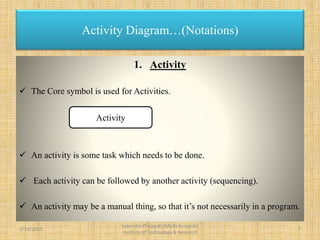
1. Activity
 The Core symbol is used for Activities.
 An activity is some task which needs to be done.
 Each activity can be followed by another activity (sequencing).
 An activity may be a manual thing, so that it’s not necessarily in a program.
Activity Diagram…(Notations)
Activity
2/19/2015 7
Lokendra Prajapati (MCA) Acropolis
Institute of Technology & Research
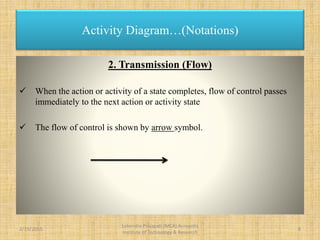
2. Transmission (Flow)
 When the action or activity of a state completes, flow of control passes
immediately to the next action or activity state
 The flow of control is shown by arrow symbol.
Activity Diagram…(Notations)
2/19/2015 8
Lokendra Prajapati (MCA) Acropolis
Institute of Technology & Research
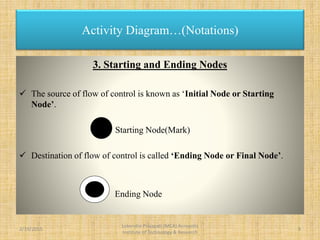
3. Starting and Ending Nodes
 The source of flow of control is known as ‘Initial Node or Starting
Node’.
Starting Node(Mark)
 Destination of flow of control is called ‘Ending Node or Final Node’.
Ending Node
Activity Diagram…(Notations)
2/19/2015 9
Lokendra Prajapati (MCA) Acropolis
Institute of Technology & Research
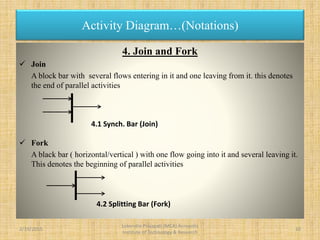
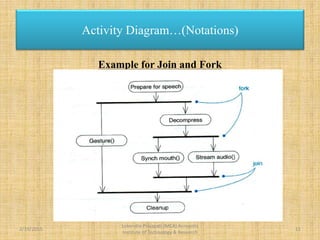
4. Join and Fork
 Join
A block bar with several flows entering in it and one leaving from it. this denotes
the end of parallel activities
 Fork
A black bar ( horizontal/vertical ) with one flow going into it and several leaving it.
This denotes the beginning of parallel activities
Activity Diagram…(Notations)
4.1 Synch. Bar (Join)
4.2 Splitting Bar (Fork)
2/19/2015 10
Lokendra Prajapati (MCA) Acropolis
Institute of Technology & Research
Example for Join and Fork
Activity Diagram…(Notations)
2/19/2015 11
Lokendra Prajapati (MCA) Acropolis
Institute of Technology & Research
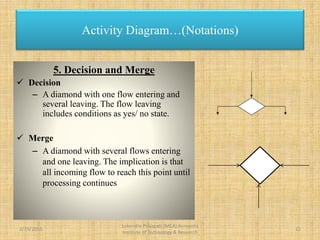
5. Decision and Merge
 Decision
– A diamond with one flow entering and
several leaving. The flow leaving
includes conditions as yes/ no state.
 Merge
– A diamond with several flows entering
and one leaving. The implication is that
all incoming flow to reach this point until
processing continues
Activity Diagram…(Notations)
2/19/2015 12
Lokendra Prajapati (MCA) Acropolis
Institute of Technology & Research
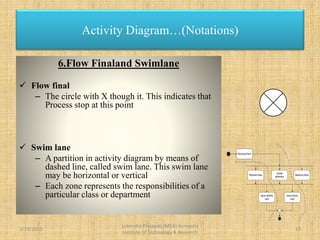
6.Flow Finaland Swimlane
 Flow final
– The circle with X though it. This indicates that
Process stop at this point
 Swim lane
– A partition in activity diagram by means of
dashed line, called swim lane. This swim lane
may be horizontal or vertical
– Each zone represents the responsibilities of a
particular class or department
Activity Diagram…(Notations)
Received form
Payment fees
Hostel
allotment
Issue identity
card
Medical check
Issue library
card
2/19/2015 13
Lokendra Prajapati (MCA) Acropolis
Institute of Technology & Research
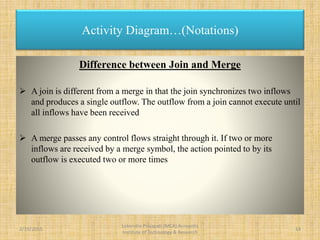
Difference between Join and Merge
 A join is different from a merge in that the join synchronizes two inflows
and produces a single outflow. The outflow from a join cannot execute until
all inflows have been received
 A merge passes any control flows straight through it. If two or more
inflows are received by a merge symbol, the action pointed to by its
outflow is executed two or more times
Activity Diagram…(Notations)
2/19/2015 14
Lokendra Prajapati (MCA) Acropolis
Institute of Technology & Research
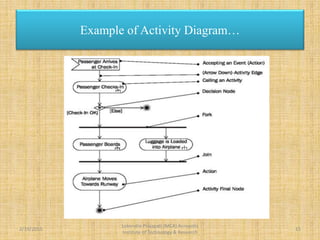
Example of Activity Diagram…
2/19/2015 15
Lokendra Prajapati (MCA) Acropolis
Institute of Technology & Research
Example of Activity Diagram…
Fill-in
form
Check
form
[Incorrect]
[Correct]
Display student
screen
Input student
information Search for Student
selection list
Verify the
applications
Regret message
Create record
Regret
registration
[No Match]
[Match]
[Not Found]
[Found]
1
StudentRegistrarSystem
2/19/2015 16
Lokendra Prajapati (MCA) Acropolis
Institute of Technology & Research
 Activity diagrams tell you what is happening, but not who does what.
 In domain modelling, this diagram type does not convey which people or
departments are responsible for each activity.
 In programming, it does not convey which class is responsible for each
activity
Drawback of Activity Diagram…
2/19/2015 17
Lokendra Prajapati (MCA) Acropolis
Institute of Technology & Research
 Books:
 Software Engineering, A Practitioner’s Approach, By Roger S.
Pressman..
 System Analysis and Design, By Elias M. Awad.
 Web Source:
 www.google.co.in
 www.tutorialspoint.com
 www.slideshare.com
 www.wikipedia.com
2/19/2015 18
Lokendra Prajapati (MCA) Acropolis
Institute of Technology & Research
Reference
2/19/2015
Lokendra Prajapati (MCA) Acropolis
Institute of Technology & Research
19
Presentation Powered By :
Lokendra Prajapati

Activity diagram

  • 1.
    Acropolis Institute ofTechnology and Research Presentation On: Activity Diagram 2/19/2015 1 Lokendra Prajapati (MCA) Acropolis Institute of Technology & Research
  • 2.
    What is UMLDiagram…?  UML stands for “Unified Modeling Language”.  It is a industry-standard graphical language for specifying, visualizing, constructing and documenting the artifacts of software system.  The UML uses mostly graphical notation to express the ‘analysis’ and ‘design’ of software projects.  The UML represent a collection of best engineering practices that are very helpful in the modeling o large and complex system. 2/19/2015 2 Lokendra Prajapati (MCA) Acropolis Institute of Technology & Research
  • 3.
    Why UML formodeling..?  It is mostly use for simplifies the complex process of software design.  The UML is very important part of developing object oriented software and the software development process.  The UML helps project teams communicate, explore design and validate the architectural design of the software. 2/19/2015 3 Lokendra Prajapati (MCA) Acropolis Institute of Technology & Research
  • 4.
    UML Structural Behavioral Interaction ClassDiagram Activity Communication Component State Machine Sequence Object Use Case Timing Deployment Composite Structure Package Types of UML 2/19/2015 4 Lokendra Prajapati (MCA) Acropolis Institute of Technology & Research
  • 5.
    Activity Diagram…  Activitydiagrams represent the dynamic (behavioral) view of a system.  Activity diagrams are typically used for business (transaction) process modeling and modeling the logic captured by a single use-case or usage scenario.  Activity diagram is used to represent the flow across use cases or to represent flow within a particular use case.  UML activity diagrams are the object oriented equivalent of flow chart and data flow diagrams in function-oriented design approach.  Activity diagram contains activities, transitions between activities, decision points, synchronization bars, swim lanes and many more… 2/19/2015 5 Lokendra Prajapati (MCA) Acropolis Institute of Technology & Research
  • 6.
     Describes howactivities are coordinated.  Is particularly useful when you know that an operation has to achieve a number of different things, and you want to model what the essential dependencies between them are, before you decide in what order to do them.  Records the dependencies between activities, such as which things can happen in parallel and what must be finished before something else can start.  Represents the workflow of the process. Activity Diagram… 2/19/2015 6 Lokendra Prajapati (MCA) Acropolis Institute of Technology & Research
  • 7.
    1. Activity  TheCore symbol is used for Activities.  An activity is some task which needs to be done.  Each activity can be followed by another activity (sequencing).  An activity may be a manual thing, so that it’s not necessarily in a program. Activity Diagram…(Notations) Activity 2/19/2015 7 Lokendra Prajapati (MCA) Acropolis Institute of Technology & Research
  • 8.
    2. Transmission (Flow) When the action or activity of a state completes, flow of control passes immediately to the next action or activity state  The flow of control is shown by arrow symbol. Activity Diagram…(Notations) 2/19/2015 8 Lokendra Prajapati (MCA) Acropolis Institute of Technology & Research
  • 9.
    3. Starting andEnding Nodes  The source of flow of control is known as ‘Initial Node or Starting Node’. Starting Node(Mark)  Destination of flow of control is called ‘Ending Node or Final Node’. Ending Node Activity Diagram…(Notations) 2/19/2015 9 Lokendra Prajapati (MCA) Acropolis Institute of Technology & Research
  • 10.
    4. Join andFork  Join A block bar with several flows entering in it and one leaving from it. this denotes the end of parallel activities  Fork A black bar ( horizontal/vertical ) with one flow going into it and several leaving it. This denotes the beginning of parallel activities Activity Diagram…(Notations) 4.1 Synch. Bar (Join) 4.2 Splitting Bar (Fork) 2/19/2015 10 Lokendra Prajapati (MCA) Acropolis Institute of Technology & Research
  • 11.
    Example for Joinand Fork Activity Diagram…(Notations) 2/19/2015 11 Lokendra Prajapati (MCA) Acropolis Institute of Technology & Research
  • 12.
    5. Decision andMerge  Decision – A diamond with one flow entering and several leaving. The flow leaving includes conditions as yes/ no state.  Merge – A diamond with several flows entering and one leaving. The implication is that all incoming flow to reach this point until processing continues Activity Diagram…(Notations) 2/19/2015 12 Lokendra Prajapati (MCA) Acropolis Institute of Technology & Research
  • 13.
    6.Flow Finaland Swimlane Flow final – The circle with X though it. This indicates that Process stop at this point  Swim lane – A partition in activity diagram by means of dashed line, called swim lane. This swim lane may be horizontal or vertical – Each zone represents the responsibilities of a particular class or department Activity Diagram…(Notations) Received form Payment fees Hostel allotment Issue identity card Medical check Issue library card 2/19/2015 13 Lokendra Prajapati (MCA) Acropolis Institute of Technology & Research
  • 14.
    Difference between Joinand Merge  A join is different from a merge in that the join synchronizes two inflows and produces a single outflow. The outflow from a join cannot execute until all inflows have been received  A merge passes any control flows straight through it. If two or more inflows are received by a merge symbol, the action pointed to by its outflow is executed two or more times Activity Diagram…(Notations) 2/19/2015 14 Lokendra Prajapati (MCA) Acropolis Institute of Technology & Research
  • 15.
    Example of ActivityDiagram… 2/19/2015 15 Lokendra Prajapati (MCA) Acropolis Institute of Technology & Research
  • 16.
    Example of ActivityDiagram… Fill-in form Check form [Incorrect] [Correct] Display student screen Input student information Search for Student selection list Verify the applications Regret message Create record Regret registration [No Match] [Match] [Not Found] [Found] 1 StudentRegistrarSystem 2/19/2015 16 Lokendra Prajapati (MCA) Acropolis Institute of Technology & Research
  • 17.
     Activity diagramstell you what is happening, but not who does what.  In domain modelling, this diagram type does not convey which people or departments are responsible for each activity.  In programming, it does not convey which class is responsible for each activity Drawback of Activity Diagram… 2/19/2015 17 Lokendra Prajapati (MCA) Acropolis Institute of Technology & Research
  • 18.
     Books:  SoftwareEngineering, A Practitioner’s Approach, By Roger S. Pressman..  System Analysis and Design, By Elias M. Awad.  Web Source:  www.google.co.in  www.tutorialspoint.com  www.slideshare.com  www.wikipedia.com 2/19/2015 18 Lokendra Prajapati (MCA) Acropolis Institute of Technology & Research Reference
  • 19.
    2/19/2015 Lokendra Prajapati (MCA)Acropolis Institute of Technology & Research 19 Presentation Powered By : Lokendra Prajapati