McGraw-Hill ©The McGraw-Hill Companies, Inc., 2004
Chapter 26
SMTP
and
FTP
» In this chapter we’ll discuss two popular applications for exchanging
information.
1. Electronic Mail: Exchanges information between people.
2. File Transfer. Exchanges files between computers.
McGraw-Hill ©The McGraw-Hill Companies, Inc., 2004
26.1 Electronic Mail
Sending/Receiving Mail
Addresses
User Agent
MIME
Mail Transfer Agent
Mail Access Protocols
McGraw-Hill ©The McGraw-Hill Companies, Inc., 2004
26.1 Electronic Mail
» Electronic mail or email is one of the most popular network service.
» Electronic mail is used for sending a single messages that includes:
» Text,
» Voice,
» Video or
» Graphics
» To one or more recipients.
» Simple Mail Transfer Protocol (SMTP) is standard mechanism for
electronic mail in Internet.
McGraw-Hill ©The McGraw-Hill Companies, Inc., 2004
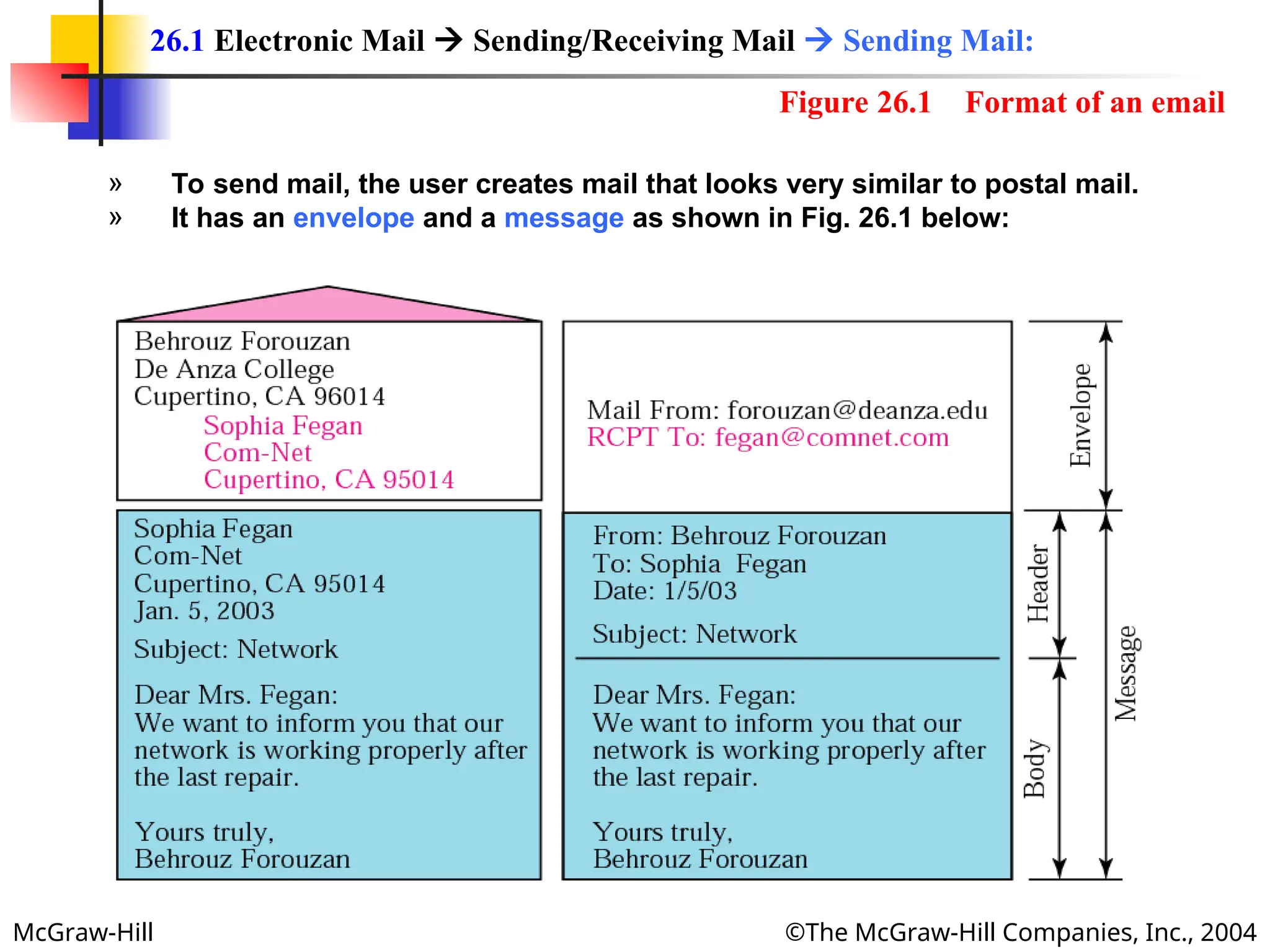
Figure 26.1 Format of an email
» To send mail, the user creates mail that looks very similar to postal mail.
» It has an envelope and a message as shown in Fig. 26.1 below:
26.1 Electronic Mail  Sending/Receiving Mail  Sending Mail:
McGraw-Hill ©The McGraw-Hill Companies, Inc., 2004
Envelop:
» The envelop usually contains the sender address, the receiver address
and other information.
Message:
» The message contains the headers and the body part.
» The headers of the message defines the sender, the receiver, the subject
of the message and other information.
» The body of the message contains the actual information to be read by
the recipient.
26.1 Electronic Mail  Sending/Receiving Mail  Sending Mail:
McGraw-Hill ©The McGraw-Hill Companies, Inc., 2004
» The email system periodically checks the mailboxes.
» If a user has mail, it inform the user with a notice.
» If the user is ready to read the mail, a list displayed in which each line
contains a summary of the information about a particular message in the
mailbox.
» The summary usually includes:
» The sender mail address,
» The subject,
» And the time the mail was sent or received.
» The user can select any of the message and display its contents on the
screen.
26.1 Electronic Mail  Sending/Receiving Mail  Receiving Mail:
McGraw-Hill ©The McGraw-Hill Companies, Inc., 2004
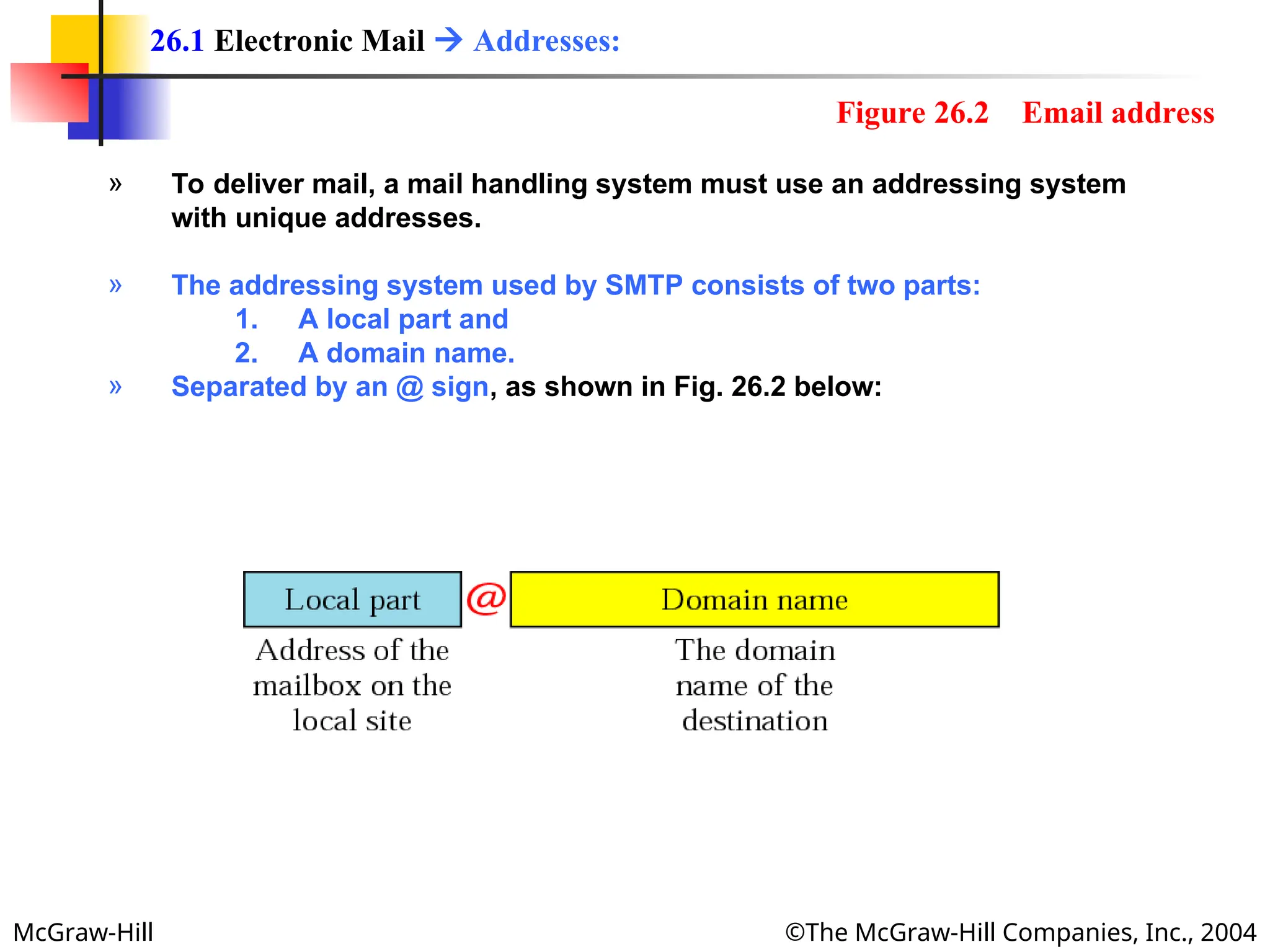
» To deliver mail, a mail handling system must use an addressing system
with unique addresses.
» The addressing system used by SMTP consists of two parts:
1. A local part and
2. A domain name.
» Separated by an @ sign, as shown in Fig. 26.2 below:
26.1 Electronic Mail  Addresses:
Figure 26.2 Email address
McGraw-Hill ©The McGraw-Hill Companies, Inc., 2004
Local Part:
» The local part defines the name of a special file, called the user mailbox,
where all the mail received for a user, is stored for retrieval by the user
agent.
Domain Name:
» The second part of the address is the domain name.
» An organization usually selects one or more hosts to receive and send
email; they are sometimes called mail exchanges.
» The domain name assigned to each mail exchanger either comes from
the DNS database or is logical name (e.g., the name of the organization).
26.1 Electronic Mail  Addresses:
McGraw-Hill ©The McGraw-Hill Companies, Inc., 2004
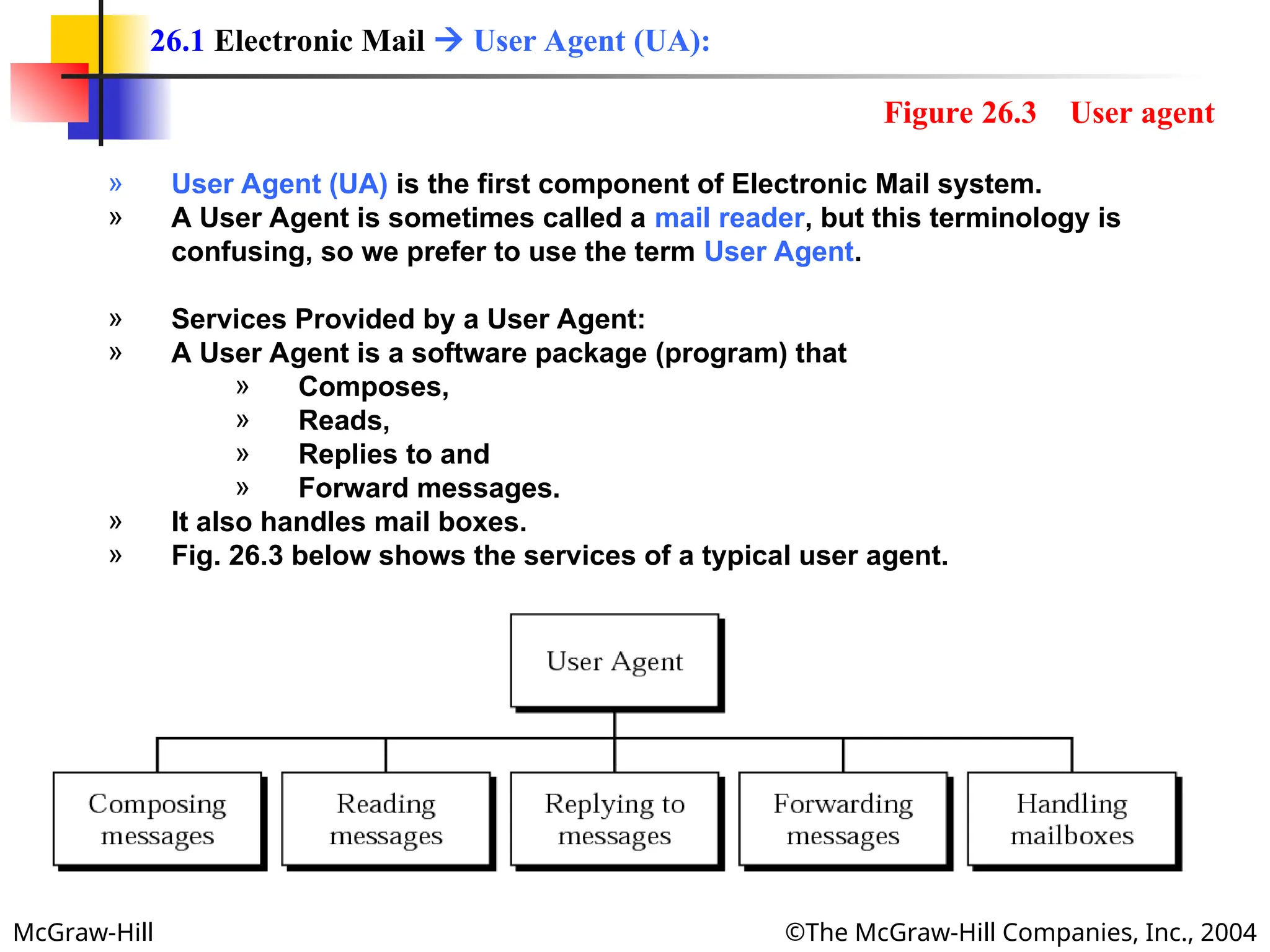
» User Agent (UA) is the first component of Electronic Mail system.
» A User Agent is sometimes called a mail reader, but this terminology is
confusing, so we prefer to use the term User Agent.
» Services Provided by a User Agent:
» A User Agent is a software package (program) that
» Composes,
» Reads,
» Replies to and
» Forward messages.
» It also handles mail boxes.
» Fig. 26.3 below shows the services of a typical user agent.
26.1 Electronic Mail  User Agent (UA):
Figure 26.3 User agent
McGraw-Hill ©The McGraw-Hill Companies, Inc., 2004
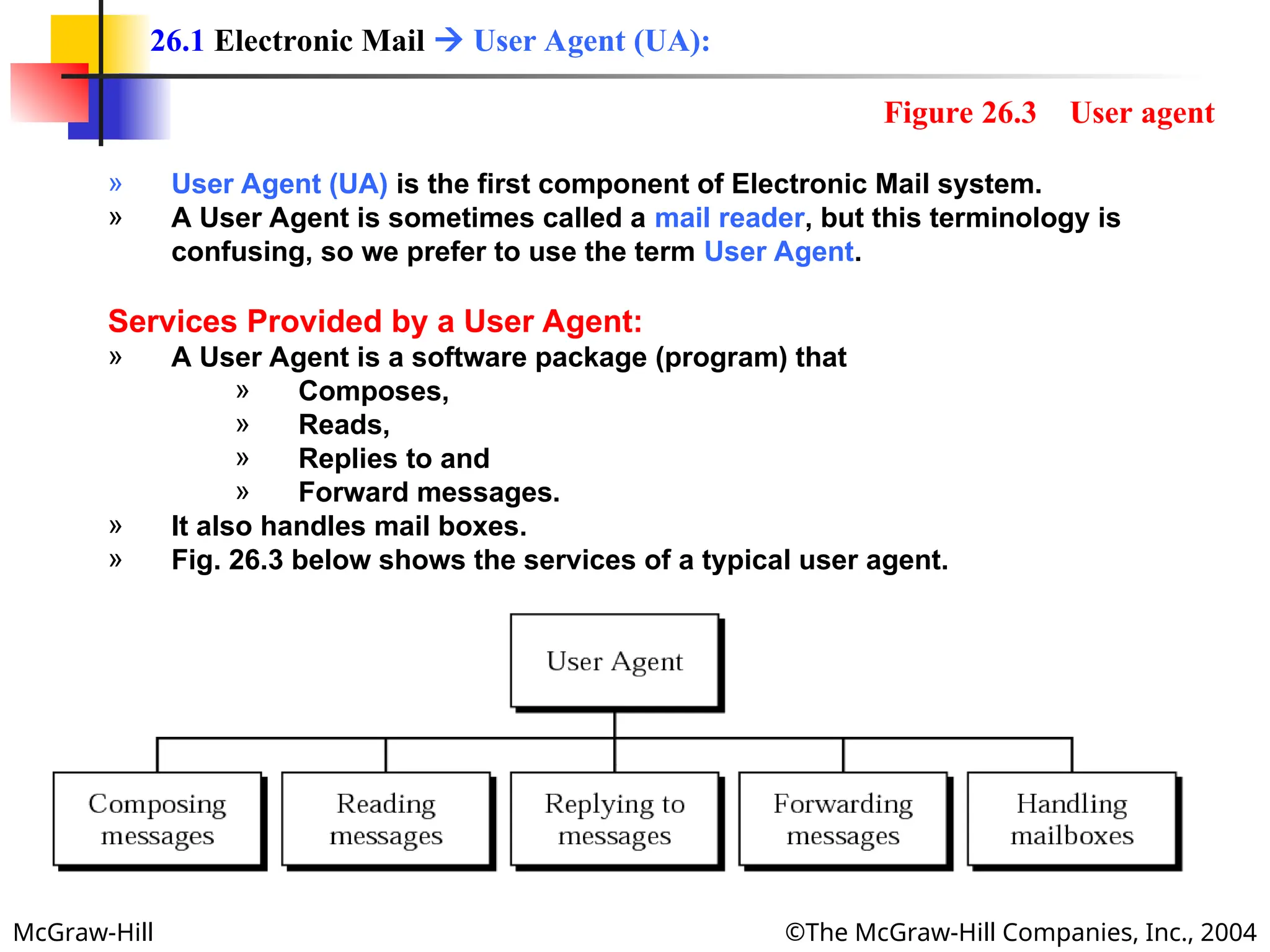
» User Agent (UA) is the first component of Electronic Mail system.
» A User Agent is sometimes called a mail reader, but this terminology is
confusing, so we prefer to use the term User Agent.
Services Provided by a User Agent:
» A User Agent is a software package (program) that
» Composes,
» Reads,
» Replies to and
» Forward messages.
» It also handles mail boxes.
» Fig. 26.3 below shows the services of a typical user agent.
26.1 Electronic Mail  User Agent (UA):
Figure 26.3 User agent
McGraw-Hill ©The McGraw-Hill Companies, Inc., 2004
Composing Messages:
» A User Agent is responsible for composing the email message to be sent
out.
» Most user agents provide a template on the screen to be filled in by the
user.
» Some even has a built-in editor that can do:
» Spell checking,
» Grammar checking, and
» other tasks one expects from a sophisticated word processor.
» A user, off course, can use his or her favorite text editor or word
processor to create the message and import it, or cut and paste, into the
user agent.
26.1 Electronic Mail  User Agent (UA)  Services Provided By a User Agent:
McGraw-Hill ©The McGraw-Hill Companies, Inc., 2004
Reading Messages:
» The second duty of the user agent is to read the incoming messages.
» When a user invokes a user agent, it first checks the mail in the incoming
mailbox.
» Most user agents show a one-line summary of each retrieval mail which
contain the following fields:
1. A number field,
2. A flag field that shows if
» the mail is new,
» already read but not replied to,
» read and replied,
» and so on.
3. The size of the message,
4. The sender,
5. The subject field if the subject line in the message Is not empty.
26.1 Electronic Mail  User Agent (UA)  Services Provided By a User Agent:
McGraw-Hill ©The McGraw-Hill Companies, Inc., 2004
Replying to Messages:
» After reading a message, a user can use the user agent to reply to a
message.
» Normally, a user agent allows the user to reply to the original sender or
to reply to all recipients of the message.
» The reply message normally contains the original message (for quick
reference) and the new message.
Forwarding Message:
» Replying is defined as sending a message to the sender or recipients of
the copy.
» Forwarding means to send the message to a third party.
» A user agent allows the receiver to forward the message, with or without
extra comments, to a third party.
26.1 Electronic Mail  User Agent (UA)  Services Provided By a User Agent:
McGraw-Hill ©The McGraw-Hill Companies, Inc., 2004
Handling Mailboxes:
» A user agent creates two mailboxes:
1. Inbox and
2. Outbox.
» Each box is a file with special format that can be handled by the user
agent.
» The inbox keeps all the received emails until they are deleted by the
user.
» The outbox keeps all the sent emails until the user deletes them.
26.1 Electronic Mail  User Agent (UA)  Services Provided By a User Agent:
McGraw-Hill ©The McGraw-Hill Companies, Inc., 2004
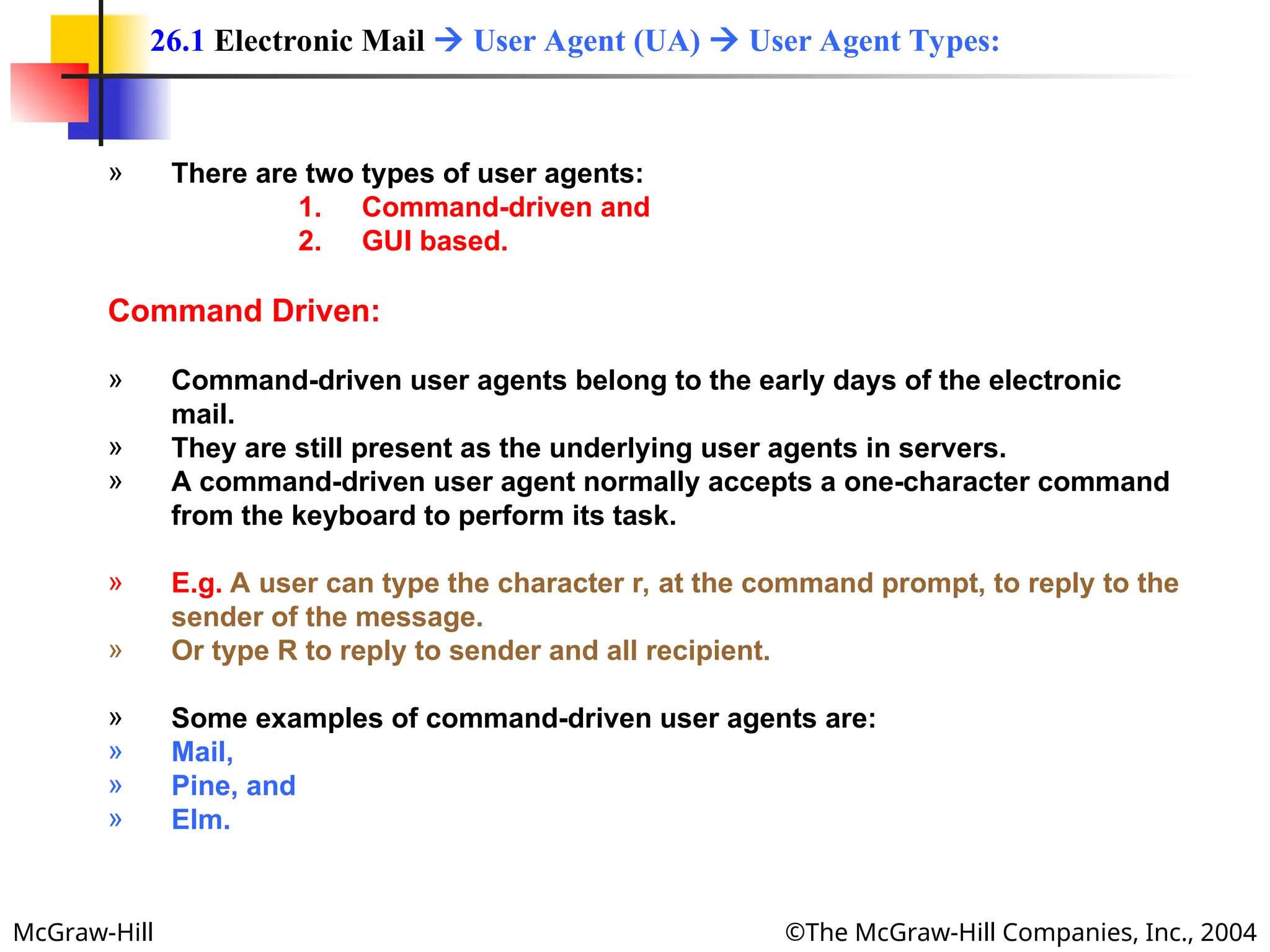
» There are two types of user agents:
1. Command-driven and
2. GUI based.
Command Driven:
» Command-driven user agents belong to the early days of the electronic
mail.
» They are still present as the underlying user agents in servers.
» A command-driven user agent normally accepts a one-character command
from the keyboard to perform its task.
» E.g. A user can type the character r, at the command prompt, to reply to the
sender of the message.
» Or type R to reply to sender and all recipient.
» Some examples of command-driven user agents are:
» Mail,
» Pine, and
» Elm.
26.1 Electronic Mail  User Agent (UA)  User Agent Types:
McGraw-Hill ©The McGraw-Hill Companies, Inc., 2004
Some examples of command-driven
user agents are mail, pine, and elm.
Note
Note:
:
McGraw-Hill ©The McGraw-Hill Companies, Inc., 2004
GUI Based:
» Modern user agents are GUI-based.
» They contain graphical user interface (GUI) components that allow the user
to interact with the software by using both the keyboard and the mouse.
» They have graphical components such as
» Icons,
» Menu bars and
» Windows
» that make the services easy access.
» Some examples of GUI-based user agents are:
» Eudora,
» Microsoft’s Outlook and
» Netscape.
26.1 Electronic Mail  User Agent (UA)  User Agent Types:
McGraw-Hill ©The McGraw-Hill Companies, Inc., 2004
Some examples of GUI-based user
agents are Eudora, Outlook, and
Netscape.
Note
Note:
:
McGraw-Hill ©The McGraw-Hill Companies, Inc., 2004
Multipurpose Internet Mail Extensions:
» SMPTP is a simple mail transfer protocol.
» Its simplicity, however comes with a price.
» SMTP has some limitations e.g.
» SMTP can send messages only in 7-bit ASCII format.
» SMTP cannot be used for languages that are not supported by 7-bit
ASCII characters (such as French, German, Russian Chinese and
Japanese).
» SMTP cannot be used to send binary files (files that are stored as
stream of 0s and 1s without using any character code), video and
audio.
» MIME is a supplementary protocol that allows non-ASCII data to be sent
through SMTP.
» MIME is not a mail protocol and cannot replace SMTP.
» MIME is only an extension to SMTP.
26.1 Electronic Mail  MIME:
McGraw-Hill ©The McGraw-Hill Companies, Inc., 2004
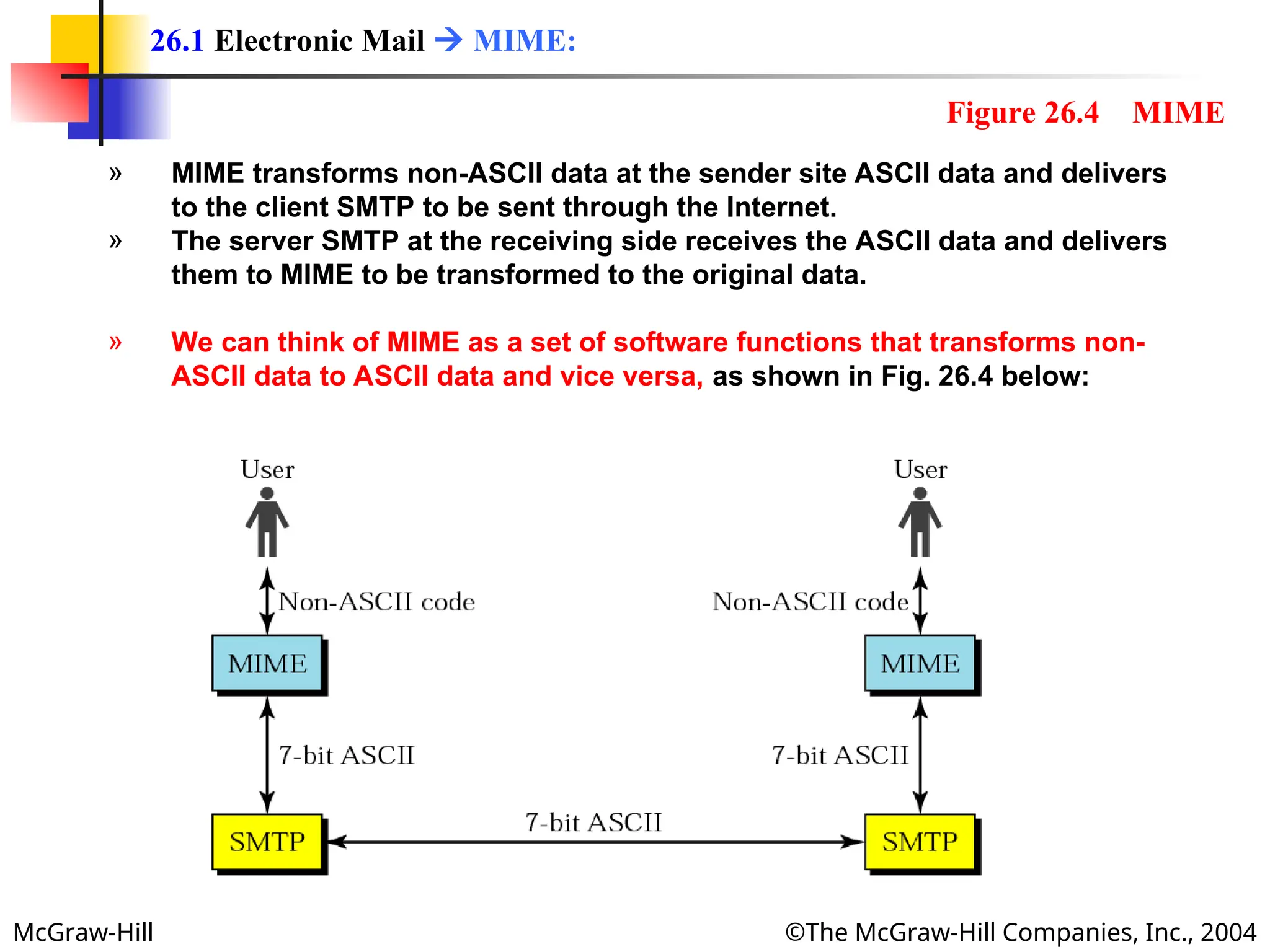
» MIME transforms non-ASCII data at the sender site ASCII data and delivers
to the client SMTP to be sent through the Internet.
» The server SMTP at the receiving side receives the ASCII data and delivers
them to MIME to be transformed to the original data.
» We can think of MIME as a set of software functions that transforms non-
ASCII data to ASCII data and vice versa, as shown in Fig. 26.4 below:
26.1 Electronic Mail  MIME:
Figure 26.4 MIME
McGraw-Hill ©The McGraw-Hill Companies, Inc., 2004
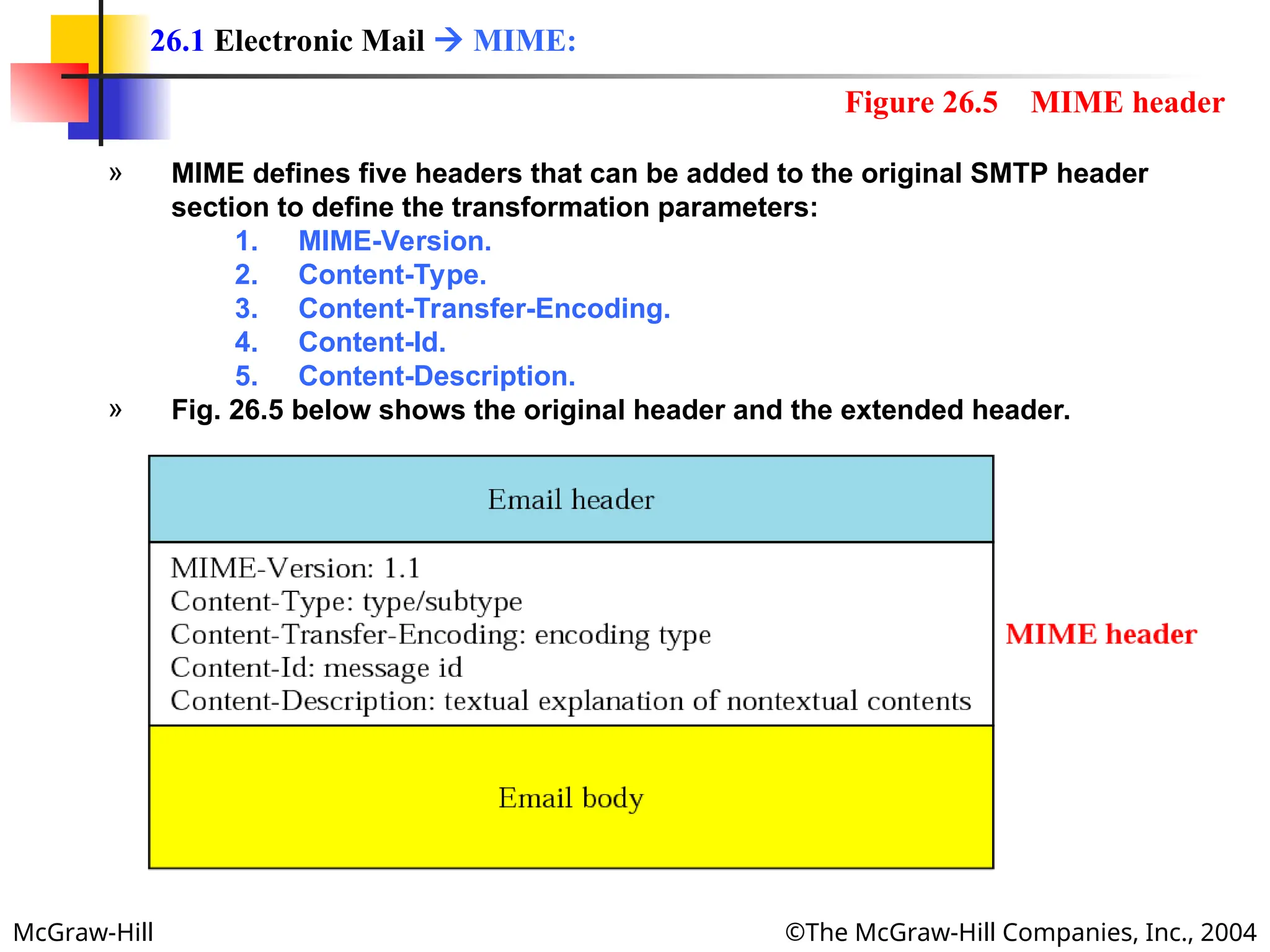
» MIME defines five headers that can be added to the original SMTP header
section to define the transformation parameters:
1. MIME-Version.
2. Content-Type.
3. Content-Transfer-Encoding.
4. Content-Id.
5. Content-Description.
» Fig. 26.5 below shows the original header and the extended header.
26.1 Electronic Mail  MIME:
Figure 26.5 MIME header
McGraw-Hill ©The McGraw-Hill Companies, Inc., 2004
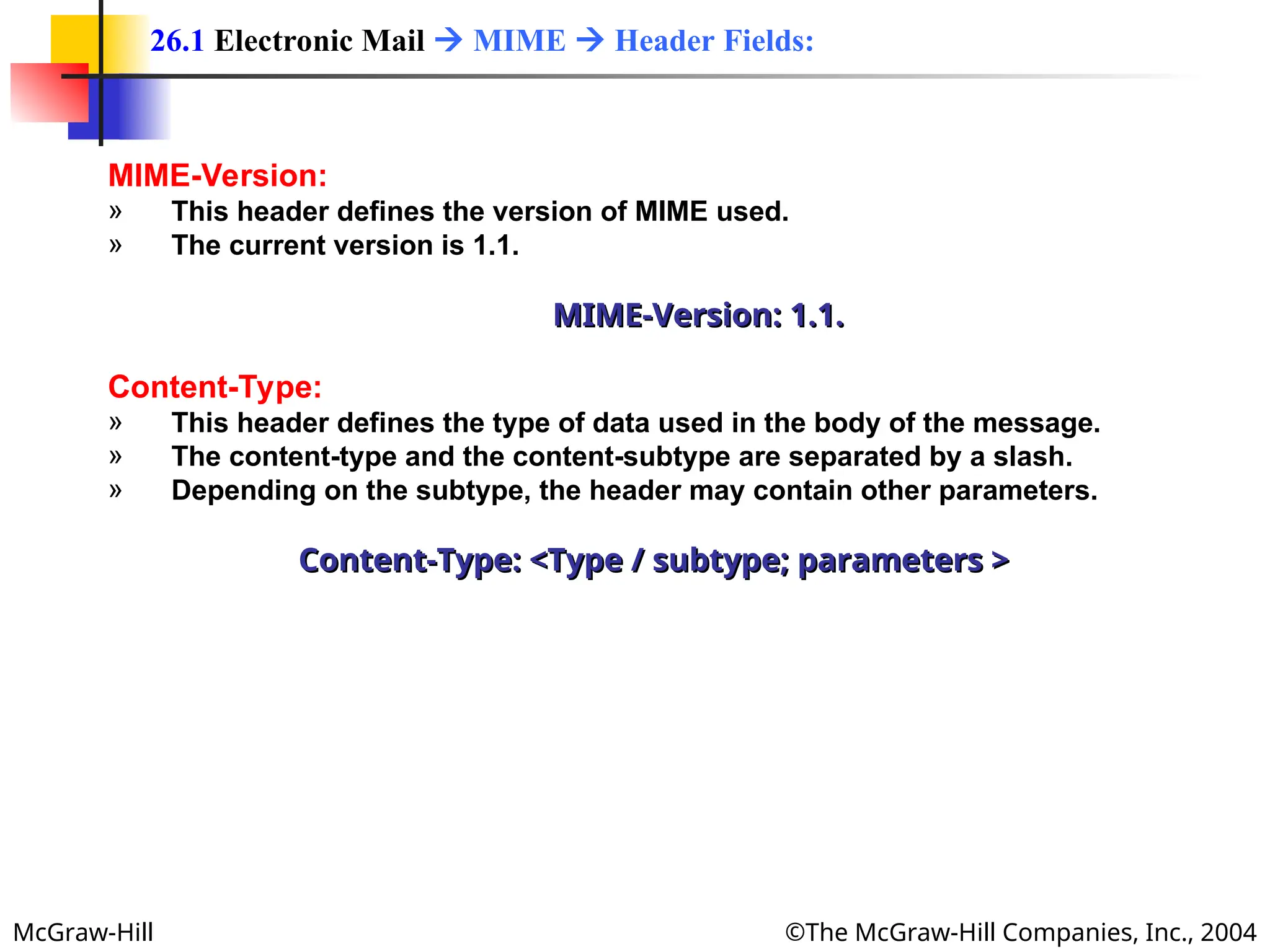
MIME-Version:
» This header defines the version of MIME used.
» The current version is 1.1.
MIME-Version: 1.1.
MIME-Version: 1.1.
Content-Type:
» This header defines the type of data used in the body of the message.
» The content-type and the content-subtype are separated by a slash.
» Depending on the subtype, the header may contain other parameters.
Content-Type: <Type / subtype; parameters >
26.1 Electronic Mail  MIME  Header Fields:
McGraw-Hill ©The McGraw-Hill Companies, Inc., 2004
Table 26.1
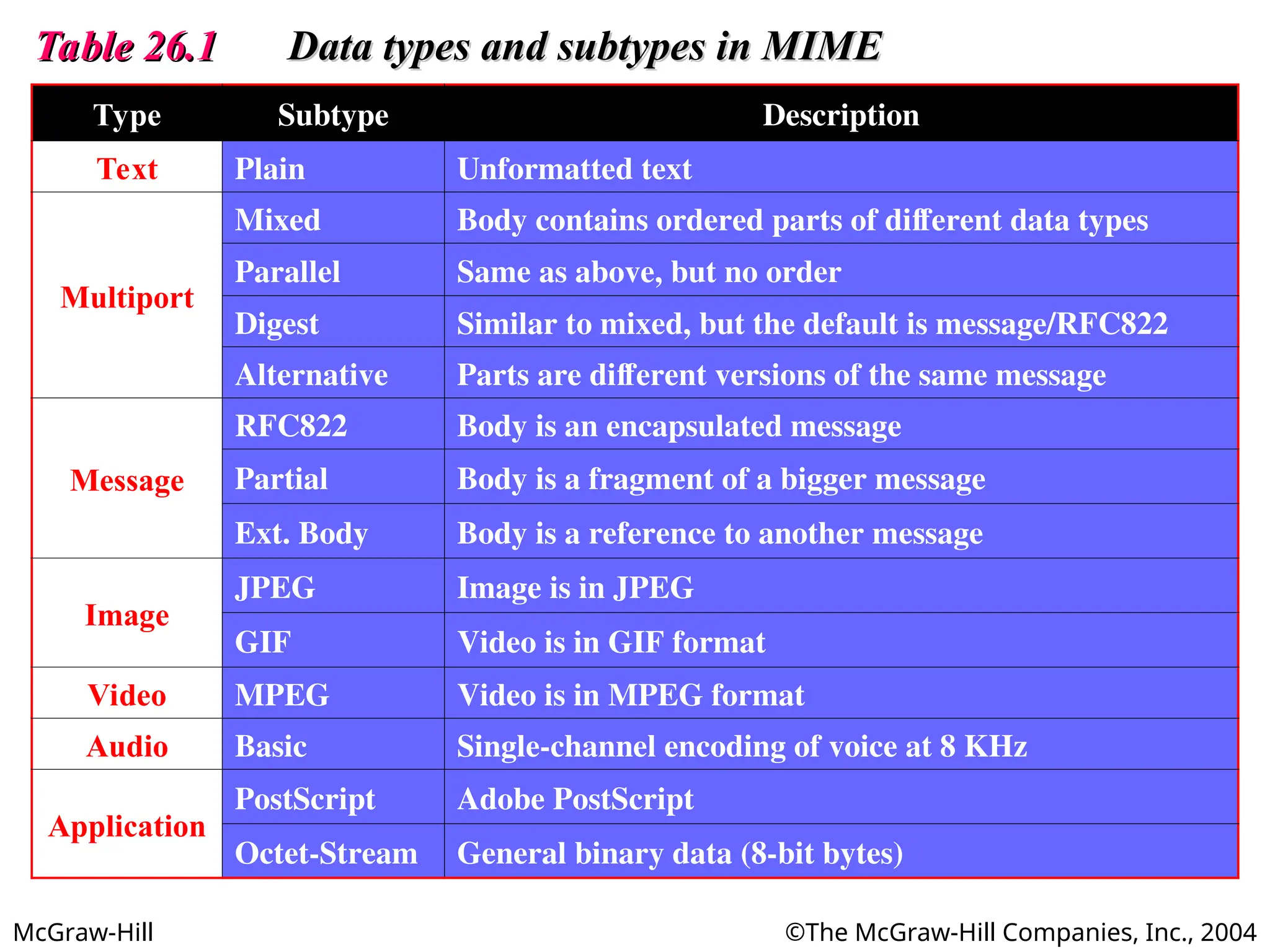
Table 26.1 Data types and subtypes in MIME
Data types and subtypes in MIME
Type Subtype Description
Text Plain Unformatted text
Multiport
Mixed Body contains ordered parts of different data types
Parallel Same as above, but no order
Digest Similar to mixed, but the default is message/RFC822
Alternative Parts are different versions of the same message
Message
RFC822 Body is an encapsulated message
Partial Body is a fragment of a bigger message
Ext. Body Body is a reference to another message
Image
JPEG Image is in JPEG
GIF Video is in GIF format
Video MPEG Video is in MPEG format
Audio Basic Single-channel encoding of voice at 8 KHz
Application
PostScript Adobe PostScript
Octet-Stream General binary data (8-bit bytes)
McGraw-Hill ©The McGraw-Hill Companies, Inc., 2004
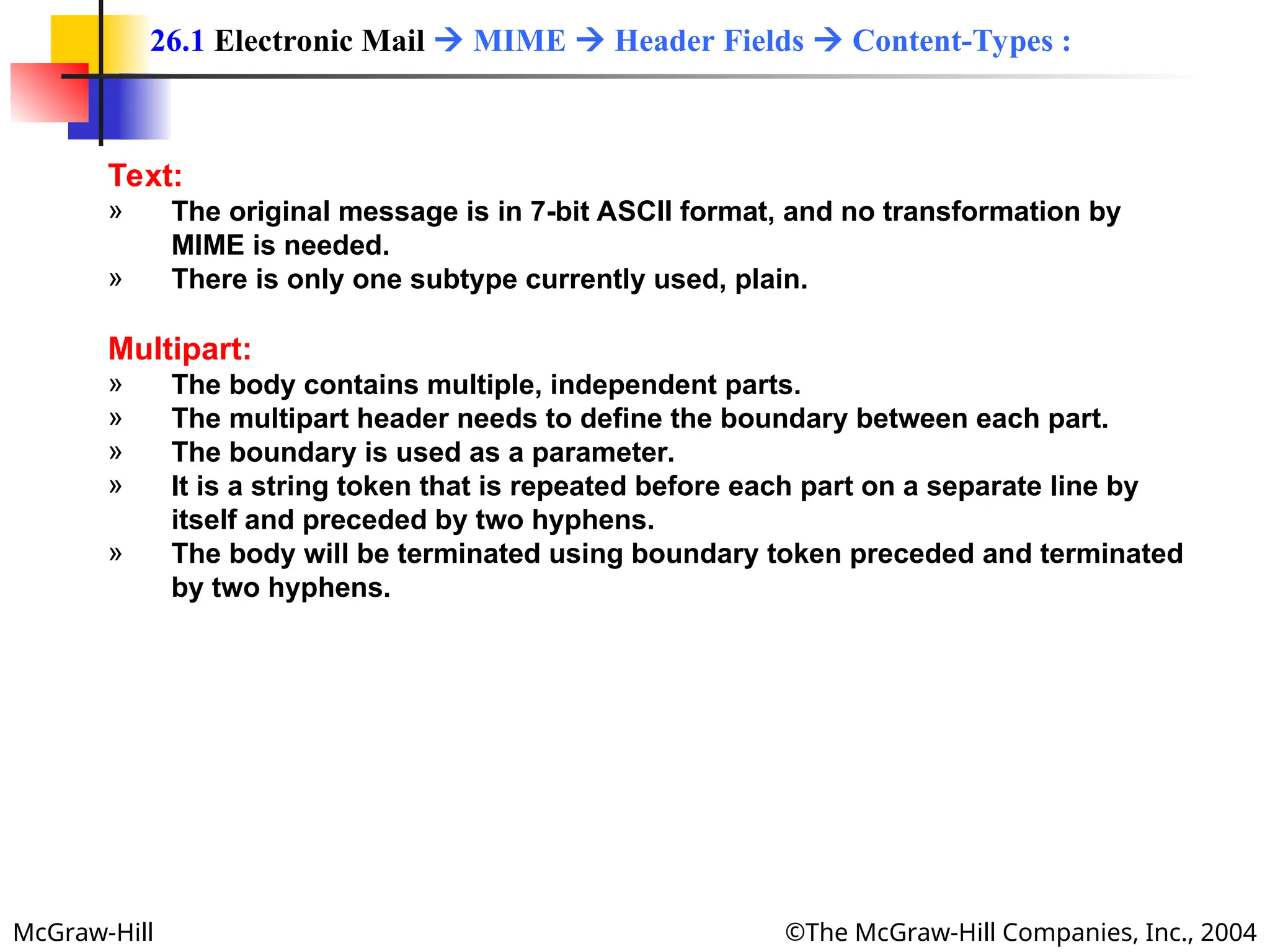
Text:
» The original message is in 7-bit ASCII format, and no transformation by
MIME is needed.
» There is only one subtype currently used, plain.
Multipart:
» The body contains multiple, independent parts.
» The multipart header needs to define the boundary between each part.
» The boundary is used as a parameter.
» It is a string token that is repeated before each part on a separate line by
itself and preceded by two hyphens.
» The body will be terminated using boundary token preceded and terminated
by two hyphens.
26.1 Electronic Mail  MIME  Header Fields  Content-Types :
McGraw-Hill ©The McGraw-Hill Companies, Inc., 2004
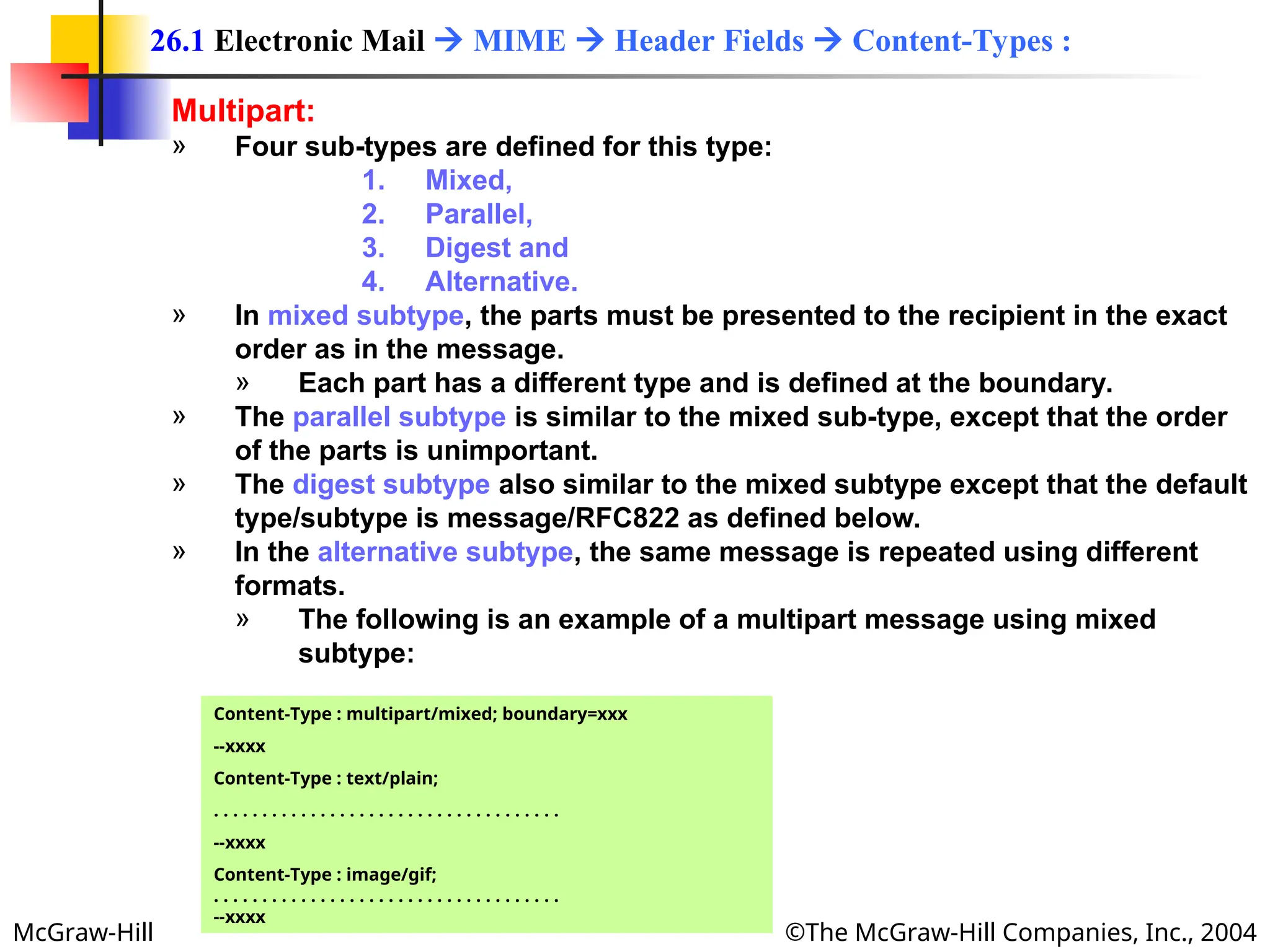
Multipart:
» Four sub-types are defined for this type:
1. Mixed,
2. Parallel,
3. Digest and
4. Alternative.
» In mixed subtype, the parts must be presented to the recipient in the exact
order as in the message.
» Each part has a different type and is defined at the boundary.
» The parallel subtype is similar to the mixed sub-type, except that the order
of the parts is unimportant.
» The digest subtype also similar to the mixed subtype except that the default
type/subtype is message/RFC822 as defined below.
» In the alternative subtype, the same message is repeated using different
formats.
» The following is an example of a multipart message using mixed
subtype:
26.1 Electronic Mail  MIME  Header Fields  Content-Types :
Content-Type : multipart/mixed; boundary=xxx
--xxxx
Content-Type : text/plain;
. . . . . . . . . . . . . . . . . . . . . . . . . . . . . . . . . . . .
--xxxx
Content-Type : image/gif;
. . . . . . . . . . . . . . . . . . . . . . . . . . . . . . . . . . . .
--xxxx
McGraw-Hill ©The McGraw-Hill Companies, Inc., 2004
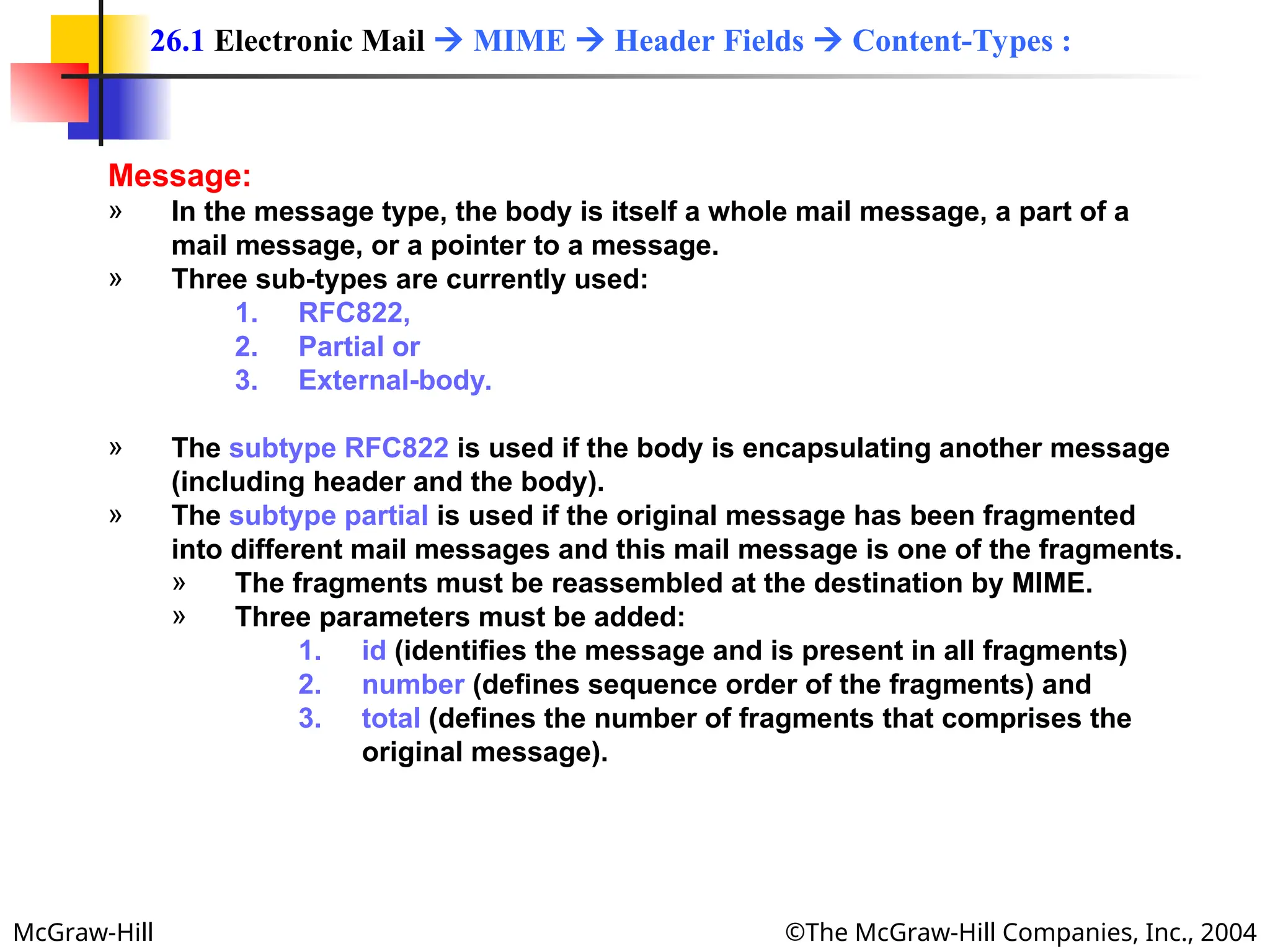
Message:
» In the message type, the body is itself a whole mail message, a part of a
mail message, or a pointer to a message.
» Three sub-types are currently used:
1. RFC822,
2. Partial or
3. External-body.
» The subtype RFC822 is used if the body is encapsulating another message
(including header and the body).
» The subtype partial is used if the original message has been fragmented
into different mail messages and this mail message is one of the fragments.
» The fragments must be reassembled at the destination by MIME.
» Three parameters must be added:
1. id (identifies the message and is present in all fragments)
2. number (defines sequence order of the fragments) and
3. total (defines the number of fragments that comprises the
original message).
26.1 Electronic Mail  MIME  Header Fields  Content-Types :
McGraw-Hill ©The McGraw-Hill Companies, Inc., 2004
Message:
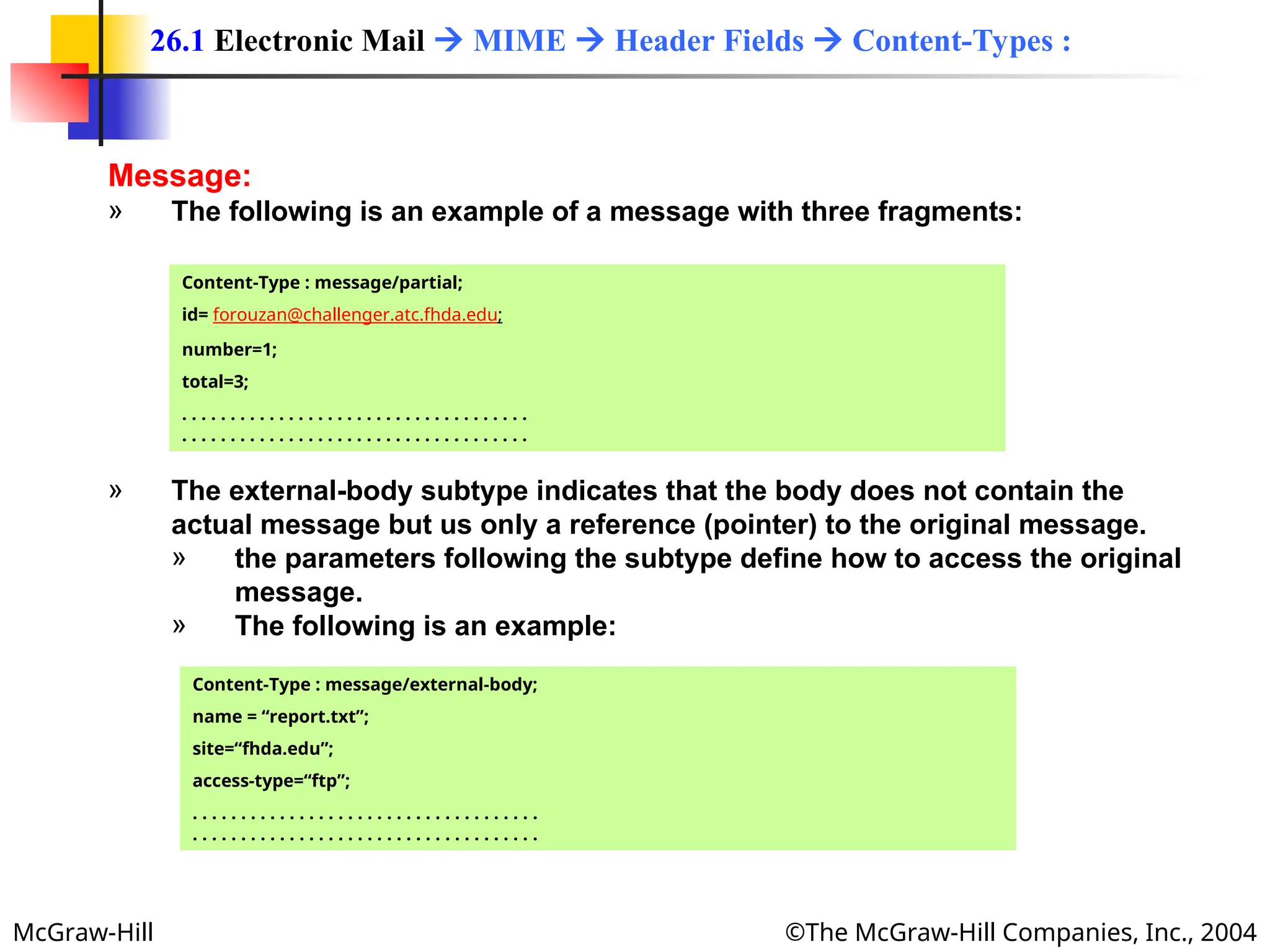
» The following is an example of a message with three fragments:
26.1 Electronic Mail  MIME  Header Fields  Content-Types :
Content-Type : message/partial;
id= forouzan@challenger.atc.fhda.edu;
number=1;
total=3;
. . . . . . . . . . . . . . . . . . . . . . . . . . . . . . . . . . . .
. . . . . . . . . . . . . . . . . . . . . . . . . . . . . . . . . . . .
» The external-body subtype indicates that the body does not contain the
actual message but us only a reference (pointer) to the original message.
» the parameters following the subtype define how to access the original
message.
» The following is an example:
Content-Type : message/external-body;
name = “report.txt”;
site=“fhda.edu”;
access-type=“ftp”;
. . . . . . . . . . . . . . . . . . . . . . . . . . . . . . . . . . . .
. . . . . . . . . . . . . . . . . . . . . . . . . . . . . . . . . . . .
McGraw-Hill ©The McGraw-Hill Companies, Inc., 2004
Image:
» The original message is a stationary image, indicating that there is no
animation.
» The two currently used subtypes are:
1. Joint Photographic Experts Group (JPEG) (uses image compression) and
2. Graphics Interchange Format (GIF).
Video:
» The original message is time-varying iamge (animation).
» The only subtype is Motion Picture Experts Group (MPEG).
» If the animation image contains sounds, it must be separately using the audio
content type.
Audio:
» The original message is a sound.
» The only subtype is basic, which uses 8-KHz standard audio data.
26.1 Electronic Mail  MIME  Header Fields  Content-Types :
McGraw-Hill ©The McGraw-Hill Companies, Inc., 2004
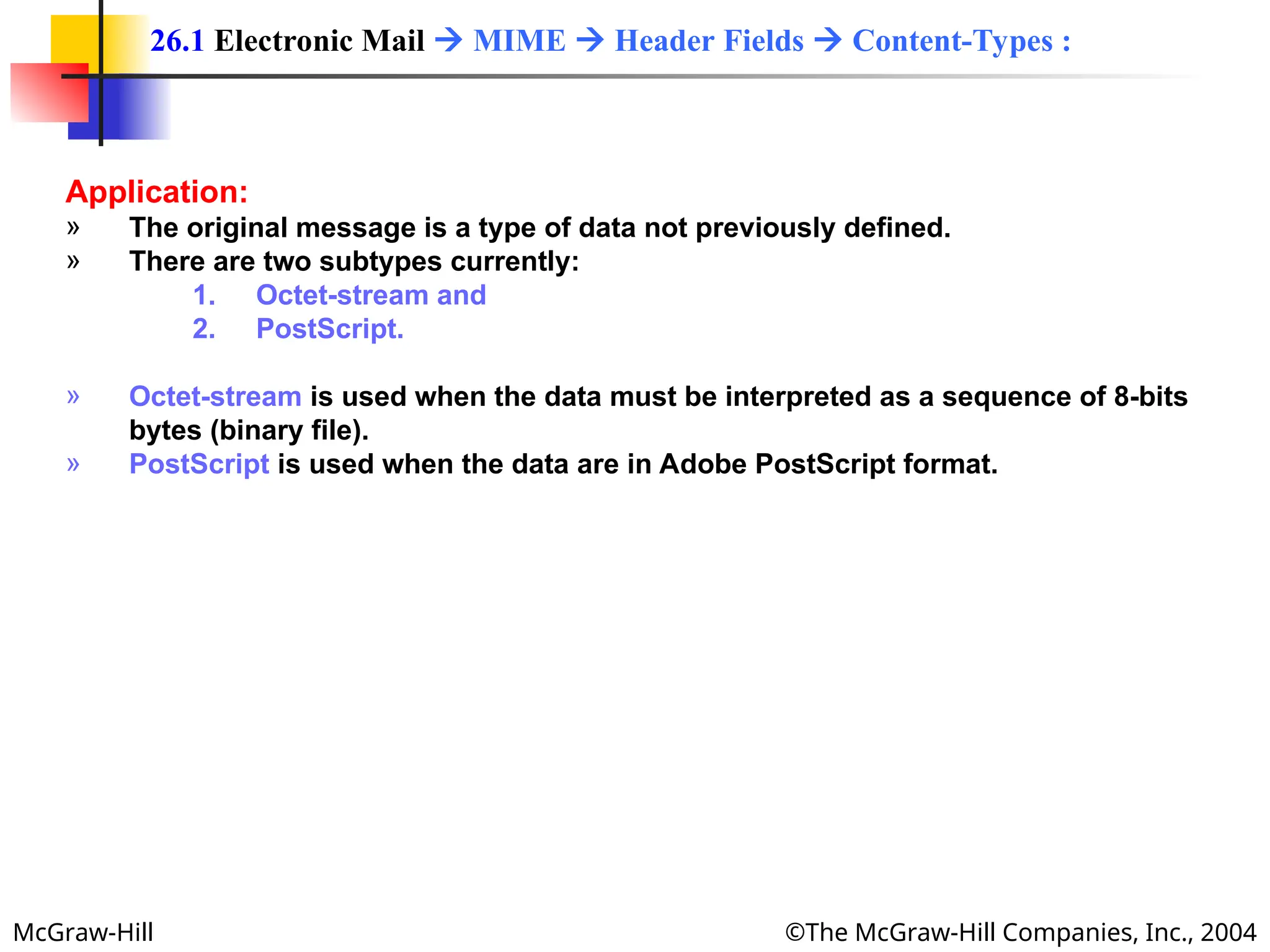
Application:
» The original message is a type of data not previously defined.
» There are two subtypes currently:
1. Octet-stream and
2. PostScript.
» Octet-stream is used when the data must be interpreted as a sequence of 8-bits
bytes (binary file).
» PostScript is used when the data are in Adobe PostScript format.
26.1 Electronic Mail  MIME  Header Fields  Content-Types :
McGraw-Hill ©The McGraw-Hill Companies, Inc., 2004
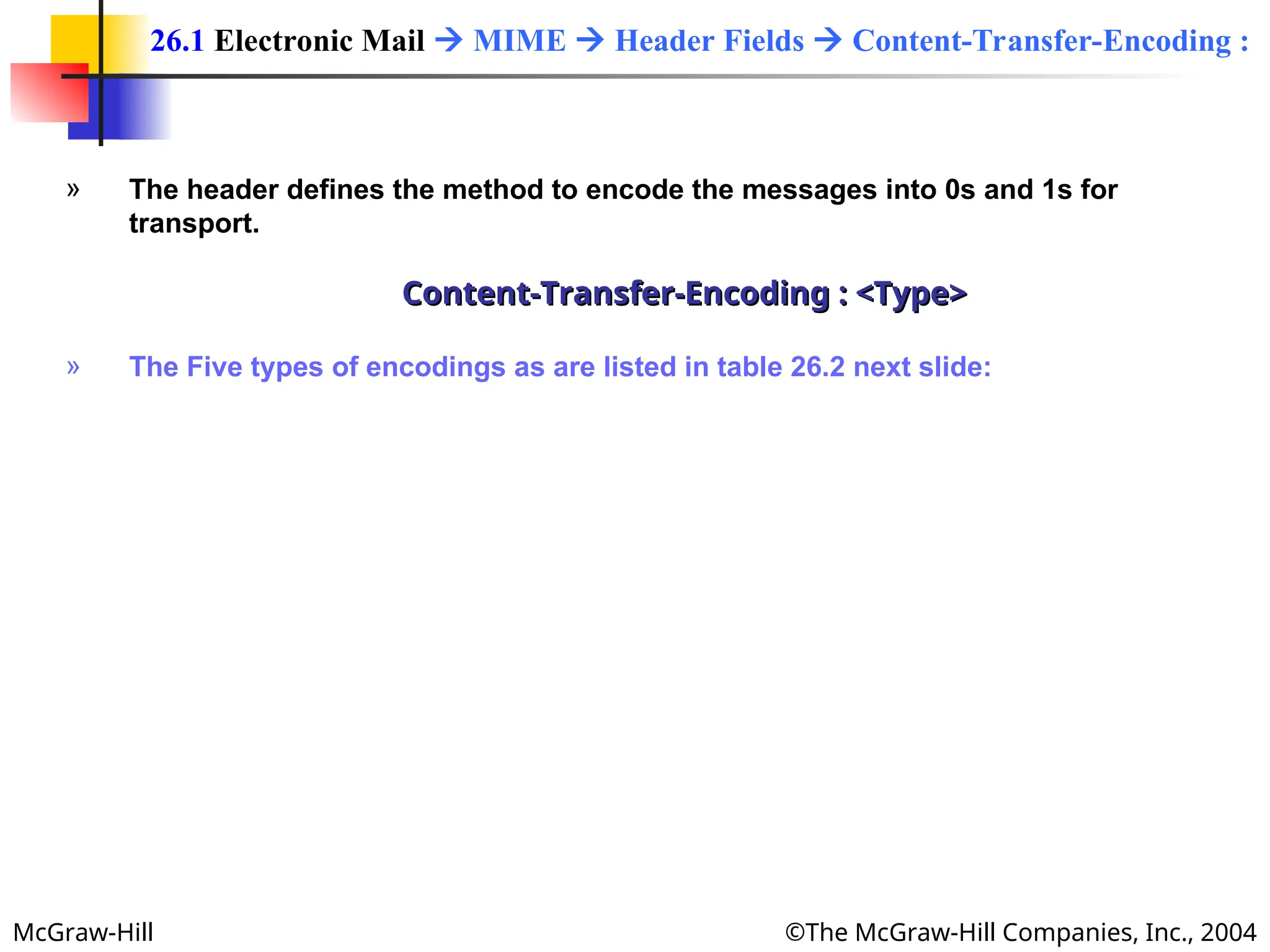
» The header defines the method to encode the messages into 0s and 1s for
transport.
Content-Transfer-Encoding : <Type>
» The Five types of encodings as are listed in table 26.2 next slide:
26.1 Electronic Mail  MIME  Header Fields  Content-Transfer-Encoding :
McGraw-Hill ©The McGraw-Hill Companies, Inc., 2004
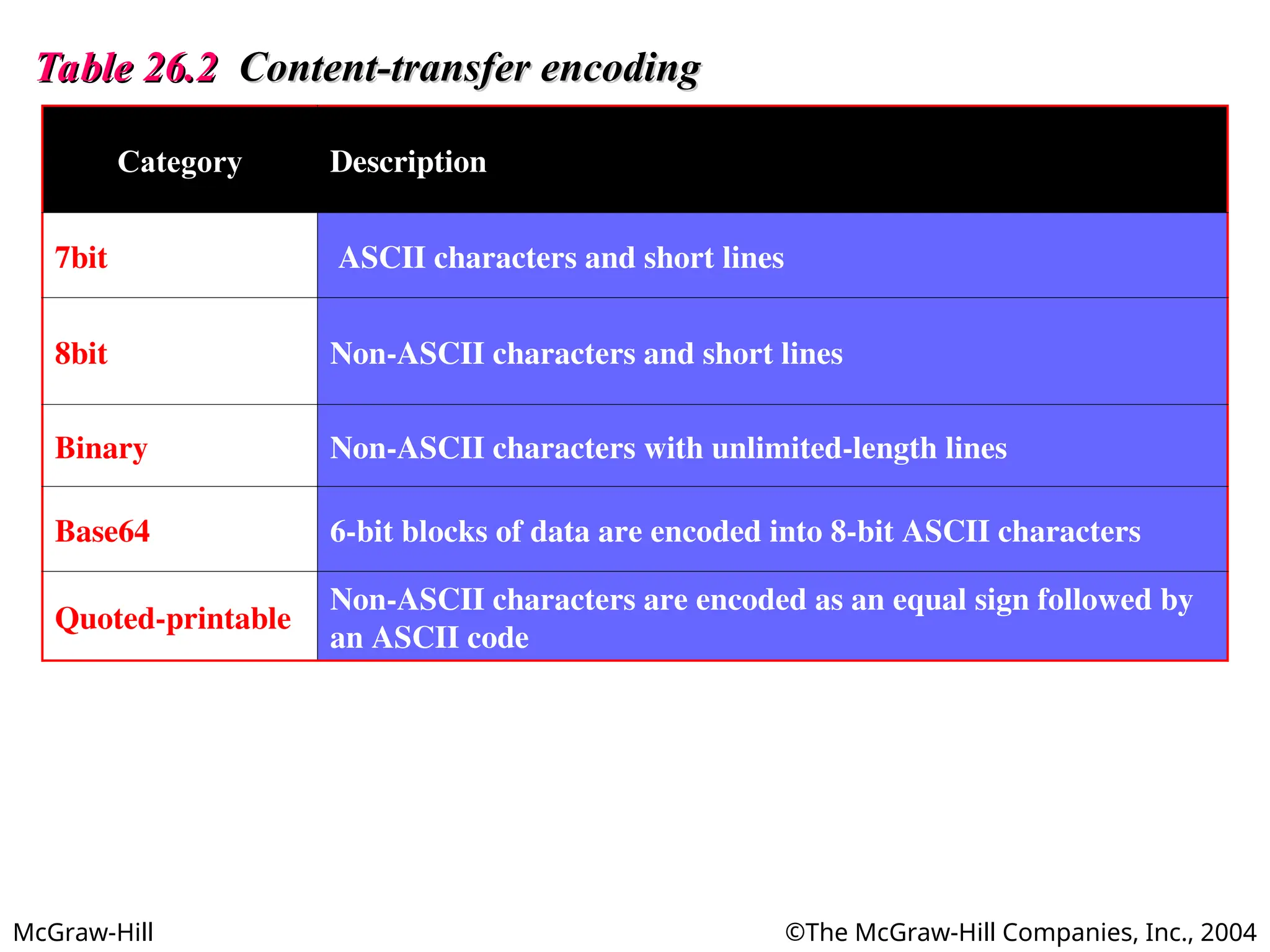
Table 26.2
Table 26.2 Content-transfer encoding
Content-transfer encoding
Category Description
7bit ASCII characters and short lines
8bit Non-ASCII characters and short lines
Binary Non-ASCII characters with unlimited-length lines
Base64 6-bit blocks of data are encoded into 8-bit ASCII characters
Quoted-printable
Non-ASCII characters are encoded as an equal sign followed by
an ASCII code
McGraw-Hill ©The McGraw-Hill Companies, Inc., 2004
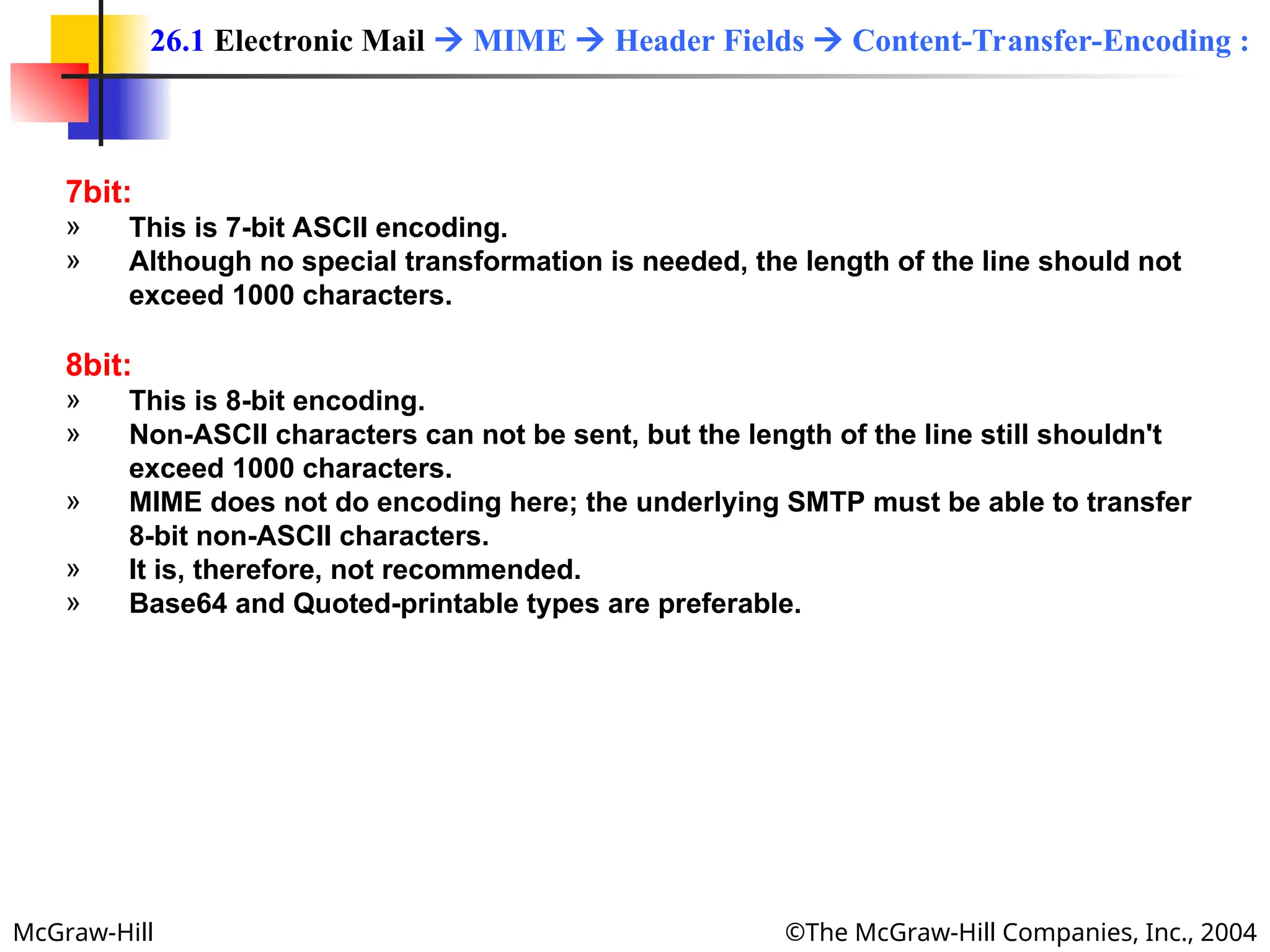
7bit:
» This is 7-bit ASCII encoding.
» Although no special transformation is needed, the length of the line should not
exceed 1000 characters.
8bit:
» This is 8-bit encoding.
» Non-ASCII characters can not be sent, but the length of the line still shouldn't
exceed 1000 characters.
» MIME does not do encoding here; the underlying SMTP must be able to transfer
8-bit non-ASCII characters.
» It is, therefore, not recommended.
» Base64 and Quoted-printable types are preferable.
26.1 Electronic Mail  MIME  Header Fields  Content-Transfer-Encoding :
McGraw-Hill ©The McGraw-Hill Companies, Inc., 2004
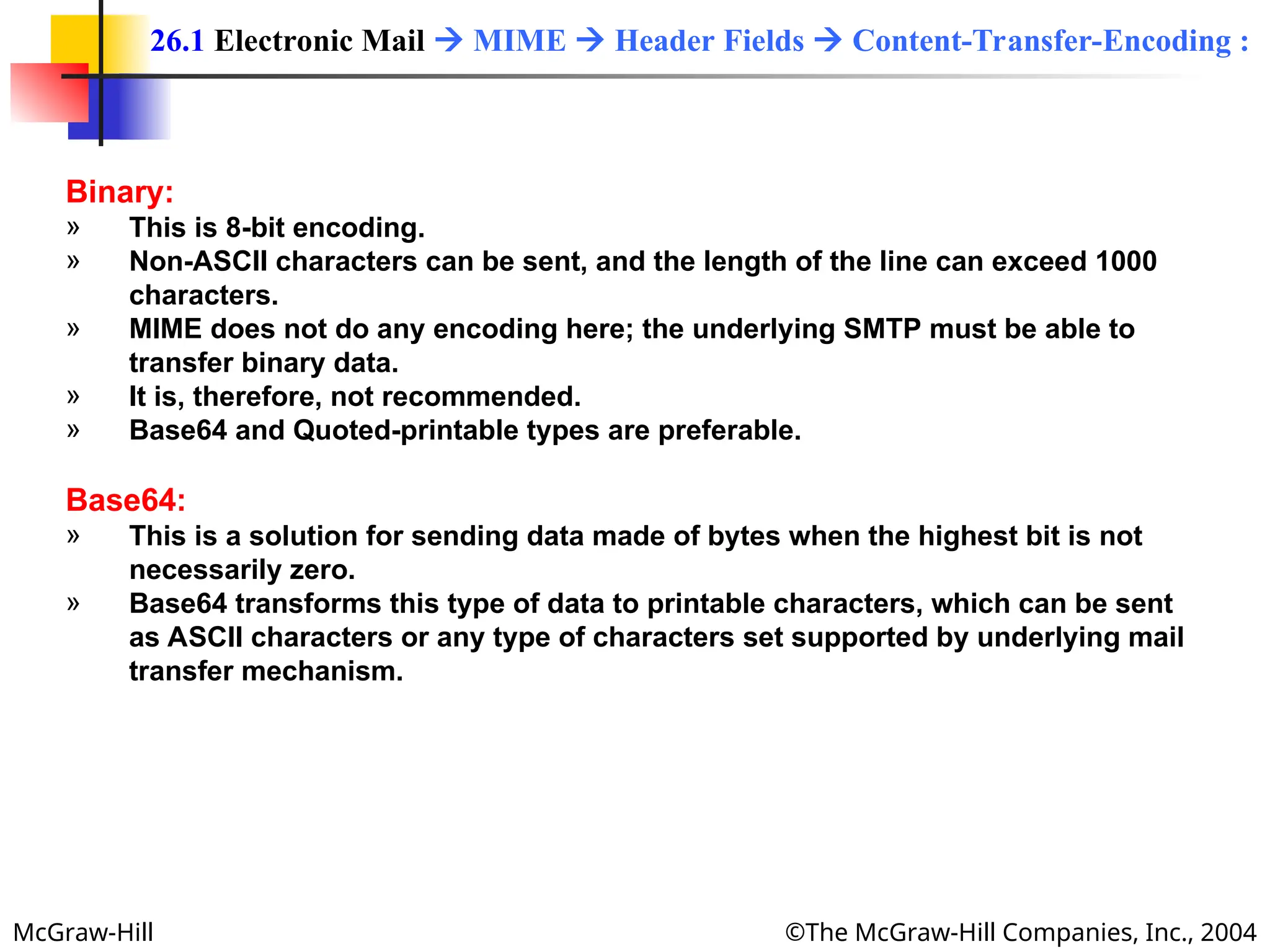
Binary:
» This is 8-bit encoding.
» Non-ASCII characters can be sent, and the length of the line can exceed 1000
characters.
» MIME does not do any encoding here; the underlying SMTP must be able to
transfer binary data.
» It is, therefore, not recommended.
» Base64 and Quoted-printable types are preferable.
Base64:
» This is a solution for sending data made of bytes when the highest bit is not
necessarily zero.
» Base64 transforms this type of data to printable characters, which can be sent
as ASCII characters or any type of characters set supported by underlying mail
transfer mechanism.
26.1 Electronic Mail  MIME  Header Fields  Content-Transfer-Encoding :
McGraw-Hill ©The McGraw-Hill Companies, Inc., 2004
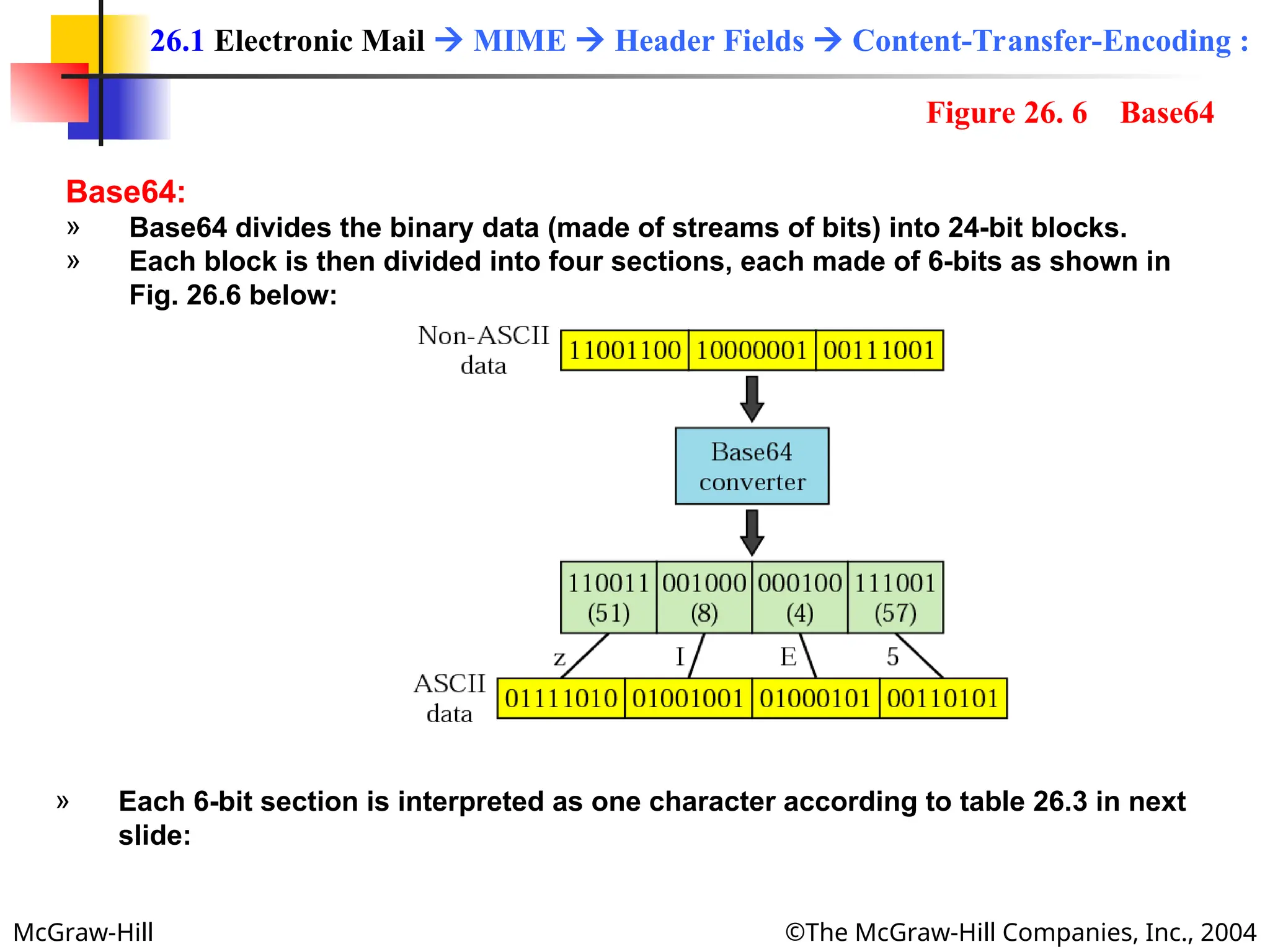
Base64:
» Base64 divides the binary data (made of streams of bits) into 24-bit blocks.
» Each block is then divided into four sections, each made of 6-bits as shown in
Fig. 26.6 below:
26.1 Electronic Mail  MIME  Header Fields  Content-Transfer-Encoding :
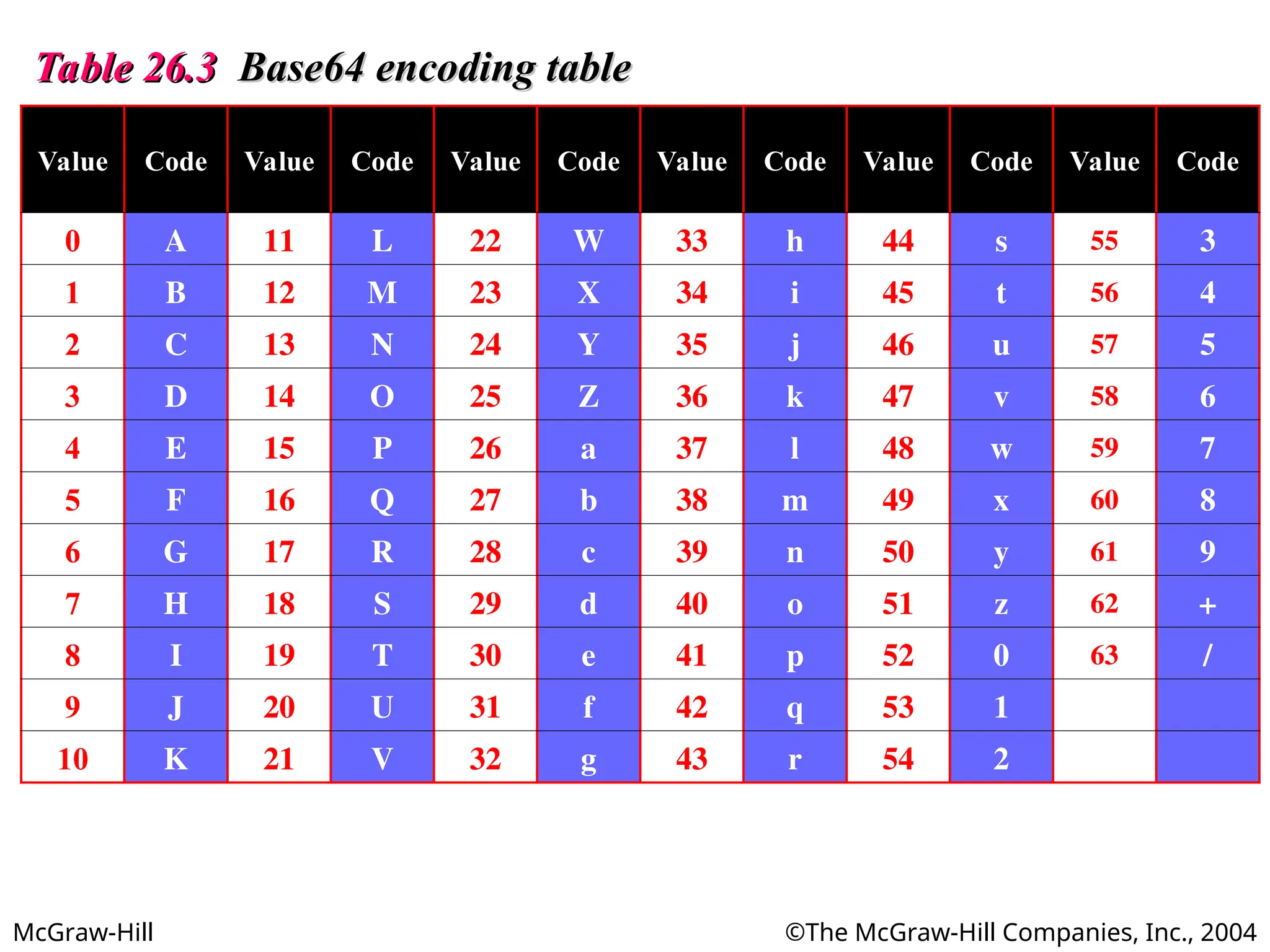
» Each 6-bit section is interpreted as one character according to table 26.3 in next
slide:
Figure 26. 6 Base64
McGraw-Hill ©The McGraw-Hill Companies, Inc., 2004
Table 26.3
Table 26.3 Base64 encoding table
Base64 encoding table
Value Code Value Code Value Code Value Code Value Code Value Code
0 A 11 L 22 W 33 h 44 s 55 3
1 B 12 M 23 X 34 i 45 t 56 4
2 C 13 N 24 Y 35 j 46 u 57 5
3 D 14 O 25 Z 36 k 47 v 58 6
4 E 15 P 26 a 37 l 48 w 59 7
5 F 16 Q 27 b 38 m 49 x 60 8
6 G 17 R 28 c 39 n 50 y 61 9
7 H 18 S 29 d 40 o 51 z 62 +
8 I 19 T 30 e 41 p 52 0 63 /
9 J 20 U 31 f 42 q 53 1
10 K 21 V 32 g 43 r 54 2
McGraw-Hill ©The McGraw-Hill Companies, Inc., 2004
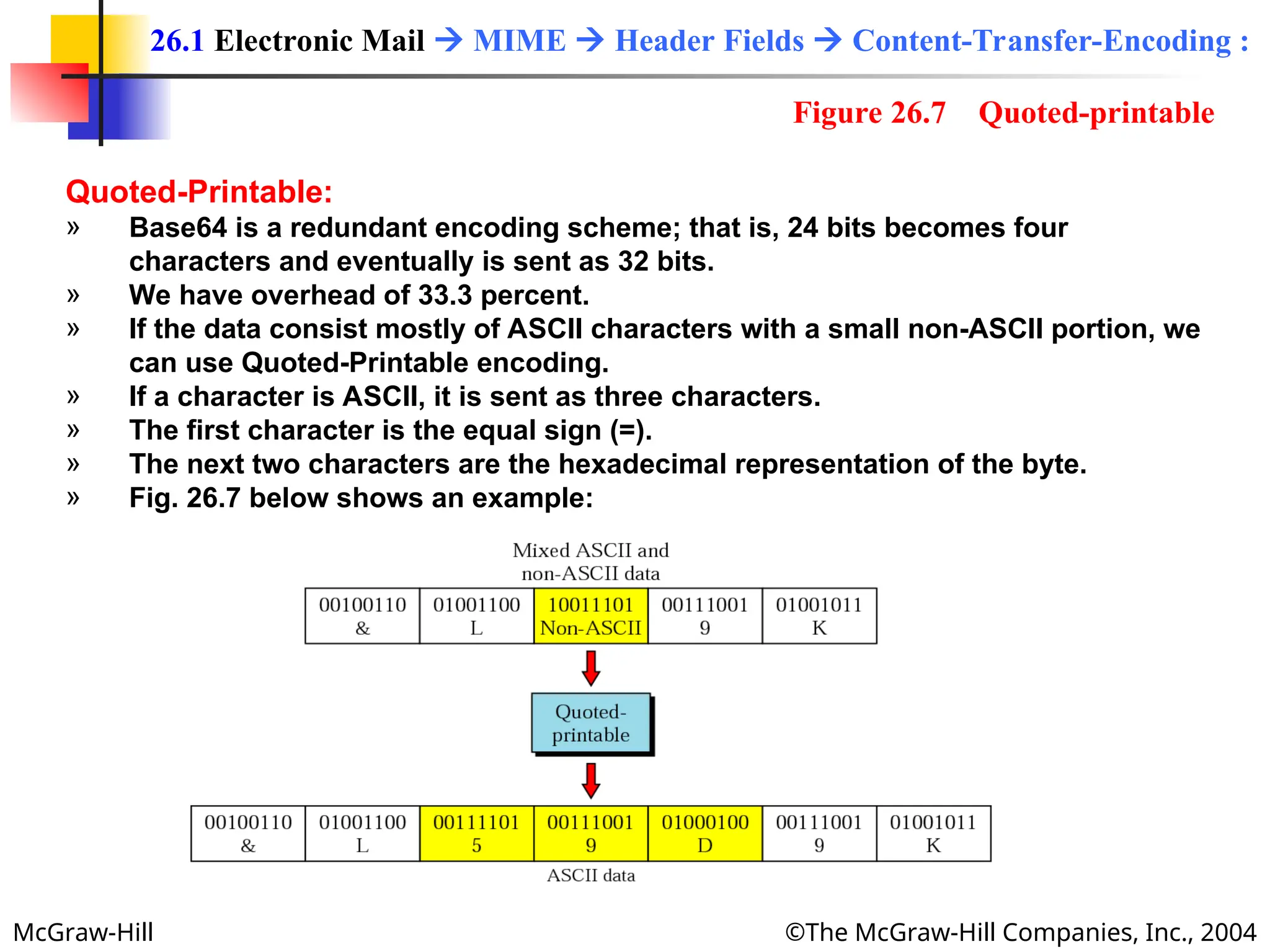
Quoted-Printable:
» Base64 is a redundant encoding scheme; that is, 24 bits becomes four
characters and eventually is sent as 32 bits.
» We have overhead of 33.3 percent.
» If the data consist mostly of ASCII characters with a small non-ASCII portion, we
can use Quoted-Printable encoding.
» If a character is ASCII, it is sent as three characters.
» The first character is the equal sign (=).
» The next two characters are the hexadecimal representation of the byte.
» Fig. 26.7 below shows an example:
26.1 Electronic Mail  MIME  Header Fields  Content-Transfer-Encoding :
Figure 26.7 Quoted-printable
McGraw-Hill ©The McGraw-Hill Companies, Inc., 2004
» This header uniquely identifies the whole message is a multiple-message
environment.
Content-Id : id=<content-id>
26.1 Electronic Mail  MIME  Header Fields  Content-Id :
McGraw-Hill ©The McGraw-Hill Companies, Inc., 2004
» This header field defines whether the body is
» image,
» audio or
» video.
Content-Description : <description>
26.1 Electronic Mail  MIME  Header Fields  Content-Description :
McGraw-Hill ©The McGraw-Hill Companies, Inc., 2004
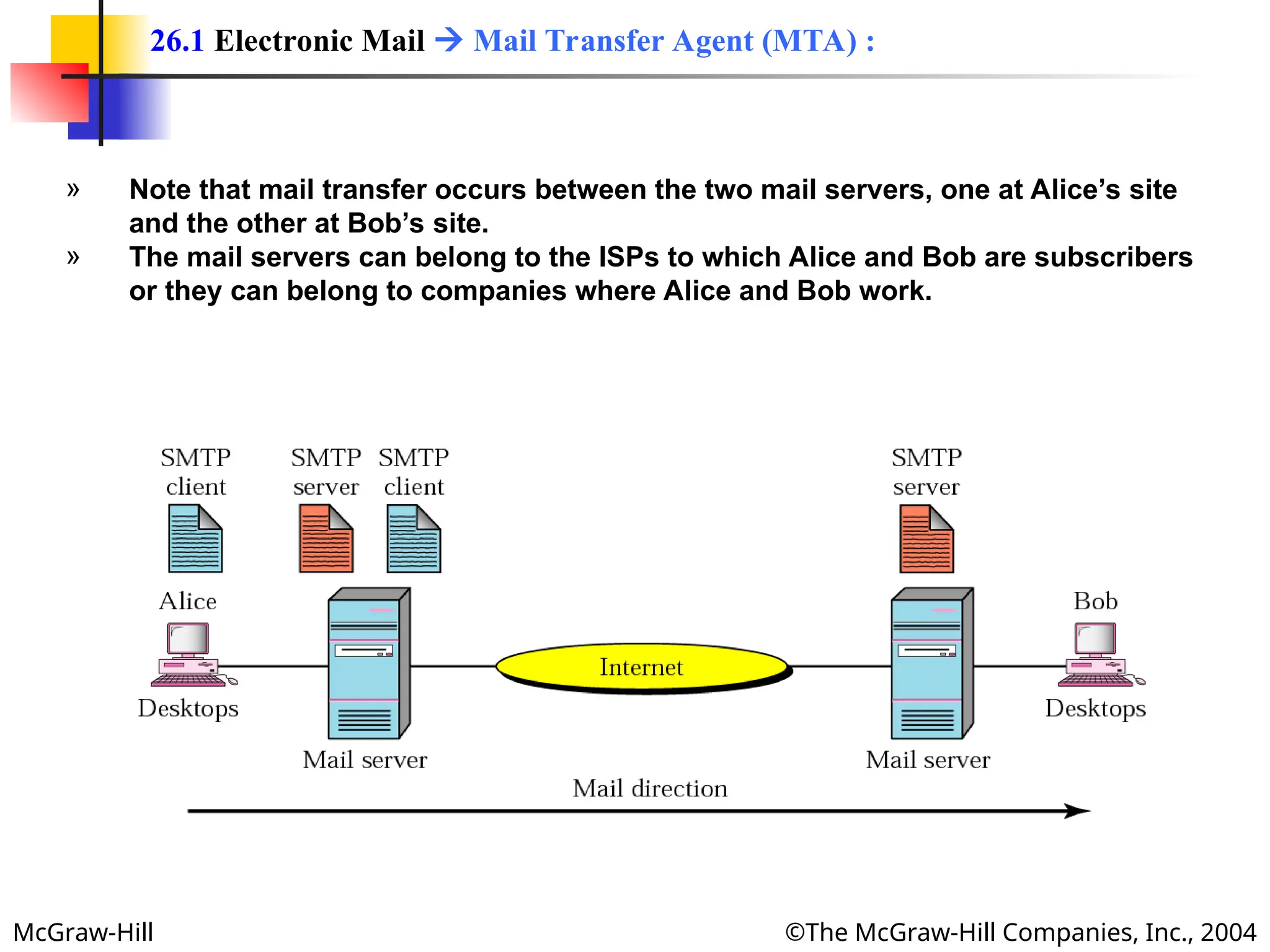
» The actual mail transfers done through Mail Transfer Agents (MTAs).
» To send mail, a system must have a client MTA and
» To receive a mail, a system, must have a server MTA.
» In Internet, message transfer is done through protocol (and software) named
Simple Mail Transfer Protocol (SMTP).
» To send a message, we need a client SMTP and a server SMPT.
» Fig. 26.8 below Alice is shown sending email to Bob with the SMTP clients and
server needed.
26.1 Electronic Mail  Mail Transfer Agent (MTA) :
Figure 26.8 MTA client and server
McGraw-Hill ©The McGraw-Hill Companies, Inc., 2004
» Note that mail transfer occurs between the two mail servers, one at Alice’s site
and the other at Bob’s site.
» The mail servers can belong to the ISPs to which Alice and Bob are subscribers
or they can belong to companies where Alice and Bob work.
26.1 Electronic Mail  Mail Transfer Agent (MTA) :
McGraw-Hill ©The McGraw-Hill Companies, Inc., 2004
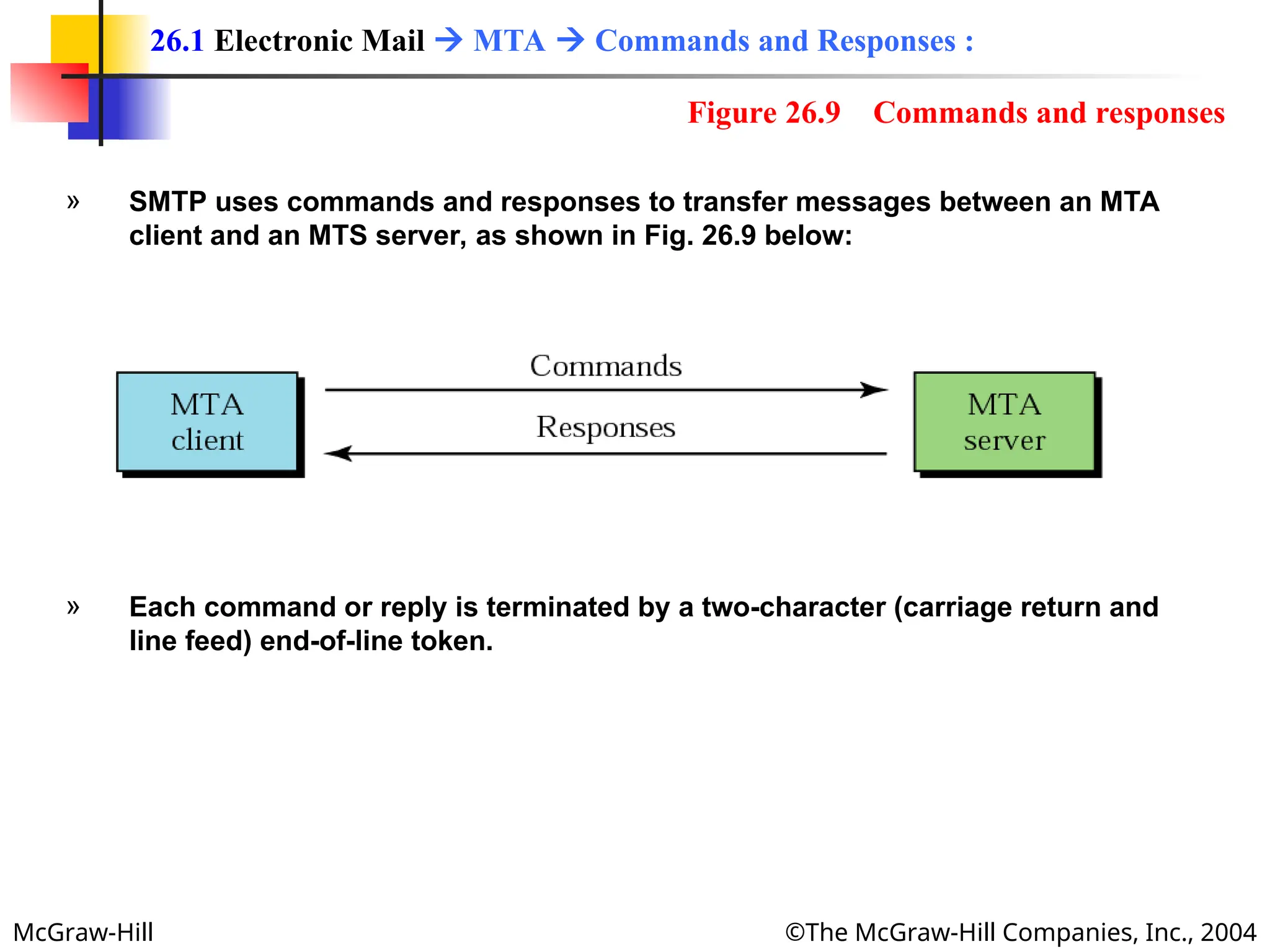
» SMTP uses commands and responses to transfer messages between an MTA
client and an MTS server, as shown in Fig. 26.9 below:
» Each command or reply is terminated by a two-character (carriage return and
line feed) end-of-line token.
26.1 Electronic Mail  MTA  Commands and Responses :
Figure 26.9 Commands and responses
McGraw-Hill ©The McGraw-Hill Companies, Inc., 2004
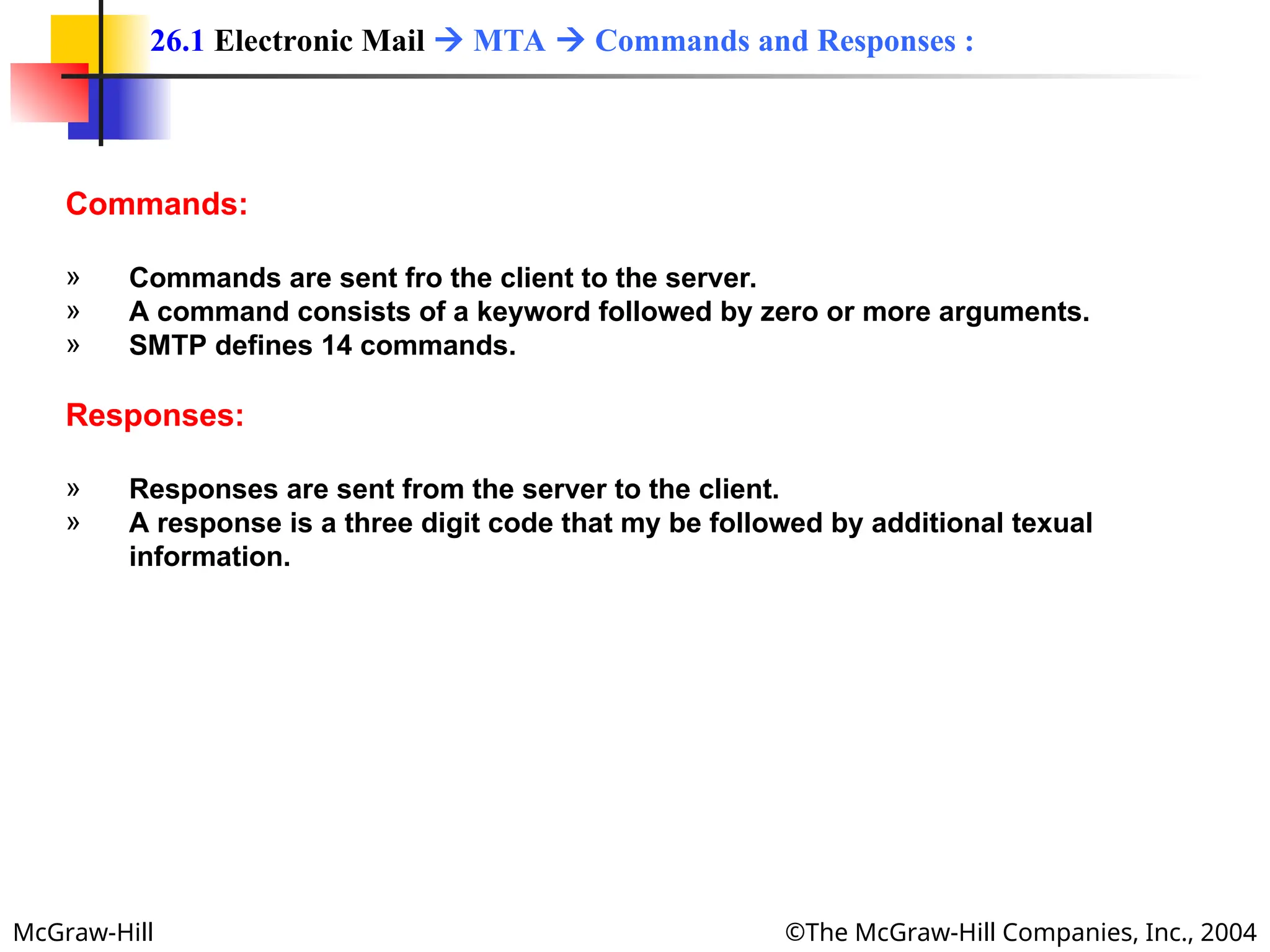
Commands:
» Commands are sent fro the client to the server.
» A command consists of a keyword followed by zero or more arguments.
» SMTP defines 14 commands.
Responses:
» Responses are sent from the server to the client.
» A response is a three digit code that my be followed by additional texual
information.
26.1 Electronic Mail  MTA  Commands and Responses :
McGraw-Hill ©The McGraw-Hill Companies, Inc., 2004
» The process of transferring a mail message occurs in three phases:
1. Connection establishment,
2. Message transfer and
3. Connection termination.
Connection Establishment:
» After a client has made a TCP connection to the well-known port 25, the SMTP
server starts the connection phase.
Message Transfer:
» After connection has been established between SMTP client and server, a single
message between a sender and one or more recipients can be exchanged.
Connection Termination:
» After the message is transferred successfully, the client terminates the
connection.
26.1 Electronic Mail  MTA  Mail Transfer Phases :
McGraw-Hill ©The McGraw-Hill Companies, Inc., 2004
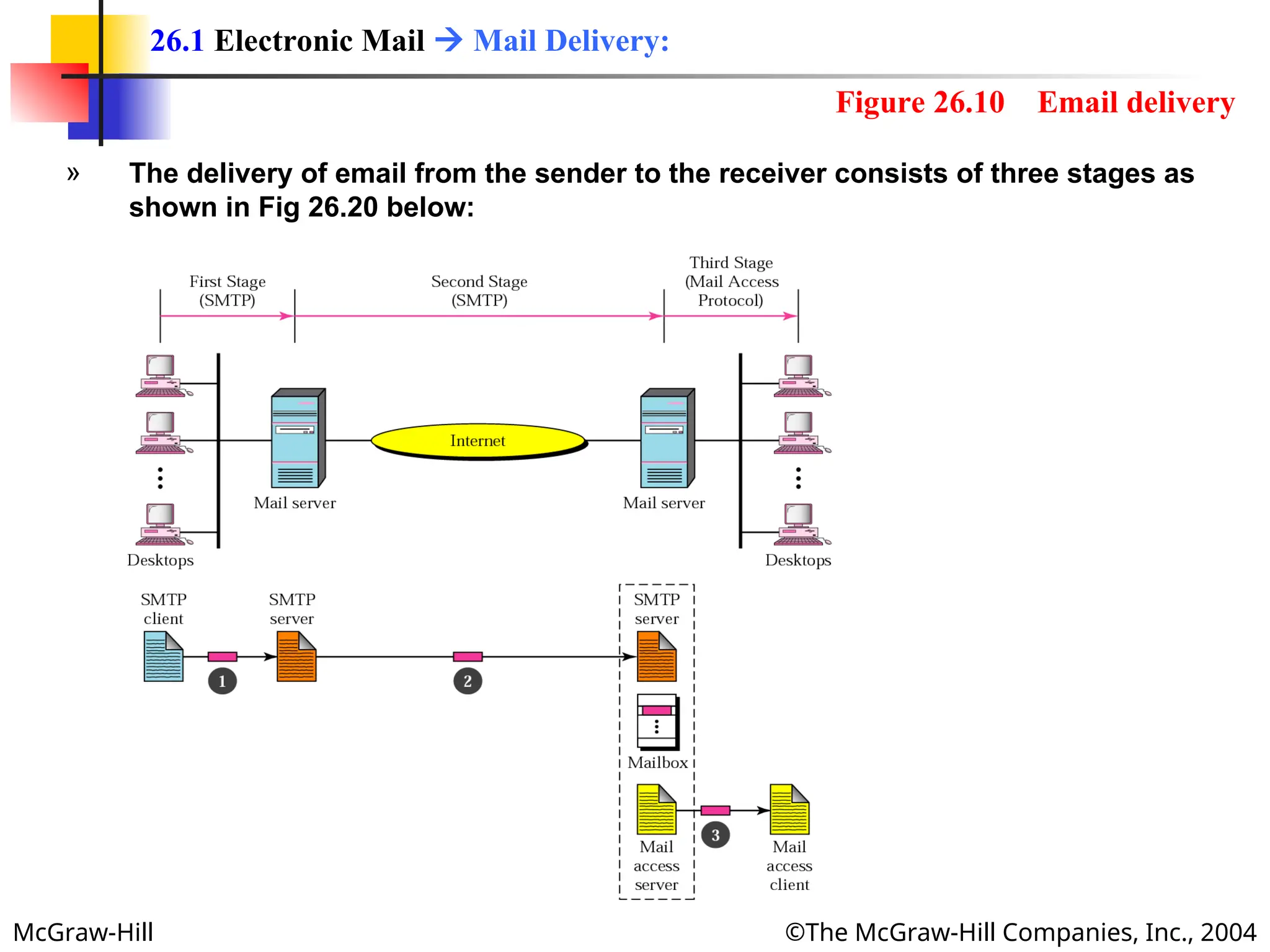
» The delivery of email from the sender to the receiver consists of three stages as
shown in Fig 26.20 below:
26.1 Electronic Mail  Mail Delivery:
Figure 26.10 Email delivery
McGraw-Hill ©The McGraw-Hill Companies, Inc., 2004
» In the first stage, the email goes from the user agent to the local server.
» The mail does not go directly to the remote server because the remote server
may not be available at all times.
» Therefore, the mail is stored in the local server until it can be sent.
» The user agent uses SMTP client software,
» and the local server uses SMTP server software.
26.1 Electronic Mail  Mail Delivery  First Stage:
McGraw-Hill ©The McGraw-Hill Companies, Inc., 2004
» In second stage, the email relayed by local server, which now acts as the SMTP
client, to the remote server, which is the SMTP server in this stage.
» The email is delivered to the remote server, not to the remote user agent.
» The reason is that SMTP messages must be received by a server that is always
running since mail can arrive at any time.
» However, people often turnoff there computers at the end of the day, and those
with laptops or mobile computers do not normally have them all the time.
» So usually an organization (or an ISP) assigns a computer to be the email server
and run the SMTP server program.
» The email is received by this mail server and stored in the mailboxes of the user
for later retrieval.
26.1 Electronic Mail  Mail Delivery  Second Stage:
McGraw-Hill ©The McGraw-Hill Companies, Inc., 2004
» In third stage, the remote user agent uses a Mail Access Protocol such as POP3
or IMAP4 (both coming up) to access the mailbox and obtain the mail.
26.1 Electronic Mail  Mail Delivery  Third Stage:
McGraw-Hill ©The McGraw-Hill Companies, Inc., 2004
» The first and second stages of mail delivery use SMTP.
» However, SMTP is not involved in the third stage.
» Because SMPT is a push protocol: it pushes messages from sender to receiver
even if the receiver does not want it.
» The operation of SMTP starts with sender, not the receiver.
» On the other hand, the third stage needs a pull protocol: the operation must
start with the recipient.
» The mail must stay in the mail server mailbox until the recipient retrieves it.
» The third stage uses a Mail Access Protocol.
» Currently two mail access protocols are available:
1. Post Office Protocol, version 3. (POP3) and
2. Internet Mail Access Protocol, version 4 (IMAP4).
26.1 Electronic Mail  Mail Access Protocols:
McGraw-Hill ©The McGraw-Hill Companies, Inc., 2004
» Post Office Protocol, version 3. (POP3) is simple, but is limited in
functionality.
» The Clint POP3 software is installed on the recipient computer.
» The server POP3 software is installed on the mail server.
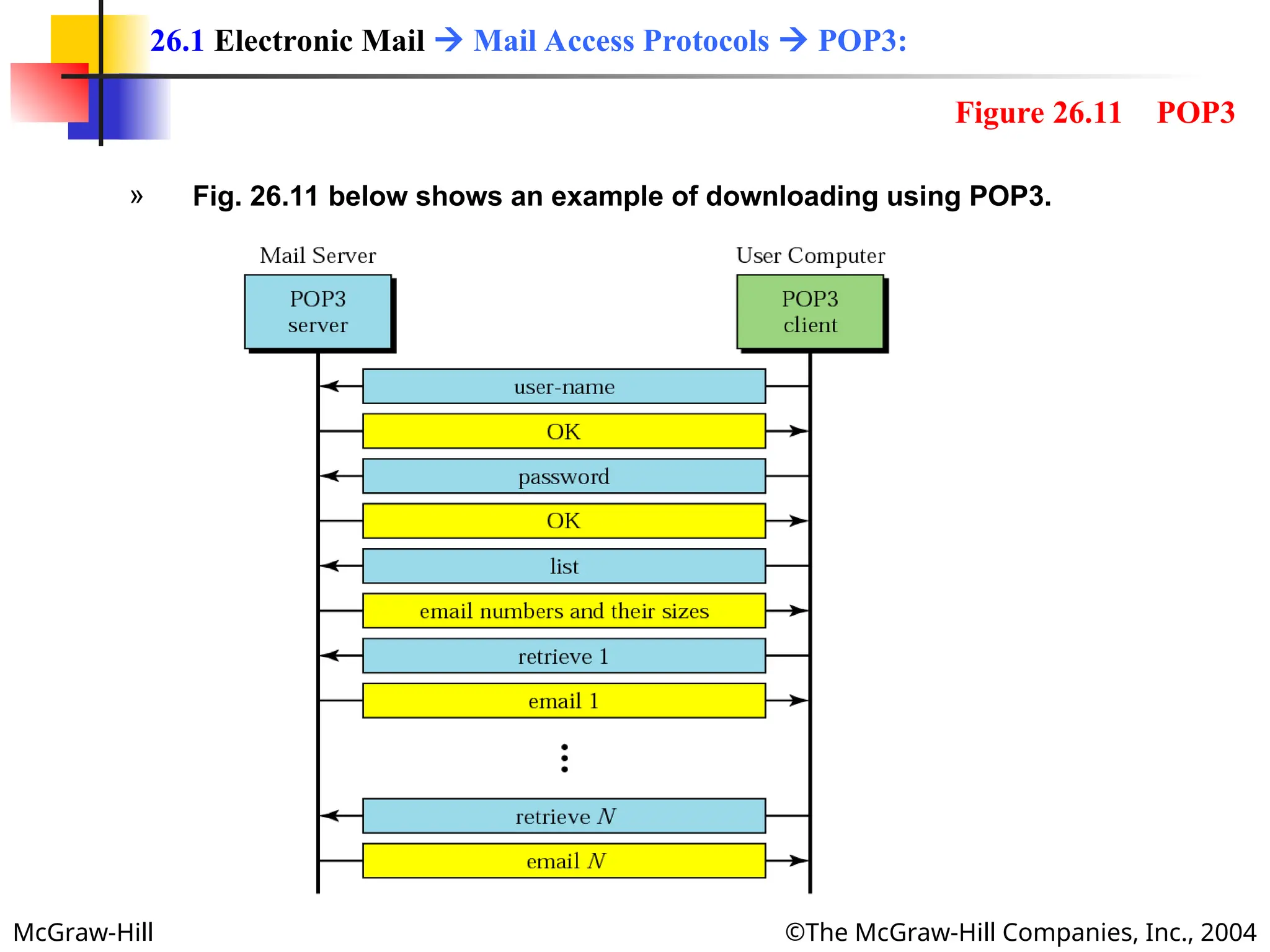
» Mail access starts with the client when the user needs to download email
from the mailbox on the mail server.
» The client (user agent) opens a connection with the server TCP port 110.
» It then sends its user name and password to access mailbox.
» The user can then list and retrieves the mail messages, one by one.
26.1 Electronic Mail  Mail Access Protocols  POP3:
McGraw-Hill ©The McGraw-Hill Companies, Inc., 2004
» Fig. 26.11 below shows an example of downloading using POP3.
26.1 Electronic Mail  Mail Access Protocols  POP3:
Figure 26.11 POP3
McGraw-Hill ©The McGraw-Hill Companies, Inc., 2004
» POP3 has two modes:
1. The delete mode and
2. The keep mode.
» In the delete mode, the mail is deleted from the mailbox after each retrieval.
» It is used when the user is working at his or her permanent computer
and can save and organize the received mail after reading or replying.
» In the keep mode, the mail remains in the mailbox after retrieval.
» It is used when the user accesses mail away from the primary
computer (e.g., a laptop).
» The mail is read but kept in the system for later retrieval and
organizing.
26.1 Electronic Mail  Mail Access Protocols  POP3:
McGraw-Hill ©The McGraw-Hill Companies, Inc., 2004
» POP3 assumes that each time a client accesses the server, the whole
mailbox will be cleared out (transferred).
» This is not continent when people access their mailboxes from different
clients (at home, at work, on a trip at a hotel etc).
» POP 3 deficient in several ways it does not allow the user to organize mail
on the server; the user cannot have different folders on the server.
» User can only create folders on his/her own computer.
» In addition POP3does not allow the user to partially check the contents of
the mail before downloading.
26.1 Electronic Mail  Mail Access Protocols  POP3 (drawbacks):
McGraw-Hill ©The McGraw-Hill Companies, Inc., 2004
» Internet Mail Access Protocol, version4 (IMAP4) is another mail access
protocol similar to POP3.
» IMAP4 has more features, more powerful and more complex.
» IMAP provides the following extra functions:
» A user can check the mail header prior to downloading.
» A user can search the contents of the mail for a specific string of
characters prior to downloading.
» A user can partially download email.
» This is specially useful if bandwidth is limited and the email contains
multimedia with high bandwidth requirement,
» A user can create, delete or rename mailbox on the mail server.
» A user can create hierarchy of mailboxes in a folder for email storage.
26.1 Electronic Mail  Mail Access Protocols  IMAP4:
McGraw-Hill ©The McGraw-Hill Companies, Inc., 2004
» Email is such a common application that some websites today provide this
service to anyone who accesses the site.
» The common sites are Hotmail and Yahoo.
» The ides is very simple.
1. Mail transfer from Alice’s browser to her mail server is done through HTTP.
2. The transfer of message from sending mail server to the receiving mail
server is still through SMTP.
3. Finally, the message from the receiving server (the web server) to Bob’s
browser is done through HTTP.
» The last phase is very interesting.
» Instead of P{OP3 or IMAP4, HTTP is normally used.
» When Bob needs to retrieve his emails, he sends a message to the website (e.g,
Yahoo).
» The website sends a form to be filled in y Bob, which includes the log-in name
ad password.
» If the log-in name and password match, the email is transferred from web-server
to Bob’s browser in HTML format.
26.1 Electronic Mail  Web-Based Mail :
McGraw-Hill ©The McGraw-Hill Companies, Inc., 2004
26.2 File Transfer
26.2 File Transfer
Connections
Communication
File Transfer
User Interface
Anonymous FTP
McGraw-Hill ©The McGraw-Hill Companies, Inc., 2004
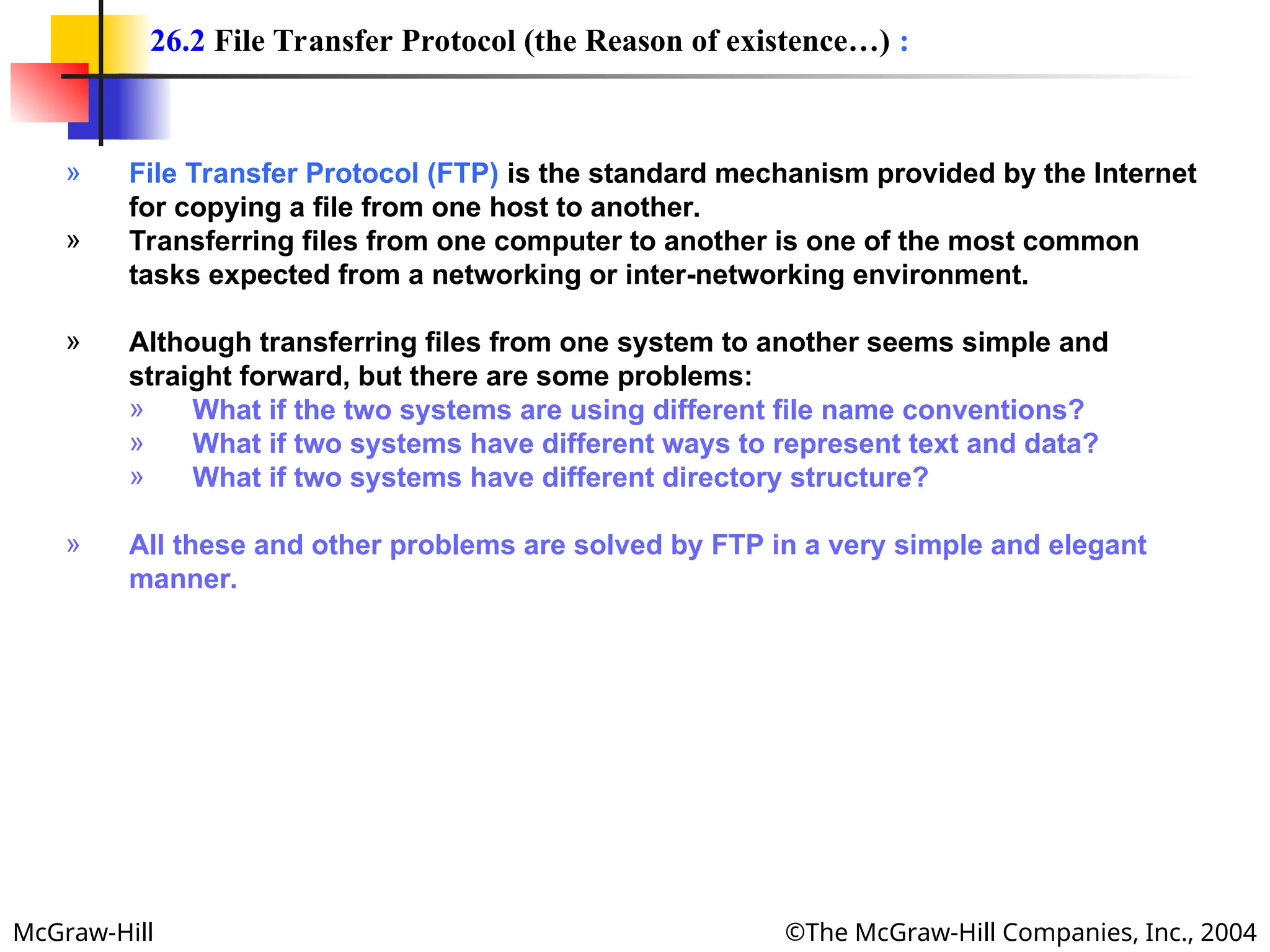
» File Transfer Protocol (FTP) is the standard mechanism provided by the Internet
for copying a file from one host to another.
» Transferring files from one computer to another is one of the most common
tasks expected from a networking or inter-networking environment.
» Although transferring files from one system to another seems simple and
straight forward, but there are some problems:
» What if the two systems are using different file name conventions?
» What if two systems have different ways to represent text and data?
» What if two systems have different directory structure?
» All these and other problems are solved by FTP in a very simple and elegant
manner.
26.2 File Transfer Protocol (the Reason of existence…) :
McGraw-Hill ©The McGraw-Hill Companies, Inc., 2004
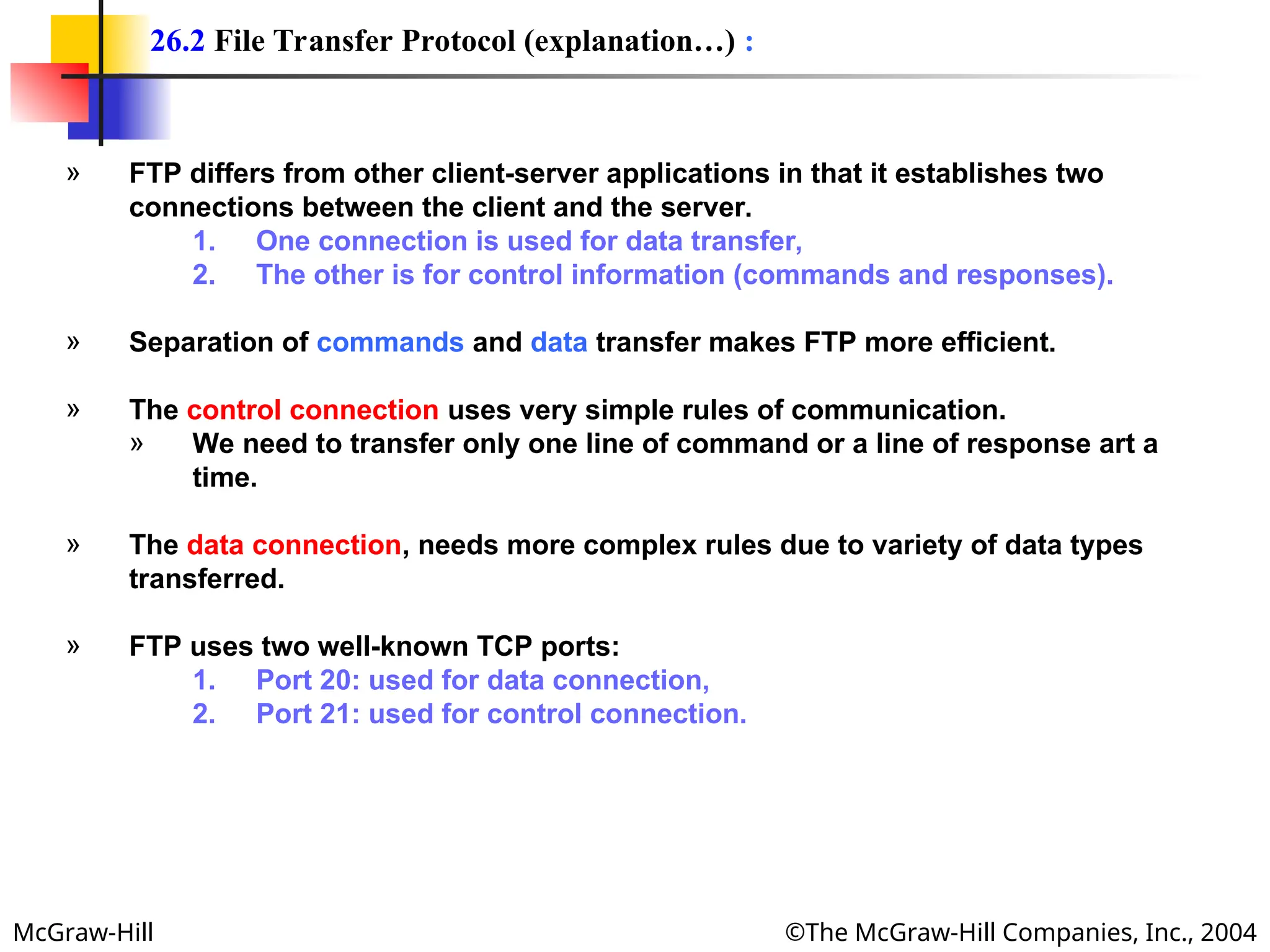
» FTP differs from other client-server applications in that it establishes two
connections between the client and the server.
1. One connection is used for data transfer,
2. The other is for control information (commands and responses).
» Separation of commands and data transfer makes FTP more efficient.
» The control connection uses very simple rules of communication.
» We need to transfer only one line of command or a line of response art a
time.
» The data connection, needs more complex rules due to variety of data types
transferred.
» FTP uses two well-known TCP ports:
1. Port 20: used for data connection,
2. Port 21: used for control connection.
26.2 File Transfer Protocol (explanation…) :
McGraw-Hill ©The McGraw-Hill Companies, Inc., 2004
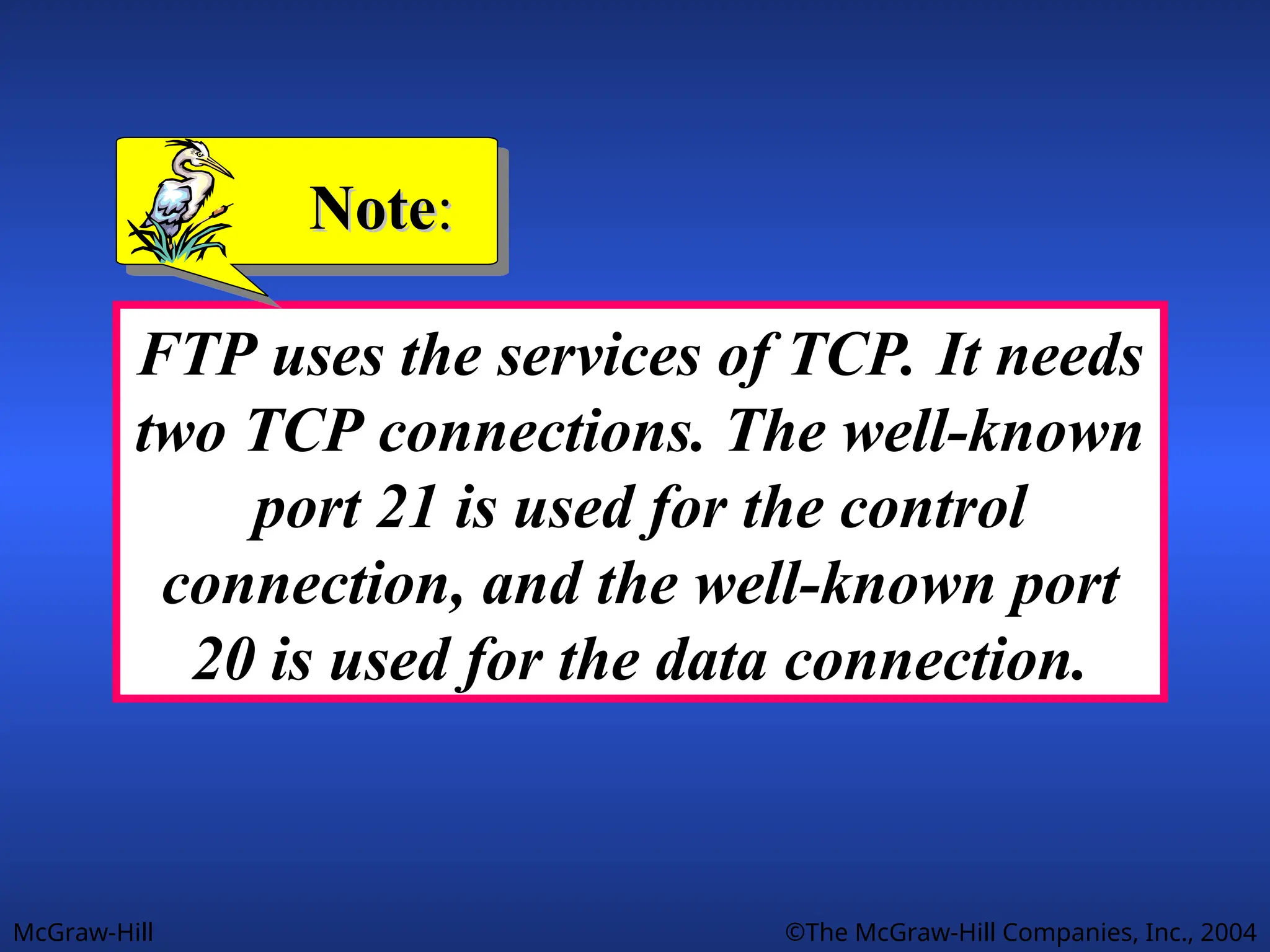
FTP uses the services of TCP. It needs
two TCP connections. The well-known
port 21 is used for the control
connection, and the well-known port
20 is used for the data connection.
Note
Note:
:
McGraw-Hill ©The McGraw-Hill Companies, Inc., 2004
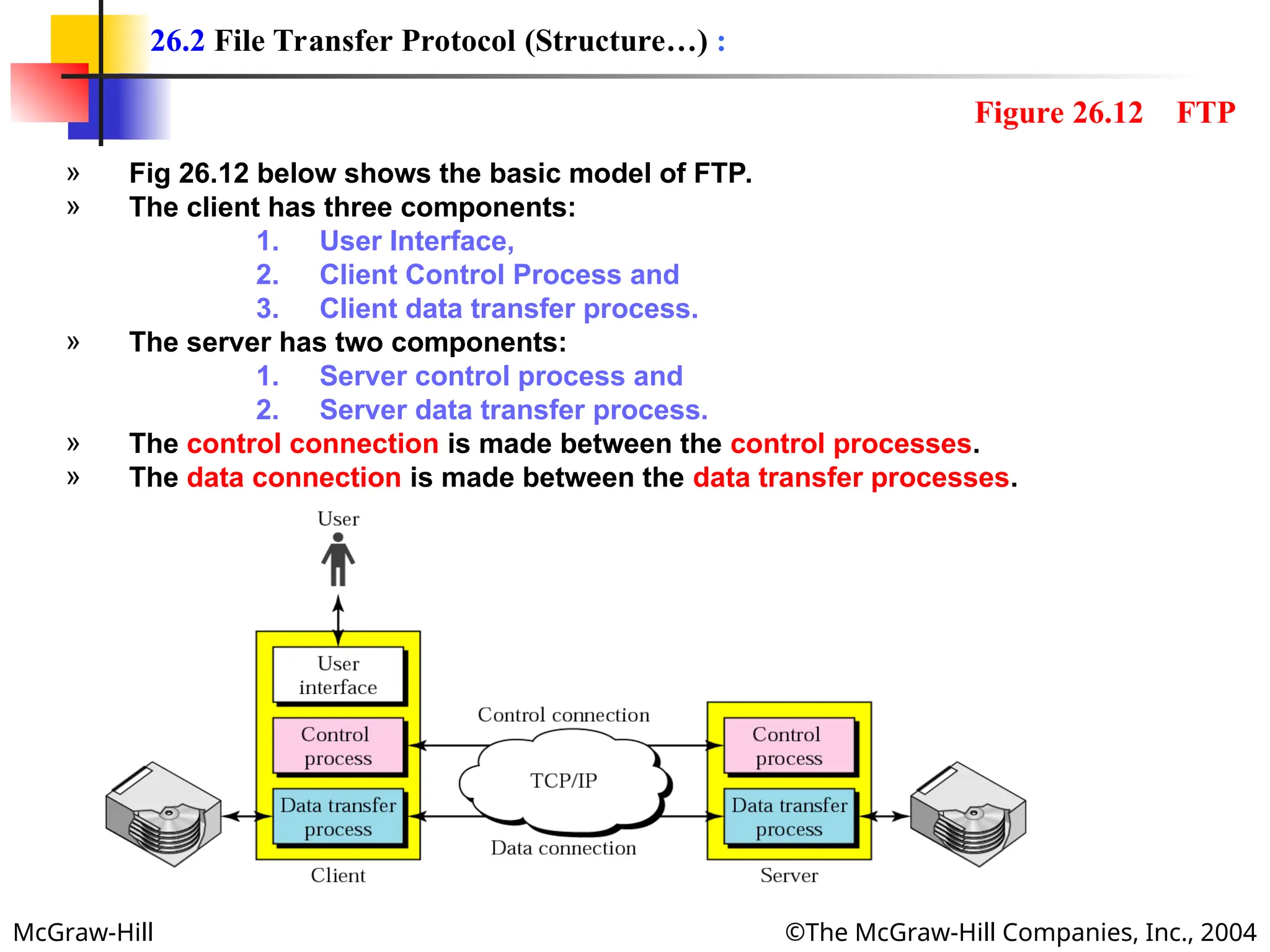
» Fig 26.12 below shows the basic model of FTP.
» The client has three components:
1. User Interface,
2. Client Control Process and
3. Client data transfer process.
» The server has two components:
1. Server control process and
2. Server data transfer process.
» The control connection is made between the control processes.
» The data connection is made between the data transfer processes.
26.2 File Transfer Protocol (Structure…) :
Figure 26.12 FTP
McGraw-Hill ©The McGraw-Hill Companies, Inc., 2004
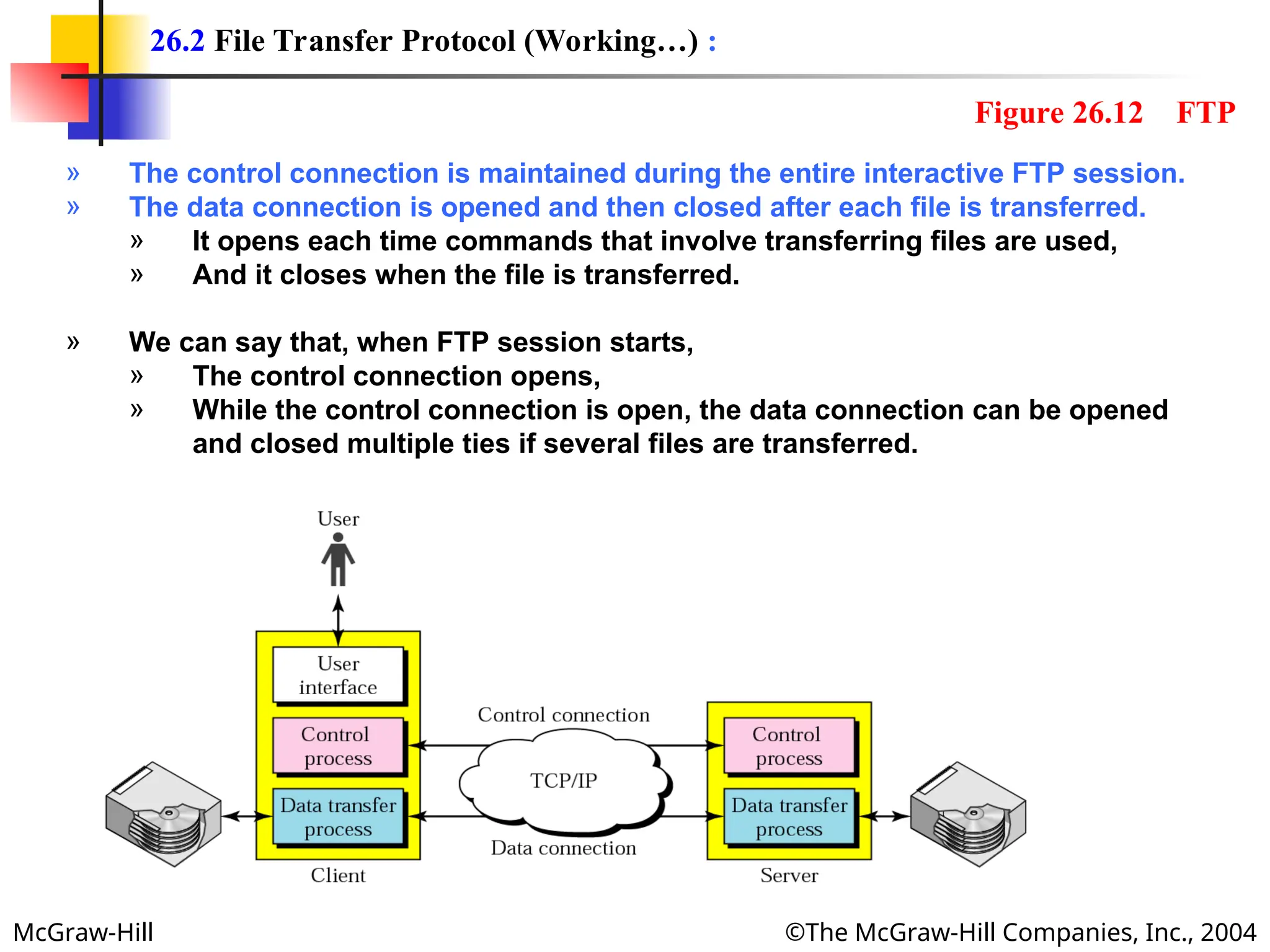
» The control connection is maintained during the entire interactive FTP session.
» The data connection is opened and then closed after each file is transferred.
» It opens each time commands that involve transferring files are used,
» And it closes when the file is transferred.
» We can say that, when FTP session starts,
» The control connection opens,
» While the control connection is open, the data connection can be opened
and closed multiple ties if several files are transferred.
26.2 File Transfer Protocol (Working…) :
Figure 26.12 FTP
McGraw-Hill ©The McGraw-Hill Companies, Inc., 2004
» The two FTP connections:
1. Control connection and
2. Data connection,
» Use different strategies and different port numbers.
Control Connection:
» The control connection uses well-known port 21 and it is created in the same
way as other application programs described so for.
» The connection remains open during the entire process.
» The service type used by the IP is minimize delay,
» Because there is an interactive connection a user (human) and a server.
» The user types commands and expects to receive responses without significant
delay.
Data connection:
» The data connection uses the well-known port 21 at the receiver site.
» The data connection is opened when data are ready to transfer.
» It is closed when it is not needed.
» A data connection may be opened and closed several times during session:
» The control connection is opened and closed once.
» The service type used by IP is maximize throughput.
26.2 FTP  Connections :
McGraw-Hill ©The McGraw-Hill Companies, Inc., 2004
» FTP client and server, which run on different computers, must communicate
with each other.
» The two computers may use
» Different operation systems,
» Different character sets,
» Different file structures and
» Different file formats.
» FTP must make this heterogeneity compatible.
» FTP has two different approaches:
1. Communication over Control Connection and
2. Communication over Data Connection.
26.2 FTP  Communication :
McGraw-Hill ©The McGraw-Hill Companies, Inc., 2004
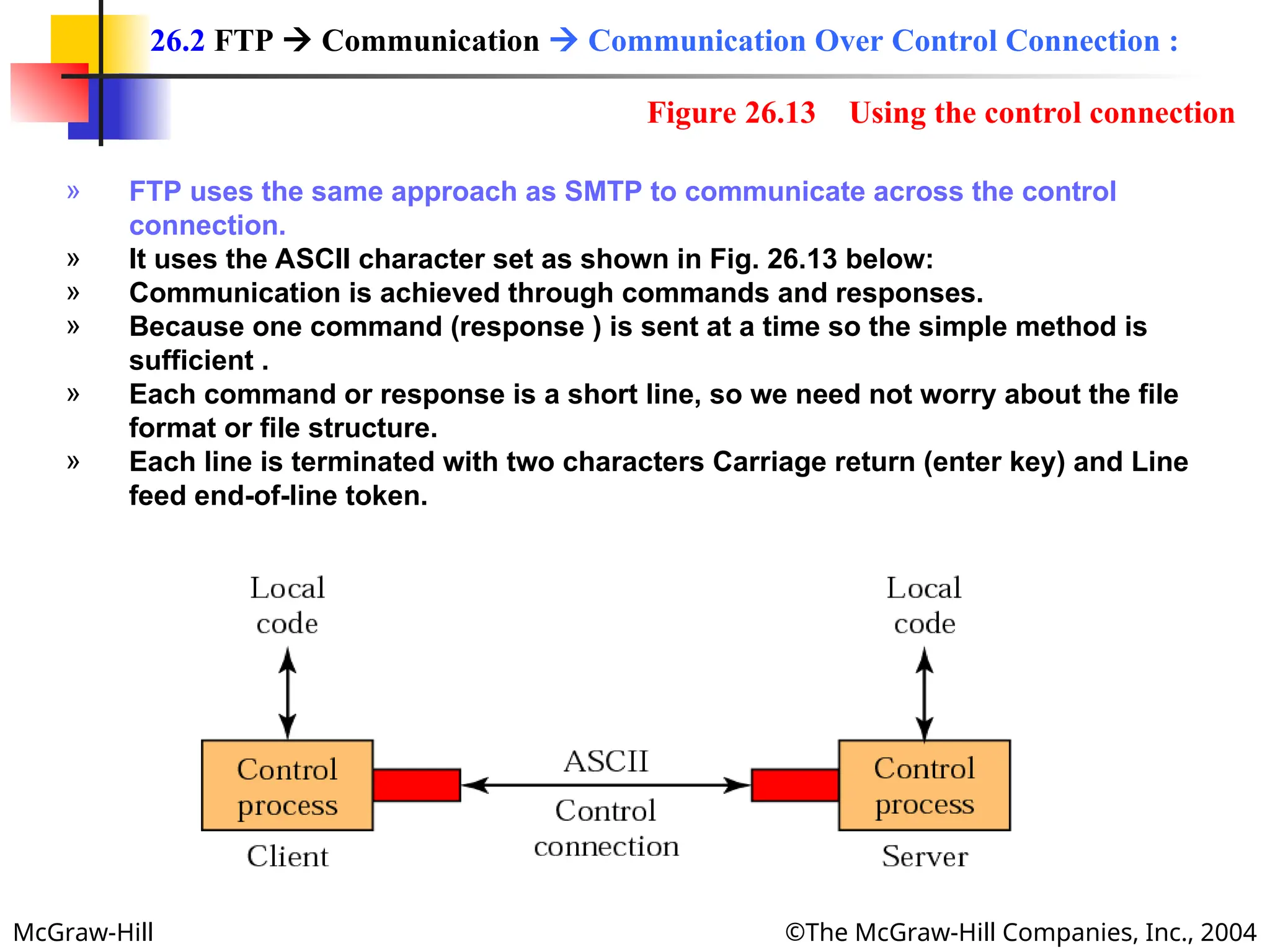
» FTP uses the same approach as SMTP to communicate across the control
connection.
» It uses the ASCII character set as shown in Fig. 26.13 below:
» Communication is achieved through commands and responses.
» Because one command (response ) is sent at a time so the simple method is
sufficient .
» Each command or response is a short line, so we need not worry about the file
format or file structure.
» Each line is terminated with two characters Carriage return (enter key) and Line
feed end-of-line token.
26.2 FTP  Communication  Communication Over Control Connection :
Figure 26.13 Using the control connection
McGraw-Hill ©The McGraw-Hill Companies, Inc., 2004
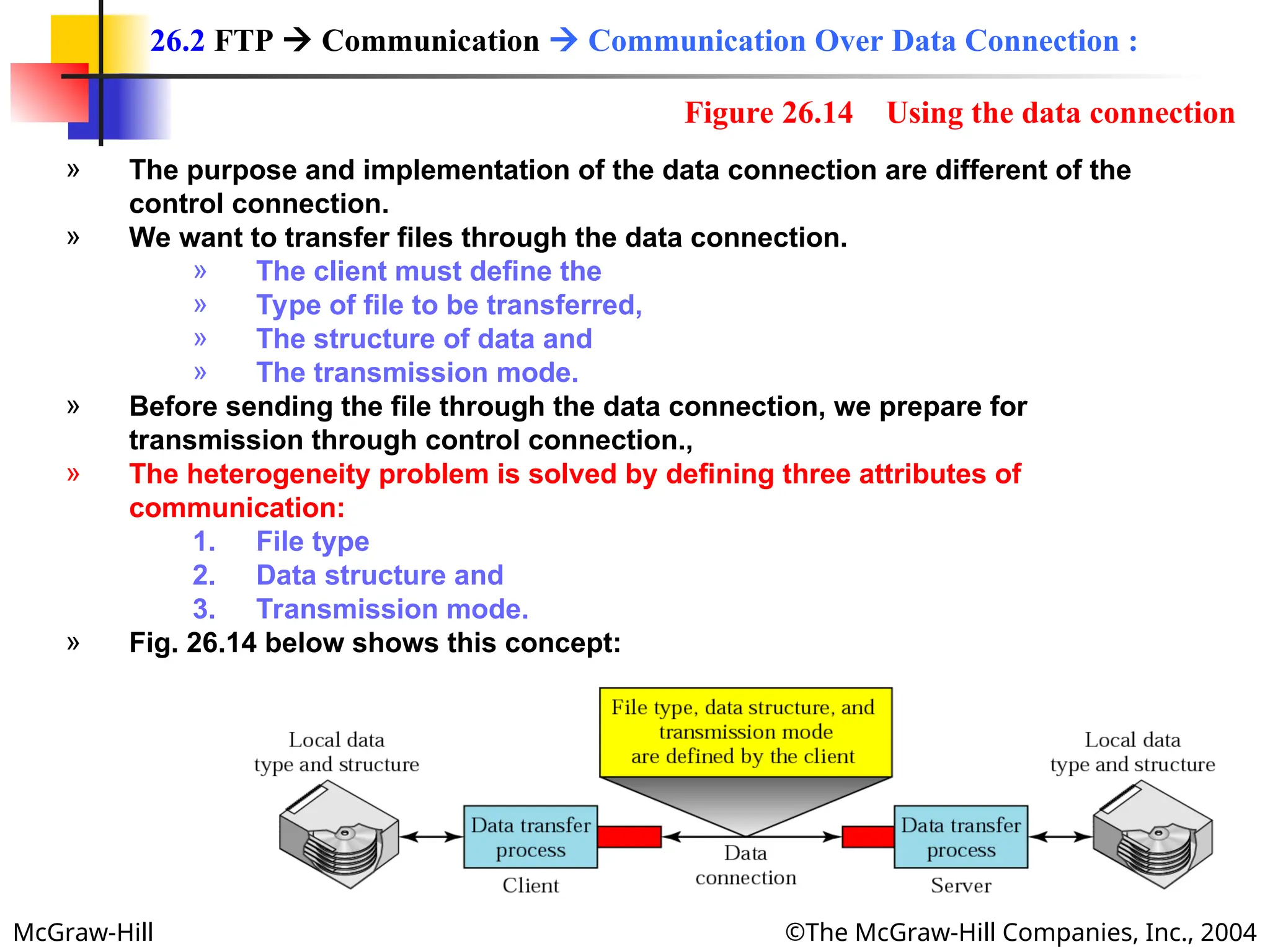
» The purpose and implementation of the data connection are different of the
control connection.
» We want to transfer files through the data connection.
» The client must define the
» Type of file to be transferred,
» The structure of data and
» The transmission mode.
» Before sending the file through the data connection, we prepare for
transmission through control connection.,
» The heterogeneity problem is solved by defining three attributes of
communication:
1. File type
2. Data structure and
3. Transmission mode.
» Fig. 26.14 below shows this concept:
26.2 FTP  Communication  Communication Over Data Connection :
Figure 26.14 Using the data connection
McGraw-Hill ©The McGraw-Hill Companies, Inc., 2004
» FTP can transfer one of the following file types across the data connection:
ASCII File:
» This is default format for transferring text files.
» Each character is encoded using ASCII.
» The sender transforms the file from its own representation to ASCII characters,
and the receiver transforms the ASCII characters to its own representation.
EBCDIC File:
» The file can be transferred using EBCDIC encoding if one or both ends of the
connection use EBCDID encoding (used in IBM computers).
Image File:
» This is the default format for transferring binary files.
» The file is sent as continuous streams of bits without ant interuption or
encoding.
» The is mostly used to transfer binary files such as compiled programs or
images encoded as 0s and 1s.
26.2 FTP  Communication  File Type :
EBCDIC: E(xtended) B(inary) C(oded) D(ecimal) I(nterchange) C(ode).]
A standard code that uses 8 bits to represent each of up to 256 alphanumeric characters.
McGraw-Hill ©The McGraw-Hill Companies, Inc., 2004
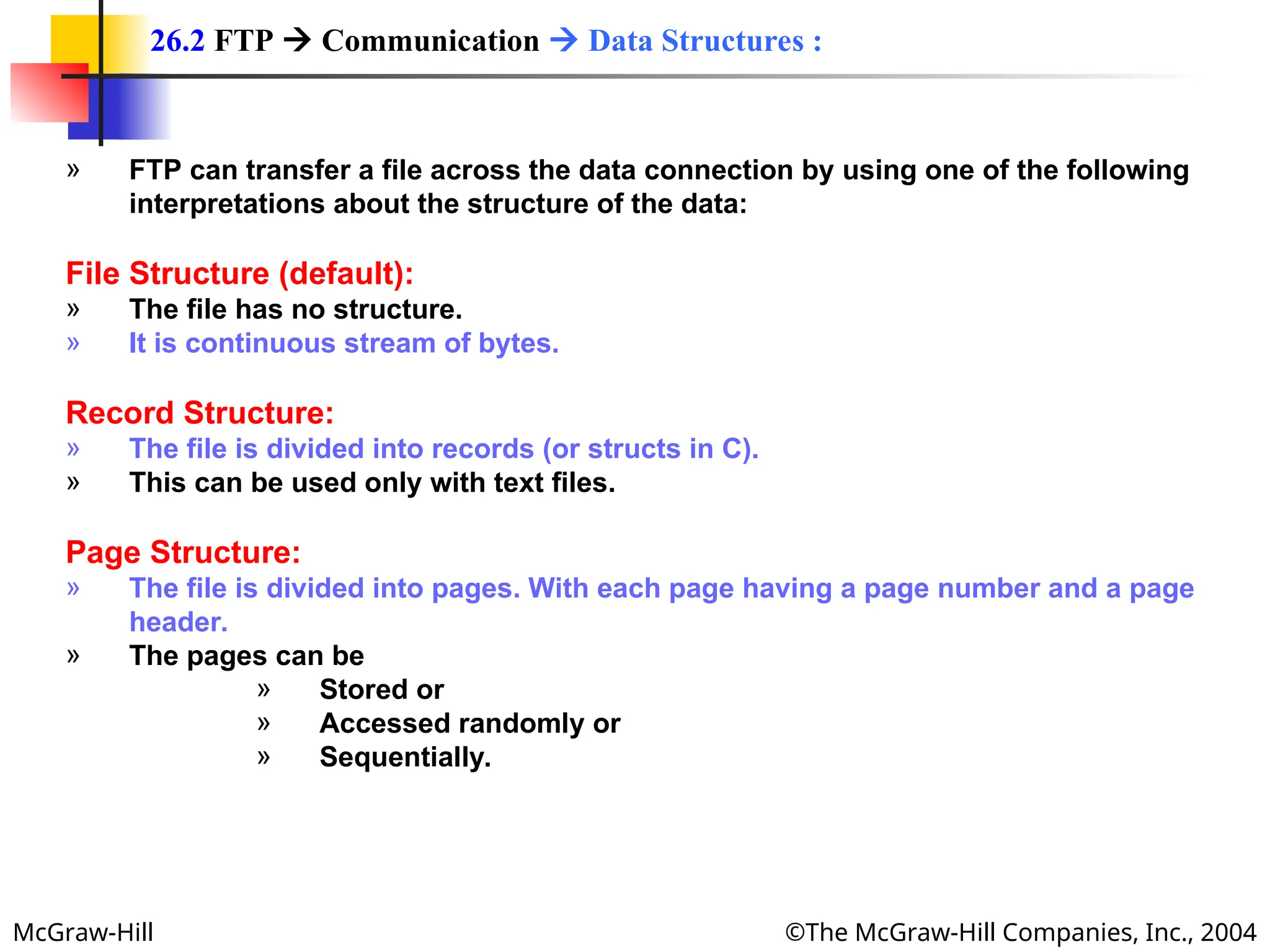
» FTP can transfer a file across the data connection by using one of the following
interpretations about the structure of the data:
File Structure (default):
» The file has no structure.
» It is continuous stream of bytes.
Record Structure:
» The file is divided into records (or structs in C).
» This can be used only with text files.
Page Structure:
» The file is divided into pages. With each page having a page number and a page
header.
» The pages can be
» Stored or
» Accessed randomly or
» Sequentially.
26.2 FTP  Communication  Data Structures :
McGraw-Hill ©The McGraw-Hill Companies, Inc., 2004
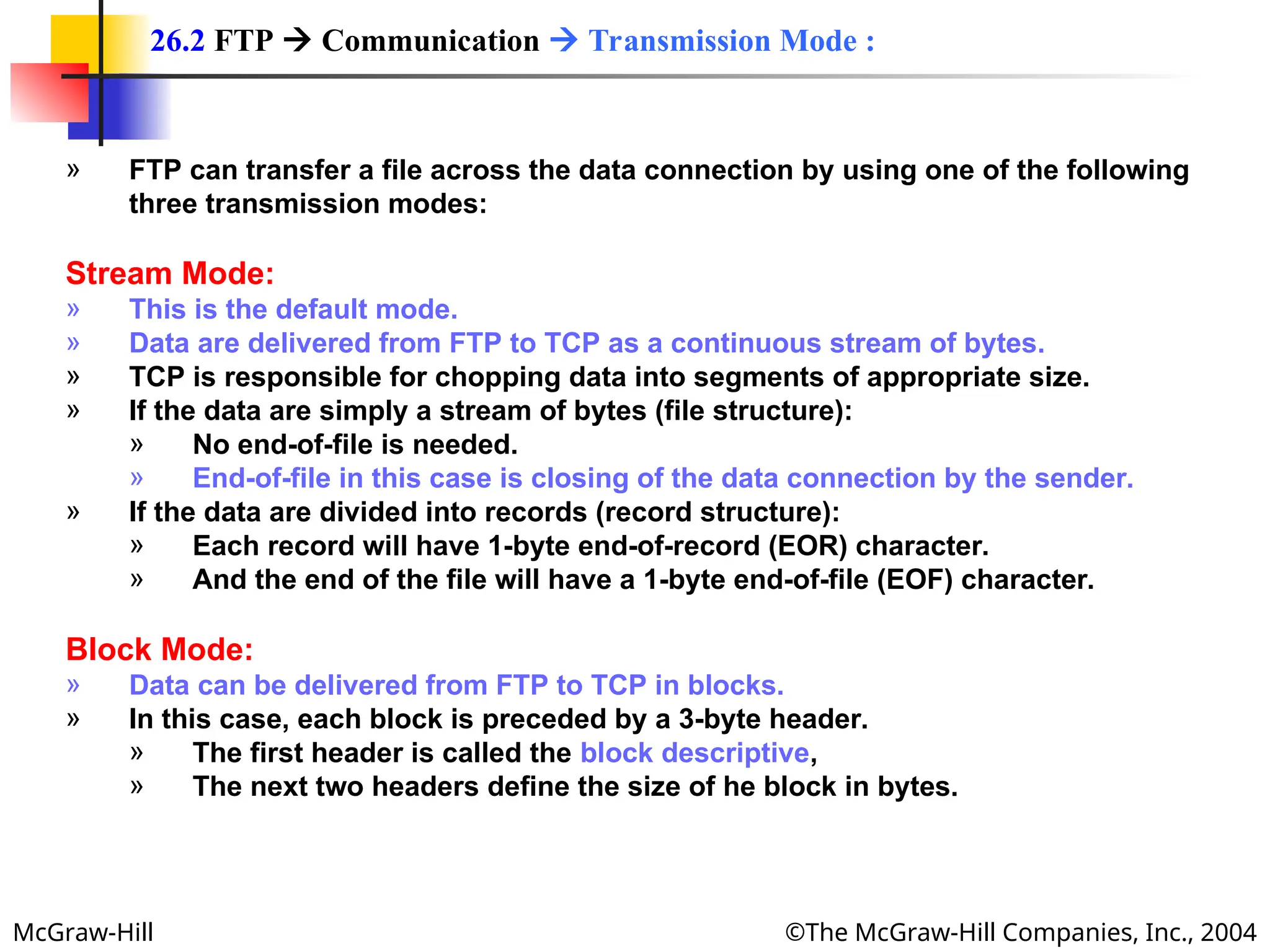
» FTP can transfer a file across the data connection by using one of the following
three transmission modes:
Stream Mode:
» This is the default mode.
» Data are delivered from FTP to TCP as a continuous stream of bytes.
» TCP is responsible for chopping data into segments of appropriate size.
» If the data are simply a stream of bytes (file structure):
» No end-of-file is needed.
» End-of-file in this case is closing of the data connection by the sender.
» If the data are divided into records (record structure):
» Each record will have 1-byte end-of-record (EOR) character.
» And the end of the file will have a 1-byte end-of-file (EOF) character.
Block Mode:
» Data can be delivered from FTP to TCP in blocks.
» In this case, each block is preceded by a 3-byte header.
» The first header is called the block descriptive,
» The next two headers define the size of he block in bytes.
26.2 FTP  Communication  Transmission Mode :
McGraw-Hill ©The McGraw-Hill Companies, Inc., 2004
Compressed Mode:
» If the file is big, the data can be compressed.
» The compression method normally used in run-length encoding.
» In this method, consecutive appearances of a data unit are replaced by one
occurrence and the number o repetitions.
» In a text file this is usually spaces (blanks).
» In a binary file, null characters are usually compressed.
26.2 FTP  Communication  Transmission Mode :
McGraw-Hill ©The McGraw-Hill Companies, Inc., 2004
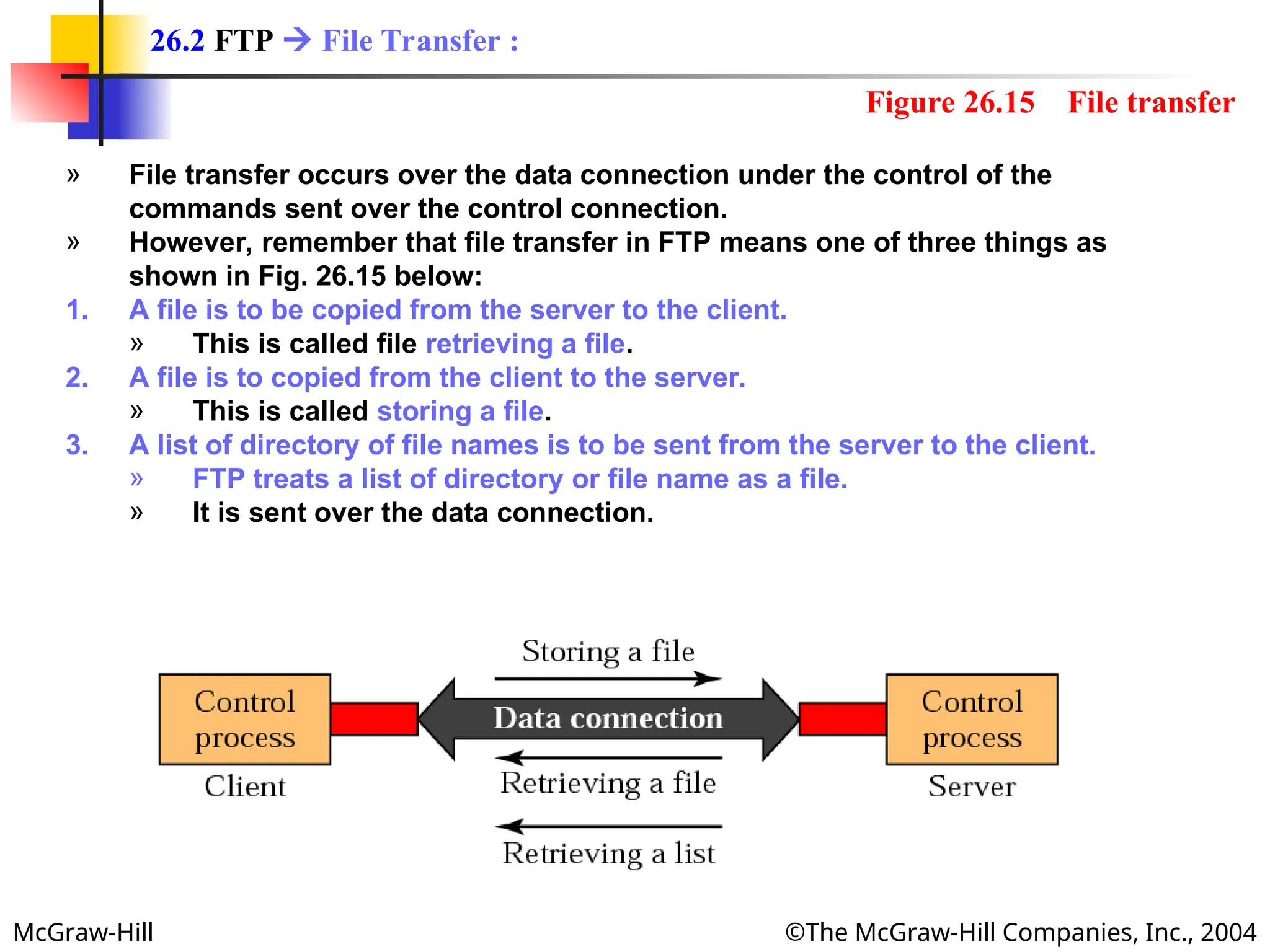
» File transfer occurs over the data connection under the control of the
commands sent over the control connection.
» However, remember that file transfer in FTP means one of three things as
shown in Fig. 26.15 below:
1. A file is to be copied from the server to the client.
» This is called file retrieving a file.
2. A file is to copied from the client to the server.
» This is called storing a file.
3. A list of directory of file names is to be sent from the server to the client.
» FTP treats a list of directory or file name as a file.
» It is sent over the data connection.
26.2 FTP  File Transfer :
Figure 26.15 File transfer
McGraw-Hill ©The McGraw-Hill Companies, Inc., 2004
Example 1
Example 1
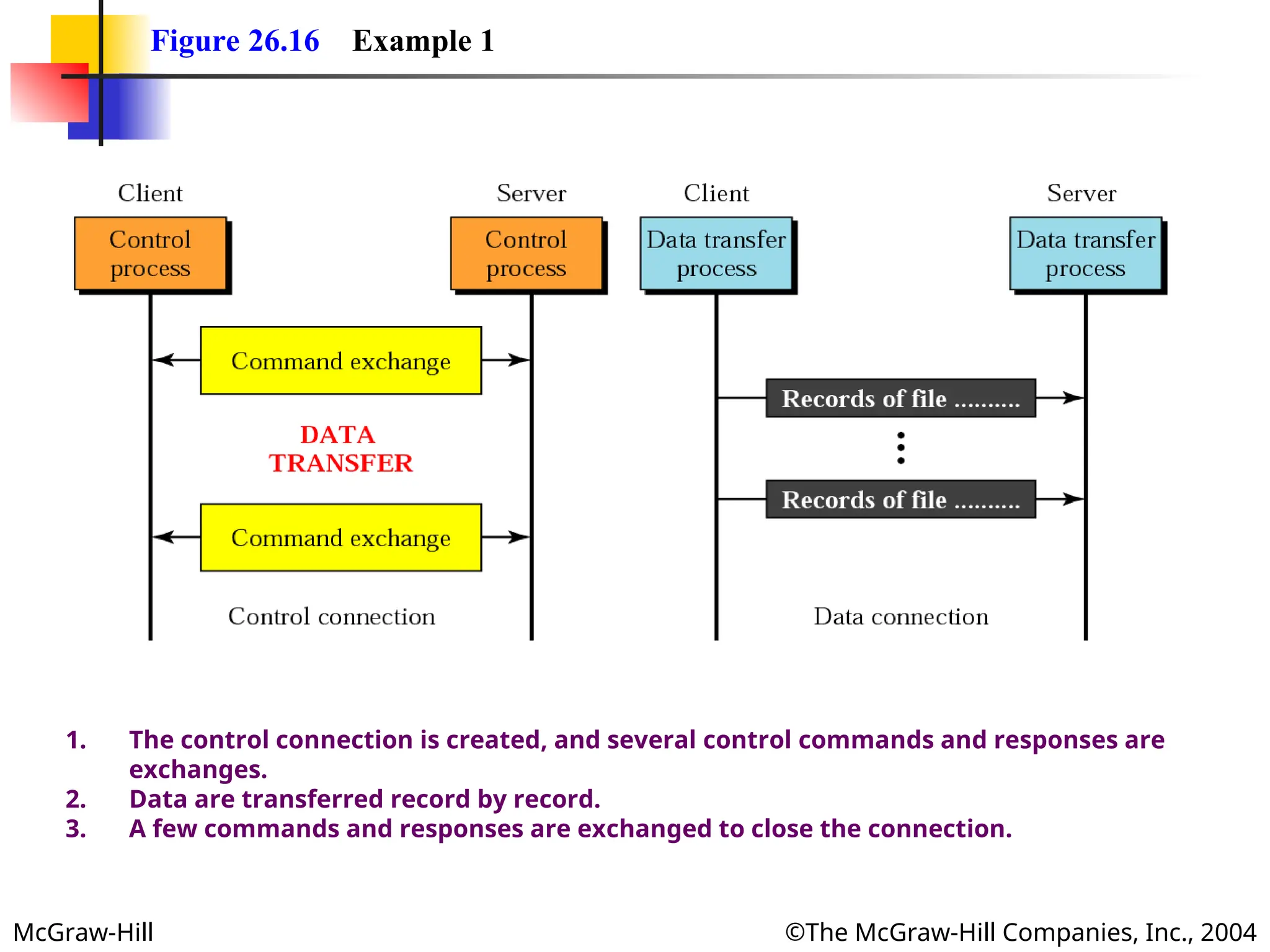
Figure 26.16 (next slide) shows an example of how a file is stored.
1. The control connection is created, and several control
commands and responses are exchanged.
2. Data are transferred record by record.
3. A few commands and responses are exchanged to close the
connection.
McGraw-Hill ©The McGraw-Hill Companies, Inc., 2004
Figure 26.16 Example 1
1. The control connection is created, and several control commands and responses are
exchanges.
2. Data are transferred record by record.
3. A few commands and responses are exchanged to close the connection.
McGraw-Hill ©The McGraw-Hill Companies, Inc., 2004
» Most operating System provide a user interface to access the services of FTP.
» The interface prompts the user for the appropriate input.
» After the user types a line, the FTP interface reads the line and changes it to the
corresponding FTP command.
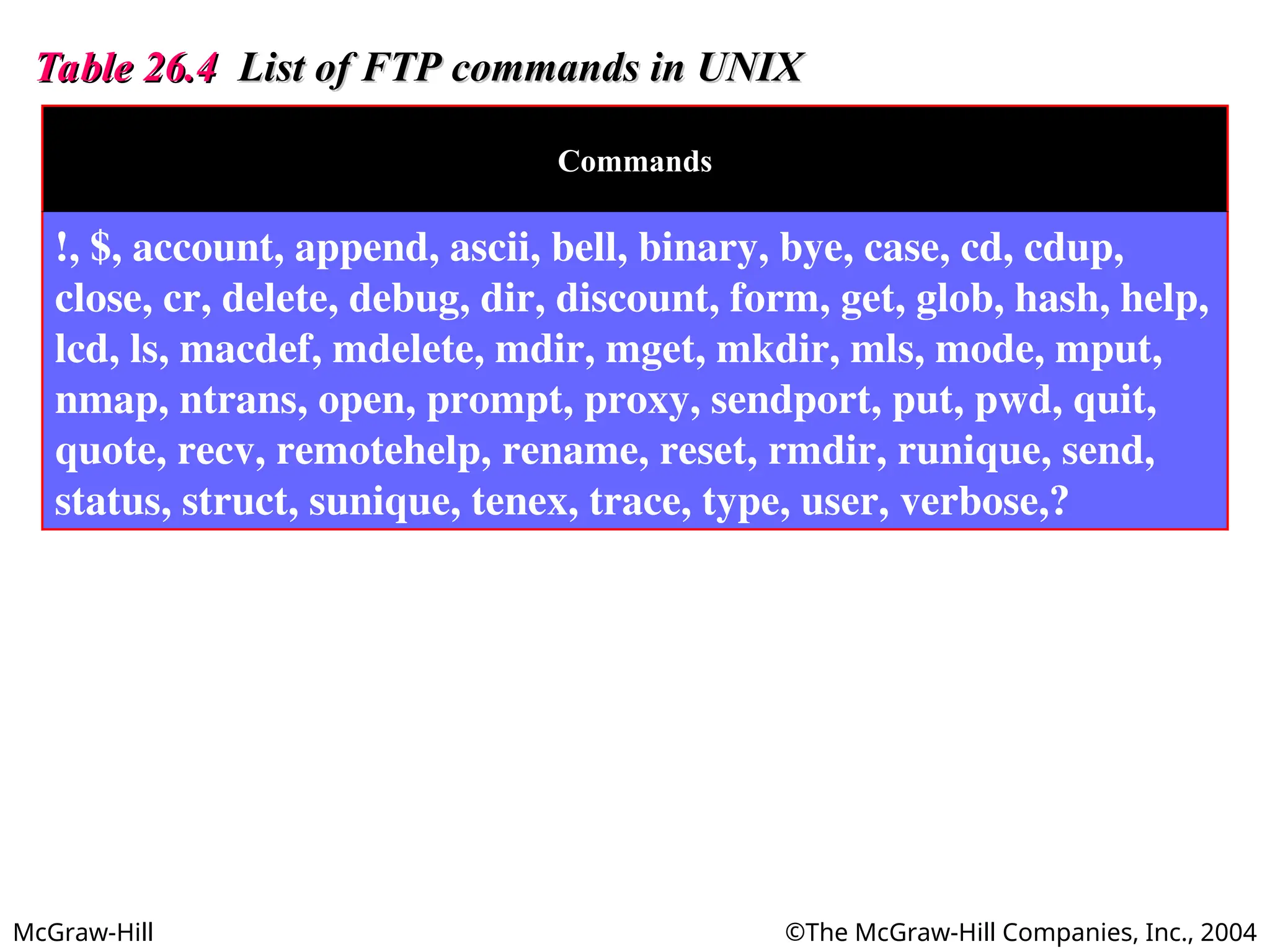
» Table 26.4 in next slide shows the interface commands provided in UNIX FTP.
» Some of the commands can be abbreviated as long as there is no ambiguity.
26.2 FTP  Communication  User Interface :
McGraw-Hill ©The McGraw-Hill Companies, Inc., 2004
Table 26.4
Table 26.4 List of FTP commands in UNIX
List of FTP commands in UNIX
Commands
!, $, account, append, ascii, bell, binary, bye, case, cd, cdup,
close, cr, delete, debug, dir, discount, form, get, glob, hash, help,
lcd, ls, macdef, mdelete, mdir, mget, mkdir, mls, mode, mput,
nmap, ntrans, open, prompt, proxy, sendport, put, pwd, quit,
quote, recv, remotehelp, rename, reset, rmdir, runique, send,
status, struct, sunique, tenex, trace, type, user, verbose,?
McGraw-Hill ©The McGraw-Hill Companies, Inc., 2004
Example 2
Example 2
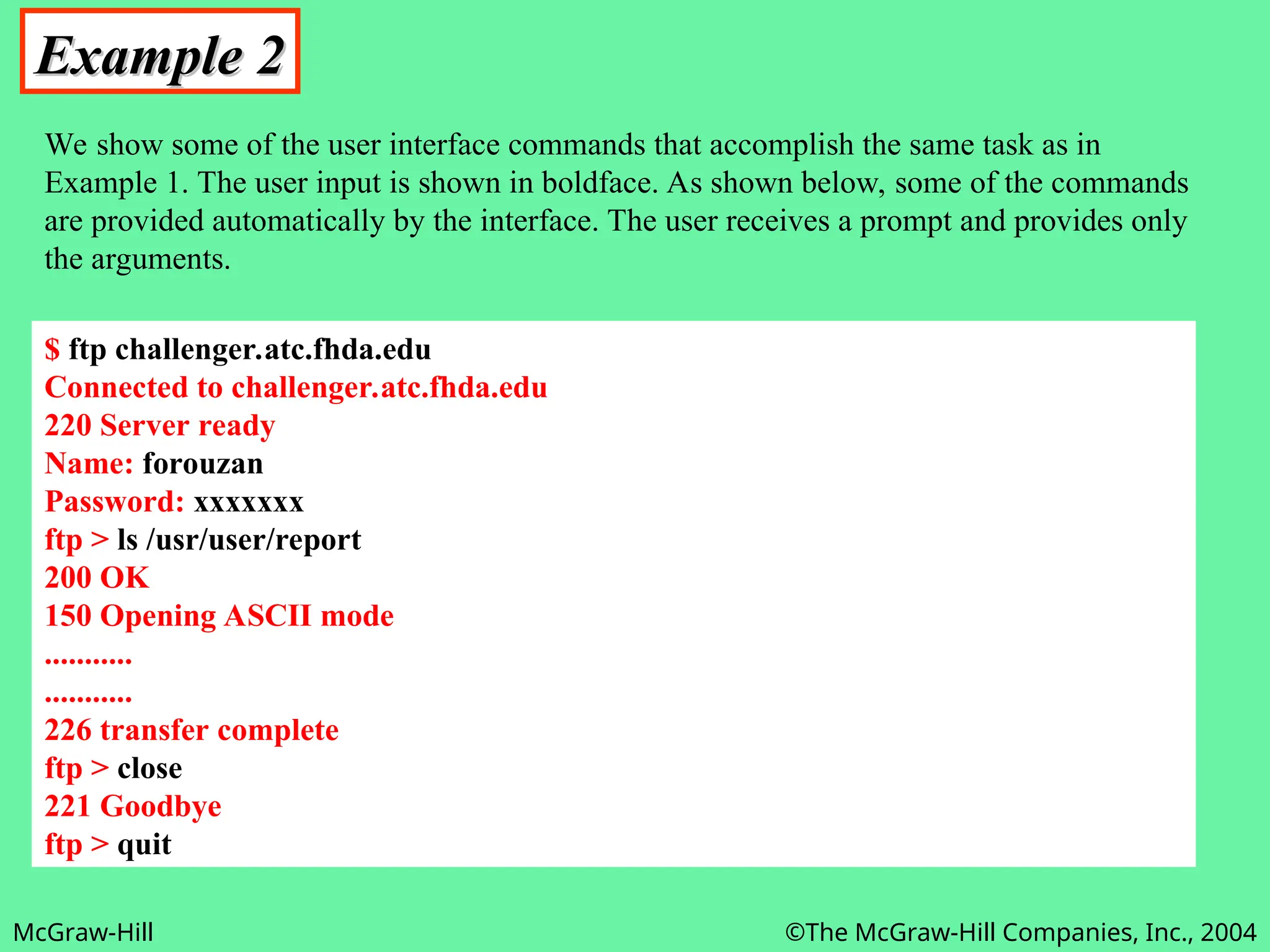
We show some of the user interface commands that accomplish the same task as in
Example 1. The user input is shown in boldface. As shown below, some of the commands
are provided automatically by the interface. The user receives a prompt and provides only
the arguments.
$ ftp challenger.atc.fhda.edu
Connected to challenger.atc.fhda.edu
220 Server ready
Name: forouzan
Password: xxxxxxx
ftp > ls /usr/user/report
200 OK
150 Opening ASCII mode
...........
...........
226 transfer complete
ftp > close
221 Goodbye
ftp > quit
McGraw-Hill ©The McGraw-Hill Companies, Inc., 2004
» To use FTP, a user needs an account (user name) and a password on the
remote server.
» Some sites have a set of files available for public access.
» To access these files, a user does not need to have an account or password.
» Instead, the user can use anonymous as the user name and guest as the
password.
» User access to the system is very limited.
» Some sites allow anonymous users only a subset of commands.
» E.g., most sites allow the user to copy some files, but do not allow navigate
through directories.
26.2 FTP  Communication  Anonymous FTP :
McGraw-Hill ©The McGraw-Hill Companies, Inc., 2004
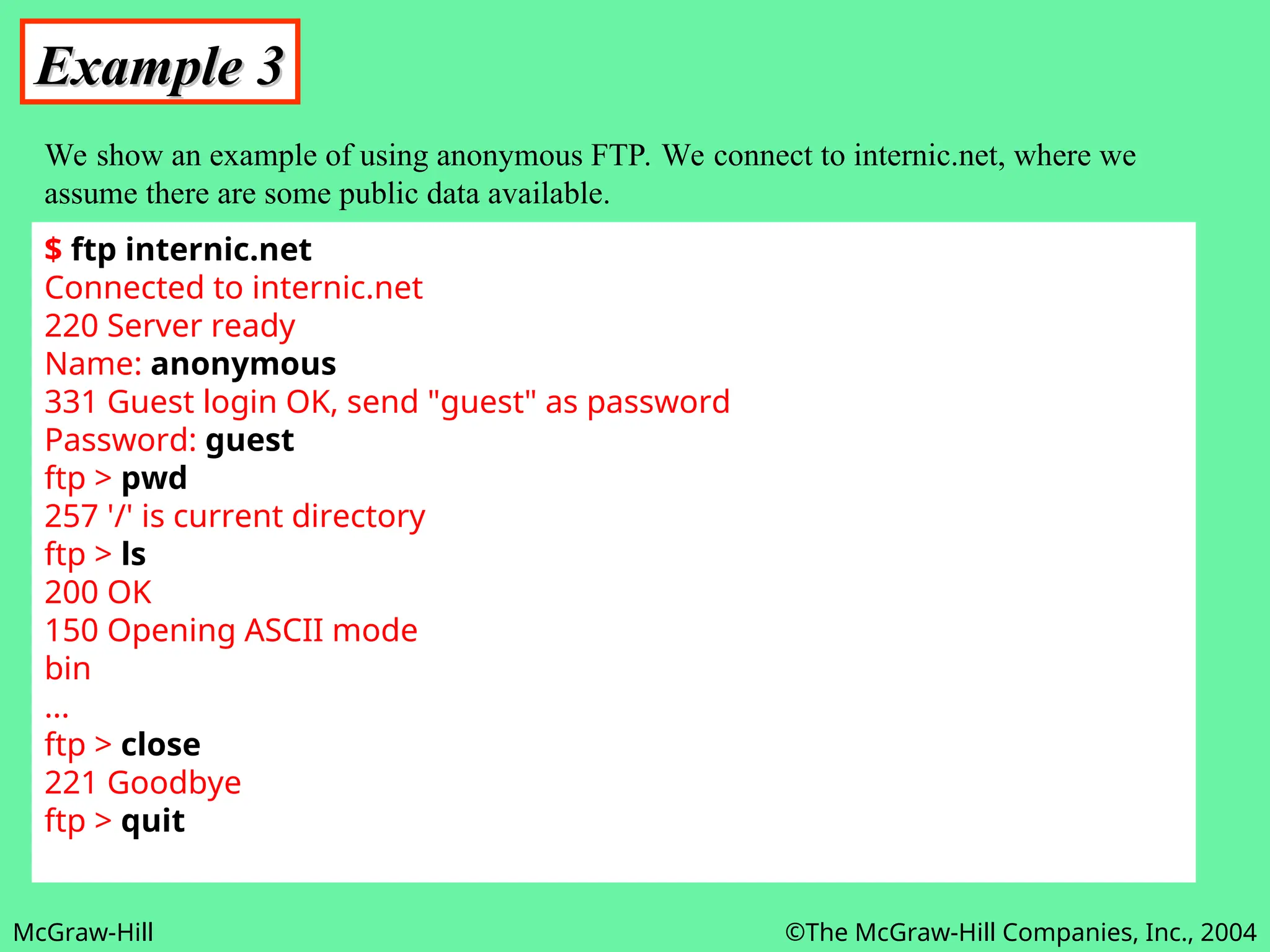
Example 3
Example 3
We show an example of using anonymous FTP. We connect to internic.net, where we
assume there are some public data available.
$ ftp internic.net
Connected to internic.net
220 Server ready
Name: anonymous
331 Guest login OK, send "guest" as password
Password: guest
ftp > pwd
257 '/' is current directory
ftp > ls
200 OK
150 Opening ASCII mode
bin
...
ftp > close
221 Goodbye
ftp > quit

26 (SMTP and FTP) 76 slides 2.ppt 26 (SMTP and FTP) 76 slides 2.ppt

  • 1.
    McGraw-Hill ©The McGraw-HillCompanies, Inc., 2004 Chapter 26 SMTP and FTP » In this chapter we’ll discuss two popular applications for exchanging information. 1. Electronic Mail: Exchanges information between people. 2. File Transfer. Exchanges files between computers.
  • 2.
    McGraw-Hill ©The McGraw-HillCompanies, Inc., 2004 26.1 Electronic Mail 26.1 Electronic Mail Sending/Receiving Mail Addresses User Agent MIME Mail Transfer Agent Mail Access Protocols
  • 3.
    McGraw-Hill ©The McGraw-HillCompanies, Inc., 2004 26.1 Electronic Mail » Electronic mail or email is one of the most popular network service. » Electronic mail is used for sending a single messages that includes: » Text, » Voice, » Video or » Graphics » To one or more recipients. » Simple Mail Transfer Protocol (SMTP) is standard mechanism for electronic mail in Internet.
  • 4.
    McGraw-Hill ©The McGraw-HillCompanies, Inc., 2004 Figure 26.1 Format of an email » To send mail, the user creates mail that looks very similar to postal mail. » It has an envelope and a message as shown in Fig. 26.1 below: 26.1 Electronic Mail  Sending/Receiving Mail  Sending Mail:
  • 5.
    McGraw-Hill ©The McGraw-HillCompanies, Inc., 2004 Envelop: » The envelop usually contains the sender address, the receiver address and other information. Message: » The message contains the headers and the body part. » The headers of the message defines the sender, the receiver, the subject of the message and other information. » The body of the message contains the actual information to be read by the recipient. 26.1 Electronic Mail  Sending/Receiving Mail  Sending Mail:
  • 6.
    McGraw-Hill ©The McGraw-HillCompanies, Inc., 2004 » The email system periodically checks the mailboxes. » If a user has mail, it inform the user with a notice. » If the user is ready to read the mail, a list displayed in which each line contains a summary of the information about a particular message in the mailbox. » The summary usually includes: » The sender mail address, » The subject, » And the time the mail was sent or received. » The user can select any of the message and display its contents on the screen. 26.1 Electronic Mail  Sending/Receiving Mail  Receiving Mail:
  • 7.
    McGraw-Hill ©The McGraw-HillCompanies, Inc., 2004 » To deliver mail, a mail handling system must use an addressing system with unique addresses. » The addressing system used by SMTP consists of two parts: 1. A local part and 2. A domain name. » Separated by an @ sign, as shown in Fig. 26.2 below: 26.1 Electronic Mail  Addresses: Figure 26.2 Email address
  • 8.
    McGraw-Hill ©The McGraw-HillCompanies, Inc., 2004 Local Part: » The local part defines the name of a special file, called the user mailbox, where all the mail received for a user, is stored for retrieval by the user agent. Domain Name: » The second part of the address is the domain name. » An organization usually selects one or more hosts to receive and send email; they are sometimes called mail exchanges. » The domain name assigned to each mail exchanger either comes from the DNS database or is logical name (e.g., the name of the organization). 26.1 Electronic Mail  Addresses:
  • 9.
    McGraw-Hill ©The McGraw-HillCompanies, Inc., 2004 » User Agent (UA) is the first component of Electronic Mail system. » A User Agent is sometimes called a mail reader, but this terminology is confusing, so we prefer to use the term User Agent. » Services Provided by a User Agent: » A User Agent is a software package (program) that » Composes, » Reads, » Replies to and » Forward messages. » It also handles mail boxes. » Fig. 26.3 below shows the services of a typical user agent. 26.1 Electronic Mail  User Agent (UA): Figure 26.3 User agent
  • 10.
    McGraw-Hill ©The McGraw-HillCompanies, Inc., 2004 » User Agent (UA) is the first component of Electronic Mail system. » A User Agent is sometimes called a mail reader, but this terminology is confusing, so we prefer to use the term User Agent. Services Provided by a User Agent: » A User Agent is a software package (program) that » Composes, » Reads, » Replies to and » Forward messages. » It also handles mail boxes. » Fig. 26.3 below shows the services of a typical user agent. 26.1 Electronic Mail  User Agent (UA): Figure 26.3 User agent
  • 11.
    McGraw-Hill ©The McGraw-HillCompanies, Inc., 2004 Composing Messages: » A User Agent is responsible for composing the email message to be sent out. » Most user agents provide a template on the screen to be filled in by the user. » Some even has a built-in editor that can do: » Spell checking, » Grammar checking, and » other tasks one expects from a sophisticated word processor. » A user, off course, can use his or her favorite text editor or word processor to create the message and import it, or cut and paste, into the user agent. 26.1 Electronic Mail  User Agent (UA)  Services Provided By a User Agent:
  • 12.
    McGraw-Hill ©The McGraw-HillCompanies, Inc., 2004 Reading Messages: » The second duty of the user agent is to read the incoming messages. » When a user invokes a user agent, it first checks the mail in the incoming mailbox. » Most user agents show a one-line summary of each retrieval mail which contain the following fields: 1. A number field, 2. A flag field that shows if » the mail is new, » already read but not replied to, » read and replied, » and so on. 3. The size of the message, 4. The sender, 5. The subject field if the subject line in the message Is not empty. 26.1 Electronic Mail  User Agent (UA)  Services Provided By a User Agent:
  • 13.
    McGraw-Hill ©The McGraw-HillCompanies, Inc., 2004 Replying to Messages: » After reading a message, a user can use the user agent to reply to a message. » Normally, a user agent allows the user to reply to the original sender or to reply to all recipients of the message. » The reply message normally contains the original message (for quick reference) and the new message. Forwarding Message: » Replying is defined as sending a message to the sender or recipients of the copy. » Forwarding means to send the message to a third party. » A user agent allows the receiver to forward the message, with or without extra comments, to a third party. 26.1 Electronic Mail  User Agent (UA)  Services Provided By a User Agent:
  • 14.
    McGraw-Hill ©The McGraw-HillCompanies, Inc., 2004 Handling Mailboxes: » A user agent creates two mailboxes: 1. Inbox and 2. Outbox. » Each box is a file with special format that can be handled by the user agent. » The inbox keeps all the received emails until they are deleted by the user. » The outbox keeps all the sent emails until the user deletes them. 26.1 Electronic Mail  User Agent (UA)  Services Provided By a User Agent:
  • 15.
    McGraw-Hill ©The McGraw-HillCompanies, Inc., 2004 » There are two types of user agents: 1. Command-driven and 2. GUI based. Command Driven: » Command-driven user agents belong to the early days of the electronic mail. » They are still present as the underlying user agents in servers. » A command-driven user agent normally accepts a one-character command from the keyboard to perform its task. » E.g. A user can type the character r, at the command prompt, to reply to the sender of the message. » Or type R to reply to sender and all recipient. » Some examples of command-driven user agents are: » Mail, » Pine, and » Elm. 26.1 Electronic Mail  User Agent (UA)  User Agent Types:
  • 16.
    McGraw-Hill ©The McGraw-HillCompanies, Inc., 2004 Some examples of command-driven user agents are mail, pine, and elm. Note Note: :
  • 17.
    McGraw-Hill ©The McGraw-HillCompanies, Inc., 2004 GUI Based: » Modern user agents are GUI-based. » They contain graphical user interface (GUI) components that allow the user to interact with the software by using both the keyboard and the mouse. » They have graphical components such as » Icons, » Menu bars and » Windows » that make the services easy access. » Some examples of GUI-based user agents are: » Eudora, » Microsoft’s Outlook and » Netscape. 26.1 Electronic Mail  User Agent (UA)  User Agent Types:
  • 18.
    McGraw-Hill ©The McGraw-HillCompanies, Inc., 2004 Some examples of GUI-based user agents are Eudora, Outlook, and Netscape. Note Note: :
  • 19.
    McGraw-Hill ©The McGraw-HillCompanies, Inc., 2004 Multipurpose Internet Mail Extensions: » SMPTP is a simple mail transfer protocol. » Its simplicity, however comes with a price. » SMTP has some limitations e.g. » SMTP can send messages only in 7-bit ASCII format. » SMTP cannot be used for languages that are not supported by 7-bit ASCII characters (such as French, German, Russian Chinese and Japanese). » SMTP cannot be used to send binary files (files that are stored as stream of 0s and 1s without using any character code), video and audio. » MIME is a supplementary protocol that allows non-ASCII data to be sent through SMTP. » MIME is not a mail protocol and cannot replace SMTP. » MIME is only an extension to SMTP. 26.1 Electronic Mail  MIME:
  • 20.
    McGraw-Hill ©The McGraw-HillCompanies, Inc., 2004 » MIME transforms non-ASCII data at the sender site ASCII data and delivers to the client SMTP to be sent through the Internet. » The server SMTP at the receiving side receives the ASCII data and delivers them to MIME to be transformed to the original data. » We can think of MIME as a set of software functions that transforms non- ASCII data to ASCII data and vice versa, as shown in Fig. 26.4 below: 26.1 Electronic Mail  MIME: Figure 26.4 MIME
  • 21.
    McGraw-Hill ©The McGraw-HillCompanies, Inc., 2004 » MIME defines five headers that can be added to the original SMTP header section to define the transformation parameters: 1. MIME-Version. 2. Content-Type. 3. Content-Transfer-Encoding. 4. Content-Id. 5. Content-Description. » Fig. 26.5 below shows the original header and the extended header. 26.1 Electronic Mail  MIME: Figure 26.5 MIME header
  • 22.
    McGraw-Hill ©The McGraw-HillCompanies, Inc., 2004 MIME-Version: » This header defines the version of MIME used. » The current version is 1.1. MIME-Version: 1.1. MIME-Version: 1.1. Content-Type: » This header defines the type of data used in the body of the message. » The content-type and the content-subtype are separated by a slash. » Depending on the subtype, the header may contain other parameters. Content-Type: <Type / subtype; parameters > Content-Type: <Type / subtype; parameters > 26.1 Electronic Mail  MIME  Header Fields:
  • 23.
    McGraw-Hill ©The McGraw-HillCompanies, Inc., 2004 Table 26.1 Table 26.1 Data types and subtypes in MIME Data types and subtypes in MIME Type Subtype Description Text Plain Unformatted text Multiport Mixed Body contains ordered parts of different data types Parallel Same as above, but no order Digest Similar to mixed, but the default is message/RFC822 Alternative Parts are different versions of the same message Message RFC822 Body is an encapsulated message Partial Body is a fragment of a bigger message Ext. Body Body is a reference to another message Image JPEG Image is in JPEG GIF Video is in GIF format Video MPEG Video is in MPEG format Audio Basic Single-channel encoding of voice at 8 KHz Application PostScript Adobe PostScript Octet-Stream General binary data (8-bit bytes)
  • 24.
    McGraw-Hill ©The McGraw-HillCompanies, Inc., 2004 Text: » The original message is in 7-bit ASCII format, and no transformation by MIME is needed. » There is only one subtype currently used, plain. Multipart: » The body contains multiple, independent parts. » The multipart header needs to define the boundary between each part. » The boundary is used as a parameter. » It is a string token that is repeated before each part on a separate line by itself and preceded by two hyphens. » The body will be terminated using boundary token preceded and terminated by two hyphens. 26.1 Electronic Mail  MIME  Header Fields  Content-Types :
  • 25.
    McGraw-Hill ©The McGraw-HillCompanies, Inc., 2004 Multipart: » Four sub-types are defined for this type: 1. Mixed, 2. Parallel, 3. Digest and 4. Alternative. » In mixed subtype, the parts must be presented to the recipient in the exact order as in the message. » Each part has a different type and is defined at the boundary. » The parallel subtype is similar to the mixed sub-type, except that the order of the parts is unimportant. » The digest subtype also similar to the mixed subtype except that the default type/subtype is message/RFC822 as defined below. » In the alternative subtype, the same message is repeated using different formats. » The following is an example of a multipart message using mixed subtype: 26.1 Electronic Mail  MIME  Header Fields  Content-Types : Content-Type : multipart/mixed; boundary=xxx --xxxx Content-Type : text/plain; . . . . . . . . . . . . . . . . . . . . . . . . . . . . . . . . . . . . --xxxx Content-Type : image/gif; . . . . . . . . . . . . . . . . . . . . . . . . . . . . . . . . . . . . --xxxx
  • 26.
    McGraw-Hill ©The McGraw-HillCompanies, Inc., 2004 Message: » In the message type, the body is itself a whole mail message, a part of a mail message, or a pointer to a message. » Three sub-types are currently used: 1. RFC822, 2. Partial or 3. External-body. » The subtype RFC822 is used if the body is encapsulating another message (including header and the body). » The subtype partial is used if the original message has been fragmented into different mail messages and this mail message is one of the fragments. » The fragments must be reassembled at the destination by MIME. » Three parameters must be added: 1. id (identifies the message and is present in all fragments) 2. number (defines sequence order of the fragments) and 3. total (defines the number of fragments that comprises the original message). 26.1 Electronic Mail  MIME  Header Fields  Content-Types :
  • 27.
    McGraw-Hill ©The McGraw-HillCompanies, Inc., 2004 Message: » The following is an example of a message with three fragments: 26.1 Electronic Mail  MIME  Header Fields  Content-Types : Content-Type : message/partial; id= forouzan@challenger.atc.fhda.edu; number=1; total=3; . . . . . . . . . . . . . . . . . . . . . . . . . . . . . . . . . . . . . . . . . . . . . . . . . . . . . . . . . . . . . . . . . . . . . . . . » The external-body subtype indicates that the body does not contain the actual message but us only a reference (pointer) to the original message. » the parameters following the subtype define how to access the original message. » The following is an example: Content-Type : message/external-body; name = “report.txt”; site=“fhda.edu”; access-type=“ftp”; . . . . . . . . . . . . . . . . . . . . . . . . . . . . . . . . . . . . . . . . . . . . . . . . . . . . . . . . . . . . . . . . . . . . . . . .
  • 28.
    McGraw-Hill ©The McGraw-HillCompanies, Inc., 2004 Image: » The original message is a stationary image, indicating that there is no animation. » The two currently used subtypes are: 1. Joint Photographic Experts Group (JPEG) (uses image compression) and 2. Graphics Interchange Format (GIF). Video: » The original message is time-varying iamge (animation). » The only subtype is Motion Picture Experts Group (MPEG). » If the animation image contains sounds, it must be separately using the audio content type. Audio: » The original message is a sound. » The only subtype is basic, which uses 8-KHz standard audio data. 26.1 Electronic Mail  MIME  Header Fields  Content-Types :
  • 29.
    McGraw-Hill ©The McGraw-HillCompanies, Inc., 2004 Application: » The original message is a type of data not previously defined. » There are two subtypes currently: 1. Octet-stream and 2. PostScript. » Octet-stream is used when the data must be interpreted as a sequence of 8-bits bytes (binary file). » PostScript is used when the data are in Adobe PostScript format. 26.1 Electronic Mail  MIME  Header Fields  Content-Types :
  • 30.
    McGraw-Hill ©The McGraw-HillCompanies, Inc., 2004 » The header defines the method to encode the messages into 0s and 1s for transport. Content-Transfer-Encoding : <Type> Content-Transfer-Encoding : <Type> » The Five types of encodings as are listed in table 26.2 next slide: 26.1 Electronic Mail  MIME  Header Fields  Content-Transfer-Encoding :
  • 31.
    McGraw-Hill ©The McGraw-HillCompanies, Inc., 2004 Table 26.2 Table 26.2 Content-transfer encoding Content-transfer encoding Category Description 7bit ASCII characters and short lines 8bit Non-ASCII characters and short lines Binary Non-ASCII characters with unlimited-length lines Base64 6-bit blocks of data are encoded into 8-bit ASCII characters Quoted-printable Non-ASCII characters are encoded as an equal sign followed by an ASCII code
  • 32.
    McGraw-Hill ©The McGraw-HillCompanies, Inc., 2004 7bit: » This is 7-bit ASCII encoding. » Although no special transformation is needed, the length of the line should not exceed 1000 characters. 8bit: » This is 8-bit encoding. » Non-ASCII characters can not be sent, but the length of the line still shouldn't exceed 1000 characters. » MIME does not do encoding here; the underlying SMTP must be able to transfer 8-bit non-ASCII characters. » It is, therefore, not recommended. » Base64 and Quoted-printable types are preferable. 26.1 Electronic Mail  MIME  Header Fields  Content-Transfer-Encoding :
  • 33.
    McGraw-Hill ©The McGraw-HillCompanies, Inc., 2004 Binary: » This is 8-bit encoding. » Non-ASCII characters can be sent, and the length of the line can exceed 1000 characters. » MIME does not do any encoding here; the underlying SMTP must be able to transfer binary data. » It is, therefore, not recommended. » Base64 and Quoted-printable types are preferable. Base64: » This is a solution for sending data made of bytes when the highest bit is not necessarily zero. » Base64 transforms this type of data to printable characters, which can be sent as ASCII characters or any type of characters set supported by underlying mail transfer mechanism. 26.1 Electronic Mail  MIME  Header Fields  Content-Transfer-Encoding :
  • 34.
    McGraw-Hill ©The McGraw-HillCompanies, Inc., 2004 Base64: » Base64 divides the binary data (made of streams of bits) into 24-bit blocks. » Each block is then divided into four sections, each made of 6-bits as shown in Fig. 26.6 below: 26.1 Electronic Mail  MIME  Header Fields  Content-Transfer-Encoding : » Each 6-bit section is interpreted as one character according to table 26.3 in next slide: Figure 26. 6 Base64
  • 35.
    McGraw-Hill ©The McGraw-HillCompanies, Inc., 2004 Table 26.3 Table 26.3 Base64 encoding table Base64 encoding table Value Code Value Code Value Code Value Code Value Code Value Code 0 A 11 L 22 W 33 h 44 s 55 3 1 B 12 M 23 X 34 i 45 t 56 4 2 C 13 N 24 Y 35 j 46 u 57 5 3 D 14 O 25 Z 36 k 47 v 58 6 4 E 15 P 26 a 37 l 48 w 59 7 5 F 16 Q 27 b 38 m 49 x 60 8 6 G 17 R 28 c 39 n 50 y 61 9 7 H 18 S 29 d 40 o 51 z 62 + 8 I 19 T 30 e 41 p 52 0 63 / 9 J 20 U 31 f 42 q 53 1 10 K 21 V 32 g 43 r 54 2
  • 36.
    McGraw-Hill ©The McGraw-HillCompanies, Inc., 2004 Quoted-Printable: » Base64 is a redundant encoding scheme; that is, 24 bits becomes four characters and eventually is sent as 32 bits. » We have overhead of 33.3 percent. » If the data consist mostly of ASCII characters with a small non-ASCII portion, we can use Quoted-Printable encoding. » If a character is ASCII, it is sent as three characters. » The first character is the equal sign (=). » The next two characters are the hexadecimal representation of the byte. » Fig. 26.7 below shows an example: 26.1 Electronic Mail  MIME  Header Fields  Content-Transfer-Encoding : Figure 26.7 Quoted-printable
  • 37.
    McGraw-Hill ©The McGraw-HillCompanies, Inc., 2004 » This header uniquely identifies the whole message is a multiple-message environment. Content-Id : id=<content-id> Content-Id : id=<content-id> 26.1 Electronic Mail  MIME  Header Fields  Content-Id :
  • 38.
    McGraw-Hill ©The McGraw-HillCompanies, Inc., 2004 » This header field defines whether the body is » image, » audio or » video. Content-Description : <description> Content-Description : <description> 26.1 Electronic Mail  MIME  Header Fields  Content-Description :
  • 39.
    McGraw-Hill ©The McGraw-HillCompanies, Inc., 2004 » The actual mail transfers done through Mail Transfer Agents (MTAs). » To send mail, a system must have a client MTA and » To receive a mail, a system, must have a server MTA. » In Internet, message transfer is done through protocol (and software) named Simple Mail Transfer Protocol (SMTP). » To send a message, we need a client SMTP and a server SMPT. » Fig. 26.8 below Alice is shown sending email to Bob with the SMTP clients and server needed. 26.1 Electronic Mail  Mail Transfer Agent (MTA) : Figure 26.8 MTA client and server
  • 40.
    McGraw-Hill ©The McGraw-HillCompanies, Inc., 2004 » Note that mail transfer occurs between the two mail servers, one at Alice’s site and the other at Bob’s site. » The mail servers can belong to the ISPs to which Alice and Bob are subscribers or they can belong to companies where Alice and Bob work. 26.1 Electronic Mail  Mail Transfer Agent (MTA) :
  • 41.
    McGraw-Hill ©The McGraw-HillCompanies, Inc., 2004 » SMTP uses commands and responses to transfer messages between an MTA client and an MTS server, as shown in Fig. 26.9 below: » Each command or reply is terminated by a two-character (carriage return and line feed) end-of-line token. 26.1 Electronic Mail  MTA  Commands and Responses : Figure 26.9 Commands and responses
  • 42.
    McGraw-Hill ©The McGraw-HillCompanies, Inc., 2004 Commands: » Commands are sent fro the client to the server. » A command consists of a keyword followed by zero or more arguments. » SMTP defines 14 commands. Responses: » Responses are sent from the server to the client. » A response is a three digit code that my be followed by additional texual information. 26.1 Electronic Mail  MTA  Commands and Responses :
  • 43.
    McGraw-Hill ©The McGraw-HillCompanies, Inc., 2004 » The process of transferring a mail message occurs in three phases: 1. Connection establishment, 2. Message transfer and 3. Connection termination. Connection Establishment: » After a client has made a TCP connection to the well-known port 25, the SMTP server starts the connection phase. Message Transfer: » After connection has been established between SMTP client and server, a single message between a sender and one or more recipients can be exchanged. Connection Termination: » After the message is transferred successfully, the client terminates the connection. 26.1 Electronic Mail  MTA  Mail Transfer Phases :
  • 44.
    McGraw-Hill ©The McGraw-HillCompanies, Inc., 2004 » The delivery of email from the sender to the receiver consists of three stages as shown in Fig 26.20 below: 26.1 Electronic Mail  Mail Delivery: Figure 26.10 Email delivery
  • 45.
    McGraw-Hill ©The McGraw-HillCompanies, Inc., 2004 » In the first stage, the email goes from the user agent to the local server. » The mail does not go directly to the remote server because the remote server may not be available at all times. » Therefore, the mail is stored in the local server until it can be sent. » The user agent uses SMTP client software, » and the local server uses SMTP server software. 26.1 Electronic Mail  Mail Delivery  First Stage:
  • 46.
    McGraw-Hill ©The McGraw-HillCompanies, Inc., 2004 » In second stage, the email relayed by local server, which now acts as the SMTP client, to the remote server, which is the SMTP server in this stage. » The email is delivered to the remote server, not to the remote user agent. » The reason is that SMTP messages must be received by a server that is always running since mail can arrive at any time. » However, people often turnoff there computers at the end of the day, and those with laptops or mobile computers do not normally have them all the time. » So usually an organization (or an ISP) assigns a computer to be the email server and run the SMTP server program. » The email is received by this mail server and stored in the mailboxes of the user for later retrieval. 26.1 Electronic Mail  Mail Delivery  Second Stage:
  • 47.
    McGraw-Hill ©The McGraw-HillCompanies, Inc., 2004 » In third stage, the remote user agent uses a Mail Access Protocol such as POP3 or IMAP4 (both coming up) to access the mailbox and obtain the mail. 26.1 Electronic Mail  Mail Delivery  Third Stage:
  • 48.
    McGraw-Hill ©The McGraw-HillCompanies, Inc., 2004 » The first and second stages of mail delivery use SMTP. » However, SMTP is not involved in the third stage. » Because SMPT is a push protocol: it pushes messages from sender to receiver even if the receiver does not want it. » The operation of SMTP starts with sender, not the receiver. » On the other hand, the third stage needs a pull protocol: the operation must start with the recipient. » The mail must stay in the mail server mailbox until the recipient retrieves it. » The third stage uses a Mail Access Protocol. » Currently two mail access protocols are available: 1. Post Office Protocol, version 3. (POP3) and 2. Internet Mail Access Protocol, version 4 (IMAP4). 26.1 Electronic Mail  Mail Access Protocols:
  • 49.
    McGraw-Hill ©The McGraw-HillCompanies, Inc., 2004 » Post Office Protocol, version 3. (POP3) is simple, but is limited in functionality. » The Clint POP3 software is installed on the recipient computer. » The server POP3 software is installed on the mail server. » Mail access starts with the client when the user needs to download email from the mailbox on the mail server. » The client (user agent) opens a connection with the server TCP port 110. » It then sends its user name and password to access mailbox. » The user can then list and retrieves the mail messages, one by one. 26.1 Electronic Mail  Mail Access Protocols  POP3:
  • 50.
    McGraw-Hill ©The McGraw-HillCompanies, Inc., 2004 » Fig. 26.11 below shows an example of downloading using POP3. 26.1 Electronic Mail  Mail Access Protocols  POP3: Figure 26.11 POP3
  • 51.
    McGraw-Hill ©The McGraw-HillCompanies, Inc., 2004 » POP3 has two modes: 1. The delete mode and 2. The keep mode. » In the delete mode, the mail is deleted from the mailbox after each retrieval. » It is used when the user is working at his or her permanent computer and can save and organize the received mail after reading or replying. » In the keep mode, the mail remains in the mailbox after retrieval. » It is used when the user accesses mail away from the primary computer (e.g., a laptop). » The mail is read but kept in the system for later retrieval and organizing. 26.1 Electronic Mail  Mail Access Protocols  POP3:
  • 52.
    McGraw-Hill ©The McGraw-HillCompanies, Inc., 2004 » POP3 assumes that each time a client accesses the server, the whole mailbox will be cleared out (transferred). » This is not continent when people access their mailboxes from different clients (at home, at work, on a trip at a hotel etc). » POP 3 deficient in several ways it does not allow the user to organize mail on the server; the user cannot have different folders on the server. » User can only create folders on his/her own computer. » In addition POP3does not allow the user to partially check the contents of the mail before downloading. 26.1 Electronic Mail  Mail Access Protocols  POP3 (drawbacks):
  • 53.
    McGraw-Hill ©The McGraw-HillCompanies, Inc., 2004 » Internet Mail Access Protocol, version4 (IMAP4) is another mail access protocol similar to POP3. » IMAP4 has more features, more powerful and more complex. » IMAP provides the following extra functions: » A user can check the mail header prior to downloading. » A user can search the contents of the mail for a specific string of characters prior to downloading. » A user can partially download email. » This is specially useful if bandwidth is limited and the email contains multimedia with high bandwidth requirement, » A user can create, delete or rename mailbox on the mail server. » A user can create hierarchy of mailboxes in a folder for email storage. 26.1 Electronic Mail  Mail Access Protocols  IMAP4:
  • 54.
    McGraw-Hill ©The McGraw-HillCompanies, Inc., 2004 » Email is such a common application that some websites today provide this service to anyone who accesses the site. » The common sites are Hotmail and Yahoo. » The ides is very simple. 1. Mail transfer from Alice’s browser to her mail server is done through HTTP. 2. The transfer of message from sending mail server to the receiving mail server is still through SMTP. 3. Finally, the message from the receiving server (the web server) to Bob’s browser is done through HTTP. » The last phase is very interesting. » Instead of P{OP3 or IMAP4, HTTP is normally used. » When Bob needs to retrieve his emails, he sends a message to the website (e.g, Yahoo). » The website sends a form to be filled in y Bob, which includes the log-in name ad password. » If the log-in name and password match, the email is transferred from web-server to Bob’s browser in HTML format. 26.1 Electronic Mail  Web-Based Mail :
  • 55.
    McGraw-Hill ©The McGraw-HillCompanies, Inc., 2004 26.2 File Transfer 26.2 File Transfer Connections Communication File Transfer User Interface Anonymous FTP
  • 56.
    McGraw-Hill ©The McGraw-HillCompanies, Inc., 2004 » File Transfer Protocol (FTP) is the standard mechanism provided by the Internet for copying a file from one host to another. » Transferring files from one computer to another is one of the most common tasks expected from a networking or inter-networking environment. » Although transferring files from one system to another seems simple and straight forward, but there are some problems: » What if the two systems are using different file name conventions? » What if two systems have different ways to represent text and data? » What if two systems have different directory structure? » All these and other problems are solved by FTP in a very simple and elegant manner. 26.2 File Transfer Protocol (the Reason of existence…) :
  • 57.
    McGraw-Hill ©The McGraw-HillCompanies, Inc., 2004 » FTP differs from other client-server applications in that it establishes two connections between the client and the server. 1. One connection is used for data transfer, 2. The other is for control information (commands and responses). » Separation of commands and data transfer makes FTP more efficient. » The control connection uses very simple rules of communication. » We need to transfer only one line of command or a line of response art a time. » The data connection, needs more complex rules due to variety of data types transferred. » FTP uses two well-known TCP ports: 1. Port 20: used for data connection, 2. Port 21: used for control connection. 26.2 File Transfer Protocol (explanation…) :
  • 58.
    McGraw-Hill ©The McGraw-HillCompanies, Inc., 2004 FTP uses the services of TCP. It needs two TCP connections. The well-known port 21 is used for the control connection, and the well-known port 20 is used for the data connection. Note Note: :
  • 59.
    McGraw-Hill ©The McGraw-HillCompanies, Inc., 2004 » Fig 26.12 below shows the basic model of FTP. » The client has three components: 1. User Interface, 2. Client Control Process and 3. Client data transfer process. » The server has two components: 1. Server control process and 2. Server data transfer process. » The control connection is made between the control processes. » The data connection is made between the data transfer processes. 26.2 File Transfer Protocol (Structure…) : Figure 26.12 FTP
  • 60.
    McGraw-Hill ©The McGraw-HillCompanies, Inc., 2004 » The control connection is maintained during the entire interactive FTP session. » The data connection is opened and then closed after each file is transferred. » It opens each time commands that involve transferring files are used, » And it closes when the file is transferred. » We can say that, when FTP session starts, » The control connection opens, » While the control connection is open, the data connection can be opened and closed multiple ties if several files are transferred. 26.2 File Transfer Protocol (Working…) : Figure 26.12 FTP
  • 61.
    McGraw-Hill ©The McGraw-HillCompanies, Inc., 2004 » The two FTP connections: 1. Control connection and 2. Data connection, » Use different strategies and different port numbers. Control Connection: » The control connection uses well-known port 21 and it is created in the same way as other application programs described so for. » The connection remains open during the entire process. » The service type used by the IP is minimize delay, » Because there is an interactive connection a user (human) and a server. » The user types commands and expects to receive responses without significant delay. Data connection: » The data connection uses the well-known port 21 at the receiver site. » The data connection is opened when data are ready to transfer. » It is closed when it is not needed. » A data connection may be opened and closed several times during session: » The control connection is opened and closed once. » The service type used by IP is maximize throughput. 26.2 FTP  Connections :
  • 62.
    McGraw-Hill ©The McGraw-HillCompanies, Inc., 2004 » FTP client and server, which run on different computers, must communicate with each other. » The two computers may use » Different operation systems, » Different character sets, » Different file structures and » Different file formats. » FTP must make this heterogeneity compatible. » FTP has two different approaches: 1. Communication over Control Connection and 2. Communication over Data Connection. 26.2 FTP  Communication :
  • 63.
    McGraw-Hill ©The McGraw-HillCompanies, Inc., 2004 » FTP uses the same approach as SMTP to communicate across the control connection. » It uses the ASCII character set as shown in Fig. 26.13 below: » Communication is achieved through commands and responses. » Because one command (response ) is sent at a time so the simple method is sufficient . » Each command or response is a short line, so we need not worry about the file format or file structure. » Each line is terminated with two characters Carriage return (enter key) and Line feed end-of-line token. 26.2 FTP  Communication  Communication Over Control Connection : Figure 26.13 Using the control connection
  • 64.
    McGraw-Hill ©The McGraw-HillCompanies, Inc., 2004 » The purpose and implementation of the data connection are different of the control connection. » We want to transfer files through the data connection. » The client must define the » Type of file to be transferred, » The structure of data and » The transmission mode. » Before sending the file through the data connection, we prepare for transmission through control connection., » The heterogeneity problem is solved by defining three attributes of communication: 1. File type 2. Data structure and 3. Transmission mode. » Fig. 26.14 below shows this concept: 26.2 FTP  Communication  Communication Over Data Connection : Figure 26.14 Using the data connection
  • 65.
    McGraw-Hill ©The McGraw-HillCompanies, Inc., 2004 » FTP can transfer one of the following file types across the data connection: ASCII File: » This is default format for transferring text files. » Each character is encoded using ASCII. » The sender transforms the file from its own representation to ASCII characters, and the receiver transforms the ASCII characters to its own representation. EBCDIC File: » The file can be transferred using EBCDIC encoding if one or both ends of the connection use EBCDID encoding (used in IBM computers). Image File: » This is the default format for transferring binary files. » The file is sent as continuous streams of bits without ant interuption or encoding. » The is mostly used to transfer binary files such as compiled programs or images encoded as 0s and 1s. 26.2 FTP  Communication  File Type : EBCDIC: E(xtended) B(inary) C(oded) D(ecimal) I(nterchange) C(ode).] A standard code that uses 8 bits to represent each of up to 256 alphanumeric characters.
  • 66.
    McGraw-Hill ©The McGraw-HillCompanies, Inc., 2004 » FTP can transfer a file across the data connection by using one of the following interpretations about the structure of the data: File Structure (default): » The file has no structure. » It is continuous stream of bytes. Record Structure: » The file is divided into records (or structs in C). » This can be used only with text files. Page Structure: » The file is divided into pages. With each page having a page number and a page header. » The pages can be » Stored or » Accessed randomly or » Sequentially. 26.2 FTP  Communication  Data Structures :
  • 67.
    McGraw-Hill ©The McGraw-HillCompanies, Inc., 2004 » FTP can transfer a file across the data connection by using one of the following three transmission modes: Stream Mode: » This is the default mode. » Data are delivered from FTP to TCP as a continuous stream of bytes. » TCP is responsible for chopping data into segments of appropriate size. » If the data are simply a stream of bytes (file structure): » No end-of-file is needed. » End-of-file in this case is closing of the data connection by the sender. » If the data are divided into records (record structure): » Each record will have 1-byte end-of-record (EOR) character. » And the end of the file will have a 1-byte end-of-file (EOF) character. Block Mode: » Data can be delivered from FTP to TCP in blocks. » In this case, each block is preceded by a 3-byte header. » The first header is called the block descriptive, » The next two headers define the size of he block in bytes. 26.2 FTP  Communication  Transmission Mode :
  • 68.
    McGraw-Hill ©The McGraw-HillCompanies, Inc., 2004 Compressed Mode: » If the file is big, the data can be compressed. » The compression method normally used in run-length encoding. » In this method, consecutive appearances of a data unit are replaced by one occurrence and the number o repetitions. » In a text file this is usually spaces (blanks). » In a binary file, null characters are usually compressed. 26.2 FTP  Communication  Transmission Mode :
  • 69.
    McGraw-Hill ©The McGraw-HillCompanies, Inc., 2004 » File transfer occurs over the data connection under the control of the commands sent over the control connection. » However, remember that file transfer in FTP means one of three things as shown in Fig. 26.15 below: 1. A file is to be copied from the server to the client. » This is called file retrieving a file. 2. A file is to copied from the client to the server. » This is called storing a file. 3. A list of directory of file names is to be sent from the server to the client. » FTP treats a list of directory or file name as a file. » It is sent over the data connection. 26.2 FTP  File Transfer : Figure 26.15 File transfer
  • 70.
    McGraw-Hill ©The McGraw-HillCompanies, Inc., 2004 Example 1 Example 1 Figure 26.16 (next slide) shows an example of how a file is stored. 1. The control connection is created, and several control commands and responses are exchanged. 2. Data are transferred record by record. 3. A few commands and responses are exchanged to close the connection.
  • 71.
    McGraw-Hill ©The McGraw-HillCompanies, Inc., 2004 Figure 26.16 Example 1 1. The control connection is created, and several control commands and responses are exchanges. 2. Data are transferred record by record. 3. A few commands and responses are exchanged to close the connection.
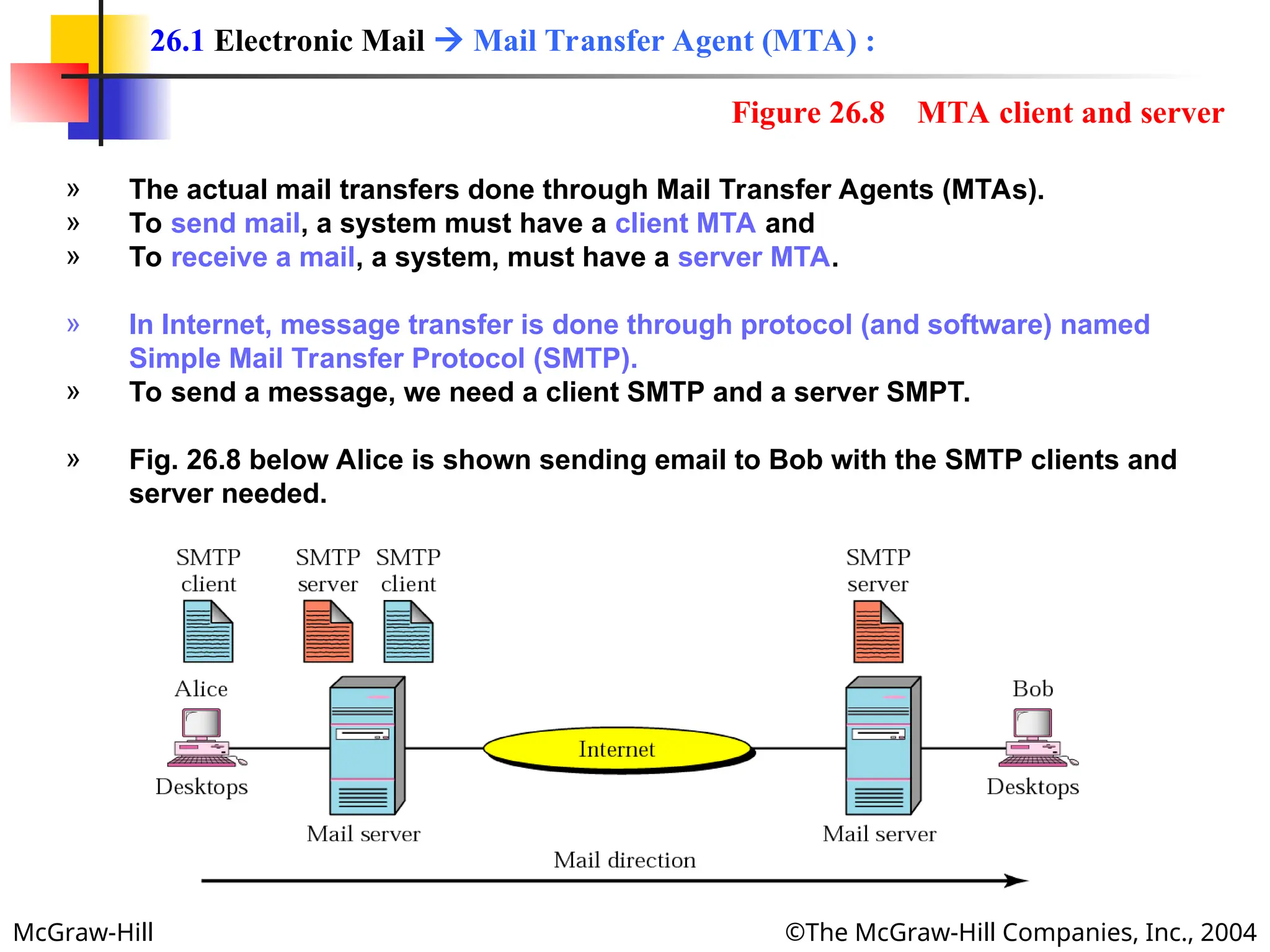
  • 72.
    McGraw-Hill ©The McGraw-HillCompanies, Inc., 2004 » Most operating System provide a user interface to access the services of FTP. » The interface prompts the user for the appropriate input. » After the user types a line, the FTP interface reads the line and changes it to the corresponding FTP command. » Table 26.4 in next slide shows the interface commands provided in UNIX FTP. » Some of the commands can be abbreviated as long as there is no ambiguity. 26.2 FTP  Communication  User Interface :
  • 73.
    McGraw-Hill ©The McGraw-HillCompanies, Inc., 2004 Table 26.4 Table 26.4 List of FTP commands in UNIX List of FTP commands in UNIX Commands !, $, account, append, ascii, bell, binary, bye, case, cd, cdup, close, cr, delete, debug, dir, discount, form, get, glob, hash, help, lcd, ls, macdef, mdelete, mdir, mget, mkdir, mls, mode, mput, nmap, ntrans, open, prompt, proxy, sendport, put, pwd, quit, quote, recv, remotehelp, rename, reset, rmdir, runique, send, status, struct, sunique, tenex, trace, type, user, verbose,?
  • 74.
    McGraw-Hill ©The McGraw-HillCompanies, Inc., 2004 Example 2 Example 2 We show some of the user interface commands that accomplish the same task as in Example 1. The user input is shown in boldface. As shown below, some of the commands are provided automatically by the interface. The user receives a prompt and provides only the arguments. $ ftp challenger.atc.fhda.edu Connected to challenger.atc.fhda.edu 220 Server ready Name: forouzan Password: xxxxxxx ftp > ls /usr/user/report 200 OK 150 Opening ASCII mode ........... ........... 226 transfer complete ftp > close 221 Goodbye ftp > quit
  • 75.
    McGraw-Hill ©The McGraw-HillCompanies, Inc., 2004 » To use FTP, a user needs an account (user name) and a password on the remote server. » Some sites have a set of files available for public access. » To access these files, a user does not need to have an account or password. » Instead, the user can use anonymous as the user name and guest as the password. » User access to the system is very limited. » Some sites allow anonymous users only a subset of commands. » E.g., most sites allow the user to copy some files, but do not allow navigate through directories. 26.2 FTP  Communication  Anonymous FTP :
  • 76.
    McGraw-Hill ©The McGraw-HillCompanies, Inc., 2004 Example 3 Example 3 We show an example of using anonymous FTP. We connect to internic.net, where we assume there are some public data available. $ ftp internic.net Connected to internic.net 220 Server ready Name: anonymous 331 Guest login OK, send "guest" as password Password: guest ftp > pwd 257 '/' is current directory ftp > ls 200 OK 150 Opening ASCII mode bin ... ftp > close 221 Goodbye ftp > quit