EBP for the EBP 
(Extremely Busy Practitioner)
         Susan Fowler, MLIS
          Medical Librarian
         Fowler@wustl.edu
           314‐362‐8092
          pg: 314‐360‐1069
Outline
•   Search Strategy
•   Pulling Keywords from Your PICO Question
•   Boolean, Truncation, and Wild Cards
•   Hierarchy of Evidence and Study Design
•   National Guidelines Clearinghouse
•   Cochrane Database of Systematic Reviews
•   PubMed (MEDLINE)
•   CINAHL
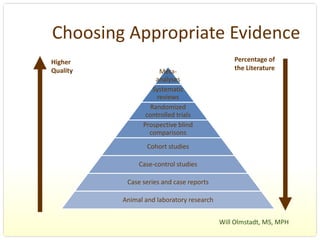
Choosing Appropriate Evidence
Higher                                          Percentage of 
Quality                Meta‐                    the Literature 
                     analyses
                    Systematic 
                      reviews
                   Randomized 
                  controlled trials
                 Prospective blind 
                   comparisons
                   Cohort studies

                Case‐control studies

            Case series and case reports

           Animal and laboratory research


                                            Will Olmstadt, MS, MPH 
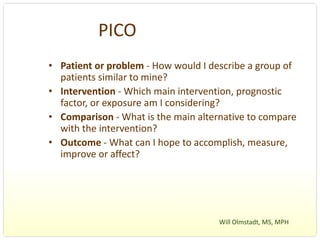
PICO
• Patient or problem ‐ How would I describe a group of 
  patients similar to mine?
• Intervention ‐ Which main intervention, prognostic 
  factor, or exposure am I considering?
• Comparison ‐ What is the main alternative to compare 
  with the intervention?
• Outcome ‐ What can I hope to accomplish, measure, 
  improve or affect?


                                     Will Olmstadt, MS, MPH 
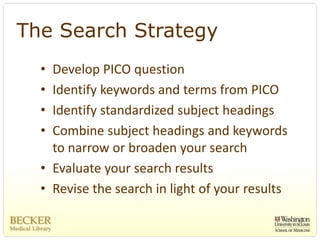
The Search Strategy
  • Develop PICO question
  • Identify keywords and terms from PICO
  • Identify standardized subject headings
  • Combine subject headings and keywords 
    to narrow or broaden your search
  • Evaluate your search results
  • Revise the search in light of your results
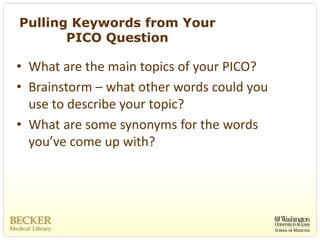
Pulling Keywords from Your
       PICO Question

• What are the main topics of your PICO?
• Brainstorm – what other words could you 
  use to describe your topic?
• What are some synonyms for the words 
  you’ve come up with?
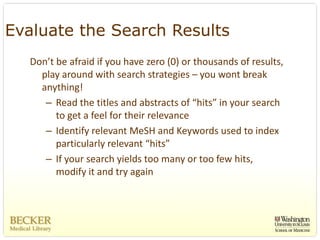
Evaluate the Search Results
  Don’t be afraid if you have zero (0) or thousands of results, 
    play around with search strategies – you wont break 
    anything!
     – Read the titles and abstracts of “hits” in your search 
        to get a feel for their relevance
     – Identify relevant MeSH and Keywords used to index 
        particularly relevant “hits”
     – If your search yields too many or too few hits, 
        modify it and try again
Revise the Search in Light of
          your Results
• Narrow the search by combining search 
  terms and applying limits

• Broaden the search if the results are too 
  limited by removing keywords and limits
Boolean
• AND
• OR
• NOT
Boolean
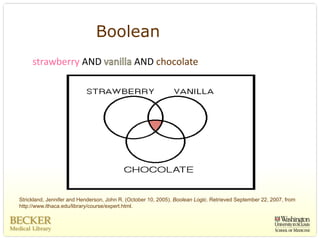
     strawberry AND                            AND chocolate


Strickland, Jennifer and Henderson, John R. (October 10, 2005). Boolean Logic. Retrieved September 22, 2007, from
http://www.ithaca.edu/library/course/expert.html.
Boolean
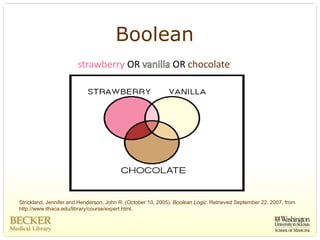
                       strawberry OR                          OR chocolate


Strickland, Jennifer and Henderson, John R. (October 10, 2005). Boolean Logic. Retrieved September 22, 2007, from
http://www.ithaca.edu/library/course/expert.html.
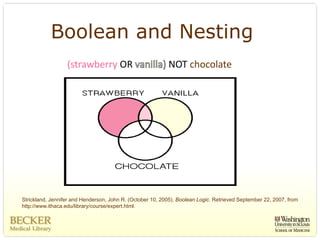
Boolean and Nesting
                  (strawberry OR                           NOT chocolate


Strickland, Jennifer and Henderson, John R. (October 10, 2005). Boolean Logic. Retrieved September 22, 2007, from
http://www.ithaca.edu/library/course/expert.html.
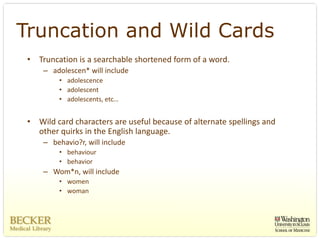
Truncation and Wild Cards
 •   Truncation is a searchable shortened form of a word. 
      – adolescen* will include
          • adolescence
          • adolescent
          • adolescents, etc…


 •   Wild card characters are useful because of alternate spellings and 
     other quirks in the English language. 
      – behavio?r, will include
          • behaviour 
          • behavior 
      – Wom*n, will include
          • women 
          • woman
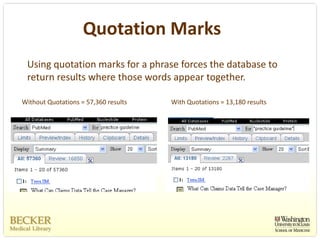
Quotation Marks
 Using quotation marks for a phrase forces the database to 
 return results where those words appear together. 

Without Quotations = 57,360 results   With Quotations = 13,180 results
National Guidelines Clearinghouse
  • http://www.guideline.gov/
  • Freely accessible database of evidence‐based clinical 
    practice guidelines and related documents. 
  • Initiated by the AHRQ in partnership with the American 
    Medical Association and America's Health Insurance 
    Plans.
  • Now maintained by the Agency for Healthcare Research 
    and Quality (AHRQ) and the U.S. Department of Health 
    and Human Services.
  • If you have developed a good practice guideline 
    consider submitting it to the NGC
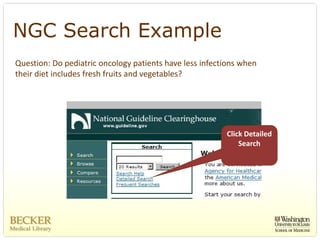
NGC Search Example
Question: Do pediatric oncology patients have less infections when 
their diet includes fresh fruits and vegetables?


                                                          Click Detailed 
                                                              Search
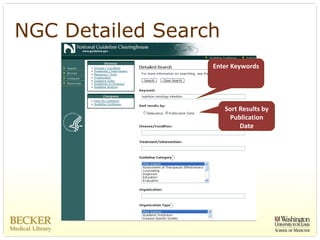
NGC Detailed Search
                  Enter Keywords


                      Sort Results by 
                       Publication 
                           Date
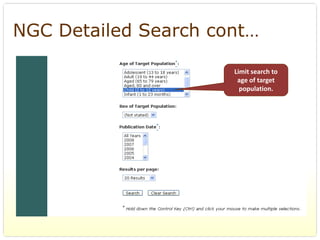
NGC Detailed Search cont…

                      Limit search to 
                       age of target 
                        population.
NGC
Pros
  – Freely accessible practice guidelines that 
    have undergone rigorous acceptance 
    standards by the AMA, AHIP, AHRQ, and the 
    U.S. Department of Health and Human 
    Services
Cons
  – Limited content
  – Limited search capabilities
Cochrane Database of
               Systematic Reviews
• http://www.cochrane.org/

• “Gold Standard” for systematic reviews 

• Free database, but requires paid subscription to access 
  most content
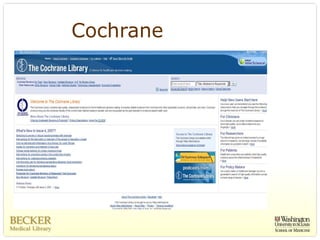
Cochrane
Cochrane Search
           Example
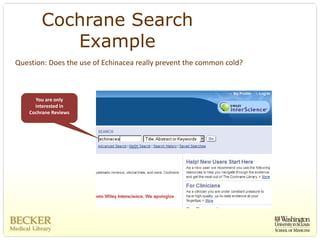
Question: Does the use of Echinacea really prevent the common cold? 


      You are only 
      interested in 
    Cochrane Reviews
Cochrane Search Example cont…
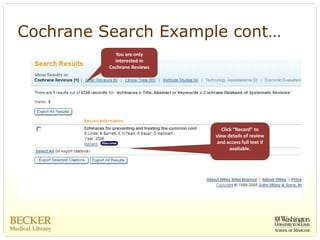
            You are only 
            interested in 
          Cochrane Reviews


                                Click “Record” to 
                             view details of review 
                             and access full text if 
                                    available. 
Cochrane Systematic
         Reviews
Pros
  – Compiled through rigorous standards 
  – Review process has already been done so 
    you don’t have to
Cons
  – Limited content
  – Limited search capabilities
  – Access to most full‐text content requires paid 
    subscription
PubMed        (MEDLINE)

• www.pubmed.gov
• Created and maintained by the National 
  Institute of Health (NIH) and the National 
  Library of Medicine (NLM)
• 17 million citations back to 1950s
• Free database of citations with some 
  content available for free
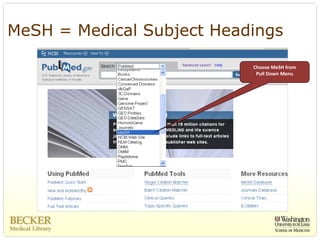
MeSH = Medical Subject Headings

                           Choose MeSH from 
                            Pull Down Menu
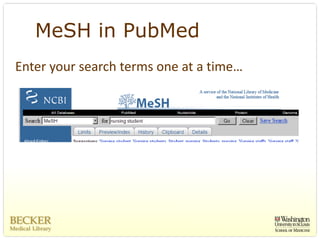
MeSH in PubMed
Enter your search terms one at a time…
PubMed - MeSH cont…


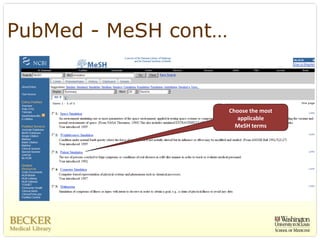
                      Choose the most 
                         applicable 
                        MeSH terms
PubMed - MeSH cont…

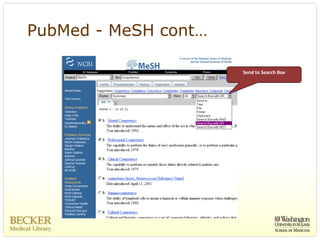
                      Send to Search Box
PubMed ‐ MeSH cont…
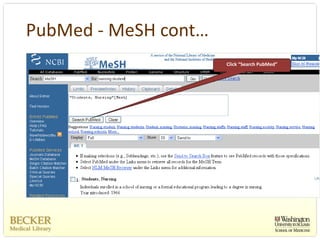
                      Click “Search PubMed”
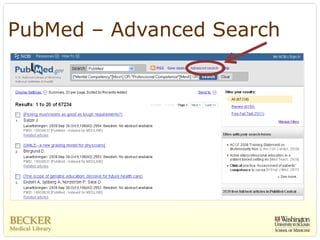
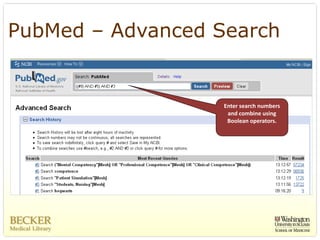
PubMed – Advanced Search


                   Enter search numbers 
                    and combine using 
                    Boolean operators.
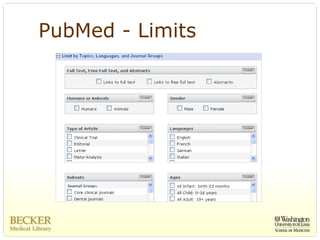
PubMed - Limits
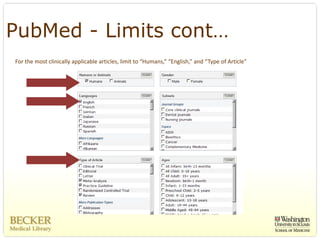
PubMed - Limits cont…
For the most clinically applicable articles, limit to “Humans,” “English,” and “Type of Article”
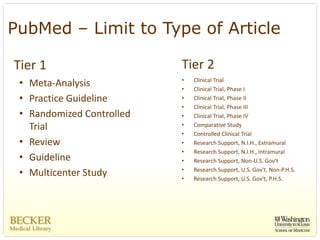
PubMed – Limit to Type of Article

Tier 1                      Tier 2
                            •   Clinical Trial
 • Meta‐Analysis            •   Clinical Trial, Phase I
 • Practice Guideline       •   Clinical Trial, Phase II
                            •   Clinical Trial, Phase III
 • Randomized Controlled    •   Clinical Trial, Phase IV
   Trial                    •   Comparative Study
                            •   Controlled Clinical Trial
 • Review                   •   Research Support, N.I.H., Extramural
                            •   Research Support, N.I.H., Intramural
 • Guideline                •   Research Support, Non‐U.S. Gov't
                            •   Research Support, U.S. Gov't, Non‐P.H.S.
 • Multicenter Study        •   Research Support, U.S. Gov't, P.H.S.
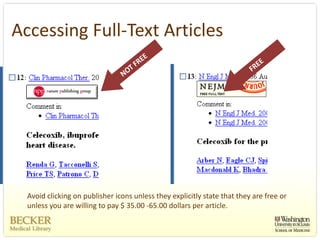
Accessing Full‐Text Articles


  Avoid clicking on publisher icons unless they explicitly state that they are free or 
  unless you are willing to pay $ 35.00 ‐65.00 dollars per article. 
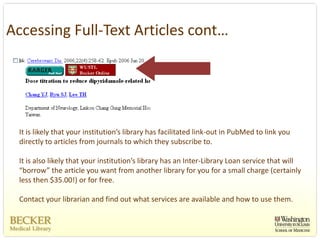
Accessing Full‐Text Articles cont…


 It is likely that your institution’s library has facilitated link‐out in PubMed to link you 
 directly to articles from journals to which they subscribe to.

 It is also likely that your institution’s library has an Inter‐Library Loan service that will 
 “borrow” the article you want from another library for you for a small charge (certainly 
 less then $35.00!) or for free.  

 Contact your librarian and find out what services are available and how to use them. 
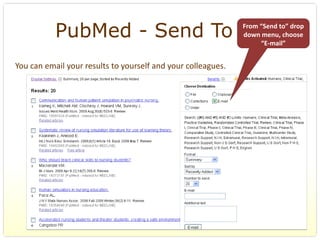
PubMed - Send To                                    From “Send to” drop 
                                                               down menu, choose 
                                                                    “E‐mail”


You can email your results to yourself and your colleagues. 
PubMed - Search History


 Don’t forget to save your search history!
PubMed (MEDLINE)
PubMed advantages                PubMed disadvantages
   – Free to search                 – Still have to appraise articles 
   – No username/password             once located
   – Searches same content as 
     Ovid MEDLINE
   – Links to free full‐text 
     sometimes available
CINAHL
• Cumulative Index to Nursing & Allied Health Literature
• Indexes over 3,000 journals plus additional materials 
  (book chapters, dissertations) back to 1937
• Requires a paid subscription to access
• CINAHL has its own headings similar to MeSH (70%)
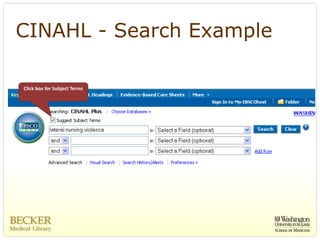
CINAHL - Search Example

Click box for Subject Terms
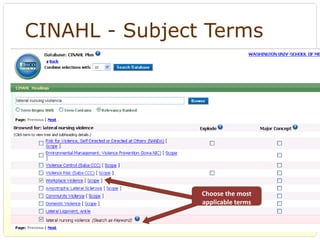
CINAHL - Subject Terms


                Choose the most 
                applicable terms
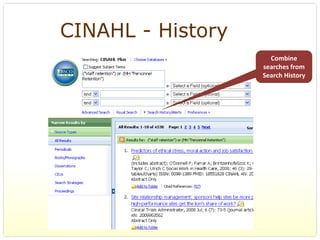
CINAHL - History
                     Combine 
                   searches from 
                   Search History
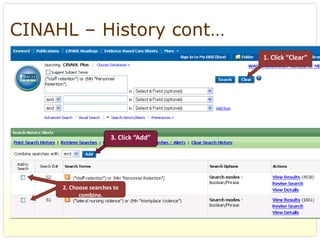
CINAHL – History cont…
                                        1. Click “Clear”


                       3. Click “Add”


     2. Choose searches to 
           combine.
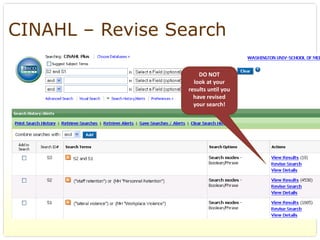
CINAHL – Revise Search

                      DO NOT 
                    look at your 
                  results until you 
                    have revised 
                    your search!
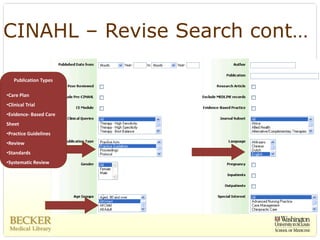
CINAHL – Revise Search cont…

    Publication Types

•Care Plan
•Clinical Trial 
•Evidence‐ Based Care 
Sheet 
•Practice Guidelines
•Review
•Standards
•Systematic Review
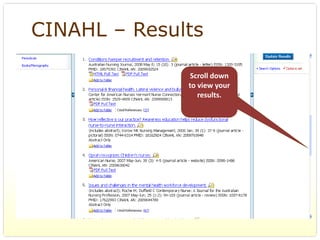
CINAHL – Results

               Scroll down 
              to view your 
                 results.
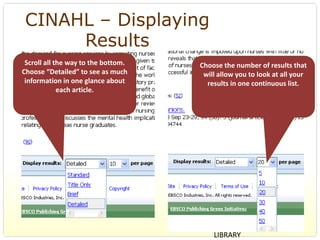
CINAHL – Displaying
      Results
 Scroll all the way to the bottom.    Choose the number of results that 
Choose “Detailed” to see as much       will allow you to look at all your 
 information in one glance about        results in one continuous list. 
             each article.


                                          BERNARD BECKER MEDICAL 
                                          LIBRARY
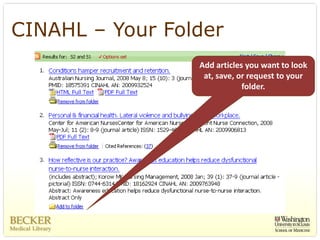
CINAHL – Your Folder
                 Add articles you want to look 
                  at, save, or request to your 
                             folder. 
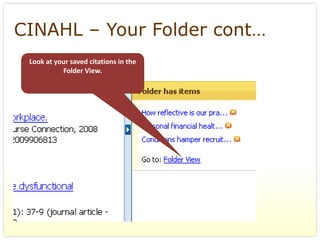
CINAHL – Your Folder cont…
 Look at your saved citations in the 
           Folder View.
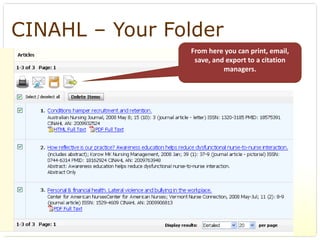
CINAHL – Your Folder
                From here you can print, email, 
                 save, and export to a citation 
                          managers.
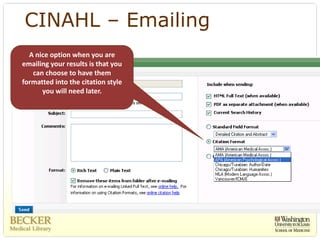
CINAHL – Emailing
  A nice option when you are 
emailing your results is that you 
   can choose to have them 
formatted into the citation style 
      you will need later. 
CINAHL
CINAHL advantages                    CINAHL disadvantages
   – Nursing and allied health          – Subscription product
     content                            – Content is limited compared 
   – Includes content MEDLINE             to MedLine
     does not                           – EBP limiters are limited 
   – Searching CINAHL is expected 
     in many evidence settings
   – CINAHL headings
Good Database Searching Rules
 Following these rules will improve your results…

 1. Use standardized subject headings like MeSH and CINAHL Subject Terms. 
 2. Apply Limits like “English” and “Humans.”
 3. Limit “Publications Types” to 
       – Meta‐analysis
       – Practice Guidelines 
       – Randomized Controlled Trials
       – Reviews
 4. Keep a copy of your search history. 
 5. If it takes you longer then 20 minutes – ask your librarian for help. 
Library Locations
• 660 S. Euclid                 • St. Louis Children’s Hospital
   314‐362‐7085                   Lauren Yaeger, 314‐454‐2768
   Susan Fowler, 314‐362‐8092     yaegerl@wustl.edu
   Pg: 314‐360‐1069
   fowler@wustl.edu


• BJ North, Rothschild 
  Medical Library
  Reka Kozak, 314‐454‐7208
  kozakr@wustl.edu

Ebp for the ebp

  • 1.
    EBP for the EBP  (Extremely Busy Practitioner) Susan Fowler, MLIS Medical Librarian Fowler@wustl.edu 314‐362‐8092 pg: 314‐360‐1069
  • 2.
    Outline • Search Strategy • Pulling Keywords from Your PICO Question • Boolean, Truncation, and Wild Cards • Hierarchy of Evidence and Study Design • National Guidelines Clearinghouse • Cochrane Database of Systematic Reviews • PubMed (MEDLINE) • CINAHL
  • 3.
    Choosing Appropriate Evidence Higher  Percentage of  Quality  Meta‐ the Literature  analyses Systematic  reviews Randomized  controlled trials Prospective blind  comparisons Cohort studies Case‐control studies Case series and case reports Animal and laboratory research Will Olmstadt, MS, MPH 
  • 4.
    PICO • Patient or problem ‐How would I describe a group of  patients similar to mine? • Intervention ‐ Which main intervention, prognostic  factor, or exposure am I considering? • Comparison ‐ What is the main alternative to compare  with the intervention? • Outcome ‐ What can I hope to accomplish, measure,  improve or affect? Will Olmstadt, MS, MPH 
  • 5.
    The Search Strategy • Develop PICO question • Identify keywords and terms from PICO • Identify standardized subject headings • Combine subject headings and keywords  to narrow or broaden your search • Evaluate your search results • Revise the search in light of your results
  • 6.
    Pulling Keywords fromYour PICO Question • What are the main topics of your PICO? • Brainstorm – what other words could you  use to describe your topic? • What are some synonyms for the words  you’ve come up with?
  • 7.
    Evaluate the SearchResults Don’t be afraid if you have zero (0) or thousands of results,  play around with search strategies – you wont break  anything! – Read the titles and abstracts of “hits” in your search  to get a feel for their relevance – Identify relevant MeSH and Keywords used to index  particularly relevant “hits” – If your search yields too many or too few hits,  modify it and try again
  • 8.
    Revise the Searchin Light of your Results • Narrow the search by combining search  terms and applying limits • Broaden the search if the results are too  limited by removing keywords and limits
  • 9.
  • 10.
    Boolean strawberry AND  AND chocolate Strickland, Jennifer and Henderson, John R. (October 10, 2005). Boolean Logic. Retrieved September 22, 2007, from http://www.ithaca.edu/library/course/expert.html.
  • 11.
    Boolean strawberry OR  OR chocolate Strickland, Jennifer and Henderson, John R. (October 10, 2005). Boolean Logic. Retrieved September 22, 2007, from http://www.ithaca.edu/library/course/expert.html.
  • 12.
    Boolean and Nesting (strawberry OR  NOT chocolate Strickland, Jennifer and Henderson, John R. (October 10, 2005). Boolean Logic. Retrieved September 22, 2007, from http://www.ithaca.edu/library/course/expert.html.
  • 13.
    Truncation and WildCards • Truncation is a searchable shortened form of a word.  – adolescen* will include • adolescence • adolescent • adolescents, etc… • Wild card characters are useful because of alternate spellings and  other quirks in the English language.  – behavio?r, will include • behaviour  • behavior  – Wom*n, will include • women  • woman
  • 14.
  • 15.
    National Guidelines Clearinghouse • http://www.guideline.gov/ • Freely accessible database of evidence‐based clinical  practice guidelines and related documents.  • Initiated by the AHRQ in partnership with the American  Medical Association and America's Health Insurance  Plans. • Now maintained by the Agency for Healthcare Research  and Quality (AHRQ) and the U.S. Department of Health  and Human Services. • If you have developed a good practice guideline  consider submitting it to the NGC
  • 16.
  • 17.
    NGC Detailed Search Enter Keywords Sort Results by  Publication  Date
  • 18.
    NGC Detailed Searchcont… Limit search to  age of target  population.
  • 19.
    NGC Pros –Freely accessible practice guidelines that  have undergone rigorous acceptance  standards by the AMA, AHIP, AHRQ, and the  U.S. Department of Health and Human  Services Cons – Limited content – Limited search capabilities
  • 20.
    Cochrane Database of Systematic Reviews • http://www.cochrane.org/ • “Gold Standard” for systematic reviews  • Free database, but requires paid subscription to access  most content
  • 21.
  • 22.
    Cochrane Search Example Question: Does the use of Echinacea really prevent the common cold?  You are only  interested in  Cochrane Reviews
  • 23.
    Cochrane Search Examplecont… You are only  interested in  Cochrane Reviews Click “Record” to  view details of review  and access full text if  available. 
  • 24.
    Cochrane Systematic Reviews Pros – Compiled through rigorous standards  – Review process has already been done so  you don’t have to Cons – Limited content – Limited search capabilities – Access to most full‐text content requires paid  subscription
  • 25.
    PubMed (MEDLINE) • www.pubmed.gov • Created and maintained by the National  Institute of Health (NIH) and the National  Library of Medicine (NLM) • 17 million citations back to 1950s • Free database of citations with some  content available for free
  • 26.
    MeSH = MedicalSubject Headings Choose MeSH from  Pull Down Menu
  • 27.
  • 28.
    PubMed - MeSHcont… Choose the most  applicable  MeSH terms
  • 29.
    PubMed - MeSHcont… Send to Search Box
  • 30.
    PubMed ‐ MeSHcont… Click “Search PubMed”
  • 31.
  • 32.
    PubMed – AdvancedSearch Enter search numbers  and combine using  Boolean operators.
  • 33.
  • 34.
    PubMed - Limitscont… For the most clinically applicable articles, limit to “Humans,” “English,” and “Type of Article”
  • 35.
    PubMed – Limitto Type of Article Tier 1 Tier 2 • Clinical Trial • Meta‐Analysis • Clinical Trial, Phase I • Practice Guideline • Clinical Trial, Phase II • Clinical Trial, Phase III • Randomized Controlled  • Clinical Trial, Phase IV Trial • Comparative Study • Controlled Clinical Trial • Review • Research Support, N.I.H., Extramural • Research Support, N.I.H., Intramural • Guideline • Research Support, Non‐U.S. Gov't • Research Support, U.S. Gov't, Non‐P.H.S. • Multicenter Study • Research Support, U.S. Gov't, P.H.S.
  • 36.
  • 37.
    Accessing Full‐Text Articles cont… It is likely that your institution’s library has facilitated link‐out in PubMed to link you  directly to articles from journals to which they subscribe to. It is also likely that your institution’s library has an Inter‐Library Loan service that will  “borrow” the article you want from another library for you for a small charge (certainly  less then $35.00!) or for free.   Contact your librarian and find out what services are available and how to use them. 
  • 38.
    PubMed - SendTo From “Send to” drop  down menu, choose  “E‐mail” You can email your results to yourself and your colleagues. 
  • 39.
    PubMed - SearchHistory Don’t forget to save your search history!
  • 40.
    PubMed (MEDLINE) PubMed advantages PubMed disadvantages – Free to search – Still have to appraise articles  – No username/password once located – Searches same content as  Ovid MEDLINE – Links to free full‐text  sometimes available
  • 41.
    CINAHL • Cumulative Index to Nursing & Allied Health Literature • Indexes over 3,000 journals plus additional materials  (book chapters, dissertations) back to 1937 • Requires a paid subscription to access • CINAHL has its own headings similar to MeSH (70%)
  • 42.
    CINAHL - SearchExample Click box for Subject Terms
  • 43.
    CINAHL - SubjectTerms Choose the most  applicable terms
  • 44.
    CINAHL - History Combine  searches from  Search History
  • 45.
    CINAHL – Historycont… 1. Click “Clear” 3. Click “Add” 2. Choose searches to  combine.
  • 46.
    CINAHL – ReviseSearch DO NOT  look at your  results until you  have revised  your search!
  • 47.
    CINAHL – ReviseSearch cont… Publication Types •Care Plan •Clinical Trial  •Evidence‐ Based Care  Sheet  •Practice Guidelines •Review •Standards •Systematic Review
  • 48.
    CINAHL – Results Scroll down  to view your  results.
  • 49.
    CINAHL – Displaying Results Scroll all the way to the bottom.  Choose the number of results that  Choose “Detailed” to see as much  will allow you to look at all your  information in one glance about  results in one continuous list.  each article. BERNARD BECKER MEDICAL  LIBRARY
  • 50.
    CINAHL – YourFolder Add articles you want to look  at, save, or request to your  folder. 
  • 51.
    CINAHL – YourFolder cont… Look at your saved citations in the  Folder View.
  • 52.
    CINAHL – YourFolder From here you can print, email,  save, and export to a citation  managers.
  • 53.
    CINAHL – Emailing A nice option when you are  emailing your results is that you  can choose to have them  formatted into the citation style  you will need later. 
  • 54.
    CINAHL CINAHL advantages CINAHL disadvantages – Nursing and allied health  – Subscription product content – Content is limited compared  – Includes content MEDLINE  to MedLine does not – EBP limiters are limited  – Searching CINAHL is expected  in many evidence settings – CINAHL headings
  • 55.
    Good Database SearchingRules Following these rules will improve your results… 1. Use standardized subject headings like MeSH and CINAHL Subject Terms.  2. Apply Limits like “English” and “Humans.” 3. Limit “Publications Types” to  – Meta‐analysis – Practice Guidelines  – Randomized Controlled Trials – Reviews 4. Keep a copy of your search history.  5. If it takes you longer then 20 minutes – ask your librarian for help. 
  • 56.
    Library Locations • 660 S. Euclid • St. Louis Children’s Hospital 314‐362‐7085 Lauren Yaeger, 314‐454‐2768 Susan Fowler, 314‐362‐8092 yaegerl@wustl.edu Pg: 314‐360‐1069 fowler@wustl.edu • BJ North, Rothschild  Medical Library Reka Kozak, 314‐454‐7208 kozakr@wustl.edu