Delivering knowledge,  informing decisions
Authors   Searching for Authors,  Creating Alerts, Exporting Data Susan Fowler, MLIS Clinical Librarian Ph: 314-362-8092 Pg: 314-360-1069 [email_address] Cathy Sarli, MLS, AHIP Scholarly Communications Specialist [email_address]
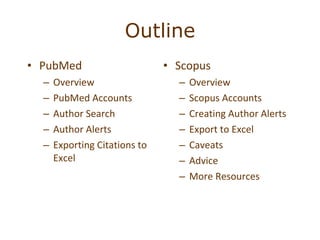
Outline Scopus  Overview Scopus Accounts Creating Author Alerts Export to Excel Caveats Advice More Resources PubMed Overview PubMed Accounts Author Search Author Alerts Exporting Citations to Excel
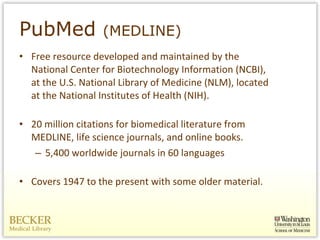
PubMed  (MEDLINE) Free resource developed and maintained by the National Center for Biotechnology Information (NCBI), at the U.S. National Library of Medicine (NLM), located at the National Institutes of Health (NIH). 20 million citations for biomedical literature from MEDLINE, life science journals, and online books.  5,400 worldwide journals in 60 languages Covers 1947 to the present with some older material.
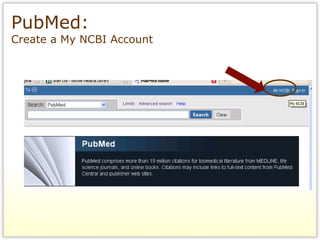
PubMed:  Create a My NCBI Account
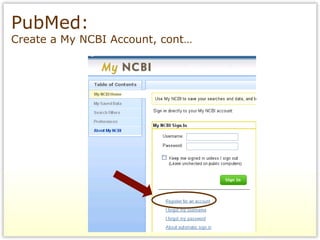
PubMed:  Create a My NCBI Account, cont…
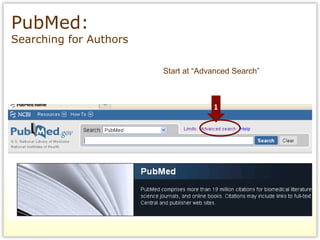
PubMed:  Searching for Authors Start at “Advanced Search”
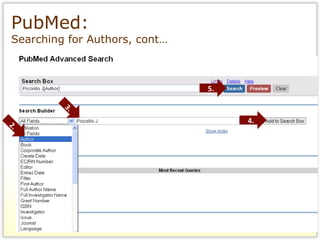
PubMed:  Searching for Authors, cont… 2. 3. 4. 5.
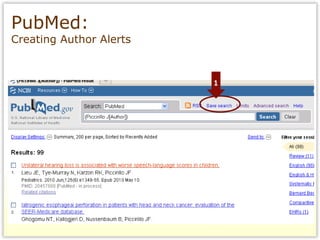
PubMed:  Creating Author Alerts
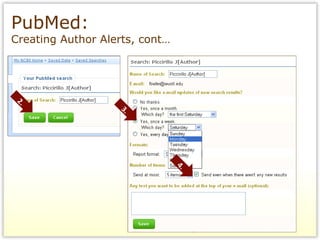
PubMed:  Creating Author Alerts, cont… 2. 4. 3.
To transfer PubMed citations to an Excel spreadsheet, you must first send them to a citation management software like EndNote or RefWorks RefWorks is free to all Wash U Faculty, Staff, and Students PubMed:  Exporting Citations to Excel
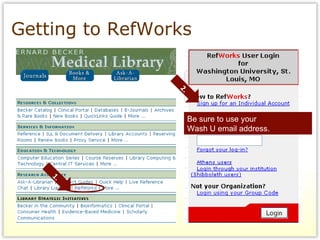
Getting to RefWorks 1. 2. Be sure to use your  Wash U email address.
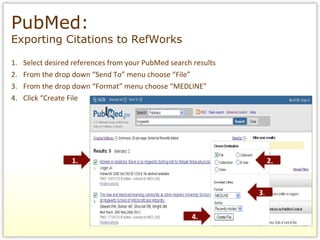
Select desired references from your PubMed search results  From the drop down “Send To” menu choose “File” From the drop down “Format” menu choose “MEDLINE” Click “Create File PubMed:  Exporting Citations to RefWorks 1. 2. 4. 3 .
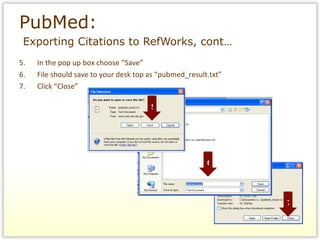
PubMed:    Exporting Citations to RefWorks, cont… 5.  In the pop up box choose “Save”  6. File should save to your desk top as “pubmed_result.txt” 7. Click “Close” 5 6 7
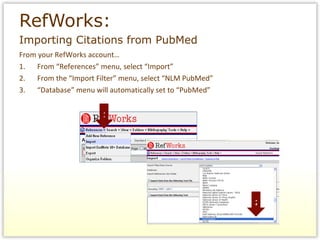
From your RefWorks account… 1. From “References” menu, select “Import” 2. From the “Import Filter” menu, select “NLM PubMed” 3. “Database” menu will automatically set to “PubMed” RefWorks:   Importing Citations from PubMed 1 2
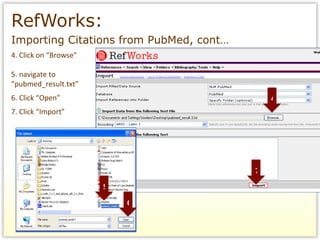
RefWorks:   Importing Citations from PubMed, cont… 4. Click on “Browse” 5. navigate to “ pubmed_result.txt” 6. Click “Open” 7. Click “Import” 4 5 6 7
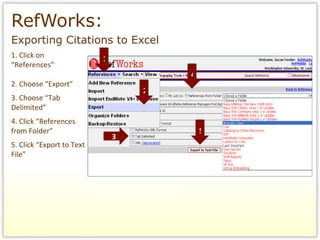
RefWorks:   Exporting Citations to Excel 1. Click on “ References” 2. Choose “Export” 3. Choose “Tab Delimited” 4. Click “References from Folder” 5. Click “Export to Text File”  1 2 3 4 5
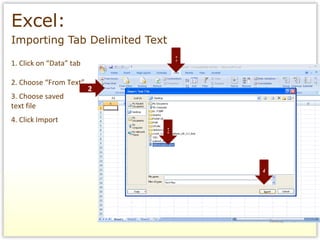
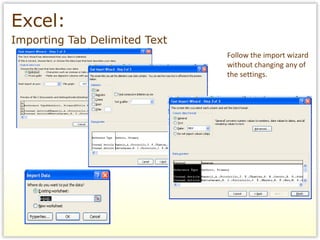
Excel:   Importing Tab Delimited Text 1. Click on “Data” tab 2. Choose “From Text” 3. Choose saved  text file 4. Click Import 1 2 3 4
Excel:   Importing Tab Delimited Text Follow the import wizard without changing any of the settings.
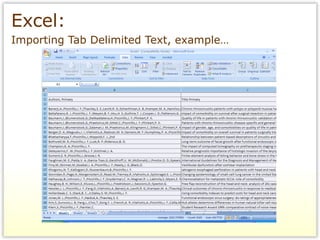
Excel:   Importing Tab Delimited Text, example…
www.scopus.com SCOPUS:  Creating author alerts
What is Scopus? A large citation and abstract database of research literature:  Over 40 million records dating from 1823 with complete records from 1996 to current Author Identifier, Citation Tracker, and Journal Analyzer tools Free registration to create search alerts, document citation alerts and saved searches via email or RSS feeds Exports records via  EndNote ,  RefWorks , etc., text and csv ( Excel ) files Converts records to various citation styles Proxy, CITRIX or VPN compliant Links to most journals subscribed by Becker Medical Library
What Does Scopus Cover? Content includes cross-disciplinary subject matter (Sciences, Social Sciences, and Arts & Humanities) 18,000 journal titles from more than 5,000 publishers 600 trade publications 350 book series Conference abstracts Articles-in-press (AIP) from more than 3,000 journals Scientific web pages including University repositories and theses/dissertations Patent records from five patent offices
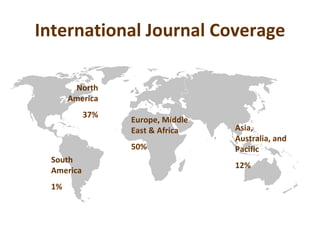
International Journal Coverage North America 37% South America 1% Europe, Middle East & Africa 50% Asia, Australia, and Pacific 12%
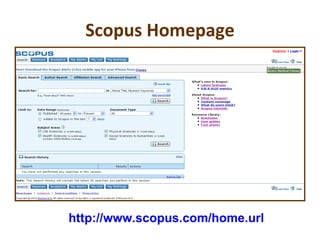
Scopus Homepage http://www.scopus.com/home.url
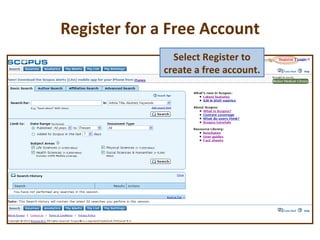
Register for a Free Account Select Register to create a free account.
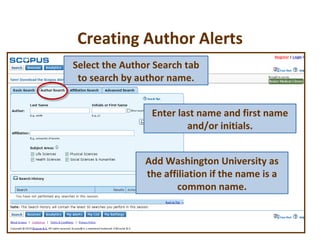
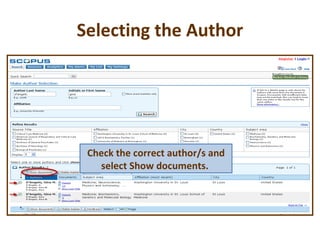
Creating Author Alerts Add Washington University as the affiliation if the name is a common name. Select the Author Search tab to search by author name. Enter last name and first name and/or initials.
Selecting the Author Check the correct author/s and select Show documents.
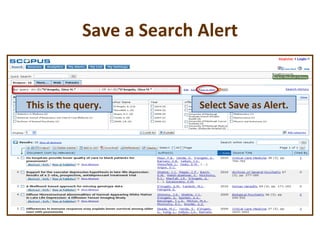
Save a Search Alert Select Save as Alert. This is the query.
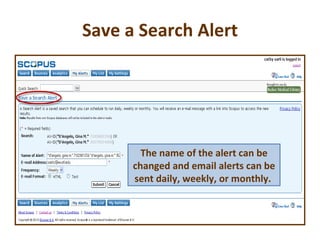
Save a Search Alert The name of the alert can be changed and email alerts can be sent daily, weekly, or monthly.
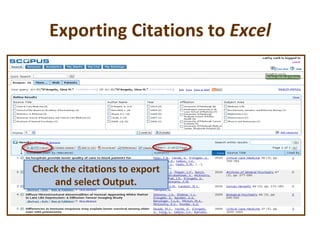
Exporting Citations to  Excel Check the citations to export and select Output.
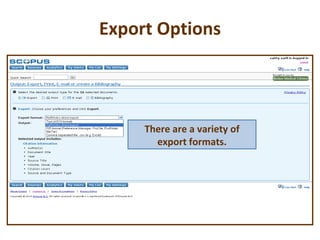
Export Options There are a variety of export formats.
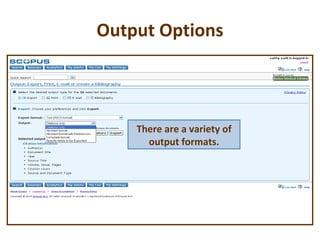
Output Options There are a variety of output formats.
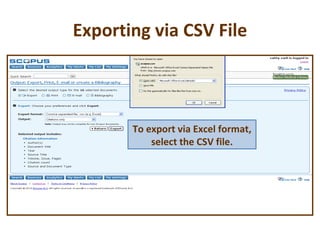
Exporting via CSV File To export via Excel format, select the CSV file.
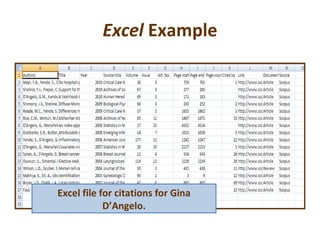
Excel  Example Excel file for citations for Gina D’Angelo.
Caveat There may be multiple entries noted for the same author name. If this is noted, look at the affiliation and review the publications for each entry to determine if they are the same author. What to do? If they are the same author, submit a Feedback message, “Group these Author Names” so that Scopus can reconcile the multiple authors as a single author.
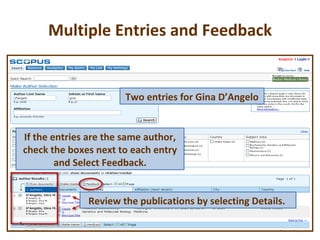
Multiple Entries and Feedback Two entries for Gina D’Angelo Review the publications by selecting Details.  If the entries are the same author, check the boxes next to each entry and Select Feedback.
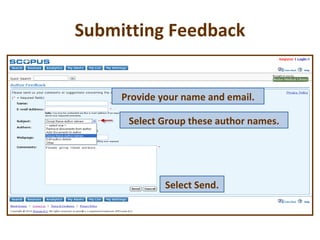
Submitting Feedback Select Group these author names. Select Send. Provide your name and email.
Caveat There may be a single author entry for one author but the affiliation may not be noted as WU.  What to do? Review the publications to confirm that this is the author you are searching for. There is often a lag between assignment of a new or updated affiliation for an author.
Words of Advice Authors are highly recommended to use the same variation of their name consistently throughout the course of their career.  If the name is a common name, authors should consider adding a middle name to distinguish it from other authors.  Consistency enhances retrieval and helps to prevent confusion among author names in databases.  Uniqueness of a name helps establishes  a “presence” for an author.  Authors are highly encouraged to use a standardized version of an affiliation address using no abbreviations.
Additional Resources http://www.info.scopus.com SCOPUS Author Search Tutorial : http://help.scopus.com/flare/Content/tutorials/sc_AuthorSearch.html Using the Personalized Features Tutorial : http://help.scopus.com/flare/Content/tutorials/sc_Personal.html
Librarians, we’re here to help… Cathy Sarli, MLS, AHIP Scholarly Communications Specialist   [email_address] Susan Fowler, MLIS Clinical Librarian Ph: 314-362-8092 Pg: 314-360-1069 [email_address] If  20 minutes  have passed and you have not resolved your information query, stop and contact one of us.

Author alerts scopus pubmed

  • 1.
    Delivering knowledge, informing decisions
  • 2.
    Authors Searching for Authors, Creating Alerts, Exporting Data Susan Fowler, MLIS Clinical Librarian Ph: 314-362-8092 Pg: 314-360-1069 [email_address] Cathy Sarli, MLS, AHIP Scholarly Communications Specialist [email_address]
  • 3.
    Outline Scopus Overview Scopus Accounts Creating Author Alerts Export to Excel Caveats Advice More Resources PubMed Overview PubMed Accounts Author Search Author Alerts Exporting Citations to Excel
  • 4.
    PubMed (MEDLINE)Free resource developed and maintained by the National Center for Biotechnology Information (NCBI), at the U.S. National Library of Medicine (NLM), located at the National Institutes of Health (NIH). 20 million citations for biomedical literature from MEDLINE, life science journals, and online books. 5,400 worldwide journals in 60 languages Covers 1947 to the present with some older material.
  • 5.
    PubMed: Createa My NCBI Account
  • 6.
    PubMed: Createa My NCBI Account, cont…
  • 7.
    PubMed: Searchingfor Authors Start at “Advanced Search”
  • 8.
    PubMed: Searchingfor Authors, cont… 2. 3. 4. 5.
  • 9.
    PubMed: CreatingAuthor Alerts
  • 10.
    PubMed: CreatingAuthor Alerts, cont… 2. 4. 3.
  • 11.
    To transfer PubMedcitations to an Excel spreadsheet, you must first send them to a citation management software like EndNote or RefWorks RefWorks is free to all Wash U Faculty, Staff, and Students PubMed: Exporting Citations to Excel
  • 12.
    Getting to RefWorks1. 2. Be sure to use your Wash U email address.
  • 13.
    Select desired referencesfrom your PubMed search results From the drop down “Send To” menu choose “File” From the drop down “Format” menu choose “MEDLINE” Click “Create File PubMed: Exporting Citations to RefWorks 1. 2. 4. 3 .
  • 14.
    PubMed: Exporting Citations to RefWorks, cont… 5. In the pop up box choose “Save” 6. File should save to your desk top as “pubmed_result.txt” 7. Click “Close” 5 6 7
  • 15.
    From your RefWorksaccount… 1. From “References” menu, select “Import” 2. From the “Import Filter” menu, select “NLM PubMed” 3. “Database” menu will automatically set to “PubMed” RefWorks: Importing Citations from PubMed 1 2
  • 16.
    RefWorks: Importing Citations from PubMed, cont… 4. Click on “Browse” 5. navigate to “ pubmed_result.txt” 6. Click “Open” 7. Click “Import” 4 5 6 7
  • 17.
    RefWorks: Exporting Citations to Excel 1. Click on “ References” 2. Choose “Export” 3. Choose “Tab Delimited” 4. Click “References from Folder” 5. Click “Export to Text File” 1 2 3 4 5
  • 18.
    Excel: Importing Tab Delimited Text 1. Click on “Data” tab 2. Choose “From Text” 3. Choose saved text file 4. Click Import 1 2 3 4
  • 19.
    Excel: Importing Tab Delimited Text Follow the import wizard without changing any of the settings.
  • 20.
    Excel: Importing Tab Delimited Text, example…
  • 21.
    www.scopus.com SCOPUS: Creating author alerts
  • 22.
    What is Scopus?A large citation and abstract database of research literature: Over 40 million records dating from 1823 with complete records from 1996 to current Author Identifier, Citation Tracker, and Journal Analyzer tools Free registration to create search alerts, document citation alerts and saved searches via email or RSS feeds Exports records via EndNote , RefWorks , etc., text and csv ( Excel ) files Converts records to various citation styles Proxy, CITRIX or VPN compliant Links to most journals subscribed by Becker Medical Library
  • 23.
    What Does ScopusCover? Content includes cross-disciplinary subject matter (Sciences, Social Sciences, and Arts & Humanities) 18,000 journal titles from more than 5,000 publishers 600 trade publications 350 book series Conference abstracts Articles-in-press (AIP) from more than 3,000 journals Scientific web pages including University repositories and theses/dissertations Patent records from five patent offices
  • 24.
    International Journal CoverageNorth America 37% South America 1% Europe, Middle East & Africa 50% Asia, Australia, and Pacific 12%
  • 25.
  • 26.
    Register for aFree Account Select Register to create a free account.
  • 27.
    Creating Author AlertsAdd Washington University as the affiliation if the name is a common name. Select the Author Search tab to search by author name. Enter last name and first name and/or initials.
  • 28.
    Selecting the AuthorCheck the correct author/s and select Show documents.
  • 29.
    Save a SearchAlert Select Save as Alert. This is the query.
  • 30.
    Save a SearchAlert The name of the alert can be changed and email alerts can be sent daily, weekly, or monthly.
  • 31.
    Exporting Citations to Excel Check the citations to export and select Output.
  • 32.
    Export Options Thereare a variety of export formats.
  • 33.
    Output Options Thereare a variety of output formats.
  • 34.
    Exporting via CSVFile To export via Excel format, select the CSV file.
  • 35.
    Excel ExampleExcel file for citations for Gina D’Angelo.
  • 36.
    Caveat There maybe multiple entries noted for the same author name. If this is noted, look at the affiliation and review the publications for each entry to determine if they are the same author. What to do? If they are the same author, submit a Feedback message, “Group these Author Names” so that Scopus can reconcile the multiple authors as a single author.
  • 37.
    Multiple Entries andFeedback Two entries for Gina D’Angelo Review the publications by selecting Details. If the entries are the same author, check the boxes next to each entry and Select Feedback.
  • 38.
    Submitting Feedback SelectGroup these author names. Select Send. Provide your name and email.
  • 39.
    Caveat There maybe a single author entry for one author but the affiliation may not be noted as WU. What to do? Review the publications to confirm that this is the author you are searching for. There is often a lag between assignment of a new or updated affiliation for an author.
  • 40.
    Words of AdviceAuthors are highly recommended to use the same variation of their name consistently throughout the course of their career. If the name is a common name, authors should consider adding a middle name to distinguish it from other authors. Consistency enhances retrieval and helps to prevent confusion among author names in databases. Uniqueness of a name helps establishes a “presence” for an author. Authors are highly encouraged to use a standardized version of an affiliation address using no abbreviations.
  • 41.
    Additional Resources http://www.info.scopus.comSCOPUS Author Search Tutorial : http://help.scopus.com/flare/Content/tutorials/sc_AuthorSearch.html Using the Personalized Features Tutorial : http://help.scopus.com/flare/Content/tutorials/sc_Personal.html
  • 42.
    Librarians, we’re hereto help… Cathy Sarli, MLS, AHIP Scholarly Communications Specialist [email_address] Susan Fowler, MLIS Clinical Librarian Ph: 314-362-8092 Pg: 314-360-1069 [email_address] If 20 minutes have passed and you have not resolved your information query, stop and contact one of us.