How the Internet Works
The World Wide Web is the most
popular part of the Internet by far.
- Web allows rich and diverse
communication by displaying text,
graphics, animation, photos, sound
and video.
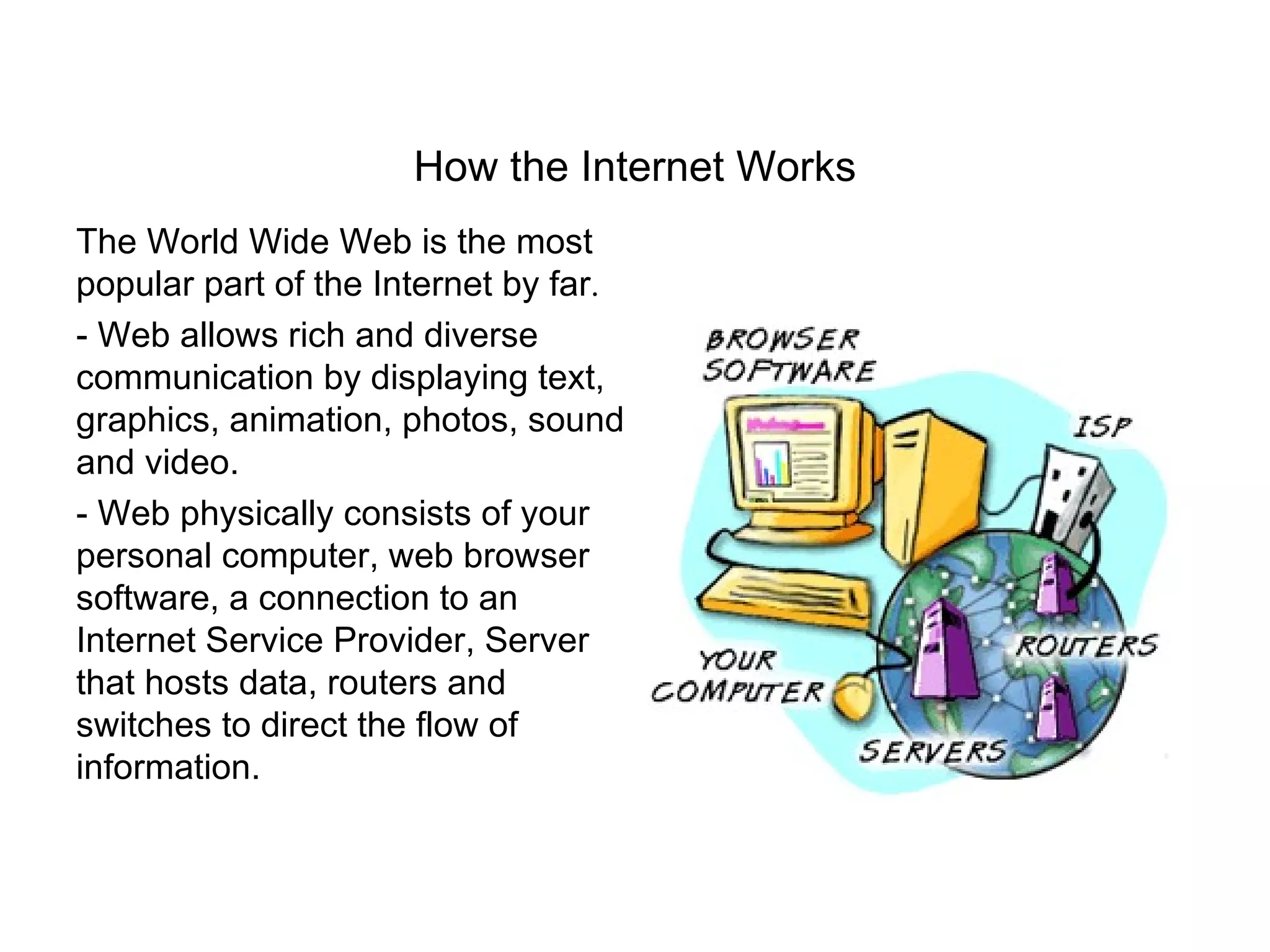
- Web physically consists of your
personal computer, web browser
software, a connection to an
Internet Service Provider, Server
that hosts data, routers and
switches to direct the flow of
information.
Components of the Internet
The Internet is comprised of many components such a Email, FTP and
Usenet News. The World Wide Web is simply one of these
components.
        • World Wide Web (World Wide Web is like an Internet
          Library with millions of books)
        • FTP
        • E-mail & E-mail Discussion Groups
        • Telnet
        • Usenet News
        • HTTP
        • Chat & Instant Messaging
What is the World Wide Web?
One simple definition of the WWW is:
The WWW is a Hypertext Information System

Hypertext browsing:
   •Non-Linear structure (not a book)
   •You read what you want next
   •Click on Hypertext links to navigate the WWW
Features of the WWW are:
   •Graphical
   •Easy to use
   •Cross Platform
   •Distributed
   •Dynamic
   •Interactive (forms, Java)
What is Hypertext?
Hypertext is a method of presenting information, where selected words
in text can be expanded at any time to provide other information about
the word.


Those words are links to other documents which may be text, file,
pictures etc., Links can be identified by highlighted (underlined) and
coloured text.


HTML (Hypertext Markup Language) is the language used to create
WWW pages and associated links.
URLs (Uniform Resource Locators) are the addresses of the WWW
pages
         http://www.computing.dcu.ie/~cgreene/index.html

To view / read the WWW pages you must have a special application i.e. a
web browser

A Web browser is an application program that provides a way to look at
and interact with all the information on the World Wide Web.
Technically, a Web browser is a client program that uses the Hypertext
Transfer Protocol (HTTP) to make requests of Web servers throughout
the Internet on behalf of the browser user and then displays web pages by
interpreting the HTML that is used to build thses pages on the web.

To publish and deliver information on the web you need a web Server

A web server is a program that runs on web sites and is responsible
for replying to a web browsers request for files
The Web works on a client / server model in which client software
(Browser) runs on a local computer. The Server software runs on a
web host. To use the web you must make an Internet connection and
then launch your web browser.
    –    Type the URL you want to visit
    –    Browser makes a connection to a server using HTTP
         protocol
    –    The Server then
          • Accepts the connection
          • Sends the file contents back to browser, and
          • Closes the connection
    –    Web browsers interpret the html pages and display them on
         screen, they can also display programs, animation, graphics,
         video-conferencing, download files etc., Browsers also allow
         you to create and publish web pages.
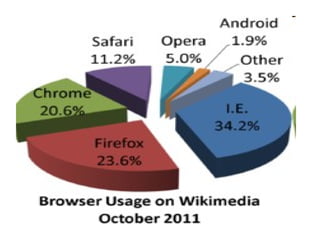
Web Browsers
Common Web Browsers
   – Mosaic – first graphical browser
   – Netscape Navigator (First commercial browser, originally known as
     Mosaic Navigator as originated from Mosaic)
   – Internet Explorer (Microsoft’s browser)
   – Lynx – text only browser

Common Errors with Browsers
   – Server Does Not Have A DNS Entry
   – 503 Service Unavailable
   – 403.9 Access Forbidden – Too Many Users are Connected
   – Spinning Hourglass
   – 404 Not Found
   – 401 Unauthorised and 402 Forbidden
File Transfer Protocol (FTP)
One of the most popular uses of the internet is to download/ upload files
that is transfer files from a computer on the internet to your computer
and vise versa.
    – Various types of files (executable programs, graphics, audio, text)

    – Different types of FTP Sites all use Login & Password
       • anonymous FTP sites (anonymous & email address as
          passwords) or automatic logon
       • Private FTP Sites (account number & password)

    – FTP runs on a Client / Server model.
       • windows has a client command-line FTP program, but other
         software programs such as WS_FTP95 are simpler and easier
         to use.
Electronic Mail (E-mail)
• Email uses the TCP/IP protocol
• SMTP (Simple Mail Transfer Protocol)
   – File attachments (binary Files)
      • MIME (Multipurpose Internet Mail Extension)
      • Uuencode (Unix to unix encoding)
• How e-mail is delivered
   – TCP/IP
   – Gateways translate email formats from one network to the
     next
   – Routers internal / external (firewall)
• E-mail Software
   – Mail Clients – Eudora, MS Exchange
       • Create folders, search through messages, address books,
         mailing lists
   – Most e-mail software reads HTML- based pages (links)
• Mail Server
Email: Advantages and Disadvantages

Advantages                 Disadvantages
• Convenience              • Misdirection
• Speed                    • Interception
• Inexpensive              • Forgery
• Printable                • Overload
• Reliable                 • Junk
• Global
                           • No response


Email Addresses
Basic form of an email address is
  username@hostname.subdomain.domain
TELNET
What is Telnet

The Telnet protocol is often thought of as simply providing a facility for
remote logins to computer via the Internet.

Telnet follows a Client / Server Model. You run a piece of software on
your own PC (the client) to use the resources of a distant Server
Computer (host computer).

Telnet enables the user of a PC to login to a host computer at another
site on the Internet.

The user's PC then acts as a dumb terminal attached to the remote host.

To use telnet you need to know the internet address of the host whose
resources you want to use.
Newsgroups
USENET is the worlds biggest electronic discussion forum. It
provides a way for messages to be sent among computers across
the entire Internet. People from all over the world participate in
discussions on thousands of specific areas of interest called
newsgroups
    – Global bulletin Board and discussion area.
    – Usenet and all messages are stored on a Usenet Server
    – Different Hierarchies of Newsgroups exist.
         • Subcategories
    – Internet site Administrator decides which newsgroup to carry
    – Moderated & Unmoderated Newsgroups
         • Moderated – human moderator
         • Unmoderated – automatically posted to everyone
    – Subscribe  Unsubscribe  Read
    – Pictures and multimedia files can be posted – files must be
       specially encoded and then downloaded and unencode to
       view them.
HTTP (Hypertext Transfer Protocol)
HTTP is a set of rules, or protocols which governs the transfer of
hypertext between two or more computers.

The World Wide Web encompasses the universe of information that
is available via HTTP.
    – HTTP is based on the client/server principle.
    – HTTP allows "computer A" (the client) to establish a
       connection to "computer B" (the server) and make a request.
       The server accepts the connection initiated by the client and
       sends back a response.
    – An HTTP request identifies the resource that the client is
       interested in and tells the server what "action" to take on the
       resource.
Chat & Instant Messaging

Instant Messaging

  Instant messaging (IM) is one of the most
  popular forms of chat. Most of the time, instant
  messaging is just between two people,
  although most IM software can handle group
  chats (with 3 or more people.)

E business internet_basics

  • 1.
    How the InternetWorks The World Wide Web is the most popular part of the Internet by far. - Web allows rich and diverse communication by displaying text, graphics, animation, photos, sound and video. - Web physically consists of your personal computer, web browser software, a connection to an Internet Service Provider, Server that hosts data, routers and switches to direct the flow of information.
  • 2.
    Components of theInternet The Internet is comprised of many components such a Email, FTP and Usenet News. The World Wide Web is simply one of these components. • World Wide Web (World Wide Web is like an Internet Library with millions of books) • FTP • E-mail & E-mail Discussion Groups • Telnet • Usenet News • HTTP • Chat & Instant Messaging
  • 3.
    What is theWorld Wide Web? One simple definition of the WWW is: The WWW is a Hypertext Information System Hypertext browsing: •Non-Linear structure (not a book) •You read what you want next •Click on Hypertext links to navigate the WWW Features of the WWW are: •Graphical •Easy to use •Cross Platform •Distributed •Dynamic •Interactive (forms, Java)
  • 4.
    What is Hypertext? Hypertextis a method of presenting information, where selected words in text can be expanded at any time to provide other information about the word. Those words are links to other documents which may be text, file, pictures etc., Links can be identified by highlighted (underlined) and coloured text. HTML (Hypertext Markup Language) is the language used to create WWW pages and associated links.
  • 5.
    URLs (Uniform ResourceLocators) are the addresses of the WWW pages http://www.computing.dcu.ie/~cgreene/index.html To view / read the WWW pages you must have a special application i.e. a web browser A Web browser is an application program that provides a way to look at and interact with all the information on the World Wide Web. Technically, a Web browser is a client program that uses the Hypertext Transfer Protocol (HTTP) to make requests of Web servers throughout the Internet on behalf of the browser user and then displays web pages by interpreting the HTML that is used to build thses pages on the web. To publish and deliver information on the web you need a web Server A web server is a program that runs on web sites and is responsible for replying to a web browsers request for files
  • 7.
    The Web workson a client / server model in which client software (Browser) runs on a local computer. The Server software runs on a web host. To use the web you must make an Internet connection and then launch your web browser. – Type the URL you want to visit – Browser makes a connection to a server using HTTP protocol – The Server then • Accepts the connection • Sends the file contents back to browser, and • Closes the connection – Web browsers interpret the html pages and display them on screen, they can also display programs, animation, graphics, video-conferencing, download files etc., Browsers also allow you to create and publish web pages.
  • 8.
    Web Browsers Common WebBrowsers – Mosaic – first graphical browser – Netscape Navigator (First commercial browser, originally known as Mosaic Navigator as originated from Mosaic) – Internet Explorer (Microsoft’s browser) – Lynx – text only browser Common Errors with Browsers – Server Does Not Have A DNS Entry – 503 Service Unavailable – 403.9 Access Forbidden – Too Many Users are Connected – Spinning Hourglass – 404 Not Found – 401 Unauthorised and 402 Forbidden
  • 9.
    File Transfer Protocol(FTP) One of the most popular uses of the internet is to download/ upload files that is transfer files from a computer on the internet to your computer and vise versa. – Various types of files (executable programs, graphics, audio, text) – Different types of FTP Sites all use Login & Password • anonymous FTP sites (anonymous & email address as passwords) or automatic logon • Private FTP Sites (account number & password) – FTP runs on a Client / Server model. • windows has a client command-line FTP program, but other software programs such as WS_FTP95 are simpler and easier to use.
  • 10.
    Electronic Mail (E-mail) •Email uses the TCP/IP protocol • SMTP (Simple Mail Transfer Protocol) – File attachments (binary Files) • MIME (Multipurpose Internet Mail Extension) • Uuencode (Unix to unix encoding) • How e-mail is delivered – TCP/IP – Gateways translate email formats from one network to the next – Routers internal / external (firewall) • E-mail Software – Mail Clients – Eudora, MS Exchange • Create folders, search through messages, address books, mailing lists – Most e-mail software reads HTML- based pages (links) • Mail Server
  • 11.
    Email: Advantages andDisadvantages Advantages Disadvantages • Convenience • Misdirection • Speed • Interception • Inexpensive • Forgery • Printable • Overload • Reliable • Junk • Global • No response Email Addresses Basic form of an email address is username@hostname.subdomain.domain
  • 12.
    TELNET What is Telnet TheTelnet protocol is often thought of as simply providing a facility for remote logins to computer via the Internet. Telnet follows a Client / Server Model. You run a piece of software on your own PC (the client) to use the resources of a distant Server Computer (host computer). Telnet enables the user of a PC to login to a host computer at another site on the Internet. The user's PC then acts as a dumb terminal attached to the remote host. To use telnet you need to know the internet address of the host whose resources you want to use.
  • 13.
    Newsgroups USENET is theworlds biggest electronic discussion forum. It provides a way for messages to be sent among computers across the entire Internet. People from all over the world participate in discussions on thousands of specific areas of interest called newsgroups – Global bulletin Board and discussion area. – Usenet and all messages are stored on a Usenet Server – Different Hierarchies of Newsgroups exist. • Subcategories – Internet site Administrator decides which newsgroup to carry – Moderated & Unmoderated Newsgroups • Moderated – human moderator • Unmoderated – automatically posted to everyone – Subscribe Unsubscribe Read – Pictures and multimedia files can be posted – files must be specially encoded and then downloaded and unencode to view them.
  • 14.
    HTTP (Hypertext TransferProtocol) HTTP is a set of rules, or protocols which governs the transfer of hypertext between two or more computers. The World Wide Web encompasses the universe of information that is available via HTTP. – HTTP is based on the client/server principle. – HTTP allows "computer A" (the client) to establish a connection to "computer B" (the server) and make a request. The server accepts the connection initiated by the client and sends back a response. – An HTTP request identifies the resource that the client is interested in and tells the server what "action" to take on the resource.
  • 15.
    Chat & InstantMessaging Instant Messaging Instant messaging (IM) is one of the most popular forms of chat. Most of the time, instant messaging is just between two people, although most IM software can handle group chats (with 3 or more people.)