CITY UNIVERSITY
Faculty of Science and Engineering
Department of Computer Science and Engineering
Fall 2021
SE 407 (MSE):Web Database Programming Assignment - 01
Submitted To
Pranab Bandhu Nath Lecturer
Department of CSE
City University, Bangladesh
Submitted By
MD. Tangimul Haque
Submission Date: 18/05/2021
What is World Wide Web?
• World Wide Web, which is also known as a Web, is a collection of websites or web pages stored in web
servers and connected to local computers through the internet. These websites contain text pages, digital
images, audios, videos, etc. Users can access the content of these sites from any part of the world over the
internet using their devices such as computers, laptops, cell phones, etc. The WWW, along with internet,
enables the retrieval and display of text and media to your device.
The building blocks of the Web are web pages which are formatted in HTML and connected by links called
"hypertext" or hyperlinks and accessed by HTTP.
Hypertext Transfer Protocol (HTTP):
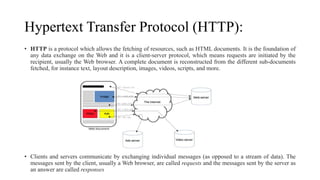
• HTTP is a protocol which allows the fetching of resources, such as HTML documents. It is the foundation of
any data exchange on the Web and it is a client-server protocol, which means requests are initiated by the
recipient, usually the Web browser. A complete document is reconstructed from the different sub-documents
fetched, for instance text, layout description, images, videos, scripts, and more.
• Clients and servers communicate by exchanging individual messages (as opposed to a stream of data). The
messages sent by the client, usually a Web browser, are called requests and the messages sent by the server as
an answer are called responses
What is a Network?
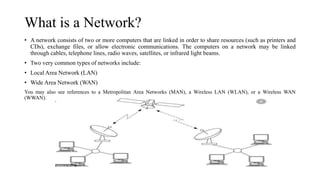
• A network consists of two or more computers that are linked in order to share resources (such as printers and
CDs), exchange files, or allow electronic communications. The computers on a network may be linked
through cables, telephone lines, radio waves, satellites, or infrared light beams.
• Two very common types of networks include:
• Local Area Network (LAN)
• Wide Area Network (WAN)
You may also see references to a Metropolitan Area Networks (MAN), a Wireless LAN (WLAN), or a Wireless WAN
(WWAN).
Local Area Network
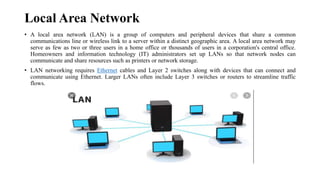
• A local area network (LAN) is a group of computers and peripheral devices that share a common
communications line or wireless link to a server within a distinct geographic area. A local area network may
serve as few as two or three users in a home office or thousands of users in a corporation's central office.
Homeowners and information technology (IT) administrators set up LANs so that network nodes can
communicate and share resources such as printers or network storage.
• LAN networking requires Ethernet cables and Layer 2 switches along with devices that can connect and
communicate using Ethernet. Larger LANs often include Layer 3 switches or routers to streamline traffic
flows.
Wide Area Network (WAN)
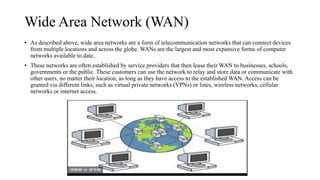
• As described above, wide area networks are a form of telecommunication networks that can connect devices
from multiple locations and across the globe. WANs are the largest and most expansive forms of computer
networks available to date.
• These networks are often established by service providers that then lease their WAN to businesses, schools,
governments or the public. These customers can use the network to relay and store data or communicate with
other users, no matter their location, as long as they have access to the established WAN. Access can be
granted via different links, such as virtual private networks (VPNs) or lines, wireless networks, cellular
networks or internet access.
What is the Internet?
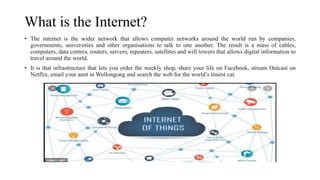
• The internet is the wider network that allows computer networks around the world run by companies,
governments, universities and other organisations to talk to one another. The result is a mass of cables,
computers, data centres, routers, servers, repeaters, satellites and wifi towers that allows digital information to
travel around the world.
• It is that infrastructure that lets you order the weekly shop, share your life on Facebook, stream Outcast on
Netflix, email your aunt in Wollongong and search the web for the world’s tiniest cat.
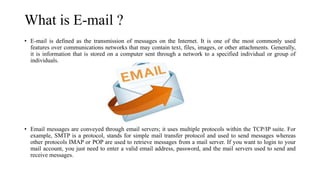
What is E-mail ?
• E-mail is defined as the transmission of messages on the Internet. It is one of the most commonly used
features over communications networks that may contain text, files, images, or other attachments. Generally,
it is information that is stored on a computer sent through a network to a specified individual or group of
individuals.
• Email messages are conveyed through email servers; it uses multiple protocols within the TCP/IP suite. For
example, SMTP is a protocol, stands for simple mail transfer protocol and used to send messages whereas
other protocols IMAP or POP are used to retrieve messages from a mail server. If you want to login to your
mail account, you just need to enter a valid email address, password, and the mail servers used to send and
receive messages.
What is SMTP?
• SMTP is part of the application layer of the TCP/IP protocol. Using a process called “store and forward,”
SMTP moves your email on and across networks. It works closely with something called the Mail Transfer
Agent (MTA) to send your communication to the right computer and email inbox.
• SMTP spells out and directs how your email moves from your computer’s MTA to an MTA on another
computer, and even several computers. Using that “store and forward” feature mentioned before, the message
can move in steps from your computer to its destination. At each step, Simple Mail Transfer Protocol is doing
its job. Lucky for us, this all takes place behind the scenes, and we don’t need to understand or operate SMTP
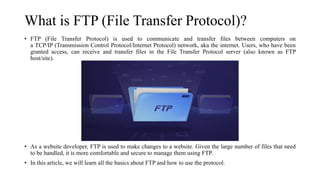
What is FTP (File Transfer Protocol)?
• FTP (File Transfer Protocol) is used to communicate and transfer files between computers on
a TCP/IP (Transmission Control Protocol/Internet Protocol) network, aka the internet. Users, who have been
granted access, can receive and transfer files in the File Transfer Protocol server (also known as FTP
host/site).
• As a website developer, FTP is used to make changes to a website. Given the large number of files that need
to be handled, it is more comfortable and secure to manage them using FTP.
• In this article, we will learn all the basics about FTP and how to use the protocol.
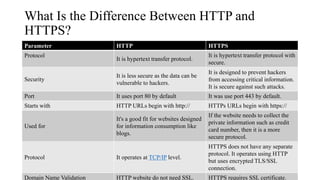
What Is the Difference Between HTTP and
HTTPS?
Parameter HTTP HTTPS
Protocol
It is hypertext transfer protocol.
It is hypertext transfer protocol with
secure.
Security
It is less secure as the data can be
vulnerable to hackers.
It is designed to prevent hackers
from accessing critical information.
It is secure against such attacks.
Port It uses port 80 by default It was use port 443 by default.
Starts with HTTP URLs begin with http:// HTTPs URLs begin with https://
Used for
It's a good fit for websites designed
for information consumption like
blogs.
If the website needs to collect the
private information such as credit
card number, then it is a more
secure protocol.
Protocol It operates at TCP/IP level.
HTTPS does not have any separate
protocol. It operates using HTTP
but uses encrypted TLS/SSL
connection.
Domain Name Validation HTTP website do not need SSL. HTTPS requires SSL certificate.
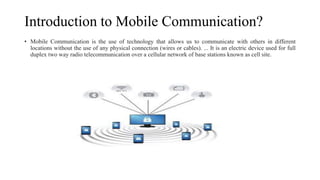
Introduction to Mobile Communication?
• Mobile Communication is the use of technology that allows us to communicate with others in different
locations without the use of any physical connection (wires or cables). ... It is an electric device used for full
duplex two way radio telecommunication over a cellular network of base stations known as cell site.
Basic of it definations

Basic of it definations

  • 1.
    CITY UNIVERSITY Faculty ofScience and Engineering Department of Computer Science and Engineering Fall 2021 SE 407 (MSE):Web Database Programming Assignment - 01 Submitted To Pranab Bandhu Nath Lecturer Department of CSE City University, Bangladesh Submitted By MD. Tangimul Haque Submission Date: 18/05/2021
  • 2.
    What is WorldWide Web? • World Wide Web, which is also known as a Web, is a collection of websites or web pages stored in web servers and connected to local computers through the internet. These websites contain text pages, digital images, audios, videos, etc. Users can access the content of these sites from any part of the world over the internet using their devices such as computers, laptops, cell phones, etc. The WWW, along with internet, enables the retrieval and display of text and media to your device. The building blocks of the Web are web pages which are formatted in HTML and connected by links called "hypertext" or hyperlinks and accessed by HTTP.
  • 3.
    Hypertext Transfer Protocol(HTTP): • HTTP is a protocol which allows the fetching of resources, such as HTML documents. It is the foundation of any data exchange on the Web and it is a client-server protocol, which means requests are initiated by the recipient, usually the Web browser. A complete document is reconstructed from the different sub-documents fetched, for instance text, layout description, images, videos, scripts, and more. • Clients and servers communicate by exchanging individual messages (as opposed to a stream of data). The messages sent by the client, usually a Web browser, are called requests and the messages sent by the server as an answer are called responses
  • 4.
    What is aNetwork? • A network consists of two or more computers that are linked in order to share resources (such as printers and CDs), exchange files, or allow electronic communications. The computers on a network may be linked through cables, telephone lines, radio waves, satellites, or infrared light beams. • Two very common types of networks include: • Local Area Network (LAN) • Wide Area Network (WAN) You may also see references to a Metropolitan Area Networks (MAN), a Wireless LAN (WLAN), or a Wireless WAN (WWAN).
  • 5.
    Local Area Network •A local area network (LAN) is a group of computers and peripheral devices that share a common communications line or wireless link to a server within a distinct geographic area. A local area network may serve as few as two or three users in a home office or thousands of users in a corporation's central office. Homeowners and information technology (IT) administrators set up LANs so that network nodes can communicate and share resources such as printers or network storage. • LAN networking requires Ethernet cables and Layer 2 switches along with devices that can connect and communicate using Ethernet. Larger LANs often include Layer 3 switches or routers to streamline traffic flows.
  • 6.
    Wide Area Network(WAN) • As described above, wide area networks are a form of telecommunication networks that can connect devices from multiple locations and across the globe. WANs are the largest and most expansive forms of computer networks available to date. • These networks are often established by service providers that then lease their WAN to businesses, schools, governments or the public. These customers can use the network to relay and store data or communicate with other users, no matter their location, as long as they have access to the established WAN. Access can be granted via different links, such as virtual private networks (VPNs) or lines, wireless networks, cellular networks or internet access.
  • 7.
    What is theInternet? • The internet is the wider network that allows computer networks around the world run by companies, governments, universities and other organisations to talk to one another. The result is a mass of cables, computers, data centres, routers, servers, repeaters, satellites and wifi towers that allows digital information to travel around the world. • It is that infrastructure that lets you order the weekly shop, share your life on Facebook, stream Outcast on Netflix, email your aunt in Wollongong and search the web for the world’s tiniest cat.
  • 8.
    What is E-mail? • E-mail is defined as the transmission of messages on the Internet. It is one of the most commonly used features over communications networks that may contain text, files, images, or other attachments. Generally, it is information that is stored on a computer sent through a network to a specified individual or group of individuals. • Email messages are conveyed through email servers; it uses multiple protocols within the TCP/IP suite. For example, SMTP is a protocol, stands for simple mail transfer protocol and used to send messages whereas other protocols IMAP or POP are used to retrieve messages from a mail server. If you want to login to your mail account, you just need to enter a valid email address, password, and the mail servers used to send and receive messages.
  • 9.
    What is SMTP? •SMTP is part of the application layer of the TCP/IP protocol. Using a process called “store and forward,” SMTP moves your email on and across networks. It works closely with something called the Mail Transfer Agent (MTA) to send your communication to the right computer and email inbox. • SMTP spells out and directs how your email moves from your computer’s MTA to an MTA on another computer, and even several computers. Using that “store and forward” feature mentioned before, the message can move in steps from your computer to its destination. At each step, Simple Mail Transfer Protocol is doing its job. Lucky for us, this all takes place behind the scenes, and we don’t need to understand or operate SMTP
  • 10.
    What is FTP(File Transfer Protocol)? • FTP (File Transfer Protocol) is used to communicate and transfer files between computers on a TCP/IP (Transmission Control Protocol/Internet Protocol) network, aka the internet. Users, who have been granted access, can receive and transfer files in the File Transfer Protocol server (also known as FTP host/site). • As a website developer, FTP is used to make changes to a website. Given the large number of files that need to be handled, it is more comfortable and secure to manage them using FTP. • In this article, we will learn all the basics about FTP and how to use the protocol.
  • 11.
    What Is theDifference Between HTTP and HTTPS? Parameter HTTP HTTPS Protocol It is hypertext transfer protocol. It is hypertext transfer protocol with secure. Security It is less secure as the data can be vulnerable to hackers. It is designed to prevent hackers from accessing critical information. It is secure against such attacks. Port It uses port 80 by default It was use port 443 by default. Starts with HTTP URLs begin with http:// HTTPs URLs begin with https:// Used for It's a good fit for websites designed for information consumption like blogs. If the website needs to collect the private information such as credit card number, then it is a more secure protocol. Protocol It operates at TCP/IP level. HTTPS does not have any separate protocol. It operates using HTTP but uses encrypted TLS/SSL connection. Domain Name Validation HTTP website do not need SSL. HTTPS requires SSL certificate.
  • 12.
    Introduction to MobileCommunication? • Mobile Communication is the use of technology that allows us to communicate with others in different locations without the use of any physical connection (wires or cables). ... It is an electric device used for full duplex two way radio telecommunication over a cellular network of base stations known as cell site.