
Internet
Introduction To Internet
• What is the Internet?
1. The internet in simple terms is a network of the
interlinked computer networking worldwide, which is
accessible to the general public. These interconnected
computers work by transmitting data through a special
type of packet switching which is known as the IP or the
internet protocol.
Internet
• It is the largest network in the world that connects
hundreds of thousands of individual networks all
over the world.
• The popular term for the Internet is the
“information highway”.
• Rather than moving through geographical space, it
moves your ideas and information through
cyberspace – the space of electronic movement of
ideas and information.
Internet
• No one owns it
• It has no formal management organization.
• As it was originally developed by the Department of
defense, this lack of centralization made it less
vulnerable to wartime or terrorist attacks.
• To access the Internet, an existing network need to
pay a small registration fee and agree to certain
standards based on the TCP/IP (Transmission
Control Protocol/Internet Protocol) .
History of INTERNET
• ARPANET was the network that became the basis for the
Internet. Based on a concept first published in 1967,
ARPANET was developed under the direction of the U.S.
Advanced Research Projects Agency (ARPA).
• In 1969, the idea became a modest reality with the
interconnection of four university computers. The initial
purpose was to communicate with and share computer
resources among mainly scientific users at the connected
institutions.
Some Basic Internet Definition
• ARPANet - The precursor to the Internet.
• ASCII - American Standard Code for Information Interchange. The
de facto world wide standard code for alphanumeric characters.
• Blacklist - Describes inappropriate advertisers on Usenet
newsgroups and via junk E-mail.
• Browser - A program that is specifically used to look at various
WWW resources.
• Client - Any computer that makes use of services available from
other computers.
Some Basic Internet Definition
• Domain Name - A unique name that identifies an Internet
site. The name always has two or more parts separated by
a dot. The last part of the name identifies the site ( i.e. gov
for government, edu for education, com for commercial,
or net for network). An electronic street address.
• E-mail - Messages, usually text, sent from one person to
another via a computer.
• Fire Wall - A combination of hardware and software that
separates a LAN into two or more parts for security
purposes.
Some Basic Internet Definition
• Host - A computer or software package which provides a specific
kind of service to other computers. One that is seen by other
computers on the Internet.
LAN - Local Area Network. Several computers located in the
same physical location which are connected together in order to
share information and services.
• Modem - A device that allows a computer to use a phone line to
communicate with another computer.
• Protocol - The rules of conduct which enables a computer to
communicate with another computer.
PPP - A protocol that allows a computer to use a telephone line
and a modem to make TCP/IP connections.
Some Basic Internet Definition
• Server - Any computer that makes services available
to other computers.
• TCP/IP - Transmission Control Protocol/Internet
Protocol. This is the protocol which defines the
Internet.
• URL - Uniform Resource Locator. A unique name
that identifies an Internet site.
• WWW - World Wide Web. The universe of hypertext
servers.
Hypertext Markup Language (HTML)
• The public files on the web servers are ordinary text files, much like
the files used by word-processing software.
• To allow Web browser software to read them, the text must be
formatted according to a generally accepted standard.
• The standard used on the web is Hypertext markup language
(HTML).
Hypertext Markup Language (HTML)
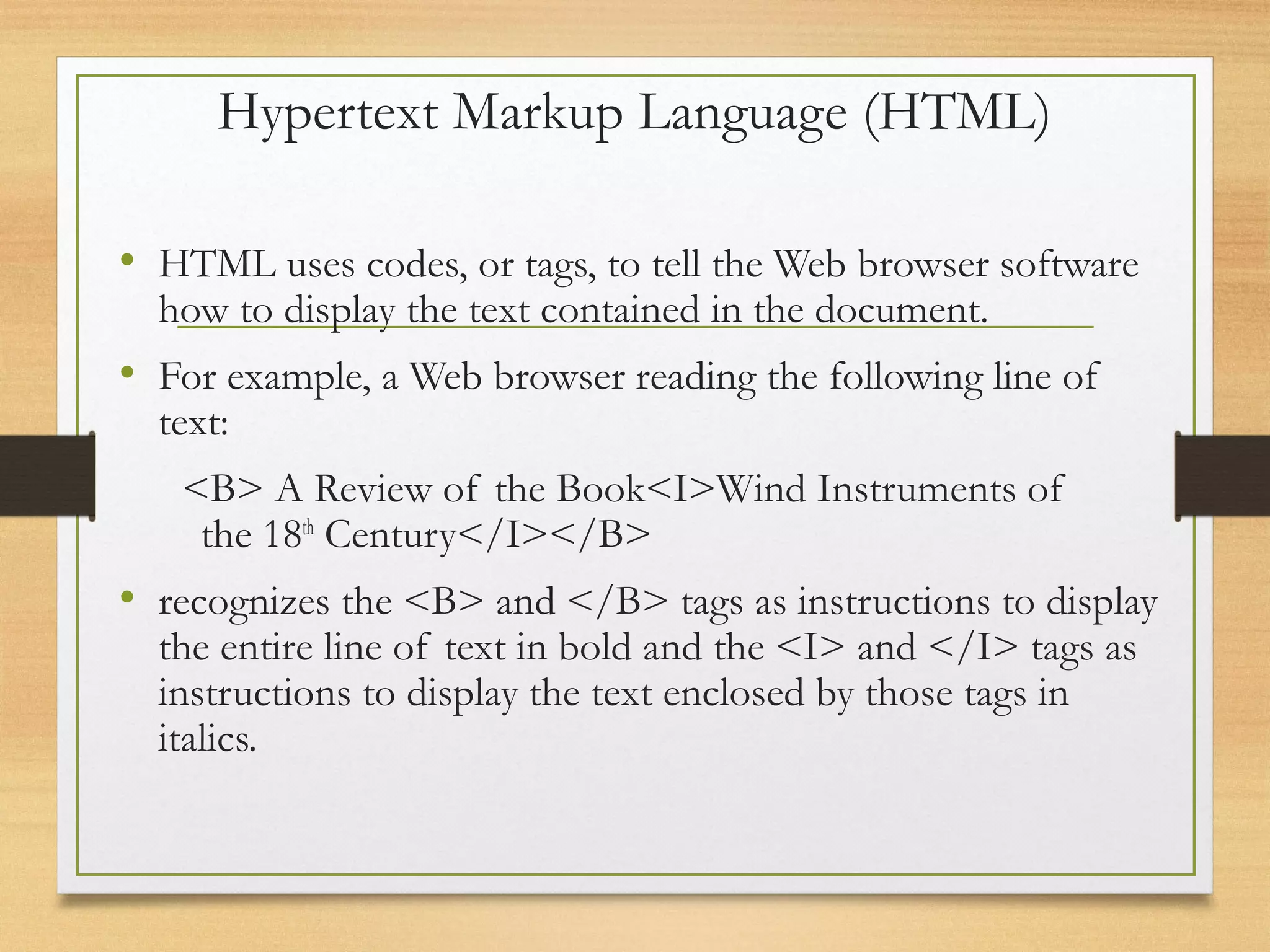
• HTML uses codes, or tags, to tell the Web browser software
how to display the text contained in the document.
• For example, a Web browser reading the following line of
text:
<B> A Review of the Book<I>Wind Instruments of
the 18th
Century</I></B>
• recognizes the <B> and </B> tags as instructions to display
the entire line of text in bold and the <I> and </I> tags as
instructions to display the text enclosed by those tags in
italics.
Addresses on the Web:IP Addressing
• Each computer on the internet does have a unique identification
number, called an IP (Internet Protocol) address.
• The IP addressing system currently in use on the Internet uses a
four-part number.
• Each part of the address is a number ranging from 0 to 255, and
each part is separated from the previous part by period,
• For example, 106.29.242.17
IP Addressing
• The combination of the four IP address parts provides 4.2 billion
possible addresses (256 x 256 x 256 x 256).
• This number seemed adequate until 1998.
• Members of various Internet task forces are working to develop
an alternate addressing system that will accommodate the
projected growth.
• However, all of their working solutions require extensive hardware
and software changes throughout the Internet.
Domain Name Addressing
• Most web browsers do not use the IP address t locate
Web sites and individual pages.
• They use domain name addressing.
• A domain name is a unique name associated with a
specific IP address by a program that runs on an Internet
host computer.
• This program, which coordinates the IP addresses and
domain names for all computers attached to it, is called
DNS (Domain Name System ) software.
• The host computer that runs this software is called a
domain name server.
Domain Name Addressing
• Domain names can include any number of parts separated by
periods, however most domain names currently in use have only
three or four parts.
• Domain names follow hierarchical model that you can follow from
top to bottom if you read the name from the right to the left.
• For example, the domain name gsb.uchicago.edu is the computer
connected to the Internet at the Graduate School of Business
(gsb), which is an academic unit of the University of Chicago
(uchicago), which is an educational institution (edu).
• No other computer on the Internet has the same domain name.
Uniform Resource Locators
• The IP address and the domain name each identify a particular
computer on the Internet.
• However, they do not indicate where a Web page’s HTML
document resides on that computer.
• To identify a Web pages exact location, Web browsers rely on
Uniform Resource Locator (URL).
• URL is a four-part addressing scheme that tells the Web browser:
What transfer protocol to use for transporting the file
The domain name of the computer on which the file resides
The pathname of the folder or directory on the computer on
which the file resides
The name of the file
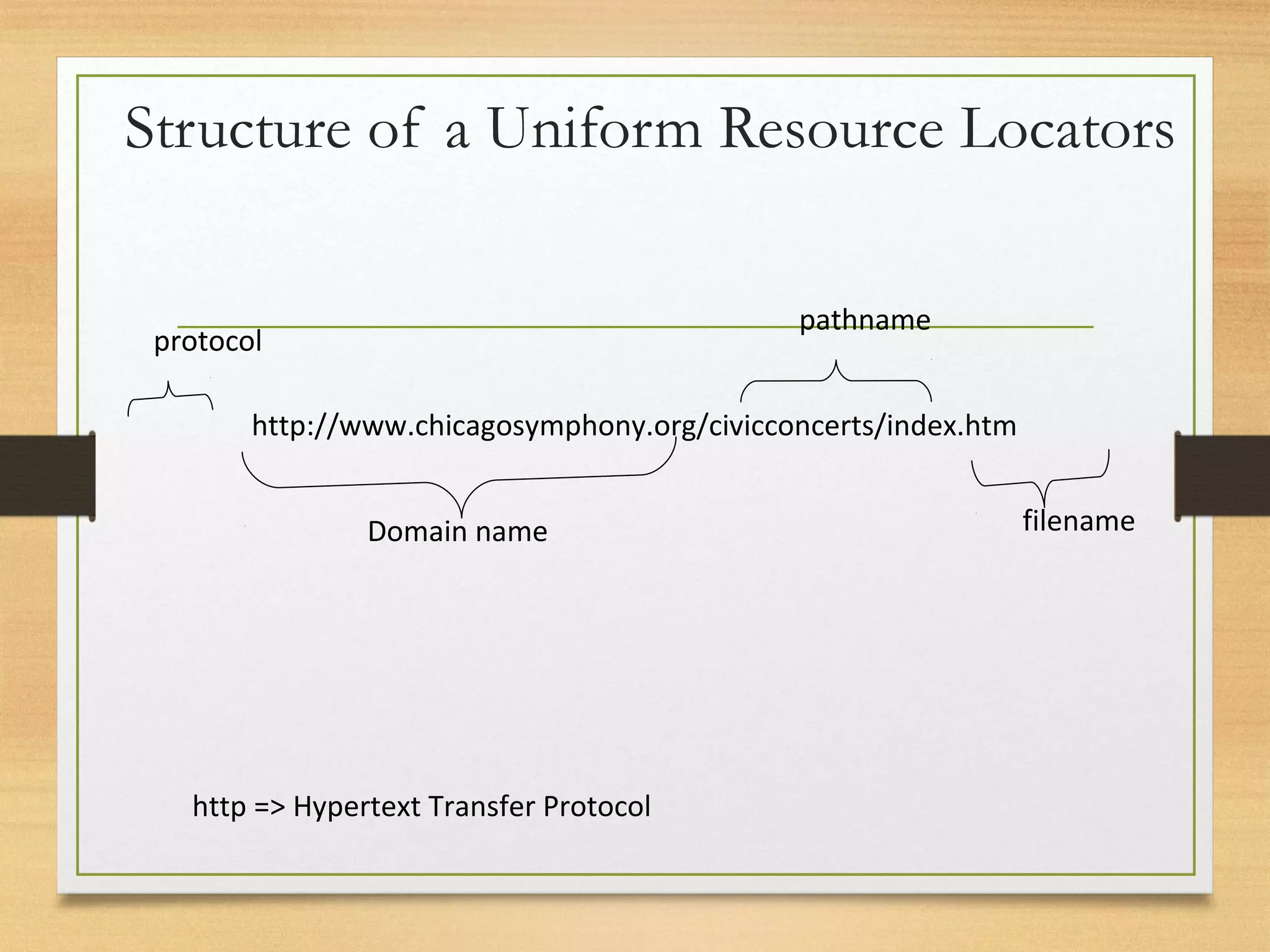
Structure of a Uniform Resource Locators
http://www.chicagosymphony.org/civicconcerts/index.htm
protocol
Domain name
pathname
filename
http => Hypertext Transfer Protocol
HTTP
• The transfer protocol is the set of rules that the
computers use to move files from one computer
to another on the Internet.
• The most common transfer protocol used on the
Internet is the Hypertext Transfer Protocol
(HTTP).
• Two other protocols that you can use on the
Internet are the File Transfer Protocol (FTP) and
the Telnet Protocol
What is Web?
• The Web (World Wide Web) consists of information
organized into Web pages containing text and graphic
images.
• It contains hypertext links, or highlighted keywords and
images that lead to related information.
• A collection of linked Web pages that has a common
theme or focus is called a Web site.
• The main page that all of the pages on a particular Web
site are organized around and link back to is called the
site’s home page.
What is the difference between
the World Wide Web and the
Internet?
• The World Wide Web (The Web) is only a portion of
what makes up the internet, but it is the fastest growing
part of the internet. The Web lets people, organizations
and companies publish information for other people to
see. This makes the Web a very useful tool for finding
information on just about any topic.
• The Web is a large number of computer documents or
"Web pages" that are stored on computers around the
world and are connected to one another using hyperlinks.
These Web pages can be seen by anyone through their
computer's "Web Browser," which is the program you
are using now.
Cont.
• A group of Web pages that follow the same theme
and are connected together with hyperlinks is called a
"Web site." Web sites and Web pages are written in
a coding language that makes it possible to add
pictures, sound and interactivity to plain old text,
making people's reading experience more exciting.
Client/Server Structure of the Web
• Web is a collection of files that reside on computers,
called Web servers, that are located all over the world
and are connected to each other through the Internet.
• When you use your Internet connection to become part
of the Web, your computer becomes a Web client in a
worldwide client/server network.
• A Web browser is the software that you run on your
computer to make it work as a web client.
THANK YOU

Internet

  • 1.
  • 2.
    Introduction To Internet •What is the Internet? 1. The internet in simple terms is a network of the interlinked computer networking worldwide, which is accessible to the general public. These interconnected computers work by transmitting data through a special type of packet switching which is known as the IP or the internet protocol.
  • 3.
    Internet • It isthe largest network in the world that connects hundreds of thousands of individual networks all over the world. • The popular term for the Internet is the “information highway”. • Rather than moving through geographical space, it moves your ideas and information through cyberspace – the space of electronic movement of ideas and information.
  • 4.
    Internet • No oneowns it • It has no formal management organization. • As it was originally developed by the Department of defense, this lack of centralization made it less vulnerable to wartime or terrorist attacks. • To access the Internet, an existing network need to pay a small registration fee and agree to certain standards based on the TCP/IP (Transmission Control Protocol/Internet Protocol) .
  • 5.
    History of INTERNET •ARPANET was the network that became the basis for the Internet. Based on a concept first published in 1967, ARPANET was developed under the direction of the U.S. Advanced Research Projects Agency (ARPA). • In 1969, the idea became a modest reality with the interconnection of four university computers. The initial purpose was to communicate with and share computer resources among mainly scientific users at the connected institutions.
  • 6.
    Some Basic InternetDefinition • ARPANet - The precursor to the Internet. • ASCII - American Standard Code for Information Interchange. The de facto world wide standard code for alphanumeric characters. • Blacklist - Describes inappropriate advertisers on Usenet newsgroups and via junk E-mail. • Browser - A program that is specifically used to look at various WWW resources. • Client - Any computer that makes use of services available from other computers.
  • 7.
    Some Basic InternetDefinition • Domain Name - A unique name that identifies an Internet site. The name always has two or more parts separated by a dot. The last part of the name identifies the site ( i.e. gov for government, edu for education, com for commercial, or net for network). An electronic street address. • E-mail - Messages, usually text, sent from one person to another via a computer. • Fire Wall - A combination of hardware and software that separates a LAN into two or more parts for security purposes.
  • 8.
    Some Basic InternetDefinition • Host - A computer or software package which provides a specific kind of service to other computers. One that is seen by other computers on the Internet. LAN - Local Area Network. Several computers located in the same physical location which are connected together in order to share information and services. • Modem - A device that allows a computer to use a phone line to communicate with another computer. • Protocol - The rules of conduct which enables a computer to communicate with another computer. PPP - A protocol that allows a computer to use a telephone line and a modem to make TCP/IP connections.
  • 9.
    Some Basic InternetDefinition • Server - Any computer that makes services available to other computers. • TCP/IP - Transmission Control Protocol/Internet Protocol. This is the protocol which defines the Internet. • URL - Uniform Resource Locator. A unique name that identifies an Internet site. • WWW - World Wide Web. The universe of hypertext servers.
  • 10.
    Hypertext Markup Language(HTML) • The public files on the web servers are ordinary text files, much like the files used by word-processing software. • To allow Web browser software to read them, the text must be formatted according to a generally accepted standard. • The standard used on the web is Hypertext markup language (HTML).
  • 11.
    Hypertext Markup Language(HTML) • HTML uses codes, or tags, to tell the Web browser software how to display the text contained in the document. • For example, a Web browser reading the following line of text: <B> A Review of the Book<I>Wind Instruments of the 18th Century</I></B> • recognizes the <B> and </B> tags as instructions to display the entire line of text in bold and the <I> and </I> tags as instructions to display the text enclosed by those tags in italics.
  • 12.
    Addresses on theWeb:IP Addressing • Each computer on the internet does have a unique identification number, called an IP (Internet Protocol) address. • The IP addressing system currently in use on the Internet uses a four-part number. • Each part of the address is a number ranging from 0 to 255, and each part is separated from the previous part by period, • For example, 106.29.242.17
  • 13.
    IP Addressing • Thecombination of the four IP address parts provides 4.2 billion possible addresses (256 x 256 x 256 x 256). • This number seemed adequate until 1998. • Members of various Internet task forces are working to develop an alternate addressing system that will accommodate the projected growth. • However, all of their working solutions require extensive hardware and software changes throughout the Internet.
  • 14.
    Domain Name Addressing •Most web browsers do not use the IP address t locate Web sites and individual pages. • They use domain name addressing. • A domain name is a unique name associated with a specific IP address by a program that runs on an Internet host computer. • This program, which coordinates the IP addresses and domain names for all computers attached to it, is called DNS (Domain Name System ) software. • The host computer that runs this software is called a domain name server.
  • 15.
    Domain Name Addressing •Domain names can include any number of parts separated by periods, however most domain names currently in use have only three or four parts. • Domain names follow hierarchical model that you can follow from top to bottom if you read the name from the right to the left. • For example, the domain name gsb.uchicago.edu is the computer connected to the Internet at the Graduate School of Business (gsb), which is an academic unit of the University of Chicago (uchicago), which is an educational institution (edu). • No other computer on the Internet has the same domain name.
  • 16.
    Uniform Resource Locators •The IP address and the domain name each identify a particular computer on the Internet. • However, they do not indicate where a Web page’s HTML document resides on that computer. • To identify a Web pages exact location, Web browsers rely on Uniform Resource Locator (URL). • URL is a four-part addressing scheme that tells the Web browser: What transfer protocol to use for transporting the file The domain name of the computer on which the file resides The pathname of the folder or directory on the computer on which the file resides The name of the file
  • 17.
    Structure of aUniform Resource Locators http://www.chicagosymphony.org/civicconcerts/index.htm protocol Domain name pathname filename http => Hypertext Transfer Protocol
  • 18.
    HTTP • The transferprotocol is the set of rules that the computers use to move files from one computer to another on the Internet. • The most common transfer protocol used on the Internet is the Hypertext Transfer Protocol (HTTP). • Two other protocols that you can use on the Internet are the File Transfer Protocol (FTP) and the Telnet Protocol
  • 19.
    What is Web? •The Web (World Wide Web) consists of information organized into Web pages containing text and graphic images. • It contains hypertext links, or highlighted keywords and images that lead to related information. • A collection of linked Web pages that has a common theme or focus is called a Web site. • The main page that all of the pages on a particular Web site are organized around and link back to is called the site’s home page.
  • 20.
    What is thedifference between the World Wide Web and the Internet? • The World Wide Web (The Web) is only a portion of what makes up the internet, but it is the fastest growing part of the internet. The Web lets people, organizations and companies publish information for other people to see. This makes the Web a very useful tool for finding information on just about any topic. • The Web is a large number of computer documents or "Web pages" that are stored on computers around the world and are connected to one another using hyperlinks. These Web pages can be seen by anyone through their computer's "Web Browser," which is the program you are using now.
  • 21.
    Cont. • A groupof Web pages that follow the same theme and are connected together with hyperlinks is called a "Web site." Web sites and Web pages are written in a coding language that makes it possible to add pictures, sound and interactivity to plain old text, making people's reading experience more exciting.
  • 22.
    Client/Server Structure ofthe Web • Web is a collection of files that reside on computers, called Web servers, that are located all over the world and are connected to each other through the Internet. • When you use your Internet connection to become part of the Web, your computer becomes a Web client in a worldwide client/server network. • A Web browser is the software that you run on your computer to make it work as a web client.
  • 23.