Networking:
Basic of Internet and Mobile Technologies.
CHAPTER 1
FOR CLASS 10 COMPUTER APPLICATION
By Sumit Kumar Bhaskar
PGT Computer Science
Internet:-
 Definition
 A huge network of networks.
 An information superhighway as it is the largest medium to share and access
information, connect and interact with people across the globe.
 The internet is INTer to the NETwork.
Internet:-
Requirement for Internet connection:-
 Requirements
 Computer System
 NIC (network interface card):- hardware that allows a computer
to communicate over a computer network.
 MODEM(modulator and demodulator):- it requires to establish
the connection on computer.
 ISP (internet service provider):-it provide the accessibility to
provide the connection to the computer.
WWW(WORLD WIDE WEB):-
 World wide web is a large collection of information which
can be accessed using web browsers.
 It is a virtual library of knowledge and resource.
 www was developed by Tim Berners Lee in 1989.
WEB SERVER:-
 Server is a special computer running a software that provides service to
another computer or clients.
 Server always full fill the request of Client node of computer.
 Apache is the most widely-installed web server.
Webpage:-
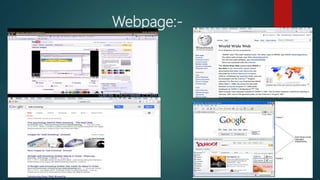
A web page or webpage is a document, commonly written in HTML, that is
viewed in an Internet browser.
A web page can be accessed by entering a URL address into a
browser's address bar.
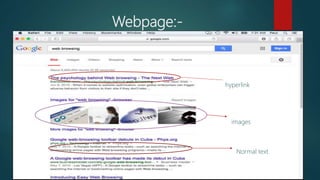
A web page may contain text, graphics, and hyperlinks to other web pages
and files.
Webpage:-
Webpage:-
hyperlink
images
Normal text
Types of Webpage:-
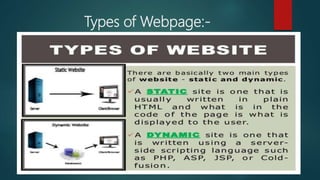
1. Static webpage:- it is the one where information is not changed
frequently. Or in other words the information is fixed to the visitors.
1. Dynamic webpage:- it is one which display different information based
upon different execution of either CGI(common gateway interface) or
server side scripting. Example the webpage of weather is frequently
changed.
Types of Webpage:-
Common terms related with webpages
 WEBSITE :-A website is the group of web pages which are placed in a
location on the internet under a domain.
 WEBPORTAL:-This might come as a confusion, but Web Portal is a
specially designed website that provides information catered from various
sources such as emails, online forums, search engines on one platform, in
a uniform way.
 WEB ADDRESS:-A website address, also known as a URL (uniform
resource locator), is an Internet or intranet name that points to to a
location where a file, directory or website page is hosted.
Common terms related with webpages
WebBlog:-
1. Definition:-
A blog (shortening of “weblog”) is an online journal or informational
website displaying information in the reverse chronological order, with
the latest posts appearing first. It is a platform where a writer or even a
group of writers share their views on an individual subject.
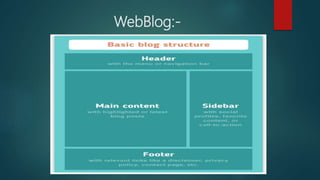
2. Structure of Blog.
 Header with the menu or navigation bar
 Main content area with highlighted or latest blog posts
 Sidebar with social profiles, favorite content, or call-to-action
 Footer with relevant links like a disclaimer, privacy policy, contact page,
etc.
WebBlog:-
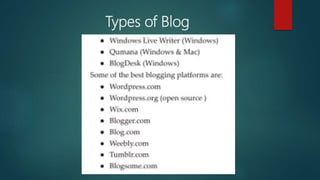
Types of Blog
News Group
 A newsgroup is a discussion about a particular subject consisting of notes
written to a central internet site and redistributed through Usenet, a
worldwide network of news discussion groups.
 Usenet uses the Network News Transfer Protocol(NNTP).
 A newsgroup is an Internet-based discussion around an individual, entity,
organization or topic.
 Newsgroups enable remotely connected users to share, discuss and learn
about their topic of interest by exchanging text messages, images, videos
and other forms of digital content.
E-Mail (Electronic mail)
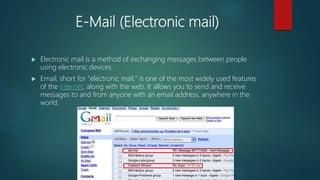
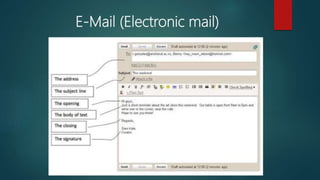
 Electronic mail is a method of exchanging messages between people
using electronic devices.
 Email, short for "electronic mail," is one of the most widely used features
of the Internet, along with the web. It allows you to send and receive
messages to and from anyone with an email address, anywhere in the
world.
E-Mail (Electronic mail)
Basic Terms of E-Mail (Electronic mail)
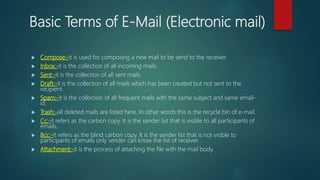
 Compose:-it is used for composing a new mail to be send to the receiver.
 Inbox:-it is the collection of all incoming mails.
 Sent:-it is the collection of all sent mails.
 Draft:-it is the collection of all mails which has been created but not sent to the
recipient.
 Spam:-it is the collection of all frequent mails with the same subject and same email-
id.
 Trash:-all deleted mails are listed here. In other words this is the recycle bin of e-mail.
 Cc:-it refers as the carbon copy. It is the sender list that is visible to all participants of
emails.
 Bcc:-It refers as the blind carbon copy. It is the sender list that is not visible to
participants of emails only sender can know the list of receiver.
 Attachment:-it is the process of attaching the file with the mail body.
Transfering of file
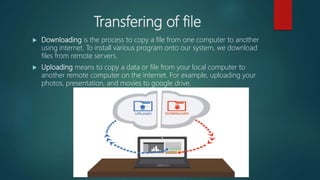
 Downloading is the process to copy a file from one computer to another
using internet. To install various program onto our system, we download
files from remote servers.
 Uploading means to copy a data or file from your local computer to
another remote computer on the internet. For example, uploading your
photos, presentation, and movies to google drive.
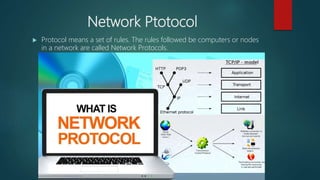
Network Ptotocol
 Protocol means a set of rules. The rules followed be computers or nodes
in a network are called Network Protocols.
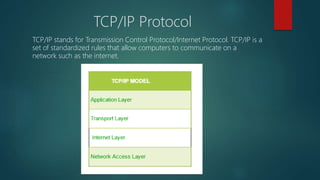
TCP/IP Protocol
TCP/IP stands for Transmission Control Protocol/Internet Protocol. TCP/IP is a
set of standardized rules that allow computers to communicate on a
network such as the internet.
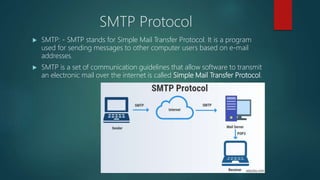
SMTP Protocol
 SMTP: - SMTP stands for Simple Mail Transfer Protocol. It is a program
used for sending messages to other computer users based on e-mail
addresses.
 SMTP is a set of communication guidelines that allow software to transmit
an electronic mail over the internet is called Simple Mail Transfer Protocol.
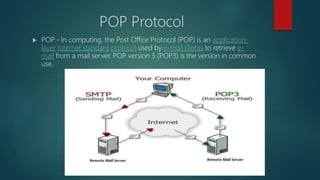
POP Protocol
 POP:- In computing, the Post Office Protocol (POP) is an application-
layer Internet standard protocol used by e-mail clients to retrieve e-
mail from a mail server. POP version 3 (POP3) is the version in common
use.
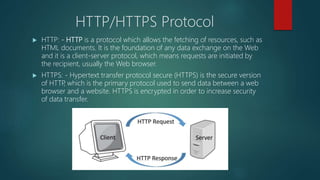
HTTP/HTTPS Protocol
 HTTP: - HTTP is a protocol which allows the fetching of resources, such as
HTML documents. It is the foundation of any data exchange on the Web
and it is a client-server protocol, which means requests are initiated by
the recipient, usually the Web browser.
 HTTPS: - Hypertext transfer protocol secure (HTTPS) is the secure version
of HTTP, which is the primary protocol used to send data between a web
browser and a website. HTTPS is encrypted in order to increase security
of data transfer.
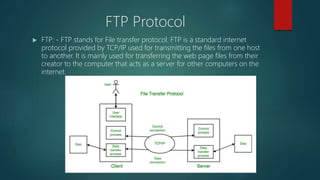
FTP Protocol
 FTP: - FTP stands for File transfer protocol. FTP is a standard internet
protocol provided by TCP/IP used for transmitting the files from one host
to another. It is mainly used for transferring the web page files from their
creator to the computer that acts as a server for other computers on the
internet.
Protocol
 SSH: - SSH, or Secure Shell, is a remote administration protocol that
allows users to control and modify their remote servers over the Internet.
 SFTP: - SFTP (SSH File Transfer Protocol) is a secure file transfer protocol.
It runs over the SSH protocol. It supports the full security and
authentication functionality of SSH.
 SCP: - The Secure Copy Protocol or “SCP” helps to transfer computer files
securely from a local to a remote host. It is somewhat similar to the File
Transfer Protocol “FTP”, but it adds security and authentication.
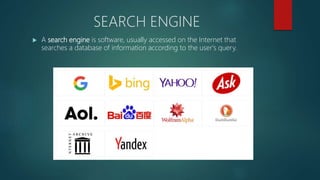
SEARCH ENGINE
 A search engine is software, usually accessed on the Internet that
searches a database of information according to the user's query.
SEARCH ENGINE WORKING
 Crawl: Scour the Internet for content, looking over the code/content for
each URL they find.
 Index: Store and organize the content found during the crawling process.
Once a page is in the index, it’s in the running to be displayed as a result
to relevant queries.
 Rank: Provide the pieces of content that will best answer a searcher's
query, which means that results are ordered by most relevant to least
relevant.
CHATING
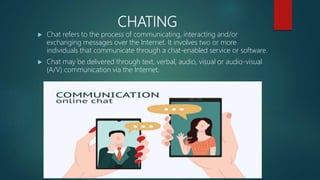
 Chat refers to the process of communicating, interacting and/or
exchanging messages over the Internet. It involves two or more
individuals that communicate through a chat-enabled service or software.
 Chat may be delivered through text, verbal, audio, visual or audio-visual
(A/V) communication via the Internet.
VIDEO CONFRENCING
 A meeting which is conducted using video and phone technologies
across remote locations is called video conferencing. In video
conferencing, two people or group, based at different locations, can have
visual conversation smoothly.
VIDEO CONFRENCING
 Advantage
 Meeting can be organized at short notices.
 Visual communication build trust and gives visual clues of the other
person.
 Disadvantage
 Need high-speed connections.
 Additional cost of hardware and software.
 Any failure in hardware or software can stop participants from attending
the meeting.
VIDEO CONFRENCING
 Requirement:
 High speed connection to establish good communication system.
 Hardware requirement
 Camera
 Monitor
 Microphones
 Speakers/ head phones
 Website
 Skype
 Whatsapp
 Google Duo
E- learning
E-learning refers to the electronic mode of delivering learning, training, or
educational programs to users. In this mode of learning, knowledge or skills
are transferred with the help of the computer connected to a network
(intranet or the Internet). E-learning applications and processes comprise
different forms of learning, including Web-based learning, computer-based
learning, and virtual classroom.
Advantage:-
 E-learning saves time and money
 E-learning leads to better retention.
 E-learning is consistent.
 E-learning is scalable.
E- Banking
 E-banking refers to electronic banking or Internet banking through which
customers can perform any banking function through their bank
accounts by connecting to the website of their respective banks. In e-
banking, the bank maintains a web-enabled centralized database that
holds the records of all its customers. The customers can access any of
the facilities provided by the bank on its website by selecting the
appropriate menu items.
E- Shopping
 The activity of purchasing items from different websites on the Internet is
known as online shopping. The online shopping is popular among
customers as it is not only convenient but also saves time. You can pay
for the items at the time of placing their orders online or on receiving
them at your given address.
E- Reservation
 Online reservation or e-reservation refers to the process that helps users
reserve movie, train, and airline tickets as well as hotel through the
Internet. For example, to check the availability of tickets for different trains
of the Indian Railways, you can simply access the website www.irctc.co.in.
E- Governance
 Electronic governance or e-governance is the application of information
and communication technology (ICT) for delivering government services,
exchange of information, communication transactions, integration of
various stand-alone systems between government to citizen (G2C),
government-to-business (G2B), government-to-government (G2G),
government-to-employees (G2E) as well as back-office processes and
interactions within the entire government framework.
E- Group
 A group (often termed as a community, e-group or club) is a feature in
many social networking services which allows users to create, post,
comment to and read from their own interest- and niche-specific forums,
often within the realm of virtual communities. Groups, which may allow
for open or closed access, invitation and/or joining by other users outside
the group, are formed to provide mini-networks within the larger, more
diverse social network service.
Social Networking Site(SNS)
 Social networking is the use of Internet-based social media sites to stay
connected with friends, family, colleagues, customers, or clients. Social
networking can have a social purpose, a business purpose, or both,
through sites such as Facebook, Twitter, LinkedIn, and Instagram, among
others.
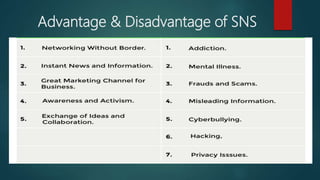
Advantage & Disadvantage of SNS
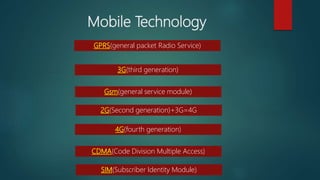
Mobile Technology
GPRS(general packet Radio Service)
3G(third generation)
Gsm(general service module)
2G(Second generation)+3G=4G
4G(fourth generation)
CDMA(Code Division Multiple Access)
SIM(Subscriber Identity Module)
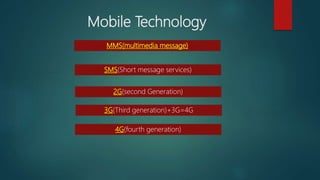
Mobile Technology
MMS(multimedia message)
SMS(Short message services)
2G(second Generation)
3G(Third generation)+3G=4G
4G(fourth generation)

Networking

  • 1.
    Networking: Basic of Internetand Mobile Technologies. CHAPTER 1 FOR CLASS 10 COMPUTER APPLICATION By Sumit Kumar Bhaskar PGT Computer Science
  • 2.
    Internet:-  Definition  Ahuge network of networks.  An information superhighway as it is the largest medium to share and access information, connect and interact with people across the globe.  The internet is INTer to the NETwork.
  • 3.
  • 4.
    Requirement for Internetconnection:-  Requirements  Computer System  NIC (network interface card):- hardware that allows a computer to communicate over a computer network.  MODEM(modulator and demodulator):- it requires to establish the connection on computer.  ISP (internet service provider):-it provide the accessibility to provide the connection to the computer.
  • 5.
    WWW(WORLD WIDE WEB):- World wide web is a large collection of information which can be accessed using web browsers.  It is a virtual library of knowledge and resource.  www was developed by Tim Berners Lee in 1989.
  • 6.
    WEB SERVER:-  Serveris a special computer running a software that provides service to another computer or clients.  Server always full fill the request of Client node of computer.  Apache is the most widely-installed web server.
  • 7.
    Webpage:- A web pageor webpage is a document, commonly written in HTML, that is viewed in an Internet browser. A web page can be accessed by entering a URL address into a browser's address bar. A web page may contain text, graphics, and hyperlinks to other web pages and files.
  • 8.
  • 9.
  • 10.
    Types of Webpage:- 1.Static webpage:- it is the one where information is not changed frequently. Or in other words the information is fixed to the visitors. 1. Dynamic webpage:- it is one which display different information based upon different execution of either CGI(common gateway interface) or server side scripting. Example the webpage of weather is frequently changed.
  • 11.
  • 12.
    Common terms relatedwith webpages  WEBSITE :-A website is the group of web pages which are placed in a location on the internet under a domain.  WEBPORTAL:-This might come as a confusion, but Web Portal is a specially designed website that provides information catered from various sources such as emails, online forums, search engines on one platform, in a uniform way.  WEB ADDRESS:-A website address, also known as a URL (uniform resource locator), is an Internet or intranet name that points to to a location where a file, directory or website page is hosted.
  • 13.
    Common terms relatedwith webpages
  • 14.
    WebBlog:- 1. Definition:- A blog(shortening of “weblog”) is an online journal or informational website displaying information in the reverse chronological order, with the latest posts appearing first. It is a platform where a writer or even a group of writers share their views on an individual subject. 2. Structure of Blog.  Header with the menu or navigation bar  Main content area with highlighted or latest blog posts  Sidebar with social profiles, favorite content, or call-to-action  Footer with relevant links like a disclaimer, privacy policy, contact page, etc.
  • 15.
  • 16.
  • 17.
    News Group  Anewsgroup is a discussion about a particular subject consisting of notes written to a central internet site and redistributed through Usenet, a worldwide network of news discussion groups.  Usenet uses the Network News Transfer Protocol(NNTP).  A newsgroup is an Internet-based discussion around an individual, entity, organization or topic.  Newsgroups enable remotely connected users to share, discuss and learn about their topic of interest by exchanging text messages, images, videos and other forms of digital content.
  • 18.
    E-Mail (Electronic mail) Electronic mail is a method of exchanging messages between people using electronic devices.  Email, short for "electronic mail," is one of the most widely used features of the Internet, along with the web. It allows you to send and receive messages to and from anyone with an email address, anywhere in the world.
  • 19.
  • 20.
    Basic Terms ofE-Mail (Electronic mail)  Compose:-it is used for composing a new mail to be send to the receiver.  Inbox:-it is the collection of all incoming mails.  Sent:-it is the collection of all sent mails.  Draft:-it is the collection of all mails which has been created but not sent to the recipient.  Spam:-it is the collection of all frequent mails with the same subject and same email- id.  Trash:-all deleted mails are listed here. In other words this is the recycle bin of e-mail.  Cc:-it refers as the carbon copy. It is the sender list that is visible to all participants of emails.  Bcc:-It refers as the blind carbon copy. It is the sender list that is not visible to participants of emails only sender can know the list of receiver.  Attachment:-it is the process of attaching the file with the mail body.
  • 21.
    Transfering of file Downloading is the process to copy a file from one computer to another using internet. To install various program onto our system, we download files from remote servers.  Uploading means to copy a data or file from your local computer to another remote computer on the internet. For example, uploading your photos, presentation, and movies to google drive.
  • 22.
    Network Ptotocol  Protocolmeans a set of rules. The rules followed be computers or nodes in a network are called Network Protocols.
  • 23.
    TCP/IP Protocol TCP/IP standsfor Transmission Control Protocol/Internet Protocol. TCP/IP is a set of standardized rules that allow computers to communicate on a network such as the internet.
  • 24.
    SMTP Protocol  SMTP:- SMTP stands for Simple Mail Transfer Protocol. It is a program used for sending messages to other computer users based on e-mail addresses.  SMTP is a set of communication guidelines that allow software to transmit an electronic mail over the internet is called Simple Mail Transfer Protocol.
  • 25.
    POP Protocol  POP:-In computing, the Post Office Protocol (POP) is an application- layer Internet standard protocol used by e-mail clients to retrieve e- mail from a mail server. POP version 3 (POP3) is the version in common use.
  • 26.
    HTTP/HTTPS Protocol  HTTP:- HTTP is a protocol which allows the fetching of resources, such as HTML documents. It is the foundation of any data exchange on the Web and it is a client-server protocol, which means requests are initiated by the recipient, usually the Web browser.  HTTPS: - Hypertext transfer protocol secure (HTTPS) is the secure version of HTTP, which is the primary protocol used to send data between a web browser and a website. HTTPS is encrypted in order to increase security of data transfer.
  • 27.
    FTP Protocol  FTP:- FTP stands for File transfer protocol. FTP is a standard internet protocol provided by TCP/IP used for transmitting the files from one host to another. It is mainly used for transferring the web page files from their creator to the computer that acts as a server for other computers on the internet.
  • 28.
    Protocol  SSH: -SSH, or Secure Shell, is a remote administration protocol that allows users to control and modify their remote servers over the Internet.  SFTP: - SFTP (SSH File Transfer Protocol) is a secure file transfer protocol. It runs over the SSH protocol. It supports the full security and authentication functionality of SSH.  SCP: - The Secure Copy Protocol or “SCP” helps to transfer computer files securely from a local to a remote host. It is somewhat similar to the File Transfer Protocol “FTP”, but it adds security and authentication.
  • 29.
    SEARCH ENGINE  Asearch engine is software, usually accessed on the Internet that searches a database of information according to the user's query.
  • 30.
    SEARCH ENGINE WORKING Crawl: Scour the Internet for content, looking over the code/content for each URL they find.  Index: Store and organize the content found during the crawling process. Once a page is in the index, it’s in the running to be displayed as a result to relevant queries.  Rank: Provide the pieces of content that will best answer a searcher's query, which means that results are ordered by most relevant to least relevant.
  • 31.
    CHATING  Chat refersto the process of communicating, interacting and/or exchanging messages over the Internet. It involves two or more individuals that communicate through a chat-enabled service or software.  Chat may be delivered through text, verbal, audio, visual or audio-visual (A/V) communication via the Internet.
  • 32.
    VIDEO CONFRENCING  Ameeting which is conducted using video and phone technologies across remote locations is called video conferencing. In video conferencing, two people or group, based at different locations, can have visual conversation smoothly.
  • 33.
    VIDEO CONFRENCING  Advantage Meeting can be organized at short notices.  Visual communication build trust and gives visual clues of the other person.  Disadvantage  Need high-speed connections.  Additional cost of hardware and software.  Any failure in hardware or software can stop participants from attending the meeting.
  • 34.
    VIDEO CONFRENCING  Requirement: High speed connection to establish good communication system.  Hardware requirement  Camera  Monitor  Microphones  Speakers/ head phones  Website  Skype  Whatsapp  Google Duo
  • 35.
    E- learning E-learning refersto the electronic mode of delivering learning, training, or educational programs to users. In this mode of learning, knowledge or skills are transferred with the help of the computer connected to a network (intranet or the Internet). E-learning applications and processes comprise different forms of learning, including Web-based learning, computer-based learning, and virtual classroom. Advantage:-  E-learning saves time and money  E-learning leads to better retention.  E-learning is consistent.  E-learning is scalable.
  • 36.
    E- Banking  E-bankingrefers to electronic banking or Internet banking through which customers can perform any banking function through their bank accounts by connecting to the website of their respective banks. In e- banking, the bank maintains a web-enabled centralized database that holds the records of all its customers. The customers can access any of the facilities provided by the bank on its website by selecting the appropriate menu items.
  • 37.
    E- Shopping  Theactivity of purchasing items from different websites on the Internet is known as online shopping. The online shopping is popular among customers as it is not only convenient but also saves time. You can pay for the items at the time of placing their orders online or on receiving them at your given address.
  • 38.
    E- Reservation  Onlinereservation or e-reservation refers to the process that helps users reserve movie, train, and airline tickets as well as hotel through the Internet. For example, to check the availability of tickets for different trains of the Indian Railways, you can simply access the website www.irctc.co.in.
  • 39.
    E- Governance  Electronicgovernance or e-governance is the application of information and communication technology (ICT) for delivering government services, exchange of information, communication transactions, integration of various stand-alone systems between government to citizen (G2C), government-to-business (G2B), government-to-government (G2G), government-to-employees (G2E) as well as back-office processes and interactions within the entire government framework.
  • 40.
    E- Group  Agroup (often termed as a community, e-group or club) is a feature in many social networking services which allows users to create, post, comment to and read from their own interest- and niche-specific forums, often within the realm of virtual communities. Groups, which may allow for open or closed access, invitation and/or joining by other users outside the group, are formed to provide mini-networks within the larger, more diverse social network service.
  • 41.
    Social Networking Site(SNS) Social networking is the use of Internet-based social media sites to stay connected with friends, family, colleagues, customers, or clients. Social networking can have a social purpose, a business purpose, or both, through sites such as Facebook, Twitter, LinkedIn, and Instagram, among others.
  • 42.
  • 43.
    Mobile Technology GPRS(general packetRadio Service) 3G(third generation) Gsm(general service module) 2G(Second generation)+3G=4G 4G(fourth generation) CDMA(Code Division Multiple Access) SIM(Subscriber Identity Module)
  • 44.
    Mobile Technology MMS(multimedia message) SMS(Shortmessage services) 2G(second Generation) 3G(Third generation)+3G=4G 4G(fourth generation)