Dynamic Resolution and Interlaced
Rendering
Claude Marais
Software Engineer
Xbox Advanced Technology Group (ATG)
This is a confidential event
No photography
No recording
No posts to social media
Thank You
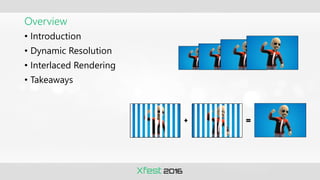
Overview
• Introduction
• Dynamic Resolution
• Interlaced Rendering
• Takeaways
Introduction
• Consumers want
• Smooth frame rates
• Prettier pixels
• Higher resolution
• Work harder
• Use PIX, optimize shaders and art, etc.
• Work smarter
• Rendering techniques
• Lower resolution
• Titles often heavily pixel shader bound
• Fewer pixels = faster rendering
• Dynamic resolution and interlaced rendering
• Render lower resolution at perceived higher resolution quality
• Several shipped titles successfully implemented these
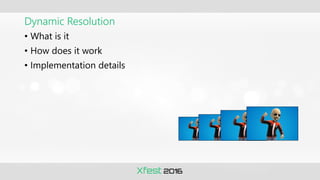
Dynamic Resolution
Dynamic Resolution
• What is it
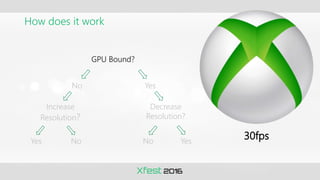
• How does it work
• Implementation details
What is it
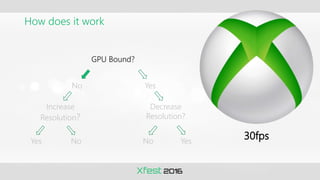
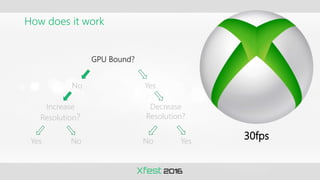
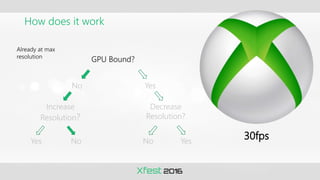
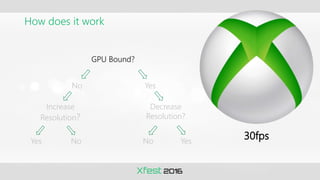
• Smooth frame rate more important than resolution
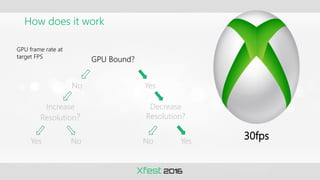
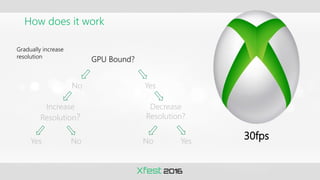
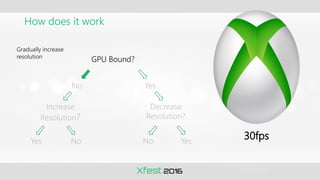
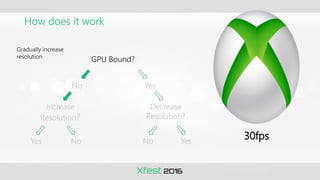
• Dynamically adjust resolution to ensure smooth frame rate
• Title gets GPU bound, decrease resolution
• Title not GPU bound anymore, increase resolution
How does it work
GPU Bound?
No Yes
Increase
Resolution?
Decrease
Resolution?
Yes No No Yes
30fps
How does it work
30fps
GPU Bound?
No Yes
Increase
Resolution?
Decrease
Resolution?
Yes No No Yes
How does it work
30fps
GPU Bound?
No Yes
Increase
Resolution?
Decrease
Resolution?
Yes No No Yes
How does it work
30fps
Already at max
resolution
GPU Bound?
No Yes
Increase
Resolution?
Decrease
Resolution?
Yes No No Yes
How does it work
30fps
GPU Bound?
No Yes
Increase
Resolution?
Decrease
Resolution?
Yes No No Yes
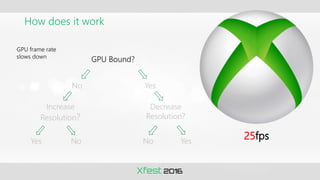
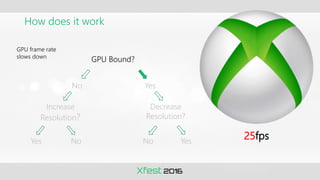
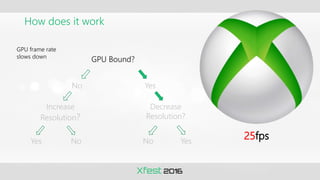
How does it work
25fps
GPU frame rate
slows down
GPU Bound?
No Yes
Increase
Resolution?
Decrease
Resolution?
Yes No No Yes
How does it work
25fps
GPU frame rate
slows down
GPU Bound?
No Yes
Increase
Resolution?
Decrease
Resolution?
Yes No No Yes
How does it work
25fps
GPU frame rate
slows down
GPU Bound?
No Yes
Increase
Resolution?
Decrease
Resolution?
Yes No No Yes
How does it work
30fps
GPU frame rate at
target FPS
GPU Bound?
No Yes
Increase
Resolution?
Decrease
Resolution?
Yes No No Yes
How does it work
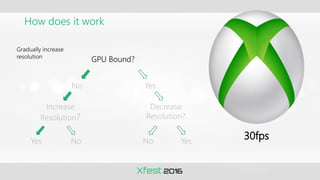
30fps
Gradually increase
resolution
GPU Bound?
No Yes
Increase
Resolution?
Decrease
Resolution?
Yes No No Yes
How does it work
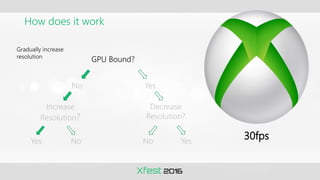
30fps
Gradually increase
resolution
GPU Bound?
No Yes
Increase
Resolution?
Decrease
Resolution?
Yes No No Yes
How does it work
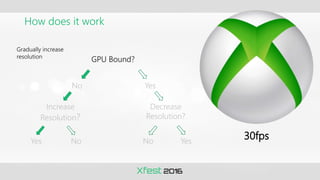
30fps
Gradually increase
resolution
GPU Bound?
No Yes
Increase
Resolution?
Decrease
Resolution?
Yes No No Yes
How does it work
30fps
Gradually increase
resolution
GPU Bound?
No Yes
Increase
Resolution?
Decrease
Resolution?
Yes No No Yes
How does it work
30fps
Gradually increase
resolution
GPU Bound?
No Yes
Increase
Resolution?
Decrease
Resolution?
Yes No No Yes
How does it work
30fps
Gradually increase
resolution
GPU Bound?
No Yes
Increase
Resolution?
Decrease
Resolution?
Yes No No Yes
Implementation
• Where to adjust resolution
• How to adjust resolution
• When to adjust resolution
• How much to adjust resolution
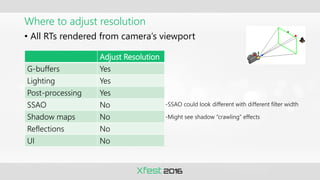
Where to adjust resolution
• All RTs rendered from camera’s viewport
Adjust Resolution
G-buffers Yes
Lighting Yes
Post-processing Yes
SSAO No
Shadow maps No
Reflections No
UI No
-SSAO could look different with different filter width
-Might see shadow “crawling” effects
How to adjust resolution
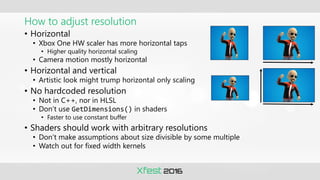
• Horizontal
• Xbox One HW scaler has more horizontal taps
• Higher quality horizontal scaling
• Camera motion mostly horizontal
• Horizontal and vertical
• Artistic look might trump horizontal only scaling
• No hardcoded resolution
• Not in C++, nor in HLSL
• Don’t use GetDimensions() in shaders
• Faster to use constant buffer
• Shaders should work with arbitrary resolutions
• Don’t make assumptions about size divisible by some multiple
• Watch out for fixed width kernels
How to adjust resolution
• Temporal rendering techniques
• Use normalized texture coordinates
• If using load(), keep track of previous resolution
• Recommend using multiple RTs
• Alias memory allocations
• E.g. CreatePlacedResource
• Better ESRAM utilization
• One RT with multiple viewports
• Extra shader ALUs to adjust texture coords
• Filters and post processing challenging
• Debug visualizations and regression tests
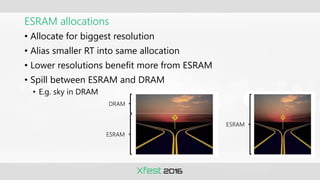
ESRAM allocations
• Allocate for biggest resolution
• Alias smaller RT into same allocation
• Lower resolutions benefit more from ESRAM
• Spill between ESRAM and DRAM
• E.g. sky in DRAM
DRAM
ESRAM
ESRAM
When to adjust resolution
• Only when camera is moving
• Resolution changes not noticeable
• Downscale vs. upscale
• In general, quickly downscale and gradually upscale
• Sudden frame drops usually caused by big visual difference , e.g.
explosions
• Resolution changes not noticeable
• Downscale won’t help if CPU bound
• Avoid ping-pong between resolutions
• Add dampening logic to upscale over several frames
• No dampening logic needed for downscale
• Use latency between GPU frame finished and VSync
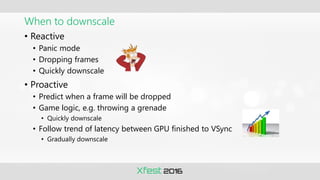
When to downscale
• Reactive
• Panic mode
• Dropping frames
• Quickly downscale
• Proactive
• Predict when a frame will be dropped
• Game logic, e.g. throwing a grenade
• Quickly downscale
• Follow trend of latency between GPU finished to VSync
• Gradually downscale
When to upscale
• Reactive
• Safe mode
• GPU frame time well within budget
• Gradually upscale with damping
• Confident mode
• Frame rate increased a lot
• E.g. menu over paused game
• Quickly upscale
• Proactive
• Game logic, e.g. going into a cutscene
• Quickly upscale
Frame statistics
• Use frame stats from multiple frames
• DXGIXGetFrameStatistics
• Timing info on already displayed frames
• Derive useful info from stats
• E.g. CPU time, GPU time, latency to VSync
• Calculate predictions from stats
• Always check for zero values
• If last value filled in, all info filled in
typedef struct _DXGIX_FRAME_STATISTICS
{
// CPU timeline
UINT64 CPUTimePresentCalled;
UINT64 CPUTimeAddedToQueue;
UINT32 QueueLengthAddedToQueue;
// GPU timeline
UINT64 CPUTimeFrameComplete;
UINT64 GPUTimeFrameComplete;
UINT64 GPUCountTitleUsed;
UINT64 GPUCountSystemUsed;
// Display timeline
UINT64 CPUTimeVSync;
UINT64 GPUTimeVSync
UINT64 CPUTimeFlip;
UINT64 GPUTimeFlip;
UINT64 VSyncCount;
FLOAT PercentScanned;
VOID* Cookie[2];
} DXGIX_FRAME_STATISTICS;
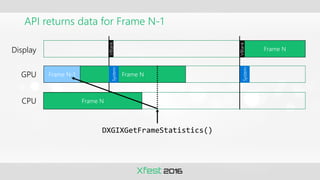
API returns data for Frame N-1
Display
GPU
CPU
Frame N
Frame N
System
VBlank
Frame N-1
System
VBlank
Frame N
DXGIXGetFrameStatistics()
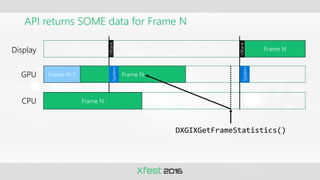
API returns SOME data for Frame N
Display
GPU
CPU
Frame N
Frame N
System
VBlank
Frame N-1
System
VBlank
Frame N
DXGIXGetFrameStatistics()
Latency from GPU finished to VSync
Display
GPU
CPU
Frame N
Frame N
System
VBlank
INT64 iPrevVSync = FrameStatistics[ iPrev ].GPUTimeVSync;
INT64 iNextPredictedVSync = iPrevVSync + ( 16.67f * iGPUTimeStampFreq );
INT64 iGPUTimeFrameComplete = FrameStatistics[ iCurrent ].GPUTimeFrameComplete;
INT64 iGPUTimeLatencyToVSync = iNextPredictedVSync – iGPUTimeFrameComplete;
FLOAT fLatencyToVSyncInMs = 1000.0f * (iGPUTimeLatencyToVSync / iGPUTimeStampFreq );
Frame N-1
System
VBlank
Frame N
Negative latency, dropped a frame
Display
GPU
CPU
Frame N
Frame N
System
VBlank
INT64 iPrevVSync = FrameStatistics[ iPrev ].GPUTimeVSync;
INT64 iNextPredictedVSync = iPrevVSync + ( 16.67f * iGPUTimeStampFreq );
INT64 iGPUTimeFrameComplete = FrameStatistics[ iCurrent ].GPUTimeFrameComplete;
INT64 iGPUTimeLatencyToVSync = iNextPredictedVSync – iGPUTimeFrameComplete;
FLOAT fLatencyToVSyncInMs = 1000.0f * (iGPUTimeLatencyToVSync / iGPUTimeStampFreq );
Frame N-1
System
VBlank
Frame N-1
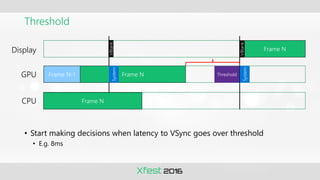
Threshold
• Start making decisions when latency to VSync goes over threshold
• E.g. 8ms
Display
GPU
CPU
Frame N
Frame N
System
VBlank
Frame N-1
System
VBlank
Threshold
Frame N
Latency from GPU finished to VSync
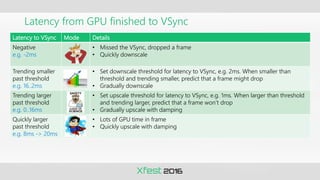
Latency to VSync Mode Details
Negative
e.g. -2ms
• Missed the VSync, dropped a frame
• Quickly downscale
Trending smaller
past threshold
e.g. 16..2ms
• Set downscale threshold for latency to VSync, e.g. 2ms. When smaller than
threshold and trending smaller, predict that a frame might drop
• Gradually downscale
Trending larger
past threshold
e.g. 0..16ms
• Set upscale threshold for latency to VSync, e.g. 1ms. When larger than threshold
and trending larger, predict that a frame won’t drop
• Gradually upscale with damping
Quickly larger
past threshold
e.g. 8ms -> 20ms
• Lots of GPU time in frame
• Quickly upscale with damping
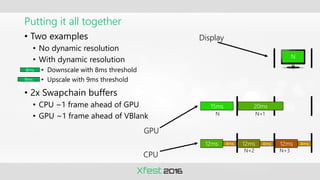
Putting it all together
• Two examples
• No dynamic resolution
• With dynamic resolution
• Downscale with 8ms threshold
• Upscale with 9ms threshold
• 2x Swapchain buffers
• CPU ~1 frame ahead of GPU
• GPU ~1 frame ahead of VBlank
15ms 20ms
12ms 12ms 12ms
4ms 4ms 4ms
N
N N+1
N+2 N+3
Display
GPU
CPU
8ms
9ms
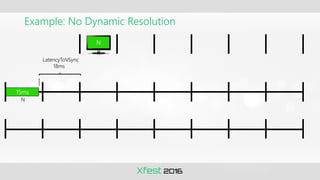
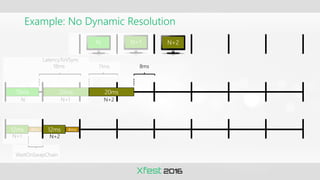
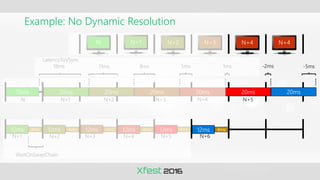
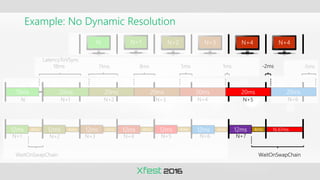
Example: No Dynamic Resolution
15ms
18ms
LatencyToVSync
N
N
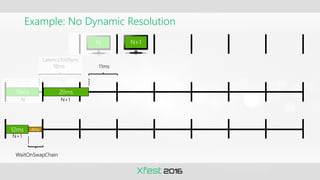
Example: No Dynamic Resolution
15ms
18ms 11ms
20ms
12ms 4ms
LatencyToVSync
WaitOnSwapChain
N N+1
N N+1
N+1
Example: No Dynamic Resolution
15ms 20ms
18ms 11ms
20ms
8ms
12ms 12ms
4ms 4ms
LatencyToVSync
N N+1 N+2
N N+1 N+2
N+1 N+2
WaitOnSwapChain
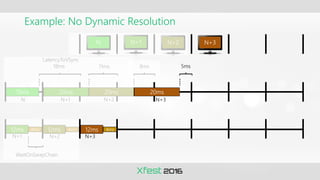
Example: No Dynamic Resolution
15ms 20ms 20ms
18ms 11ms
20ms
8ms 5ms
12ms 12ms 12ms
4ms 4ms 4ms
LatencyToVSync
N N+1 N+2 N+3
N N+1 N+2 N+3
N+1 N+2 N+3
WaitOnSwapChain
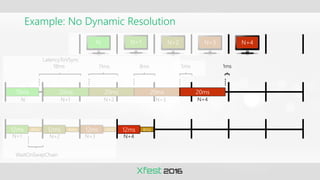
Example: No Dynamic Resolution
15ms 20ms 20ms 20ms
18ms 11ms
20ms
8ms 5ms 1ms
12ms 12ms 12ms 12ms
4ms 4ms 4ms 4ms
LatencyToVSync
N N+1 N+2 N+3 N+4
N N+1 N+2 N+3 N+4
N+1 N+2 N+3 N+4
WaitOnSwapChain
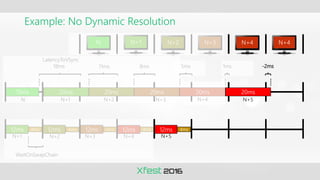
Example: No Dynamic Resolution
15ms 20ms 20ms 20ms 20ms
18ms 11ms
20ms
8ms 5ms 1ms -2ms
12ms 12ms 12ms 12ms 12ms
4ms 4ms 4ms 4ms 4ms
LatencyToVSync
N N+1 N+2 N+3 N+4 N+4
N N+1 N+2 N+3 N+4 N+5
N+1 N+2 N+3 N+4 N+5
WaitOnSwapChain
Example: No Dynamic Resolution
15ms 20ms 20ms 20ms 20ms
18ms 11ms
20ms
8ms 5ms 1ms -2ms
12ms 12ms 12ms 12ms 12ms
4ms 4ms 4ms 4ms 4ms
LatencyToVSync
20ms
-5ms
12ms 4ms
N N+1 N+2 N+3 N+4 N+4
N N+1 N+2 N+3 N+4 N+5
N+1 N+2 N+3 N+4 N+5 N+6
WaitOnSwapChain
Example: No Dynamic Resolution
15ms 20ms 20ms 20ms 20ms
18ms 11ms
20ms
8ms 5ms 1ms -2ms
12ms 12ms 12ms 12ms 12ms 12ms
4ms 4ms 4ms 4ms 4ms 4ms 16.67ms7ms
LatencyToVSync
20ms
-5ms
12ms 4ms
WaitOnSwapChain
N N+1 N+2 N+3 N+4 N+4
N N+1 N+2 N+3 N+4 N+5 N+6
N+1 N+2 N+3 N+4 N+5 N+6 N+7
WaitOnSwapChain
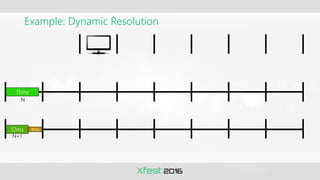
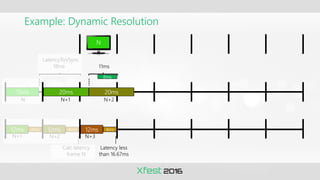
Example: Dynamic Resolution
15ms
12ms 4ms
N
N+1
Example: Dynamic Resolution
15ms 20ms
12ms 12ms
4ms 4ms
LatencyToVSync
18ms
N N+1
N+1 N+2
Calc latency
frame N
8ms
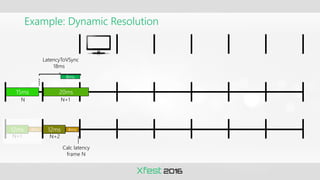
Example: Dynamic Resolution
15ms 20ms
20ms
12ms 12ms 12ms
4ms 4ms 4ms
N
LatencyToVSync
18ms 11ms
N N+1 N+2
N+1 N+2 N+3
Latency less
than 16.67ms
Calc latency
frame N
8ms
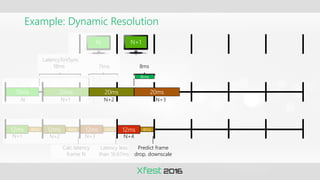
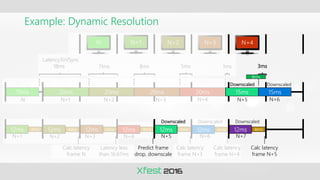
Example: Dynamic Resolution
15ms 20ms 20ms
20ms
12ms 12ms 12ms 12ms
4ms 4ms 4ms 4ms
N N+1
LatencyToVSync
18ms 11ms 8ms
N N+1 N+2 N+3
N+1 N+2 N+3 N+4
Latency less
than 16.67ms
Calc latency
frame N
8ms
Predict frame
drop, downscale
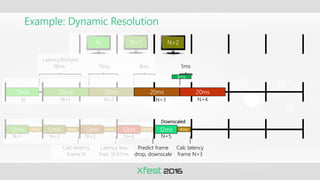
Example: Dynamic Resolution
15ms 20ms 20ms 20ms
20ms
12ms 12ms 12ms 12ms 12ms
4ms 4ms 4ms 4ms 4ms
N N+1 N+2
LatencyToVSync
18ms 11ms 8ms 5ms
N N+1 N+2 N+3 N+4
N+1 N+2 N+3 N+4 N+5
Latency less
than 16.67ms
Predict frame
drop, downscale
Calc latency
frame N
Calc latency
frame N+3
Downscaled
8ms
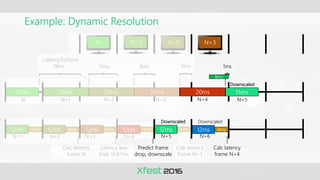
Example: Dynamic Resolution
15ms 20ms 20ms 20ms 15ms
20ms
12ms 12ms 12ms 12ms 12ms
4ms 4ms 4ms 4ms 4ms 12ms 4ms
N N+1 N+2 N+3
LatencyToVSync
18ms 11ms 8ms 5ms 1ms
N N+1 N+2 N+3 N+4 N+5
N+1 N+2 N+3 N+4 N+5 N+6
Latency less
than 16.67ms
Calc latency
frame N
Calc latency
frame N+3
Calc latency
frame N+4
Downscaled
Downscaled Downscaled
8ms
Predict frame
drop, downscale
Example: Dynamic Resolution
15ms 20ms 20ms 20ms 15ms
20ms
12ms 12ms 12ms 12ms 12ms 12ms
4ms 4ms 4ms 4ms 4ms 4ms
15ms
12ms 4ms
N N+1 N+2 N+3 N+4
LatencyToVSync
18ms 11ms 8ms 5ms 1ms 3ms
N N+1 N+2 N+3 N+4 N+5 N+6
N+1 N+2 N+3 N+4 N+5 N+6 N+7
Latency less
than 16.67ms
Calc latency
frame N
Calc latency
frame N+3
Calc latency
frame N+4
Calc latency
frame N+5
Downscaled
Downscaled Downscaled Downscaled
Downscaled
8ms
Predict frame
drop, downscale
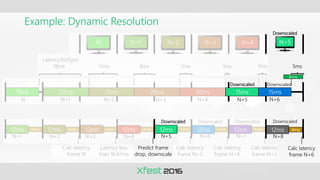
Example: Dynamic Resolution
15ms 20ms 20ms 20ms 15ms
20ms
12ms 12ms 12ms 12ms 12ms 12ms
4ms 4ms 4ms 4ms 4ms 4ms
15ms
12ms 4ms
N N+1 N+2 N+3 N+4 N+5
12ms 4ms
Calc latency
frame N+6
LatencyToVSync
18ms 11ms 8ms 5ms 1ms 3ms
N
5ms
N+1 N+2 N+3 N+4 N+5 N+6
N+1 N+2 N+3 N+4 N+5 N+6 N+7
Latency less
than 16.67ms
N+8
Calc latency
frame N
Calc latency
frame N+3
Calc latency
frame N+4
Calc latency
frame N+5
Downscaled
Downscaled
Downscaled Downscaled Downscaled Downscaled
Downscaled
8ms
Predict frame
drop, downscale
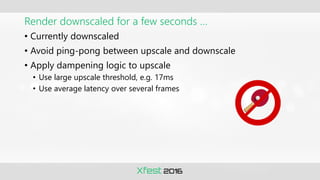
Render downscaled for a few seconds …
• Currently downscaled
• Avoid ping-pong between upscale and downscale
• Apply dampening logic to upscale
• Use large upscale threshold, e.g. 17ms
• Use average latency over several frames
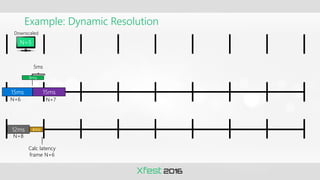
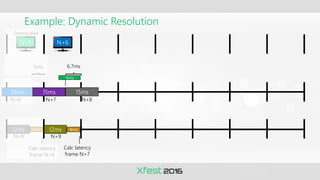
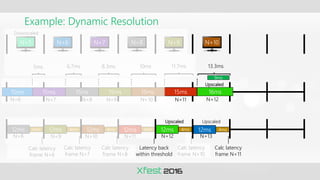
Example: Dynamic Resolution
12ms 4ms
15ms
N+7
N+8
Calc latency
frame N+6
5ms
N+6
N+5
15ms
Downscaled
9ms
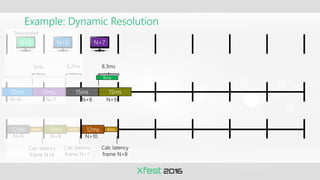
Example: Dynamic Resolution
12ms 12ms
4ms 4ms
15ms
N+7
N+8 N+9
Calc latency
frame N+7
Calc latency
frame N+6
5ms
N+6
N+5
15ms
6.7ms
15ms
N+8
N+6
Downscaled
9ms
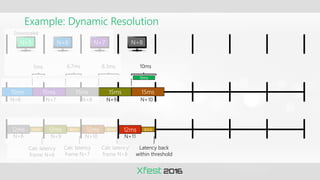
Example: Dynamic Resolution
12ms 12ms 12ms
4ms 4ms 4ms
15ms
N+7 N+9
N+8 N+9 N+10
Calc latency
frame N+8
Calc latency
frame N+7
Calc latency
frame N+6
5ms
N+6
N+5
15ms 15ms 15ms
N+8
N+6 N+7
Downscaled
6.7ms 8.3ms
9ms
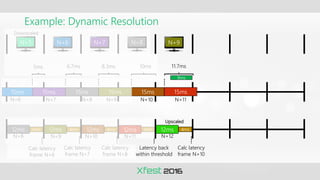
Example: Dynamic Resolution
12ms 12ms 12ms 12ms
4ms 4ms 4ms 4ms
15ms
10ms
N+7 N+9
N+8 N+9 N+10 N+11
Calc latency
frame N+8
Latency back
within threshold
Calc latency
frame N+7
Calc latency
frame N+6
5ms
N+6
N+5
15ms 15ms 15ms 15ms
N+8 N+10
N+6 N+7 N+8
Downscaled
6.7ms 8.3ms
9ms
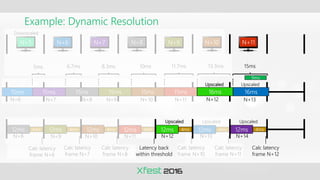
Example: Dynamic Resolution
12ms 12ms 12ms 12ms 12ms
4ms 4ms 4ms 4ms 4ms
15ms
10ms 11.7ms
N+7 N+9 N+11
N+8 N+9 N+10 N+11 N+12
Calc latency
frame N+8
Latency back
within threshold
Calc latency
frame N+7
Calc latency
frame N+10
Upscaled
Calc latency
frame N+6
5ms
N+6
N+5
15ms 15ms 15ms 15ms
N+8 N+10
N+6 N+7
15ms
N+8 N+9
Downscaled
6.7ms 8.3ms
9ms
Example: Dynamic Resolution
12ms 12ms 12ms 12ms 12ms
4ms 4ms 4ms 4ms 4ms
15ms
12ms 4ms
10ms 11.7ms
N+7 N+9 N+11 N+12
N+8 N+9 N+10 N+11 N+12 N+13
Calc latency
frame N+8
Latency back
within threshold
Calc latency
frame N+7
Calc latency
frame N+10
Calc latency
frame N+11
Upscaled Upscaled
Calc latency
frame N+6
5ms
N+6
N+5
15ms 15ms 15ms 15ms
N+8 N+10
N+6 N+7
15ms 16ms
13.3ms
N+8 N+9 N+10
Upscaled
Downscaled
6.7ms 8.3ms
9ms
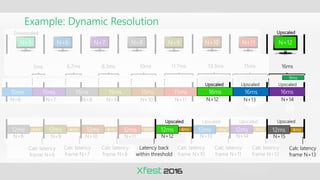
Example: Dynamic Resolution
12ms 12ms 12ms 12ms 12ms 12ms
4ms 4ms 4ms 4ms 4ms 4ms
15ms
12ms 4ms
10ms 11.7ms 15ms
N+7 N+9 N+11 N+12 N+13
N+8 N+9 N+10 N+11 N+12 N+13 N+14
Calc latency
frame N+8
Latency back
within threshold
Calc latency
frame N+7
Calc latency
frame N+10
Calc latency
frame N+11
Calc latency
frame N+12
Upscaled
Upscaled Upscaled Upscaled
Calc latency
frame N+6
5ms
N+6
N+5
15ms 15ms 15ms 15ms
N+8 N+10
N+6 N+7
15ms 16ms
13.3ms
N+8 N+9 N+10 N+11
16ms
Upscaled
Downscaled
6.7ms 8.3ms
9ms
Example: Dynamic Resolution
12ms 12ms 12ms 12ms 12ms 12ms
4ms 4ms 4ms 4ms 4ms 4ms
15ms
12ms 4ms 12ms 4ms
Calc latency
frame N+13
10ms 11.7ms 15ms 16ms
N+7 N+9 N+11 N+12 N+13 N+14
N+8 N+9 N+10 N+11 N+12 N+13 N+14
Calc latency
frame N+8
Latency back
within threshold
N+15
Calc latency
frame N+7
Calc latency
frame N+10
Calc latency
frame N+11
Calc latency
frame N+12
Upscaled
Upscaled Upscaled Upscaled Upscaled
Calc latency
frame N+6
5ms
N+6
N+5
15ms 15ms 15ms 15ms
N+8 N+10
N+6 N+7
15ms 16ms
13.3ms
N+8 N+9 N+10 N+11 N+12
Upscaled
16ms 16ms
Upscaled Upscaled
Downscaled
6.7ms 8.3ms
9ms
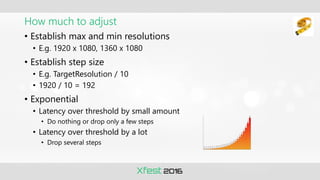
How much to adjust
• Establish max and min resolutions
• E.g. 1920 x 1080, 1360 x 1080
• Establish step size
• E.g. TargetResolution / 10
• 1920 / 10 = 192
• Exponential
• Latency over threshold by small amount
• Do nothing or drop only a few steps
• Latency over threshold by a lot
• Drop several steps
Summary
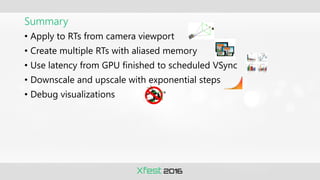
• Apply to RTs from camera viewport
• Create multiple RTs with aliased memory
• Use latency from GPU finished to scheduled VSync
• Downscale and upscale with exponential steps
• Debug visualizations
Interlaced Rendering
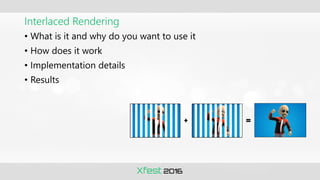
• What is it and why do you want to use it
• How does it work
• Implementation details
• Results
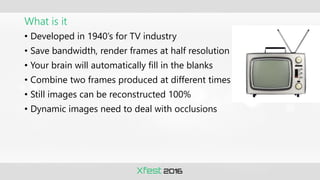
What is it
• Developed in 1940’s for TV industry
• Save bandwidth, render frames at half resolution
• Your brain will automatically fill in the blanks
• Combine two frames produced at different times
• Still images can be reconstructed 100%
• Dynamic images need to deal with occlusions
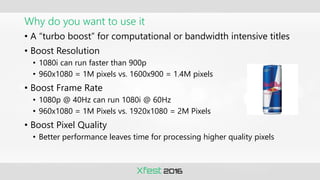
Why do you want to use it
• A “turbo boost” for computational or bandwidth intensive titles
• Boost Resolution
• 1080i can run faster than 900p
• 960x1080 = 1M pixels vs. 1600x900 = 1.4M pixels
• Boost Frame Rate
• 1080p @ 40Hz can run 1080i @ 60Hz
• 960x1080 = 1M Pixels vs. 1920x1080 = 2M Pixels
• Boost Pixel Quality
• Better performance leaves time for processing higher quality pixels
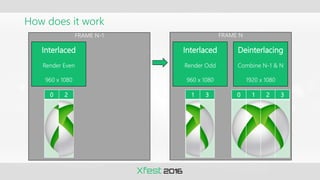
How does it work
FRAME N-1
Interlaced
Render Even
960 x 1080
FRAME N
Interlaced
Render Odd
960 x 1080
Deinterlacing
Combine N-1 & N
1920 x 1080
0 1 2 3
0 2 1 3 0 1 2 3
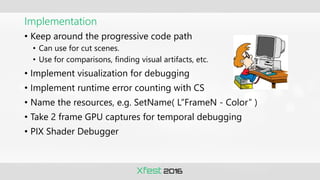
Implementation
• Keep around the progressive code path
• Can use for cut scenes.
• Use for comparisons, finding visual artifacts, etc.
• Implement visualization for debugging
• Implement runtime error counting with CS
• Name the resources, e.g. SetName( L”FrameN - Color” )
• Take 2 frame GPU captures for temporal debugging
• PIX Shader Debugger
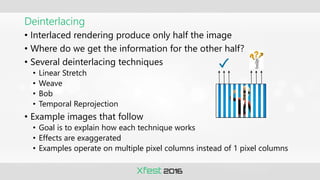
Deinterlacing
• Interlaced rendering produce only half the image
• Where do we get the information for the other half?
• Several deinterlacing techniques
• Linear Stretch
• Weave
• Bob
• Temporal Reprojection
• Example images that follow
• Goal is to explain how each technique works
• Effects are exaggerated
• Examples operate on multiple pixel columns instead of 1 pixel columns
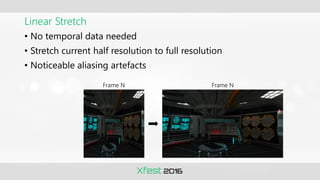
Linear Stretch
• No temporal data needed
• Stretch current half resolution to full resolution
• Noticeable aliasing artefacts
Frame N Frame N
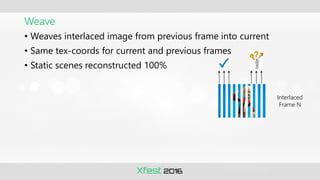
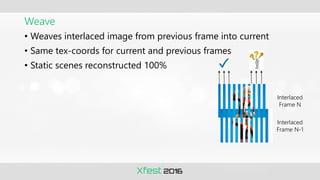
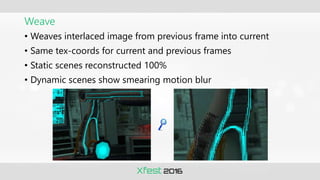
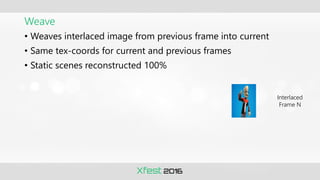
• Weaves interlaced image from previous frame into current
• Same tex-coords for current and previous frames
• Static scenes reconstructed 100%
Weave
Interlaced
Frame N
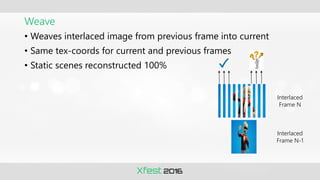
Weave
• Weaves interlaced image from previous frame into current
• Same tex-coords for current and previous frames
• Static scenes reconstructed 100%
Interlaced
Frame N
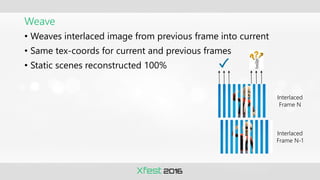
Weave
• Weaves interlaced image from previous frame into current
• Same tex-coords for current and previous frames
• Static scenes reconstructed 100%
Interlaced
Frame N
Interlaced
Frame N-1
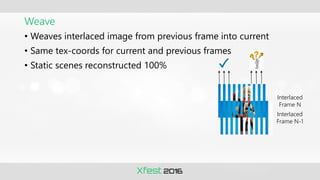
Weave
• Weaves interlaced image from previous frame into current
• Same tex-coords for current and previous frames
• Static scenes reconstructed 100%
Interlaced
Frame N-1
Interlaced
Frame N
Weave
• Weaves interlaced image from previous frame into current
• Same tex-coords for current and previous frames
• Static scenes reconstructed 100%
Interlaced
Frame N-1
Interlaced
Frame N
Weave
• Weaves interlaced image from previous frame into current
• Same tex-coords for current and previous frames
• Static scenes reconstructed 100%
Interlaced
Frame N-1
Interlaced
Frame N
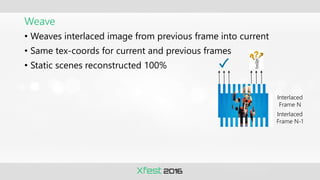
Weave
• Weaves interlaced image from previous frame into current
• Same tex-coords for current and previous frames
• Static scenes reconstructed 100%
Interlaced
Frame N
Interlaced
Frame N-1
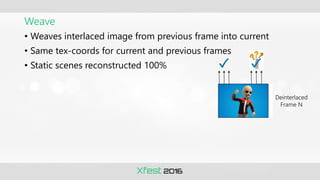
Weave
• Weaves interlaced image from previous frame into current
• Same tex-coords for current and previous frames
• Static scenes reconstructed 100%
Deinterlaced
Frame N
Weave
• Weaves interlaced image from previous frame into current
• Same tex-coords for current and previous frames
• Static scenes reconstructed 100%
• Dynamic scenes show smearing motion blur
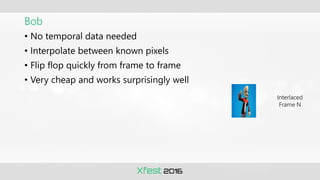
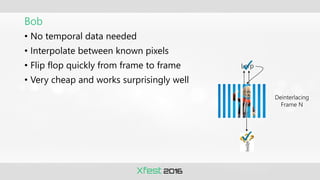
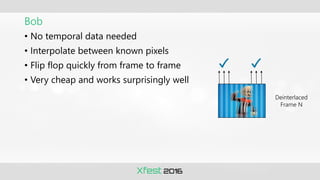
• No temporal data needed
• Interpolate between known pixels
• Flip flop quickly from frame to frame
• Very cheap and works surprisingly well
Bob
Interlaced
Frame N
• No temporal data needed
• Interpolate between known pixels
• Flip flop quickly from frame to frame
• Very cheap and works surprisingly well
Bob
Deinterlacing
Frame N
Lerp
• No temporal data needed
• Interpolate between known pixels
• Flip flop quickly from frame to frame
• Very cheap and works surprisingly well
Bob
Deinterlaced
Frame N
Temporal Reprojection
• Map pixel in one frame to same pixel in previous frame
• Calculate tex-coords using previous frame’s viewProj matrix
• Works very well, but
• Need to deal with occlusions
• Fallback using Bob
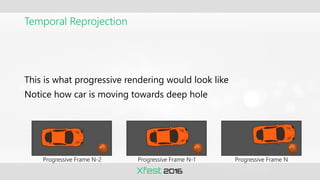
Temporal Reprojection
This is what progressive rendering would look like
Notice how car is moving towards deep hole
Progressive Frame N-2 Progressive Frame N-1 Progressive Frame N
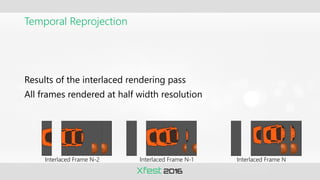
Temporal Reprojection
Results of the interlaced rendering pass
All frames rendered at half width resolution
Interlaced Frame N-1 Interlaced Frame N
Interlaced Frame N-2
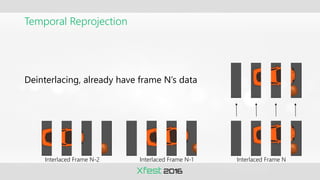
Temporal Reprojection
Deinterlacing, already have frame N’s data
Interlaced Frame N-1 Interlaced Frame N
Interlaced Frame N-2
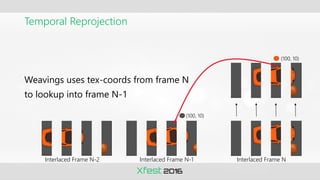
Temporal Reprojection
Weavings uses tex-coords from frame N
to lookup into frame N-1
Interlaced Frame N-1 Interlaced Frame N
Interlaced Frame N-2
(100, 10)
(100, 10)
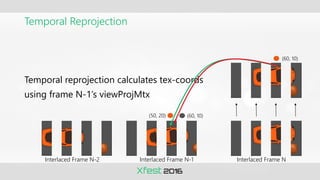
Temporal Reprojection
Temporal reprojection calculates tex-coords
using frame N-1’s viewProjMtx
Interlaced Frame N-1 Interlaced Frame N
Interlaced Frame N-2
(60, 10)
(60, 10)
(50, 20)
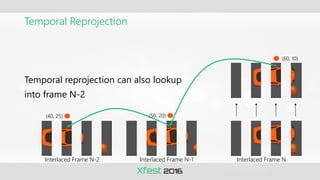
Temporal Reprojection
Temporal reprojection can also lookup
into frame N-2
Interlaced Frame N-1 Interlaced Frame N
Interlaced Frame N-2
(60, 10)
(50, 20)
(40, 25)
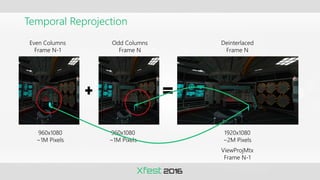
Temporal Reprojection
Even Columns
Frame N-1
Odd Columns
Frame N
Deinterlaced
Frame N
960x1080
~1M Pixels
960x1080
~1M Pixels
1920x1080
~2M Pixels
ViewProjMtx
Frame N-1
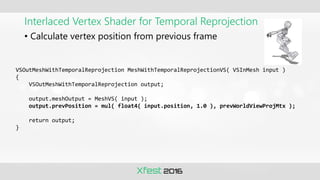
Interlaced Vertex Shader for Temporal Reprojection
• Calculate vertex position from previous frame
VSOutMeshWithTemporalReprojection MeshWithTemporalReprojectionVS( VSInMesh input )
{
VSOutMeshWithTemporalReprojection output;
output.meshOutput = MeshVS( input );
output.prevPosition = mul( float4( input.position, 1.0 ), prevWorldViewProjMtx );
return output;
}
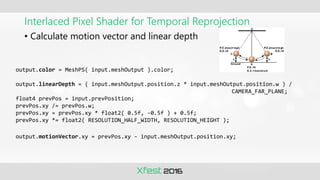
Interlaced Pixel Shader for Temporal Reprojection
• Calculate motion vector and linear depth
output.color = MeshPS( input.meshOutput ).color;
output.linearDepth = ( input.meshOutput.position.z * input.meshOutput.position.w ) /
CAMERA_FAR_PLANE;
float4 prevPos = input.prevPosition;
prevPos.xy /= prevPos.w;
prevPos.xy = prevPos.xy * float2( 0.5f, -0.5f ) + 0.5f;
prevPos.xy *= float2( RESOLUTION_HALF_WIDTH, RESOLUTION_HEIGHT );
output.motionVector.xy = prevPos.xy - input.meshOutput.position.xy;
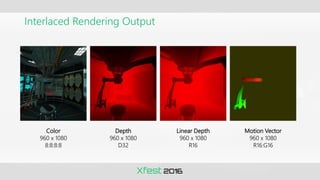
Interlaced Rendering Output
Color
960 x 1080
8:8:8:8
Motion Vector
960 x 1080
R16:G16
Depth
960 x 1080
D32
Linear Depth
960 x 1080
R16
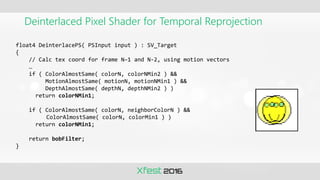
Deinterlaced Pixel Shader for Temporal Reprojection
float4 DeinterlacePS( PSInput input ) : SV_Target
{
// Calc tex coord for frame N–1 and N-2, using motion vectors
…
if ( ColorAlmostSame( colorN, colorNMin2 ) &&
MotionAlmostSame( motionN, motionNMin1 ) &&
DepthAlmostSame( depthN, depthNMin2 ) )
return colorNMin1;
if ( ColorAlmostSame( colorN, neighborColorN ) &&
ColorAlmostSame( colorN, colorMin1 ) )
return colorNMin1;
return bobFilter;
}
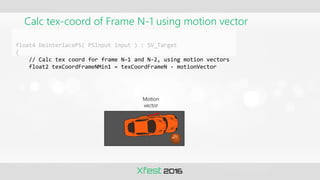
Calc tex-coord of Frame N-1 using motion vector
float4 DeinterlacePS( PSInput input ) : SV_Target
{
// Calc tex coord for frame N–1 and N-2, using motion vectors
float2 texCoordFrameNMin1 = texCoordFrameN - motionVector
Motion
vector
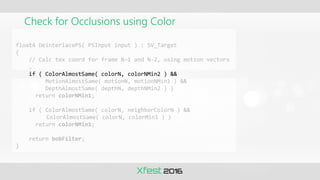
Check for Occlusions using Color
float4 DeinterlacePS( PSInput input ) : SV_Target
{
// Calc tex coord for frame N–1 and N-2, using motion vectors
…
if ( ColorAlmostSame( colorN, colorNMin2 ) &&
MotionAlmostSame( motionN, motionNMin1 ) &&
DepthAlmostSame( depthN, depthNMin2 ) )
return colorNMin1;
if ( ColorAlmostSame( colorN, neighborColorN ) &&
ColorAlmostSame( colorN, colorMin1 ) )
return colorNMin1;
return bobFilter;
}
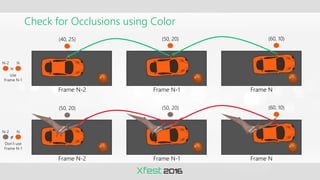
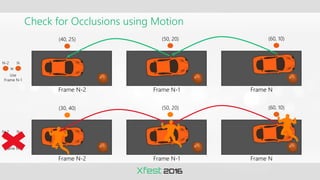
Check for Occlusions using Color
Frame N-2 Frame N-1 Frame N
(60, 10)
(50, 20)
(50, 20)
Frame N-2 Frame N-1 Frame N
(60, 10)
(50, 20)
(40, 25)
≠
≈
Use
Frame N-1
Don’t use
Frame N-1
N-2 N
N-2 N
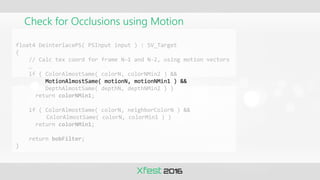
Check for Occlusions using Motion
float4 DeinterlacePS( PSInput input ) : SV_Target
{
// Calc tex coord for frame N–1 and N-2, using motion vectors
…
if ( ColorAlmostSame( colorN, colorNMin2 ) &&
MotionAlmostSame( motionN, motionNMin1 ) &&
DepthAlmostSame( depthN, depthNMin2 ) )
return colorNMin1;
if ( ColorAlmostSame( colorN, neighborColorN ) &&
ColorAlmostSame( colorN, colorMin1 ) )
return colorNMin1;
return bobFilter;
}
Check for Occlusions using Motion
Frame N-2 Frame N-1 Frame N
(60, 10)
(50, 20)
(30, 40)
Frame N-2 Frame N-1 Frame N
(60, 10)
(50, 20)
(40, 25)
≈
≈
Use
Frame N-1
Use
Frame N-1
N-2 N
N-2 N
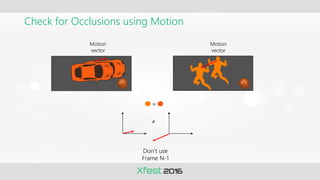
Check for Occlusions using Motion
Motion
vector
Motion
vector
≈
Don’t use
Frame N-1
≠
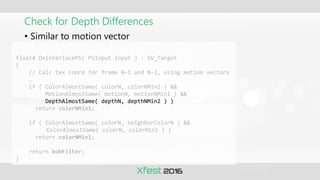
Check for Depth Differences
float4 DeinterlacePS( PSInput input ) : SV_Target
{
// Calc tex coord for frame N–1 and N-2, using motion vectors
…
if ( ColorAlmostSame( colorN, colorNMin2 ) &&
MotionAlmostSame( motionN, motionNMin1 ) &&
DepthAlmostSame( depthN, depthNMin2 ) )
return colorNMin1;
if ( ColorAlmostSame( colorN, neighborColorN ) &&
ColorAlmostSame( colorN, colorMin1 ) )
return colorNMin1;
return bobFilter;
}
• Similar to motion vector
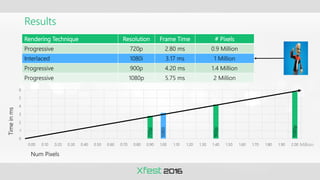
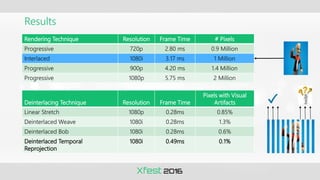
Results
Rendering Technique Resolution Frame Time # Pixels
Progressive 720p 2.80 ms 0.9 Million
Interlaced 1080i 3.17 ms 1 Million
Progressive 900p 4.20 ms 1.4 Million
Progressive 1080p 5.75 ms 2 Million
0
1
2
3
4
5
6
0.00 0.10 0.20 0.30 0.40 0.50 0.60 0.70 0.80 0.90 1.00 1.10 1.20 1.30 1.40 1.50 1.60 1.70 1.80 1.90 2.00
Time
in
ms
Num Pixels
720p
1080i
900p
1080p
Million
Results
Deinterlacing Technique Resolution Frame Time
Pixels with Visual
Artifacts
Linear Stretch 1080p 0.28ms 0.85%
Deinterlaced Weave 1080i 0.28ms 1.3%
Deinterlaced Bob 1080i 0.28ms 0.6%
Deinterlaced Temporal
Reprojection
1080i 0.49ms 0.1%
Rendering Technique Resolution Frame Time # Pixels
Progressive 720p 2.80 ms 0.9 Million
Interlaced 1080i 3.17 ms 1 Million
Progressive 900p 4.20 ms 1.4 Million
Progressive 1080p 5.75 ms 2 Million
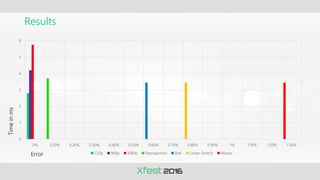
Results
0
1
2
3
4
5
6
0% 0.10% 0.20% 0.30% 0.40% 0.50% 0.60% 0.70% 0.80% 0.90% 1% 1.10% 1.20% 1.30%
720p 900p 1080p Reprojection Bob Linear Stretch Weave
Time
in
ms
Error
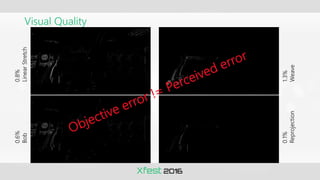
Visual Quality
0.8%
Linear
Stretch
0.6%
Bob
1.3%
Weave
0.1%
Reprojection
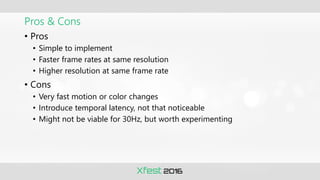
Pros & Cons
• Pros
• Simple to implement
• Faster frame rates at same resolution
• Higher resolution at same frame rate
• Cons
• Very fast motion or color changes
• Introduce temporal latency, not that noticeable
• Might not be viable for 30Hz, but worth experimenting
Interesting Thoughts
• Combine interlaced rendering with dynamic resolution
• Composite progressive over interlaced, e.g. main character as
progressive
• Horizontal vs. vertical interlacing result in different aliasing
• Vertical – very little horizontal aliasing
• Horizontal – very little vertical aliasing
Takeaways
• Dynamic resolution
• Apply to RTs from camera viewport
• Create multiple RTs with aliased memory
• Use latency from GPU finished to scheduled VSync
• Downscale and upscale with exponential steps
• Interlaced rendering
• Maintain progressive rendering
• Use temporal reprojection
• Deinterlacing is fixed cost
• Debug visualizations
References
• Dynamic Resolution sample
• Dynamic Resolution white paper
• Interlaced Rendering sample
Questions?
© 2016 Microsoft Corporation.
All rights reserved. Microsoft, Xbox, Windows, and other product names are or may be registered trademarks and/or trademarks in the U.S. and/or other countries. The
information herein is for informational purposes only and represents the current view of Microsoft Corporation as of the date of this presentation. Because Microsoft must
respond to changing market conditions, it should not be interpreted to be a commitment on the part of Microsoft, and Microsoft cannot guarantee the accuracy of any
information provided after the date of this presentation.
MICROSOFT MAKES NO WARRANTIES, EXPRESS, IMPLIED OR STATUTORY, AS TO THE INFORMATION IN THIS PRESENTATION.

Dynamic Resolution and Interlaced Rendering

  • 2.
    Dynamic Resolution andInterlaced Rendering Claude Marais Software Engineer Xbox Advanced Technology Group (ATG)
  • 3.
    This is aconfidential event No photography No recording No posts to social media Thank You
  • 4.
    Overview • Introduction • DynamicResolution • Interlaced Rendering • Takeaways
  • 5.
    Introduction • Consumers want •Smooth frame rates • Prettier pixels • Higher resolution • Work harder • Use PIX, optimize shaders and art, etc. • Work smarter • Rendering techniques • Lower resolution • Titles often heavily pixel shader bound • Fewer pixels = faster rendering • Dynamic resolution and interlaced rendering • Render lower resolution at perceived higher resolution quality • Several shipped titles successfully implemented these
  • 6.
  • 7.
    Dynamic Resolution • Whatis it • How does it work • Implementation details
  • 8.
    What is it •Smooth frame rate more important than resolution • Dynamically adjust resolution to ensure smooth frame rate • Title gets GPU bound, decrease resolution • Title not GPU bound anymore, increase resolution
  • 9.
    How does itwork GPU Bound? No Yes Increase Resolution? Decrease Resolution? Yes No No Yes 30fps
  • 10.
    How does itwork 30fps GPU Bound? No Yes Increase Resolution? Decrease Resolution? Yes No No Yes
  • 11.
    How does itwork 30fps GPU Bound? No Yes Increase Resolution? Decrease Resolution? Yes No No Yes
  • 12.
    How does itwork 30fps Already at max resolution GPU Bound? No Yes Increase Resolution? Decrease Resolution? Yes No No Yes
  • 13.
    How does itwork 30fps GPU Bound? No Yes Increase Resolution? Decrease Resolution? Yes No No Yes
  • 14.
    How does itwork 25fps GPU frame rate slows down GPU Bound? No Yes Increase Resolution? Decrease Resolution? Yes No No Yes
  • 15.
    How does itwork 25fps GPU frame rate slows down GPU Bound? No Yes Increase Resolution? Decrease Resolution? Yes No No Yes
  • 16.
    How does itwork 25fps GPU frame rate slows down GPU Bound? No Yes Increase Resolution? Decrease Resolution? Yes No No Yes
  • 17.
    How does itwork 30fps GPU frame rate at target FPS GPU Bound? No Yes Increase Resolution? Decrease Resolution? Yes No No Yes
  • 18.
    How does itwork 30fps Gradually increase resolution GPU Bound? No Yes Increase Resolution? Decrease Resolution? Yes No No Yes
  • 19.
    How does itwork 30fps Gradually increase resolution GPU Bound? No Yes Increase Resolution? Decrease Resolution? Yes No No Yes
  • 20.
    How does itwork 30fps Gradually increase resolution GPU Bound? No Yes Increase Resolution? Decrease Resolution? Yes No No Yes
  • 21.
    How does itwork 30fps Gradually increase resolution GPU Bound? No Yes Increase Resolution? Decrease Resolution? Yes No No Yes
  • 22.
    How does itwork 30fps Gradually increase resolution GPU Bound? No Yes Increase Resolution? Decrease Resolution? Yes No No Yes
  • 23.
    How does itwork 30fps Gradually increase resolution GPU Bound? No Yes Increase Resolution? Decrease Resolution? Yes No No Yes
  • 24.
    Implementation • Where toadjust resolution • How to adjust resolution • When to adjust resolution • How much to adjust resolution
  • 25.
    Where to adjustresolution • All RTs rendered from camera’s viewport Adjust Resolution G-buffers Yes Lighting Yes Post-processing Yes SSAO No Shadow maps No Reflections No UI No -SSAO could look different with different filter width -Might see shadow “crawling” effects
  • 26.
    How to adjustresolution • Horizontal • Xbox One HW scaler has more horizontal taps • Higher quality horizontal scaling • Camera motion mostly horizontal • Horizontal and vertical • Artistic look might trump horizontal only scaling • No hardcoded resolution • Not in C++, nor in HLSL • Don’t use GetDimensions() in shaders • Faster to use constant buffer • Shaders should work with arbitrary resolutions • Don’t make assumptions about size divisible by some multiple • Watch out for fixed width kernels
  • 27.
    How to adjustresolution • Temporal rendering techniques • Use normalized texture coordinates • If using load(), keep track of previous resolution • Recommend using multiple RTs • Alias memory allocations • E.g. CreatePlacedResource • Better ESRAM utilization • One RT with multiple viewports • Extra shader ALUs to adjust texture coords • Filters and post processing challenging • Debug visualizations and regression tests
  • 28.
    ESRAM allocations • Allocatefor biggest resolution • Alias smaller RT into same allocation • Lower resolutions benefit more from ESRAM • Spill between ESRAM and DRAM • E.g. sky in DRAM DRAM ESRAM ESRAM
  • 29.
    When to adjustresolution • Only when camera is moving • Resolution changes not noticeable • Downscale vs. upscale • In general, quickly downscale and gradually upscale • Sudden frame drops usually caused by big visual difference , e.g. explosions • Resolution changes not noticeable • Downscale won’t help if CPU bound • Avoid ping-pong between resolutions • Add dampening logic to upscale over several frames • No dampening logic needed for downscale • Use latency between GPU frame finished and VSync
  • 30.
    When to downscale •Reactive • Panic mode • Dropping frames • Quickly downscale • Proactive • Predict when a frame will be dropped • Game logic, e.g. throwing a grenade • Quickly downscale • Follow trend of latency between GPU finished to VSync • Gradually downscale
  • 31.
    When to upscale •Reactive • Safe mode • GPU frame time well within budget • Gradually upscale with damping • Confident mode • Frame rate increased a lot • E.g. menu over paused game • Quickly upscale • Proactive • Game logic, e.g. going into a cutscene • Quickly upscale
  • 32.
    Frame statistics • Useframe stats from multiple frames • DXGIXGetFrameStatistics • Timing info on already displayed frames • Derive useful info from stats • E.g. CPU time, GPU time, latency to VSync • Calculate predictions from stats • Always check for zero values • If last value filled in, all info filled in typedef struct _DXGIX_FRAME_STATISTICS { // CPU timeline UINT64 CPUTimePresentCalled; UINT64 CPUTimeAddedToQueue; UINT32 QueueLengthAddedToQueue; // GPU timeline UINT64 CPUTimeFrameComplete; UINT64 GPUTimeFrameComplete; UINT64 GPUCountTitleUsed; UINT64 GPUCountSystemUsed; // Display timeline UINT64 CPUTimeVSync; UINT64 GPUTimeVSync UINT64 CPUTimeFlip; UINT64 GPUTimeFlip; UINT64 VSyncCount; FLOAT PercentScanned; VOID* Cookie[2]; } DXGIX_FRAME_STATISTICS;
  • 33.
    API returns datafor Frame N-1 Display GPU CPU Frame N Frame N System VBlank Frame N-1 System VBlank Frame N DXGIXGetFrameStatistics()
  • 34.
    API returns SOMEdata for Frame N Display GPU CPU Frame N Frame N System VBlank Frame N-1 System VBlank Frame N DXGIXGetFrameStatistics()
  • 35.
    Latency from GPUfinished to VSync Display GPU CPU Frame N Frame N System VBlank INT64 iPrevVSync = FrameStatistics[ iPrev ].GPUTimeVSync; INT64 iNextPredictedVSync = iPrevVSync + ( 16.67f * iGPUTimeStampFreq ); INT64 iGPUTimeFrameComplete = FrameStatistics[ iCurrent ].GPUTimeFrameComplete; INT64 iGPUTimeLatencyToVSync = iNextPredictedVSync – iGPUTimeFrameComplete; FLOAT fLatencyToVSyncInMs = 1000.0f * (iGPUTimeLatencyToVSync / iGPUTimeStampFreq ); Frame N-1 System VBlank Frame N
  • 36.
    Negative latency, droppeda frame Display GPU CPU Frame N Frame N System VBlank INT64 iPrevVSync = FrameStatistics[ iPrev ].GPUTimeVSync; INT64 iNextPredictedVSync = iPrevVSync + ( 16.67f * iGPUTimeStampFreq ); INT64 iGPUTimeFrameComplete = FrameStatistics[ iCurrent ].GPUTimeFrameComplete; INT64 iGPUTimeLatencyToVSync = iNextPredictedVSync – iGPUTimeFrameComplete; FLOAT fLatencyToVSyncInMs = 1000.0f * (iGPUTimeLatencyToVSync / iGPUTimeStampFreq ); Frame N-1 System VBlank Frame N-1
  • 37.
    Threshold • Start makingdecisions when latency to VSync goes over threshold • E.g. 8ms Display GPU CPU Frame N Frame N System VBlank Frame N-1 System VBlank Threshold Frame N
  • 38.
    Latency from GPUfinished to VSync Latency to VSync Mode Details Negative e.g. -2ms • Missed the VSync, dropped a frame • Quickly downscale Trending smaller past threshold e.g. 16..2ms • Set downscale threshold for latency to VSync, e.g. 2ms. When smaller than threshold and trending smaller, predict that a frame might drop • Gradually downscale Trending larger past threshold e.g. 0..16ms • Set upscale threshold for latency to VSync, e.g. 1ms. When larger than threshold and trending larger, predict that a frame won’t drop • Gradually upscale with damping Quickly larger past threshold e.g. 8ms -> 20ms • Lots of GPU time in frame • Quickly upscale with damping
  • 39.
    Putting it alltogether • Two examples • No dynamic resolution • With dynamic resolution • Downscale with 8ms threshold • Upscale with 9ms threshold • 2x Swapchain buffers • CPU ~1 frame ahead of GPU • GPU ~1 frame ahead of VBlank 15ms 20ms 12ms 12ms 12ms 4ms 4ms 4ms N N N+1 N+2 N+3 Display GPU CPU 8ms 9ms
  • 40.
    Example: No DynamicResolution 15ms 18ms LatencyToVSync N N
  • 41.
    Example: No DynamicResolution 15ms 18ms 11ms 20ms 12ms 4ms LatencyToVSync WaitOnSwapChain N N+1 N N+1 N+1
  • 42.
    Example: No DynamicResolution 15ms 20ms 18ms 11ms 20ms 8ms 12ms 12ms 4ms 4ms LatencyToVSync N N+1 N+2 N N+1 N+2 N+1 N+2 WaitOnSwapChain
  • 43.
    Example: No DynamicResolution 15ms 20ms 20ms 18ms 11ms 20ms 8ms 5ms 12ms 12ms 12ms 4ms 4ms 4ms LatencyToVSync N N+1 N+2 N+3 N N+1 N+2 N+3 N+1 N+2 N+3 WaitOnSwapChain
  • 44.
    Example: No DynamicResolution 15ms 20ms 20ms 20ms 18ms 11ms 20ms 8ms 5ms 1ms 12ms 12ms 12ms 12ms 4ms 4ms 4ms 4ms LatencyToVSync N N+1 N+2 N+3 N+4 N N+1 N+2 N+3 N+4 N+1 N+2 N+3 N+4 WaitOnSwapChain
  • 45.
    Example: No DynamicResolution 15ms 20ms 20ms 20ms 20ms 18ms 11ms 20ms 8ms 5ms 1ms -2ms 12ms 12ms 12ms 12ms 12ms 4ms 4ms 4ms 4ms 4ms LatencyToVSync N N+1 N+2 N+3 N+4 N+4 N N+1 N+2 N+3 N+4 N+5 N+1 N+2 N+3 N+4 N+5 WaitOnSwapChain
  • 46.
    Example: No DynamicResolution 15ms 20ms 20ms 20ms 20ms 18ms 11ms 20ms 8ms 5ms 1ms -2ms 12ms 12ms 12ms 12ms 12ms 4ms 4ms 4ms 4ms 4ms LatencyToVSync 20ms -5ms 12ms 4ms N N+1 N+2 N+3 N+4 N+4 N N+1 N+2 N+3 N+4 N+5 N+1 N+2 N+3 N+4 N+5 N+6 WaitOnSwapChain
  • 47.
    Example: No DynamicResolution 15ms 20ms 20ms 20ms 20ms 18ms 11ms 20ms 8ms 5ms 1ms -2ms 12ms 12ms 12ms 12ms 12ms 12ms 4ms 4ms 4ms 4ms 4ms 4ms 16.67ms7ms LatencyToVSync 20ms -5ms 12ms 4ms WaitOnSwapChain N N+1 N+2 N+3 N+4 N+4 N N+1 N+2 N+3 N+4 N+5 N+6 N+1 N+2 N+3 N+4 N+5 N+6 N+7 WaitOnSwapChain
  • 48.
  • 49.
    Example: Dynamic Resolution 15ms20ms 12ms 12ms 4ms 4ms LatencyToVSync 18ms N N+1 N+1 N+2 Calc latency frame N 8ms
  • 50.
    Example: Dynamic Resolution 15ms20ms 20ms 12ms 12ms 12ms 4ms 4ms 4ms N LatencyToVSync 18ms 11ms N N+1 N+2 N+1 N+2 N+3 Latency less than 16.67ms Calc latency frame N 8ms
  • 51.
    Example: Dynamic Resolution 15ms20ms 20ms 20ms 12ms 12ms 12ms 12ms 4ms 4ms 4ms 4ms N N+1 LatencyToVSync 18ms 11ms 8ms N N+1 N+2 N+3 N+1 N+2 N+3 N+4 Latency less than 16.67ms Calc latency frame N 8ms Predict frame drop, downscale
  • 52.
    Example: Dynamic Resolution 15ms20ms 20ms 20ms 20ms 12ms 12ms 12ms 12ms 12ms 4ms 4ms 4ms 4ms 4ms N N+1 N+2 LatencyToVSync 18ms 11ms 8ms 5ms N N+1 N+2 N+3 N+4 N+1 N+2 N+3 N+4 N+5 Latency less than 16.67ms Predict frame drop, downscale Calc latency frame N Calc latency frame N+3 Downscaled 8ms
  • 53.
    Example: Dynamic Resolution 15ms20ms 20ms 20ms 15ms 20ms 12ms 12ms 12ms 12ms 12ms 4ms 4ms 4ms 4ms 4ms 12ms 4ms N N+1 N+2 N+3 LatencyToVSync 18ms 11ms 8ms 5ms 1ms N N+1 N+2 N+3 N+4 N+5 N+1 N+2 N+3 N+4 N+5 N+6 Latency less than 16.67ms Calc latency frame N Calc latency frame N+3 Calc latency frame N+4 Downscaled Downscaled Downscaled 8ms Predict frame drop, downscale
  • 54.
    Example: Dynamic Resolution 15ms20ms 20ms 20ms 15ms 20ms 12ms 12ms 12ms 12ms 12ms 12ms 4ms 4ms 4ms 4ms 4ms 4ms 15ms 12ms 4ms N N+1 N+2 N+3 N+4 LatencyToVSync 18ms 11ms 8ms 5ms 1ms 3ms N N+1 N+2 N+3 N+4 N+5 N+6 N+1 N+2 N+3 N+4 N+5 N+6 N+7 Latency less than 16.67ms Calc latency frame N Calc latency frame N+3 Calc latency frame N+4 Calc latency frame N+5 Downscaled Downscaled Downscaled Downscaled Downscaled 8ms Predict frame drop, downscale
  • 55.
    Example: Dynamic Resolution 15ms20ms 20ms 20ms 15ms 20ms 12ms 12ms 12ms 12ms 12ms 12ms 4ms 4ms 4ms 4ms 4ms 4ms 15ms 12ms 4ms N N+1 N+2 N+3 N+4 N+5 12ms 4ms Calc latency frame N+6 LatencyToVSync 18ms 11ms 8ms 5ms 1ms 3ms N 5ms N+1 N+2 N+3 N+4 N+5 N+6 N+1 N+2 N+3 N+4 N+5 N+6 N+7 Latency less than 16.67ms N+8 Calc latency frame N Calc latency frame N+3 Calc latency frame N+4 Calc latency frame N+5 Downscaled Downscaled Downscaled Downscaled Downscaled Downscaled Downscaled 8ms Predict frame drop, downscale
  • 56.
    Render downscaled fora few seconds … • Currently downscaled • Avoid ping-pong between upscale and downscale • Apply dampening logic to upscale • Use large upscale threshold, e.g. 17ms • Use average latency over several frames
  • 57.
    Example: Dynamic Resolution 12ms4ms 15ms N+7 N+8 Calc latency frame N+6 5ms N+6 N+5 15ms Downscaled 9ms
  • 58.
    Example: Dynamic Resolution 12ms12ms 4ms 4ms 15ms N+7 N+8 N+9 Calc latency frame N+7 Calc latency frame N+6 5ms N+6 N+5 15ms 6.7ms 15ms N+8 N+6 Downscaled 9ms
  • 59.
    Example: Dynamic Resolution 12ms12ms 12ms 4ms 4ms 4ms 15ms N+7 N+9 N+8 N+9 N+10 Calc latency frame N+8 Calc latency frame N+7 Calc latency frame N+6 5ms N+6 N+5 15ms 15ms 15ms N+8 N+6 N+7 Downscaled 6.7ms 8.3ms 9ms
  • 60.
    Example: Dynamic Resolution 12ms12ms 12ms 12ms 4ms 4ms 4ms 4ms 15ms 10ms N+7 N+9 N+8 N+9 N+10 N+11 Calc latency frame N+8 Latency back within threshold Calc latency frame N+7 Calc latency frame N+6 5ms N+6 N+5 15ms 15ms 15ms 15ms N+8 N+10 N+6 N+7 N+8 Downscaled 6.7ms 8.3ms 9ms
  • 61.
    Example: Dynamic Resolution 12ms12ms 12ms 12ms 12ms 4ms 4ms 4ms 4ms 4ms 15ms 10ms 11.7ms N+7 N+9 N+11 N+8 N+9 N+10 N+11 N+12 Calc latency frame N+8 Latency back within threshold Calc latency frame N+7 Calc latency frame N+10 Upscaled Calc latency frame N+6 5ms N+6 N+5 15ms 15ms 15ms 15ms N+8 N+10 N+6 N+7 15ms N+8 N+9 Downscaled 6.7ms 8.3ms 9ms
  • 62.
    Example: Dynamic Resolution 12ms12ms 12ms 12ms 12ms 4ms 4ms 4ms 4ms 4ms 15ms 12ms 4ms 10ms 11.7ms N+7 N+9 N+11 N+12 N+8 N+9 N+10 N+11 N+12 N+13 Calc latency frame N+8 Latency back within threshold Calc latency frame N+7 Calc latency frame N+10 Calc latency frame N+11 Upscaled Upscaled Calc latency frame N+6 5ms N+6 N+5 15ms 15ms 15ms 15ms N+8 N+10 N+6 N+7 15ms 16ms 13.3ms N+8 N+9 N+10 Upscaled Downscaled 6.7ms 8.3ms 9ms
  • 63.
    Example: Dynamic Resolution 12ms12ms 12ms 12ms 12ms 12ms 4ms 4ms 4ms 4ms 4ms 4ms 15ms 12ms 4ms 10ms 11.7ms 15ms N+7 N+9 N+11 N+12 N+13 N+8 N+9 N+10 N+11 N+12 N+13 N+14 Calc latency frame N+8 Latency back within threshold Calc latency frame N+7 Calc latency frame N+10 Calc latency frame N+11 Calc latency frame N+12 Upscaled Upscaled Upscaled Upscaled Calc latency frame N+6 5ms N+6 N+5 15ms 15ms 15ms 15ms N+8 N+10 N+6 N+7 15ms 16ms 13.3ms N+8 N+9 N+10 N+11 16ms Upscaled Downscaled 6.7ms 8.3ms 9ms
  • 64.
    Example: Dynamic Resolution 12ms12ms 12ms 12ms 12ms 12ms 4ms 4ms 4ms 4ms 4ms 4ms 15ms 12ms 4ms 12ms 4ms Calc latency frame N+13 10ms 11.7ms 15ms 16ms N+7 N+9 N+11 N+12 N+13 N+14 N+8 N+9 N+10 N+11 N+12 N+13 N+14 Calc latency frame N+8 Latency back within threshold N+15 Calc latency frame N+7 Calc latency frame N+10 Calc latency frame N+11 Calc latency frame N+12 Upscaled Upscaled Upscaled Upscaled Upscaled Calc latency frame N+6 5ms N+6 N+5 15ms 15ms 15ms 15ms N+8 N+10 N+6 N+7 15ms 16ms 13.3ms N+8 N+9 N+10 N+11 N+12 Upscaled 16ms 16ms Upscaled Upscaled Downscaled 6.7ms 8.3ms 9ms
  • 65.
    How much toadjust • Establish max and min resolutions • E.g. 1920 x 1080, 1360 x 1080 • Establish step size • E.g. TargetResolution / 10 • 1920 / 10 = 192 • Exponential • Latency over threshold by small amount • Do nothing or drop only a few steps • Latency over threshold by a lot • Drop several steps
  • 66.
    Summary • Apply toRTs from camera viewport • Create multiple RTs with aliased memory • Use latency from GPU finished to scheduled VSync • Downscale and upscale with exponential steps • Debug visualizations
  • 67.
  • 68.
    Interlaced Rendering • Whatis it and why do you want to use it • How does it work • Implementation details • Results
  • 69.
    What is it •Developed in 1940’s for TV industry • Save bandwidth, render frames at half resolution • Your brain will automatically fill in the blanks • Combine two frames produced at different times • Still images can be reconstructed 100% • Dynamic images need to deal with occlusions
  • 70.
    Why do youwant to use it • A “turbo boost” for computational or bandwidth intensive titles • Boost Resolution • 1080i can run faster than 900p • 960x1080 = 1M pixels vs. 1600x900 = 1.4M pixels • Boost Frame Rate • 1080p @ 40Hz can run 1080i @ 60Hz • 960x1080 = 1M Pixels vs. 1920x1080 = 2M Pixels • Boost Pixel Quality • Better performance leaves time for processing higher quality pixels
  • 71.
    How does itwork FRAME N-1 Interlaced Render Even 960 x 1080 FRAME N Interlaced Render Odd 960 x 1080 Deinterlacing Combine N-1 & N 1920 x 1080 0 1 2 3 0 2 1 3 0 1 2 3
  • 72.
    Implementation • Keep aroundthe progressive code path • Can use for cut scenes. • Use for comparisons, finding visual artifacts, etc. • Implement visualization for debugging • Implement runtime error counting with CS • Name the resources, e.g. SetName( L”FrameN - Color” ) • Take 2 frame GPU captures for temporal debugging • PIX Shader Debugger
  • 73.
    Deinterlacing • Interlaced renderingproduce only half the image • Where do we get the information for the other half? • Several deinterlacing techniques • Linear Stretch • Weave • Bob • Temporal Reprojection • Example images that follow • Goal is to explain how each technique works • Effects are exaggerated • Examples operate on multiple pixel columns instead of 1 pixel columns
  • 74.
    Linear Stretch • Notemporal data needed • Stretch current half resolution to full resolution • Noticeable aliasing artefacts Frame N Frame N
  • 75.
    • Weaves interlacedimage from previous frame into current • Same tex-coords for current and previous frames • Static scenes reconstructed 100% Weave Interlaced Frame N
  • 76.
    Weave • Weaves interlacedimage from previous frame into current • Same tex-coords for current and previous frames • Static scenes reconstructed 100% Interlaced Frame N
  • 77.
    Weave • Weaves interlacedimage from previous frame into current • Same tex-coords for current and previous frames • Static scenes reconstructed 100% Interlaced Frame N Interlaced Frame N-1
  • 78.
    Weave • Weaves interlacedimage from previous frame into current • Same tex-coords for current and previous frames • Static scenes reconstructed 100% Interlaced Frame N-1 Interlaced Frame N
  • 79.
    Weave • Weaves interlacedimage from previous frame into current • Same tex-coords for current and previous frames • Static scenes reconstructed 100% Interlaced Frame N-1 Interlaced Frame N
  • 80.
    Weave • Weaves interlacedimage from previous frame into current • Same tex-coords for current and previous frames • Static scenes reconstructed 100% Interlaced Frame N-1 Interlaced Frame N
  • 81.
    Weave • Weaves interlacedimage from previous frame into current • Same tex-coords for current and previous frames • Static scenes reconstructed 100% Interlaced Frame N Interlaced Frame N-1
  • 82.
    Weave • Weaves interlacedimage from previous frame into current • Same tex-coords for current and previous frames • Static scenes reconstructed 100% Deinterlaced Frame N
  • 83.
    Weave • Weaves interlacedimage from previous frame into current • Same tex-coords for current and previous frames • Static scenes reconstructed 100% • Dynamic scenes show smearing motion blur
  • 84.
    • No temporaldata needed • Interpolate between known pixels • Flip flop quickly from frame to frame • Very cheap and works surprisingly well Bob Interlaced Frame N
  • 85.
    • No temporaldata needed • Interpolate between known pixels • Flip flop quickly from frame to frame • Very cheap and works surprisingly well Bob Deinterlacing Frame N Lerp
  • 86.
    • No temporaldata needed • Interpolate between known pixels • Flip flop quickly from frame to frame • Very cheap and works surprisingly well Bob Deinterlaced Frame N
  • 87.
    Temporal Reprojection • Mappixel in one frame to same pixel in previous frame • Calculate tex-coords using previous frame’s viewProj matrix • Works very well, but • Need to deal with occlusions • Fallback using Bob
  • 88.
    Temporal Reprojection This iswhat progressive rendering would look like Notice how car is moving towards deep hole Progressive Frame N-2 Progressive Frame N-1 Progressive Frame N
  • 89.
    Temporal Reprojection Results ofthe interlaced rendering pass All frames rendered at half width resolution Interlaced Frame N-1 Interlaced Frame N Interlaced Frame N-2
  • 90.
    Temporal Reprojection Deinterlacing, alreadyhave frame N’s data Interlaced Frame N-1 Interlaced Frame N Interlaced Frame N-2
  • 91.
    Temporal Reprojection Weavings usestex-coords from frame N to lookup into frame N-1 Interlaced Frame N-1 Interlaced Frame N Interlaced Frame N-2 (100, 10) (100, 10)
  • 92.
    Temporal Reprojection Temporal reprojectioncalculates tex-coords using frame N-1’s viewProjMtx Interlaced Frame N-1 Interlaced Frame N Interlaced Frame N-2 (60, 10) (60, 10) (50, 20)
  • 93.
    Temporal Reprojection Temporal reprojectioncan also lookup into frame N-2 Interlaced Frame N-1 Interlaced Frame N Interlaced Frame N-2 (60, 10) (50, 20) (40, 25)
  • 94.
    Temporal Reprojection Even Columns FrameN-1 Odd Columns Frame N Deinterlaced Frame N 960x1080 ~1M Pixels 960x1080 ~1M Pixels 1920x1080 ~2M Pixels ViewProjMtx Frame N-1
  • 95.
    Interlaced Vertex Shaderfor Temporal Reprojection • Calculate vertex position from previous frame VSOutMeshWithTemporalReprojection MeshWithTemporalReprojectionVS( VSInMesh input ) { VSOutMeshWithTemporalReprojection output; output.meshOutput = MeshVS( input ); output.prevPosition = mul( float4( input.position, 1.0 ), prevWorldViewProjMtx ); return output; }
  • 96.
    Interlaced Pixel Shaderfor Temporal Reprojection • Calculate motion vector and linear depth output.color = MeshPS( input.meshOutput ).color; output.linearDepth = ( input.meshOutput.position.z * input.meshOutput.position.w ) / CAMERA_FAR_PLANE; float4 prevPos = input.prevPosition; prevPos.xy /= prevPos.w; prevPos.xy = prevPos.xy * float2( 0.5f, -0.5f ) + 0.5f; prevPos.xy *= float2( RESOLUTION_HALF_WIDTH, RESOLUTION_HEIGHT ); output.motionVector.xy = prevPos.xy - input.meshOutput.position.xy;
  • 97.
    Interlaced Rendering Output Color 960x 1080 8:8:8:8 Motion Vector 960 x 1080 R16:G16 Depth 960 x 1080 D32 Linear Depth 960 x 1080 R16
  • 98.
    Deinterlaced Pixel Shaderfor Temporal Reprojection float4 DeinterlacePS( PSInput input ) : SV_Target { // Calc tex coord for frame N–1 and N-2, using motion vectors … if ( ColorAlmostSame( colorN, colorNMin2 ) && MotionAlmostSame( motionN, motionNMin1 ) && DepthAlmostSame( depthN, depthNMin2 ) ) return colorNMin1; if ( ColorAlmostSame( colorN, neighborColorN ) && ColorAlmostSame( colorN, colorMin1 ) ) return colorNMin1; return bobFilter; }
  • 99.
    Calc tex-coord ofFrame N-1 using motion vector float4 DeinterlacePS( PSInput input ) : SV_Target { // Calc tex coord for frame N–1 and N-2, using motion vectors float2 texCoordFrameNMin1 = texCoordFrameN - motionVector Motion vector
  • 100.
    Check for Occlusionsusing Color float4 DeinterlacePS( PSInput input ) : SV_Target { // Calc tex coord for frame N–1 and N-2, using motion vectors … if ( ColorAlmostSame( colorN, colorNMin2 ) && MotionAlmostSame( motionN, motionNMin1 ) && DepthAlmostSame( depthN, depthNMin2 ) ) return colorNMin1; if ( ColorAlmostSame( colorN, neighborColorN ) && ColorAlmostSame( colorN, colorMin1 ) ) return colorNMin1; return bobFilter; }
  • 101.
    Check for Occlusionsusing Color Frame N-2 Frame N-1 Frame N (60, 10) (50, 20) (50, 20) Frame N-2 Frame N-1 Frame N (60, 10) (50, 20) (40, 25) ≠ ≈ Use Frame N-1 Don’t use Frame N-1 N-2 N N-2 N
  • 102.
    Check for Occlusionsusing Motion float4 DeinterlacePS( PSInput input ) : SV_Target { // Calc tex coord for frame N–1 and N-2, using motion vectors … if ( ColorAlmostSame( colorN, colorNMin2 ) && MotionAlmostSame( motionN, motionNMin1 ) && DepthAlmostSame( depthN, depthNMin2 ) ) return colorNMin1; if ( ColorAlmostSame( colorN, neighborColorN ) && ColorAlmostSame( colorN, colorMin1 ) ) return colorNMin1; return bobFilter; }
  • 103.
    Check for Occlusionsusing Motion Frame N-2 Frame N-1 Frame N (60, 10) (50, 20) (30, 40) Frame N-2 Frame N-1 Frame N (60, 10) (50, 20) (40, 25) ≈ ≈ Use Frame N-1 Use Frame N-1 N-2 N N-2 N
  • 104.
    Check for Occlusionsusing Motion Motion vector Motion vector ≈ Don’t use Frame N-1 ≠
  • 105.
    Check for DepthDifferences float4 DeinterlacePS( PSInput input ) : SV_Target { // Calc tex coord for frame N–1 and N-2, using motion vectors … if ( ColorAlmostSame( colorN, colorNMin2 ) && MotionAlmostSame( motionN, motionNMin1 ) && DepthAlmostSame( depthN, depthNMin2 ) ) return colorNMin1; if ( ColorAlmostSame( colorN, neighborColorN ) && ColorAlmostSame( colorN, colorMin1 ) ) return colorNMin1; return bobFilter; } • Similar to motion vector
  • 106.
    Results Rendering Technique ResolutionFrame Time # Pixels Progressive 720p 2.80 ms 0.9 Million Interlaced 1080i 3.17 ms 1 Million Progressive 900p 4.20 ms 1.4 Million Progressive 1080p 5.75 ms 2 Million 0 1 2 3 4 5 6 0.00 0.10 0.20 0.30 0.40 0.50 0.60 0.70 0.80 0.90 1.00 1.10 1.20 1.30 1.40 1.50 1.60 1.70 1.80 1.90 2.00 Time in ms Num Pixels 720p 1080i 900p 1080p Million
  • 107.
    Results Deinterlacing Technique ResolutionFrame Time Pixels with Visual Artifacts Linear Stretch 1080p 0.28ms 0.85% Deinterlaced Weave 1080i 0.28ms 1.3% Deinterlaced Bob 1080i 0.28ms 0.6% Deinterlaced Temporal Reprojection 1080i 0.49ms 0.1% Rendering Technique Resolution Frame Time # Pixels Progressive 720p 2.80 ms 0.9 Million Interlaced 1080i 3.17 ms 1 Million Progressive 900p 4.20 ms 1.4 Million Progressive 1080p 5.75 ms 2 Million
  • 108.
    Results 0 1 2 3 4 5 6 0% 0.10% 0.20%0.30% 0.40% 0.50% 0.60% 0.70% 0.80% 0.90% 1% 1.10% 1.20% 1.30% 720p 900p 1080p Reprojection Bob Linear Stretch Weave Time in ms Error
  • 109.
  • 110.
    Pros & Cons •Pros • Simple to implement • Faster frame rates at same resolution • Higher resolution at same frame rate • Cons • Very fast motion or color changes • Introduce temporal latency, not that noticeable • Might not be viable for 30Hz, but worth experimenting
  • 111.
    Interesting Thoughts • Combineinterlaced rendering with dynamic resolution • Composite progressive over interlaced, e.g. main character as progressive • Horizontal vs. vertical interlacing result in different aliasing • Vertical – very little horizontal aliasing • Horizontal – very little vertical aliasing
  • 112.
    Takeaways • Dynamic resolution •Apply to RTs from camera viewport • Create multiple RTs with aliased memory • Use latency from GPU finished to scheduled VSync • Downscale and upscale with exponential steps • Interlaced rendering • Maintain progressive rendering • Use temporal reprojection • Deinterlacing is fixed cost • Debug visualizations
  • 113.
    References • Dynamic Resolutionsample • Dynamic Resolution white paper • Interlaced Rendering sample
  • 114.
  • 115.
    © 2016 MicrosoftCorporation. All rights reserved. Microsoft, Xbox, Windows, and other product names are or may be registered trademarks and/or trademarks in the U.S. and/or other countries. The information herein is for informational purposes only and represents the current view of Microsoft Corporation as of the date of this presentation. Because Microsoft must respond to changing market conditions, it should not be interpreted to be a commitment on the part of Microsoft, and Microsoft cannot guarantee the accuracy of any information provided after the date of this presentation. MICROSOFT MAKES NO WARRANTIES, EXPRESS, IMPLIED OR STATUTORY, AS TO THE INFORMATION IN THIS PRESENTATION.