DirectX11 Performance
Reloaded
Nick Thibieroz, AMD
Holger Gruen, NVIDIA
Introduction
● Update on DX11(.1) performance advice
● Recommendations signed off by both IHVs
● (Rare) exceptions will use color coding:
● AMD
● NVIDIA
CPU-Side Pipeline View
● Examine how best to drive the
DX11 API for efficient performance
● Separated in two stages:
● Offline process
● Runtime process
Offline process
Create vertex
+index buffers
Create textures
Create shaders
Runtime process
Prepare render
list
Update dynamic
buffers
Update dynamic
textures
Send data to
graphics pipeline
Update constant
buffers
Create constant
buffers
Free-threaded Resource Creation
● Scale resource creation time with number of cores
● Especially useful to optimize shader compiling time
● Can result in major reduction in load-time on
modern CPUs
● Check support with:
struct D3D11_FEATURE_DATA_THREADING
{
BOOL DriverConcurrentCreates;
BOOL DriverCommandLists;
} D3D11_FEATURE_DATA_THREADING;
Offline process
Thread
1
Thread
2
Thread
n
Create vertex
+index buffers
Create textures
Create shaders
Create constant
buffers
…
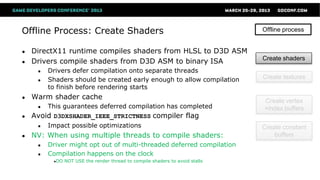
Offline Process: Create Shaders
● DirectX11 runtime compiles shaders from HLSL to D3D ASM
● Drivers compile shaders from D3D ASM to binary ISA
● Drivers defer compilation onto separate threads
● Shaders should be created early enough to allow compilation
to finish before rendering starts
● Warm shader cache
● This guarantees deferred compilation has completed
● Avoid D3DXSHADER_IEEE_STRICTNESS compiler flag
● Impact possible optimizations
● NV: When using multiple threads to compile shaders:
● Driver might opt out of multi-threaded deferred compilation
● Compilation happens on the clock
●DO NOT USE the render thread to compile shaders to avoid stalls
Offline process
Create vertex
+index buffers
Create textures
Create shaders
Create constant
buffers
Offline Process: Create Textures
● VidMM: OS video memory manager
● Responsible for storing textures and buffers into
memory pools
● May need to “touch” memory before running to
ensure optimal location
● Use the right flags at creation time
● D3D11_USAGE_IMMUTABLE allows additional
optimizations
● Specify proper bind flags at creation time
● Only set those flags where required
D3D11_BIND_UNORDERED_ACCESS
D3D11_BIND_RENDER_TARGET
Offline process
Create vertex
+index buffers
Create textures
Create shaders
Create constant
buffers
Offline Process: Create Vertex and Index Buffers
● Optimize index buffers for index locality (or “index
re-use”)
● E.g. D3DXOptimizeFaces
● Then optimize vertex buffers for linear access
● E.g. D3DXOptimizeVertices
● Should be an offline process, or performed at mesh
export time
● Includes procedural geometry!
● E.g. light volumes for deferred lighting
● Common oversight
Offline process
Create vertex
+index buffers
Create textures
Create shaders
Create constant
buffers
Offline Process: Create Constant Buffers
“Constants should be stored in Constant Buffers
according to frequency of updates”
(You’ve heard this before)
● Group constants by access patterns
● Constants used by adjacent instructions should be grouped
together
● Consider creating static CBs with per-mesh constant data
● No need to update them every frame (e.g. ViewProjection)
● Negligible VS ALU cost for extra transformation step required
● DirectX11.1: large >64KB constant buffers now supported
● Specify CB range to use at draw time
Offline process
Create vertex
+index buffers
Create textures
Create shaders
Create constant
buffers
Runtime Process: Prepare Render List
Determine visible objects
● Only visible meshes should be sent to the GPU for rendering
● GPU occlusion queries based culling
● Give at least a full frame (if not 2-3) before getting result back
● Round-robin queue of Occlusion Queries is recommended
● Stay conservative with the amount of queries you issue
● GPU Predicated Rendering
● Save the cost of rendering but not processing the draw call
● CPU-based culling
● Conservative software rasterizer
● Low-res, SSE2 optimized
● Good if you have free CPU cycles
Runtime process
Prepare render
list
Update dynamic
buffers
Update dynamic
textures
Send data to
graphics pipeline
Update constant
buffers
Image courtesy of DICE
Runtime Process: Prepare Render List
State Setting and Management
● Don’t create state objects at run-time
● Or create them on first use
● And pre-warm scene
● Minimize number of state changes
● Check for dirty states
● Set multiple resource slots in one call
E.g. Make one call to :
PSSetShaderResources(0, 4, &SRVArray);
Instead of multiple calls:
PSSetShaderResources(0, 1, &pSRV0);
PSSetShaderResources(1, 1, &pSRV1);
PSSetShaderResources(2, 1, &pSRV2);
PSSetShaderResources(3, 1, &pSRV3);
● Use geometry instancing to reduce draw calls!
Runtime process
Prepare render
list
Update dynamic
buffers
Update dynamic
textures
Send data to
graphics pipeline
Update constant
buffers
Runtime Process: Prepare Render List
Pushing Commands to Drivers 1/2
● Driver is threaded internally on a producer-consumer model
● Application producer thread: driver just buffers each call very quickly
● Driver consumer thread: processes buffered calls to build command buffers
Application producer thread
Driver Consumer thread
● Above example is application thread limited
● Not feeding draw commands to driver fast
enough
● Not ideal way to drive performance
D3D API command
- Draw command, state setting etc.
Mapped buffer uploads
- Buffer updates
Non-D3D workloads
- Anything else
Runtime Process: Prepare Render List
Pushing Commands to Drivers 2/2
● Application is only ‘driver limited’ if the consumer thread is saturated
● To achieve this the application thread must be able to feed the driver
consumer thread fast enough
● Work that is not directly feeding the driver should be moved to other threads
● Application producer thread should only send Direct3D commands
● Mapped buffer uploads should be optimized as much as possible
App Producer thread
Application thread
Application thread
…
…
…
… Driver Consumer thread
D3D API command
- Draw command, state setting etc.
Mapped buffer uploads
- Buffer updates
Non-D3D workloads
- Anything else
Runtime Process: Prepare Render List
What about Deferred Contexts?
● Nothing magical about deferred contexts
● If already consumer thread limited then deferred contexts will not help
● D3D Deferred Contexts can present efficiency issues
● Immediate Context Consumer is often a bottleneck
● Deferred Contexts can limit performance due to redundant state setup
● Properly balance the amount of DCs and the workload for each
See Bryan Dudash’s presentation about Deferred Contexts
Today at 5.30pm
Runtime Process: Update Dynamic Textures
● Update from ring of staging resources
● Update staging texture from next available one in ring
● Then CopyResource()
● If creating new resources make sure creation is done free-
threaded
● UpdateSubresource() sub-optimal path for resource
updates in general
● May require additional copies in the driver
● Update full slice of texture array or volume texture rather
than sub-rectangle
● Avoid Map() on DYNAMIC textures
● Map returns a pointer to linear data that conflicts with HW tiling
Runtime process
Prepare render
list
Update dynamic
buffers
Update dynamic
textures
Send data to
graphics pipeline
Update constant
buffers
Runtime Process: Update Dynamic Buffers 1/2
● Use DISCARD when infrequently mapping buffers
● Updating a buffer with DISCARD may cause a driver-
side copy because of contention
● Multiple DISCARD updates/frame can cause stalls due
to copy memory running out
●Especially with large buffers
●Smaller buffers allow better memory management
● AMD: <4MB DYNAMIC buffers is best
● NV: No optimal size as such but number of
buffers in flight through discards/renaming is
limited
Runtime process
Prepare render
list
Update dynamic
buffers
Update dynamic
textures
Send data to
graphics pipeline
Update constant
buffers
Runtime Process: Update Dynamic Buffers 2/2
● Frequently-updated data should use DISCARD
+ NO_OVERWRITE
● Only DISCARD when full
● DirectX11.1: Dynamic buffers can now be
bound as SRV
● Useful for advanced geometry instancing
Runtime process
Prepare render
list
Update dynamic
buffers
Update dynamic
textures
Send data to
graphics pipeline
Update constant
buffers
Runtime Process: Update Constant Buffers
● From CB creation stage: store constants into CBs
according to update frequency
● Don’t bind too many CBs per draw (<5)
● Share CBs across shader stages
● E.g. same CB bound in VS and PS
● DirectX11.1: partial updates of CB now supported!
● Map() with NO_OVERWRITE or UpdateSubresource1()
● DirectX11.1: XXSetConstantBuffers1() for CB re-basing
● Specify offset and range of constants within large CB
Runtime process
Prepare render
list
Update dynamic
buffers
Update dynamic
textures
Send data to
graphics pipeline
Update constant
buffers
GPU-Side Pipeline View
DX11 Graphics Pipeline
● Just a quick recap
● Green: Fixed-function stage
● Blue: Programmable shader stage
● Purple: Memory resources
Performance problems can
happen at almost every stage or
junction!
Vertex Shader
Tessellator
Hull Shader
Domain Shader
Geometry
Shader
Pixel Shader
Stream
Out
Rasterizer
Depth Test
Output
Merger
Input
Assembly
Buffers
Textures
Constants
Render Targets
UAVs
Depthstencil
…
Input Assembly
● Only bind vertex streams containing required vertex data
● E.g. Depth-only rendering only requires position + texture coordinates
● Specify other vertex inputs in
additional stream for color rendering
● Binding too many streams may
impact fetch performance
● 2 or 3 is often a good target
Vertex Buffers
Index Buffers
Input
Assembly
IASetInputLayout()
IASetVertexBuffers()
IASetIndexBuffer()
IASetPrimitiveTopology()
Position
Texcoord
Stream 0
Input
Assembly
Normal
Tangent
Stream 1
IASetInputLayout()
IASetVertexBuffers()
Vertex Shader
Vertex Shader
Tessellator
Hull Shader
Domain Shader
Geometry
Shader
Pixel Shader
Stream
Out
Rasterizer
Depth Test
Output
Merger
Input
Assembly
Buffers
Textures
Constants
● Vertex Shader execution can be a bottleneck in some
situations:
● Dependent fetches
●Indexed constant or textures fetches
● Poor vertex cache efficiency
●Remember to optimize your meshes
● Long and complex vertex shaders
●Advanced skinning, texture accesses…
● Those bottlenecks become more apparent in transform-
limited situations
● Watch out for large vertex output size
● Minimize the amount of attributes to PS
●AMD: 4 float4 (or less) output size is ideal
Tessellation Stages
● Tessellation is a great feature of DirectX 11
● Allows enhanced visual quality via different
techniques and provides nice properties
● Smooth silhouettes
● Greater detail and internal silhouettes through
Displacement mapping
● Natural LOD through tess factors
● Tessellation has a cost
● Content creation pipeline changes
● Performance depending on amount of usage
Use it when and where it makes sense
Vertex Shader
Tessellator
Hull Shader
Domain Shader
Geometry
Shader
Pixel Shader
Stream
Out
Rasterizer
Depth Test
Output
Merger
Input
Assembly
Buffers
Textures
Constants
Tessellation basic performance tips
● Disable tessellation completely when not
needed
● After a certain distance models should revert to no
tessellation
● When tessellation factors are too small
● Use Frustum and Backface culling
● This is different than fixed-function
hardware culling!
● Culling has to be done manually in the
Hull Shader prior to tessellator stage
● Minimize Hull and Domain Shader vertex
output attributes
Tessellation factors 1/2
● Undertessellation may produce visual artifacts
● Especially if using displacement maps (e.g. “swimming”)
● Overtessellation and very tiny triangles will degrade performance
● AMD: tessellation factors above 15 have a large impact on
performance
● Strike the right balance between quality and performance
Tessellation factors 2/2
● Use an appropriate metric to determine how much to tessellate based
on the amount of detail or base mesh footprint you want
● Screen-space adaptive
● Distance-adaptive – if you don’t do screen-space adaptive
● Orientation-adaptive
• Orientation-independent
• Target 10-16 pix/tri at minimum
• Consider resolution into accountΔsize [
Eye
Screen
Projected
sphere
diameter
𝐴 = 𝜋𝑟2𝐹𝑒𝑑𝑔𝑒 ≈ 𝐾
𝐷 𝑝𝑟𝑜𝑗
𝑆𝑡𝑎𝑟𝑔𝑒𝑡
𝐹𝑒𝑑𝑔𝑒 − 𝑒𝑑𝑔𝑒 𝑡𝑒𝑠𝑠𝑒𝑙𝑙𝑎𝑡𝑖𝑜𝑛 𝑓𝑎𝑐𝑡𝑜𝑟
𝐷 𝑝𝑟𝑜𝑗 − 𝑝𝑟𝑜𝑗𝑒𝑐𝑡𝑒𝑑 𝑑𝑖𝑎𝑚𝑒𝑡𝑒𝑟 𝑠𝑖𝑧𝑒, 𝑖𝑛 𝑝𝑖𝑥𝑒𝑙𝑠
𝑆𝑡𝑎𝑟𝑔𝑒𝑡 − 𝑡𝑎𝑟𝑔𝑒𝑡 𝑡𝑟𝑖𝑎𝑛𝑔𝑙𝑒 𝑠𝑖𝑧𝑒, 𝑖𝑛 𝑝𝑖𝑥𝑒𝑙𝑠
𝐾 − 𝑠𝑐𝑎𝑙𝑖𝑛𝑔 𝑐𝑜𝑒𝑓𝑓𝑖𝑐𝑖𝑒𝑛𝑡
Geometry Shader
● Often, there is a faster, non-GS solution
● VS techniques can be a win (depending on VS cost)
● Prefer fixed expansion
● Variable expansion rate affects performance
● Divergent workload does not pipeline well
● Please note: Pass-through GS with RT index selection
is a form of expansion
● AMD: OK if all primitives emitted from a given GS input
all go to the same RT
● Minimize input and output size and attributes to PS
Vertex Shader
Tessellator
Hull Shader
Domain Shader
Geometry
Shader
Pixel Shader
Stream
Out
Rasterizer
Depth Test
Output
Merger
Input
Assembly
Buffers
Textures
Constants
Rasterizer
● Turns triangles into pixels
● Small triangles result in poor quad occupancy
● Causes poor utilization of shader units
● Too small triangles can be caused:
● by over-tessellation
● by non-existing/poor LOD system (quite common!)
● Check triangle density by switching to wireframe
!
Vertex Shader
Tessellator
Hull Shader
Domain Shader
Geometry
Shader
Pixel Shader
Stream
Out
Rasterizer
Depth Test
Output
Merger
Input
Assembly
Pixel Shader
● Some pixel shaders are likely to be performance
bottlenecks
● Often executed on more elements than other stages
● Per-sample PS execution is very costly
●Only perform it where required
● In most cases moving work up the pipeline is a
good thing (executed on fewer elements)
● There are exceptions to this
● Use IHV tools to understand your bottlenecks
● PS supports scattered writes in DX11.0
● UAVs with or without counters
● Append/Consume UAVs
● Group UAV reads/writes together
●Help with memory access
Vertex Shader
Tessellator
Hull Shader
Domain Shader
Geometry
Shader
Pixel Shader
Stream
Out
Rasterizer
Depth Test
Output
Merger
Input
Assembly
Buffers
Textures
Constants
Pixel Shader
Execution Cost
● Some ALU instructions cost more than others
● E.g. RCP, RSQ, SIN, COS, I2F, F2I
● Integer MUL and DIV are “slower” instructions, use float instead
● Discard/clip can help performance by skipping remaining instructions
● Minimize sequence of instructions required to compute discard condition
● Shader inputs: attribute interpolation contributes to total execution cost
● Minimize the number of attributes sent from VS/DS/GS
● Avoid sending constants! (use constant buffers)
● AMD : pack attributes into float4
Pixel Shader
GPR Pressure and Fetches
● General Purpose Registers (GPR) are a limited resource
● Number of GPRs required by a shader affects execution efficiency
● Use register count in D3D asm as an indicator
● GPR pressure is affected by:
● Long lifetime of temporary variables
● Fetch dependencies (e.g. indexed constants)
● Nested Dynamic Flow Control instructions
● Watch out for dcl_indexableTemp in the D3D asm
● Replace by texture lookup or ALU for large constant arrays
Depth Test
● API places it logically after PS
● HW executes depth/stencil at
various points:
● Hi-Z/ZCull coarse rejection
● EarlyZ before PS when
possible
● Late Z after PS
● Ideal rendering order:
● Opaque first, then alpha test
● NV: Use D24 whenever
possible for performance
● NV: don’t mix GREATER and
LESS on same depth buffer
● AMD: Prefer D16 for shadow
maps
Pixel Shader
Hi-Z / ZCull
Depth/Stencil Test
Output Merger
“Early” Depth
Stencil Test
Rasterizer
“Late” Depth
Stencil Test
Vertex Shader
Tessellator
Hull Shader
Domain Shader
Geometry
Shader
Pixel Shader
Stream
Out
Rasterizer
Depth Test
Output
Merger
Input
Assembly
Depth/Stencil
Buffer
Depth Test – Early Z vs Late Z rules
Pixel Shader
Hi-Z / ZCull
Depth/Stencil Test
Output Merger
“Early” Depth
Stencil Test
Rasterizer
“Late” Depth
Stencil Test
Opaque primitives
[earlydepthstencil]
Clip()/Discard()
Alpha to Mask Output
Coverage Mask Output
Depth
Writes
OFF
with
Pixel Shader
Hi-Z / ZCull
Depth/Stencil Test
Output Merger
“Early” Depth
Stencil Test
Rasterizer
“Late” Depth
Stencil Test
Clip()/Discard()
Alpha to Mask Output
Coverage Mask Output
Depth
Writes
ON
with
Pixel Shader
Hi-Z / ZCull
Depth/Stencil Test
Output Merger
“Early” Depth
Stencil Test
Rasterizer
“Late” Depth
Stencil Test
oDepth output
UAV output
Pixel Shader
Hi-Z / ZCull
Depth/Stencil Test
Output Merger
“Early” Depth
Stencil Test
Rasterizer
“Late” Depth
Stencil Test
Conservative oDepth output
SV_DEPTH_GREATER_EQUAL or
SV_DEPTH_LESS_EQUAL
● DX11 supports conservative depth output
● Allows programmer to specify that depth output will
only be GREATEREQUAL or LESSEQUAL than current
depth buffer depth
● E.g. geometric decals, depth conversion etc.
● In this case EarlyZ is still disabled
● Because it relies on knowing actual fragment depth
● But Hi-Z/ZCull can be leveraged for early
acceptance or rejection
Depth Test – Conservative oDepth
Output Merger
● PS output: each additional color output increases
export cost
● Export cost can be more costly than PS execution
● If shader is export-bound then it is possible use “free”
ALU for packing etc.
● Watch out for those cases
● E.g. G-Buffer parameter writes
Clears:
● MSAA: always clear to reset compression
● Single-sample: use DX11.1 Discard*() API
● Clear Z every time it is needed
Vertex Shader
Tessellator
Hull Shader
Domain Shader
Geometry
Shader
Pixel Shader
Stream
Out
Rasterizer
Depth Test
Output
Merger
Input
Assembly
Render
Targets
Export Rates
● Full-rate
● Everything not mentioned below
● Half-rate
● R16, RG16 with blending
● RG32F with blending
● RGBA32, RGBA32F
● RGBA16F, R11G11B10F
● sRGB8, A2R10G10B10 with blending
● Quarter-rate
● RGBA16 with blending
● RGBA32F with blending
● RGBA32F
Vertex Shader
Tessellator
Hull Shader
Domain Shader
Geometry
Shader
Pixel Shader
Stream
Out
Rasterizer
Depth Test
Output
Merger
Input
Assembly
Render
Targets
Tessellator
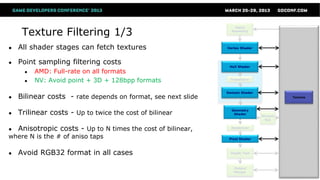
Texture Filtering 1/3
● All shader stages can fetch textures
● Point sampling filtering costs
● AMD: Full-rate on all formats
● NV: Avoid point + 3D + 128bpp formats
● Bilinear costs - rate depends on format, see next slide
● Trilinear costs - Up to twice the cost of bilinear
● Anisotropic costs - Up to N times the cost of bilinear,
where N is the # of aniso taps
● Avoid RGB32 format in all cases
Vertex Shader
Hull Shader
Domain Shader
Geometry
Shader
Pixel Shader
Stream
Out
Rasterizer
Depth Test
Output
Merger
Input
Assembly
Textures
Texture Filtering 2/3
Bilinear Filtering
● Full-rate
● Everything not mentioned below
● Quarter-rate
● RGBA32, RGBA32F
● Half-rate
● RG32, RG32F,RGBA16, RGBA16F
● BC6
Tessellator
Vertex Shader
Hull Shader
Domain Shader
Geometry
Shader
Pixel Shader
Stream
Out
Rasterizer
Depth Test
Output
Merger
Input
Assembly
Textures
Texture Filtering 3/3
● Use MIPMapping
● Avoid cache trashing
● Avoid aliasing artifacts
● All textures including displacement maps
● Texturing from multisampled surfaces
● Pre-resolve surfaces if only a single sample is
needed for a draw operation
●SSAO is classic example of this
● Use Gather() where possible
● NV: Gather with 4 offsets can result in speedups
Tessellator
Vertex Shader
Hull Shader
Domain Shader
Geometry
Shader
Pixel Shader
Stream
Out
Rasterizer
Depth Test
Output
Merger
Input
Assembly
Textures
Compute Shader 1/3
● Also known as DirectCompute
● DirectX interface for general-purpose
computing on the GPU (GPGPU)
● Advanced shader stage giving a lot of control
to programmer
● Explicit thread group execution
● Thread group shared memory
● Outputs to UAVs
● Supports atomic operations
● Explicit synchronizations
Tessellator
Hull Shader
Domain Shader
Geometry
Shader
Pixel Shader
Stream
Out
Rasterizer
Depth Test
Output
Merger
Textures
Buffers
UAVs
UAV Buffers
with counters
Append/Consume
UAV BuffersCompute Shader
Compute Shader 2/3
Performance Recommendations
● Consider the different IHV wavefront sizes
● 64 (AMD)
● 32 (NVIDIA)
● Choose a multiple of wavefront for threadgroup size
● Threadgroups(1,1,1) is a bad idea!
● Don‘t hardcode thread group sizes
● Maximum thread group size no guarantee for best parallelism
● Check for high enough machine occupancy
● Potentially join compute passes for big enough parallel workloads
● Profile/analyze with IHV tools and adapt for GPUs of different IHVs
Compute Shader 3/3
Performance Recommendations continued
Thread Group Shared Memory (TGSM)
● Store the result of thread computations into TGSM for work sharing
● E.g. resource fetches
● Only synchronize threads when needed
● GroupMemoryBarrier[WithGroupSync]
● TGSM declaration size affects machine occupancy
Bank Conflicts
● Read/writes to the same memory bank (bank=address%32) from parallel
threads cause serialization
● Exception: all threads reading from the same address is OK
Learn more in “DirectCompute for Gaming: Supercharge your engine with Compute
Shaders” presentation from Stephan and Layla at 1.30pm
Unordered Access Views (UAVs)
● DirectX11.1 allows all shader stages to write
to UAVs
● No longer limited to PS/CS
● Coalesce all reads and writes from/to UAVs
for better performance
Vertex Shader
Tessellator
Geometry
Shader
Pixel Shader
Stream
Out
Rasterizer
Depth Test
Output Merger
Input Assembly
Hull Shader
Domain Shader
Compute Shader
UAVs
UAV Buffers
with counters
Append/Consume
UAV Buffers
Questions?
Nick Thibieroz, AMD
nicolas.thibieroz@amd.com @NThibieroz
Holger Gruen, NVIDIA
hgruen@nvidia.com

Dx11 performancereloaded

  • 1.
  • 2.
    Introduction ● Update onDX11(.1) performance advice ● Recommendations signed off by both IHVs ● (Rare) exceptions will use color coding: ● AMD ● NVIDIA
  • 3.
  • 4.
    CPU-Side Pipeline View ●Examine how best to drive the DX11 API for efficient performance ● Separated in two stages: ● Offline process ● Runtime process Offline process Create vertex +index buffers Create textures Create shaders Runtime process Prepare render list Update dynamic buffers Update dynamic textures Send data to graphics pipeline Update constant buffers Create constant buffers
  • 5.
    Free-threaded Resource Creation ●Scale resource creation time with number of cores ● Especially useful to optimize shader compiling time ● Can result in major reduction in load-time on modern CPUs ● Check support with: struct D3D11_FEATURE_DATA_THREADING { BOOL DriverConcurrentCreates; BOOL DriverCommandLists; } D3D11_FEATURE_DATA_THREADING; Offline process Thread 1 Thread 2 Thread n Create vertex +index buffers Create textures Create shaders Create constant buffers …
  • 6.
    Offline Process: CreateShaders ● DirectX11 runtime compiles shaders from HLSL to D3D ASM ● Drivers compile shaders from D3D ASM to binary ISA ● Drivers defer compilation onto separate threads ● Shaders should be created early enough to allow compilation to finish before rendering starts ● Warm shader cache ● This guarantees deferred compilation has completed ● Avoid D3DXSHADER_IEEE_STRICTNESS compiler flag ● Impact possible optimizations ● NV: When using multiple threads to compile shaders: ● Driver might opt out of multi-threaded deferred compilation ● Compilation happens on the clock ●DO NOT USE the render thread to compile shaders to avoid stalls Offline process Create vertex +index buffers Create textures Create shaders Create constant buffers
  • 7.
    Offline Process: CreateTextures ● VidMM: OS video memory manager ● Responsible for storing textures and buffers into memory pools ● May need to “touch” memory before running to ensure optimal location ● Use the right flags at creation time ● D3D11_USAGE_IMMUTABLE allows additional optimizations ● Specify proper bind flags at creation time ● Only set those flags where required D3D11_BIND_UNORDERED_ACCESS D3D11_BIND_RENDER_TARGET Offline process Create vertex +index buffers Create textures Create shaders Create constant buffers
  • 8.
    Offline Process: CreateVertex and Index Buffers ● Optimize index buffers for index locality (or “index re-use”) ● E.g. D3DXOptimizeFaces ● Then optimize vertex buffers for linear access ● E.g. D3DXOptimizeVertices ● Should be an offline process, or performed at mesh export time ● Includes procedural geometry! ● E.g. light volumes for deferred lighting ● Common oversight Offline process Create vertex +index buffers Create textures Create shaders Create constant buffers
  • 9.
    Offline Process: CreateConstant Buffers “Constants should be stored in Constant Buffers according to frequency of updates” (You’ve heard this before) ● Group constants by access patterns ● Constants used by adjacent instructions should be grouped together ● Consider creating static CBs with per-mesh constant data ● No need to update them every frame (e.g. ViewProjection) ● Negligible VS ALU cost for extra transformation step required ● DirectX11.1: large >64KB constant buffers now supported ● Specify CB range to use at draw time Offline process Create vertex +index buffers Create textures Create shaders Create constant buffers
  • 10.
    Runtime Process: PrepareRender List Determine visible objects ● Only visible meshes should be sent to the GPU for rendering ● GPU occlusion queries based culling ● Give at least a full frame (if not 2-3) before getting result back ● Round-robin queue of Occlusion Queries is recommended ● Stay conservative with the amount of queries you issue ● GPU Predicated Rendering ● Save the cost of rendering but not processing the draw call ● CPU-based culling ● Conservative software rasterizer ● Low-res, SSE2 optimized ● Good if you have free CPU cycles Runtime process Prepare render list Update dynamic buffers Update dynamic textures Send data to graphics pipeline Update constant buffers Image courtesy of DICE
  • 11.
    Runtime Process: PrepareRender List State Setting and Management ● Don’t create state objects at run-time ● Or create them on first use ● And pre-warm scene ● Minimize number of state changes ● Check for dirty states ● Set multiple resource slots in one call E.g. Make one call to : PSSetShaderResources(0, 4, &SRVArray); Instead of multiple calls: PSSetShaderResources(0, 1, &pSRV0); PSSetShaderResources(1, 1, &pSRV1); PSSetShaderResources(2, 1, &pSRV2); PSSetShaderResources(3, 1, &pSRV3); ● Use geometry instancing to reduce draw calls! Runtime process Prepare render list Update dynamic buffers Update dynamic textures Send data to graphics pipeline Update constant buffers
  • 12.
    Runtime Process: PrepareRender List Pushing Commands to Drivers 1/2 ● Driver is threaded internally on a producer-consumer model ● Application producer thread: driver just buffers each call very quickly ● Driver consumer thread: processes buffered calls to build command buffers Application producer thread Driver Consumer thread ● Above example is application thread limited ● Not feeding draw commands to driver fast enough ● Not ideal way to drive performance D3D API command - Draw command, state setting etc. Mapped buffer uploads - Buffer updates Non-D3D workloads - Anything else
  • 13.
    Runtime Process: PrepareRender List Pushing Commands to Drivers 2/2 ● Application is only ‘driver limited’ if the consumer thread is saturated ● To achieve this the application thread must be able to feed the driver consumer thread fast enough ● Work that is not directly feeding the driver should be moved to other threads ● Application producer thread should only send Direct3D commands ● Mapped buffer uploads should be optimized as much as possible App Producer thread Application thread Application thread … … … … Driver Consumer thread D3D API command - Draw command, state setting etc. Mapped buffer uploads - Buffer updates Non-D3D workloads - Anything else
  • 14.
    Runtime Process: PrepareRender List What about Deferred Contexts? ● Nothing magical about deferred contexts ● If already consumer thread limited then deferred contexts will not help ● D3D Deferred Contexts can present efficiency issues ● Immediate Context Consumer is often a bottleneck ● Deferred Contexts can limit performance due to redundant state setup ● Properly balance the amount of DCs and the workload for each See Bryan Dudash’s presentation about Deferred Contexts Today at 5.30pm
  • 15.
    Runtime Process: UpdateDynamic Textures ● Update from ring of staging resources ● Update staging texture from next available one in ring ● Then CopyResource() ● If creating new resources make sure creation is done free- threaded ● UpdateSubresource() sub-optimal path for resource updates in general ● May require additional copies in the driver ● Update full slice of texture array or volume texture rather than sub-rectangle ● Avoid Map() on DYNAMIC textures ● Map returns a pointer to linear data that conflicts with HW tiling Runtime process Prepare render list Update dynamic buffers Update dynamic textures Send data to graphics pipeline Update constant buffers
  • 16.
    Runtime Process: UpdateDynamic Buffers 1/2 ● Use DISCARD when infrequently mapping buffers ● Updating a buffer with DISCARD may cause a driver- side copy because of contention ● Multiple DISCARD updates/frame can cause stalls due to copy memory running out ●Especially with large buffers ●Smaller buffers allow better memory management ● AMD: <4MB DYNAMIC buffers is best ● NV: No optimal size as such but number of buffers in flight through discards/renaming is limited Runtime process Prepare render list Update dynamic buffers Update dynamic textures Send data to graphics pipeline Update constant buffers
  • 17.
    Runtime Process: UpdateDynamic Buffers 2/2 ● Frequently-updated data should use DISCARD + NO_OVERWRITE ● Only DISCARD when full ● DirectX11.1: Dynamic buffers can now be bound as SRV ● Useful for advanced geometry instancing Runtime process Prepare render list Update dynamic buffers Update dynamic textures Send data to graphics pipeline Update constant buffers
  • 18.
    Runtime Process: UpdateConstant Buffers ● From CB creation stage: store constants into CBs according to update frequency ● Don’t bind too many CBs per draw (<5) ● Share CBs across shader stages ● E.g. same CB bound in VS and PS ● DirectX11.1: partial updates of CB now supported! ● Map() with NO_OVERWRITE or UpdateSubresource1() ● DirectX11.1: XXSetConstantBuffers1() for CB re-basing ● Specify offset and range of constants within large CB Runtime process Prepare render list Update dynamic buffers Update dynamic textures Send data to graphics pipeline Update constant buffers
  • 19.
  • 20.
    DX11 Graphics Pipeline ●Just a quick recap ● Green: Fixed-function stage ● Blue: Programmable shader stage ● Purple: Memory resources Performance problems can happen at almost every stage or junction! Vertex Shader Tessellator Hull Shader Domain Shader Geometry Shader Pixel Shader Stream Out Rasterizer Depth Test Output Merger Input Assembly Buffers Textures Constants Render Targets UAVs Depthstencil …
  • 21.
    Input Assembly ● Onlybind vertex streams containing required vertex data ● E.g. Depth-only rendering only requires position + texture coordinates ● Specify other vertex inputs in additional stream for color rendering ● Binding too many streams may impact fetch performance ● 2 or 3 is often a good target Vertex Buffers Index Buffers Input Assembly IASetInputLayout() IASetVertexBuffers() IASetIndexBuffer() IASetPrimitiveTopology() Position Texcoord Stream 0 Input Assembly Normal Tangent Stream 1 IASetInputLayout() IASetVertexBuffers()
  • 22.
    Vertex Shader Vertex Shader Tessellator HullShader Domain Shader Geometry Shader Pixel Shader Stream Out Rasterizer Depth Test Output Merger Input Assembly Buffers Textures Constants ● Vertex Shader execution can be a bottleneck in some situations: ● Dependent fetches ●Indexed constant or textures fetches ● Poor vertex cache efficiency ●Remember to optimize your meshes ● Long and complex vertex shaders ●Advanced skinning, texture accesses… ● Those bottlenecks become more apparent in transform- limited situations ● Watch out for large vertex output size ● Minimize the amount of attributes to PS ●AMD: 4 float4 (or less) output size is ideal
  • 23.
    Tessellation Stages ● Tessellationis a great feature of DirectX 11 ● Allows enhanced visual quality via different techniques and provides nice properties ● Smooth silhouettes ● Greater detail and internal silhouettes through Displacement mapping ● Natural LOD through tess factors ● Tessellation has a cost ● Content creation pipeline changes ● Performance depending on amount of usage Use it when and where it makes sense Vertex Shader Tessellator Hull Shader Domain Shader Geometry Shader Pixel Shader Stream Out Rasterizer Depth Test Output Merger Input Assembly Buffers Textures Constants
  • 24.
    Tessellation basic performancetips ● Disable tessellation completely when not needed ● After a certain distance models should revert to no tessellation ● When tessellation factors are too small ● Use Frustum and Backface culling ● This is different than fixed-function hardware culling! ● Culling has to be done manually in the Hull Shader prior to tessellator stage ● Minimize Hull and Domain Shader vertex output attributes
  • 25.
    Tessellation factors 1/2 ●Undertessellation may produce visual artifacts ● Especially if using displacement maps (e.g. “swimming”) ● Overtessellation and very tiny triangles will degrade performance ● AMD: tessellation factors above 15 have a large impact on performance ● Strike the right balance between quality and performance
  • 26.
    Tessellation factors 2/2 ●Use an appropriate metric to determine how much to tessellate based on the amount of detail or base mesh footprint you want ● Screen-space adaptive ● Distance-adaptive – if you don’t do screen-space adaptive ● Orientation-adaptive • Orientation-independent • Target 10-16 pix/tri at minimum • Consider resolution into accountΔsize [ Eye Screen Projected sphere diameter 𝐴 = 𝜋𝑟2𝐹𝑒𝑑𝑔𝑒 ≈ 𝐾 𝐷 𝑝𝑟𝑜𝑗 𝑆𝑡𝑎𝑟𝑔𝑒𝑡 𝐹𝑒𝑑𝑔𝑒 − 𝑒𝑑𝑔𝑒 𝑡𝑒𝑠𝑠𝑒𝑙𝑙𝑎𝑡𝑖𝑜𝑛 𝑓𝑎𝑐𝑡𝑜𝑟 𝐷 𝑝𝑟𝑜𝑗 − 𝑝𝑟𝑜𝑗𝑒𝑐𝑡𝑒𝑑 𝑑𝑖𝑎𝑚𝑒𝑡𝑒𝑟 𝑠𝑖𝑧𝑒, 𝑖𝑛 𝑝𝑖𝑥𝑒𝑙𝑠 𝑆𝑡𝑎𝑟𝑔𝑒𝑡 − 𝑡𝑎𝑟𝑔𝑒𝑡 𝑡𝑟𝑖𝑎𝑛𝑔𝑙𝑒 𝑠𝑖𝑧𝑒, 𝑖𝑛 𝑝𝑖𝑥𝑒𝑙𝑠 𝐾 − 𝑠𝑐𝑎𝑙𝑖𝑛𝑔 𝑐𝑜𝑒𝑓𝑓𝑖𝑐𝑖𝑒𝑛𝑡
  • 27.
    Geometry Shader ● Often,there is a faster, non-GS solution ● VS techniques can be a win (depending on VS cost) ● Prefer fixed expansion ● Variable expansion rate affects performance ● Divergent workload does not pipeline well ● Please note: Pass-through GS with RT index selection is a form of expansion ● AMD: OK if all primitives emitted from a given GS input all go to the same RT ● Minimize input and output size and attributes to PS Vertex Shader Tessellator Hull Shader Domain Shader Geometry Shader Pixel Shader Stream Out Rasterizer Depth Test Output Merger Input Assembly Buffers Textures Constants
  • 28.
    Rasterizer ● Turns trianglesinto pixels ● Small triangles result in poor quad occupancy ● Causes poor utilization of shader units ● Too small triangles can be caused: ● by over-tessellation ● by non-existing/poor LOD system (quite common!) ● Check triangle density by switching to wireframe ! Vertex Shader Tessellator Hull Shader Domain Shader Geometry Shader Pixel Shader Stream Out Rasterizer Depth Test Output Merger Input Assembly
  • 29.
    Pixel Shader ● Somepixel shaders are likely to be performance bottlenecks ● Often executed on more elements than other stages ● Per-sample PS execution is very costly ●Only perform it where required ● In most cases moving work up the pipeline is a good thing (executed on fewer elements) ● There are exceptions to this ● Use IHV tools to understand your bottlenecks ● PS supports scattered writes in DX11.0 ● UAVs with or without counters ● Append/Consume UAVs ● Group UAV reads/writes together ●Help with memory access Vertex Shader Tessellator Hull Shader Domain Shader Geometry Shader Pixel Shader Stream Out Rasterizer Depth Test Output Merger Input Assembly Buffers Textures Constants
  • 30.
    Pixel Shader Execution Cost ●Some ALU instructions cost more than others ● E.g. RCP, RSQ, SIN, COS, I2F, F2I ● Integer MUL and DIV are “slower” instructions, use float instead ● Discard/clip can help performance by skipping remaining instructions ● Minimize sequence of instructions required to compute discard condition ● Shader inputs: attribute interpolation contributes to total execution cost ● Minimize the number of attributes sent from VS/DS/GS ● Avoid sending constants! (use constant buffers) ● AMD : pack attributes into float4
  • 31.
    Pixel Shader GPR Pressureand Fetches ● General Purpose Registers (GPR) are a limited resource ● Number of GPRs required by a shader affects execution efficiency ● Use register count in D3D asm as an indicator ● GPR pressure is affected by: ● Long lifetime of temporary variables ● Fetch dependencies (e.g. indexed constants) ● Nested Dynamic Flow Control instructions ● Watch out for dcl_indexableTemp in the D3D asm ● Replace by texture lookup or ALU for large constant arrays
  • 32.
    Depth Test ● APIplaces it logically after PS ● HW executes depth/stencil at various points: ● Hi-Z/ZCull coarse rejection ● EarlyZ before PS when possible ● Late Z after PS ● Ideal rendering order: ● Opaque first, then alpha test ● NV: Use D24 whenever possible for performance ● NV: don’t mix GREATER and LESS on same depth buffer ● AMD: Prefer D16 for shadow maps Pixel Shader Hi-Z / ZCull Depth/Stencil Test Output Merger “Early” Depth Stencil Test Rasterizer “Late” Depth Stencil Test Vertex Shader Tessellator Hull Shader Domain Shader Geometry Shader Pixel Shader Stream Out Rasterizer Depth Test Output Merger Input Assembly Depth/Stencil Buffer
  • 33.
    Depth Test –Early Z vs Late Z rules Pixel Shader Hi-Z / ZCull Depth/Stencil Test Output Merger “Early” Depth Stencil Test Rasterizer “Late” Depth Stencil Test Opaque primitives [earlydepthstencil] Clip()/Discard() Alpha to Mask Output Coverage Mask Output Depth Writes OFF with Pixel Shader Hi-Z / ZCull Depth/Stencil Test Output Merger “Early” Depth Stencil Test Rasterizer “Late” Depth Stencil Test Clip()/Discard() Alpha to Mask Output Coverage Mask Output Depth Writes ON with Pixel Shader Hi-Z / ZCull Depth/Stencil Test Output Merger “Early” Depth Stencil Test Rasterizer “Late” Depth Stencil Test oDepth output UAV output
  • 34.
    Pixel Shader Hi-Z /ZCull Depth/Stencil Test Output Merger “Early” Depth Stencil Test Rasterizer “Late” Depth Stencil Test Conservative oDepth output SV_DEPTH_GREATER_EQUAL or SV_DEPTH_LESS_EQUAL ● DX11 supports conservative depth output ● Allows programmer to specify that depth output will only be GREATEREQUAL or LESSEQUAL than current depth buffer depth ● E.g. geometric decals, depth conversion etc. ● In this case EarlyZ is still disabled ● Because it relies on knowing actual fragment depth ● But Hi-Z/ZCull can be leveraged for early acceptance or rejection Depth Test – Conservative oDepth
  • 35.
    Output Merger ● PSoutput: each additional color output increases export cost ● Export cost can be more costly than PS execution ● If shader is export-bound then it is possible use “free” ALU for packing etc. ● Watch out for those cases ● E.g. G-Buffer parameter writes Clears: ● MSAA: always clear to reset compression ● Single-sample: use DX11.1 Discard*() API ● Clear Z every time it is needed Vertex Shader Tessellator Hull Shader Domain Shader Geometry Shader Pixel Shader Stream Out Rasterizer Depth Test Output Merger Input Assembly Render Targets
  • 36.
    Export Rates ● Full-rate ●Everything not mentioned below ● Half-rate ● R16, RG16 with blending ● RG32F with blending ● RGBA32, RGBA32F ● RGBA16F, R11G11B10F ● sRGB8, A2R10G10B10 with blending ● Quarter-rate ● RGBA16 with blending ● RGBA32F with blending ● RGBA32F Vertex Shader Tessellator Hull Shader Domain Shader Geometry Shader Pixel Shader Stream Out Rasterizer Depth Test Output Merger Input Assembly Render Targets
  • 37.
    Tessellator Texture Filtering 1/3 ●All shader stages can fetch textures ● Point sampling filtering costs ● AMD: Full-rate on all formats ● NV: Avoid point + 3D + 128bpp formats ● Bilinear costs - rate depends on format, see next slide ● Trilinear costs - Up to twice the cost of bilinear ● Anisotropic costs - Up to N times the cost of bilinear, where N is the # of aniso taps ● Avoid RGB32 format in all cases Vertex Shader Hull Shader Domain Shader Geometry Shader Pixel Shader Stream Out Rasterizer Depth Test Output Merger Input Assembly Textures
  • 38.
    Texture Filtering 2/3 BilinearFiltering ● Full-rate ● Everything not mentioned below ● Quarter-rate ● RGBA32, RGBA32F ● Half-rate ● RG32, RG32F,RGBA16, RGBA16F ● BC6 Tessellator Vertex Shader Hull Shader Domain Shader Geometry Shader Pixel Shader Stream Out Rasterizer Depth Test Output Merger Input Assembly Textures
  • 39.
    Texture Filtering 3/3 ●Use MIPMapping ● Avoid cache trashing ● Avoid aliasing artifacts ● All textures including displacement maps ● Texturing from multisampled surfaces ● Pre-resolve surfaces if only a single sample is needed for a draw operation ●SSAO is classic example of this ● Use Gather() where possible ● NV: Gather with 4 offsets can result in speedups Tessellator Vertex Shader Hull Shader Domain Shader Geometry Shader Pixel Shader Stream Out Rasterizer Depth Test Output Merger Input Assembly Textures
  • 40.
    Compute Shader 1/3 ●Also known as DirectCompute ● DirectX interface for general-purpose computing on the GPU (GPGPU) ● Advanced shader stage giving a lot of control to programmer ● Explicit thread group execution ● Thread group shared memory ● Outputs to UAVs ● Supports atomic operations ● Explicit synchronizations Tessellator Hull Shader Domain Shader Geometry Shader Pixel Shader Stream Out Rasterizer Depth Test Output Merger Textures Buffers UAVs UAV Buffers with counters Append/Consume UAV BuffersCompute Shader
  • 41.
    Compute Shader 2/3 PerformanceRecommendations ● Consider the different IHV wavefront sizes ● 64 (AMD) ● 32 (NVIDIA) ● Choose a multiple of wavefront for threadgroup size ● Threadgroups(1,1,1) is a bad idea! ● Don‘t hardcode thread group sizes ● Maximum thread group size no guarantee for best parallelism ● Check for high enough machine occupancy ● Potentially join compute passes for big enough parallel workloads ● Profile/analyze with IHV tools and adapt for GPUs of different IHVs
  • 42.
    Compute Shader 3/3 PerformanceRecommendations continued Thread Group Shared Memory (TGSM) ● Store the result of thread computations into TGSM for work sharing ● E.g. resource fetches ● Only synchronize threads when needed ● GroupMemoryBarrier[WithGroupSync] ● TGSM declaration size affects machine occupancy Bank Conflicts ● Read/writes to the same memory bank (bank=address%32) from parallel threads cause serialization ● Exception: all threads reading from the same address is OK Learn more in “DirectCompute for Gaming: Supercharge your engine with Compute Shaders” presentation from Stephan and Layla at 1.30pm
  • 43.
    Unordered Access Views(UAVs) ● DirectX11.1 allows all shader stages to write to UAVs ● No longer limited to PS/CS ● Coalesce all reads and writes from/to UAVs for better performance Vertex Shader Tessellator Geometry Shader Pixel Shader Stream Out Rasterizer Depth Test Output Merger Input Assembly Hull Shader Domain Shader Compute Shader UAVs UAV Buffers with counters Append/Consume UAV Buffers
  • 44.
    Questions? Nick Thibieroz, AMD nicolas.thibieroz@amd.com@NThibieroz Holger Gruen, NVIDIA hgruen@nvidia.com

Editor's Notes

  • #4 Presentation divided in two parts: CPU-Side and GPU side pipeline view. CPU-side pipeline view gives advice on how best to drive the API to maximize CPU performance of DX runtime and drivers. GPU-side pipeline view gives advice on how best to drive the API to maximize GPU performance.
  • #5 Offline process: lists the most common tasks needed at load-time. Makes sure resources are created optimally for best performance at run-time. Runtime process: lists the most common tasks needed every frame.
  • #6 Most PC out there are running on multiple cores. 4 is fairly common. Spread the cost of resource creation onto multiple threads to minimize load-time. Especially important with shader compilation which can take a long time. Resource creation likely to be more subject to I/O limitation (unless running on SSD).
  • #7 ISA = Instruction Set Architecture Games should ship with pre-compiled D3DASM binary shaders to avoid HLSL compilation time.
  • #8 Since Windows Vista all DX memory management is done by the OS (VidMM) instead of the drivers. To ensure resources are stored in optimal location those need to be “touched”, i.e. included in a warm-up rendering phase where those resources are used. This would give enough time to VidMM to move those resources into optimal pools as needed (e.g. RT into local vid mem). Specifying both UAV and RT flags may affect synchronization performance when switching from/to compute jobs.
  • #9 E.g. plug-ins are available for Maya and 3DSMax that will optimize your geometry. Procedural geometry (sphere, spotlight) often does not go through geometry optimization phase. Can be a significant performance impact especially if depth/stencil rendering is used (more load on GPU front-end).
  • #10 Grouping by access patterns helps with cache access for CB fetches. Per-mesh static CB: means that those CBs can be created up-front and not modified. This reduces the need for CB updates. DX11.1 (Windows 8 only): large CB creation used for CB rebasing. Allows NO_OVERWRITE style of CB update.
  • #11 GPU occlusion queries need to be used properly to be effective. Large number of occlusion queries will impact performance. All the usual trick of CPU-based occlusion should be used: convex hull visibility testing, occluder objects etc. Conservative software render: CPU rasterizer. SSE2 optimized. Store results in low-res buffer. Can limit number of triangles processed per frame to put an upper bound on cost. Conservative render courtesy of DICE’s Johan Andersson.
  • #12 From DX10 onwards a lot of validation work was moved from runtime to load-time. So creating state objects at run-time defeats this advantage. The fewer state changes you send to the runtime the lower the overhead. Multiple resources in one call: common oversight when porting from DirectX 9.
  • #13 App thread limited means the app is not able to push a higher number of API calls to the drivers. This will impact performance, especially on recent titles that are pushing high number of draw calls.
  • #14 Having the driver consumer thread saturated with work is the best way to achieve the highest number of API calls. For this to happen the app thread must be able to feed the driver thread fast enough. Thus, application producer thread should only be sending API calls to the runtime. Any other work should be moved onto other threads. This includes the processing of data when copying buffers. Only a pointer should be passed to Map/Unmap in the producer thread.
  • #15 Deferred contexts would only help if app is producer-thread limited.
  • #16 Update from ring of STAGING textures: because STAGING textures may still be in use to finish the copy operation in previous frames. Ring ensures there is a next STAGING texture in ring available for copy. Creating new resources should be avoided at run-time though, better to create during offline process. UpdateSubresource() has additional copy overhead. May be ok for very small textures but should be avoided for anything else. Better to perform all updates into STAGING and then upload new slice into Texture2DArray/Texture3D to avoid read/modify/write overhead. DYNAMIC textures may be stored in video memory hence in swizzled format. But Map() requires linear data so additional copy/convert overhead.
  • #17 AMD: limiting DYNAMIC buffers to 4Mb is best as it ensures buffer can be renamed at least once (allow parallelism). NV: no optimal size but doing too many DISCARD a frame may run into rename memory limitation.
  • #18 Only DISCARD when full: Some apps insist to DISCARD once a frame. Only do it when full! Not being able to bind DYNAMIC buffers as SRV was a major limitation of DX11.0. This allows the creation of instancing data with NO_OVERWRITE updates for best performance.
  • #19 Constants stored according to update frequency allows optimal balance between API calls and memory transfers. Too many CBs means fetching from different locations which can affect shader setup and cache re-use. One way to reduce CB updates is to share some CBs between multiple shader stage if they contain a lot of values needed in both. Partial updates of CB now supported: will help with CB management and reduce contention. XXSetContantBuffers1(): allow the programmer to set a “sub-” CB from a large CB. Effectively reduces the API overhead for updating CBs (multiple sub-CBs can be updated in one call).
  • #20 Will review how to drive DX11 API to enable maximal GPU efficiency and performance.
  • #21 Green – fixed function stage. Blue – programmable shader stage. Purple – memory resources. Some stages are missing (e.g. clipping, scissoring etc.) for simplicity.
  • #22 Input Assembly defines how geometry buffers are bound to the GPU for processing. Only bind vertex streams containing required vertex data: we’re still seeing some instances where the full vertex structure is bound for depth-only rendering. Binding too many streams will result in at least one cache line fetch for every stream. Perfectly valid to bind no geometry buffers and create geometry procedurally using SV_VertexID and/or by fetching data from resources manually in VS.
  • #23 Large VS output size: affects shader execution performance. Also has the side-effect of reducing number PS attributes which is a good thing. VS bottleneck can also be due to poor LOD (loads of vertices to transform but few pixels to rasterize).
  • #24 One of the main feature of DX11 along with DirectCompute. Direct correlation between amount of tessellation used and performance.
  • #25 Tessellation factor of 1 means no tessellation which is the same result as simply having VS/PS. But significant overhead of tessellation stages being enabled. Minimize Hull and Domain Shader vertex output attributes: packing data so that it uses less space. In some cases reconstructing data in later stages (e.g. PS) can be better than storing this data in HS/DS output. Need to try and see what works best. Fixed-function HW culling occurs at the rasterization stage (just before PS) so by then all triangles are already tessellated. Instead BFC should be done at HS level to ensure triangles are killed before they reach the tessellator.
  • #26 Undertessellation can produce visual artefacts when not enough vertices are used to displace a height map. This can result in a swimming effect when adaptive tessellation is used. Overtessellation on the other hand will affect performance: as mentioned before there is a direct correlation between amount of tessellation used and performance. AMD: performance cliffs when tessellation factors are above 15. As with everything in rendering it is important to strike a good balance between quality and performance.
  • #27 Screen-space adaptive (10-16 tris/pixel, also depends on resolution): some scaling of this value per resolution may be required to avoid high performance cost at higher screen resolutions. Orientation-independence is important to minimize swimming. Consider resolution into account: very large resolution (e.g. 1600p, SSAA, 4K) will produce higher tessellation factors with a fixed triangle size so need to adjust desired triangle size accordingly.
  • #28 VS instancing can be a win: especially if fixed expansion is used. For example quad or prism rendering. OK if all primitives emitted from a given GS input all go to the same RT: alternative solutions to RT index selection are 3D UAV output from PS, render to texture atlases, or rewrite the algorithm to store data to one slice at a time. Light Propagation Volumes, Sparse Voxel Octrees etc. Once again minimizing input and output size helps. Leads to better shader execution.
  • #29 There should be more triangles then edges: if all you’re seeing are edges then expect limited rendering performance (and possibly tessellation/small triangle bottleneck).
  • #30 PS often shows up as most likely bottleneck. Not always though (e.g. CS, tessellation). Hence the importance to optimize PS as much as possible. There are exceptions to this: for example to reduce outputs from previous stages (VS, HS, DS, GS). PS UAV support in DX11.0: all shader stages support UAV output in DX11.1 but DX11.0 only for PS and CS. UAV output great feature but consumes a lot of bandwidth so need to group reads and writes to help with memory accesses.
  • #31 As mentioned before reducing outputs in the previous stage will help performance. Don’t pass constant values from previous stage to PS as an interpolator, use CB instead. AMD: packing will help performance. Per-sample PS execution can be optimized by only doing it where required, e.g. on pixel edges on Deferred MSAA renderers.
  • #32 Shader tools: NV nSight or FXComposer, AMD GPUPerfStudio 2 or GPUShaderAnalyzer. Long lifetime: declaring a temp variable that is used throughout the length of the shader. Nested DFC means more GPRs to support all cases of divergences. Fetch dependencies: more GPRs needed to hide latency. Shader compilers will try to improve on those but there is a lot you can do by designing an efficient shader from the start.
  • #33 Ideal rendering order: Opaque first, then alpha test. Opaque geometry will prime HiZ/Zcull more efficiently. NV: Using D32F with normal projection matrices does not bring additional value. AMD: D16 shadow map produce enough precision in most cases. All you need is correct projection matrix (high front clip plane). Enough for most ranges of CSM.
  • #34 Opaque primitives: can be with depth writes on or off May be affected by stencil.
  • #35 Conservative oDepth not well documented in DX11 API.
  • #36 Clear is a sub-category of Output Merger Clear is not free. Discard is preferred to Clear() since a Clear doesn’t actually need to happen. Clear Z every time it is needed: always fast, no Z trick needed.
  • #37 Can vary depending on whether blending is enabled or not. Stay away from 128bpp for best export performance.
  • #38 RGB32 does not play well with memory alignment.
  • #39 Main difference here is that AMD HW is half-rate on RGBA16 filtering.
  • #40 Use MIPMapping: should be obvious. What is less obvious is that sometimes displacement maps are (e.g. for tessellation) are not MIPMapped – they should be. MSAA decompression Gather allows the fetching of 4 point sample values in a single texture instruction. Should be used for operations not requiring fitering e.g. depth buffer downsizing, DOF, AO, bilateral filters etc.
  • #41 Great tool for achieving next-gen performance on new algorithms But with great power comes great responsibility.
  • #42 A threadgroup with less than 64 threads will waste GPU resources and so will a non-multiple of 64. IHV tools: NV nSight, AMD GPUPerfStudio 2.
  • #43 TGSM declaration size affects latency hiding: declaring max amount of TGSM not necessarily the best solution for performance.