
Technologies Used In
Graphics Rendering
Presented By:
Bhupinder Singh
Basic Terminology
• Pixel is the most basic unit of a digital image, a tiny square of color.
• Resolution is the number of pixels in each dimension that can be
displayed. It is usually quoted as width × height, with the units in
pixels.
• Frame Rate is the rate at which an imaging device produces unique
consecutive images called frames. It is most often expressed in
frames per second (FPS).
• Refresh Rate is the number of times a display updates per second. It
is measured in Hertz (Hz).
• GPU – Graphics Processing Unit
• Dedicated vs. Integrated
• Nvidia vs AMD
• Nvidia
i. GeForce, the gaming graphics processing products for which Nvidia is
best known.
ii. Quadro, computer-aided design and digital content creation workstation
graphics processing products.
iii. Tegra, a system on a chip series for mobile devices.
• AMD
i. Radeon, brand for consumer line of graphics cards.
ii. FirePro, brand for professional line of graphics cards for workstations.
iii. Mobility Radeon, power-optimized versions of Radeon graphics chips for
use in laptops and mobile devices.
Rendering
• It is the process of generating an image from a 2D or 3D model (or
models in what collectively could be called a scene file), by means of
computer programs.
• If a scene is to look relatively realistic and predictable under virtual
lighting, the rendering software should solve the rendering equation.
• This is the key academic/theoretical concept in rendering. It serves as
the most abstract formal expression of the non-perceptual aspect of
rendering.
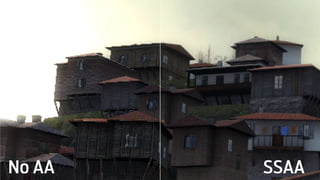
Anti - Aliasing
• If you draw a diagonal line with square pixels, their hard
edges create a jagged ‘staircase’ effect. This jaggedness
is called aliasing.
• To counter this problem, anti – aliasing is used which
works by rendering frames at a higher resolution than
the display resolution, then squeezing them back down
to size.
• Consider a pixel on a tile roof. It’s orange, and next to it
is a pixel representing a cloudy sky, which is light and
blueish. Next to each other, they create a hard, jagged
transition from roof to sky. But if you render the
scene at four times the current resolution, that one
orange roof pixel becomes four pixels. Some of those
pixels are sky - colored and some are roof - colored. If
we take the average of all four values, we get something
in between. Do that to the whole scene and the
transitions become softer.
• While it looks very good, anti - aliasing is extremely computationally
expensive. You’re rendering each frame at a resolution two or more times
higher than the one you’re playing at—even with four GTX Titans, trying to
run anti - aliasing with a display resolution of 2560x1440 isn't practical.
• This was the Supersampling (SSAA) approach. Other comparatively less
taxing approaches are as follows.
• Multisampling (MSAA): Achieves good results, but is much more efficient
than SSAA. This is typically the standard, baseline option in games.
• Coverage Sampling (CSAA): Nvidia's more efficient version of MSAA.
• Custom-filter (CFAA): AMD’s more efficient version of MSAA.
• Fast Approximate (FXAA): Rather than analyzing the 3D models (i.e. MSAA,
which looks at pixels on the edges of polygons), FXAA is a post-processing
filter, meaning it applies to the whole scene after it has been rendered, and
it's very efficient. It also catches edges inside textures which MSAA misses.
Ambient Occlusion
• It is a shading and rendering technique used to calculate how exposed each
point in a scene is to ambient lighting.
• An ambient light source represents a fixed - intensity and fixed - color light
source that affects all objects in the scene equally. Upon rendering, all
objects in the scene are brightened with the specified intensity and color.
This type of light source is mainly used to provide the scene with a basic
view of the different objects in it. This is the simplest type of lighting to
implement and models how light can be scattered or reflected many times
producing a uniform effect.
• Ambient lighting can be combined with ambient occlusion to represent
how exposed each point of the scene is, affecting the amount of ambient
light it can reflect.
• Ambient occlusion attempts to improve the effect by determining
which parts of the scene shouldn't be exposed to as much ambient
lighting as others. It doesn't cast hard shadows like a directional light
source, rather, it darkens interiors and crevices, adding soft, diffused
shading.
• Screen space ambient occlusion (SSAO) is an approximation of
ambient occlusion used in real-time rendering, and has become
commonplace in games in the past few years—it was first used in
Crysis. It is effective in adding depth to a scene. All major engines
support it, and its success will vary depending on the game and
implementation.
High Dynamic Range Rendering
• It is the rendering of computer graphics scenes by
using lighting calculations done in a larger dynamic range. This allows
preservation of details that may be lost due to limiting contrast
ratios. Video games and computer-generated movies and special
effects benefit from this as it creates more realistic scenes than with the
more simplistic lighting models used.
• The range it refers to is the range of luminosity in an image—that is, how
dark and bright it can be. The goal is for the darkest areas to be as detailed
as the brightest areas. A low-dynamic-range image might show lots of
detail in the light part of a room, but lose everything in the shadows.
• Graphics processor company Nvidia summarizes the motivation for HDRR
in three points: bright things can be really bright, dark things can be really
dark, and details can be seen in both.
• In the past, the range of dark to light in games was limited to 8 bits (only
256 values), but as of DirectX 10 128-bit HDRR is possible.
• Anisotropic Filtering: In 3D computer graphics, anisotropic
filtering (abbreviated AF) is a method of enhancing the image quality
of textures on surfaces of computer graphics that are at oblique
viewing angles with respect to the camera. Anisotropic filtering does
not filter the same in every direction. Anisotropic filtering generally
comes in 2x, 4x, 8x, and 16x levels. Nvidia describes these sample
rates as referring to the steepness of the angle the filtering will be
applied to.
• PhysX is a multi-threaded physics simulation SDK available
for Microsoft Windows, Mac OS X, Linux, PlayStation 3, Xbox
360 and Wii. It supports rigid body dynamics, soft body dynamics,
vehicle dynamics, particles, volumetric fluid simulation and cloth
simulation including tearing and pressurized cloth.
Motion Blur
• Motion blur is pretty self-explanatory: it's a post-processing
filter which simulates the film effect caused when motion
occurs while a frame is being captured, causing streaking.
• In computer animation this effect must be simulated as a virtual
camera actually does capture a discrete moment in time. This
simulated motion blur is typically applied when either the camera or
objects in the scene move rapidly.
Depth Of Field
• It is the distance between the nearest and farthest objects in a scene
that appear acceptably sharp in an image. Although a lens can
precisely focus at only one distance at a time, the decrease in
sharpness is gradual on each side of the focused distance, so that
within the DOF, the unsharpness is imperceptible under normal
viewing conditions.
• In some cases, it may be desirable to have the entire image sharp,
and a large DOF is appropriate. In other cases, a small DOF may be
more effective, emphasizing the subject while de-emphasizing the
foreground and background.
Vertical Sync
• To understand the importance of vertical sync, we first need to look at the
concept of screen tearing.
• When a display's refresh cycle is out of sync with the game's rendering
cycle, the screen can refresh just as the game has finished supplying a
frame and started on another one. The effect is a ‘break’ called screen
tearing, where we're seeing portions of two or more frames at the same
time.
• In other words, it is a visual artifact in video display where a display
device shows information from two or more frames in a single screen draw
• The artifact occurs when the video feed to the device isn't in sync with the
display's refresh. This can be due to non-matching refresh rates or simply
from lack of sync between two equal frame rates. During video motion,
screen tearing creates a torn look as edges of objects (such as a wall or a
tree) fail to line up.
• Vertical synchronization is an option in most systems, wherein the
video card is prevented from doing anything visible to the display
memory until after the monitor finishes its current refresh cycle.
• With Nvidia cards there is an option to enable 'Adaptive Vsync'. This
option will only turn on vertical synchronization when the frame rate
of the rendering engine exceeds the display's refresh rate, leaving the
frame rate unlocked otherwise. This eliminates the stutter that occurs
as the rendering engine frame rate drops below the display's refresh
rate.
• In gaming terms, Vsync prevents the game from messing with the
display until it completes its refresh cycle. Unfortunately, Vsync causes
its own problems, one being that it contributes to input lag when the
game is running at a higher frame rate than the display's refresh rate.
Bloom
• Bloom is a computer graphics effect used in video games and high
dynamic range rendering (HDR) to reproduce an imaging artifact of
real-world cameras. The effect produces fringes (or feathers) of light
extending from the borders of bright areas in an image, contributing
to the illusion of an extremely bright light overwhelming the camera
or eye capturing the scene.
• It is a famously overused effect that attempts to simulate the way
bright light can appear to spill over edges, a visual cue that makes
light sources seem brighter than they are. It can work, but too often
it's applied with a thick brush, making distant oil lamps look like
nuclear detonations.
Newer & Advanced Technologies
• Bump Mapping
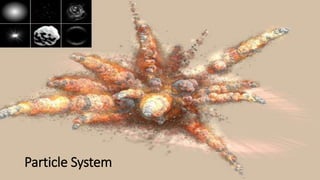
• Particle System
• Crepuscular Rays [ God Rays ]
Bump Mapping
Particle System
Crepuscular Rays [ God Rays ]
Future Scope
• Parallel Processing
i. Nvidia SLI
ii. AMD CrossfireX
• Oculus Rift
• 4K Gaming
Oculus Rift
Conclusion
• These are the major techniques used in rendering realistic and lifelike
images and find vast applications in the multi – billion dollar video
gaming industry as well as computer – aided design and scientific
purposes.
• The highest end GPUs with dual or quadruple configurations may be
required to make use of these techniques at their highest levels. In
mid – level consumer devices, tradeoffs are often made between
these technologies to achieve a steady frame rate as well as a steady
balance between efficiency and graphic realism.
• Following are some screenshots of popular high end video games
deploying these techniques to their fullest.
References
•www.pcgamer.com
Popular blogging site for everything gaming related.
•gamescom Cologne, Germany Press
Conferences
The world’s largest gaming event.
•www.Wikipedia.org

Technologies Used In Graphics Rendering

  • 1.
    Technologies Used In GraphicsRendering Presented By: Bhupinder Singh
  • 2.
    Basic Terminology • Pixelis the most basic unit of a digital image, a tiny square of color. • Resolution is the number of pixels in each dimension that can be displayed. It is usually quoted as width × height, with the units in pixels. • Frame Rate is the rate at which an imaging device produces unique consecutive images called frames. It is most often expressed in frames per second (FPS). • Refresh Rate is the number of times a display updates per second. It is measured in Hertz (Hz).
  • 3.
    • GPU –Graphics Processing Unit • Dedicated vs. Integrated • Nvidia vs AMD • Nvidia i. GeForce, the gaming graphics processing products for which Nvidia is best known. ii. Quadro, computer-aided design and digital content creation workstation graphics processing products. iii. Tegra, a system on a chip series for mobile devices. • AMD i. Radeon, brand for consumer line of graphics cards. ii. FirePro, brand for professional line of graphics cards for workstations. iii. Mobility Radeon, power-optimized versions of Radeon graphics chips for use in laptops and mobile devices.
  • 4.
    Rendering • It isthe process of generating an image from a 2D or 3D model (or models in what collectively could be called a scene file), by means of computer programs. • If a scene is to look relatively realistic and predictable under virtual lighting, the rendering software should solve the rendering equation. • This is the key academic/theoretical concept in rendering. It serves as the most abstract formal expression of the non-perceptual aspect of rendering.
  • 5.
    Anti - Aliasing •If you draw a diagonal line with square pixels, their hard edges create a jagged ‘staircase’ effect. This jaggedness is called aliasing. • To counter this problem, anti – aliasing is used which works by rendering frames at a higher resolution than the display resolution, then squeezing them back down to size. • Consider a pixel on a tile roof. It’s orange, and next to it is a pixel representing a cloudy sky, which is light and blueish. Next to each other, they create a hard, jagged transition from roof to sky. But if you render the scene at four times the current resolution, that one orange roof pixel becomes four pixels. Some of those pixels are sky - colored and some are roof - colored. If we take the average of all four values, we get something in between. Do that to the whole scene and the transitions become softer.
  • 6.
    • While itlooks very good, anti - aliasing is extremely computationally expensive. You’re rendering each frame at a resolution two or more times higher than the one you’re playing at—even with four GTX Titans, trying to run anti - aliasing with a display resolution of 2560x1440 isn't practical. • This was the Supersampling (SSAA) approach. Other comparatively less taxing approaches are as follows. • Multisampling (MSAA): Achieves good results, but is much more efficient than SSAA. This is typically the standard, baseline option in games. • Coverage Sampling (CSAA): Nvidia's more efficient version of MSAA. • Custom-filter (CFAA): AMD’s more efficient version of MSAA. • Fast Approximate (FXAA): Rather than analyzing the 3D models (i.e. MSAA, which looks at pixels on the edges of polygons), FXAA is a post-processing filter, meaning it applies to the whole scene after it has been rendered, and it's very efficient. It also catches edges inside textures which MSAA misses.
  • 8.
    Ambient Occlusion • Itis a shading and rendering technique used to calculate how exposed each point in a scene is to ambient lighting. • An ambient light source represents a fixed - intensity and fixed - color light source that affects all objects in the scene equally. Upon rendering, all objects in the scene are brightened with the specified intensity and color. This type of light source is mainly used to provide the scene with a basic view of the different objects in it. This is the simplest type of lighting to implement and models how light can be scattered or reflected many times producing a uniform effect. • Ambient lighting can be combined with ambient occlusion to represent how exposed each point of the scene is, affecting the amount of ambient light it can reflect.
  • 9.
    • Ambient occlusionattempts to improve the effect by determining which parts of the scene shouldn't be exposed to as much ambient lighting as others. It doesn't cast hard shadows like a directional light source, rather, it darkens interiors and crevices, adding soft, diffused shading. • Screen space ambient occlusion (SSAO) is an approximation of ambient occlusion used in real-time rendering, and has become commonplace in games in the past few years—it was first used in Crysis. It is effective in adding depth to a scene. All major engines support it, and its success will vary depending on the game and implementation.
  • 11.
    High Dynamic RangeRendering • It is the rendering of computer graphics scenes by using lighting calculations done in a larger dynamic range. This allows preservation of details that may be lost due to limiting contrast ratios. Video games and computer-generated movies and special effects benefit from this as it creates more realistic scenes than with the more simplistic lighting models used. • The range it refers to is the range of luminosity in an image—that is, how dark and bright it can be. The goal is for the darkest areas to be as detailed as the brightest areas. A low-dynamic-range image might show lots of detail in the light part of a room, but lose everything in the shadows. • Graphics processor company Nvidia summarizes the motivation for HDRR in three points: bright things can be really bright, dark things can be really dark, and details can be seen in both. • In the past, the range of dark to light in games was limited to 8 bits (only 256 values), but as of DirectX 10 128-bit HDRR is possible.
  • 13.
    • Anisotropic Filtering:In 3D computer graphics, anisotropic filtering (abbreviated AF) is a method of enhancing the image quality of textures on surfaces of computer graphics that are at oblique viewing angles with respect to the camera. Anisotropic filtering does not filter the same in every direction. Anisotropic filtering generally comes in 2x, 4x, 8x, and 16x levels. Nvidia describes these sample rates as referring to the steepness of the angle the filtering will be applied to. • PhysX is a multi-threaded physics simulation SDK available for Microsoft Windows, Mac OS X, Linux, PlayStation 3, Xbox 360 and Wii. It supports rigid body dynamics, soft body dynamics, vehicle dynamics, particles, volumetric fluid simulation and cloth simulation including tearing and pressurized cloth.
  • 14.
    Motion Blur • Motionblur is pretty self-explanatory: it's a post-processing filter which simulates the film effect caused when motion occurs while a frame is being captured, causing streaking. • In computer animation this effect must be simulated as a virtual camera actually does capture a discrete moment in time. This simulated motion blur is typically applied when either the camera or objects in the scene move rapidly.
  • 17.
    Depth Of Field •It is the distance between the nearest and farthest objects in a scene that appear acceptably sharp in an image. Although a lens can precisely focus at only one distance at a time, the decrease in sharpness is gradual on each side of the focused distance, so that within the DOF, the unsharpness is imperceptible under normal viewing conditions. • In some cases, it may be desirable to have the entire image sharp, and a large DOF is appropriate. In other cases, a small DOF may be more effective, emphasizing the subject while de-emphasizing the foreground and background.
  • 20.
    Vertical Sync • Tounderstand the importance of vertical sync, we first need to look at the concept of screen tearing. • When a display's refresh cycle is out of sync with the game's rendering cycle, the screen can refresh just as the game has finished supplying a frame and started on another one. The effect is a ‘break’ called screen tearing, where we're seeing portions of two or more frames at the same time. • In other words, it is a visual artifact in video display where a display device shows information from two or more frames in a single screen draw • The artifact occurs when the video feed to the device isn't in sync with the display's refresh. This can be due to non-matching refresh rates or simply from lack of sync between two equal frame rates. During video motion, screen tearing creates a torn look as edges of objects (such as a wall or a tree) fail to line up.
  • 21.
    • Vertical synchronizationis an option in most systems, wherein the video card is prevented from doing anything visible to the display memory until after the monitor finishes its current refresh cycle. • With Nvidia cards there is an option to enable 'Adaptive Vsync'. This option will only turn on vertical synchronization when the frame rate of the rendering engine exceeds the display's refresh rate, leaving the frame rate unlocked otherwise. This eliminates the stutter that occurs as the rendering engine frame rate drops below the display's refresh rate. • In gaming terms, Vsync prevents the game from messing with the display until it completes its refresh cycle. Unfortunately, Vsync causes its own problems, one being that it contributes to input lag when the game is running at a higher frame rate than the display's refresh rate.
  • 23.
    Bloom • Bloom isa computer graphics effect used in video games and high dynamic range rendering (HDR) to reproduce an imaging artifact of real-world cameras. The effect produces fringes (or feathers) of light extending from the borders of bright areas in an image, contributing to the illusion of an extremely bright light overwhelming the camera or eye capturing the scene. • It is a famously overused effect that attempts to simulate the way bright light can appear to spill over edges, a visual cue that makes light sources seem brighter than they are. It can work, but too often it's applied with a thick brush, making distant oil lamps look like nuclear detonations.
  • 25.
    Newer & AdvancedTechnologies • Bump Mapping • Particle System • Crepuscular Rays [ God Rays ]
  • 26.
  • 27.
  • 28.
  • 29.
    Future Scope • ParallelProcessing i. Nvidia SLI ii. AMD CrossfireX • Oculus Rift • 4K Gaming
  • 30.
  • 31.
    Conclusion • These arethe major techniques used in rendering realistic and lifelike images and find vast applications in the multi – billion dollar video gaming industry as well as computer – aided design and scientific purposes. • The highest end GPUs with dual or quadruple configurations may be required to make use of these techniques at their highest levels. In mid – level consumer devices, tradeoffs are often made between these technologies to achieve a steady frame rate as well as a steady balance between efficiency and graphic realism. • Following are some screenshots of popular high end video games deploying these techniques to their fullest.
  • 34.
    References •www.pcgamer.com Popular blogging sitefor everything gaming related. •gamescom Cologne, Germany Press Conferences The world’s largest gaming event. •www.Wikipedia.org