Graphics Hardware
 Display (CRT, LCD,…)
 Graphics accelerator
 Scan controller
 Video Memory (frame buffer)
 Display/Graphics Processor
 CPU/Memory/Disk …
Display Technologies
 Front projection
 Back projection
 Direct view
 Backlit
Display Technologies
 CRT
 LED
 LCD
 Plasma Panels
 DLP
 OLED
 Etc.
Trade-offs
 Cost, Weight, Size
 Power consumption
 Spatial & Color resolution
 Peak brightness, Black, contrast
 Etc.
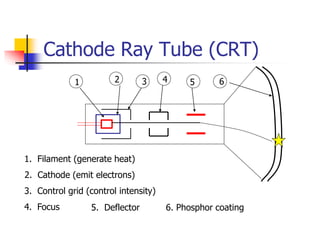
Cathode Ray Tube (CRT)
1 2 3 4 5 6
1. Filament (generate heat)
2. Cathode (emit electrons)
3. Control grid (control intensity)
4. Focus 5. Deflector 6. Phosphor coating
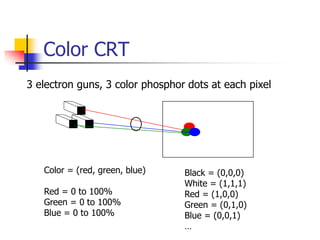
Color CRT
Color = (red, green, blue)
Red = 0 to 100%
Green = 0 to 100%
Blue = 0 to 100%
Black = (0,0,0)
White = (1,1,1)
Red = (1,0,0)
Green = (0,1,0)
Blue = (0,0,1)
…
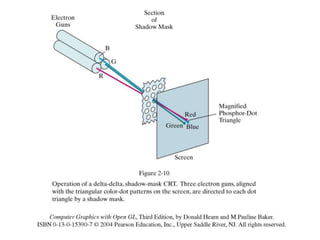
3 electron guns, 3 color phosphor dots at each pixel
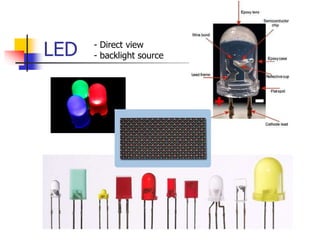
LED - Direct view
- backlight source
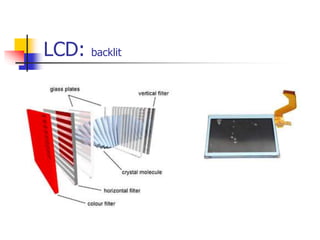
LCD: backlit
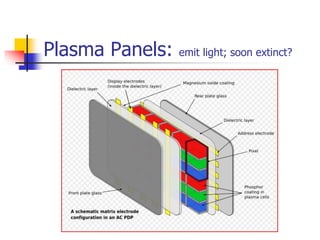
Plasma Panels: emit light; soon extinct?
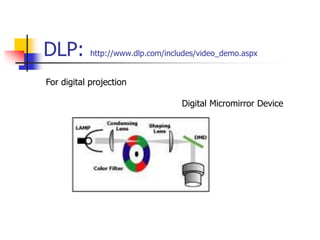
DLP: http://www.dlp.com/includes/video_demo.aspx
Digital Micromirror Device
For digital projection
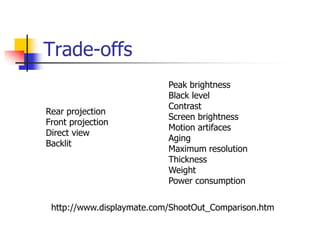
Trade-offs
Peak brightness
Black level
Contrast
Screen brightness
Motion artifaces
Aging
Maximum resolution
Thickness
Weight
Power consumption
Rear projection
Front projection
Direct view
Backlit
http://www.displaymate.com/ShootOut_Comparison.htm
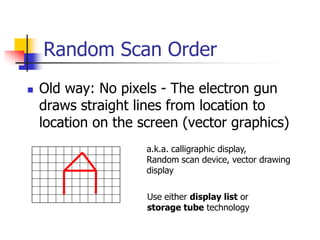
Random Scan Order
 Old way: No pixels - The electron gun
draws straight lines from location to
location on the screen (vector graphics)
a.k.a. calligraphic display,
Random scan device, vector drawing
display
Use either display list or
storage tube technology
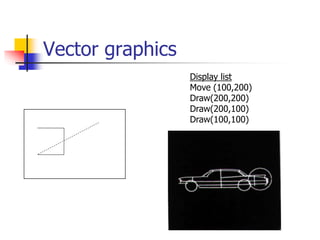
Vector graphics
Display list
Move (100,200)
Draw(200,200)
Draw(200,100)
Draw(100,100)
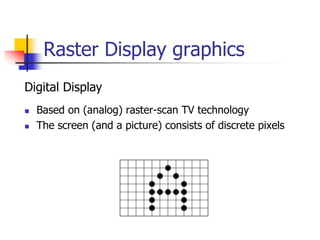
Raster Display graphics
 Based on (analog) raster-scan TV technology
 The screen (and a picture) consists of discrete pixels
Digital Display
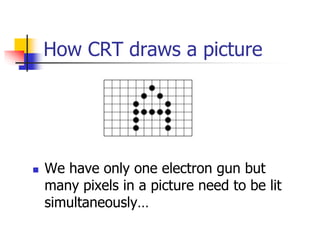
How CRT draws a picture
 We have only one electron gun but
many pixels in a picture need to be lit
simultaneously…
Refresh of CRT
 Refresh – the electron gun needs to come back to
hit the pixel again before it fades out
 An appropriate fresh rate depends on the property of
phosphor coating
Phosphor persistence: the time it takes for the
emitted light to decay to 1/10 of the original intensity
 Typical refresh rate: 60 – 80 times per second (Hz)
(What will happen if refreshing is too slow or too
fast?)
Frame Buffer
 Frame buffer: the memory to hold the pixel intensity
values
 Properties of a frame buffer that affect the graphics
performance:
 Size: screen resolution
 Depth: color level
1 bit/pixel: black and white
8 bits/pixel: 256 levels of gray
24 bits/pixel: 16 million colors
 Speed: refresh speed
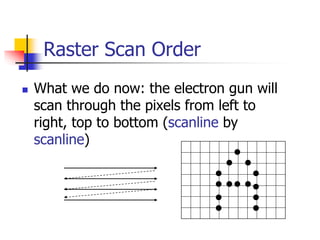
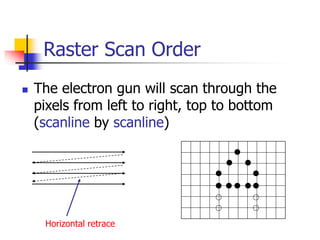
Raster Scan Order
 What we do now: the electron gun will
scan through the pixels from left to
right, top to bottom (scanline by
scanline)
Raster Scan Order
 The electron gun will scan through the
pixels from left to right, top to bottom
(scanline by scanline)
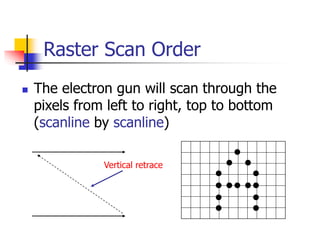
Horizontal retrace
Raster Scan Order
 The electron gun will scan through the
pixels from left to right, top to bottom
(scanline by scanline)
Vertical retrace
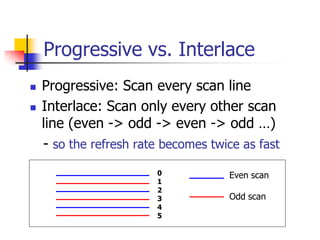
Progressive vs. Interlace
 Progressive: Scan every scan line
 Interlace: Scan only every other scan
line (even -> odd -> even -> odd …)
- so the refresh rate becomes twice as fast
0
1
2
3
4
5
Even scan
Odd scan
Standards
 NTSC: Interlaced, 525 line, 59.94Hz,
4:3
 DTV: Digital version of NTSC, 480i, 4:3
 HDTV: e.g. 720p, 60Hz, 16:9
 Blu-ray: 1080p
 Other standards?
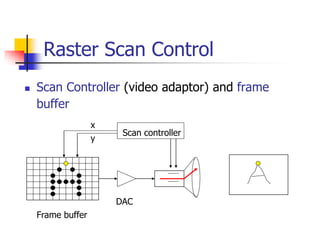
Raster Scan Control
 Scan Controller (video adaptor) and frame
buffer
Frame buffer
Scan controller
x
y
DAC
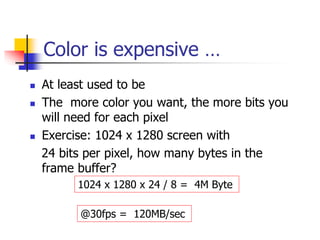
Color is expensive …
 At least used to be
 The more color you want, the more bits you
will need for each pixel
 Exercise: 1024 x 1280 screen with
24 bits per pixel, how many bytes in the
frame buffer?
1024 x 1280 x 24 / 8 = 4M Byte
@30fps = 120MB/sec
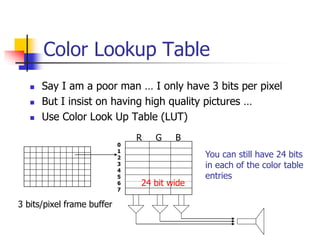
Color Lookup Table
 Say I am a poor man … I only have 3 bits per pixel
 But I insist on having high quality pictures …
 Use Color Look Up Table (LUT)
3 bits/pixel frame buffer
R G B
You can still have 24 bits
in each of the color table
entries
0
1
2
3
4
5
6
7
24 bit wide
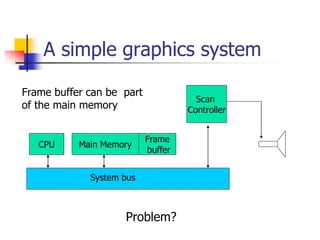
A simple graphics system
System bus
CPU Main Memory
Frame
buffer
Scan
Controller
Frame buffer can be part
of the main memory
Problem?
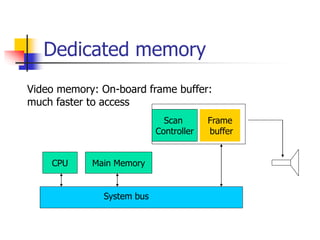
Dedicated memory
System bus
CPU Main Memory
Frame
buffer
Scan
Controller
Video memory: On-board frame buffer:
much faster to access
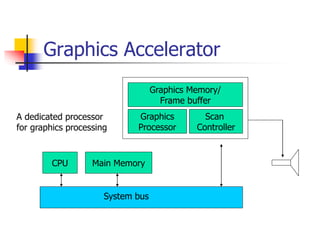
Graphics Accelerator
System bus
CPU Main Memory
Graphics Memory/
Frame buffer
Scan
Controller
Graphics
Processor
A dedicated processor
for graphics processing
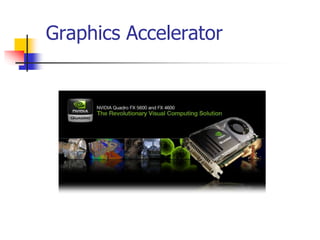
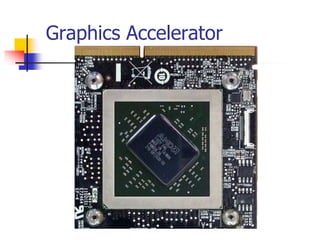
Graphics Accelerator
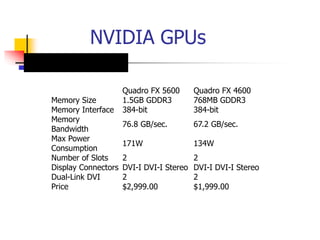
NVIDIA GPUs
Quadro FX 5600 Quadro FX 4600
Memory Size 1.5GB GDDR3 768MB GDDR3
Memory Interface 384-bit 384-bit
Memory
Bandwidth
76.8 GB/sec. 67.2 GB/sec.
Max Power
Consumption
171W 134W
Number of Slots 2 2
Display Connectors DVI-I DVI-I Stereo DVI-I DVI-I Stereo
Dual-Link DVI 2 2
Price $2,999.00 $1,999.00
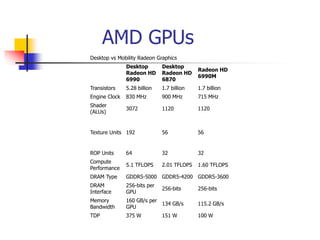
AMD GPUs
Desktop vs Mobility Radeon Graphics
Desktop
Radeon HD
6990
Desktop
Radeon HD
6870
Radeon HD
6990M
Transistors 5.28 billion 1.7 billion 1.7 billion
Engine Clock 830 MHz 900 MHz 715 MHz
Shader
(ALUs)
3072 1120 1120
Texture Units 192 56 56
ROP Units 64 32 32
Compute
Performance
5.1 TFLOPS 2.01 TFLOPS 1.60 TFLOPS
DRAM Type GDDR5-5000 GDDR5-4200 GDDR5-3600
DRAM
Interface
256-bits per
GPU
256-bits 256-bits
Memory
Bandwidth
160 GB/s per
GPU
134 GB/s 115.2 GB/s
TDP 375 W 151 W 100 W
GPUs
http://sbel.wisc.edu/Courses/ME964/2011/Literature/onGPUcomputingDally2010.pdf
THE GPU COMPUTING ERA
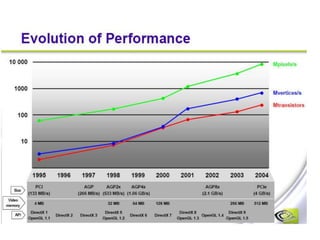
The Evolution of GPUs
ftp://download.nvidia.com/developer/presentations/2004/Perfect_Kitchen_Art/English_Evolution_of_GPUs.pdf
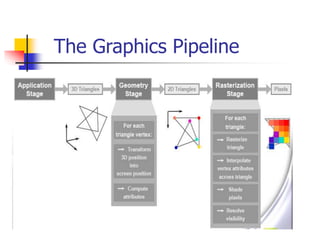
The Graphics Pipeline
Graphics Bus Interface
CPU Main Memory
Graphics Memory/
Frame buffer
Scan
Controller
Graphics
Processor
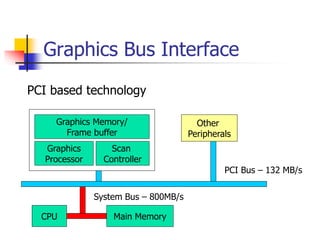
PCI based technology
PCI Bus – 132 MB/s
System Bus – 800MB/s
Other
Peripherals
Graphics Bus Interface (2)
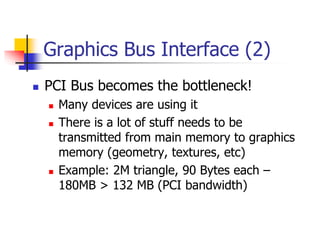
 PCI Bus becomes the bottleneck!
 Many devices are using it
 There is a lot of stuff needs to be
transmitted from main memory to graphics
memory (geometry, textures, etc)
 Example: 2M triangle, 90 Bytes each –
180MB > 132 MB (PCI bandwidth)
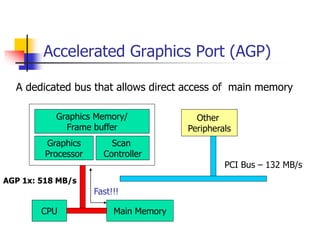
Accelerated Graphics Port (AGP)
CPU Main Memory
Graphics Memory/
Frame buffer
Scan
Controller
Graphics
Processor
PCI Bus – 132 MB/s
Other
Peripherals
AGP 1x: 518 MB/s
A dedicated bus that allows direct access of main memory
Fast!!!
AGP
 AGP 1x is four times as fast compared
to PCI! (now we have AGP 8x)
 No more local bus congestion!
 More geometry can be processed!
 Direct execution of many graphics
operations from main memory
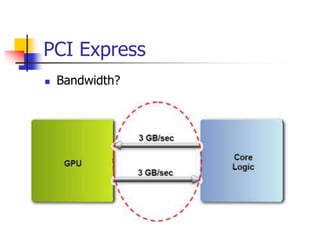
PCI Express
 Bandwidth?
Reading and Lab1
 Textbook Chapter 1, 2
Lab 1: Compile and run the sample OpenGL
program posted on the class web site

2.Hardware.ppt

  • 1.
    Graphics Hardware  Display(CRT, LCD,…)  Graphics accelerator  Scan controller  Video Memory (frame buffer)  Display/Graphics Processor  CPU/Memory/Disk …
  • 2.
    Display Technologies  Frontprojection  Back projection  Direct view  Backlit
  • 3.
    Display Technologies  CRT LED  LCD  Plasma Panels  DLP  OLED  Etc.
  • 4.
    Trade-offs  Cost, Weight,Size  Power consumption  Spatial & Color resolution  Peak brightness, Black, contrast  Etc.
  • 5.
    Cathode Ray Tube(CRT) 1 2 3 4 5 6 1. Filament (generate heat) 2. Cathode (emit electrons) 3. Control grid (control intensity) 4. Focus 5. Deflector 6. Phosphor coating
  • 7.
    Color CRT Color =(red, green, blue) Red = 0 to 100% Green = 0 to 100% Blue = 0 to 100% Black = (0,0,0) White = (1,1,1) Red = (1,0,0) Green = (0,1,0) Blue = (0,0,1) … 3 electron guns, 3 color phosphor dots at each pixel
  • 8.
    LED - Directview - backlight source
  • 9.
  • 10.
    Plasma Panels: emitlight; soon extinct?
  • 11.
  • 12.
    Trade-offs Peak brightness Black level Contrast Screenbrightness Motion artifaces Aging Maximum resolution Thickness Weight Power consumption Rear projection Front projection Direct view Backlit http://www.displaymate.com/ShootOut_Comparison.htm
  • 13.
    Random Scan Order Old way: No pixels - The electron gun draws straight lines from location to location on the screen (vector graphics) a.k.a. calligraphic display, Random scan device, vector drawing display Use either display list or storage tube technology
  • 14.
    Vector graphics Display list Move(100,200) Draw(200,200) Draw(200,100) Draw(100,100)
  • 15.
    Raster Display graphics Based on (analog) raster-scan TV technology  The screen (and a picture) consists of discrete pixels Digital Display
  • 16.
    How CRT drawsa picture  We have only one electron gun but many pixels in a picture need to be lit simultaneously…
  • 17.
    Refresh of CRT Refresh – the electron gun needs to come back to hit the pixel again before it fades out  An appropriate fresh rate depends on the property of phosphor coating Phosphor persistence: the time it takes for the emitted light to decay to 1/10 of the original intensity  Typical refresh rate: 60 – 80 times per second (Hz) (What will happen if refreshing is too slow or too fast?)
  • 18.
    Frame Buffer  Framebuffer: the memory to hold the pixel intensity values  Properties of a frame buffer that affect the graphics performance:  Size: screen resolution  Depth: color level 1 bit/pixel: black and white 8 bits/pixel: 256 levels of gray 24 bits/pixel: 16 million colors  Speed: refresh speed
  • 19.
    Raster Scan Order What we do now: the electron gun will scan through the pixels from left to right, top to bottom (scanline by scanline)
  • 20.
    Raster Scan Order The electron gun will scan through the pixels from left to right, top to bottom (scanline by scanline) Horizontal retrace
  • 21.
    Raster Scan Order The electron gun will scan through the pixels from left to right, top to bottom (scanline by scanline) Vertical retrace
  • 22.
    Progressive vs. Interlace Progressive: Scan every scan line  Interlace: Scan only every other scan line (even -> odd -> even -> odd …) - so the refresh rate becomes twice as fast 0 1 2 3 4 5 Even scan Odd scan
  • 23.
    Standards  NTSC: Interlaced,525 line, 59.94Hz, 4:3  DTV: Digital version of NTSC, 480i, 4:3  HDTV: e.g. 720p, 60Hz, 16:9  Blu-ray: 1080p  Other standards?
  • 24.
    Raster Scan Control Scan Controller (video adaptor) and frame buffer Frame buffer Scan controller x y DAC
  • 25.
    Color is expensive…  At least used to be  The more color you want, the more bits you will need for each pixel  Exercise: 1024 x 1280 screen with 24 bits per pixel, how many bytes in the frame buffer? 1024 x 1280 x 24 / 8 = 4M Byte @30fps = 120MB/sec
  • 26.
    Color Lookup Table Say I am a poor man … I only have 3 bits per pixel  But I insist on having high quality pictures …  Use Color Look Up Table (LUT) 3 bits/pixel frame buffer R G B You can still have 24 bits in each of the color table entries 0 1 2 3 4 5 6 7 24 bit wide
  • 27.
    A simple graphicssystem System bus CPU Main Memory Frame buffer Scan Controller Frame buffer can be part of the main memory Problem?
  • 28.
    Dedicated memory System bus CPUMain Memory Frame buffer Scan Controller Video memory: On-board frame buffer: much faster to access
  • 29.
    Graphics Accelerator System bus CPUMain Memory Graphics Memory/ Frame buffer Scan Controller Graphics Processor A dedicated processor for graphics processing
  • 30.
  • 31.
  • 32.
    NVIDIA GPUs Quadro FX5600 Quadro FX 4600 Memory Size 1.5GB GDDR3 768MB GDDR3 Memory Interface 384-bit 384-bit Memory Bandwidth 76.8 GB/sec. 67.2 GB/sec. Max Power Consumption 171W 134W Number of Slots 2 2 Display Connectors DVI-I DVI-I Stereo DVI-I DVI-I Stereo Dual-Link DVI 2 2 Price $2,999.00 $1,999.00
  • 33.
    AMD GPUs Desktop vsMobility Radeon Graphics Desktop Radeon HD 6990 Desktop Radeon HD 6870 Radeon HD 6990M Transistors 5.28 billion 1.7 billion 1.7 billion Engine Clock 830 MHz 900 MHz 715 MHz Shader (ALUs) 3072 1120 1120 Texture Units 192 56 56 ROP Units 64 32 32 Compute Performance 5.1 TFLOPS 2.01 TFLOPS 1.60 TFLOPS DRAM Type GDDR5-5000 GDDR5-4200 GDDR5-3600 DRAM Interface 256-bits per GPU 256-bits 256-bits Memory Bandwidth 160 GB/s per GPU 134 GB/s 115.2 GB/s TDP 375 W 151 W 100 W
  • 35.
    GPUs http://sbel.wisc.edu/Courses/ME964/2011/Literature/onGPUcomputingDally2010.pdf THE GPU COMPUTINGERA The Evolution of GPUs ftp://download.nvidia.com/developer/presentations/2004/Perfect_Kitchen_Art/English_Evolution_of_GPUs.pdf
  • 36.
  • 37.
    Graphics Bus Interface CPUMain Memory Graphics Memory/ Frame buffer Scan Controller Graphics Processor PCI based technology PCI Bus – 132 MB/s System Bus – 800MB/s Other Peripherals
  • 38.
    Graphics Bus Interface(2)  PCI Bus becomes the bottleneck!  Many devices are using it  There is a lot of stuff needs to be transmitted from main memory to graphics memory (geometry, textures, etc)  Example: 2M triangle, 90 Bytes each – 180MB > 132 MB (PCI bandwidth)
  • 39.
    Accelerated Graphics Port(AGP) CPU Main Memory Graphics Memory/ Frame buffer Scan Controller Graphics Processor PCI Bus – 132 MB/s Other Peripherals AGP 1x: 518 MB/s A dedicated bus that allows direct access of main memory Fast!!!
  • 40.
    AGP  AGP 1xis four times as fast compared to PCI! (now we have AGP 8x)  No more local bus congestion!  More geometry can be processed!  Direct execution of many graphics operations from main memory
  • 41.
  • 42.
    Reading and Lab1 Textbook Chapter 1, 2 Lab 1: Compile and run the sample OpenGL program posted on the class web site