Disaster Recovery and the Cloud
Rishikesh Somshetti
CEO & MD
September 2013
Agenda
The need for disaster recovery (DR)
Cloud computing overview
Virtualization and disaster recovery
PlateSpin Protect and PlateSpin Forge
®

2

© 2013 NetGains Technologies Pvt. Ltd. All rights reserved.

®
The Need for Disaster Recovery
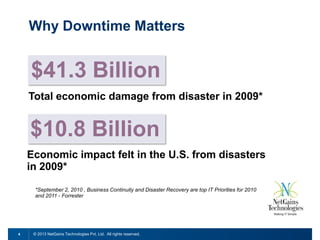
Why Downtime Matters

$41.3 Billion
Total economic damage from disaster in 2009*

$10.8 Billion
Economic impact felt in the U.S. from disasters
in 2009*
*September 2, 2010 , Business Continuity and Disaster Recovery are top IT Priorities for 2010
and 2011 - Forrester

4

© 2013 NetGains Technologies Pvt. Ltd. All rights reserved.
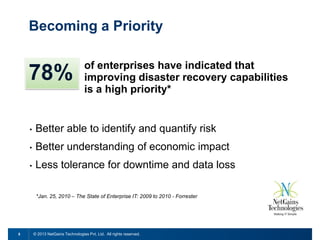
Becoming a Priority

78%

of enterprises have indicated that
improving disaster recovery capabilities
is a high priority*
Critical Priority 30% - High Priority 48%

•

Better able to identify and quantify risk

•

Better understanding of economic impact

•

Less tolerance for downtime and data loss
*Jan. 25, 2010 – The State of Enterprise IT: 2009 to 2010 - Forrester

5

© 2013 NetGains Technologies Pvt. Ltd. All rights reserved.
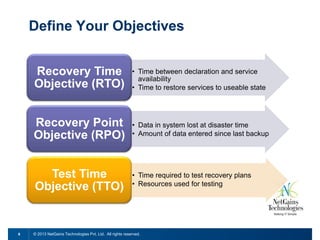
Define Your Objectives
Recovery Time
Objective (RTO)
Recovery Point
Objective (RPO)

• Data in system lost at disaster time
• Amount of data entered since last backup

Test Time
Objective (TTO)

6

• Time between declaration and service
availability
• Time to restore services to useable state

• Time required to test recovery plans
• Resources used for testing

© 2013 NetGains Technologies Pvt. Ltd. All rights reserved.
Cloud Computing Overview
From a Big Box to a Big Cloud

8

© 2013 NetGains Technologies Pvt. Ltd. All rights reserved.
Defining Cloud Characteristics

9

© 2013 NetGains Technologies Pvt. Ltd. All rights reserved.
The Cloud Stack

10

© 2013 NetGains Technologies Pvt. Ltd. All rights reserved.
Your cloud, my cloud
•

Public
 Scalable

and elastic computing services offered to external
customers via the Internet.

 Typically

multi-tenant, where multiple customers are able
to share a single set of resources.

•

Private
 Dynamic

and scalable computer services offered to internal
customers using equipment the customer owns and
delivered over a private network.

11

© 2013 NetGains Technologies Pvt. Ltd. All rights reserved.
Traditional Approaches to DR
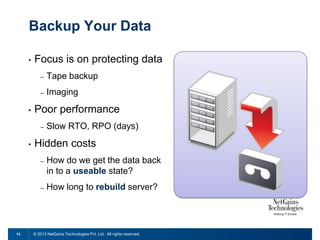
Backup Your Data
•

Focus is on protecting data
–
–

•

Tape backup
Imaging

Poor performance
–

•

Slow RTO, RPO (days)

Hidden costs
–

–

13

How do we get the data back
in to a useable state?

How long to rebuild server?

© 2013 NetGains Technologies Pvt. Ltd. All rights reserved.
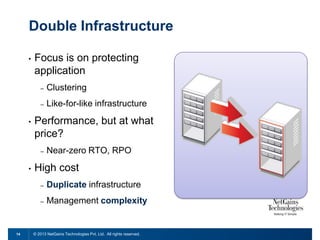
Double Infrastructure
•

Focus is on protecting
application
–
–

•

Clustering
Like-for-like infrastructure

Performance, but at what
price?
–

•

Near-zero RTO, RPO

High cost
–
–

14

Duplicate infrastructure
Management complexity

© 2013 NetGains Technologies Pvt. Ltd. All rights reserved.
Virtualize Disaster Recovery
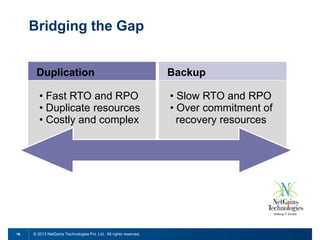
Bridging the Gap
Duplication
• Fast RTO and RPO
• Duplicate resources
• Costly and complex

16

Backup
• Slow RTO and RPO
• Over commitment of
recovery resources

© 2013 NetGains Technologies Pvt. Ltd. All rights reserved.
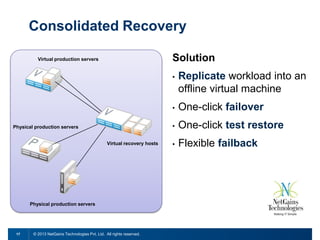
Consolidated Recovery
Solution

Virtual production servers

•

•

Virtual recovery hosts

Physical production servers

17

© 2013 NetGains Technologies Pvt. Ltd. All rights reserved.

One-click failover

•

Physical production servers

Replicate workload into an
offline virtual machine
One-click test restore

•

Flexible failback
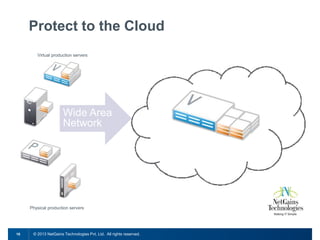
Protect to the Cloud
Virtual production servers

Wide Area
Network
Hosted Virtual Recovery Hosts

Physical production servers

18

© 2013 NetGains Technologies Pvt. Ltd. All rights reserved.
NetGains DR Offerings
®
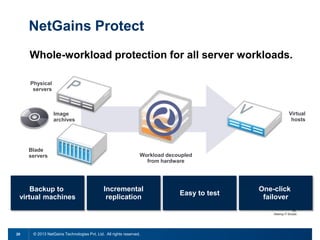
NetGains Protect
Whole-workload protection for all server workloads.
Physical
servers

Virtual
hosts

Image
archives

Blade
servers

Backup to
virtual machines

20

Workload decoupled
from hardware

Incremental
replication

© 2013 NetGains Technologies Pvt. Ltd. All rights reserved.

Easy to test

One-click
failover
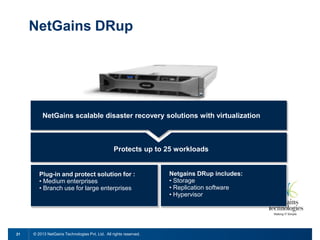
NetGains DRup

NetGains scalable disaster recovery solutions with virtualization

Protects up to 25 workloads

Plug-in and protect solution for :
• Medium enterprises
• Branch use for large enterprises

21

© 2013 NetGains Technologies Pvt. Ltd. All rights reserved.

Netgains DRup includes:
• Storage
• Replication software
• Hypervisor
Building a Protection Cloud
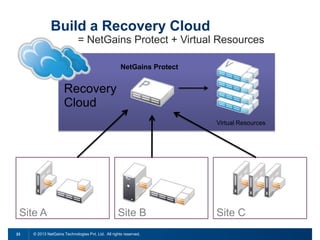
Build a Recovery Cloud
= NetGains Protect + Virtual Resources
NetGains Protect

Recovery
Cloud
Virtual Resources

Site A
23

Site B

© 2013 NetGains Technologies Pvt. Ltd. All rights reserved.

Site C
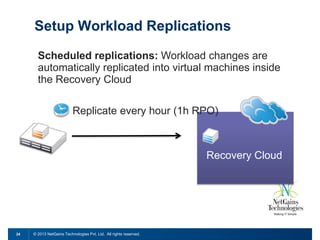
Setup Workload Replications
Scheduled replications: Workload changes are
automatically replicated into virtual machines inside
the Recovery Cloud
Replicate every hour (1h RPO)

Recovery Cloud

24

© 2013 NetGains Technologies Pvt. Ltd. All rights reserved.
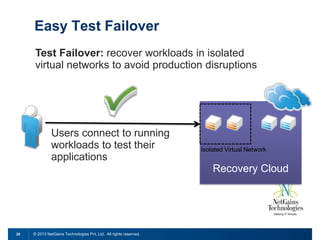
Easy Test Failover
Test Failover: recover workloads in isolated
virtual networks to avoid production disruptions

Users connect to running
workloads to test their
applications

Isolated Virtual Network

Recovery Cloud

25

© 2013 NetGains Technologies Pvt. Ltd. All rights reserved.
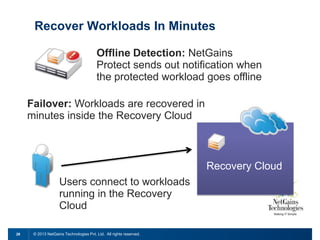
Recover Workloads In Minutes
Offline Detection: NetGains
Protect sends out notification when
the protected workload goes offline
Failover: Workloads are recovered in
minutes inside the Recovery Cloud

Recovery Cloud
Users connect to workloads
running in the Recovery
Cloud
26

© 2013 NetGains Technologies Pvt. Ltd. All rights reserved.
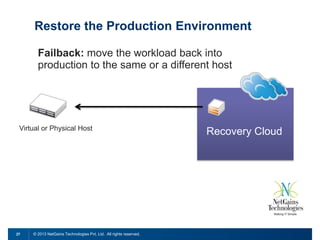
Restore the Production Environment
Failback: move the workload back into
production to the same or a different host

Virtual or Physical Host

27

© 2013 NetGains Technologies Pvt. Ltd. All rights reserved.

Recovery Cloud
Solution Flexibility
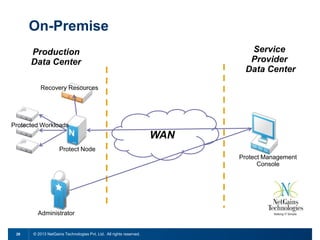
On-Premise
Service
Provider
Data Center

Production
Data Center
Recovery Resources

Protected Workloads

WAN
Protect Node
Protect Management
Console

Administrator

29

© 2013 NetGains Technologies Pvt. Ltd. All rights reserved.
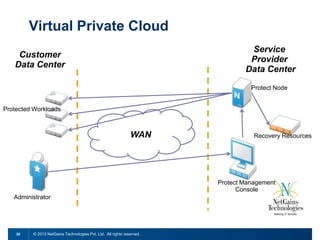
Virtual Private Cloud
Service
Provider
Data Center

Customer
Data Center

Protect Node
Protected Workloads

WAN

Recovery Resources

Protect Management
Console
Administrator

30

© 2013 NetGains Technologies Pvt. Ltd. All rights reserved.
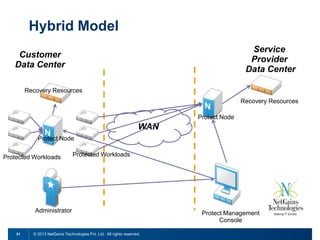
Hybrid Model
Service
Provider
Data Center

Customer
Data Center
Recovery Resources

Recovery Resources
Protect Node

WAN
Protect Node
Protected Workloads

Protected Workloads

Administrator

31

© 2013 NetGains Technologies Pvt. Ltd. All rights reserved.

Protect Management
Console
Real World Results
Questions?
sales@netgainstechnologies.com
This document could include technical inaccuracies or typographical errors. Changes are
periodically made to the information herein. These changes may be incorporated in new
editions of this document. NetGains Technologies Pvt Ltd may make improvements in or
changes to the software described in this document at any time.
Copyright © 2013 NetGains Technologies Pvt. Ltd. All rights reserved.

DR hosting & cloud

  • 1.
    Disaster Recovery andthe Cloud Rishikesh Somshetti CEO & MD September 2013
  • 2.
    Agenda The need fordisaster recovery (DR) Cloud computing overview Virtualization and disaster recovery PlateSpin Protect and PlateSpin Forge ® 2 © 2013 NetGains Technologies Pvt. Ltd. All rights reserved. ®
  • 3.
    The Need forDisaster Recovery
  • 4.
    Why Downtime Matters $41.3Billion Total economic damage from disaster in 2009* $10.8 Billion Economic impact felt in the U.S. from disasters in 2009* *September 2, 2010 , Business Continuity and Disaster Recovery are top IT Priorities for 2010 and 2011 - Forrester 4 © 2013 NetGains Technologies Pvt. Ltd. All rights reserved.
  • 5.
    Becoming a Priority 78% ofenterprises have indicated that improving disaster recovery capabilities is a high priority* Critical Priority 30% - High Priority 48% • Better able to identify and quantify risk • Better understanding of economic impact • Less tolerance for downtime and data loss *Jan. 25, 2010 – The State of Enterprise IT: 2009 to 2010 - Forrester 5 © 2013 NetGains Technologies Pvt. Ltd. All rights reserved.
  • 6.
    Define Your Objectives RecoveryTime Objective (RTO) Recovery Point Objective (RPO) • Data in system lost at disaster time • Amount of data entered since last backup Test Time Objective (TTO) 6 • Time between declaration and service availability • Time to restore services to useable state • Time required to test recovery plans • Resources used for testing © 2013 NetGains Technologies Pvt. Ltd. All rights reserved.
  • 7.
  • 8.
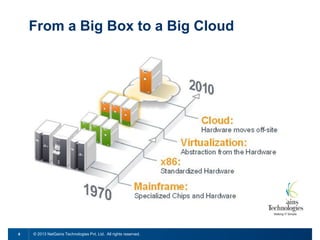
    From a BigBox to a Big Cloud 8 © 2013 NetGains Technologies Pvt. Ltd. All rights reserved.
  • 9.
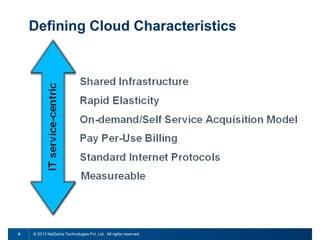
    Defining Cloud Characteristics 9 ©2013 NetGains Technologies Pvt. Ltd. All rights reserved.
  • 10.
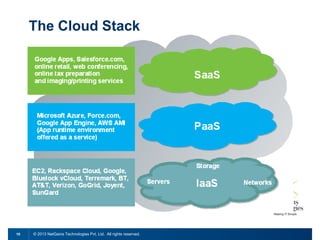
    The Cloud Stack 10 ©2013 NetGains Technologies Pvt. Ltd. All rights reserved.
  • 11.
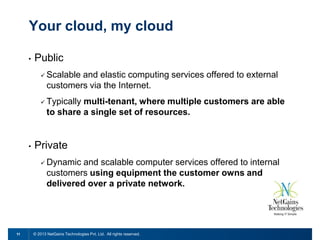
    Your cloud, mycloud • Public  Scalable and elastic computing services offered to external customers via the Internet.  Typically multi-tenant, where multiple customers are able to share a single set of resources. • Private  Dynamic and scalable computer services offered to internal customers using equipment the customer owns and delivered over a private network. 11 © 2013 NetGains Technologies Pvt. Ltd. All rights reserved.
  • 12.
  • 13.
    Backup Your Data • Focusis on protecting data – – • Tape backup Imaging Poor performance – • Slow RTO, RPO (days) Hidden costs – – 13 How do we get the data back in to a useable state? How long to rebuild server? © 2013 NetGains Technologies Pvt. Ltd. All rights reserved.
  • 14.
    Double Infrastructure • Focus ison protecting application – – • Clustering Like-for-like infrastructure Performance, but at what price? – • Near-zero RTO, RPO High cost – – 14 Duplicate infrastructure Management complexity © 2013 NetGains Technologies Pvt. Ltd. All rights reserved.
  • 15.
  • 16.
    Bridging the Gap Duplication •Fast RTO and RPO • Duplicate resources • Costly and complex 16 Backup • Slow RTO and RPO • Over commitment of recovery resources © 2013 NetGains Technologies Pvt. Ltd. All rights reserved.
  • 17.
    Consolidated Recovery Solution Virtual productionservers • • Virtual recovery hosts Physical production servers 17 © 2013 NetGains Technologies Pvt. Ltd. All rights reserved. One-click failover • Physical production servers Replicate workload into an offline virtual machine One-click test restore • Flexible failback
  • 18.
    Protect to theCloud Virtual production servers Wide Area Network Hosted Virtual Recovery Hosts Physical production servers 18 © 2013 NetGains Technologies Pvt. Ltd. All rights reserved.
  • 19.
  • 20.
    NetGains Protect Whole-workload protectionfor all server workloads. Physical servers Virtual hosts Image archives Blade servers Backup to virtual machines 20 Workload decoupled from hardware Incremental replication © 2013 NetGains Technologies Pvt. Ltd. All rights reserved. Easy to test One-click failover
  • 21.
    NetGains DRup NetGains scalabledisaster recovery solutions with virtualization Protects up to 25 workloads Plug-in and protect solution for : • Medium enterprises • Branch use for large enterprises 21 © 2013 NetGains Technologies Pvt. Ltd. All rights reserved. Netgains DRup includes: • Storage • Replication software • Hypervisor
  • 22.
  • 23.
    Build a RecoveryCloud = NetGains Protect + Virtual Resources NetGains Protect Recovery Cloud Virtual Resources Site A 23 Site B © 2013 NetGains Technologies Pvt. Ltd. All rights reserved. Site C
  • 24.
    Setup Workload Replications Scheduledreplications: Workload changes are automatically replicated into virtual machines inside the Recovery Cloud Replicate every hour (1h RPO) Recovery Cloud 24 © 2013 NetGains Technologies Pvt. Ltd. All rights reserved.
  • 25.
    Easy Test Failover TestFailover: recover workloads in isolated virtual networks to avoid production disruptions Users connect to running workloads to test their applications Isolated Virtual Network Recovery Cloud 25 © 2013 NetGains Technologies Pvt. Ltd. All rights reserved.
  • 26.
    Recover Workloads InMinutes Offline Detection: NetGains Protect sends out notification when the protected workload goes offline Failover: Workloads are recovered in minutes inside the Recovery Cloud Recovery Cloud Users connect to workloads running in the Recovery Cloud 26 © 2013 NetGains Technologies Pvt. Ltd. All rights reserved.
  • 27.
    Restore the ProductionEnvironment Failback: move the workload back into production to the same or a different host Virtual or Physical Host 27 © 2013 NetGains Technologies Pvt. Ltd. All rights reserved. Recovery Cloud
  • 28.
  • 29.
    On-Premise Service Provider Data Center Production Data Center RecoveryResources Protected Workloads WAN Protect Node Protect Management Console Administrator 29 © 2013 NetGains Technologies Pvt. Ltd. All rights reserved.
  • 30.
    Virtual Private Cloud Service Provider DataCenter Customer Data Center Protect Node Protected Workloads WAN Recovery Resources Protect Management Console Administrator 30 © 2013 NetGains Technologies Pvt. Ltd. All rights reserved.
  • 31.
    Hybrid Model Service Provider Data Center Customer DataCenter Recovery Resources Recovery Resources Protect Node WAN Protect Node Protected Workloads Protected Workloads Administrator 31 © 2013 NetGains Technologies Pvt. Ltd. All rights reserved. Protect Management Console
  • 32.
  • 33.
  • 35.
    This document couldinclude technical inaccuracies or typographical errors. Changes are periodically made to the information herein. These changes may be incorporated in new editions of this document. NetGains Technologies Pvt Ltd may make improvements in or changes to the software described in this document at any time. Copyright © 2013 NetGains Technologies Pvt. Ltd. All rights reserved.

Editor's Notes

  • #30 In this solution, the management console resides on the SP side. Key Features:Licensing and management console resides on the SP premiseProtect Node does all execution locallyUses customer’s infrastructure for the recovery resourcesWho is it for?Customers interested in WRaaS (subscription model for their workloads)Security conscious – unwilling\unable to have workloads in an external cloudHave excess capacity within their own datacenterDon’t want to “own” the licenses
  • #31 In this solution, the management console resides on the SP side. Key Features:DR infrastructure resides entirely within the SP datacenterSelf-Service front-end allows customers to manage their own DRWho is it for?Customers interested in WRaaS (subscription model for their workloads)SMBs or customer looking for offsite DRMost common use case for WRaaS based on feedback
  • #32 In this solution, the management console resides on the SP side. Key Features:Self-Service front-end allows customers to manage their own DRRecovery resources reside in both customer and SP datacentersHave the ability to protect workloads both onsite and offsiteA single point of management for administratorsWho is it for?Customers who need recovery with higher performanceInstances where not all workloads can be hosted off-site – due to RTO requirements or security concernsWhen there’s a need to bring together public and private resources seamlessly