Cloud-based Disaster Recovery
Disaster Recovery as a Service (DRaaS)
Iwan Cahya Widarta
1
Disaster
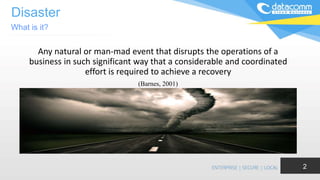
Any natural or man-mad event that disrupts the operations of a
business in such significant way that a considerable and coordinated
effort is required to achieve a recovery
(Barnes, 2001)
What is it?
2
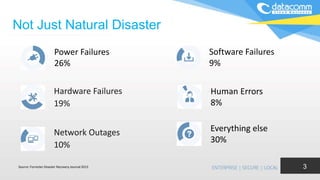
Not Just Natural Disaster
3
Power Failures
26%
Hardware Failures
19%
Network Outages
10%
Software Failures
9%
Human Errors
8%
Everything else
30%
Source: Forrester Disaster Recovery Journal 2013
4
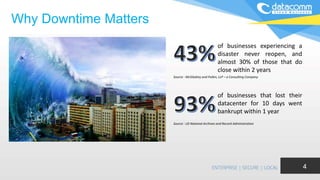
Why Downtime Matters
of businesses experiencing a
disaster never reopen, and
almost 30% of those that do
close within 2 years
of businesses that lost their
datacenter for 10 days went
bankrupt within 1 year
Source : McGladrey and Pullen, LLP – a Consulting Company
Source : US National Archives and Record Administration
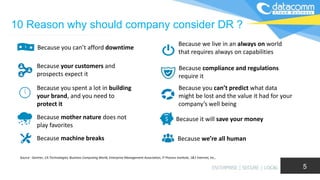
Because you can’t afford downtime
Because your customers and
prospects expect it
Because you spent a lot in building
your brand, and you need to
protect it
Because mother nature does not
play favorites
Because machine breaks
Because we live in an always on world
that requires always on capabilities
Because compliance and regulations
require it
Because you can’t predict what data
might be lost and the value it had for your
company’s well being
Because it will save your money
Because we’re all human
Source : Gartner, CA Technologies, Business Computing World, Enterprise Management Association, IT Process Institute, 1&1 Internet, Inc.,
10 Reason why should company consider DR ?
5
DR Challenges
• Too many moving parts and complexity
• Lack of automation – reliance on manual execution
• Driving without dials – no real time meters to monitor
DR service
• DR drills are expensive and impact production
6
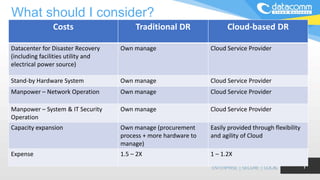
What should I consider?
7
Costs Traditional DR Cloud-based DR
Datacenter for Disaster Recovery
(including facilities utility and
electrical power source)
Own manage Cloud Service Provider
Stand-by Hardware System Own manage Cloud Service Provider
Manpower – Network Operation Own manage Cloud Service Provider
Manpower – System & IT Security
Operation
Own manage Cloud Service Provider
Capacity expansion Own manage (procurement
process + more hardware to
manage)
Easily provided through flexibility
and agility of Cloud
Expense 1.5 – 2X 1 – 1.2X
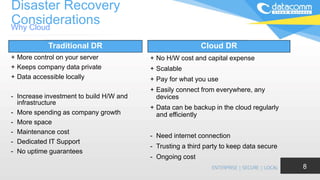
Disaster Recovery
Considerations
+ More control on your server
+ Keeps company data private
+ Data accessible locally
- Increase investment to build H/W and
infrastructure
- More spending as company growth
- More space
- Maintenance cost
- Dedicated IT Support
- No uptime guarantees
+ No H/W cost and capital expense
+ Scalable
+ Pay for what you use
+ Easily connect from everywhere, any
devices
+ Data can be backup in the cloud regularly
and efficiently
- Need internet connection
- Trusting a third party to keep data secure
- Ongoing cost
Traditional DR Cloud DR
Why Cloud
8
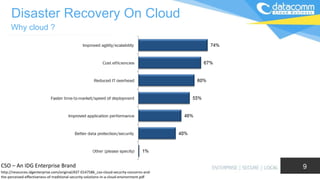
Why cloud ?
Disaster Recovery On Cloud
CSO – An IDG Enterprise Brand
http://resources.idgenterprise.com/original/AST-0147586_cso-cloud-security-concerns-and-
the-perceived-effectiveness-of-traditional-security-solutions-in-a-cloud-environment.pdf
9
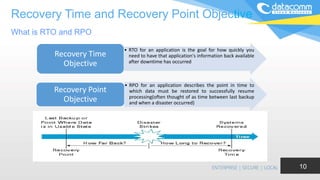
Recovery Time and Recovery Point Objective
What is RTO and RPO
10
• RTO for an application is the goal for how quickly you
need to have that application's information back available
after downtime has occurred
Recovery Time
Objective
• RPO for an application describes the point in time to
which data must be restored to successfully resume
processing(often thought of as time between last backup
and when a disaster occurred)
Recovery Point
Objective
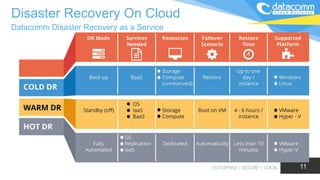
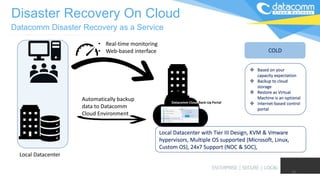
Datacomm Disaster Recovery as a Service
Disaster Recovery On Cloud
11
Ganti gambar
12
Local Datacenter
Automatically backup
data to Datacomm
Cloud Environment
• Real-time monitoring
• Web-based interface
Local Datacenter with Tier III Design, KVM & Vmware
hypervisors, Multiple OS supported (Microsoft, Linux,
Custom OS), 24x7 Support (NOC & SOC),
Datacomm Disaster Recovery as a Service
Disaster Recovery On Cloud
Datacomm Cloud Back-Up Portal
COLD
 Based on your
capacity expectation
 Backup to cloud
storage
 Restore as Virtual
Machine is an optional
 Internet-based control
portal
13
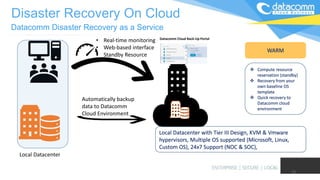
Local Datacenter
Automatically backup
data to Datacomm
Cloud Environment
• Real-time monitoring
• Web-based interface
• Standby Resource
Local Datacenter with Tier III Design, KVM & Vmware
hypervisors, Multiple OS supported (Microsoft, Linux,
Custom OS), 24x7 Support (NOC & SOC),
Datacomm Disaster Recovery as a Service
Disaster Recovery On Cloud
Datacomm Cloud Back-Up Portal
WARM
 Compute resource
reservation (standby)
 Recovery from your
own baseline OS
template
 Quick recovery to
Datacomm cloud
environment
14
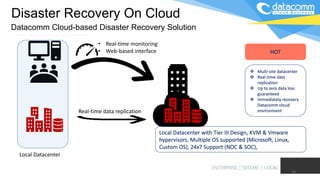
Local Datacenter
Real-time data replication
• Real-time monitoring
• Web-based interface
Local Datacenter with Tier III Design, KVM & Vmware
hypervisors, Multiple OS supported (Microsoft, Linux,
Custom OS), 24x7 Support (NOC & SOC),
Datacomm Cloud-based Disaster Recovery Solution
Disaster Recovery On Cloud
HOT
 Multi-site datacenter
 Real-time data
replication
 Up to zero data loss
guaranteed
 Immediately recovery
Datacomm cloud
environment
• High availability – guaranteed 99.9% SLA data backup availability
• Physical and virtual systems – protection of both physical and virtual
systems in one service
• Automatic and scheduled backup through online control portal
• Up to zero data loss guaranteed
• File and disk image-based backup - backup of selected files or complete
disk images
• Define your own baseline OS template for recovery
15
Key Features
Disaster Recovery On Cloud
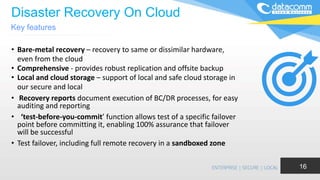
• Bare-metal recovery – recovery to same or dissimilar hardware,
even from the cloud
• Comprehensive - provides robust replication and offsite backup
• Local and cloud storage – support of local and safe cloud storage in
our secure and local
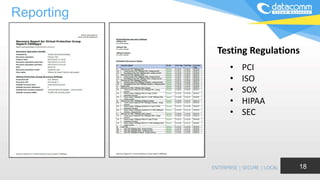
• Recovery reports document execution of BC/DR processes, for easy
auditing and reporting
• ‘test-before-you-commit’ function allows test of a specific failover
point before committing it, enabling 100% assurance that failover
will be successful
• Test failover, including full remote recovery in a sandboxed zone
Key features
16
Sandbox for DR Testing
• Non-disruptive DR testing
• Create a test and development environment
• During the test, replication and the production environment is still in process
• Can be done during working days
• No downtime on the production environment
17
Reporting
18
• PCI
• ISO
• SOX
• HIPAA
• SEC
Testing Regulations
Cloud Based Disaster Recovery (DRaaS)

Cloud Based Disaster Recovery (DRaaS)

  • 1.
    Cloud-based Disaster Recovery DisasterRecovery as a Service (DRaaS) Iwan Cahya Widarta 1
  • 2.
    Disaster Any natural orman-mad event that disrupts the operations of a business in such significant way that a considerable and coordinated effort is required to achieve a recovery (Barnes, 2001) What is it? 2
  • 3.
    Not Just NaturalDisaster 3 Power Failures 26% Hardware Failures 19% Network Outages 10% Software Failures 9% Human Errors 8% Everything else 30% Source: Forrester Disaster Recovery Journal 2013
  • 4.
    4 Why Downtime Matters ofbusinesses experiencing a disaster never reopen, and almost 30% of those that do close within 2 years of businesses that lost their datacenter for 10 days went bankrupt within 1 year Source : McGladrey and Pullen, LLP – a Consulting Company Source : US National Archives and Record Administration
  • 5.
    Because you can’tafford downtime Because your customers and prospects expect it Because you spent a lot in building your brand, and you need to protect it Because mother nature does not play favorites Because machine breaks Because we live in an always on world that requires always on capabilities Because compliance and regulations require it Because you can’t predict what data might be lost and the value it had for your company’s well being Because it will save your money Because we’re all human Source : Gartner, CA Technologies, Business Computing World, Enterprise Management Association, IT Process Institute, 1&1 Internet, Inc., 10 Reason why should company consider DR ? 5
  • 6.
    DR Challenges • Toomany moving parts and complexity • Lack of automation – reliance on manual execution • Driving without dials – no real time meters to monitor DR service • DR drills are expensive and impact production 6
  • 7.
    What should Iconsider? 7 Costs Traditional DR Cloud-based DR Datacenter for Disaster Recovery (including facilities utility and electrical power source) Own manage Cloud Service Provider Stand-by Hardware System Own manage Cloud Service Provider Manpower – Network Operation Own manage Cloud Service Provider Manpower – System & IT Security Operation Own manage Cloud Service Provider Capacity expansion Own manage (procurement process + more hardware to manage) Easily provided through flexibility and agility of Cloud Expense 1.5 – 2X 1 – 1.2X
  • 8.
    Disaster Recovery Considerations + Morecontrol on your server + Keeps company data private + Data accessible locally - Increase investment to build H/W and infrastructure - More spending as company growth - More space - Maintenance cost - Dedicated IT Support - No uptime guarantees + No H/W cost and capital expense + Scalable + Pay for what you use + Easily connect from everywhere, any devices + Data can be backup in the cloud regularly and efficiently - Need internet connection - Trusting a third party to keep data secure - Ongoing cost Traditional DR Cloud DR Why Cloud 8
  • 9.
    Why cloud ? DisasterRecovery On Cloud CSO – An IDG Enterprise Brand http://resources.idgenterprise.com/original/AST-0147586_cso-cloud-security-concerns-and- the-perceived-effectiveness-of-traditional-security-solutions-in-a-cloud-environment.pdf 9
  • 10.
    Recovery Time andRecovery Point Objective What is RTO and RPO 10 • RTO for an application is the goal for how quickly you need to have that application's information back available after downtime has occurred Recovery Time Objective • RPO for an application describes the point in time to which data must be restored to successfully resume processing(often thought of as time between last backup and when a disaster occurred) Recovery Point Objective
  • 11.
    Datacomm Disaster Recoveryas a Service Disaster Recovery On Cloud 11 Ganti gambar
  • 12.
    12 Local Datacenter Automatically backup datato Datacomm Cloud Environment • Real-time monitoring • Web-based interface Local Datacenter with Tier III Design, KVM & Vmware hypervisors, Multiple OS supported (Microsoft, Linux, Custom OS), 24x7 Support (NOC & SOC), Datacomm Disaster Recovery as a Service Disaster Recovery On Cloud Datacomm Cloud Back-Up Portal COLD  Based on your capacity expectation  Backup to cloud storage  Restore as Virtual Machine is an optional  Internet-based control portal
  • 13.
    13 Local Datacenter Automatically backup datato Datacomm Cloud Environment • Real-time monitoring • Web-based interface • Standby Resource Local Datacenter with Tier III Design, KVM & Vmware hypervisors, Multiple OS supported (Microsoft, Linux, Custom OS), 24x7 Support (NOC & SOC), Datacomm Disaster Recovery as a Service Disaster Recovery On Cloud Datacomm Cloud Back-Up Portal WARM  Compute resource reservation (standby)  Recovery from your own baseline OS template  Quick recovery to Datacomm cloud environment
  • 14.
    14 Local Datacenter Real-time datareplication • Real-time monitoring • Web-based interface Local Datacenter with Tier III Design, KVM & Vmware hypervisors, Multiple OS supported (Microsoft, Linux, Custom OS), 24x7 Support (NOC & SOC), Datacomm Cloud-based Disaster Recovery Solution Disaster Recovery On Cloud HOT  Multi-site datacenter  Real-time data replication  Up to zero data loss guaranteed  Immediately recovery Datacomm cloud environment
  • 15.
    • High availability– guaranteed 99.9% SLA data backup availability • Physical and virtual systems – protection of both physical and virtual systems in one service • Automatic and scheduled backup through online control portal • Up to zero data loss guaranteed • File and disk image-based backup - backup of selected files or complete disk images • Define your own baseline OS template for recovery 15 Key Features Disaster Recovery On Cloud
  • 16.
    Disaster Recovery OnCloud • Bare-metal recovery – recovery to same or dissimilar hardware, even from the cloud • Comprehensive - provides robust replication and offsite backup • Local and cloud storage – support of local and safe cloud storage in our secure and local • Recovery reports document execution of BC/DR processes, for easy auditing and reporting • ‘test-before-you-commit’ function allows test of a specific failover point before committing it, enabling 100% assurance that failover will be successful • Test failover, including full remote recovery in a sandboxed zone Key features 16
  • 17.
    Sandbox for DRTesting • Non-disruptive DR testing • Create a test and development environment • During the test, replication and the production environment is still in process • Can be done during working days • No downtime on the production environment 17
  • 18.
    Reporting 18 • PCI • ISO •SOX • HIPAA • SEC Testing Regulations

Editor's Notes

  • #2 This is the first page. You can change the text into anything that suit your need.
  • #12 A cold site is as if you had a spare, bare-bones car parked in the garage at home. When your car breaks down, you have to call a friend to get your other car and bring it to you. You and the friend may have to coordinate the logistics of getting extra keys for the car. No matter what, it’s going to take a long time before your new ride arrives, so be prepared to wait a while. In IT terms, this equates to a site where there is little or no hardware set up when a disaster strikes. You’re saving a lot of money by not having equipment set up and running, but it will take a formidable amount of time to get your site back online. A warm site is as if you’re driving on the road and your extra car is following behind you. However, it could have gotten stuck at a few lights and be several miles behind you; therefore, it could take a little while to catch up to you. Your extra car won’t be as fancy as your current one (no heated seats or satellite radio), but there is gas in the tank and the engine works, which is really all you need until you can get your current car fixed and running again. Similarly, a warm site recovery means you have hardware and network connections established from your site to a second site, but they are not equal. Your recovery will still be delayed while you retrieve your data from your remote backup site. A hot site is as if it’s imperative you get to your destination on time and can’t afford any delays whatsoever. You also aren’t willing to give up your extra features, (maybe you’re driving the president) and if your current car breaks down, you need a near-exact replica. You’ve got your extra car in the lane next to you, driving the same speed. If you break down, it’s right there to get you out of a jam, but you’re essentially paying for two fancy cars, not to mention the gas (premium, most likely), you need to keep them both on the road, which will be quite expensive. When it comes to your data, a hot site is a complete copy of your production site, including personnel, network systems, power grids and almost instant backups of your data. There is very minimal downtime when moving from the host site to the backup one.