Deploying Exchange 2013 in 
Hybrid Mode 
Rishikesh Somshetti 
CEO – NetGains Technologies Pvt Ltd 
@netgainsCEO 
www.netgainstechnologies.com
Building a hybrid configuration 
Expectations… Reality (Ex2013)…
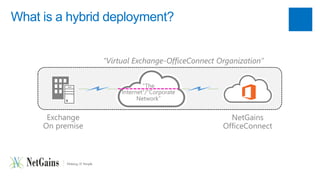
What is a hybrid deployment? 
Exchange 
On premise 
“Virtual Exchange-OfficeConnect Organization” 
“The 
Internet”/”Corporate 
Network” 
NetGains 
OfficeConnect
Why hybrid? 
• Long-term coexistence 
• Take advantages of Affordable NetGains OfficeConnect 
• Large migrations where cutover is not possible (e.g. EX2010 +) 
• Two companies merge but maintain separate systems for a period of time 
• Non-Exchange systems are involved in the email environment, eg a Unix 
qmail server 
• Adapt newer email systems and features with upgrade.
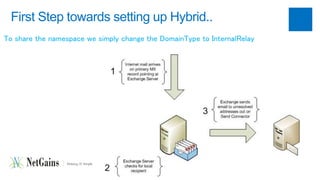
First Step towards setting up Hybrid.. 
To share the namespace we simply change the DomainType to InternalRelay
Hybrid Configuration – Send Connector 
• Secanpda Cbiolitniensector to tell Exchange where to send the emails that do not 
have a local recipient. 
• IP address of the other email system is configured and the Hub Transport 
server is used to send the emails 
• Now when an email arrives on the Exchange server that has no matching 
local recipient address, it will forward it on to the other mail system for 
delivery.
NetGains OfficeConnect Configuration.. 
• Mails received from Exchange Send Connector are delivered locally. 
• Mails generated locally with recipient's on Exchange will be forwarded to 
MX of the domain. 
• Mails rejected by Exchange Server for not having local mailbox are 
bounced back to Sender. 
• Detailed SMTP in/Out Logging.
Hybrid Prerequisites 
• A Windows Server Running NetGains OfficeConnect. 
• OfficeConnect Exchange Connector. 
• Exchange Server with Domain Relay type set to Internal Relay. 
• MailBox naming conventions to avoid duplicate mailbox on Exchange and 
OfficeConnect Server 
• Administrative access to both OS and Mail Servers.
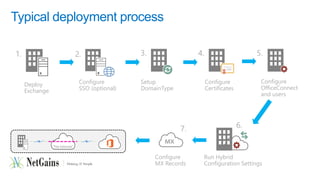
Typical deployment process 
“The Internet” 
Deploy 
Exchange 
1. 
2. 
Configure 
SSO (optional) 
3. 
Setup 
DomainType 
Configure 
Certificates 
4. 
5. 
Configure 
OfficeConnect 
and users 
6. 
Run Hybrid 
Configuration Settings 
MX 
7. 
Configure 
MX Records
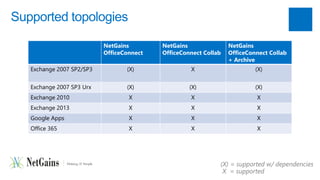
Supported topologies 
NetGains 
OfficeConnect 
NetGains 
OfficeConnect Collab 
NetGains 
OfficeConnect Collab 
+ Archive 
Exchange 2007 SP2/SP3 (X) X (X) 
Exchange 2007 SP3 Urx (X) (X) (X) 
Exchange 2010 X X X 
Exchange 2013 X X X 
Google Apps X X X 
Office 365 X X X 
(X) = supported w/ dependencies 
X = supported
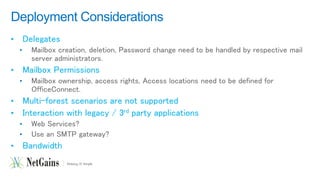
Deployment Considerations 
• Delegates 
• Mailbox creation, deletion, Password change need to be handled by respective mail 
server administrators. 
• Mailbox Permissions 
• Mailbox ownership, access rights, Access locations need to be defined for 
OfficeConnect. 
• Multi-forest scenarios are not supported 
• Interaction with legacy / 3rd party applications 
• Web Services? 
• Use an SMTP gateway? 
• Bandwidth
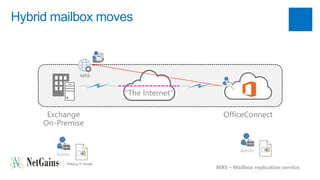
Hybrid mailbox moves 
Exchange 
On-Premise 
“The Internet” 
OfficeConnect 
MRS 
Admin 
Admin 
MRS – Mailbox replication service.
Mailbox moves: user experience 
• When a mailbox is moved based email client user experience defers.. 
 Microsoft Outlook users will continue to use same interface. 
 OWA users will see all the new interface with lot of similarity to Outlook 2010. 
 eMail password can remain same or changed based on policy. 
 Mobile users can use local client or OfficeConnect web Interface.
Common mistakes/issues 
• Certificates 
• Expired 
• Not from a trusted source 
• Missing/Wrong subject (alternative) name 
• Delay in mail delivery from OfficeConnect to Exchange if the MX is very 
Busy. 
• OfficeConnect SMTP IP and Exchange SMTP should be whitelisted. 
• Users not recognized as “internal” if domain type in not changed 
• Outlook-related (e.g. missing updates)
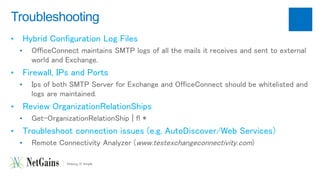
Troubleshooting 
• Hybrid Configuration Log Files 
• OfficeConnect maintains SMTP logs of all the mails it receives and sent to external 
world and Exchange. 
• Firewall, IPs and Ports 
• Ips of both SMTP Server for Exchange and OfficeConnect should be whitelisted and 
logs are maintained. 
• Review OrganizationRelationShips 
• Get-OrganizationRelationShip | fl * 
• Troubleshoot connection issues (e.g. AutoDiscover/Web Services) 
• Remote Connectivity Analyzer (www.testexchangeconnectivity.com)
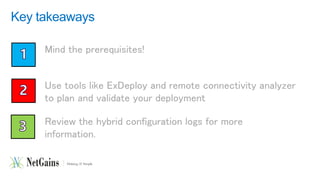
Key takeaways 
Mind the prerequisites! 
Use tools like ExDeploy and remote connectivity analyzer 
to plan and validate your deployment 
Review the hybrid configuration logs for more 
information.
The result 
Q&A 
THANK YOU!

Office connect hybrid microsoft exchange

  • 1.
    Deploying Exchange 2013in Hybrid Mode Rishikesh Somshetti CEO – NetGains Technologies Pvt Ltd @netgainsCEO www.netgainstechnologies.com
  • 2.
    Building a hybridconfiguration Expectations… Reality (Ex2013)…
  • 3.
    What is ahybrid deployment? Exchange On premise “Virtual Exchange-OfficeConnect Organization” “The Internet”/”Corporate Network” NetGains OfficeConnect
  • 4.
    Why hybrid? •Long-term coexistence • Take advantages of Affordable NetGains OfficeConnect • Large migrations where cutover is not possible (e.g. EX2010 +) • Two companies merge but maintain separate systems for a period of time • Non-Exchange systems are involved in the email environment, eg a Unix qmail server • Adapt newer email systems and features with upgrade.
  • 6.
    First Step towardssetting up Hybrid.. To share the namespace we simply change the DomainType to InternalRelay
  • 7.
    Hybrid Configuration –Send Connector • Secanpda Cbiolitniensector to tell Exchange where to send the emails that do not have a local recipient. • IP address of the other email system is configured and the Hub Transport server is used to send the emails • Now when an email arrives on the Exchange server that has no matching local recipient address, it will forward it on to the other mail system for delivery.
  • 8.
    NetGains OfficeConnect Configuration.. • Mails received from Exchange Send Connector are delivered locally. • Mails generated locally with recipient's on Exchange will be forwarded to MX of the domain. • Mails rejected by Exchange Server for not having local mailbox are bounced back to Sender. • Detailed SMTP in/Out Logging.
  • 9.
    Hybrid Prerequisites •A Windows Server Running NetGains OfficeConnect. • OfficeConnect Exchange Connector. • Exchange Server with Domain Relay type set to Internal Relay. • MailBox naming conventions to avoid duplicate mailbox on Exchange and OfficeConnect Server • Administrative access to both OS and Mail Servers.
  • 10.
    Typical deployment process “The Internet” Deploy Exchange 1. 2. Configure SSO (optional) 3. Setup DomainType Configure Certificates 4. 5. Configure OfficeConnect and users 6. Run Hybrid Configuration Settings MX 7. Configure MX Records
  • 12.
    Supported topologies NetGains OfficeConnect NetGains OfficeConnect Collab NetGains OfficeConnect Collab + Archive Exchange 2007 SP2/SP3 (X) X (X) Exchange 2007 SP3 Urx (X) (X) (X) Exchange 2010 X X X Exchange 2013 X X X Google Apps X X X Office 365 X X X (X) = supported w/ dependencies X = supported
  • 13.
    Deployment Considerations •Delegates • Mailbox creation, deletion, Password change need to be handled by respective mail server administrators. • Mailbox Permissions • Mailbox ownership, access rights, Access locations need to be defined for OfficeConnect. • Multi-forest scenarios are not supported • Interaction with legacy / 3rd party applications • Web Services? • Use an SMTP gateway? • Bandwidth
  • 14.
    Hybrid mailbox moves Exchange On-Premise “The Internet” OfficeConnect MRS Admin Admin MRS – Mailbox replication service.
  • 16.
    Mailbox moves: userexperience • When a mailbox is moved based email client user experience defers..  Microsoft Outlook users will continue to use same interface.  OWA users will see all the new interface with lot of similarity to Outlook 2010.  eMail password can remain same or changed based on policy.  Mobile users can use local client or OfficeConnect web Interface.
  • 17.
    Common mistakes/issues •Certificates • Expired • Not from a trusted source • Missing/Wrong subject (alternative) name • Delay in mail delivery from OfficeConnect to Exchange if the MX is very Busy. • OfficeConnect SMTP IP and Exchange SMTP should be whitelisted. • Users not recognized as “internal” if domain type in not changed • Outlook-related (e.g. missing updates)
  • 18.
    Troubleshooting • HybridConfiguration Log Files • OfficeConnect maintains SMTP logs of all the mails it receives and sent to external world and Exchange. • Firewall, IPs and Ports • Ips of both SMTP Server for Exchange and OfficeConnect should be whitelisted and logs are maintained. • Review OrganizationRelationShips • Get-OrganizationRelationShip | fl * • Troubleshoot connection issues (e.g. AutoDiscover/Web Services) • Remote Connectivity Analyzer (www.testexchangeconnectivity.com)
  • 20.
    Key takeaways Mindthe prerequisites! Use tools like ExDeploy and remote connectivity analyzer to plan and validate your deployment Review the hybrid configuration logs for more information.
  • 21.
    The result Q&A THANK YOU!

Editor's Notes

  • #3 Image courtesy: the internet
  • #11 Build your on-premise Exchange environment; if already exists add Exchange 2013 into the organization.
  • #22 Image courtesy: the internet