Ria Groenewald
Department of Library Services
    University of Pretoria
You cannot teach a man anything;
you can only help him find it within himself

                 Galileo Galilei
Simplified definition of digitisation


            Digitisation is the managed conversion
            of analogue material to a digital format
            for ongoing access by electronic
            devices during the intended life cycle
            of the digital object
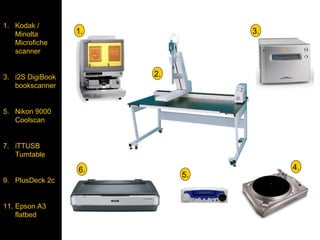
1. Kodak /
    Minolta       1.             3.
    Microfiche
• Kodak /
    scanner
Minolta
Microfiche
scanner
3. i2S DigiBook        2.
•i2S DigiBook
    bookscanner
book scanner
•Nikon 9000
5. Nikon
Coolscan 9000
    Coolscan
•USB
Turntable
•Tapedeck -
7. iTTUSB
    Turntable
ripper
•Epson 1640X      6.                  4.
                            5.
9. PlusDeck 2c


11. Epson A3
    flatbed
The library needs to use technology effectively in
    reaching out to users. In the academy, this
     means bringing innovation to our thinking

             http://www.llrx.com/node/2177/print
                Stuart Basefsky, 16 June 2009
Following benchmarks and best practices that are not a
     good fit for your [university] or its culture can be
    counterproductive. The most effective way of using
      benchmarks and best practices is as a creative
     mechanism for raising questions about your own
 [situation]. Following what others do is rarely a form of
                     good leadership.”


              Leadership & The Role of Information:
            Making The Creatively Informed Questioner
          By Stuart Basefsky, Published on October 29, 2008
   http://www.llrx.com/features/leadershipandroleofinformation.htm
Identify a project

• Know your collections
   – what is valuable
   – what others need to “see”
   – core business of institution
   – what is used often
   – benefit of such a project (collection as well as
     stakeholders)
Project planning

As part of a digitisation project planning, you’ll
have to decide on the scanning and format
specifications such as the:

• bit depth (bitonal, greyscale or 24-bit colour)
• scanning resolution (400 dpi, etc.)
• image manipulation options (deskewing,
  etc.)
• file format (TIFF, etc.)
Cost

• Hard to provide a general price range, variation in
collections and requirements for digitisation
• Digitisation projects, services and costs can be
as unique as the collections selected for
digitisation
• Projects have fundamental similarities (dpi selection,
   derivative file creation, source material format, etc.)
   other characteristics can make apparently similar
projects completely different
Policy making


Institutions should be able to define and defend their
choices related to digitisation in terms of their institutional
mission of teaching and research, and to avoid the
distraction of commercialising their products
Think – don’t tumble


• Will digital assets increase access to information that
  is hard to obtain otherwise?

• Will digital assets increase the information value of
  the physical material?
Questions


• Does digitisation fit the organisation’s mission?

• Is there a known potential audience for the materials
  that are planned to be digitised?

• Will digitisation increase access, functionality or
  intellectual control?
Questions


• Will digitising these materials fill a need that is
  currently unmet?

• Are the materials in the public domain or can proper
  rights be secured?

• Is funding in place for the digitisation program?
Workflow

•   Identify a project
•   Selection criteria
•   Copyright
•   Basic preservation on physical material
•   Scanning
•   Manipulation
•   Web ready
•   Submit or hand over
Selection criteria


• know the history and rationale behind selection of
sources
• start with collection items that are often used
• embrittled material
• published between a certain time-line
• materials have to be Africana
• language limitations
• forming part of a certain collection
• make sure no doubles are included
Copyright


• stay clear of copyright
• try to avoid material still in copyright
• where necessary start with copyright clearance
  first – may take long to sort out
• note every step along the way – keep the evidence
Physical preservation


• Basic cleaning of material
   – dust
   – tears / broken corners
   – mould
   – remove selotype / glue / pritt
   – remove staplers, gem clips, anything that can
     cause rust marks
   – store in acid free containers if possible
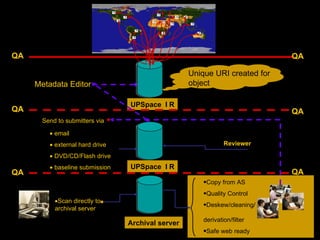
QA                                                                          QA

                                                   Unique URI created for
     Metadata Editor                               object

                                 UPSpace I R
QA                                                                          QA
       Send to submitters via

         • email
         • external hard drive                                 Reviewer

         • DVD/CD/Flash drive
         • baseline submission   UPSpace I R
QA                                                                          QA
                                                       •Copy from AS
                                                       •Quality Control
           •Scan directly to
                                                       •Deskew/cleaning/
           archival server
                                                       derivation/filter
                                 Archival server
                                                       •Safe web ready
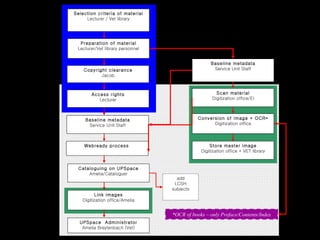
Selection criteria of material
                   Lecturer / Vet library


                Preparation of material
               Lecturer/Vet library personnel


                                                                Baseline metadata
                  Copyright clearance                            Service Unit Staff
                         Jacob


                     Access rights                                 Scan material
                        Lecturer                                 Digitization office/EI


                   Baseline metadata                       Conversion of image + OCR*
                    Service Unit Staff                           Digitization office


                  Webready process                              Store master image
                                                            Digitization office + VET library


               Cataloguing on UPSpace
                   Amelia/Cataloguer
                                                  add
                                                 LCSH
                                                subjects
                       Link images
                 Digitization office/Amelia


                                                *OCR of books – only Preface/Contents/Index
                UPSpace Administrator
                 Amelia Breytenbach (Vet)
13 Apr 2005
Scanning

• Start with the easy part
   – photo collection
   – black and white documents
• Phase it
• Reward yourself when finished
Guidelines to digital imaging
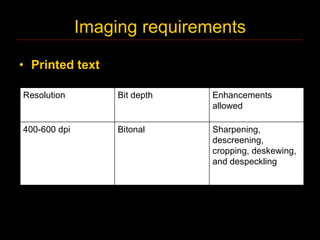
Imaging requirements

• Printed text

Resolution         Bit depth   Enhancements
                               allowed

400-600 dpi        Bitonal     Sharpening,
                               descreening,
                               cropping, deskewing,
                               and despeckling
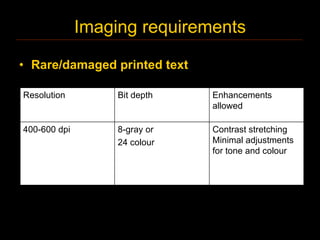
Imaging requirements

• Rare/damaged printed text

Resolution         Bit depth   Enhancements
                               allowed

400-600 dpi        8-gray or   Contrast stretching
                   24 colour   Minimal adjustments
                               for tone and colour
Imaging requirements

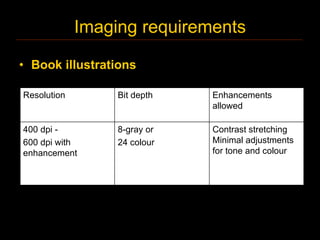
• Book illustrations

Resolution        Bit depth   Enhancements
                              allowed

400 dpi -         8-gray or   Contrast stretching
600 dpi with      24 colour   Minimal adjustments
enhancement                   for tone and colour
Image manipulation


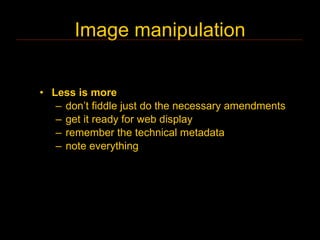
• Less is more
   – don’t fiddle just do the necessary amendments
   – get it ready for web display
   – remember the technical metadata
   – note everything
Redaction

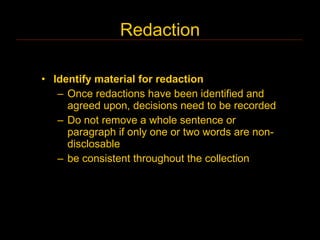
• Identify material for redaction
   – Once redactions have been identified and
     agreed upon, decisions need to be recorded
   – Do not remove a whole sentence or
     paragraph if only one or two words are non-
     disclosable
   – be consistent throughout the collection
Storage

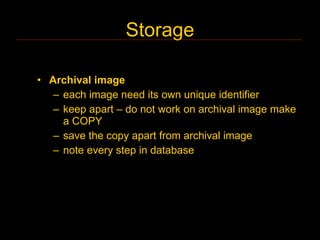
• Archival image
   – each image need its own unique identifier
   – keep apart – do not work on archival image make
     a COPY
   – save the copy apart from archival image
   – note every step in database
Storage

• More is better
  – archival image
  – at least one TIFF original on DVD/ hard disk /
    external hard disk
  – at least one derivate copy on DVD/ hard disk/
    external hard disk
  – store apart, if possible keep a copy in another
    building
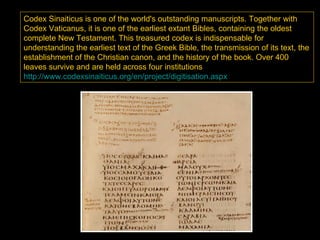
Codex Sinaiticus is one of the world's outstanding manuscripts. Together with
Codex Vaticanus, it is one of the earliest extant Bibles, containing the oldest
complete New Testament. This treasured codex is indispensable for
understanding the earliest text of the Greek Bible, the transmission of its text, the
establishment of the Christian canon, and the history of the book. Over 400
leaves survive and are held across four institutions
http://www.codexsinaiticus.org/en/project/digitisation.aspx
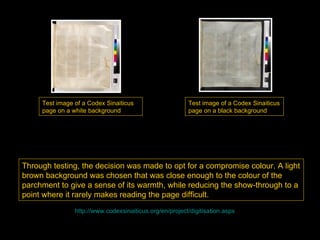
Test image of a Codex Sinaiticus                    Test image of a Codex Sinaiticus
     page on a white background                          page on a black background


Through testing, the decision was made to opt for a compromise colour. A light
brown background was chosen that was close enough to the colour of the
parchment to give a sense of its warmth, while reducing the show-through to a
point where it rarely makes reading the page difficult.
                http://www.codexsinaiticus.org/en/project/digitisation.aspx
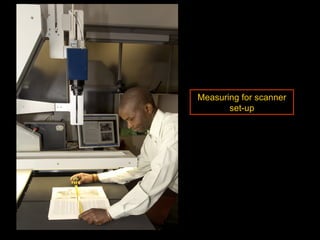
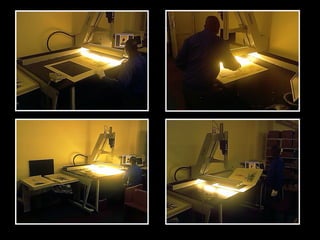
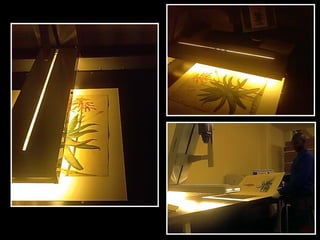
Measuring for scanner
       set-up
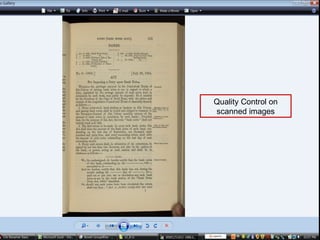
Quality Control on
scanned images
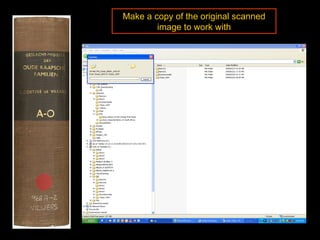
Make a copy of the original scanned
        image to work with
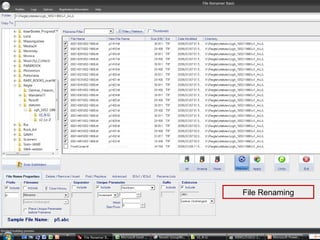
File Renaming
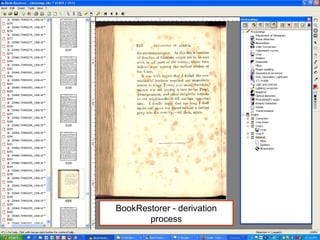
BookRestorer - derivation
       process
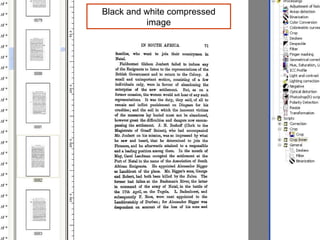
Black and white compressed
          image
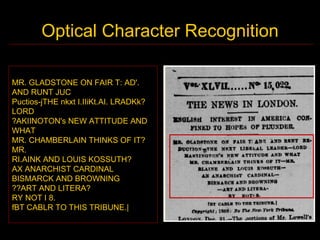
Optical Character Recognition

MR. GLADSTONE ON FAIR T: AD'.
AND RUNT JUC
Puctios-jTHE nkxt I.IIiKt.AI. LRADKk?
LORD
?AKIINOTON's NEW ATTITUDE AND
WHAT
MR. CHAMBERLAIN THINKS OF IT?
MR.
RI.AINK AND LOUIS KOSSUTH?
AX ANARCHIST CARDINAL
BISMARCK AND BROWNING
??ART AND LITERA?
RY NOT I 8.
fBT CABLR TO THIS TRIBUNE.|
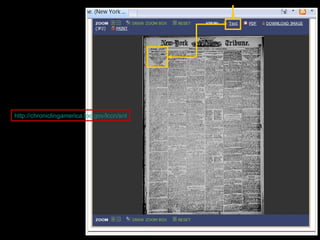
http://chroniclingamerica.loc.gov/lccn/sn83030214/1888-01-01/ed-1/seq-1/%3Bwords%3D/
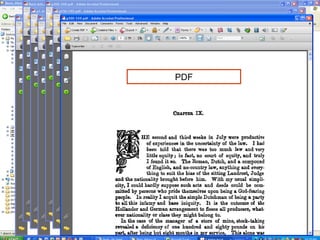
PDF
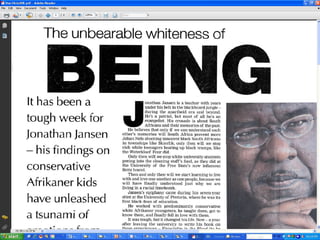
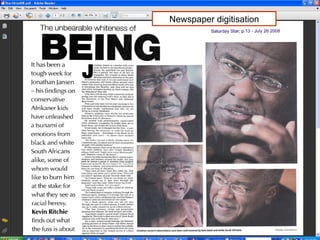
Newspaper digitisation
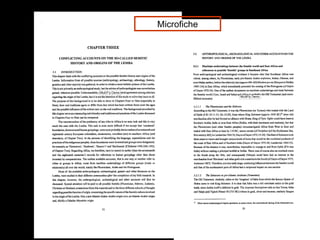
Microfiche
Risk analysis for digital objects

•   Hard drive failure
•   URL error – linked broken
•   Storage medium failure
•   Loss of information/data
•   Human error and memory
•   Hackers


          www.fotosearch.com
Preservation


• Preservation strategies should enable subsequent users
  to work with digital resources in the same way that they
  would be able to continue to work with older, analogue
  materials.

• Can we afford to scan at a low resolution, or make other
  compromises in the digitisation life-cycle
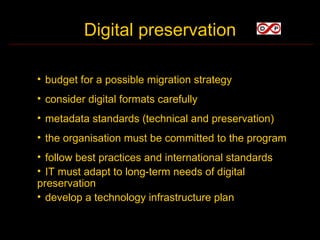
Digital preservation

• budget for a possible migration strategy
• consider digital formats carefully
• metadata standards (technical and preservation)
• the organisation must be committed to the program
• follow best practices and international standards
• IT must adapt to long-term needs of digital
preservation
• develop a technology infrastructure plan
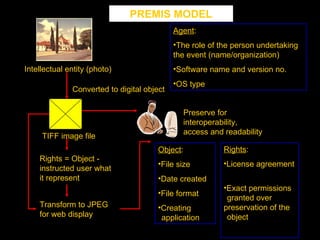
PREMIS MODEL
                                            Agent:
                                            •The role of the person undertaking
                                            the event (name/organization)
Intellectual entity (photo)                 •Software name and version no.
                                            •OS type
              Converted to digital object

                                              Preserve for
                                              interoperability,
                                              access and readability
     TIFF image file
                                       Object:            Rights:
    Rights = Object -
                                       •File size         •License agreement
    instructed user what
    it represent                       •Date created
                                                          •Exact permissions
                                       •File format
                                                           granted over
    Transform to JPEG                  •Creating          preservation of the
    for web display                     application        object
Ria Groenewald
Digitization Coordinator
Department of Library Services
University of Pretoria
Email:
ria.groenewald@up.ac.za
Tel: 012 x 420-3792
Digitisation Overview

Digitisation Overview

  • 1.
    Ria Groenewald Department ofLibrary Services University of Pretoria
  • 2.
    You cannot teacha man anything; you can only help him find it within himself Galileo Galilei
  • 3.
    Simplified definition ofdigitisation Digitisation is the managed conversion of analogue material to a digital format for ongoing access by electronic devices during the intended life cycle of the digital object
  • 4.
    1. Kodak / Minolta 1. 3. Microfiche • Kodak / scanner Minolta Microfiche scanner 3. i2S DigiBook 2. •i2S DigiBook bookscanner book scanner •Nikon 9000 5. Nikon Coolscan 9000 Coolscan •USB Turntable •Tapedeck - 7. iTTUSB Turntable ripper •Epson 1640X 6. 4. 5. 9. PlusDeck 2c 11. Epson A3 flatbed
  • 5.
    The library needsto use technology effectively in reaching out to users. In the academy, this means bringing innovation to our thinking http://www.llrx.com/node/2177/print Stuart Basefsky, 16 June 2009
  • 6.
    Following benchmarks andbest practices that are not a good fit for your [university] or its culture can be counterproductive. The most effective way of using benchmarks and best practices is as a creative mechanism for raising questions about your own [situation]. Following what others do is rarely a form of good leadership.” Leadership & The Role of Information: Making The Creatively Informed Questioner By Stuart Basefsky, Published on October 29, 2008 http://www.llrx.com/features/leadershipandroleofinformation.htm
  • 7.
    Identify a project •Know your collections – what is valuable – what others need to “see” – core business of institution – what is used often – benefit of such a project (collection as well as stakeholders)
  • 8.
    Project planning As partof a digitisation project planning, you’ll have to decide on the scanning and format specifications such as the: • bit depth (bitonal, greyscale or 24-bit colour) • scanning resolution (400 dpi, etc.) • image manipulation options (deskewing, etc.) • file format (TIFF, etc.)
  • 9.
    Cost • Hard toprovide a general price range, variation in collections and requirements for digitisation • Digitisation projects, services and costs can be as unique as the collections selected for digitisation • Projects have fundamental similarities (dpi selection, derivative file creation, source material format, etc.) other characteristics can make apparently similar projects completely different
  • 10.
    Policy making Institutions shouldbe able to define and defend their choices related to digitisation in terms of their institutional mission of teaching and research, and to avoid the distraction of commercialising their products
  • 11.
    Think – don’ttumble • Will digital assets increase access to information that is hard to obtain otherwise? • Will digital assets increase the information value of the physical material?
  • 12.
    Questions • Does digitisationfit the organisation’s mission? • Is there a known potential audience for the materials that are planned to be digitised? • Will digitisation increase access, functionality or intellectual control?
  • 13.
    Questions • Will digitisingthese materials fill a need that is currently unmet? • Are the materials in the public domain or can proper rights be secured? • Is funding in place for the digitisation program?
  • 15.
    Workflow • Identify a project • Selection criteria • Copyright • Basic preservation on physical material • Scanning • Manipulation • Web ready • Submit or hand over
  • 16.
    Selection criteria • knowthe history and rationale behind selection of sources • start with collection items that are often used • embrittled material • published between a certain time-line • materials have to be Africana • language limitations • forming part of a certain collection • make sure no doubles are included
  • 17.
    Copyright • stay clearof copyright • try to avoid material still in copyright • where necessary start with copyright clearance first – may take long to sort out • note every step along the way – keep the evidence
  • 18.
    Physical preservation • Basiccleaning of material – dust – tears / broken corners – mould – remove selotype / glue / pritt – remove staplers, gem clips, anything that can cause rust marks – store in acid free containers if possible
  • 19.
    QA QA Unique URI created for Metadata Editor object UPSpace I R QA QA Send to submitters via • email • external hard drive Reviewer • DVD/CD/Flash drive • baseline submission UPSpace I R QA QA •Copy from AS •Quality Control •Scan directly to •Deskew/cleaning/ archival server derivation/filter Archival server •Safe web ready
  • 20.
    Selection criteria ofmaterial Lecturer / Vet library Preparation of material Lecturer/Vet library personnel Baseline metadata Copyright clearance Service Unit Staff Jacob Access rights Scan material Lecturer Digitization office/EI Baseline metadata Conversion of image + OCR* Service Unit Staff Digitization office Webready process Store master image Digitization office + VET library Cataloguing on UPSpace Amelia/Cataloguer add LCSH subjects Link images Digitization office/Amelia *OCR of books – only Preface/Contents/Index UPSpace Administrator Amelia Breytenbach (Vet) 13 Apr 2005
  • 21.
    Scanning • Start withthe easy part – photo collection – black and white documents • Phase it • Reward yourself when finished
  • 22.
  • 23.
    Imaging requirements • Printedtext Resolution Bit depth Enhancements allowed 400-600 dpi Bitonal Sharpening, descreening, cropping, deskewing, and despeckling
  • 24.
    Imaging requirements • Rare/damagedprinted text Resolution Bit depth Enhancements allowed 400-600 dpi 8-gray or Contrast stretching 24 colour Minimal adjustments for tone and colour
  • 25.
    Imaging requirements • Bookillustrations Resolution Bit depth Enhancements allowed 400 dpi - 8-gray or Contrast stretching 600 dpi with 24 colour Minimal adjustments enhancement for tone and colour
  • 26.
    Image manipulation • Lessis more – don’t fiddle just do the necessary amendments – get it ready for web display – remember the technical metadata – note everything
  • 27.
    Redaction • Identify materialfor redaction – Once redactions have been identified and agreed upon, decisions need to be recorded – Do not remove a whole sentence or paragraph if only one or two words are non- disclosable – be consistent throughout the collection
  • 28.
    Storage • Archival image – each image need its own unique identifier – keep apart – do not work on archival image make a COPY – save the copy apart from archival image – note every step in database
  • 29.
    Storage • More isbetter – archival image – at least one TIFF original on DVD/ hard disk / external hard disk – at least one derivate copy on DVD/ hard disk/ external hard disk – store apart, if possible keep a copy in another building
  • 30.
    Codex Sinaiticus isone of the world's outstanding manuscripts. Together with Codex Vaticanus, it is one of the earliest extant Bibles, containing the oldest complete New Testament. This treasured codex is indispensable for understanding the earliest text of the Greek Bible, the transmission of its text, the establishment of the Christian canon, and the history of the book. Over 400 leaves survive and are held across four institutions http://www.codexsinaiticus.org/en/project/digitisation.aspx
  • 31.
    Test image ofa Codex Sinaiticus Test image of a Codex Sinaiticus page on a white background page on a black background Through testing, the decision was made to opt for a compromise colour. A light brown background was chosen that was close enough to the colour of the parchment to give a sense of its warmth, while reducing the show-through to a point where it rarely makes reading the page difficult. http://www.codexsinaiticus.org/en/project/digitisation.aspx
  • 32.
  • 37.
  • 38.
    Make a copyof the original scanned image to work with
  • 39.
  • 40.
  • 41.
    Black and whitecompressed image
  • 42.
    Optical Character Recognition MR.GLADSTONE ON FAIR T: AD'. AND RUNT JUC Puctios-jTHE nkxt I.IIiKt.AI. LRADKk? LORD ?AKIINOTON's NEW ATTITUDE AND WHAT MR. CHAMBERLAIN THINKS OF IT? MR. RI.AINK AND LOUIS KOSSUTH? AX ANARCHIST CARDINAL BISMARCK AND BROWNING ??ART AND LITERA? RY NOT I 8. fBT CABLR TO THIS TRIBUNE.|
  • 43.
  • 44.
  • 45.
  • 47.
  • 48.
    Risk analysis fordigital objects • Hard drive failure • URL error – linked broken • Storage medium failure • Loss of information/data • Human error and memory • Hackers www.fotosearch.com
  • 49.
    Preservation • Preservation strategiesshould enable subsequent users to work with digital resources in the same way that they would be able to continue to work with older, analogue materials. • Can we afford to scan at a low resolution, or make other compromises in the digitisation life-cycle
  • 50.
    Digital preservation • budgetfor a possible migration strategy • consider digital formats carefully • metadata standards (technical and preservation) • the organisation must be committed to the program • follow best practices and international standards • IT must adapt to long-term needs of digital preservation • develop a technology infrastructure plan
  • 51.
    PREMIS MODEL Agent: •The role of the person undertaking the event (name/organization) Intellectual entity (photo) •Software name and version no. •OS type Converted to digital object Preserve for interoperability, access and readability TIFF image file Object: Rights: Rights = Object - •File size •License agreement instructed user what it represent •Date created •Exact permissions •File format granted over Transform to JPEG •Creating preservation of the for web display application object
  • 55.
    Ria Groenewald Digitization Coordinator Departmentof Library Services University of Pretoria Email: ria.groenewald@up.ac.za Tel: 012 x 420-3792