Preparing for a Digitization Project Wilson County Public Library June 13, 2011 Nicholas Graham Lisa Gregory Audra Eagle Yun
Agenda Welcome and Introductions About Connecting to Collections 10:00 – 10:45 Planning for a Digital Project Selecting and Evaluating Materials Copyright 10:45 – 11:15 Digitization Equipment and Expertise Standards and Guidelines 11:15 – 12:00 Description Evaluating Metadata Needs Metadata Standards and Controlled Vocabularies Creating a Data Dictionary 12:00 – 1:00 Lunch 1:00 – 1:30 Digital Publishing Free and Cheap Options Open Source and Homegrown Options CONTENTdm
Agenda,  continued 1:30 – 2:00 Digital Preservation Long-term Care for your Digital Files 2:00 – 2:30 North Carolina Digital Heritage Center Services Offered by the NC Digital Heritage Center How to Develop a Project with the Digital Heritage Center 2:30 – 3:00 Questions and Discussion
 
Planning for a Digital Project Essential Components of a Successful Project Institutional Support Community Support Support from Other Institutions Time, Energy, Curiosity, and Enthusiasm
Planning for a Digital Project Deciding What to Digitize What do you have that nobody else does? What’s the most difficult? What’s the easiest? What do you already have described?
Planning for a Digital Project Evaluating Your Materials Does your institution own the materials you’re planning to digitize? Are the materials in good enough condition to withstand digitization?
Planning for a Digital Project Copyright Are the materials in the public domain? Does your library own the rights to the materials? Have you received permission from the rights holder? Have you made an effort to locate the rights holder? What is your institution’s risk tolerance? Have a take-down policy.
Digitization
Digitization Equipment and Expertise Creating a project team Roles and responsibilities Managing staff and volunteers Creating a digital production station Creating your space Choosing hardware Choosing software
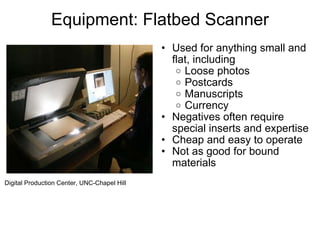
Equipment: Flatbed Scanner Used for anything small and flat, including Loose photos Postcards Manuscripts Currency Negatives often require special inserts and expertise Cheap and easy to operate Not as good for bound materials Digital Production Center, UNC-Chapel Hill
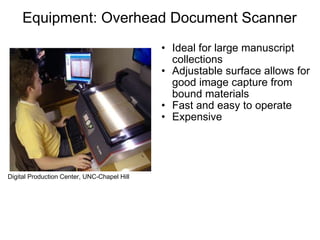
Equipment: Overhead Document Scanner Ideal for large manuscript collections Adjustable surface allows for good image capture from bound materials Fast and easy to operate Expensive Digital Production Center, UNC-Chapel Hill
Equipment: Book Scanner Designed specifically for mass digitization of monographs Very fast and effective Expensive to lease Outsourcing book digitization may be the best option for many organizations Digital Production Center, UNC-Chapel Hill
Equipment: Sheet-fed Scanner Great for loose, flat, small, and sturdy items (like catalog cards or loose papers) Extremely fast (hundreds of scans per minute) Not a good option for images, manuscripts, or any materials of varying size Digital Production Center, UNC-Chapel Hill
Equipment: Digital Camera Back and Vacuum Table Ideal for digitizing large and fragile flat items (great for maps) Requires a good amount of training and expertise to operate Expensive Digital Production Center, UNC-Chapel Hill
Digitization The Scanning Process Specifications Scan once, use many times  LOCKSS  See NC ECHO, NEDCC, and digitizationguidelines.gov   Format and resolution Text -- Master: 200 dpi TIFF; Access: 200 dpi JPG; PDF Photos or Documents -- Master: 600 dpi TIFF; Access: 300 dpi JPG  Maps or Drawings -- Master: 300 dpi TIFF; Access: 200-300 dpi JPG Video -- Master: AVI; Access: MPEG Audio -- Master: WAV; Access: MP3; WMA
Digitization The Scanning Process Organizing files Naming Storing Workflow Create project queue  Track digital production Note metadata and other tasks
Metadata = Data about Data What is it for? What kinds? What should you do? Standards Controlled vocabularies Data dictionaries
Metadata ONLINE Vital that it’s… Shareable Interoperable Consistent Audience appropriate Appropriately complete Helps keep your digital content… Findable (by humans and machines) Manageable Authentic
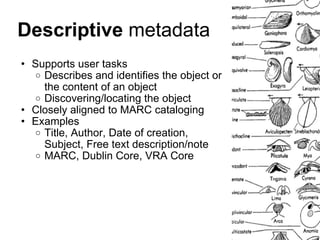
Descriptive  metadata Supports user tasks  Describes and identifies the object or the content of an object Discovering/locating the object Closely aligned to MARC cataloging Examples Title, Author, Date of creation, Subject, Free text description/note MARC, Dublin Core, VRA Core
Supports management tasks Subcategories: technical - technical characteristics about the object preservation - actions that have been performed on the object and source, custody of the object, provenance rights - information about access and use of the object Examples File size, File name, Rights statement, Digital format Administrative  metadata
Supports long-term management and access to object May not display in user interface Meta-metadata - information about the metadata itself; who created it, when, where it came from, when it was updated. Examples Bit depth, Checksum, File type, Owner, File creation date, Last modified date PREMIS, NC-PMDO Preservation  metadata
Structural  metadata Multi-part objects in the digital environment Replicates the physical structure E.g., Paging/chaptering in digital books when each page is an image Describes the relationships between related objects Examples Relationship, Page number, Chapter number, Total page numbers, File “order” TEI
What should YOU do? Consider your environment Decide on standards/controlled vocabularies Test them out on a few objects Create a data dictionary Describe, describe, describe
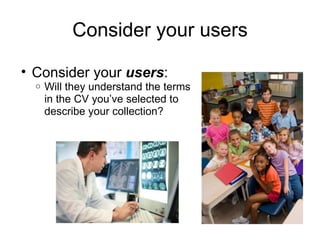
Consider your users Consider your  users :  Will they understand the terms in the CV you’ve selected to describe your collection?
Consider your community Consider your  community :  If other medical libraries are describing their collections with MeSH, maybe you should, too. Less confusing for users Makes your collections more interoperable
Consider your collection Consider the  nature and extent of the collection   now and in the future:  If the collection is small and discreet, you may not need a huge, complicated CV to describe it Flickr user define23
Consider your metadaters Consider the  skills and available time of your data creators :  Will  they  understand the terms in the CV, or do you need a specialist to describe the materials? What do they know about: Neuropathy? Neuroscience? Mitochondrial Dysfunction? Sometimes, you’ve just got other fish to fry
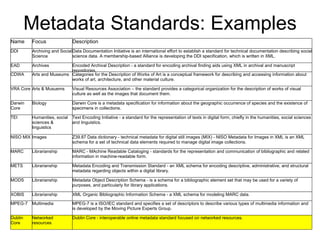
Metadata Standards: Examples Name Focus Description DDI Archiving and Social Science Data Documentation Initiative is an international effort to establish a standard for technical documentation describing social science data. A membership-based Alliance is developing the DDI specification, which is written in XML. EAD Archives Encoded Archival Description - a standard for encoding archival finding aids using XML in archival and manuscript repositories. CDWA Arts and Museums Categories for the Description of Works of Art is a conceptual framework for describing and accessing information about works of art, architecture, and other material culture. VRA Core Arts & Musuems Visual Resources Association – the standard provides a categorical organization for the description of works of visual culture as well as the images that document them. Darwin Core Biology Darwin Core is a metadata specification for information about the geographic occurrence of species and the existence of specimens in collections. TEI Humanities, social sciences & linguistics Text Encoding Initiative - a standard for the representation of texts in digital form, chiefly in the humanities, social sciences and linguistics. NISO MIX Images Z39.87 Data dictionary - technical metadata for digital still images (MIX) - NISO Metadata for Images in XML is an XML schema for a set of technical data elements required to manage digital image collections. MARC Librarianship MARC - MAchine Readable Cataloging - standards for the representation and communication of bibliographic and related information in machine-readable form. METS Librarianship Metadata Encoding and Transmission Standard - an XML schema for encoding descriptive, administrative, and structural metadata regarding objects within a digital library. MODS Librarianship Metadata Object Description Schema - is a schema for a bibliographic element set that may be used for a variety of purposes, and particularly for library applications. XOBIS Librarianship XML Organic Bibliographic Information Schema - a XML schema for modeling MARC data. MPEG-7 Multimedia MPEG-7 is a ISO/IEC standard and specifies a set of descriptors to describe various types of multimedia information and is developed by the Moving Picture Experts Group. Dublin Core Networked resources Dublin Core - interoperable online metadata standard focused on networked resources.
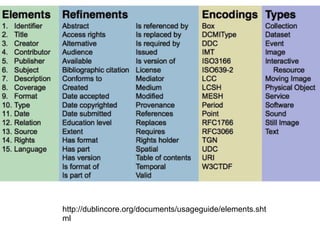
http://dublincore.org/documents/usageguide/elements.shtml
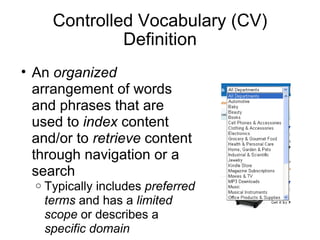
Controlled Vocabulary (CV) Definition An  organized  arrangement of words and phrases that are used to  index  content and/or to  retrieve  content through navigation or a search Typically includes  preferred terms  and has a  limited scope  or describes a  specific domain
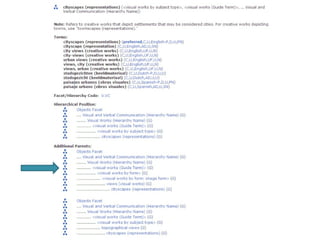
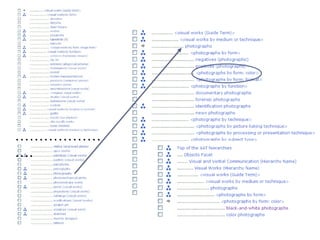
What CVs give us Standard terminology Cows? Steers? Cattle? Livestock? Standard formatting Raleigh, NC? Raleigh, North Carolina Synonyms (non-hierarchical) “ USE FOR” Hierarchical relationships Photographs > black-and-white photographs
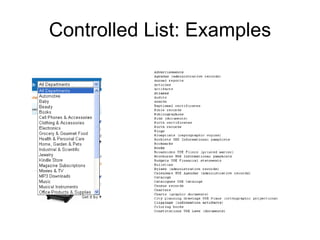
Controlled List: Examples
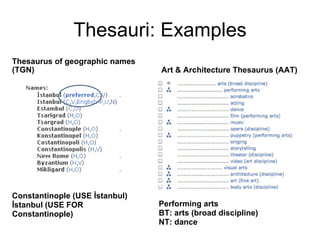
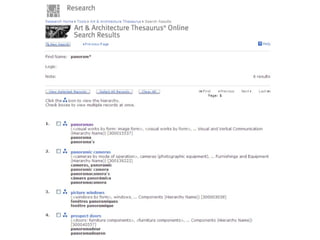
Thesauri: Examples Thesaurus of geographic names (TGN) Constantinople (USE İstanbul) İstanbul (USE FOR Constantinople) Performing arts BT: arts (broad discipline) NT: dance Art & Architecture Thesaurus (AAT)
Controlled Vocabularies: Examples Some are freely available on the Web AAT http://www.getty.edu/research/tools/vocabularies/aat/index.html MESH http://www.nlm.nih.gov/mesh/MBrowser.html TGM http://www.loc.gov/rr/print/tgm1/ LC-NAF http://authorities.loc.gov/ Taxonomy Warehouse (clearinghouse) http://www.taxonomywarehouse.com/ Some aren’t Library of Congress Subject Headings (online, called “Classification Web”) http://bit.ly/fsIcgy
Costs/Benefits – Build your own CV? Resource intensive Interoperable? We’ll never share it . . . We’re not experts Local need We’ll never share it… Just the right size We’re the experts
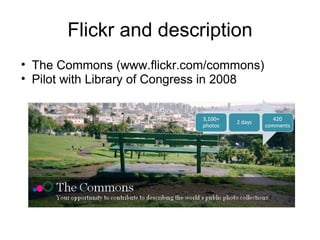
Flickr and description The Commons (www.flickr.com/commons) Pilot with Library of Congress in 2008
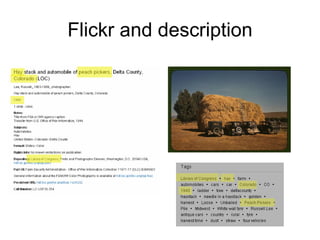
Flickr and description
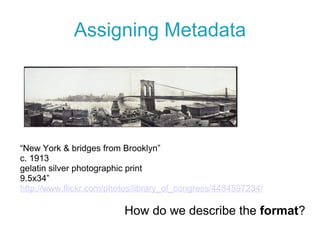
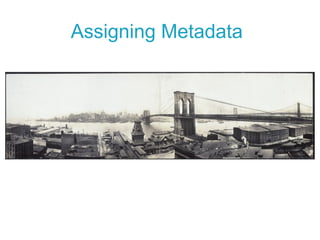
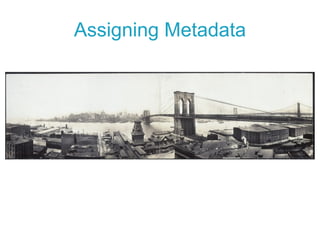
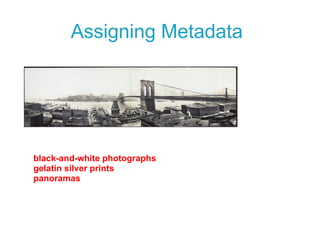
Assigning Metadata “ New York & bridges from Brooklyn” c. 1913 gelatin silver photographic print 9.5x34” http://www.flickr.com/photos/library_of_congress/4484597234/ How do we describe the  format ?
 
Assigning Metadata
 
 
Assigning Metadata
 
………………… .
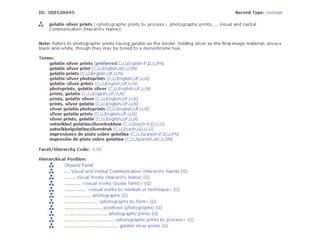
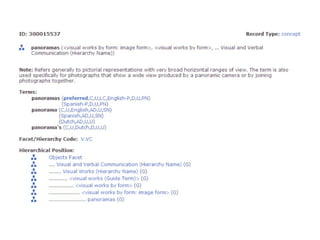
Assigning Metadata black-and-white photographs gelatin silver prints panoramas
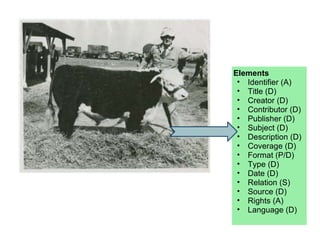
Elements Identifier (A) Title (D) Creator (D) Contributor (D) Publisher (D) Subject (D) Description (D) Coverage (D) Format (P/D) Type (D) Date (D) Relation (S) Source (D) Rights (A) Language (D)
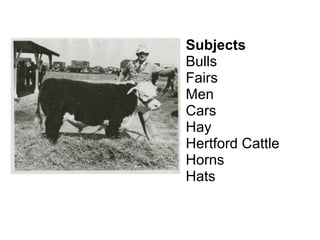
Subjects Bulls Fairs Men Cars Hay Hertford Cattle Horns Hats
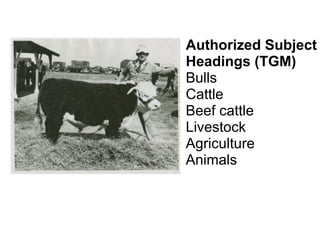
Authorized Subject Headings (TGM) Bulls Cattle Beef cattle Livestock Agriculture Animals
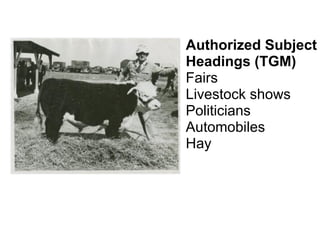
Authorized Subject Headings (TGM) Fairs Livestock shows Politicians Automobiles Hay
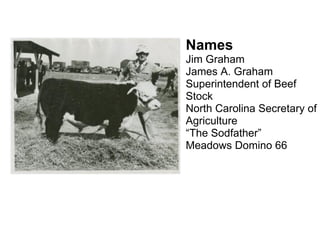
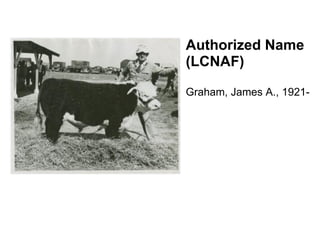
Names Jim Graham James A. Graham Superintendent of Beef Stock North Carolina Secretary of Agriculture “ The Sodfather” Meadows Domino 66
Authorized Name  (LCNAF) Graham, James A., 1921-
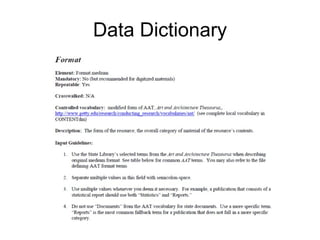
Example Metadata Record Title:  Jim Graham with bull, Meadows Domino 66 Creator:  Fern, Douglas M.  Date:  1969  Subject:    Fairs; Livestock shows; Politicians; Automobiles; Hay; Graham, James A., 1921-; Description:  Jim Graham, Superintendent of Beef Stock at the North Carolina State Fair stands with the 16 month-old Meadows Domino 66.  The bull was sold by J. Horton Doughton of Doughton Meadows Farm, Laurel Springs, N.C., to Mr. and Mrs. A.W. Fanjoy of Joy Acres Farm, Statesville, N.C., for $10,000. It won every class ever shown in except one and received second place there, and was the Grand Champion at the N.C. State Fair. At the time, it was the highest priced bull ever sold in N.C. Weight: 1450 lbs.  Time Period [Coverage]:  20th century Location [Coverage]:  Raleigh, N.C. (Wake County)  Format:  image/jpeg; 721 KB  Type:  Image Rights:  This image may be under copyright. Please contact INSTITUTION NAME for permission to reproduce.  Identifier:  agcoll_17.11.189.jpg  Capture Date [Date]:  2011-06-05 Capture Tools:  Epson Expression 10000XL; Metadata Creator:  Gregory, Lisa
Data Dictionary
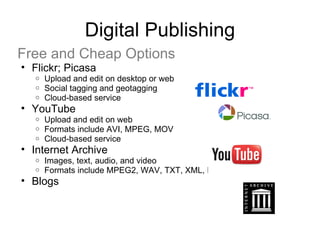
Digital Publishing Free and Cheap Options Flickr; Picasa Upload and edit on desktop or web Social tagging and geotagging Cloud-based service YouTube Upload and edit on web Formats include AVI, MPEG, MOV Cloud-based service Internet Archive Images, text, audio, and video Formats include MPEG2, WAV, TXT, XML, PDF Blogs
Digital Publishing Traditional Options Open-source Tools “ Homegrown” Systems CONTENTdm
Digital Preservation Digital preservation is the  process  of  ensuring  that you have  long-term access   to your digital materials Digital Preservation ≠ Digitization
Born-digital resources Files that are created natively on electronic devises, such as computers, cell phones, digital cameras, and digital audio recorders
Digitized resources Analog objects that are transferred to a digital format through some conversion process. Paper documents/printed books Photographic materials like slides, prints, or glass-plate 3D objects Audio such as cassette tape and LPs Film and other moving images
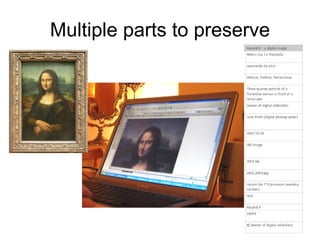
Multiple parts to preserve
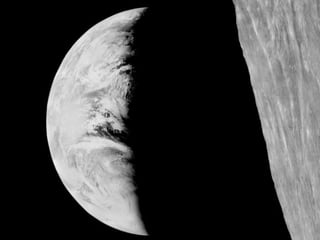
NASA loses big. Lunar Orbiter program of 1966 and 1967 Mission: to map the entire surface of the moon in preparation for the Apollo landings -- and all five performed magnificently. Lunar Orbiter 1 took the first pictures of Earth as a full planet.
 
NASA loses big. Nancy Evans, a NASA archivist, began collecting the technology in the late-1980s.  Grabbed the analog tapes and saved imaging hardware from government surplus After she retired she stored everything, shrink wrapped and on wooden pallets, in her garage
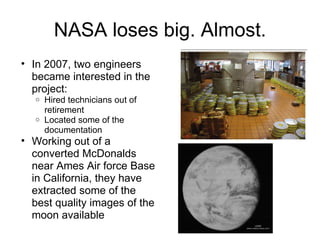
NASA loses big. Almost. In 2007, two engineers became interested in the project: Hired technicians out of retirement Located some of the documentation Working out of a converted McDonalds near Ames Air force Base in California, they have extracted some of the best quality images of the moon available
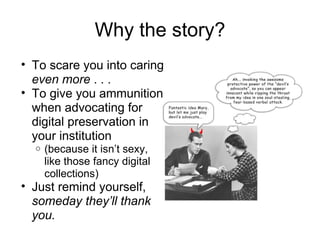
Why the story? To scare you into caring  even more  . . .  To give you ammunition when advocating for digital preservation in your institution (because it isn’t sexy, like those fancy digital collections) Just remind yourself,  someday they’ll thank you.
“ I’ve digitized this stuff … now how do I preserve it?” With digital preservation, this might not apply.
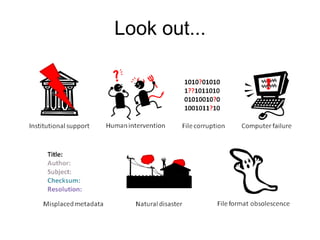
Look out...
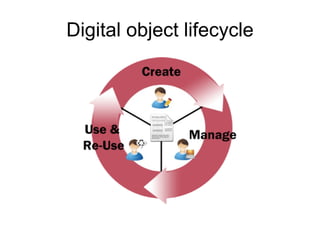
Digital object lifecycle
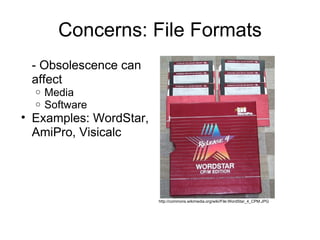
Concerns: File Formats - Obsolescence can affect Media Software Examples: WordStar, AmiPro, Visicalc http://commons.wikimedia.org/wiki/File:WordStar_4_CPM.JPG
Concerns: File Formats - Proprietary vs. Open Source Software Proprietary: code is locked down Open source: code is available for viewing and manipulation by all Escrowed source: source code is held by third party, should company ever cease
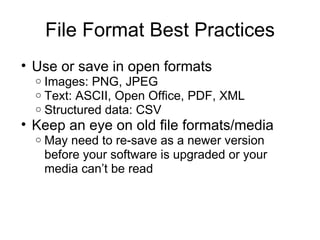
File Format Best Practices Use or save in open formats Images: PNG, JPEG Text: ASCII, Open Office, PDF, XML Structured data: CSV Keep an eye on old file formats/media May need to re-save as a newer version before your software is upgraded or your media can’t be read
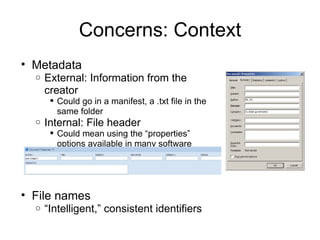
Concerns: Context Metadata External: Information from the creator Could go in a manifest, a .txt file in the same folder Internal: File header Could mean using the “properties” options available in many software programs File names “ Intelligent,” consistent identifiers
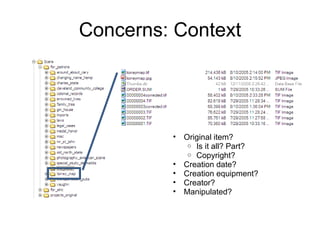
Concerns: Context Original item? Is it all? Part? Copyright? Creation date? Creation equipment? Creator? Manipulated?
Context Best Practices Get the metadata up front Keep the metadata with the file (or refer back from an alternate location) Name file names intelligently and consistently, using a standard For human eyes For computers, too
Concerns: Storage Special constraints at your institution Access restrictions Disaster! Staff turnover Human error
Storage Best Practices Recognize that IT is often interested in BACKUPs not PRESERVATION Keep your important items in multiple locations Skip the CDs – use external hard drives if possible Keep in mind who has access Metadata will help with storage
Digital Preservation There are lots of resources to help you Digital Information Management Program, State Library of North Carolina  http://digitalpreservation.ncdcr.gov Other online resources – see handout and Digital Preservation Section 
North Carolina Digital Heritage Center Current Projects Images of North Carolina College and University Yearbooks North Carolina Memory North Carolina Newspapers
North Carolina Digital Heritage Center Who Can Participate? Any cultural heritage institution in North Carolina that holds collections that are open to the public. Participants to date have included public and private college and universities, community colleges, public libraries, private libraries, and museums.
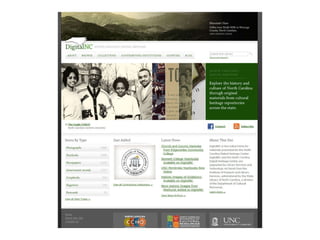
North Carolina Digital Heritage Center Services Provided Digital Publishing materials are published on DigitalNC.org, where they can be searched and discovered alongside collections from other institutions around the state Digitization the Digital Production Center at UNC-Chapel Hill supports the NC Digital Heritage Center with a wide variety of services Project Planning and Consulting staff members are available for consultation whether you’re working with the NC Digital Heritage Center or not


North Carolina Digital Heritage Center How to Get Involved Review the Contributors Manual Contact us to discuss project ideas: Nicholas Graham [email_address]  / (919) 962-4836 Maggie Dickson [email_address]  / (919) 962-4836

Intro to Digitization Projects

  • 1.
    Preparing for aDigitization Project Wilson County Public Library June 13, 2011 Nicholas Graham Lisa Gregory Audra Eagle Yun
  • 2.
    Agenda Welcome andIntroductions About Connecting to Collections 10:00 – 10:45 Planning for a Digital Project Selecting and Evaluating Materials Copyright 10:45 – 11:15 Digitization Equipment and Expertise Standards and Guidelines 11:15 – 12:00 Description Evaluating Metadata Needs Metadata Standards and Controlled Vocabularies Creating a Data Dictionary 12:00 – 1:00 Lunch 1:00 – 1:30 Digital Publishing Free and Cheap Options Open Source and Homegrown Options CONTENTdm
  • 3.
    Agenda, continued1:30 – 2:00 Digital Preservation Long-term Care for your Digital Files 2:00 – 2:30 North Carolina Digital Heritage Center Services Offered by the NC Digital Heritage Center How to Develop a Project with the Digital Heritage Center 2:30 – 3:00 Questions and Discussion
  • 4.
  • 5.
    Planning for aDigital Project Essential Components of a Successful Project Institutional Support Community Support Support from Other Institutions Time, Energy, Curiosity, and Enthusiasm
  • 6.
    Planning for aDigital Project Deciding What to Digitize What do you have that nobody else does? What’s the most difficult? What’s the easiest? What do you already have described?
  • 7.
    Planning for aDigital Project Evaluating Your Materials Does your institution own the materials you’re planning to digitize? Are the materials in good enough condition to withstand digitization?
  • 8.
    Planning for aDigital Project Copyright Are the materials in the public domain? Does your library own the rights to the materials? Have you received permission from the rights holder? Have you made an effort to locate the rights holder? What is your institution’s risk tolerance? Have a take-down policy.
  • 9.
  • 10.
    Digitization Equipment andExpertise Creating a project team Roles and responsibilities Managing staff and volunteers Creating a digital production station Creating your space Choosing hardware Choosing software
  • 11.
    Equipment: Flatbed ScannerUsed for anything small and flat, including Loose photos Postcards Manuscripts Currency Negatives often require special inserts and expertise Cheap and easy to operate Not as good for bound materials Digital Production Center, UNC-Chapel Hill
  • 12.
    Equipment: Overhead DocumentScanner Ideal for large manuscript collections Adjustable surface allows for good image capture from bound materials Fast and easy to operate Expensive Digital Production Center, UNC-Chapel Hill
  • 13.
    Equipment: Book ScannerDesigned specifically for mass digitization of monographs Very fast and effective Expensive to lease Outsourcing book digitization may be the best option for many organizations Digital Production Center, UNC-Chapel Hill
  • 14.
    Equipment: Sheet-fed ScannerGreat for loose, flat, small, and sturdy items (like catalog cards or loose papers) Extremely fast (hundreds of scans per minute) Not a good option for images, manuscripts, or any materials of varying size Digital Production Center, UNC-Chapel Hill
  • 15.
    Equipment: Digital CameraBack and Vacuum Table Ideal for digitizing large and fragile flat items (great for maps) Requires a good amount of training and expertise to operate Expensive Digital Production Center, UNC-Chapel Hill
  • 16.
    Digitization The ScanningProcess Specifications Scan once, use many times  LOCKSS See NC ECHO, NEDCC, and digitizationguidelines.gov Format and resolution Text -- Master: 200 dpi TIFF; Access: 200 dpi JPG; PDF Photos or Documents -- Master: 600 dpi TIFF; Access: 300 dpi JPG Maps or Drawings -- Master: 300 dpi TIFF; Access: 200-300 dpi JPG Video -- Master: AVI; Access: MPEG Audio -- Master: WAV; Access: MP3; WMA
  • 17.
    Digitization The ScanningProcess Organizing files Naming Storing Workflow Create project queue Track digital production Note metadata and other tasks
  • 18.
    Metadata = Dataabout Data What is it for? What kinds? What should you do? Standards Controlled vocabularies Data dictionaries
  • 19.
    Metadata ONLINE Vitalthat it’s… Shareable Interoperable Consistent Audience appropriate Appropriately complete Helps keep your digital content… Findable (by humans and machines) Manageable Authentic
  • 20.
    Descriptive metadataSupports user tasks Describes and identifies the object or the content of an object Discovering/locating the object Closely aligned to MARC cataloging Examples Title, Author, Date of creation, Subject, Free text description/note MARC, Dublin Core, VRA Core
  • 21.
    Supports management tasksSubcategories: technical - technical characteristics about the object preservation - actions that have been performed on the object and source, custody of the object, provenance rights - information about access and use of the object Examples File size, File name, Rights statement, Digital format Administrative metadata
  • 22.
    Supports long-term managementand access to object May not display in user interface Meta-metadata - information about the metadata itself; who created it, when, where it came from, when it was updated. Examples Bit depth, Checksum, File type, Owner, File creation date, Last modified date PREMIS, NC-PMDO Preservation metadata
  • 23.
    Structural metadataMulti-part objects in the digital environment Replicates the physical structure E.g., Paging/chaptering in digital books when each page is an image Describes the relationships between related objects Examples Relationship, Page number, Chapter number, Total page numbers, File “order” TEI
  • 24.
    What should YOUdo? Consider your environment Decide on standards/controlled vocabularies Test them out on a few objects Create a data dictionary Describe, describe, describe
  • 25.
    Consider your usersConsider your users : Will they understand the terms in the CV you’ve selected to describe your collection?
  • 26.
    Consider your communityConsider your community : If other medical libraries are describing their collections with MeSH, maybe you should, too. Less confusing for users Makes your collections more interoperable
  • 27.
    Consider your collectionConsider the nature and extent of the collection now and in the future: If the collection is small and discreet, you may not need a huge, complicated CV to describe it Flickr user define23
  • 28.
    Consider your metadatersConsider the skills and available time of your data creators : Will they understand the terms in the CV, or do you need a specialist to describe the materials? What do they know about: Neuropathy? Neuroscience? Mitochondrial Dysfunction? Sometimes, you’ve just got other fish to fry
  • 29.
    Metadata Standards: ExamplesName Focus Description DDI Archiving and Social Science Data Documentation Initiative is an international effort to establish a standard for technical documentation describing social science data. A membership-based Alliance is developing the DDI specification, which is written in XML. EAD Archives Encoded Archival Description - a standard for encoding archival finding aids using XML in archival and manuscript repositories. CDWA Arts and Museums Categories for the Description of Works of Art is a conceptual framework for describing and accessing information about works of art, architecture, and other material culture. VRA Core Arts & Musuems Visual Resources Association – the standard provides a categorical organization for the description of works of visual culture as well as the images that document them. Darwin Core Biology Darwin Core is a metadata specification for information about the geographic occurrence of species and the existence of specimens in collections. TEI Humanities, social sciences & linguistics Text Encoding Initiative - a standard for the representation of texts in digital form, chiefly in the humanities, social sciences and linguistics. NISO MIX Images Z39.87 Data dictionary - technical metadata for digital still images (MIX) - NISO Metadata for Images in XML is an XML schema for a set of technical data elements required to manage digital image collections. MARC Librarianship MARC - MAchine Readable Cataloging - standards for the representation and communication of bibliographic and related information in machine-readable form. METS Librarianship Metadata Encoding and Transmission Standard - an XML schema for encoding descriptive, administrative, and structural metadata regarding objects within a digital library. MODS Librarianship Metadata Object Description Schema - is a schema for a bibliographic element set that may be used for a variety of purposes, and particularly for library applications. XOBIS Librarianship XML Organic Bibliographic Information Schema - a XML schema for modeling MARC data. MPEG-7 Multimedia MPEG-7 is a ISO/IEC standard and specifies a set of descriptors to describe various types of multimedia information and is developed by the Moving Picture Experts Group. Dublin Core Networked resources Dublin Core - interoperable online metadata standard focused on networked resources.
  • 30.
  • 31.
    Controlled Vocabulary (CV)Definition An organized arrangement of words and phrases that are used to index content and/or to retrieve content through navigation or a search Typically includes preferred terms and has a limited scope or describes a specific domain
  • 32.
    What CVs giveus Standard terminology Cows? Steers? Cattle? Livestock? Standard formatting Raleigh, NC? Raleigh, North Carolina Synonyms (non-hierarchical) “ USE FOR” Hierarchical relationships Photographs > black-and-white photographs
  • 33.
  • 34.
    Thesauri: Examples Thesaurusof geographic names (TGN) Constantinople (USE İstanbul) İstanbul (USE FOR Constantinople) Performing arts BT: arts (broad discipline) NT: dance Art & Architecture Thesaurus (AAT)
  • 35.
    Controlled Vocabularies: ExamplesSome are freely available on the Web AAT http://www.getty.edu/research/tools/vocabularies/aat/index.html MESH http://www.nlm.nih.gov/mesh/MBrowser.html TGM http://www.loc.gov/rr/print/tgm1/ LC-NAF http://authorities.loc.gov/ Taxonomy Warehouse (clearinghouse) http://www.taxonomywarehouse.com/ Some aren’t Library of Congress Subject Headings (online, called “Classification Web”) http://bit.ly/fsIcgy
  • 36.
    Costs/Benefits – Buildyour own CV? Resource intensive Interoperable? We’ll never share it . . . We’re not experts Local need We’ll never share it… Just the right size We’re the experts
  • 37.
    Flickr and descriptionThe Commons (www.flickr.com/commons) Pilot with Library of Congress in 2008
  • 38.
  • 39.
    Assigning Metadata “New York & bridges from Brooklyn” c. 1913 gelatin silver photographic print 9.5x34” http://www.flickr.com/photos/library_of_congress/4484597234/ How do we describe the format ?
  • 40.
  • 41.
  • 42.
  • 43.
  • 44.
  • 45.
  • 46.
  • 47.
    Assigning Metadata black-and-whitephotographs gelatin silver prints panoramas
  • 48.
    Elements Identifier (A)Title (D) Creator (D) Contributor (D) Publisher (D) Subject (D) Description (D) Coverage (D) Format (P/D) Type (D) Date (D) Relation (S) Source (D) Rights (A) Language (D)
  • 49.
    Subjects Bulls FairsMen Cars Hay Hertford Cattle Horns Hats
  • 50.
    Authorized Subject Headings(TGM) Bulls Cattle Beef cattle Livestock Agriculture Animals
  • 51.
    Authorized Subject Headings(TGM) Fairs Livestock shows Politicians Automobiles Hay
  • 52.
    Names Jim GrahamJames A. Graham Superintendent of Beef Stock North Carolina Secretary of Agriculture “ The Sodfather” Meadows Domino 66
  • 53.
    Authorized Name (LCNAF) Graham, James A., 1921-
  • 54.
    Example Metadata RecordTitle: Jim Graham with bull, Meadows Domino 66 Creator: Fern, Douglas M. Date: 1969 Subject:  Fairs; Livestock shows; Politicians; Automobiles; Hay; Graham, James A., 1921-; Description: Jim Graham, Superintendent of Beef Stock at the North Carolina State Fair stands with the 16 month-old Meadows Domino 66.  The bull was sold by J. Horton Doughton of Doughton Meadows Farm, Laurel Springs, N.C., to Mr. and Mrs. A.W. Fanjoy of Joy Acres Farm, Statesville, N.C., for $10,000. It won every class ever shown in except one and received second place there, and was the Grand Champion at the N.C. State Fair. At the time, it was the highest priced bull ever sold in N.C. Weight: 1450 lbs. Time Period [Coverage]: 20th century Location [Coverage]: Raleigh, N.C. (Wake County) Format: image/jpeg; 721 KB Type: Image Rights: This image may be under copyright. Please contact INSTITUTION NAME for permission to reproduce.  Identifier: agcoll_17.11.189.jpg Capture Date [Date]: 2011-06-05 Capture Tools: Epson Expression 10000XL; Metadata Creator: Gregory, Lisa
  • 55.
  • 56.
    Digital Publishing Freeand Cheap Options Flickr; Picasa Upload and edit on desktop or web Social tagging and geotagging Cloud-based service YouTube Upload and edit on web Formats include AVI, MPEG, MOV Cloud-based service Internet Archive Images, text, audio, and video Formats include MPEG2, WAV, TXT, XML, PDF Blogs
  • 57.
    Digital Publishing TraditionalOptions Open-source Tools “ Homegrown” Systems CONTENTdm
  • 58.
    Digital Preservation Digitalpreservation is the process of ensuring that you have long-term access to your digital materials Digital Preservation ≠ Digitization
  • 59.
    Born-digital resources Filesthat are created natively on electronic devises, such as computers, cell phones, digital cameras, and digital audio recorders
  • 60.
    Digitized resources Analogobjects that are transferred to a digital format through some conversion process. Paper documents/printed books Photographic materials like slides, prints, or glass-plate 3D objects Audio such as cassette tape and LPs Film and other moving images
  • 61.
  • 62.
    NASA loses big.Lunar Orbiter program of 1966 and 1967 Mission: to map the entire surface of the moon in preparation for the Apollo landings -- and all five performed magnificently. Lunar Orbiter 1 took the first pictures of Earth as a full planet.
  • 63.
  • 64.
    NASA loses big.Nancy Evans, a NASA archivist, began collecting the technology in the late-1980s. Grabbed the analog tapes and saved imaging hardware from government surplus After she retired she stored everything, shrink wrapped and on wooden pallets, in her garage
  • 65.
    NASA loses big.Almost. In 2007, two engineers became interested in the project: Hired technicians out of retirement Located some of the documentation Working out of a converted McDonalds near Ames Air force Base in California, they have extracted some of the best quality images of the moon available
  • 66.
    Why the story?To scare you into caring even more . . . To give you ammunition when advocating for digital preservation in your institution (because it isn’t sexy, like those fancy digital collections) Just remind yourself, someday they’ll thank you.
  • 67.
    “ I’ve digitizedthis stuff … now how do I preserve it?” With digital preservation, this might not apply.
  • 68.
  • 69.
  • 70.
    Concerns: File Formats- Obsolescence can affect Media Software Examples: WordStar, AmiPro, Visicalc http://commons.wikimedia.org/wiki/File:WordStar_4_CPM.JPG
  • 71.
    Concerns: File Formats- Proprietary vs. Open Source Software Proprietary: code is locked down Open source: code is available for viewing and manipulation by all Escrowed source: source code is held by third party, should company ever cease
  • 72.
    File Format BestPractices Use or save in open formats Images: PNG, JPEG Text: ASCII, Open Office, PDF, XML Structured data: CSV Keep an eye on old file formats/media May need to re-save as a newer version before your software is upgraded or your media can’t be read
  • 73.
    Concerns: Context MetadataExternal: Information from the creator Could go in a manifest, a .txt file in the same folder Internal: File header Could mean using the “properties” options available in many software programs File names “ Intelligent,” consistent identifiers
  • 74.
    Concerns: Context Originalitem? Is it all? Part? Copyright? Creation date? Creation equipment? Creator? Manipulated?
  • 75.
    Context Best PracticesGet the metadata up front Keep the metadata with the file (or refer back from an alternate location) Name file names intelligently and consistently, using a standard For human eyes For computers, too
  • 76.
    Concerns: Storage Specialconstraints at your institution Access restrictions Disaster! Staff turnover Human error
  • 77.
    Storage Best PracticesRecognize that IT is often interested in BACKUPs not PRESERVATION Keep your important items in multiple locations Skip the CDs – use external hard drives if possible Keep in mind who has access Metadata will help with storage
  • 78.
    Digital Preservation Thereare lots of resources to help you Digital Information Management Program, State Library of North Carolina http://digitalpreservation.ncdcr.gov Other online resources – see handout and Digital Preservation Section 
  • 79.
    North Carolina DigitalHeritage Center Current Projects Images of North Carolina College and University Yearbooks North Carolina Memory North Carolina Newspapers
  • 80.
    North Carolina DigitalHeritage Center Who Can Participate? Any cultural heritage institution in North Carolina that holds collections that are open to the public. Participants to date have included public and private college and universities, community colleges, public libraries, private libraries, and museums.
  • 81.
    North Carolina DigitalHeritage Center Services Provided Digital Publishing materials are published on DigitalNC.org, where they can be searched and discovered alongside collections from other institutions around the state Digitization the Digital Production Center at UNC-Chapel Hill supports the NC Digital Heritage Center with a wide variety of services Project Planning and Consulting staff members are available for consultation whether you’re working with the NC Digital Heritage Center or not
  • 82.
  • 83.
  • 84.
  • 85.
  • 86.
    North Carolina DigitalHeritage Center How to Get Involved Review the Contributors Manual Contact us to discuss project ideas: Nicholas Graham [email_address] / (919) 962-4836 Maggie Dickson [email_address] / (919) 962-4836

Editor's Notes

  • #19 As curators of collections, we know the importance of description. Same thing applies online, perhaps more, with dominance of Google and increased real or perceived search saavy.
  • #31 Coverage = geographic, temporal
  • #32 Organized – A-Z Index + retrieve – faster and more relevant Preferred Limited scope Specific domain
  • #35 Two thesauri examples that show some of these principles in action.
  • #38 LOC partnered with Flickr in 2008 with the idea of a “Commons,” putting up over 3100 photos and encouraging users to tag them. The idea – they’ve got sooooo much stuff, and people want access to it online, yet doing full description by trained professionals is the big bottleneck in the system. So why not leverage the crowd? Here’s what they got.
  • #39 They’ve been continuing to add a lot of content to flickr, and here’s an example. I’ve pulled a picture, and on the left is the LOC metadata. On the right are the user-designated tags. Highlighted are the ones that overlap – you can see it isn’t many. Call attention to: “deltacounty” (one word), “needle in a haystack” (idioms), “tyre” (alternate spellings)
  • #40 Pretend we’re with a public library, which probably has to consider a pretty broad audience. Plus, this is material that might be used by kids, but isn’t specifically for kids. But we don’t want anything with acronyms – want terms that can be used by laypeople. Let’s go to a controlled vocabulary source, the Getty Research Institute’s Art & Architecture Thesaurus. Popular for describing visual materials. First, search using what we already know. Gelatin silver photograph print.
  • #41 That’s the first term. What else?
  • #43 It’s a wide photo – panorama?
  • #45 City – starting to get into subject, but I’ll try it anyway
  • #46 Cityscapes? Yes or no – judgment call. The other thing I wanted to point out is that it’s often helpful to browse your CV, especially if you’re not familiar with the topic. If you click on the little triangle of boxes in the AAT, you can do that.
  • #47 So once I click on Visual works “Guide Term,” you can browse through the list. I see “photographs” and “photographs by form: color” which brings me to another applicable format term I could use – black-and-white photographs. (Guide term – a term used to collocate like concepts, but shouldn’t be applied within a CV)
  • #48 So here’s what we’ve come up with.
  • #59 Digitization provides greater access to materials, which may lead to the decision to preserve those files HOWEVER Digitization creates new digital objects that themselves require preservation Digitization creates metadata that requires preservation
  • #62 The original painting (in this case the Mona Lisa) The digitized image The metadata The reality is that we are much more adept at this point in preserving analog objects like paintings and paper. That painting is over 500 years old. We can only dream that our digital files will last that long.
  • #66 Again, lots of federal funding was directed towards the project. Do you have that kind of support? I know that we don’t. And, we’re lucky enough to have multiple staff...
  • #68 Think about it up front.
  • #71 Concerns regarding file formats include what media they’re saved on, and what software was used to create them. 5 ¼” floppies – drives aren’t available Wordstar – software isn’t compatible with current operating systems. When we no longer have the software to read them, we need to move them to an alternate format. This could result in data loss, changes in presentation, or may simply be impossible.
  • #72 Proprietary software formats also offer a challenge. To handle files over time, we need to be able to read and possibly manipulate them to make sure they remain readable. If the company that originally created the file format goes out of business without divulging their source code, it can be incredibly difficult to still read it. Open source formats are preferable, because the source code has been made available.
  • #73 So these are best practices for file formats: We all know that the State has made Microsoft products the standard, and in fact they’re the standard in general. However their file formats are proprietary, which can cause a preservation challenge. We can’t tell people not to use the tools they’re provided, but we can ask them…. Keep the original too (or better yet, send it to us)
  • #74 Something near and dear to your hearts. The next issue we’d like to talk about is context, because files without context are adrift… Impress upon people the importance of keeping information about their files with their files. Metadata items – this may seem burdensome to people. Again, reinforce giving them to us. If we don’t know about it, it limits its usefulness. File names – intelligent identifiers are best demonstrated by an example…
  • #75 Some dirty laundry – I discovered this folder out on the K drive earlier this week. This is work that someone did – and took a lot of care in doing – that we currently can’t use. We may be able to find the original object, but we won’t have any info on how the items were created or whether or not they’ve been manipulated. It’ll take more time to piece it together than it probably took to originally digitize.
  • #76 .txt file in same directory or database that refers to file location SORTING!
  • #77 special constraints Keeping access to a minimum to avoid accidental loss Something people always mention – especially pertinent b/c of older buildings a lot of agencies reside in. Much more prevalent is staff turnover – people don’t consider how to handle files in period of transition, often until employee is gone.