Introduction to
Computers
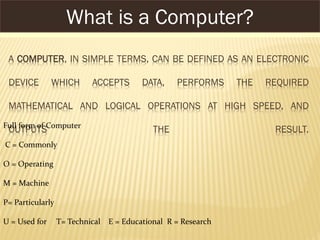
A COMPUTER, IN SIMPLE TERMS, CAN BE DEFINED AS AN ELECTRONIC
DEVICE WHICH ACCEPTS DATA, PERFORMS THE REQUIRED
MATHEMATICAL AND LOGICAL OPERATIONS AT HIGH SPEED, AND
OUTPUTS THE RESULT.
What is a Computer?
Full form of Computer
C = Commonly
O = Operating
M = Machine
P= Particularly
U = Used for T= Technical E = Educational R = Research
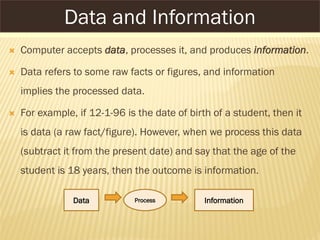
 Computer accepts data, processes it, and produces information.
 Data refers to some raw facts or figures, and information
implies the processed data.
 For example, if 12-1-96 is the date of birth of a student, then it
is data (a raw fact/figure). However, when we process this data
(subtract it from the present date) and say that the age of the
student is 18 years, then the outcome is information.
ProcessData Information
Data and Information
The history of computer starts out/begning with 19th centuary English
mathematics professor name Charles Babbage.He designed the analytical
engine and it was this design that the basic framework of the computers of
today are based on. His design Contained the five Key characcteristics of
modern computers:
 An input device
 Storage for numbers waiting to processed
 A unit to control the task and the sequence of its calculations.
 An output devices
History of Computer
SPEED: COMPUTERS CAN PERFORM MILLIONS OF OPERATIONS PER
SECOND. THE SPEED OF COMPUTERS IS USUALLY GIVEN IN
NANOSECONDS (NS) AND PICOSECONDS (PS), WHERE 1 NS = 1×10⁻⁹
SEC AND 1 PS = 1×10-12 SEC.
VERSATILE: COMPUTERS CAN PERFORM MULTIPLE TASKS OF
DIFFERENT NATURE AT THE SAME TIME.
MEMORY: COMPUTERS HAVE INTERNAL OR PRIMARY MEMORY
(STORAGE SPACE) AS WELL AS EXTERNAL OR SECONDARY MEMORY TO
STORE DATA AND PROGRAMS.
Characteristics of Computers
Accuracy: A computer always gives accurate results, provided the
correct data and instructions are input to it. If the input data is
wrong, then the output will also be erroneous. This is called
garbage-in, garbage-out (GIGO).
Automation: Computers perform a task without any user
intervention.
Diligence: Unlike humans, computers never get tired of a
repetitive task.
Characteristics of Computers
No IQ: Computers do not have any decision-making abilities of
their own. They need guidance to perform various tasks.
Economical: Computers are considered as short-term
investments for achieving long-term gains. They save time,
money, and energy.
Characteristics of Computers
THE WORD ‘GENERATION’, WHEN APPLIED TO COMPUTING, REFERS TO
THE DIFFERENT ADVANCEMENTS IN COMPUTER TECHNOLOGY.
THE FOCUS OF EVERY NEW GENERATION HAS BEEN ON
MINIATURIZATION, SPEED, POWER, AND EFFICIENT COMPUTER
MEMORY.
Generations of Computers
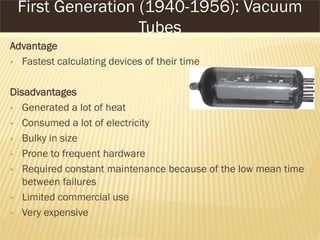
Advantage
 Fastest calculating devices of their time
Disadvantages
 Generated a lot of heat
 Consumed a lot of electricity
 Bulky in size
 Prone to frequent hardware
 Required constant maintenance because of the low mean time
between failures
 Limited commercial use
 Very expensive
First Generation (1940-1956): Vacuum
Tubes
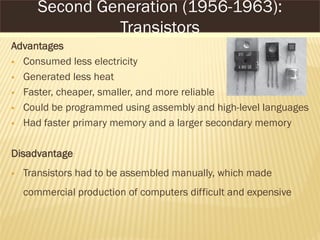
Advantages
 Consumed less electricity
 Generated less heat
 Faster, cheaper, smaller, and more reliable
 Could be programmed using assembly and high-level languages
 Had faster primary memory and a larger secondary memory
Disadvantage
 Transistors had to be assembled manually, which made
commercial production of computers difficult and expensive
Second Generation (1956-1963):
Transistors
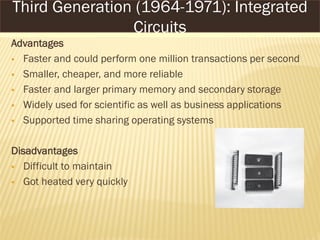
Advantages
 Faster and could perform one million transactions per second
 Smaller, cheaper, and more reliable
 Faster and larger primary memory and secondary storage
 Widely used for scientific as well as business applications
 Supported time sharing operating systems
Disadvantages
 Difficult to maintain
 Got heated very quickly
Third Generation (1964-1971): Integrated
Circuits
Advantages
 Smaller, cheaper, faster, and more reliable
 Consumed less electricity and generated less heat
 Faster and larger primary memory and secondary storage
 Could be used as general-purpose computers
 GUIs enabled people to learn to work with computers very easily
 Lead to widespread use of computers in offices and at homes
 Networks allowed sharing of resources
Disadvantage
 Not intelligent systems
Fourth Generation (1971-1989):
Microprocessors
 Gaming: Computers are programmed to play games such as
chess and checkers. More recent examples of such gaming
systems include PlayStation by Sony.
 Expert systems: Computers are programmed to take decisions
in real-world situations.
 Natural languages: Computers are programmed to understand
and respond to natural human languages.
Fifth Generation (Present and Beyond): Artificial
Intelligence
 Neural networks: Systems are programmed to simulate
intelligence by reproducing the physical connections that take
place in animal brains.
 Robotics: Computers are programmed to look, listen, and react
to other sensory stimuli.
Fifth Generation (Present and Beyond): Artificial
Intelligence
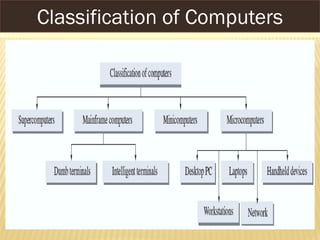
Classification of Computers
SUPERCOMPUTERS
 Fastest, most powerful, and most expensive computer
 Used to process large amounts of data and to solve complex
scientific problems
 Can support thousands of users at the same time
 Mainly used for weather forecasting, nuclear energy research,
aircraft design, automotive design, online banking, etc.
 Some examples of supercomputers are CRAY-1, CRAY-2, Control
Data CYBER 205, and ETA A-10
Supercomputers
MAINFRAME COMPUTERS
 Large-scale computers, but smaller than Supercomputers
 Very expensive
 Need a very large clean room with air conditioning
 Used as servers on the World Wide Web
 Some examples are IBM S/390, Control Data CYBER 176,
and Amdahl 580
Mainframe Computers
MINI COMPUTERS
 Smaller, cheaper, and slower than Mainframes
 Can be used as servers in a networked environment
 Widely used in business, education, hospitals, government
 Some examples are AS/400 computers (IBM Corporation),
Data General Corporation, and Prime Computer
Minicomputers
MICROCOMPUTERS
Desktop PCs
 Most popular model
 Widely used in homes and offices
Laptops
 Very handy and easily portable
 Storage capacity is almost equivalent to that of a desktop
computer
 For input, laptops have a built-in keyboard and a touchpad
 More expensive than desktop computers
Microcomputers
Workstations
 Single-user computers
 Same features as PCs but with higher processing speed
 Have advanced processors, more RAM and storage capacity
 Can be used as servers in a networked environment
Microcomputers
Network Computers
 Designed to be used as terminals in a networked
environment
 Have less processing power, memory, and storage
 Those used to access Internet or Intranet are often known as
Internet PCs or Internet boxes
 Some used in homes do not even have a monitor. They may
be connected to a TV. They are called WebTV
Microcomputers
Handheld Computers
 Single-user computers
 Can fit in one hand
 Have small-sized screens and keyboards
 Some examples of handheld computers are
 Personal Digital Assistants (PDA)
 Cellular Phones
 H/PC Pro Devices
Microcomputers
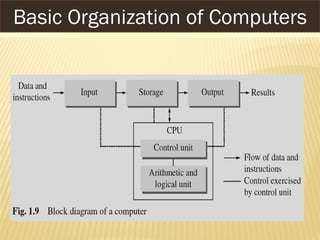
Basic Organization of Computers
 Input: The process of entering data and instructions (also
known as programs) into the computer system
 Storage: The process of saving data and instructions
permanently in the computer so that they can be used for
processing. A computer has two types of storage areas:
 Primary storage (main memory) is the storage area that is
directly accessible by the CPU at very high speeds
 Secondary storage (secondary or auxiliary memory)
supplements the limited storage capacity of the primary
memory
Basic Organization of Computers
 Processing: The process of performing operations on the
data as per the instructions specified by the user (program)
 Output: The process of giving the result of data processing
to the outside world (external to the computer system)
 Control Unit: It is the central nervous system of the computer
system that manages and controls all the other components
Basic Organization of Computers

Computer fundamental

  • 1.
  • 2.
    A COMPUTER, INSIMPLE TERMS, CAN BE DEFINED AS AN ELECTRONIC DEVICE WHICH ACCEPTS DATA, PERFORMS THE REQUIRED MATHEMATICAL AND LOGICAL OPERATIONS AT HIGH SPEED, AND OUTPUTS THE RESULT. What is a Computer? Full form of Computer C = Commonly O = Operating M = Machine P= Particularly U = Used for T= Technical E = Educational R = Research
  • 3.
     Computer acceptsdata, processes it, and produces information.  Data refers to some raw facts or figures, and information implies the processed data.  For example, if 12-1-96 is the date of birth of a student, then it is data (a raw fact/figure). However, when we process this data (subtract it from the present date) and say that the age of the student is 18 years, then the outcome is information. ProcessData Information Data and Information
  • 4.
    The history ofcomputer starts out/begning with 19th centuary English mathematics professor name Charles Babbage.He designed the analytical engine and it was this design that the basic framework of the computers of today are based on. His design Contained the five Key characcteristics of modern computers:  An input device  Storage for numbers waiting to processed  A unit to control the task and the sequence of its calculations.  An output devices History of Computer
  • 5.
    SPEED: COMPUTERS CANPERFORM MILLIONS OF OPERATIONS PER SECOND. THE SPEED OF COMPUTERS IS USUALLY GIVEN IN NANOSECONDS (NS) AND PICOSECONDS (PS), WHERE 1 NS = 1×10⁻⁹ SEC AND 1 PS = 1×10-12 SEC. VERSATILE: COMPUTERS CAN PERFORM MULTIPLE TASKS OF DIFFERENT NATURE AT THE SAME TIME. MEMORY: COMPUTERS HAVE INTERNAL OR PRIMARY MEMORY (STORAGE SPACE) AS WELL AS EXTERNAL OR SECONDARY MEMORY TO STORE DATA AND PROGRAMS. Characteristics of Computers
  • 6.
    Accuracy: A computeralways gives accurate results, provided the correct data and instructions are input to it. If the input data is wrong, then the output will also be erroneous. This is called garbage-in, garbage-out (GIGO). Automation: Computers perform a task without any user intervention. Diligence: Unlike humans, computers never get tired of a repetitive task. Characteristics of Computers
  • 7.
    No IQ: Computersdo not have any decision-making abilities of their own. They need guidance to perform various tasks. Economical: Computers are considered as short-term investments for achieving long-term gains. They save time, money, and energy. Characteristics of Computers
  • 8.
    THE WORD ‘GENERATION’,WHEN APPLIED TO COMPUTING, REFERS TO THE DIFFERENT ADVANCEMENTS IN COMPUTER TECHNOLOGY. THE FOCUS OF EVERY NEW GENERATION HAS BEEN ON MINIATURIZATION, SPEED, POWER, AND EFFICIENT COMPUTER MEMORY. Generations of Computers
  • 9.
    Advantage  Fastest calculatingdevices of their time Disadvantages  Generated a lot of heat  Consumed a lot of electricity  Bulky in size  Prone to frequent hardware  Required constant maintenance because of the low mean time between failures  Limited commercial use  Very expensive First Generation (1940-1956): Vacuum Tubes
  • 10.
    Advantages  Consumed lesselectricity  Generated less heat  Faster, cheaper, smaller, and more reliable  Could be programmed using assembly and high-level languages  Had faster primary memory and a larger secondary memory Disadvantage  Transistors had to be assembled manually, which made commercial production of computers difficult and expensive Second Generation (1956-1963): Transistors
  • 11.
    Advantages  Faster andcould perform one million transactions per second  Smaller, cheaper, and more reliable  Faster and larger primary memory and secondary storage  Widely used for scientific as well as business applications  Supported time sharing operating systems Disadvantages  Difficult to maintain  Got heated very quickly Third Generation (1964-1971): Integrated Circuits
  • 12.
    Advantages  Smaller, cheaper,faster, and more reliable  Consumed less electricity and generated less heat  Faster and larger primary memory and secondary storage  Could be used as general-purpose computers  GUIs enabled people to learn to work with computers very easily  Lead to widespread use of computers in offices and at homes  Networks allowed sharing of resources Disadvantage  Not intelligent systems Fourth Generation (1971-1989): Microprocessors
  • 13.
     Gaming: Computersare programmed to play games such as chess and checkers. More recent examples of such gaming systems include PlayStation by Sony.  Expert systems: Computers are programmed to take decisions in real-world situations.  Natural languages: Computers are programmed to understand and respond to natural human languages. Fifth Generation (Present and Beyond): Artificial Intelligence
  • 14.
     Neural networks:Systems are programmed to simulate intelligence by reproducing the physical connections that take place in animal brains.  Robotics: Computers are programmed to look, listen, and react to other sensory stimuli. Fifth Generation (Present and Beyond): Artificial Intelligence
  • 15.
  • 16.
    SUPERCOMPUTERS  Fastest, mostpowerful, and most expensive computer  Used to process large amounts of data and to solve complex scientific problems  Can support thousands of users at the same time  Mainly used for weather forecasting, nuclear energy research, aircraft design, automotive design, online banking, etc.  Some examples of supercomputers are CRAY-1, CRAY-2, Control Data CYBER 205, and ETA A-10 Supercomputers
  • 17.
    MAINFRAME COMPUTERS  Large-scalecomputers, but smaller than Supercomputers  Very expensive  Need a very large clean room with air conditioning  Used as servers on the World Wide Web  Some examples are IBM S/390, Control Data CYBER 176, and Amdahl 580 Mainframe Computers
  • 18.
    MINI COMPUTERS  Smaller,cheaper, and slower than Mainframes  Can be used as servers in a networked environment  Widely used in business, education, hospitals, government  Some examples are AS/400 computers (IBM Corporation), Data General Corporation, and Prime Computer Minicomputers
  • 19.
    MICROCOMPUTERS Desktop PCs  Mostpopular model  Widely used in homes and offices Laptops  Very handy and easily portable  Storage capacity is almost equivalent to that of a desktop computer  For input, laptops have a built-in keyboard and a touchpad  More expensive than desktop computers Microcomputers
  • 20.
    Workstations  Single-user computers Same features as PCs but with higher processing speed  Have advanced processors, more RAM and storage capacity  Can be used as servers in a networked environment Microcomputers
  • 21.
    Network Computers  Designedto be used as terminals in a networked environment  Have less processing power, memory, and storage  Those used to access Internet or Intranet are often known as Internet PCs or Internet boxes  Some used in homes do not even have a monitor. They may be connected to a TV. They are called WebTV Microcomputers
  • 22.
    Handheld Computers  Single-usercomputers  Can fit in one hand  Have small-sized screens and keyboards  Some examples of handheld computers are  Personal Digital Assistants (PDA)  Cellular Phones  H/PC Pro Devices Microcomputers
  • 23.
  • 24.
     Input: Theprocess of entering data and instructions (also known as programs) into the computer system  Storage: The process of saving data and instructions permanently in the computer so that they can be used for processing. A computer has two types of storage areas:  Primary storage (main memory) is the storage area that is directly accessible by the CPU at very high speeds  Secondary storage (secondary or auxiliary memory) supplements the limited storage capacity of the primary memory Basic Organization of Computers
  • 25.
     Processing: Theprocess of performing operations on the data as per the instructions specified by the user (program)  Output: The process of giving the result of data processing to the outside world (external to the computer system)  Control Unit: It is the central nervous system of the computer system that manages and controls all the other components Basic Organization of Computers