Mr. T.SOMASUNDARAM
ASSISTANT PROFESSOR
DEPT OF MANAGEMENT
KRISTU JAYANTI COLLEGE (AUTONOMOUS),
BENGALURU
INFORMATION TECHNOLOGY FOR
BUSINESS (ITB)
UNIT – 1
INFORMATION TECHNOLOGY &
INFORMATION SYSTEM
Introduction to Information Technology (IT),
Introduction to Information System (IS), Difference
between IS & IT, Need for Information System,
Information systems in the enterprise, Impact of
information technology on business (Business Data
Processing, Intra and Inter organizational
communication using network technology, Business
process and Knowledge process outsourcing), Managers
and activities in IS, Importance of IS in decision making
and strategy building, Information systems and
subsystems.
Introduction:
“ Information is a collection of facts (data) organized in
some manner so that they are meaningful to a recipient”.
“ Information is a collection of facts organized so that
they have additional value beyond the value of facts
themselves”.
(E.g.) Student name along with address & qualification.
“Information is data that have been shaped into a form
that is meaningful and useful to human beings”.
“Information is data that has been categorized, counted
and thus given meaning, relevance or purpose”.
INFORMATION TECHNOLOGY
INFORMATION
Definition:
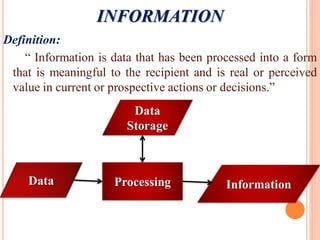
“ Information is data that has been processed into a form
that is meaningful to the recipient and is real or perceived
value in current or prospective actions or decisions.”
Data
Storage
Information
Data Processing
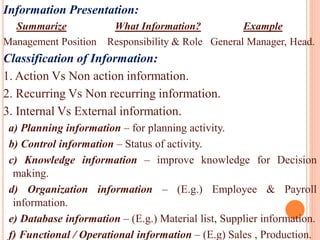
Information Presentation:
Summarize What Information? Example
Management Position Responsibility & Role General Manager, Head.
Classification of Information:
1. Action Vs Non action information.
2. Recurring Vs Non recurring information.
3. Internal Vs External information.
a) Planning information – for planning activity.
b) Control information – Status of activity.
c) Knowledge information – improve knowledge for Decision
making.
d) Organization information – (E.g.) Employee & Payroll
information.
e) Database information – (E.g.) Material list, Supplier information.
f) Functional / Operational information – (E.g) Sales , Production.
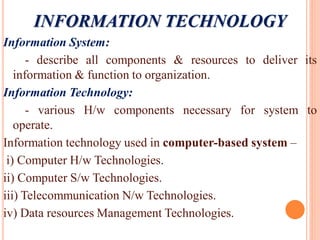
INFORMATION TECHNOLOGY
Information System:
- describe all components & resources to deliver its
information & function to organization.
Information Technology:
- various H/w components necessary for system to
operate.
Information technology used in computer-based system –
i) Computer H/w Technologies.
ii) Computer S/w Technologies.
iii) Telecommunication N/w Technologies.
iv) Data resources Management Technologies.
Characteristics:
- improve representation of an entity.
- updates the level of knowledge.
- surprise value, reduces uncertainty.
- aids in Decision making.
(E.g.) Particulars of Data Characteristics
* Sales data - represents sales information
* Library data - represents information book, volume etc.
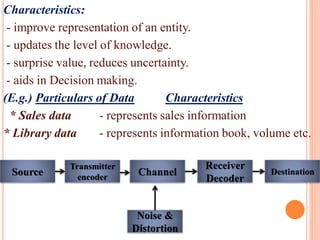
Source
Transmitter
encoder
Noise &
Distortion
Channel
Receiver
Decoder
Destination
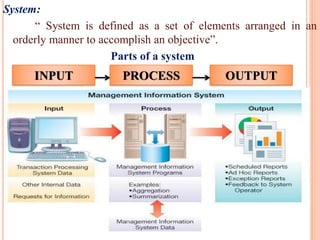
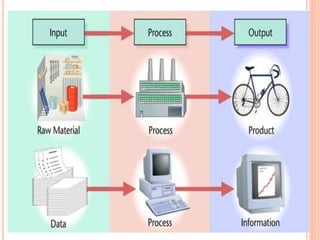
System:
“ System is defined as a set of elements arranged in an
orderly manner to accomplish an objective”.
Parts of a system
INPUT PROCESS OUTPUT
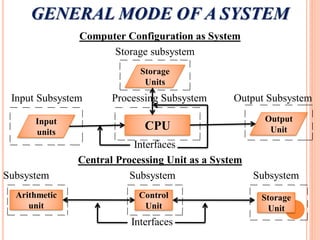
GENERAL MODE OF A SYSTEM
Computer Configuration as System
Storage subsystem
Input Subsystem Processing Subsystem Output Subsystem
Interfaces
Central Processing Unit as a System
Subsystem Subsystem Subsystem
Interfaces
Storage
Units
Input
units
Output
Unit
CPU
Arithmetic
unit
Control
Unit
Storage
Unit
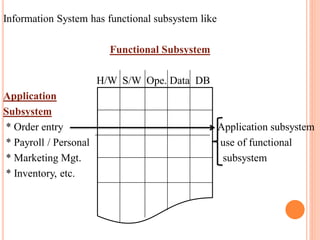
Information System has functional subsystem like
Functional Subsystem
H/W S/W Ope. Data DB
Application
Subsystem
* Order entry Application subsystem
* Payroll / Personal use of functional
* Marketing Mgt. subsystem
* Inventory, etc.
Introduction:
Information System (IS) refers to a computer-based system
that provides information to the management of an
organization which enables them to make decisions.
IS helps management in decision making.
It contain information about significant people, places and
things within the organization or in the environment
surrounding it.
Definition:
“Information System can be defined as a set of interrelated
components (data, software, hardware, people and procedure)
that work together to collect, process, store and distribute
information to help organizations in decision making”.
INFORMATION SYSTEM
INFORMATION SYSTEM
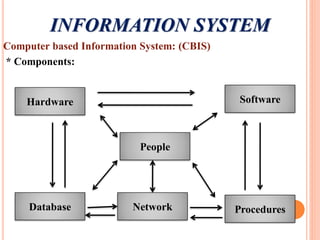
Computer based Information System: (CBIS)
* Components:
Hardware
People
Database Network Procedures
Software
COMPONENTS OF INFOMRATION
SYSTEM
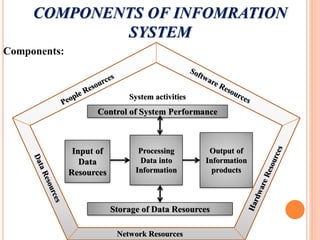
Components:
Control of System Performance
Storage of Data Resources
Input of
Data
Resources
Processing
Data into
Information
Output of
Information
products
Network Resources
System activities
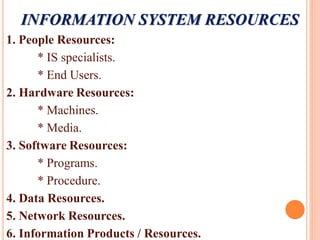
INFORMATION SYSTEM RESOURCES
1. People Resources:
* IS specialists.
* End Users.
2. Hardware Resources:
* Machines.
* Media.
3. Software Resources:
* Programs.
* Procedure.
4. Data Resources.
5. Network Resources.
6. Information Products / Resources.
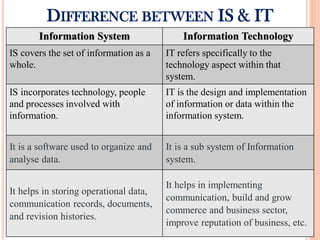
DIFFERENCE BETWEEN IS & IT
Information System Information Technology
IS covers the set of information as a
whole.
IT refers specifically to the
technology aspect within that
system.
IS incorporates technology, people
and processes involved with
information.
IT is the design and implementation
of information or data within the
information system.
It is a software used to organize and
analyse data.
It is a sub system of Information
system.
It helps in storing operational data,
communication records, documents,
and revision histories.
It helps in implementing
communication, build and grow
commerce and business sector,
improve reputation of business, etc.
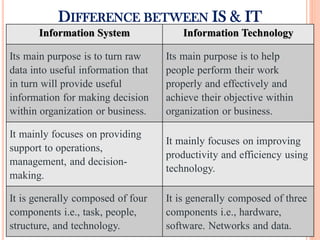
DIFFERENCE BETWEEN IS & IT
Information System Information Technology
Its main purpose is to turn raw
data into useful information that
in turn will provide useful
information for making decision
within organization or business.
Its main purpose is to help
people perform their work
properly and effectively and
achieve their objective within
organization or business.
It mainly focuses on providing
support to operations,
management, and decision-
making.
It mainly focuses on improving
productivity and efficiency using
technology.
It is generally composed of four
components i.e., task, people,
structure, and technology.
It is generally composed of three
components i.e., hardware,
software. Networks and data.
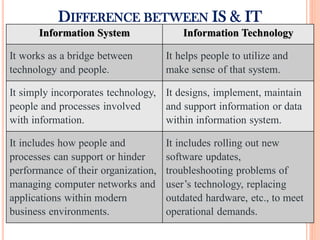
DIFFERENCE BETWEEN IS & IT
Information System Information Technology
It works as a bridge between
technology and people.
It helps people to utilize and
make sense of that system.
It simply incorporates technology,
people and processes involved
with information.
It designs, implement, maintain
and support information or data
within information system.
It includes how people and
processes can support or hinder
performance of their organization,
managing computer networks and
applications within modern
business environments.
It includes rolling out new
software updates,
troubleshooting problems of
user’s technology, replacing
outdated hardware, etc., to meet
operational demands.
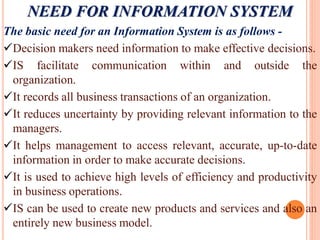
NEED FOR INFORMATION SYSTEM
The basic need for an Information System is as follows -
Decision makers need information to make effective decisions.
IS facilitate communication within and outside the
organization.
It records all business transactions of an organization.
It reduces uncertainty by providing relevant information to the
managers.
It helps management to access relevant, accurate, up-to-date
information in order to make accurate decisions.
It is used to achieve high levels of efficiency and productivity
in business operations.
IS can be used to create new products and services and also an
entirely new business model.
NEED FOR INFORMATION SYSTEM
An effective information system helps to protect the data
from unauthorized access.
A computer based information system reduces paper work.
It helps to communicate and share information with people
online through e-mails, messengers and other social
networking tools like Facebook, Twitter, etc.
It is used to collect data from multiple online sources,
analyze it and generate actionable information to help the
management in decision making.
It is used to manage people and business processes –
anywhere, anytime.
It is used to solve complex business queries related with
business transactions.
INFORMATION SYSTEM IN THE ENTERPRISE
Today, companies use modern technology to streamline
and automate these operations.
IS plays a crucial role in data processing and decision
making.
Information System is very essential for running and
managing a business today.
Information System is a way to collect, store and share
data related to your business.
Every businesses can save time and money while making
smarter decisions with the help of information system.
A company’s internal departments like marketing and
sales can communicate better and share information more
easily.
INFORMATION SYSTEM IN THE ENTERPRISE
Information System supports the business organizations in the
following way –
a) Support the business process – it treats inputs as a request from
the customer and outputs as service to customer and supports
current operations and use the system to influence further way of
working.
b) Support Operations of a Business Organizations – it supports
business operations of organization by giving timely information,
maintenance & enhancement which provides flexibility in the
operations of organizations.
c) Support Decision making – helps employees make decisions in
their day-to-day activities and supports managers in decision
making to meet goals & objectives.
d) Strategies for an organization – it help organization to develop
appropriate strategies for the business.
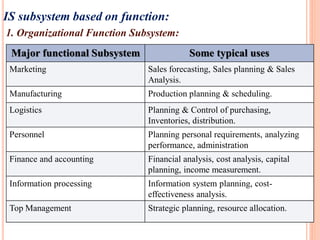
IS subsystem based on function:
1. Organizational Function Subsystem:
Major functional Subsystem Some typical uses
Marketing Sales forecasting, Sales planning & Sales
Analysis.
Manufacturing Production planning & scheduling.
Logistics Planning & Control of purchasing,
Inventories, distribution.
Personnel Planning personal requirements, analyzing
performance, administration
Finance and accounting Financial analysis, cost analysis, capital
planning, income measurement.
Information processing Information system planning, cost-
effectiveness analysis.
Top Management Strategic planning, resource allocation.
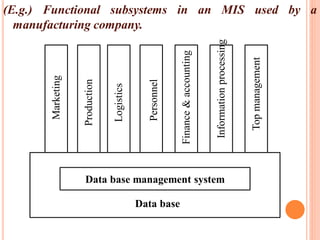
(E.g.) Functional subsystems in an MIS used by a
manufacturing company.
Data base management system
Data base
Marketing
Production
Logistics
Personnel
Finance
&
accounting
Information
processing
Top
management
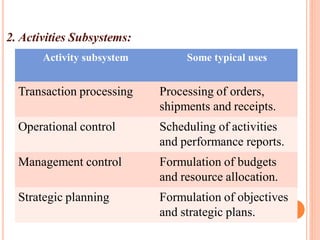
2. Activities Subsystems:
Activity subsystem Some typical uses
Transaction processing Processing of orders,
shipments and receipts.
Operational control Scheduling of activities
and performance reports.
Management control Formulation of budgets
and resource allocation.
Strategic planning Formulation of objectives
and strategic plans.
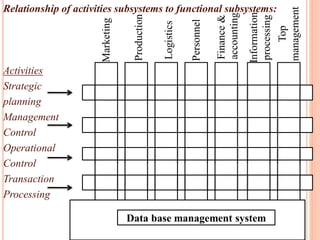
Relationship of activities subsystems to functional subsystems:
Activities
Strategic
planning
Management
Control
Operational
Control
Transaction
Processing
Data base management system
Marketing
Production
Logistics
Personnel
Finance
&
accounting
Information
processing
Top
management
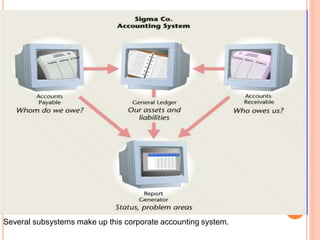
Several subsystems make up this corporate accounting system.
IMPACT OF IT ON BUSINESS
Computer-based information systems automate many steps
in business processes like client’s credit, generating invoice,
shipping order, etc.
The major impacts of IT on business are -
a) Information Sharing:
 Anyone with the organization can share or access
organization’s data directly or indirectly with the help of IT.
 It change the flow of information, make more people to
access and share which eliminates delays in decision
making.
b) Communication
 It gives tools like email, video conferencing, SMS, etc. for
quick and effective communication to the business world.
c) Business Models:
 New IT frequently changes the way a business works and
supports entirely new business models.
 (E.g.) Downloading Kindle e-book from Amazon, buying
online, downloading music track, etc.
d) Improved Security:
 Technology used to protect financial data, confidential
executive decisions and other information that leads to
competitive advantages.
e) Cost effectiveness:
 IT can be effective way to make your business more
productive and profitable.
 People are able to operate their businesses 24x7, even from
remote locations only due to advent of IT.
f) Collaboration and Outsourcing:
 Business technology allows companies to outsource business
functions to other businesses in national & international
business environment.
 Outsourcing help companies lower costs and focus on
completing business function they do best.
g) Globalization:
 Technology has driven the development of e-commerce,
which has brought new dimensions to the globalization of
companies.
f) Cloud Computing:
 It is a internet based computing service, where resources are
shared to allow you to access information and computer
resources from anywhere, service over the internet, at
another location, etc.
BUSINESS PROCESS OUTSOURCING (BPO) &
KNOWLEDGE PROCESS OUTSOURCING (KPO)
Business Process Outsourcing (BPO):
“BPO can be defined as the act of giving a other party
responsibility of performing what would otherwise be an
internal system or service.”
(E.g.) Insurance company outsource their claims processing,
banks outsource their loan processing, call centres, etc.
BPO is divided into two categories –
i) bank office outsourcing which includes internal business
functions like billing or purchasing.
ii) front office outsourcing which includes customer-related
services such as marketing or technical support.
Many kinds of work that can be outsourced to BPO’s
are –
 Call / Help centres
 Medical Transcription
 Billing
 Payroll Processing
 Data Entry
 IT Services
 HR functions.
Due to proximity of IT industry to BPO, this industry
is also termed as ITES (Information Technology
Enabled Service).
ADVANTAGES OF BPO
1. Achieve Cost reduction – reduce and bring administrative
and other costs under control.
2. Key in on company’s main business – management devote
more time to building the company’s core businesses.
3. Obtain outside expertise – it ensures that domain experts
from another company provide the needed guidance and skills.
4. Meet constantly changing customer demands – BPO
vendors provide management with flexible and scalable
services to meet customer’s changing requirements.
5. Achieving revenue increases – company focus on
increasing their sales and market share, develop new products
and enhance customer service & satisfactions.
BUSINESS PROCESS OUTSOURCING (BPO) &
KNOWLEDGE PROCESS OUTSOURCING (KPO)
Knowledge Process Outsourcing (KPO):
“KPO is the allocation of relatively high level tasks to
an outside organization or a different group (in different
geographic location) within the same organization.”
KPO is one step extension of BPO.
KPO involves off shoring of knowledge intensive business
processes that require specialized domain expertise, thus
delivering high value to organizations by providing business
expertise rather than just process expertise.
 KPO is involved in services like valuation and investment
research, patent filing, legal and insurance, etc.
ADVANTAGES OF KPO
1. Accelerate Reengineering benefits – aims for drastic
improvements in critical measures of performance such as
cost, service, quality and speed.
2. Access to top class capabilities – good and competent
providers make extensive investments in technology, people
and methodologies, which helps to avoid cost of acquiring
technology.
3. Optimal use of resources – it allows organization to
redirect its resources from non core activities toward activities
which serve the core need of customer.
4. Solution to difficult problems – it is an option for
addressing the problem of managing difficult activities
requiring core technical skills.
ADVANTAGES OF KPO
5. Focus on main business – It allows a company to focus on
its core business by having operational non core functions
assumed by an outside expert.
6. Best use of financial resources – it is always in a fix to
decide where to invest the capital funds, which justifies non-
core capital investments when core areas directly related to
producing a product and improve certain financial
measurements of company.
7. Cost Reduction – it help company to reduce its costs as an
outside provider’s lower cost structure, reduces company’s
operating costs.
8. Minimum Risk – tremendous risks are associated with the
investments made by the organizations.
MANAGERS AND ACTIVITIES IN IS
Information systems manager are also often called an
Information Technology (IT) Managers.
Managers are responsible for managing the information
system of their employer.
They involved with any task related to installing, upgrading
or repairing these information systems.
Roles and Responsibilities of IS / IT Manager:
 Creating and managing the various database used by the
organization.
 Implementing technology, directing the work of systems and
business analysts, developers, support specialists and other
computer related workers in the organization.
 Evaluating user needs and system functionality, ensuring that IT
facilities meet these needs.
 Installing and maintaining network connectivity for the various
machines used within the organization.
 Planning, developing and implementing the IT budget and
obtain competitive prices from suppliers to ensure cost-
effectiveness.
 Scheduling upgrades and security backups of hardware and
software systems.
 Ensuring the smooth running of all IT based systems in the
organization.
 Providing data security from internal and external attacks.
 Arranging technical training session for the new IT support staff.
 Contributing to organizational policies regarding quality
standards.
Activities in Information System:
The major activities in an information system are -
1. Input – it captures or collects raw data within organization of
from its external environment.
2. Processing – it converts this raw input into a meaningful form,
which includes calculating, comparing, sorting, classifying and
summarizing, etc.
3. Output – it transfers processed information to people who will
use it or to activities for which it will be used.
4. Storage – it is information system activity in which data and
information are retained in an organized manner for later use.
5. Feedback – its control the performance, which require feedback
that returned to appropriate members of organizations to help them
evaluate or correct the input stage.
IMPORTANCE OF IS IN DECISION MAKING &
STRATEGY BUILDING
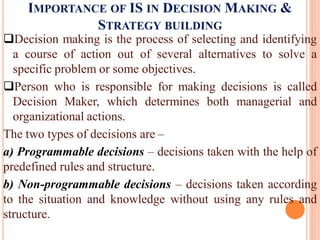
Decision making is the process of selecting and identifying
a course of action out of several alternatives to solve a
specific problem or some objectives.
Person who is responsible for making decisions is called
Decision Maker, which determines both managerial and
organizational actions.
The two types of decisions are –
a) Programmable decisions – decisions taken with the help of
predefined rules and structure.
b) Non-programmable decisions – decisions taken according
to the situation and knowledge without using any rules and
structure.
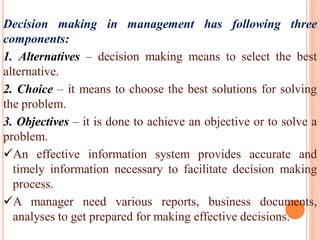
Decision making in management has following three
components:
1. Alternatives – decision making means to select the best
alternative.
2. Choice – it means to choose the best solutions for solving
the problem.
3. Objectives – it is done to achieve an objective or to solve a
problem.
An effective information system provides accurate and
timely information necessary to facilitate decision making
process.
A manager need various reports, business documents,
analyses to get prepared for making effective decisions.
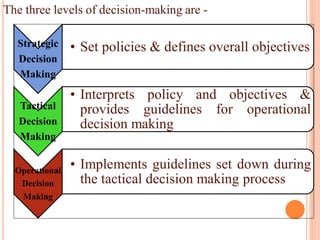
The three levels of decision-making are -
Strategic
Decision
Making
• Set policies & defines overall objectives
Tactical
Decision
Making
• Interprets policy and objectives &
provides guidelines for operational
decision making
Operational
Decision
Making
• Implements guidelines set down during
the tactical decision making process
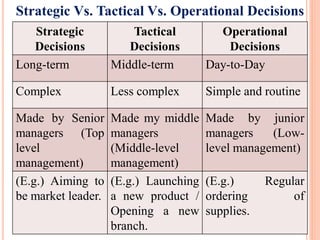
Strategic Vs. Tactical Vs. Operational Decisions
Strategic
Decisions
Tactical
Decisions
Operational
Decisions
Long-term Middle-term Day-to-Day
Complex Less complex Simple and routine
Made by Senior
managers (Top
level
management)
Made my middle
managers
(Middle-level
management)
Made by junior
managers (Low-
level management)
(E.g.) Aiming to
be market leader.
(E.g.) Launching
a new product /
Opening a new
branch.
(E.g.) Regular
ordering of
supplies.
INFORMATION SYSTEMS AND SUBSYSTEMS
A System may be seen as a set of sub-system and it has well-
defined specific task.
All sub-system work in coordination to achieve overall
objective of the system.
Information system is set of people, process and information
technology to achieve a business objective.
a) People: Individual who interact in a business process.
b) Business Process: Any sequence of events or tasks that
must be performed for a business to operate.
c) Information technology (IT): Use of computers to store,
retrieve, transmit, manipulate and share information.
The following are the sub-systems of Information System:
1. Transaction Processing System (TPS):
It is used to record day-to-day business transaction of the
organization.
It is used by non management staff (Clerical staff) to provide
regular business activities.
2. Management Information System (MIS):
It is designed to take relatively raw data and convert them into a
summarized and aggregate form for manager, in report format.
It is used by operational management (low-level & operational
supervisor) to monitor and control transaction processing activities
at clerical level.
3. Decision Support System (DSS):
It is a computer-based information system that supports business or
organizational decision making activities.
Tactical managers are responsible for ensuring plans & targets.
4. Executive Information System (EIS):
It is also known as Expert Support System (ESS), type of
management support system that facilities and supports senior
executive information and decision making needs.
5. Office Automation System (OAS):
It is a software system typically used to create, collect, store,
transmit and digitally manipulate office information needed to
accomplish desired task.
It is to execute a variety of office operations like word
processing, electronic filling and e-mail.
6. Expert System (ES):
It is also known as knowledge-based systems designed to act as
expert in particular domain.
It needs Knowledge Engineer to design expert system and
translates the rules into terms that a computer can understand.
ITB - UNIT 1.pdf

ITB - UNIT 1.pdf

  • 1.
    Mr. T.SOMASUNDARAM ASSISTANT PROFESSOR DEPTOF MANAGEMENT KRISTU JAYANTI COLLEGE (AUTONOMOUS), BENGALURU INFORMATION TECHNOLOGY FOR BUSINESS (ITB)
  • 2.
    UNIT – 1 INFORMATIONTECHNOLOGY & INFORMATION SYSTEM Introduction to Information Technology (IT), Introduction to Information System (IS), Difference between IS & IT, Need for Information System, Information systems in the enterprise, Impact of information technology on business (Business Data Processing, Intra and Inter organizational communication using network technology, Business process and Knowledge process outsourcing), Managers and activities in IS, Importance of IS in decision making and strategy building, Information systems and subsystems.
  • 3.
    Introduction: “ Information isa collection of facts (data) organized in some manner so that they are meaningful to a recipient”. “ Information is a collection of facts organized so that they have additional value beyond the value of facts themselves”. (E.g.) Student name along with address & qualification. “Information is data that have been shaped into a form that is meaningful and useful to human beings”. “Information is data that has been categorized, counted and thus given meaning, relevance or purpose”. INFORMATION TECHNOLOGY
  • 4.
    INFORMATION Definition: “ Information isdata that has been processed into a form that is meaningful to the recipient and is real or perceived value in current or prospective actions or decisions.” Data Storage Information Data Processing
  • 5.
    Information Presentation: Summarize WhatInformation? Example Management Position Responsibility & Role General Manager, Head. Classification of Information: 1. Action Vs Non action information. 2. Recurring Vs Non recurring information. 3. Internal Vs External information. a) Planning information – for planning activity. b) Control information – Status of activity. c) Knowledge information – improve knowledge for Decision making. d) Organization information – (E.g.) Employee & Payroll information. e) Database information – (E.g.) Material list, Supplier information. f) Functional / Operational information – (E.g) Sales , Production.
  • 6.
    INFORMATION TECHNOLOGY Information System: -describe all components & resources to deliver its information & function to organization. Information Technology: - various H/w components necessary for system to operate. Information technology used in computer-based system – i) Computer H/w Technologies. ii) Computer S/w Technologies. iii) Telecommunication N/w Technologies. iv) Data resources Management Technologies.
  • 7.
    Characteristics: - improve representationof an entity. - updates the level of knowledge. - surprise value, reduces uncertainty. - aids in Decision making. (E.g.) Particulars of Data Characteristics * Sales data - represents sales information * Library data - represents information book, volume etc. Source Transmitter encoder Noise & Distortion Channel Receiver Decoder Destination
  • 8.
    System: “ System isdefined as a set of elements arranged in an orderly manner to accomplish an objective”. Parts of a system INPUT PROCESS OUTPUT
  • 10.
    GENERAL MODE OFA SYSTEM Computer Configuration as System Storage subsystem Input Subsystem Processing Subsystem Output Subsystem Interfaces Central Processing Unit as a System Subsystem Subsystem Subsystem Interfaces Storage Units Input units Output Unit CPU Arithmetic unit Control Unit Storage Unit
  • 11.
    Information System hasfunctional subsystem like Functional Subsystem H/W S/W Ope. Data DB Application Subsystem * Order entry Application subsystem * Payroll / Personal use of functional * Marketing Mgt. subsystem * Inventory, etc.
  • 12.
    Introduction: Information System (IS)refers to a computer-based system that provides information to the management of an organization which enables them to make decisions. IS helps management in decision making. It contain information about significant people, places and things within the organization or in the environment surrounding it. Definition: “Information System can be defined as a set of interrelated components (data, software, hardware, people and procedure) that work together to collect, process, store and distribute information to help organizations in decision making”. INFORMATION SYSTEM
  • 13.
    INFORMATION SYSTEM Computer basedInformation System: (CBIS) * Components: Hardware People Database Network Procedures Software
  • 14.
    COMPONENTS OF INFOMRATION SYSTEM Components: Controlof System Performance Storage of Data Resources Input of Data Resources Processing Data into Information Output of Information products Network Resources System activities
  • 15.
    INFORMATION SYSTEM RESOURCES 1.People Resources: * IS specialists. * End Users. 2. Hardware Resources: * Machines. * Media. 3. Software Resources: * Programs. * Procedure. 4. Data Resources. 5. Network Resources. 6. Information Products / Resources.
  • 16.
    DIFFERENCE BETWEEN IS& IT Information System Information Technology IS covers the set of information as a whole. IT refers specifically to the technology aspect within that system. IS incorporates technology, people and processes involved with information. IT is the design and implementation of information or data within the information system. It is a software used to organize and analyse data. It is a sub system of Information system. It helps in storing operational data, communication records, documents, and revision histories. It helps in implementing communication, build and grow commerce and business sector, improve reputation of business, etc.
  • 17.
    DIFFERENCE BETWEEN IS& IT Information System Information Technology Its main purpose is to turn raw data into useful information that in turn will provide useful information for making decision within organization or business. Its main purpose is to help people perform their work properly and effectively and achieve their objective within organization or business. It mainly focuses on providing support to operations, management, and decision- making. It mainly focuses on improving productivity and efficiency using technology. It is generally composed of four components i.e., task, people, structure, and technology. It is generally composed of three components i.e., hardware, software. Networks and data.
  • 18.
    DIFFERENCE BETWEEN IS& IT Information System Information Technology It works as a bridge between technology and people. It helps people to utilize and make sense of that system. It simply incorporates technology, people and processes involved with information. It designs, implement, maintain and support information or data within information system. It includes how people and processes can support or hinder performance of their organization, managing computer networks and applications within modern business environments. It includes rolling out new software updates, troubleshooting problems of user’s technology, replacing outdated hardware, etc., to meet operational demands.
  • 19.
    NEED FOR INFORMATIONSYSTEM The basic need for an Information System is as follows - Decision makers need information to make effective decisions. IS facilitate communication within and outside the organization. It records all business transactions of an organization. It reduces uncertainty by providing relevant information to the managers. It helps management to access relevant, accurate, up-to-date information in order to make accurate decisions. It is used to achieve high levels of efficiency and productivity in business operations. IS can be used to create new products and services and also an entirely new business model.
  • 20.
    NEED FOR INFORMATIONSYSTEM An effective information system helps to protect the data from unauthorized access. A computer based information system reduces paper work. It helps to communicate and share information with people online through e-mails, messengers and other social networking tools like Facebook, Twitter, etc. It is used to collect data from multiple online sources, analyze it and generate actionable information to help the management in decision making. It is used to manage people and business processes – anywhere, anytime. It is used to solve complex business queries related with business transactions.
  • 21.
    INFORMATION SYSTEM INTHE ENTERPRISE Today, companies use modern technology to streamline and automate these operations. IS plays a crucial role in data processing and decision making. Information System is very essential for running and managing a business today. Information System is a way to collect, store and share data related to your business. Every businesses can save time and money while making smarter decisions with the help of information system. A company’s internal departments like marketing and sales can communicate better and share information more easily.
  • 22.
    INFORMATION SYSTEM INTHE ENTERPRISE Information System supports the business organizations in the following way – a) Support the business process – it treats inputs as a request from the customer and outputs as service to customer and supports current operations and use the system to influence further way of working. b) Support Operations of a Business Organizations – it supports business operations of organization by giving timely information, maintenance & enhancement which provides flexibility in the operations of organizations. c) Support Decision making – helps employees make decisions in their day-to-day activities and supports managers in decision making to meet goals & objectives. d) Strategies for an organization – it help organization to develop appropriate strategies for the business.
  • 23.
    IS subsystem basedon function: 1. Organizational Function Subsystem: Major functional Subsystem Some typical uses Marketing Sales forecasting, Sales planning & Sales Analysis. Manufacturing Production planning & scheduling. Logistics Planning & Control of purchasing, Inventories, distribution. Personnel Planning personal requirements, analyzing performance, administration Finance and accounting Financial analysis, cost analysis, capital planning, income measurement. Information processing Information system planning, cost- effectiveness analysis. Top Management Strategic planning, resource allocation.
  • 24.
    (E.g.) Functional subsystemsin an MIS used by a manufacturing company. Data base management system Data base Marketing Production Logistics Personnel Finance & accounting Information processing Top management
  • 25.
    2. Activities Subsystems: Activitysubsystem Some typical uses Transaction processing Processing of orders, shipments and receipts. Operational control Scheduling of activities and performance reports. Management control Formulation of budgets and resource allocation. Strategic planning Formulation of objectives and strategic plans.
  • 26.
    Relationship of activitiessubsystems to functional subsystems: Activities Strategic planning Management Control Operational Control Transaction Processing Data base management system Marketing Production Logistics Personnel Finance & accounting Information processing Top management
  • 27.
    Several subsystems makeup this corporate accounting system.
  • 28.
    IMPACT OF ITON BUSINESS Computer-based information systems automate many steps in business processes like client’s credit, generating invoice, shipping order, etc. The major impacts of IT on business are - a) Information Sharing:  Anyone with the organization can share or access organization’s data directly or indirectly with the help of IT.  It change the flow of information, make more people to access and share which eliminates delays in decision making. b) Communication  It gives tools like email, video conferencing, SMS, etc. for quick and effective communication to the business world.
  • 29.
    c) Business Models: New IT frequently changes the way a business works and supports entirely new business models.  (E.g.) Downloading Kindle e-book from Amazon, buying online, downloading music track, etc. d) Improved Security:  Technology used to protect financial data, confidential executive decisions and other information that leads to competitive advantages. e) Cost effectiveness:  IT can be effective way to make your business more productive and profitable.  People are able to operate their businesses 24x7, even from remote locations only due to advent of IT.
  • 30.
    f) Collaboration andOutsourcing:  Business technology allows companies to outsource business functions to other businesses in national & international business environment.  Outsourcing help companies lower costs and focus on completing business function they do best. g) Globalization:  Technology has driven the development of e-commerce, which has brought new dimensions to the globalization of companies. f) Cloud Computing:  It is a internet based computing service, where resources are shared to allow you to access information and computer resources from anywhere, service over the internet, at another location, etc.
  • 31.
    BUSINESS PROCESS OUTSOURCING(BPO) & KNOWLEDGE PROCESS OUTSOURCING (KPO) Business Process Outsourcing (BPO): “BPO can be defined as the act of giving a other party responsibility of performing what would otherwise be an internal system or service.” (E.g.) Insurance company outsource their claims processing, banks outsource their loan processing, call centres, etc. BPO is divided into two categories – i) bank office outsourcing which includes internal business functions like billing or purchasing. ii) front office outsourcing which includes customer-related services such as marketing or technical support.
  • 32.
    Many kinds ofwork that can be outsourced to BPO’s are –  Call / Help centres  Medical Transcription  Billing  Payroll Processing  Data Entry  IT Services  HR functions. Due to proximity of IT industry to BPO, this industry is also termed as ITES (Information Technology Enabled Service).
  • 33.
    ADVANTAGES OF BPO 1.Achieve Cost reduction – reduce and bring administrative and other costs under control. 2. Key in on company’s main business – management devote more time to building the company’s core businesses. 3. Obtain outside expertise – it ensures that domain experts from another company provide the needed guidance and skills. 4. Meet constantly changing customer demands – BPO vendors provide management with flexible and scalable services to meet customer’s changing requirements. 5. Achieving revenue increases – company focus on increasing their sales and market share, develop new products and enhance customer service & satisfactions.
  • 34.
    BUSINESS PROCESS OUTSOURCING(BPO) & KNOWLEDGE PROCESS OUTSOURCING (KPO) Knowledge Process Outsourcing (KPO): “KPO is the allocation of relatively high level tasks to an outside organization or a different group (in different geographic location) within the same organization.” KPO is one step extension of BPO. KPO involves off shoring of knowledge intensive business processes that require specialized domain expertise, thus delivering high value to organizations by providing business expertise rather than just process expertise.  KPO is involved in services like valuation and investment research, patent filing, legal and insurance, etc.
  • 35.
    ADVANTAGES OF KPO 1.Accelerate Reengineering benefits – aims for drastic improvements in critical measures of performance such as cost, service, quality and speed. 2. Access to top class capabilities – good and competent providers make extensive investments in technology, people and methodologies, which helps to avoid cost of acquiring technology. 3. Optimal use of resources – it allows organization to redirect its resources from non core activities toward activities which serve the core need of customer. 4. Solution to difficult problems – it is an option for addressing the problem of managing difficult activities requiring core technical skills.
  • 36.
    ADVANTAGES OF KPO 5.Focus on main business – It allows a company to focus on its core business by having operational non core functions assumed by an outside expert. 6. Best use of financial resources – it is always in a fix to decide where to invest the capital funds, which justifies non- core capital investments when core areas directly related to producing a product and improve certain financial measurements of company. 7. Cost Reduction – it help company to reduce its costs as an outside provider’s lower cost structure, reduces company’s operating costs. 8. Minimum Risk – tremendous risks are associated with the investments made by the organizations.
  • 37.
    MANAGERS AND ACTIVITIESIN IS Information systems manager are also often called an Information Technology (IT) Managers. Managers are responsible for managing the information system of their employer. They involved with any task related to installing, upgrading or repairing these information systems. Roles and Responsibilities of IS / IT Manager:  Creating and managing the various database used by the organization.  Implementing technology, directing the work of systems and business analysts, developers, support specialists and other computer related workers in the organization.
  • 38.
     Evaluating userneeds and system functionality, ensuring that IT facilities meet these needs.  Installing and maintaining network connectivity for the various machines used within the organization.  Planning, developing and implementing the IT budget and obtain competitive prices from suppliers to ensure cost- effectiveness.  Scheduling upgrades and security backups of hardware and software systems.  Ensuring the smooth running of all IT based systems in the organization.  Providing data security from internal and external attacks.  Arranging technical training session for the new IT support staff.  Contributing to organizational policies regarding quality standards.
  • 39.
    Activities in InformationSystem: The major activities in an information system are - 1. Input – it captures or collects raw data within organization of from its external environment. 2. Processing – it converts this raw input into a meaningful form, which includes calculating, comparing, sorting, classifying and summarizing, etc. 3. Output – it transfers processed information to people who will use it or to activities for which it will be used. 4. Storage – it is information system activity in which data and information are retained in an organized manner for later use. 5. Feedback – its control the performance, which require feedback that returned to appropriate members of organizations to help them evaluate or correct the input stage.
  • 40.
    IMPORTANCE OF ISIN DECISION MAKING & STRATEGY BUILDING Decision making is the process of selecting and identifying a course of action out of several alternatives to solve a specific problem or some objectives. Person who is responsible for making decisions is called Decision Maker, which determines both managerial and organizational actions. The two types of decisions are – a) Programmable decisions – decisions taken with the help of predefined rules and structure. b) Non-programmable decisions – decisions taken according to the situation and knowledge without using any rules and structure.
  • 41.
    Decision making inmanagement has following three components: 1. Alternatives – decision making means to select the best alternative. 2. Choice – it means to choose the best solutions for solving the problem. 3. Objectives – it is done to achieve an objective or to solve a problem. An effective information system provides accurate and timely information necessary to facilitate decision making process. A manager need various reports, business documents, analyses to get prepared for making effective decisions.
  • 42.
    The three levelsof decision-making are - Strategic Decision Making • Set policies & defines overall objectives Tactical Decision Making • Interprets policy and objectives & provides guidelines for operational decision making Operational Decision Making • Implements guidelines set down during the tactical decision making process
  • 43.
    Strategic Vs. TacticalVs. Operational Decisions Strategic Decisions Tactical Decisions Operational Decisions Long-term Middle-term Day-to-Day Complex Less complex Simple and routine Made by Senior managers (Top level management) Made my middle managers (Middle-level management) Made by junior managers (Low- level management) (E.g.) Aiming to be market leader. (E.g.) Launching a new product / Opening a new branch. (E.g.) Regular ordering of supplies.
  • 44.
    INFORMATION SYSTEMS ANDSUBSYSTEMS A System may be seen as a set of sub-system and it has well- defined specific task. All sub-system work in coordination to achieve overall objective of the system. Information system is set of people, process and information technology to achieve a business objective. a) People: Individual who interact in a business process. b) Business Process: Any sequence of events or tasks that must be performed for a business to operate. c) Information technology (IT): Use of computers to store, retrieve, transmit, manipulate and share information.
  • 45.
    The following arethe sub-systems of Information System: 1. Transaction Processing System (TPS): It is used to record day-to-day business transaction of the organization. It is used by non management staff (Clerical staff) to provide regular business activities. 2. Management Information System (MIS): It is designed to take relatively raw data and convert them into a summarized and aggregate form for manager, in report format. It is used by operational management (low-level & operational supervisor) to monitor and control transaction processing activities at clerical level. 3. Decision Support System (DSS): It is a computer-based information system that supports business or organizational decision making activities. Tactical managers are responsible for ensuring plans & targets.
  • 46.
    4. Executive InformationSystem (EIS): It is also known as Expert Support System (ESS), type of management support system that facilities and supports senior executive information and decision making needs. 5. Office Automation System (OAS): It is a software system typically used to create, collect, store, transmit and digitally manipulate office information needed to accomplish desired task. It is to execute a variety of office operations like word processing, electronic filling and e-mail. 6. Expert System (ES): It is also known as knowledge-based systems designed to act as expert in particular domain. It needs Knowledge Engineer to design expert system and translates the rules into terms that a computer can understand.