




























March 8–11, 2016 | Palm Springs, CA
Esri Developer Summit
Getting To Know Your Users
An Introduction to User Experience
Heath Meyette
Frank Garofalo
Part 2 of 2
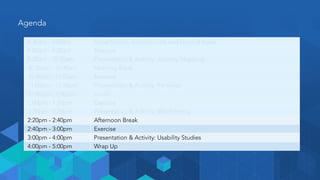
8:30am - 9:00am Expectations, Introductions and Ground Rules
9:00am - 9:20am Exercise
9:20am - 10:20am Presentation & Activity: Journey Mapping
10:20am - 10:40am Morning Break
10:40am - 11:00am Exercise
11:00am - 12:00pm Presentation & Activity: Personas
12:00pm - 1:00pm Lunch
1:00pm - 1:20pm Exercise
1:20pm - 2:20pm Presentation & Activity: Wireframing
2:20pm - 2:40pm Afternoon Break
2:40pm - 3:00pm Exercise
3:00pm - 4:00pm Presentation & Activity: Usability Studies
4:00pm - 5:00pm Wrap Up
Agenda
Sketch-ercises
Exercise Three
TIME:
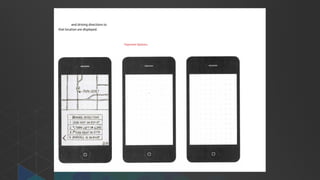
20
minutes
Your Mission: Sketch-ercises
• You’ll need a sheet of paper
and a writing utensil
TIME:
20
minutes
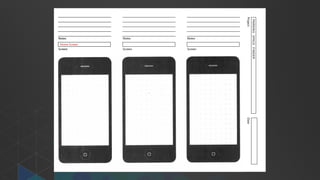
Wireframes
Presentation & Activity
Workshop Overview
1 Define & Examples
2 Discuss the Benefits
3 Demonstration
4 Group Activity
5 Presentations
6 Questions
What are
Wireframes?
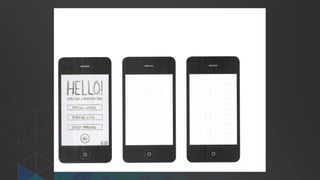
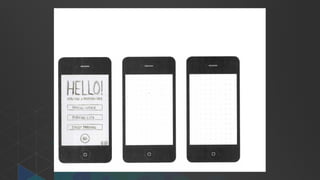
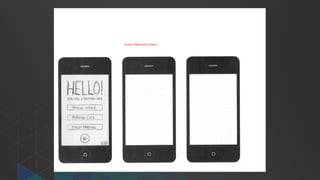
What are Wireframes?
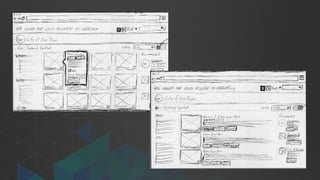
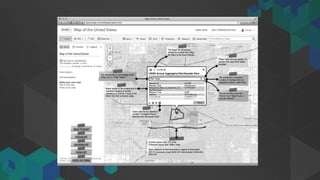
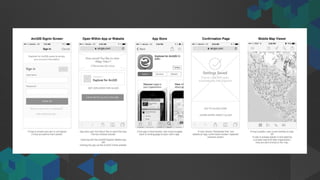
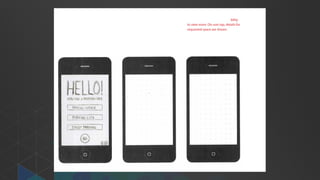
Simple black and white line diagrams
that show placement of elements
within an interface.
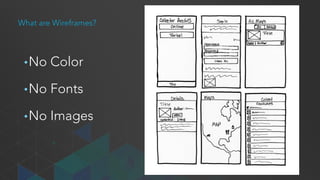
What are Wireframes?
•No Color
•No Fonts
•No Images
Wireframes are
Low-Fidelity Mockups
Wireframes should be focused on…
1. Elements
2. Organization
3. Interactions
Why should I use
Wireframes?
Why Should I Use Wireframes?
• Clients & Stakeholders
• Designers
• Developers
Why Should I Use Wireframes?
For Clients & Stakeholders
• Reach Consensus
• Solicit Feedback
• Get Buy-In
• Stay on Track
• Anything Missing?
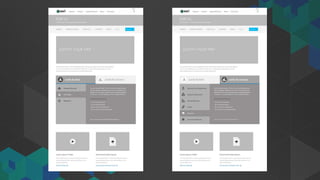
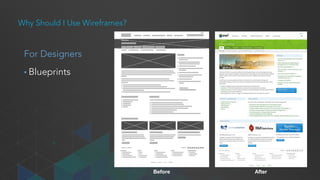
Before After
Why Should I Use Wireframes?
For Designers
• Blueprints
Why Should I Use Wireframes?
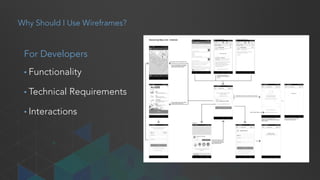
For Developers
• Functionality
• Technical Requirements
• Interactions
How to create
Wireframes
How To Create Wireframes
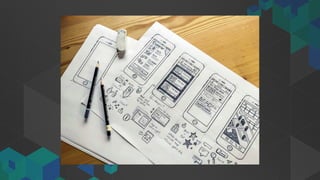
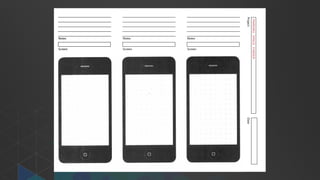
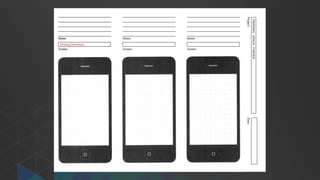
• Don’t always need to use software
• Pen & paper
• Capture ideas quickly
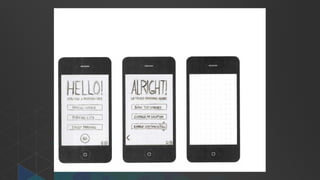
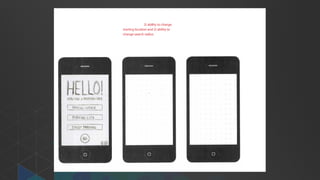
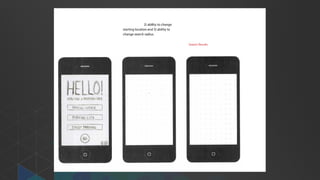
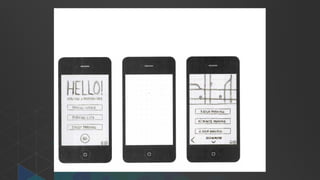
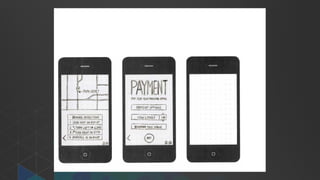
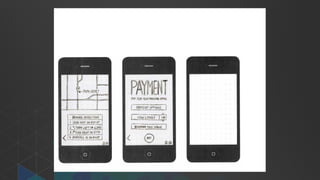
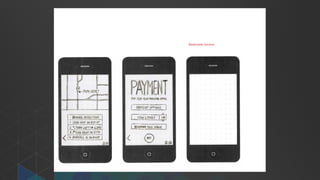
Wireframe Demonstration
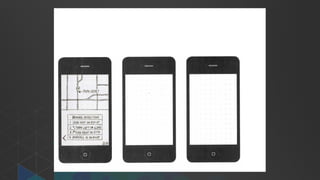
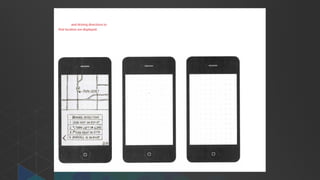
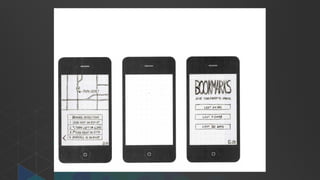
Scenario:
You want to create an app for people in town for a
conference that need to find a place to park.
Wireframe Demonstration
Requirements:
1. Type of parking (street, garage, lot)
2. Show spaces on map
3. Change distance/location
4. Duration
5. Directions
6. Pay using app
7. Bookmark spaces
Things to keep in mind
Fight the urge to make them look pretty.
Solicit feedback early and often.
Always keep the your user in mind.
Make liberal use of notes and annotations.
Don’t be afraid to experiment.
Group Activity
Wireframe a Simple Handheld App
TIME:
30
minutes
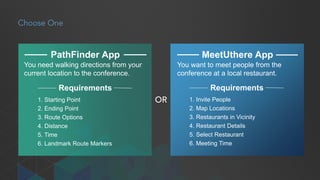
1. Starting Point
2. Ending Point
3. Route Options
4. Distance
5. Time
6. Landmark Route Markers
You need walking directions from your
current location to the conference.
PathFinder App
Requirements
MeetUthere App
1. Invite People
2. Map Locations
3. Restaurants in Vicinity
4. Restaurant Details
5. Select Restaurant
6. Meeting Time
You want to meet people from the
conference at a local restaurant.
OR
Requirements
Choose One
Instant Replay
Group Presentations
TIME:
10
minutes
?
8:30am - 9:00am Expectations, Introductions and Ground Rules
9:00am - 9:20am Exercise
9:20am - 10:20am Presentation & Activity: Journey Mapping
10:20am - 10:40am Morning Break
10:40am - 11:00am Exercise
11:00am - 12:00pm Presentation & Activity: Personas
12:00pm - 1:00pm Lunch
1:00pm - 1:20pm Exercise
1:20pm - 2:20pm Presentation & Activity: Wireframing
2:20pm - 2:40pm Afternoon Break
2:40pm - 3:00pm Exercise
3:00pm - 4:00pm Presentation & Activity: Usability Studies
4:00pm - 5:00pm Wrap Up
Agenda
Break!
2:20 pm – 2:40 pm (20 minutes)
Telephone Art Direction
Exercise Four
TIME:
20
minutes
Your Mission: Telephone Art Direction
• Find a partner
- 1 person is the “Art director” and 1 person is the “Artist”
• “Art director” identifies an object in the room. They
describe the object visually for “Artist,” to draw by using
written notes (aka text messages).
• “Artist” draws the object without knowing what it is.
TIME:
20
minutes
Your Mission: Telephone Art Direction
• Find a partner
- 1 person is the “Art director” and 1 person is the “Artist”
• “Art director” identifies an object in the room. They
describe the object visually for “Artist,” to draw by using
written notes (aka text messages).
• “Artist” draws the object without knowing what it is.
• Clear, effective communication of the vision the key.
Working with others to understand their vision for a
system feature or an interface design can be challenging.
TIME:
20
minutes
Usability Studies
Presentation & Activity
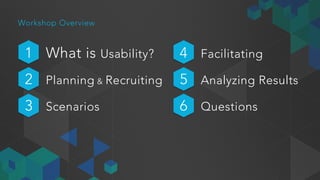
Workshop Overview
1 What is Usability?
2 Planning & Recruiting
3 Scenarios
4 Facilitating
5 Analyzing Results
6 Questions
What is
Usability Research?
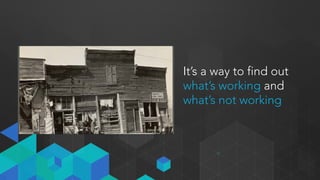
It’s not rocket science!
It’s a way to find out
what’s working and
what’s not working
Why is
Usability useful?
Users are unpredictable
Benefits to the Team
• User perspective
• Unknown issues
• Fix problems
• Validate assumptions
• Unnecessary features
• Objectivity
• Stakeholder buy in!
Business Benefits
• Fix problems early
• Customer satisfaction
• Reduce costs
• Reduce risk
• Measure improvement
You can use an eraser on the drafting table
or a sledgehammer on the construction site
Frank Lloyd Wright
Planning a
Usability Study
Easier than you think!
Usability in a Nutshell
• Decide which designs to validate?
• Define the audience (Persona’s)
• Recruit 4-6 participants
• Write some scenarios & tasks, around 3-4 for a 1 hour session
• Set a date for the study
• INVITE OBSERVERS!
• Conduct the study sessions
• Gather, compare notes and discuss
Develop a Study Plan
• Describe the project
• Outline objectives
• Set a date
• What is being
• Desired users
• Write tasks
• What type of feedback are you looking for?
Develop a Study Plan
• Equipment
• Computer to run the study
• Video / Audio Capture
• Personnel
- Moderator (1)
- Observer (1+)
• Usability Studies can be conducted pretty much anywhere!
Recruiting Participants
• Participants match target audience
• Work with sales or marketing to recruit actual customers
• Recruit participants through blogs / social media
• If all else fails
- Recruit from within the company
- Recruit people from Support
4-6 people is plenty
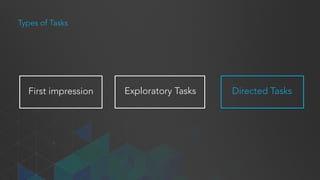
First impression
Types of Tasks
Directed TasksExploratory Tasks
Preparing for Your Study
Things to keep in mind while writing tasks:
• Make the task realistic
• Make the task actionable
• Avoid clues and describing steps
Example Tasks
Poor Task:
Look at the sites for American Airlines and JetBlue to
see who has a better deal on airfare.
Good Task:
You're planning a vacation to New York City, August 3 −
August 14. You need to buy airfare. Go to the American
Airlines site and JetBlue Airlines site and see who has
the best deals.
Facilitating a
Usability Study
Don’t Panic
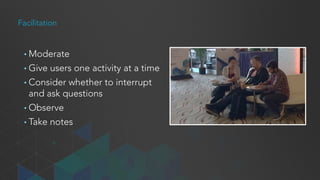
Facilitation
• Moderate
• Give users one activity at a time
• Consider whether to interrupt
and ask questions
• Observe
• Take notes
Moderator Responsibilities
• Tell the users what you want them to do
• Encourage them to think out loud
• Listen carefully to what they have to say
• Protect them
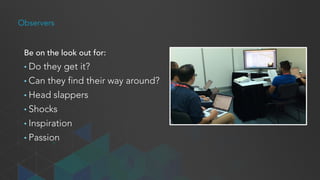
Observers
Be on the look out for:
• Do they get it?
• Can they find their way around?
• Head slappers
• Shocks
• Inspiration
• Passion
Activity
Quick Usability Study
Outcome: Observer notes
TIME:
20
minutes
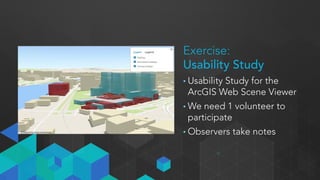
Exercise:
Usability Study
• Usability Study for the
ArcGIS Web Scene Viewer
• We need 1 volunteer to
participate
• Observers take notes
What Did
We Observe?
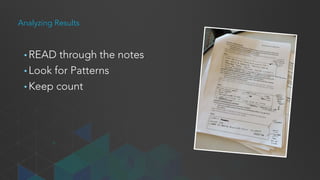
Analyzing Results
• READ through the notes
• Look for Patterns
• Keep count
Sharing Findings
• Consider your audience!
• Audience expectations
• Make it compelling
Wash, rinse, repeat.
?
8:30am - 9:00am Expectations, Introductions and Ground Rules
9:00am - 9:20am Exercise
9:20am - 10:20am Presentation & Activity: Journey Mapping
10:20am - 10:40am Morning Break
10:40am - 11:00am Exercise
11:00am - 12:00pm Presentation & Activity: Personas
12:00pm - 1:00pm Lunch
1:00pm - 1:20pm Exercise
1:20pm - 2:20pm Presentation & Activity: Wireframing
2:20pm - 2:40pm Afternoon Break
2:40pm - 3:00pm Exercise
3:00pm - 4:00pm Presentation & Activity: Usability Studies
4:00pm - 5:00pm Wrap Up
Agenda
Wrap Up
Recap & Discussion
Journey Mapping
• Journey maps bring focus to your work
• Identify gaps between devices, depts, channels
• Stay in sync with your customers
• How to map the customer journey
Recap
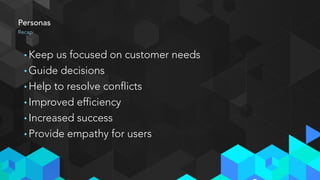
Personas
• Keep us focused on customer needs
• Guide decisions
• Help to resolve conflicts
• Improved efficiency
• Increased success
• Provide empathy for users
Recap
Wireframing
• The role of wireframes in user friendly products
• There are several types of wireframes
• The benefits of wireframing
• How to create a successful wireframe
Recap
Usability Studies
• Helps us understand what is/isn’t working
• User are unpredictable
• Reveal unknown/unexpected issues
• Test assumptions
Recap
Discussion
Q&A
Expectation
Sticky Notes
Review your expectations
Not met, Partially Met, Met, & Exceeded
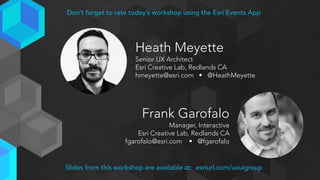
Heath Meyette
Senior UX Architect
Esri Creative Lab, Redlands CA
hmeyette@esri.com • @HeathMeyette
Frank Garofalo
Manager, Interactive
Esri Creative Lab, Redlands CA
fgarofalo@esri.com • @fgarofalo
Slides from this workshop are available at: esriurl.com/uxuigroup
Don’t forget to rate today’s workshop using the Esri Events App
Richard Caballero
UX Architect
Esri Creative Lab, Redlands CA
rcaballero@esri.com • @richc117
Steven Nelson
UX & UI Team Lead - Software
Esri Creative Lab, Redlands CA
snelson@esri.com • @SMNelsonDesign
Slides from this workshop are available at: esriurl.com/uxuigroup
Don’t forget to rate today’s workshop using the Esri Events App
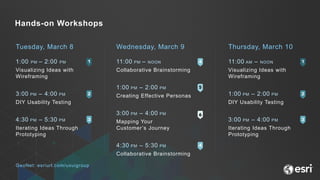
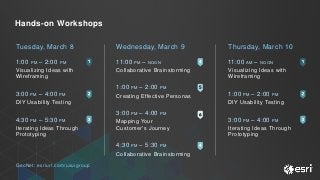
Wednesday, March 9
11:00 PM – NOON
Collaborative Brainstorming
1:00 PM – 2:00 PM
Creating Effective Personas
3:00 PM – 4:00 PM
Mapping Your
Customer’s Journey
4:30 PM – 5:30 PM
Collaborative Brainstorming
Tuesday, March 8
1:00 PM – 2:00 PM
Visualizing Ideas with
Wireframing
3:00 PM – 4:00 PM
DIY Usability Testing
4:30 PM – 5:30 PM
Iterating Ideas Through
Prototyping
Thursday, March 10
11:00 AM – NOON
Visualizing Ideas with
Wireframing
1:00 PM – 2:00 PM
DIY Usability Testing
3:00 PM – 4:00 PM
Iterating Ideas Through
Prototyping
Hands-on Workshops
GeoNet: esriurl.com/uxuigroup
DevSummit 2016 PreSummit Workshop: Getting to Know Your Users (Part 2 of 2)

DevSummit 2016 PreSummit Workshop: Getting to Know Your Users (Part 2 of 2)

  • 1.
    March 8–11, 2016| Palm Springs, CA Esri Developer Summit Getting To Know Your Users An Introduction to User Experience Heath Meyette Frank Garofalo Part 2 of 2
  • 2.
    8:30am - 9:00amExpectations, Introductions and Ground Rules 9:00am - 9:20am Exercise 9:20am - 10:20am Presentation & Activity: Journey Mapping 10:20am - 10:40am Morning Break 10:40am - 11:00am Exercise 11:00am - 12:00pm Presentation & Activity: Personas 12:00pm - 1:00pm Lunch 1:00pm - 1:20pm Exercise 1:20pm - 2:20pm Presentation & Activity: Wireframing 2:20pm - 2:40pm Afternoon Break 2:40pm - 3:00pm Exercise 3:00pm - 4:00pm Presentation & Activity: Usability Studies 4:00pm - 5:00pm Wrap Up Agenda
  • 3.
  • 4.
    Your Mission: Sketch-ercises •You’ll need a sheet of paper and a writing utensil TIME: 20 minutes
  • 5.
  • 6.
    Workshop Overview 1 Define& Examples 2 Discuss the Benefits 3 Demonstration 4 Group Activity 5 Presentations 6 Questions
  • 7.
  • 8.
    What are Wireframes? Simpleblack and white line diagrams that show placement of elements within an interface.
  • 9.
    What are Wireframes? •NoColor •No Fonts •No Images
  • 10.
  • 11.
    Wireframes should befocused on… 1. Elements 2. Organization 3. Interactions
  • 17.
    Why should Iuse Wireframes?
  • 18.
    Why Should IUse Wireframes? • Clients & Stakeholders • Designers • Developers
  • 19.
    Why Should IUse Wireframes? For Clients & Stakeholders • Reach Consensus • Solicit Feedback • Get Buy-In • Stay on Track • Anything Missing?
  • 20.
    Before After Why ShouldI Use Wireframes? For Designers • Blueprints
  • 21.
    Why Should IUse Wireframes? For Developers • Functionality • Technical Requirements • Interactions
  • 22.
  • 23.
    How To CreateWireframes • Don’t always need to use software • Pen & paper • Capture ideas quickly
  • 24.
    Wireframe Demonstration Scenario: You wantto create an app for people in town for a conference that need to find a place to park.
  • 25.
    Wireframe Demonstration Requirements: 1. Typeof parking (street, garage, lot) 2. Show spaces on map 3. Change distance/location 4. Duration 5. Directions 6. Pay using app 7. Bookmark spaces
  • 45.
    Things to keepin mind Fight the urge to make them look pretty. Solicit feedback early and often. Always keep the your user in mind. Make liberal use of notes and annotations. Don’t be afraid to experiment.
  • 46.
    Group Activity Wireframe aSimple Handheld App TIME: 30 minutes
  • 47.
    1. Starting Point 2.Ending Point 3. Route Options 4. Distance 5. Time 6. Landmark Route Markers You need walking directions from your current location to the conference. PathFinder App Requirements MeetUthere App 1. Invite People 2. Map Locations 3. Restaurants in Vicinity 4. Restaurant Details 5. Select Restaurant 6. Meeting Time You want to meet people from the conference at a local restaurant. OR Requirements Choose One
  • 48.
  • 49.
  • 50.
    8:30am - 9:00amExpectations, Introductions and Ground Rules 9:00am - 9:20am Exercise 9:20am - 10:20am Presentation & Activity: Journey Mapping 10:20am - 10:40am Morning Break 10:40am - 11:00am Exercise 11:00am - 12:00pm Presentation & Activity: Personas 12:00pm - 1:00pm Lunch 1:00pm - 1:20pm Exercise 1:20pm - 2:20pm Presentation & Activity: Wireframing 2:20pm - 2:40pm Afternoon Break 2:40pm - 3:00pm Exercise 3:00pm - 4:00pm Presentation & Activity: Usability Studies 4:00pm - 5:00pm Wrap Up Agenda
  • 51.
    Break! 2:20 pm –2:40 pm (20 minutes)
  • 52.
    Telephone Art Direction ExerciseFour TIME: 20 minutes
  • 53.
    Your Mission: TelephoneArt Direction • Find a partner - 1 person is the “Art director” and 1 person is the “Artist” • “Art director” identifies an object in the room. They describe the object visually for “Artist,” to draw by using written notes (aka text messages). • “Artist” draws the object without knowing what it is. TIME: 20 minutes
  • 54.
    Your Mission: TelephoneArt Direction • Find a partner - 1 person is the “Art director” and 1 person is the “Artist” • “Art director” identifies an object in the room. They describe the object visually for “Artist,” to draw by using written notes (aka text messages). • “Artist” draws the object without knowing what it is. • Clear, effective communication of the vision the key. Working with others to understand their vision for a system feature or an interface design can be challenging. TIME: 20 minutes
  • 55.
  • 56.
    Workshop Overview 1 Whatis Usability? 2 Planning & Recruiting 3 Scenarios 4 Facilitating 5 Analyzing Results 6 Questions
  • 57.
  • 58.
    It’s a wayto find out what’s working and what’s not working
  • 59.
  • 60.
    Benefits to theTeam • User perspective • Unknown issues • Fix problems • Validate assumptions • Unnecessary features • Objectivity • Stakeholder buy in!
  • 61.
    Business Benefits • Fixproblems early • Customer satisfaction • Reduce costs • Reduce risk • Measure improvement
  • 62.
    You can usean eraser on the drafting table or a sledgehammer on the construction site Frank Lloyd Wright
  • 63.
  • 64.
    Usability in aNutshell • Decide which designs to validate? • Define the audience (Persona’s) • Recruit 4-6 participants • Write some scenarios & tasks, around 3-4 for a 1 hour session • Set a date for the study • INVITE OBSERVERS! • Conduct the study sessions • Gather, compare notes and discuss
  • 65.
    Develop a StudyPlan • Describe the project • Outline objectives • Set a date • What is being • Desired users • Write tasks • What type of feedback are you looking for?
  • 66.
    Develop a StudyPlan • Equipment • Computer to run the study • Video / Audio Capture • Personnel - Moderator (1) - Observer (1+) • Usability Studies can be conducted pretty much anywhere!
  • 67.
    Recruiting Participants • Participantsmatch target audience • Work with sales or marketing to recruit actual customers • Recruit participants through blogs / social media • If all else fails - Recruit from within the company - Recruit people from Support 4-6 people is plenty
  • 68.
    First impression Types ofTasks Directed TasksExploratory Tasks
  • 69.
    Preparing for YourStudy Things to keep in mind while writing tasks: • Make the task realistic • Make the task actionable • Avoid clues and describing steps
  • 70.
    Example Tasks Poor Task: Lookat the sites for American Airlines and JetBlue to see who has a better deal on airfare. Good Task: You're planning a vacation to New York City, August 3 − August 14. You need to buy airfare. Go to the American Airlines site and JetBlue Airlines site and see who has the best deals.
  • 71.
  • 72.
    Facilitation • Moderate • Giveusers one activity at a time • Consider whether to interrupt and ask questions • Observe • Take notes
  • 73.
    Moderator Responsibilities • Tellthe users what you want them to do • Encourage them to think out loud • Listen carefully to what they have to say • Protect them
  • 74.
    Observers Be on thelook out for: • Do they get it? • Can they find their way around? • Head slappers • Shocks • Inspiration • Passion
  • 75.
    Activity Quick Usability Study Outcome:Observer notes TIME: 20 minutes
  • 76.
    Exercise: Usability Study • UsabilityStudy for the ArcGIS Web Scene Viewer • We need 1 volunteer to participate • Observers take notes
  • 77.
  • 78.
    Analyzing Results • READthrough the notes • Look for Patterns • Keep count
  • 79.
    Sharing Findings • Consideryour audience! • Audience expectations • Make it compelling
  • 80.
  • 81.
  • 82.
    8:30am - 9:00amExpectations, Introductions and Ground Rules 9:00am - 9:20am Exercise 9:20am - 10:20am Presentation & Activity: Journey Mapping 10:20am - 10:40am Morning Break 10:40am - 11:00am Exercise 11:00am - 12:00pm Presentation & Activity: Personas 12:00pm - 1:00pm Lunch 1:00pm - 1:20pm Exercise 1:20pm - 2:20pm Presentation & Activity: Wireframing 2:20pm - 2:40pm Afternoon Break 2:40pm - 3:00pm Exercise 3:00pm - 4:00pm Presentation & Activity: Usability Studies 4:00pm - 5:00pm Wrap Up Agenda
  • 83.
    Wrap Up Recap &Discussion
  • 84.
    Journey Mapping • Journeymaps bring focus to your work • Identify gaps between devices, depts, channels • Stay in sync with your customers • How to map the customer journey Recap
  • 85.
    Personas • Keep usfocused on customer needs • Guide decisions • Help to resolve conflicts • Improved efficiency • Increased success • Provide empathy for users Recap
  • 86.
    Wireframing • The roleof wireframes in user friendly products • There are several types of wireframes • The benefits of wireframing • How to create a successful wireframe Recap
  • 87.
    Usability Studies • Helpsus understand what is/isn’t working • User are unpredictable • Reveal unknown/unexpected issues • Test assumptions Recap
  • 88.
  • 89.
    Expectation Sticky Notes Review yourexpectations Not met, Partially Met, Met, & Exceeded
  • 90.
    Heath Meyette Senior UXArchitect Esri Creative Lab, Redlands CA hmeyette@esri.com • @HeathMeyette Frank Garofalo Manager, Interactive Esri Creative Lab, Redlands CA fgarofalo@esri.com • @fgarofalo Slides from this workshop are available at: esriurl.com/uxuigroup Don’t forget to rate today’s workshop using the Esri Events App
  • 91.
    Richard Caballero UX Architect EsriCreative Lab, Redlands CA rcaballero@esri.com • @richc117 Steven Nelson UX & UI Team Lead - Software Esri Creative Lab, Redlands CA snelson@esri.com • @SMNelsonDesign Slides from this workshop are available at: esriurl.com/uxuigroup Don’t forget to rate today’s workshop using the Esri Events App
  • 92.
    Wednesday, March 9 11:00PM – NOON Collaborative Brainstorming 1:00 PM – 2:00 PM Creating Effective Personas 3:00 PM – 4:00 PM Mapping Your Customer’s Journey 4:30 PM – 5:30 PM Collaborative Brainstorming Tuesday, March 8 1:00 PM – 2:00 PM Visualizing Ideas with Wireframing 3:00 PM – 4:00 PM DIY Usability Testing 4:30 PM – 5:30 PM Iterating Ideas Through Prototyping Thursday, March 10 11:00 AM – NOON Visualizing Ideas with Wireframing 1:00 PM – 2:00 PM DIY Usability Testing 3:00 PM – 4:00 PM Iterating Ideas Through Prototyping Hands-on Workshops GeoNet: esriurl.com/uxuigroup