Keys in Databases
DIFFERENT TYPES OF KEYS USED IN DATABASES
What is a
key?
An attribute or set of
attributes that
uniquely identifies a
tuple in a relation.
The keys are defined in
relations to access the
stored data quickly
and efficiently.
They are also used to
create relationship
between different
relations.
Types of Keys
 Different types of keys used
in databases are as follows:
1. PRIMARY KEY
2. COMPOSITE /
CONCATENATE KEY
3. CANDIDATE KEY
4. ALTERNATE KEY
5. FOREIGN KEY
6. SECONADRY KEY
7. SORT/CONTROL KEY
1. Primary Key
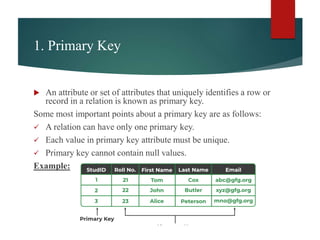
 An attribute or set of attributes that uniquely identifies a row or
record in a relation is known as primary key.
Some most important points about a primary key are as follows:
 A relation can have only one primary key.
 Each value in primary key attribute must be unique.
 Primary key cannot contain null values.
Example:
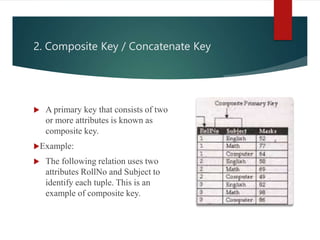
2. Composite Key / Concatenate Key
 A primary key that consists of two
or more attributes is known as
composite key.
Example:
 The following relation uses two
attributes RollNo and Subject to
identify each tuple. This is an
example of composite key.
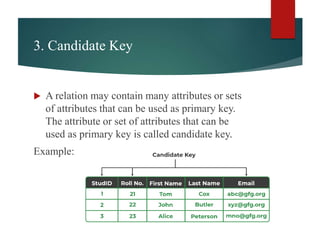
3. Candidate Key
 A relation may contain many attributes or sets
of attributes that can be used as primary key.
The attribute or set of attributes that can be
used as primary key is called candidate key.
Example:
4. Alternate Key
 The candidate keys that are not selected
as primary key are known as alternate
keys.
Example:
5. Foreign Key
 A foreign key is an attribute or set of attributes in a relation whose
values match a primary key in another relation.
 The relation in which foreign key is created is known as dependent
relation or child relation.
 The relation to which the foreign key refers is known as parent
relation.
 The key connects to another relation when a relationship is
established between two relations.
 A relation may contain many foreign keys.
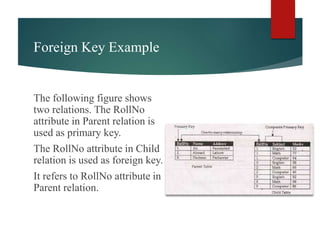
Foreign Key Example
The following figure shows
two relations. The RollNo
attribute in Parent relation is
used as primary key.
The RollNo attribute in Child
relation is used as foreign key.
It refers to RollNo attribute in
Parent relation.
6.
Secondary
Key
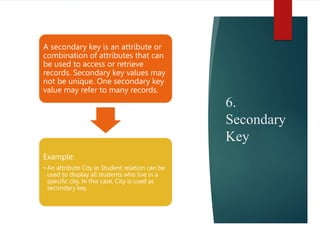
A secondary key is an attribute or
combination of attributes that can
be used to access or retrieve
records. Secondary key values may
not be unique. One secondary key
value may refer to many records.
Example:
• An attribute City in Student relation can be
used to display all students who live in a
specific city. In this case, City is used as
secondary key.
7. Sort / Control Key
 An attribute or set of attributes that is
used to physically sequence the stored
data is called sort key. It is also known
as control key.
 The stored data can be sorted in
different ways according to the user
requirement.

Database_Keys types of keys in DBMS.pptx

  • 1.
    Keys in Databases DIFFERENTTYPES OF KEYS USED IN DATABASES
  • 2.
    What is a key? Anattribute or set of attributes that uniquely identifies a tuple in a relation. The keys are defined in relations to access the stored data quickly and efficiently. They are also used to create relationship between different relations.
  • 3.
    Types of Keys Different types of keys used in databases are as follows: 1. PRIMARY KEY 2. COMPOSITE / CONCATENATE KEY 3. CANDIDATE KEY 4. ALTERNATE KEY 5. FOREIGN KEY 6. SECONADRY KEY 7. SORT/CONTROL KEY
  • 4.
    1. Primary Key An attribute or set of attributes that uniquely identifies a row or record in a relation is known as primary key. Some most important points about a primary key are as follows:  A relation can have only one primary key.  Each value in primary key attribute must be unique.  Primary key cannot contain null values. Example:
  • 5.
    2. Composite Key/ Concatenate Key  A primary key that consists of two or more attributes is known as composite key. Example:  The following relation uses two attributes RollNo and Subject to identify each tuple. This is an example of composite key.
  • 6.
    3. Candidate Key A relation may contain many attributes or sets of attributes that can be used as primary key. The attribute or set of attributes that can be used as primary key is called candidate key. Example:
  • 7.
    4. Alternate Key The candidate keys that are not selected as primary key are known as alternate keys. Example:
  • 8.
    5. Foreign Key A foreign key is an attribute or set of attributes in a relation whose values match a primary key in another relation.  The relation in which foreign key is created is known as dependent relation or child relation.  The relation to which the foreign key refers is known as parent relation.  The key connects to another relation when a relationship is established between two relations.  A relation may contain many foreign keys.
  • 9.
    Foreign Key Example Thefollowing figure shows two relations. The RollNo attribute in Parent relation is used as primary key. The RollNo attribute in Child relation is used as foreign key. It refers to RollNo attribute in Parent relation.
  • 10.
    6. Secondary Key A secondary keyis an attribute or combination of attributes that can be used to access or retrieve records. Secondary key values may not be unique. One secondary key value may refer to many records. Example: • An attribute City in Student relation can be used to display all students who live in a specific city. In this case, City is used as secondary key.
  • 11.
    7. Sort /Control Key  An attribute or set of attributes that is used to physically sequence the stored data is called sort key. It is also known as control key.  The stored data can be sorted in different ways according to the user requirement.