
Biswajeet
Data Visualization
Using
‘R ‘
Introduction
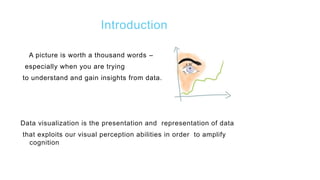
A picture is worth a thousand words –
especially when you are trying
to understand and gain insights from data.
Data visualization is the presentation and representation of data
that exploits our visual perception abilities in order to amplify
cognition
Why is data visualization important?
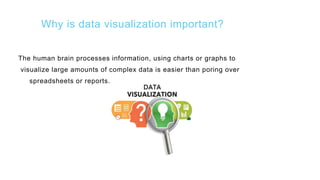
The human brain processes information, using charts or graphs to
visualize large amounts of complex data is easier than poring over
spreadsheets or reports.
What’s Missing ?
The skills required for most effectively displaying information are not
intuitive and rely largely on principles that must be learned
Stephen Few- ‘Show me the Numbers’
Doing data visualisation well is less a technology problem ,
more a people problem
Paraphrasing Aron Pilhofer, New York Times
Purpose of Data Visualization
 To find relationships among hundreds, or even thousands, of
variables to determine their relative importance
 To simplify data values, promote the understanding of them, and
communicate important concepts and ideas
 It enables decision makers to see analytics presented visually, so they
can grasp difficult concepts or identify new patterns.
Key Challenges….
To fully take advantage of visual analytics, organizations need to address
several challenges :
1. Meeting the need for speed
2. Understanding the data
3. Addressing data quality
4. Displaying meaningful results
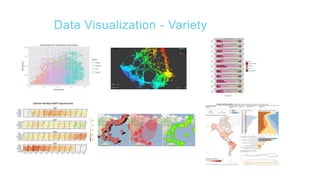
Data Visualization - Variety
Basic Concepts to generate best Visual
Analytics
 Understand the data we are trying to visualize, including its size
and cardinality
 Determine what we are trying to visualize and what kind of
information we want to communicate
 Know your audience and understand how it processes visual
information
 Use a visual that conveys the information in the best and
simplest form for your audience
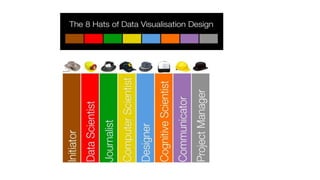
6 Thinking Hats – Data Visualisation
 By Edward De Bono, 1985
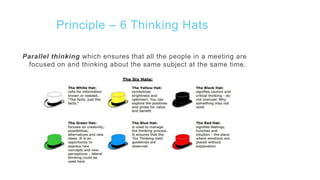
 Six metaphorical hats and each defines a certain type of thinking
 Put on or take off one of these hats to indicate the type of
thinking you are using
 This putting on and taking off is essential, because it allows
you to switch from one type of thinking to another
 When done in a group, everybody should wear the same hat at
the same time
Principle – 6 Thinking Hats
Parallel thinking which ensures that all the people in a meeting are
focused on and thinking about the same subject at the same time.
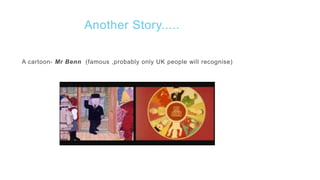
Another Story.....
A cartoon- Mr Benn (famous ,probably only UK people will recognise)
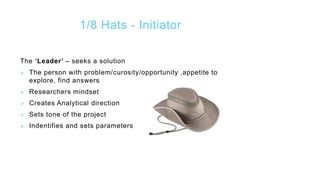
1/8 Hats - Initiator
The ‘Leader’ – seeks a solution
 The person with problem/curosity/opportunity ,appetite to
explore, find answers
 Researchers mindset
 Creates Analytical direction
 Sets tone of the project
 Indentifies and sets parameters
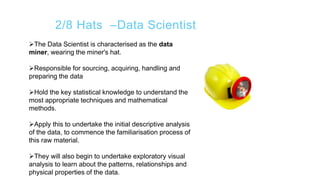
2/8 Hats –Data Scientist
The Data Scientist is characterised as the data
miner, wearing the miner's hat.
Responsible for sourcing, acquiring, handling and
preparing the data
Hold the key statistical knowledge to understand the
most appropriate techniques and mathematical
methods.
Apply this to undertake the initial descriptive analysis
of the data, to commence the familiarisation process of
this raw material.
They will also begin to undertake exploratory visual
analysis to learn about the patterns, relationships and
physical properties of the data.
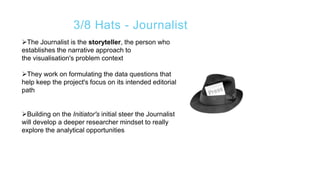
3/8 Hats - Journalist
The Journalist is the storyteller, the person who
establishes the narrative approach to
the visualisation's problem context
They work on formulating the data questions that
help keep the project's focus on its intended editorial
path
Building on the Initiator's initial steer the Journalist
will develop a deeper researcher mindset to really
explore the analytical opportunities
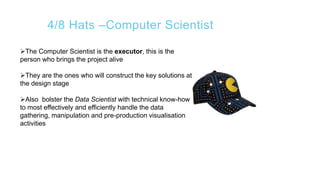
4/8 Hats –Computer Scientist
The Computer Scientist is the executor, this is the
person who brings the project alive
They are the ones who will construct the key solutions at
the design stage
Also bolster the Data Scientist with technical know-how
to most effectively and efficiently handle the data
gathering, manipulation and pre-production visualisation
activities
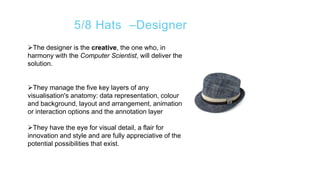
5/8 Hats –Designer
The designer is the creative, the one who, in
harmony with the Computer Scientist, will deliver the
solution.
They manage the five key layers of any
visualisation's anatomy: data representation, colour
and background, layout and arrangement, animation
or interaction options and the annotation layer
They have the eye for visual detail, a flair for
innovation and style and are fully appreciative of the
potential possibilities that exist.
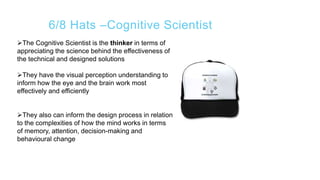
6/8 Hats –Cognitive Scientist
The Cognitive Scientist is the thinker in terms of
appreciating the science behind the effectiveness of
the technical and designed solutions
They have the visual perception understanding to
inform how the eye and the brain work most
effectively and efficiently
They also can inform the design process in relation
to the complexities of how the mind works in terms
of memory, attention, decision-making and
behavioural change
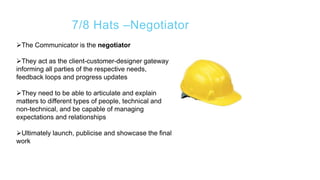
7/8 Hats –Negotiator
The Communicator is the negotiator
They act as the client-customer-designer gateway
informing all parties of the respective needs,
feedback loops and progress updates
They need to be able to articulate and explain
matters to different types of people, technical and
non-technical, and be capable of managing
expectations and relationships
Ultimately launch, publicise and showcase the final
work
8/8 Hats –Project Manager
 Manager does much to pick up many of the
unpopular duties to bring the whole project together
 They manage the process and look after the
project's progress, ensuring it is cohesive, on time
and on message
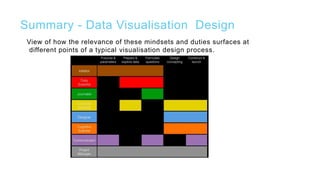
Summary - Data Visualisation Design
View of how the relevance of these mindsets and duties surfaces at
different points of a typical visualisation design process.
How to Install R Studio
RStudio is an integrated development environment (IDE) for R. It
includes a console, syntax-highlighting editor that supports
direct code execution, as well as tools for plotting, history,
debugging and workspace management.
In order to run R and R-studio on your system, you need to follow
the following three steps in the same order.
 Install R
 Install R-Studio
 Install R-Packages (If needed)
Prerequisites for RStudio
 These software packages can be downloaded from http://www.r-
project.org/ and http://rstudio.org/ respectively and are
available on the Windows, Linux and Mac OS X platforms.
 It must be noted that the R-Scripts can run without the
installation of the IDE, using R-Console, and students are free
to use any other IDE for R if they wish to do so.
 Any version of R (2.11.1 or higher)
Installation Steps
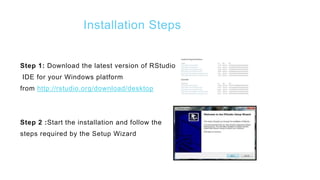
Step 1: Download the latest version of RStudio
IDE for your Windows platform
from http://rstudio.org/download/desktop
Step 2 :Start the installation and follow the
steps required by the Setup Wizard
Installation RStudio for Linux
 For complete R System installation in Linux, follow the
instructions on the following link (Link )
 For Ubuntu with Apt-get installed, execute
sudo apt-get install r-base in terminal.
Install Package in R Studio
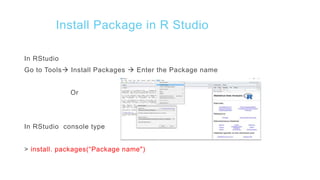
In RStudio
Go to Tools Install Packages  Enter the Package name
Or
In RStudio console type
> install. packages(“Package name")
Types of plots in R - Histogram
A histogram consists of parallel vertical bars that graphically shows the
frequency distribution of a quantitative variable. The area of each bar is
equal to the frequency of items found in each class.
Example
Consider the R built-in data set faithful, the histogram of
the eruptions variable is a collection of parallel vertical bars showing the
number of eruptions classified according to their durations.
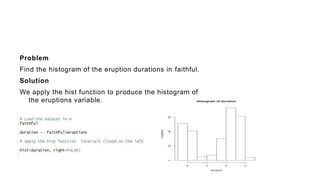
Problem
Find the histogram of the eruption durations in faithful.
Solution
We apply the hist function to produce the histogram of
the eruptions variable.
Types of plots in R – Bar plot
A bar graph of a qualitative data sample consists of vertical
parallel bars that shows the frequency distribution graphically.
Example
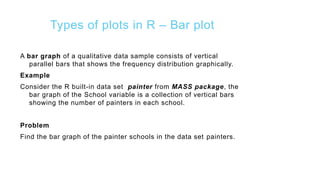
Consider the R built-in data set painter from MASS package, the
bar graph of the School variable is a collection of vertical bars
showing the number of painters in each school.
Problem
Find the bar graph of the painter schools in the data set painters.
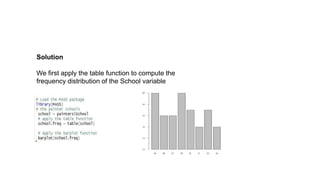
Solution
We first apply the table function to compute the
frequency distribution of the School variable
Types of plots in R – Pie Chart
A pie chart of a qualitative data sample consists of pizza wedges
that shows the frequency distribution graphically.
Example
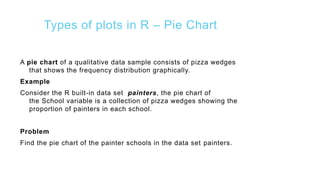
Consider the R built-in data set painters, the pie chart of
the School variable is a collection of pizza wedges showing the
proportion of painters in each school.
Problem
Find the pie chart of the painter schools in the data set painters.
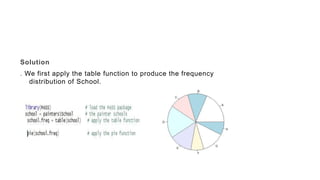
Solution
. We first apply the table function to produce the frequency
distribution of School.
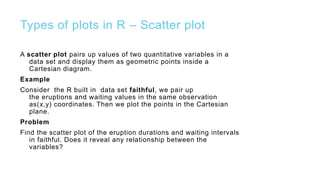
Types of plots in R – Scatter plot
A scatter plot pairs up values of two quantitative variables in a
data set and display them as geometric points inside a
Cartesian diagram.
Example
Consider the R built in data set faithful, we pair up
the eruptions and waiting values in the same observation
as(x,y) coordinates. Then we plot the points in the Cartesian
plane.
Problem
Find the scatter plot of the eruption durations and waiting intervals
in faithful. Does it reveal any relationship between the
variables?
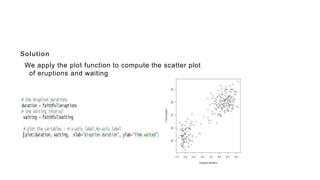
Solution
We apply the plot function to compute the scatter plot
of eruptions and waiting
Types of plots in R – Box plot
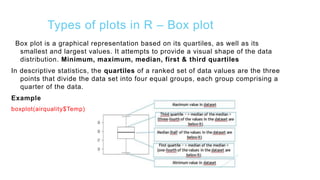
Box plot is a graphical representation based on its quartiles, as well as its
smallest and largest values. It attempts to provide a visual shape of the data
distribution. Minimum, maximum, median, first & third quartiles
In descriptive statistics, the quartiles of a ranked set of data values are the three
points that divide the data set into four equal groups, each group comprising a
quarter of the data.
Example
boxplot(airquality$Temp)
Types of plots in R – Box plot
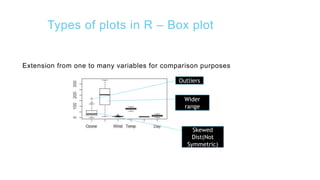
Extension from one to many variables for comparison purposes
Outliers
Wider
range
Skewed
Dist(Not
Symmetric)
Plots for basic descriptive statistics
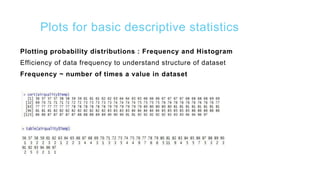
Plotting probability distributions : Frequency and Histogram
Efficiency of data frequency to understand structure of dataset
Frequency ~ number of times a value in dataset
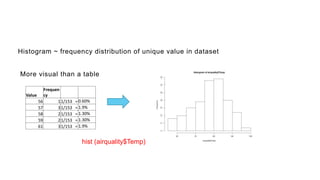
Histogram ~ frequency distribution of unique value in dataset
More visual than a table
Value
Frequen
cy
56 11/153 = 0.60%
57 31/153 = 1.9%
58 21/153 = 1.30%
59 21/153 = 1.30%
61 31/153 = 1.9%
hist (airquality$Temp)
Plots for basic descriptive statistics
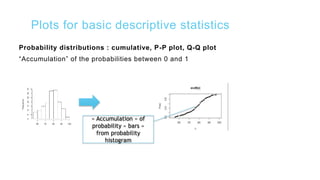
Probability distributions : cumulative, P-P plot, Q-Q plot
“Accumulation” of the probabilities between 0 and 1
« Accumulation » of
probability « bars »
from probability
histogram
Plots for basic descriptive statistics
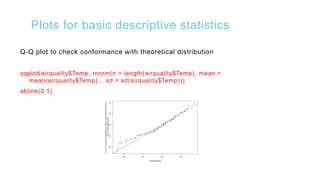
Q-Q plot to check conformance with theoretical distribution
qqplot(airquality$Temp, rnorm(n = length(airquality$Temp), mean =
mean(airquality$Temp) , sd = sd(airquality$Temp)))
abline(0,1)
Plots for basic descriptive statistics
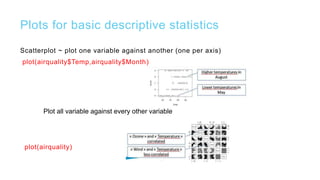
Scatterplot ~ plot one variable against another (one per axis)
plot(airquality$Temp,airquality$Month)
plot(airquality)
Plot all variable against every other variable

Data visualization with R

  • 1.
  • 2.
    Introduction A picture isworth a thousand words – especially when you are trying to understand and gain insights from data. Data visualization is the presentation and representation of data that exploits our visual perception abilities in order to amplify cognition
  • 3.
    Why is datavisualization important? The human brain processes information, using charts or graphs to visualize large amounts of complex data is easier than poring over spreadsheets or reports.
  • 4.
    What’s Missing ? Theskills required for most effectively displaying information are not intuitive and rely largely on principles that must be learned Stephen Few- ‘Show me the Numbers’ Doing data visualisation well is less a technology problem , more a people problem Paraphrasing Aron Pilhofer, New York Times
  • 5.
    Purpose of DataVisualization  To find relationships among hundreds, or even thousands, of variables to determine their relative importance  To simplify data values, promote the understanding of them, and communicate important concepts and ideas  It enables decision makers to see analytics presented visually, so they can grasp difficult concepts or identify new patterns.
  • 6.
    Key Challenges…. To fullytake advantage of visual analytics, organizations need to address several challenges : 1. Meeting the need for speed 2. Understanding the data 3. Addressing data quality 4. Displaying meaningful results
  • 7.
  • 8.
    Basic Concepts togenerate best Visual Analytics  Understand the data we are trying to visualize, including its size and cardinality  Determine what we are trying to visualize and what kind of information we want to communicate  Know your audience and understand how it processes visual information  Use a visual that conveys the information in the best and simplest form for your audience
  • 9.
    6 Thinking Hats– Data Visualisation  By Edward De Bono, 1985  Six metaphorical hats and each defines a certain type of thinking  Put on or take off one of these hats to indicate the type of thinking you are using  This putting on and taking off is essential, because it allows you to switch from one type of thinking to another  When done in a group, everybody should wear the same hat at the same time
  • 10.
    Principle – 6Thinking Hats Parallel thinking which ensures that all the people in a meeting are focused on and thinking about the same subject at the same time.
  • 11.
    Another Story..... A cartoon-Mr Benn (famous ,probably only UK people will recognise)
  • 13.
    1/8 Hats -Initiator The ‘Leader’ – seeks a solution  The person with problem/curosity/opportunity ,appetite to explore, find answers  Researchers mindset  Creates Analytical direction  Sets tone of the project  Indentifies and sets parameters
  • 14.
    2/8 Hats –DataScientist The Data Scientist is characterised as the data miner, wearing the miner's hat. Responsible for sourcing, acquiring, handling and preparing the data Hold the key statistical knowledge to understand the most appropriate techniques and mathematical methods. Apply this to undertake the initial descriptive analysis of the data, to commence the familiarisation process of this raw material. They will also begin to undertake exploratory visual analysis to learn about the patterns, relationships and physical properties of the data.
  • 15.
    3/8 Hats -Journalist The Journalist is the storyteller, the person who establishes the narrative approach to the visualisation's problem context They work on formulating the data questions that help keep the project's focus on its intended editorial path Building on the Initiator's initial steer the Journalist will develop a deeper researcher mindset to really explore the analytical opportunities
  • 16.
    4/8 Hats –ComputerScientist The Computer Scientist is the executor, this is the person who brings the project alive They are the ones who will construct the key solutions at the design stage Also bolster the Data Scientist with technical know-how to most effectively and efficiently handle the data gathering, manipulation and pre-production visualisation activities
  • 17.
    5/8 Hats –Designer Thedesigner is the creative, the one who, in harmony with the Computer Scientist, will deliver the solution. They manage the five key layers of any visualisation's anatomy: data representation, colour and background, layout and arrangement, animation or interaction options and the annotation layer They have the eye for visual detail, a flair for innovation and style and are fully appreciative of the potential possibilities that exist.
  • 18.
    6/8 Hats –CognitiveScientist The Cognitive Scientist is the thinker in terms of appreciating the science behind the effectiveness of the technical and designed solutions They have the visual perception understanding to inform how the eye and the brain work most effectively and efficiently They also can inform the design process in relation to the complexities of how the mind works in terms of memory, attention, decision-making and behavioural change
  • 19.
    7/8 Hats –Negotiator TheCommunicator is the negotiator They act as the client-customer-designer gateway informing all parties of the respective needs, feedback loops and progress updates They need to be able to articulate and explain matters to different types of people, technical and non-technical, and be capable of managing expectations and relationships Ultimately launch, publicise and showcase the final work
  • 20.
    8/8 Hats –ProjectManager  Manager does much to pick up many of the unpopular duties to bring the whole project together  They manage the process and look after the project's progress, ensuring it is cohesive, on time and on message
  • 21.
    Summary - DataVisualisation Design View of how the relevance of these mindsets and duties surfaces at different points of a typical visualisation design process.
  • 22.
    How to InstallR Studio RStudio is an integrated development environment (IDE) for R. It includes a console, syntax-highlighting editor that supports direct code execution, as well as tools for plotting, history, debugging and workspace management. In order to run R and R-studio on your system, you need to follow the following three steps in the same order.  Install R  Install R-Studio  Install R-Packages (If needed)
  • 23.
    Prerequisites for RStudio These software packages can be downloaded from http://www.r- project.org/ and http://rstudio.org/ respectively and are available on the Windows, Linux and Mac OS X platforms.  It must be noted that the R-Scripts can run without the installation of the IDE, using R-Console, and students are free to use any other IDE for R if they wish to do so.  Any version of R (2.11.1 or higher)
  • 24.
    Installation Steps Step 1:Download the latest version of RStudio IDE for your Windows platform from http://rstudio.org/download/desktop Step 2 :Start the installation and follow the steps required by the Setup Wizard
  • 25.
    Installation RStudio forLinux  For complete R System installation in Linux, follow the instructions on the following link (Link )  For Ubuntu with Apt-get installed, execute sudo apt-get install r-base in terminal.
  • 26.
    Install Package inR Studio In RStudio Go to Tools Install Packages  Enter the Package name Or In RStudio console type > install. packages(“Package name")
  • 27.
    Types of plotsin R - Histogram A histogram consists of parallel vertical bars that graphically shows the frequency distribution of a quantitative variable. The area of each bar is equal to the frequency of items found in each class. Example Consider the R built-in data set faithful, the histogram of the eruptions variable is a collection of parallel vertical bars showing the number of eruptions classified according to their durations.
  • 28.
    Problem Find the histogramof the eruption durations in faithful. Solution We apply the hist function to produce the histogram of the eruptions variable.
  • 29.
    Types of plotsin R – Bar plot A bar graph of a qualitative data sample consists of vertical parallel bars that shows the frequency distribution graphically. Example Consider the R built-in data set painter from MASS package, the bar graph of the School variable is a collection of vertical bars showing the number of painters in each school. Problem Find the bar graph of the painter schools in the data set painters.
  • 30.
    Solution We first applythe table function to compute the frequency distribution of the School variable
  • 31.
    Types of plotsin R – Pie Chart A pie chart of a qualitative data sample consists of pizza wedges that shows the frequency distribution graphically. Example Consider the R built-in data set painters, the pie chart of the School variable is a collection of pizza wedges showing the proportion of painters in each school. Problem Find the pie chart of the painter schools in the data set painters.
  • 32.
    Solution . We firstapply the table function to produce the frequency distribution of School.
  • 33.
    Types of plotsin R – Scatter plot A scatter plot pairs up values of two quantitative variables in a data set and display them as geometric points inside a Cartesian diagram. Example Consider the R built in data set faithful, we pair up the eruptions and waiting values in the same observation as(x,y) coordinates. Then we plot the points in the Cartesian plane. Problem Find the scatter plot of the eruption durations and waiting intervals in faithful. Does it reveal any relationship between the variables?
  • 34.
    Solution We apply theplot function to compute the scatter plot of eruptions and waiting
  • 35.
    Types of plotsin R – Box plot Box plot is a graphical representation based on its quartiles, as well as its smallest and largest values. It attempts to provide a visual shape of the data distribution. Minimum, maximum, median, first & third quartiles In descriptive statistics, the quartiles of a ranked set of data values are the three points that divide the data set into four equal groups, each group comprising a quarter of the data. Example boxplot(airquality$Temp)
  • 36.
    Types of plotsin R – Box plot Extension from one to many variables for comparison purposes Outliers Wider range Skewed Dist(Not Symmetric)
  • 37.
    Plots for basicdescriptive statistics Plotting probability distributions : Frequency and Histogram Efficiency of data frequency to understand structure of dataset Frequency ~ number of times a value in dataset
  • 38.
    Histogram ~ frequencydistribution of unique value in dataset More visual than a table Value Frequen cy 56 11/153 = 0.60% 57 31/153 = 1.9% 58 21/153 = 1.30% 59 21/153 = 1.30% 61 31/153 = 1.9% hist (airquality$Temp)
  • 39.
    Plots for basicdescriptive statistics Probability distributions : cumulative, P-P plot, Q-Q plot “Accumulation” of the probabilities between 0 and 1 « Accumulation » of probability « bars » from probability histogram
  • 40.
    Plots for basicdescriptive statistics Q-Q plot to check conformance with theoretical distribution qqplot(airquality$Temp, rnorm(n = length(airquality$Temp), mean = mean(airquality$Temp) , sd = sd(airquality$Temp))) abline(0,1)
  • 41.
    Plots for basicdescriptive statistics Scatterplot ~ plot one variable against another (one per axis) plot(airquality$Temp,airquality$Month) plot(airquality) Plot all variable against every other variable

Editor's Notes

  • #7 CRAN - is a comprehensive R archive network of ftp and web servers around the world that store identical, up-to-date,versions of code .
  • #25  NOTE : We are going to use R version 3.3.0 (2016-05-03) -- "Supposedly Educational" Copyright (C) 2016 The R Foundation for Statistical Computing Platform: x86_64-w64-mingw32/x64 (64-bit)