R Studio
R Basics
Packages
Datasets
R Reading Group
Introduction to R
Olga Scrivner
1 / 23
R Studio
R Basics
Packages
Datasets
R software
R is a free software for statistical analysis, text mining and
graphics.
To install R on Window:
1 Download the binary file for R https://cran.
r-project.org/bin/windows/base/R-3.3.1-win.exe
2 Open the downloaded .exe file and Install R
To install R on Mac:
1 Download the appropriate version of .pkg file
https://cran.r-project.org/bin/macosx/
2 Open the downloaded .pkg file and Install R
2 / 23
R Studio
R Basics
Packages
Datasets
R Studio
RStudio is a free user interface for R.
1 Install the appropriate RStudio version https:
//www.rstudio.com/products/rstudio/download/
2 Run it to install R-studio
3 / 23
R Studio
R Basics
Packages
Datasets
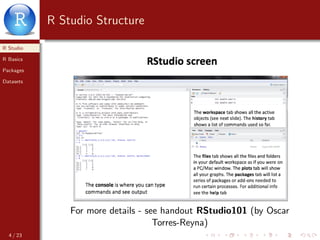
R Studio Structure
For more details - see handout RStudio101 (by Oscar
Torres-Reyna)
4 / 23
R Studio
R Basics
Packages
Datasets
Creating Scripts
Create R File: File → New File → R Script
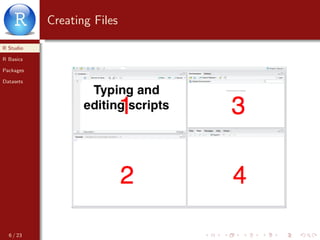
Save R File: File → Save - name it (ex. myscript1.r)
Close R File: File → Close
Open R File: File → Open
5 / 23
R Studio
R Basics
Packages
Datasets
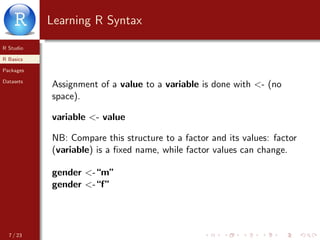
Creating Files
6 / 23
R Studio
R Basics
Packages
Datasets
Learning R Syntax
Assignment of a value to a variable is done with <- (no
space).
variable <- value
7 / 23
R Studio
R Basics
Packages
Datasets
Learning R Syntax
Assignment of a value to a variable is done with <- (no
space).
variable <- value
NB: Compare this structure to a factor and its values: factor
(variable) is a fixed name, while factor values can change.
gender <-“m”
gender <-“f”
7 / 23
R Studio
R Basics
Packages
Datasets
Strings
Strings (characters) are enclosed in quotation marks:
mystring <-“This is my string”
Numbers are without quotation marks:
mynumber <- 5
8 / 23
R Studio
R Basics
Packages
Datasets
Run - Practice
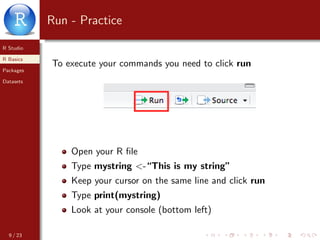
To execute your commands you need to click run
Open your R file
Type mystring <-“This is my string”
Keep your cursor on the same line and click run
Type print(mystring)
Look at your console (bottom left)
9 / 23
R Studio
R Basics
Packages
Datasets
Vector
Vector is a sequence of strings (or numbers)
vector <- c(“string1”,“string2”,“string3”)
vector <- c(1,2,3,4)
Practice:
Type mywords <-c(“These”, “are”,“my”,“words”)
Keep your cursor on the same line and click run
Type print(mywords)
10 / 23
R Studio
R Basics
Packages
Datasets
Length
Length of string vector - how many elements (words) are in
the vector
mywords <-c(“These”, “are”,“my”,“words”)
1 How many words in mywords?
Type length(mywords) and Run
2 What is the first word in mywords?
Type mywords[1] and Run
3 What are the second and third words in mywords?
Type mywords[2:3] and Run
11 / 23
R Studio
R Basics
Packages
Datasets
Installing Packages
In your bottom left window - go to Packages
12 / 23
R Studio
R Basics
Packages
Datasets
Selecting Packages
13 / 23
R Studio
R Basics
Packages
Datasets
Package = Library
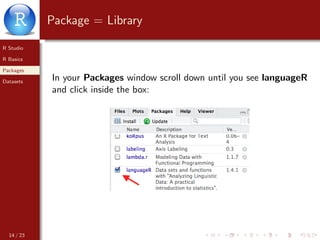
In your Packages window scroll down until you see languageR
and click inside the box:
14 / 23
R Studio
R Basics
Packages
Datasets
Package Content
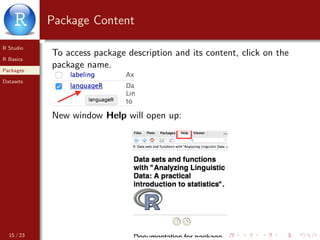
To access package description and its content, click on the
package name.
New window Help will open up:
15 / 23
R Studio
R Basics
Packages
Datasets
Accessing Info from Packages
Scroll down and select languageR-package
You will see the list of available functions from this package
16 / 23
R Studio
R Basics
Packages
Datasets
Quick Help
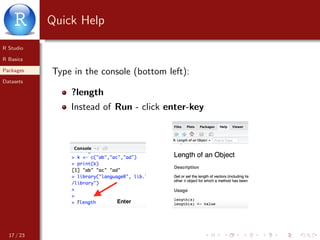
Type in the console (bottom left):
?length
Instead of Run - click enter-key
17 / 23
R Studio
R Basics
Packages
Datasets
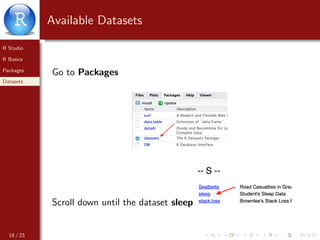
Available Datasets
Go to Packages
Scroll down until the dataset sleep
18 / 23
R Studio
R Basics
Packages
Datasets
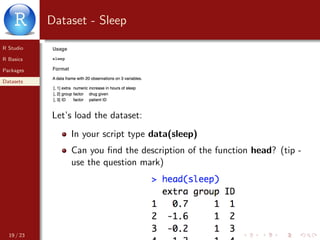
Dataset - Sleep
Let’s load the dataset:
In your script type data(sleep)
Can you find the description of the function head? (tip -
use the question mark)
19 / 23
R Studio
R Basics
Packages
Datasets
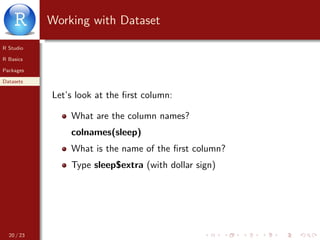
Working with Dataset
Let’s look at the first column:
What are the column names?
colnames(sleep)
What is the name of the first column?
Type sleep$extra (with dollar sign)
20 / 23
R Studio
R Basics
Packages
Datasets
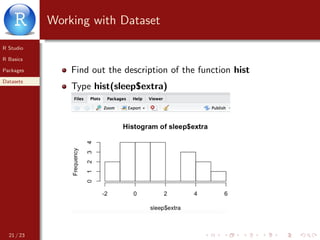
Working with Dataset
Find out the description of the function hist
Type hist(sleep$extra)
21 / 23
R Studio
R Basics
Packages
Datasets
Exporting and Saving
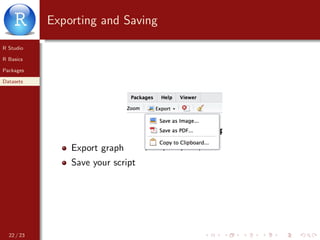
Export graph
Save your script
22 / 23
R Studio
R Basics
Packages
Datasets
Practice
Next: loading files into R (text files, csv files, urls, twitter etc)
RRRRR!
23 / 23

Introduction to Rstudio