DATA
REPRESENTATION
1.DATA TYPES
2.COMPLEMENTS
3.FIXED-POINT REPRESENTATION
4.FLOATING-POINT
REPRESENTATION
5.OTHER BINARY CODES
6.ERROR DETECTION CODES
1.DATA TYPES
 In Digital Computers the binary information is
stored in memory or processor registers.
 Registers are made up of flip-flops.
 flip-flop’s are two-state devices which can store only
binary-coded information(0’s and 1’s)
 Registers store DATA or CONTROL INFORMATION.
 DATA : Data are numbers and other binary coded
information that are operated on to achieve
required computational results
 Control Information : A bit or group of bits used to
specify the sequence of command signals used for
manipulation of data
DATA TYPES
 The data types found in the registers of digital
computers may be classified as one of the
following categories:
 1.numbers used in arithmetic computations.
 2.letters of alphabet used in data processing.
 3.other discrete symbols used for specific
purposes.
NUMBER SYSTEMS:
The number system has different bases and the most
common of them are the decimal, binary, octal, and
hexadecimal.
The base or radix of the number system is the
total number of the digit used in the number system.
DECIMAL:
RADIX:10(BASE)
The decimal number contitutes 10 symbols:
0,1,2,3,4,5,6,7,8,9
EXAMPLE:
75.1
7(10^2)+5(10)+1(10^-1)
NUMBER SYSTEMS:
 BINARY:
 Radix:2(base)
 The two digit symbols used are 0 and 1:
 Example:101101
 Conversion of binary to decimal:
 (101101) = (1 × 2 ) + (0 × 2 ) + (1 × 2³) + (1 × 2²)
₂ ⁵ ⁴
+
(0 × 2¹) + (1 × 2 ) = (45)
⁰ ₁₀
NUMBER SYSTEM:
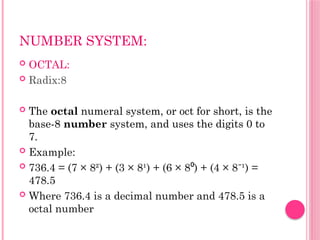
 OCTAL:
 Radix:8
 The octal numeral system, or oct for short, is the
base-8 number system, and uses the digits 0 to
7.
 Example:
 736.4 = (7 × 8²) + (3 × 8¹) + (6 × 8 ) + (4 × 8 ¹) =
⁰ ⁻
478.5
 Where 736.4 is a decimal number and 478.5 is a
octal number
NUMBER SYSTEM:
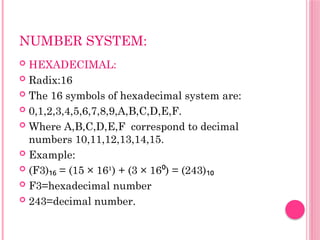
 HEXADECIMAL:
 Radix:16
 The 16 symbols of hexadecimal system are:
 0,1,2,3,4,5,6,7,8,9,A,B,C,D,E,F.
 Where A,B,C,D,E,F correspond to decimal
numbers 10,11,12,13,14,15.
 Example:
 (F3) = (15 × 16¹) + (3 × 16 ) = (243)
₁₆ ⁰ ₁₀
 F3=hexadecimal number
 243=decimal number.
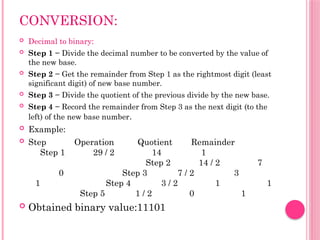
CONVERSION:
 Decimal to binary:
 Step 1 − Divide the decimal number to be converted by the value of
the new base.
 Step 2 − Get the remainder from Step 1 as the rightmost digit (least
significant digit) of new base number.
 Step 3 − Divide the quotient of the previous divide by the new base.
 Step 4 − Record the remainder from Step 3 as the next digit (to the
left) of the new base number.
 Example:
 Step Operation Quotient Remainder
Step 1 29 / 2 14 1
Step 2 14 / 2 7
0 Step 3 7 / 2 3
1 Step 4 3 / 2 1 1
Step 5 1 / 2 0 1
 Obtained binary value:11101
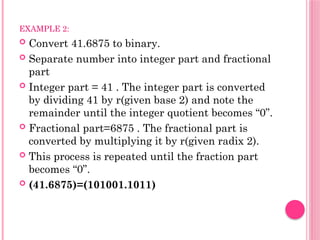
EXAMPLE 2:
 Convert 41.6875 to binary.
 Separate number into integer part and fractional
part
 Integer part = 41 . The integer part is converted
by dividing 41 by r(given base 2) and note the
remainder until the integer quotient becomes “0”.
 Fractional part=6875 . The fractional part is
converted by multiplying it by r(given radix 2).
 This process is repeated until the fraction part
becomes “0”.
 (41.6875)=(101001.1011)
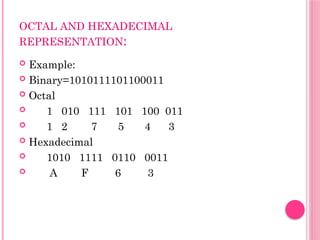
OCTAL AND HEXADECIMAL
REPRESENTATION:
 Example:
 Binary=1010111101100011
 Octal
 1 010 111 101 100 011
 1 2 7 5 4 3
 Hexadecimal
 1010 1111 0110 0011
 A F 6 3
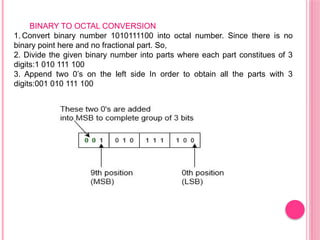
BINARY TO OCTAL CONVERSION
1. Convert binary number 1010111100 into octal number. Since there is no
binary point here and no fractional part. So,
2. Divide the given binary number into parts where each part constitues of 3
digits:1 010 111 100
3. Append two 0’s on the left side In order to obtain all the parts with 3
digits:001 010 111 100
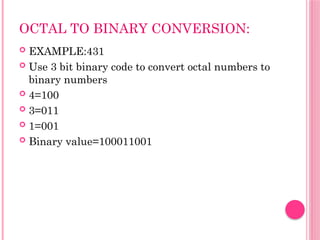
OCTAL TO BINARY CONVERSION:
 EXAMPLE:431
 Use 3 bit binary code to convert octal numbers to
binary numbers
 4=100
 3=011
 1=001
 Binary value=100011001
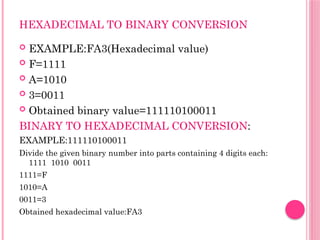
HEXADECIMAL TO BINARY CONVERSION
 EXAMPLE:FA3(Hexadecimal value)
 F=1111
 A=1010
 3=0011
 Obtained binary value=111110100011
BINARY TO HEXADECIMAL CONVERSION:
EXAMPLE:111110100011
Divide the given binary number into parts containing 4 digits each:
1111 1010 0011
1111=F
1010=A
0011=3
Obtained hexadecimal value:FA3
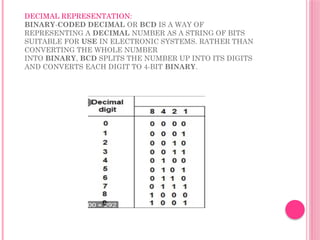
DECIMAL REPRESENTATION:
BINARY-CODED DECIMAL OR BCD IS A WAY OF
REPRESENTING A DECIMAL NUMBER AS A STRING OF BITS
SUITABLE FOR USE IN ELECTRONIC SYSTEMS. RATHER THAN
CONVERTING THE WHOLE NUMBER
INTO BINARY, BCD SPLITS THE NUMBER UP INTO ITS DIGITS
AND CONVERTS EACH DIGIT TO 4-BIT BINARY.
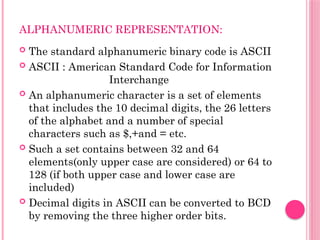
ALPHANUMERIC REPRESENTATION:
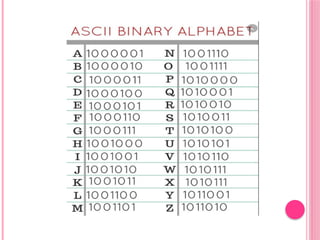
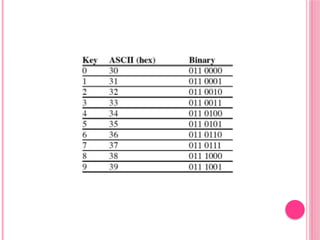
 The standard alphanumeric binary code is ASCII
 ASCII : American Standard Code for Information
Interchange
 An alphanumeric character is a set of elements
that includes the 10 decimal digits, the 26 letters
of the alphabet and a number of special
characters such as $,+and = etc.
 Such a set contains between 32 and 64
elements(only upper case are considered) or 64 to
128 (if both upper case and lower case are
included)
 Decimal digits in ASCII can be converted to BCD
by removing the three higher order bits.
2.COMPLEMENTS:
 Complements are used in the digital computers in order to
simplify the subtraction operation and for the logical
manipulations. For each radix-r system (radix r represents
base of number system) there are two types of
complements.
 We have 2 types of complements
 1.r’s complement
 2.(r-1)’s complement
 For decimal numbers : complements are 10’s complement
and 9’s complement as the base of decimal numbers is 10
 In the same way binary numbers have 2’s complement and
1’s complement
1’S COMPLEMENT:
 1’s complement of a binary number is calculated by altering 0’s
and 1’s.
 Let numbers be stored using 4 bits
 1's complement of 7 (0111) is 8 (1000)
 1's complement of 12 (1100) is 3 (0011)
 But in case of negative binary number representation, we
represent in 1’s complement. If the number is negative then it is
represented using 1’s complement. First represent the number
with positive sign and then take 1’s complement of that number.
 Example :
 5= 0101
 But as 5 is a positive number an MSB bit is set to “0”
 Therefore +5=0 0101, 1’s complement = 01010
 If in case of -5,MSB bit is set to “1”
 Therefore -5=1 0101 , 1’s complement=11010
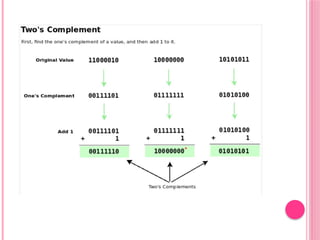
2’S COMPLEMENT:
 2’s complement = 1 + 1’s complement
 1’s complement of a given binary number is
added with 1 in LSB position.
 In case of –ve number MSB bit remains
unchanged.
 Example:
 2’s complement of -5:
 -5=1 0101
 1’s complement of -5= 1 1010
 2’s complement = 11010+1=11011
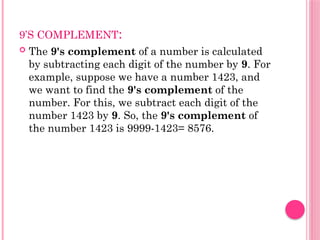
9’S COMPLEMENT:
 The 9's complement of a number is calculated
by subtracting each digit of the number by 9. For
example, suppose we have a number 1423, and
we want to find the 9's complement of the
number. For this, we subtract each digit of the
number 1423 by 9. So, the 9's complement of
the number 1423 is 9999-1423= 8576.
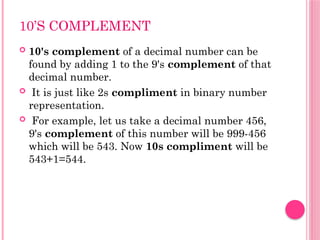
10’S COMPLEMENT
 10's complement of a decimal number can be
found by adding 1 to the 9's complement of that
decimal number.
 It is just like 2s compliment in binary number
representation.
 For example, let us take a decimal number 456,
9's complement of this number will be 999-456
which will be 543. Now 10s compliment will be
543+1=544.
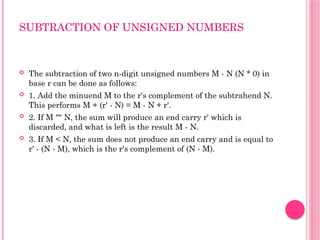
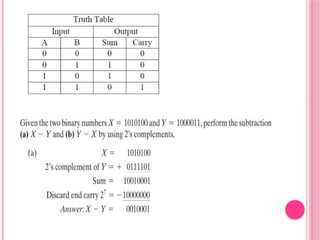
SUBTRACTION OF UNSIGNED NUMBERS
 The subtraction of two n-digit unsigned numbers M - N (N * 0) in
base r can be done as follows:
 1. Add the minuend M to the r's complement of the subtrahend N.
This performs M + (r' - N) = M - N + r'.
 2. If M "" N, the sum will produce an end carry r' which is
discarded, and what is left is the result M - N.
 3. If M < N, the sum does not produce an end carry and is equal to
r' - (N - M), which is the r's complement of (N - M).
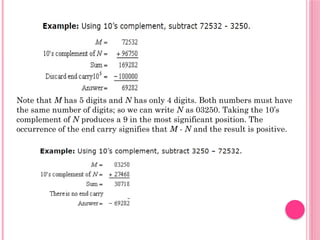
Note that M has 5 digits and N has only 4 digits. Both numbers must have
the same number of digits; so we can write N as 03250. Taking the 10’s
complement of N pro­
duces a 9 in the most significant position. The
occurrence of the end carry signifies that M - N and the result is positive.
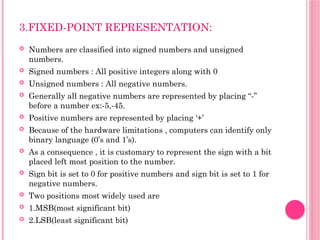
3.FIXED-POINT REPRESENTATION:
 Numbers are classified into signed numbers and unsigned
numbers.
 Signed numbers : All positive integers along with 0
 Unsigned numbers : All negative numbers.
 Generally all negative numbers are represented by placing “-”
before a number ex:-5,-45.
 Positive numbers are represented by placing ‘+’
 Because of the hardware limitations , computers can identify only
binary language (0’s and 1’s).
 As a consequence , it is customary to represent the sign with a bit
placed left most position to the number.
 Sign bit is set to 0 for positive numbers and sign bit is set to 1 for
negative numbers.
 Two positions most widely used are
 1.MSB(most significant bit)
 2.LSB(least significant bit)
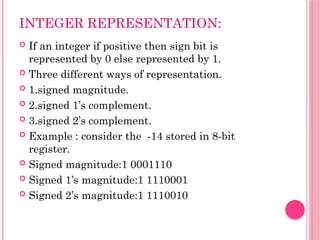
INTEGER REPRESENTATION:
 If an integer if positive then sign bit is
represented by 0 else represented by 1.
 Three different ways of representation.
 1.signed magnitude.
 2.signed 1’s complement.
 3.signed 2’s complement.
 Example : consider the -14 stored in 8-bit
register.
 Signed magnitude:1 0001110
 Signed 1’s magnitude:1 1110001
 Signed 2’s magnitude:1 1110010
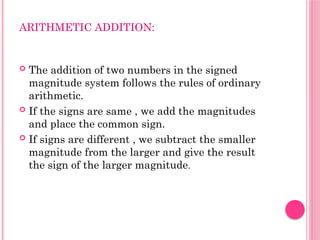
ARITHMETIC ADDITION:
 The addition of two numbers in the signed
magnitude system follows the rules of ordinary
arithmetic.
 If the signs are same , we add the magnitudes
and place the common sign.
 If signs are different , we subtract the smaller
magnitude from the larger and give the result
the sign of the larger magnitude.
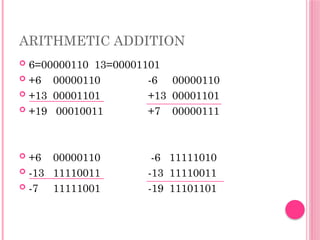
ARITHMETIC ADDITION
 6=00000110 13=00001101
 +6 00000110 -6 00000110
 +13 00001101 +13 00001101
 +19 00010011 +7 00000111
 +6 00000110 -6 11111010
 -13 11110011 -13 11110011
 -7 11111001 -19 11101101
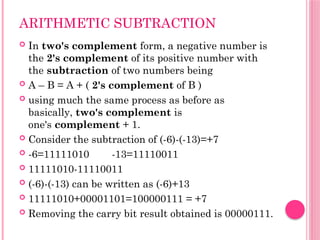
ARITHMETIC SUBTRACTION
 In two's complement form, a negative number is
the 2's complement of its positive number with
the subtraction of two numbers being
 A – B = A + ( 2's complement of B )
 using much the same process as before as
basically, two's complement is
one's complement + 1.
 Consider the subtraction of (-6)-(-13)=+7
 -6=11111010 -13=11110011
 11111010-11110011
 (-6)-(-13) can be written as (-6)+13
 11111010+00001101=100000111 = +7
 Removing the carry bit result obtained is 00000111.
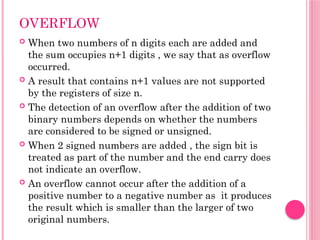
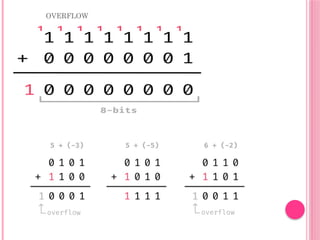
OVERFLOW
 When two numbers of n digits each are added and
the sum occupies n+1 digits , we say that as overflow
occurred.
 A result that contains n+1 values are not supported
by the registers of size n.
 The detection of an overflow after the addition of two
binary numbers depends on whether the numbers
are considered to be signed or unsigned.
 When 2 signed numbers are added , the sign bit is
treated as part of the number and the end carry does
not indicate an overflow.
 An overflow cannot occur after the addition of a
positive number to a negative number as it produces
the result which is smaller than the larger of two
original numbers.
OVERFLOW
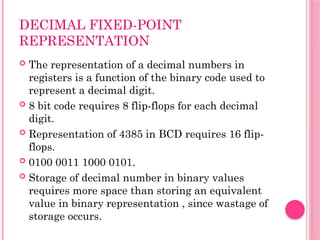
DECIMAL FIXED-POINT
REPRESENTATION
 The representation of a decimal numbers in
registers is a function of the binary code used to
represent a decimal digit.
 8 bit code requires 8 flip-flops for each decimal
digit.
 Representation of 4385 in BCD requires 16 flip-
flops.
 0100 0011 1000 0101.
 Storage of decimal number in binary values
requires more space than storing an equivalent
value in binary representation , since wastage of
storage occurs.
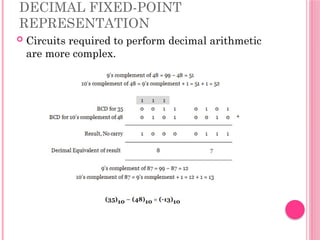
DECIMAL FIXED-POINT
REPRESENTATION
 Circuits required to perform decimal arithmetic
are more complex.
4.FLOATING-POINT
REPRESENTATION
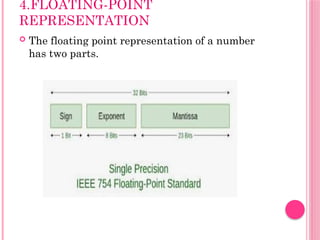
 The floating point representation of a number
has two parts.
FLOATING POINT
REPRESENTATION
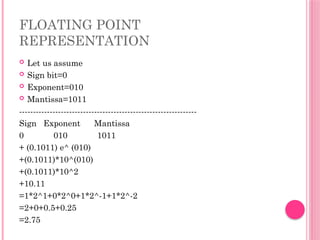
 Let us assume
 Sign bit=0
 Exponent=010
 Mantissa=1011
----------------------------------------------------------------
Sign Exponent Mantissa
0 010 1011
+ (0.1011) e^ (010)
+(0.1011)*10^(010)
+(0.1011)*10^2
+10.11
=1*2^1+0*2^0+1*2^-1+1*2^-2
=2+0+0.5+0.25
=2.75
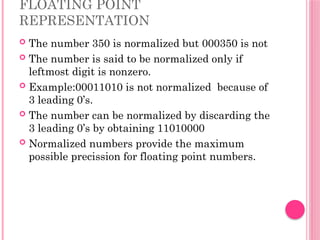
FLOATING POINT
REPRESENTATION
 The number 350 is normalized but 000350 is not
 The number is said to be normalized only if
leftmost digit is nonzero.
 Example:00011010 is not normalized because of
3 leading 0’s.
 The number can be normalized by discarding the
3 leading 0’s by obtaining 11010000
 Normalized numbers provide the maximum
possible precission for floating point numbers.
5.OTHER BINARY CODES
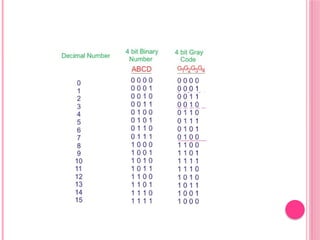
 1.Gray code:
 Gray code – also known as Cyclic Code,
Reflected Binary Code (RBC), Reflected
Binary (RB) .
 Grey code – is defined as an ordering of the
binary number system such that each
incremental value can only differ by one bit.
 In gray code, while traversing from one step to
another step only one bit in the code group
changes.
 That is to say that two adjacent code numbers
differ from each other by only one bit.
GRAY CODE
 Gray code counters are sometimes used to
provide the timing sequences that control the
operations in a digital system
 Gray code counters remove ambiguity during the
change from one state to other state of the
counter because only one bit can change during
the state transition.
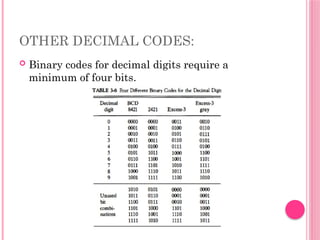
OTHER DECIMAL CODES:
 Binary codes for decimal digits require a
minimum of four bits.
OTHER BINARY CODES:
 self-complementing: One disadvantage of using
BCD is the difficulty encountered when the 9's
complement of the number is. to be computed.
 On the other hand, the 9's complement is easily
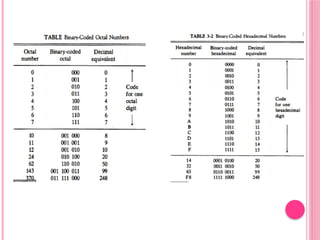
obtained with the 2421 and the excess-3 codes listed
self-complementing in Table 3-6.
 These two codes have a self-complementing property
which means that the 9' s complement of a decimal
number, when represented in one of these codes, is
easily obtained by changing 1's to O's and O's to l's.
 This property is useful when arithmetic operations
are done in signed-complement representation.
WEIGHTED CODE:
 weighted code: The 2421 is an example of a
weighted code. In a weighted code, the bits are
multiplied by the weights indicated and the sum
of the weighted bits gives the decimal digit. For
example, the bit combination 1101, when
weighted by the respective digits 2421, gives the
decimal equivalent of 2 x 1 + 4 x 1 + 2 x 0 + 1 x 1
= 7. The BCD code can be assigned the weights
8421 and for this reason it is sometimes called
the 8421 code.
EXCESS 3 CODE
 excess-3 code: The excess-3 code is a decimal
code that has been used in older computers. This
is an unweighted code. Its binary code
assignment is obtained from the corresponding
BCD equivalent binary number after the addition
of binary 3 (0011).
OTHER ALPHANUMERIC CODES:
 The ASCII code (Table 3-4) is the standard code
commonly used for the transmission of binary
information.
 Each character is represented by a 7-bit code and
usually an eighth bit is inserted for parity (see Sec. 3-
6). The code consists of 128 characters.
 Ninety-five characters represent graphic symbols that
include upper- and lowercase letters, numerals zero to
nine, punctuation marks, and special symbols. Twenty-
three characters represent format effectors, which are
functional characters for controlling the layout of
printing or display devices such as carriage return, line
feed, horizontal tabulation, and back space.
 The other 10 characters are used to direct the data
communication flow and report its status.
EBCDIC
 EBCDIC: Another alphanumeric (sometimes
called alphameric) code used in IBM equipment
is the EBCDIC (Extended BCD Interchange
Code). It uses eight bits for each character (and a
ninth bit for parity). EBCDIC has the same
character symbols as ASCII but the bit
assignment to characters is different.
6.ERROR DETECTION CODES:
 Binary information transmitted through some form
of communication medium is subject to external
noise that could change bits from 1 to 0, and vice
versa. An error detection code is a binary code that
detects digital errors during transmission.
 The detected errors cannot be corrected but their
presence is indicated.
 The usual procedure is to observe the frequency of
errors.
 If errors occur infrequently at random, the
particular erroneous information is transmitted
again. If the error occurs too often, the system is
checked for malfunction.
PARITY BIT
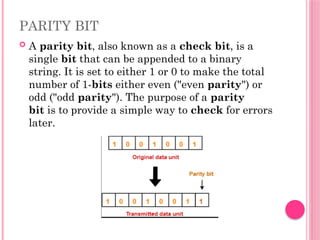
 A parity bit, also known as a check bit, is a
single bit that can be appended to a binary
string. It is set to either 1 or 0 to make the total
number of 1-bits either even ("even parity") or
odd ("odd parity"). The purpose of a parity
bit is to provide a simple way to check for errors
later.
PARITY GENERATOR
 A parity generator is a combinational logic
circuit that generates the parity bit in the
transmitter. On the other hand, a circuit that
checks the parity in the receiver is
called parity checker.
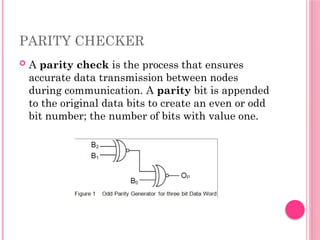
PARITY CHECKER
 A parity check is the process that ensures
accurate data transmission between nodes
during communication. A parity bit is appended
to the original data bits to create an even or odd
bit number; the number of bits with value one.
computer organization-computer organization-

  • 1.
  • 2.
    1.DATA TYPES  InDigital Computers the binary information is stored in memory or processor registers.  Registers are made up of flip-flops.  flip-flop’s are two-state devices which can store only binary-coded information(0’s and 1’s)  Registers store DATA or CONTROL INFORMATION.  DATA : Data are numbers and other binary coded information that are operated on to achieve required computational results  Control Information : A bit or group of bits used to specify the sequence of command signals used for manipulation of data
  • 3.
    DATA TYPES  Thedata types found in the registers of digital computers may be classified as one of the following categories:  1.numbers used in arithmetic computations.  2.letters of alphabet used in data processing.  3.other discrete symbols used for specific purposes.
  • 4.
    NUMBER SYSTEMS: The numbersystem has different bases and the most common of them are the decimal, binary, octal, and hexadecimal. The base or radix of the number system is the total number of the digit used in the number system. DECIMAL: RADIX:10(BASE) The decimal number contitutes 10 symbols: 0,1,2,3,4,5,6,7,8,9 EXAMPLE: 75.1 7(10^2)+5(10)+1(10^-1)
  • 5.
    NUMBER SYSTEMS:  BINARY: Radix:2(base)  The two digit symbols used are 0 and 1:  Example:101101  Conversion of binary to decimal:  (101101) = (1 × 2 ) + (0 × 2 ) + (1 × 2³) + (1 × 2²) ₂ ⁵ ⁴ + (0 × 2¹) + (1 × 2 ) = (45) ⁰ ₁₀
  • 6.
    NUMBER SYSTEM:  OCTAL: Radix:8  The octal numeral system, or oct for short, is the base-8 number system, and uses the digits 0 to 7.  Example:  736.4 = (7 × 8²) + (3 × 8¹) + (6 × 8 ) + (4 × 8 ¹) = ⁰ ⁻ 478.5  Where 736.4 is a decimal number and 478.5 is a octal number
  • 7.
    NUMBER SYSTEM:  HEXADECIMAL: Radix:16  The 16 symbols of hexadecimal system are:  0,1,2,3,4,5,6,7,8,9,A,B,C,D,E,F.  Where A,B,C,D,E,F correspond to decimal numbers 10,11,12,13,14,15.  Example:  (F3) = (15 × 16¹) + (3 × 16 ) = (243) ₁₆ ⁰ ₁₀  F3=hexadecimal number  243=decimal number.
  • 8.
    CONVERSION:  Decimal tobinary:  Step 1 − Divide the decimal number to be converted by the value of the new base.  Step 2 − Get the remainder from Step 1 as the rightmost digit (least significant digit) of new base number.  Step 3 − Divide the quotient of the previous divide by the new base.  Step 4 − Record the remainder from Step 3 as the next digit (to the left) of the new base number.  Example:  Step Operation Quotient Remainder Step 1 29 / 2 14 1 Step 2 14 / 2 7 0 Step 3 7 / 2 3 1 Step 4 3 / 2 1 1 Step 5 1 / 2 0 1  Obtained binary value:11101
  • 9.
    EXAMPLE 2:  Convert41.6875 to binary.  Separate number into integer part and fractional part  Integer part = 41 . The integer part is converted by dividing 41 by r(given base 2) and note the remainder until the integer quotient becomes “0”.  Fractional part=6875 . The fractional part is converted by multiplying it by r(given radix 2).  This process is repeated until the fraction part becomes “0”.  (41.6875)=(101001.1011)
  • 10.
    OCTAL AND HEXADECIMAL REPRESENTATION: Example:  Binary=1010111101100011  Octal  1 010 111 101 100 011  1 2 7 5 4 3  Hexadecimal  1010 1111 0110 0011  A F 6 3
  • 12.
    BINARY TO OCTALCONVERSION 1. Convert binary number 1010111100 into octal number. Since there is no binary point here and no fractional part. So, 2. Divide the given binary number into parts where each part constitues of 3 digits:1 010 111 100 3. Append two 0’s on the left side In order to obtain all the parts with 3 digits:001 010 111 100
  • 13.
    OCTAL TO BINARYCONVERSION:  EXAMPLE:431  Use 3 bit binary code to convert octal numbers to binary numbers  4=100  3=011  1=001  Binary value=100011001
  • 14.
    HEXADECIMAL TO BINARYCONVERSION  EXAMPLE:FA3(Hexadecimal value)  F=1111  A=1010  3=0011  Obtained binary value=111110100011 BINARY TO HEXADECIMAL CONVERSION: EXAMPLE:111110100011 Divide the given binary number into parts containing 4 digits each: 1111 1010 0011 1111=F 1010=A 0011=3 Obtained hexadecimal value:FA3
  • 15.
    DECIMAL REPRESENTATION: BINARY-CODED DECIMALOR BCD IS A WAY OF REPRESENTING A DECIMAL NUMBER AS A STRING OF BITS SUITABLE FOR USE IN ELECTRONIC SYSTEMS. RATHER THAN CONVERTING THE WHOLE NUMBER INTO BINARY, BCD SPLITS THE NUMBER UP INTO ITS DIGITS AND CONVERTS EACH DIGIT TO 4-BIT BINARY.
  • 16.
    ALPHANUMERIC REPRESENTATION:  Thestandard alphanumeric binary code is ASCII  ASCII : American Standard Code for Information Interchange  An alphanumeric character is a set of elements that includes the 10 decimal digits, the 26 letters of the alphabet and a number of special characters such as $,+and = etc.  Such a set contains between 32 and 64 elements(only upper case are considered) or 64 to 128 (if both upper case and lower case are included)  Decimal digits in ASCII can be converted to BCD by removing the three higher order bits.
  • 19.
    2.COMPLEMENTS:  Complements areused in the digital computers in order to simplify the subtraction operation and for the logical manipulations. For each radix-r system (radix r represents base of number system) there are two types of complements.  We have 2 types of complements  1.r’s complement  2.(r-1)’s complement  For decimal numbers : complements are 10’s complement and 9’s complement as the base of decimal numbers is 10  In the same way binary numbers have 2’s complement and 1’s complement
  • 20.
    1’S COMPLEMENT:  1’scomplement of a binary number is calculated by altering 0’s and 1’s.  Let numbers be stored using 4 bits  1's complement of 7 (0111) is 8 (1000)  1's complement of 12 (1100) is 3 (0011)  But in case of negative binary number representation, we represent in 1’s complement. If the number is negative then it is represented using 1’s complement. First represent the number with positive sign and then take 1’s complement of that number.  Example :  5= 0101  But as 5 is a positive number an MSB bit is set to “0”  Therefore +5=0 0101, 1’s complement = 01010  If in case of -5,MSB bit is set to “1”  Therefore -5=1 0101 , 1’s complement=11010
  • 21.
    2’S COMPLEMENT:  2’scomplement = 1 + 1’s complement  1’s complement of a given binary number is added with 1 in LSB position.  In case of –ve number MSB bit remains unchanged.  Example:  2’s complement of -5:  -5=1 0101  1’s complement of -5= 1 1010  2’s complement = 11010+1=11011
  • 23.
    9’S COMPLEMENT:  The9's complement of a number is calculated by subtracting each digit of the number by 9. For example, suppose we have a number 1423, and we want to find the 9's complement of the number. For this, we subtract each digit of the number 1423 by 9. So, the 9's complement of the number 1423 is 9999-1423= 8576.
  • 24.
    10’S COMPLEMENT  10'scomplement of a decimal number can be found by adding 1 to the 9's complement of that decimal number.  It is just like 2s compliment in binary number representation.  For example, let us take a decimal number 456, 9's complement of this number will be 999-456 which will be 543. Now 10s compliment will be 543+1=544.
  • 25.
    SUBTRACTION OF UNSIGNEDNUMBERS  The subtraction of two n-digit unsigned numbers M - N (N * 0) in base r can be done as follows:  1. Add the minuend M to the r's complement of the subtrahend N. This performs M + (r' - N) = M - N + r'.  2. If M "" N, the sum will produce an end carry r' which is discarded, and what is left is the result M - N.  3. If M < N, the sum does not produce an end carry and is equal to r' - (N - M), which is the r's complement of (N - M).
  • 27.
    Note that Mhas 5 digits and N has only 4 digits. Both numbers must have the same number of digits; so we can write N as 03250. Taking the 10’s complement of N pro­ duces a 9 in the most significant position. The occurrence of the end carry signifies that M - N and the result is positive.
  • 28.
    3.FIXED-POINT REPRESENTATION:  Numbersare classified into signed numbers and unsigned numbers.  Signed numbers : All positive integers along with 0  Unsigned numbers : All negative numbers.  Generally all negative numbers are represented by placing “-” before a number ex:-5,-45.  Positive numbers are represented by placing ‘+’  Because of the hardware limitations , computers can identify only binary language (0’s and 1’s).  As a consequence , it is customary to represent the sign with a bit placed left most position to the number.  Sign bit is set to 0 for positive numbers and sign bit is set to 1 for negative numbers.  Two positions most widely used are  1.MSB(most significant bit)  2.LSB(least significant bit)
  • 29.
    INTEGER REPRESENTATION:  Ifan integer if positive then sign bit is represented by 0 else represented by 1.  Three different ways of representation.  1.signed magnitude.  2.signed 1’s complement.  3.signed 2’s complement.  Example : consider the -14 stored in 8-bit register.  Signed magnitude:1 0001110  Signed 1’s magnitude:1 1110001  Signed 2’s magnitude:1 1110010
  • 30.
    ARITHMETIC ADDITION:  Theaddition of two numbers in the signed magnitude system follows the rules of ordinary arithmetic.  If the signs are same , we add the magnitudes and place the common sign.  If signs are different , we subtract the smaller magnitude from the larger and give the result the sign of the larger magnitude.
  • 31.
    ARITHMETIC ADDITION  6=0000011013=00001101  +6 00000110 -6 00000110  +13 00001101 +13 00001101  +19 00010011 +7 00000111  +6 00000110 -6 11111010  -13 11110011 -13 11110011  -7 11111001 -19 11101101
  • 32.
    ARITHMETIC SUBTRACTION  Intwo's complement form, a negative number is the 2's complement of its positive number with the subtraction of two numbers being  A – B = A + ( 2's complement of B )  using much the same process as before as basically, two's complement is one's complement + 1.  Consider the subtraction of (-6)-(-13)=+7  -6=11111010 -13=11110011  11111010-11110011  (-6)-(-13) can be written as (-6)+13  11111010+00001101=100000111 = +7  Removing the carry bit result obtained is 00000111.
  • 33.
    OVERFLOW  When twonumbers of n digits each are added and the sum occupies n+1 digits , we say that as overflow occurred.  A result that contains n+1 values are not supported by the registers of size n.  The detection of an overflow after the addition of two binary numbers depends on whether the numbers are considered to be signed or unsigned.  When 2 signed numbers are added , the sign bit is treated as part of the number and the end carry does not indicate an overflow.  An overflow cannot occur after the addition of a positive number to a negative number as it produces the result which is smaller than the larger of two original numbers.
  • 34.
  • 35.
    DECIMAL FIXED-POINT REPRESENTATION  Therepresentation of a decimal numbers in registers is a function of the binary code used to represent a decimal digit.  8 bit code requires 8 flip-flops for each decimal digit.  Representation of 4385 in BCD requires 16 flip- flops.  0100 0011 1000 0101.  Storage of decimal number in binary values requires more space than storing an equivalent value in binary representation , since wastage of storage occurs.
  • 36.
    DECIMAL FIXED-POINT REPRESENTATION  Circuitsrequired to perform decimal arithmetic are more complex.
  • 37.
    4.FLOATING-POINT REPRESENTATION  The floatingpoint representation of a number has two parts.
  • 38.
    FLOATING POINT REPRESENTATION  Letus assume  Sign bit=0  Exponent=010  Mantissa=1011 ---------------------------------------------------------------- Sign Exponent Mantissa 0 010 1011 + (0.1011) e^ (010) +(0.1011)*10^(010) +(0.1011)*10^2 +10.11 =1*2^1+0*2^0+1*2^-1+1*2^-2 =2+0+0.5+0.25 =2.75
  • 39.
    FLOATING POINT REPRESENTATION  Thenumber 350 is normalized but 000350 is not  The number is said to be normalized only if leftmost digit is nonzero.  Example:00011010 is not normalized because of 3 leading 0’s.  The number can be normalized by discarding the 3 leading 0’s by obtaining 11010000  Normalized numbers provide the maximum possible precission for floating point numbers.
  • 40.
    5.OTHER BINARY CODES 1.Gray code:  Gray code – also known as Cyclic Code, Reflected Binary Code (RBC), Reflected Binary (RB) .  Grey code – is defined as an ordering of the binary number system such that each incremental value can only differ by one bit.  In gray code, while traversing from one step to another step only one bit in the code group changes.  That is to say that two adjacent code numbers differ from each other by only one bit.
  • 42.
    GRAY CODE  Graycode counters are sometimes used to provide the timing sequences that control the operations in a digital system  Gray code counters remove ambiguity during the change from one state to other state of the counter because only one bit can change during the state transition.
  • 43.
    OTHER DECIMAL CODES: Binary codes for decimal digits require a minimum of four bits.
  • 44.
    OTHER BINARY CODES: self-complementing: One disadvantage of using BCD is the difficulty encountered when the 9's complement of the number is. to be computed.  On the other hand, the 9's complement is easily obtained with the 2421 and the excess-3 codes listed self-complementing in Table 3-6.  These two codes have a self-complementing property which means that the 9' s complement of a decimal number, when represented in one of these codes, is easily obtained by changing 1's to O's and O's to l's.  This property is useful when arithmetic operations are done in signed-complement representation.
  • 45.
    WEIGHTED CODE:  weightedcode: The 2421 is an example of a weighted code. In a weighted code, the bits are multiplied by the weights indicated and the sum of the weighted bits gives the decimal digit. For example, the bit combination 1101, when weighted by the respective digits 2421, gives the decimal equivalent of 2 x 1 + 4 x 1 + 2 x 0 + 1 x 1 = 7. The BCD code can be assigned the weights 8421 and for this reason it is sometimes called the 8421 code.
  • 46.
    EXCESS 3 CODE excess-3 code: The excess-3 code is a decimal code that has been used in older computers. This is an unweighted code. Its binary code assignment is obtained from the corresponding BCD equivalent binary number after the addition of binary 3 (0011).
  • 47.
    OTHER ALPHANUMERIC CODES: The ASCII code (Table 3-4) is the standard code commonly used for the transmission of binary information.  Each character is represented by a 7-bit code and usually an eighth bit is inserted for parity (see Sec. 3- 6). The code consists of 128 characters.  Ninety-five characters represent graphic symbols that include upper- and lowercase letters, numerals zero to nine, punctuation marks, and special symbols. Twenty- three characters represent format effectors, which are functional characters for controlling the layout of printing or display devices such as carriage return, line feed, horizontal tabulation, and back space.  The other 10 characters are used to direct the data communication flow and report its status.
  • 48.
    EBCDIC  EBCDIC: Anotheralphanumeric (sometimes called alphameric) code used in IBM equipment is the EBCDIC (Extended BCD Interchange Code). It uses eight bits for each character (and a ninth bit for parity). EBCDIC has the same character symbols as ASCII but the bit assignment to characters is different.
  • 49.
    6.ERROR DETECTION CODES: Binary information transmitted through some form of communication medium is subject to external noise that could change bits from 1 to 0, and vice versa. An error detection code is a binary code that detects digital errors during transmission.  The detected errors cannot be corrected but their presence is indicated.  The usual procedure is to observe the frequency of errors.  If errors occur infrequently at random, the particular erroneous information is transmitted again. If the error occurs too often, the system is checked for malfunction.
  • 50.
    PARITY BIT  Aparity bit, also known as a check bit, is a single bit that can be appended to a binary string. It is set to either 1 or 0 to make the total number of 1-bits either even ("even parity") or odd ("odd parity"). The purpose of a parity bit is to provide a simple way to check for errors later.
  • 51.
    PARITY GENERATOR  Aparity generator is a combinational logic circuit that generates the parity bit in the transmitter. On the other hand, a circuit that checks the parity in the receiver is called parity checker.
  • 52.
    PARITY CHECKER  Aparity check is the process that ensures accurate data transmission between nodes during communication. A parity bit is appended to the original data bits to create an even or odd bit number; the number of bits with value one.