1
Data representation
2
Binary numbers
 Binary number is simply a number comprised of only 0's and 1's.
 Computers use binary numbers because it's easy for them to
communicate using electrical current -- 0 is off, 1 is on.
 You can express any base 10 (our number system -- where
each digit is between 0 and 9) with binary numbers.
 The need to translate decimal number to binary and binary to
decimal.
 There are many ways in representing decimal number in binary
numbers. (later)
3
How does the binary system
work?
 It is just like any other system
 In decimal system the base is 10
• We have 10 possible values 0-9
 In binary system the base is 2
• We have only two possible values 0 or 1.
• The same as in any base, 0 digit has non
contribution, where 1’s has contribution which
depends at there position.
4
Example
 3040510 = 30000 + 400 + 5
= 3*104+4*102+5*100
 101012 =10000+100+1
=1*24+1*22+1*20
5
Examples: decimal -- binary
 Find the binary representation of 12910.
 Find the decimal value represented by
the following binary representations:
• 10000011
• 10101010
6
Examples: Representing
fractional numbers
 Find the binary representations of:
• 0.510 = 0.1
• 0.7510 = 0.11
 Using only 8 binary digits find the binary
representations of:
• 0.210
• 0.810
7
Number representation
 Representing whole numbers
 Representing fractional numbers
8
Integer Representations
• Unsigned notation
• Signed magnitude notion
• Two’s complement notation.
9
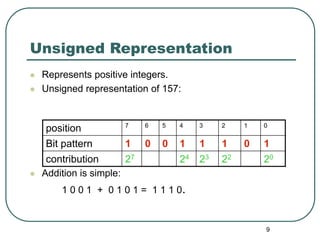
Unsigned Representation
 Represents positive integers.
 Unsigned representation of 157:
 Addition is simple:
1 0 0 1 + 0 1 0 1 = 1 1 1 0.
position 7 6 5 4 3 2 1 0
Bit pattern 1 0 0 1 1 1 0 1
contribution 27 24 23 22 20
10
Advantages and disadvantages of
unsigned notation
 Advantages:
• One representation of zero
• Simple addition
 Disadvantages
• Negative numbers can not be represented.
• The need of different notation to represent
negative numbers.
11
Representation of negative
numbers
 Is a representation of negative numbers
possible?
 Unfortunately:
• you can not just stick a negative sign in front of a binary
number. (it does not work like that)
 There are three methods used to represent
negative numbers.
• Signed magnitude notation
• Excess notation notation
• Two’s complement notation
12
Signed Magnitude
Representation
 Unsigned: - and + are the same.
 In signed magnitude
• the left-most bit represents the sign of the integer.
• 0 for positive numbers.
• 1 for negative numbers.
 The remaining bits represent to
magnitude of the numbers.
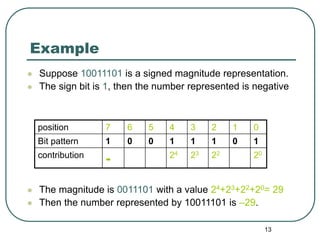
13
Example
 Suppose 10011101 is a signed magnitude representation.
 The sign bit is 1, then the number represented is negative
 The magnitude is 0011101 with a value 24+23+22+20= 29
 Then the number represented by 10011101 is –29.
position 7 6 5 4 3 2 1 0
Bit pattern 1 0 0 1 1 1 0 1
contribution
- 24 23 22 20
14
Exercise 1
1. 3710 has 0010 0101 in signed magnitude notation. Find
the signed magnitude of –3710 ?
2. Using the signed magnitude notation find the 8-bit
binary representation of the decimal value 2410 and -
2410.
3. Find the signed magnitude of –63 using 8-bit binary
sequence?
15
Disadvantage of Signed
Magnitude
 Addition and subtractions are difficult.
 Signs and magnitude, both have to carry out
the required operation.
 They are two representations of 0
• 00000000 = + 010
• 10000000 = - 010
• To test if a number is 0 or not, the CPU will need to see
whether it is 00000000 or 10000000.
• 0 is always performed in programs.
• Therefore, having two representations of 0 is inconvenient.
16
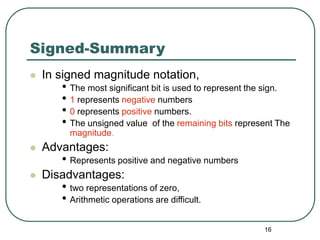
Signed-Summary
 In signed magnitude notation,
• The most significant bit is used to represent the sign.
• 1 represents negative numbers
• 0 represents positive numbers.
• The unsigned value of the remaining bits represent The
magnitude.
 Advantages:
• Represents positive and negative numbers
 Disadvantages:
• two representations of zero,
• Arithmetic operations are difficult.
17
Two’s Complement Notation
 The most used representation for
integers.
• All positive numbers begin with 0.
• All negative numbers begin with 1.
• One representation of zero
• i.e. 0 is represented as 0000 using 4-bit binary
sequence.
18
Two’s Complement Notation with 4-bits
Binary pattern Value in 2’s complement.
0 1 1 1 7
0 1 1 0 6
0 1 0 1 5
0 1 0 0 4
0 0 1 1 3
0 0 1 0 2
0 0 0 1 1
0 0 0 0 0
1 1 1 1 -1
1 1 1 0 -2
1 1 0 1 -3
1 1 0 0 -4
1 0 1 1 -5
1 0 1 0 -6
1 0 0 1 -7
1 0 0 0 -8
19
Properties of Two’s Complement
Notation
 Positive numbers begin with 0
 Negative numbers begin with 1
 Only one representation of 0, i.e. 0000
 Relationship between +n and –n.
• 0 1 0 0 +4 0 0 0 1 0 0 1 0 +18
• 1 1 0 0 -4 1 1 1 0 1 1 1 0 -18
20
Advantages of Two’s
Complement Notation
 It is easy to add two numbers.
0 0 0 1 +1 1 0 0 0 -8
0 1 0 1 +5 0 1 0 1 +5
+ +
0 1 1 0 +6 1 1 0 1 -3
• Subtraction can be easily performed.
• Multiplication is just a repeated addition.
• Division is just a repeated subtraction
• Two’s complement is widely used in ALU
21
Evaluating numbers in two’s
complement notation
 Sign bit = 0, the number is positive. The value is determined in
the usual way.
 Sign bit = 1, the number is negative. three methods can be
used:
Method 1 decimal value of (n-1) bits, then subtract 2n-1
Method 2 - 2n-1 is the contribution of the sign bit.
Method 3  Binary rep. of the corresponding positive number.
 Let V be its decimal value.
 - V is the required value.
22
Example- 10101 in Two’s
Complement
 The most significant bit is 1, hence it is a
negative number.
 Method 1
• 0101 = +5 (+5 – 25-1 = 5 – 24 = 5-16 = -11)
 Method 2
4 3 2 1 0
1 0 1 0 1
-24 22 20 = -11
 Method 3
• Corresponding + number is 01011 = 8 + 2+1 = 11
the result is then –11.
23
Two’s complement-summary
 In two’s complement the most significant for an n-bit number
has a contribution of –2(n-1).
 One representation of zero
 All arithmetic operations can be performed by using addition
and inversion.
 The most significant bit: 0 for positive and 1 for negative.
 Three methods can the decimal value of a negative number:
Method 1 decimal value of (n-1) bits, then subtract 2n-1
Method 2 - 2n-1 is the contribution of the sign bit.
Method 3  Binary rep. of the corresponding positive number.
 Let V be its decimal value.
 - V is the required value.
24
Exercise - 10001011
 Determine the decimal value
represented by 10001011 in each of
the following four systems.
1. Unsigned notation?
2. Signed magnitude notation?
3. Two’s complements?
26
Fraction Representation
 To represent fraction we need other
representations:
• Fixed point representation
• Floating point representation.
27
Fixed-Point Representation
old position 7 6 5 4 3 2 1 0
New position 4 3 2 1 0 -1 -2 -3
Bit pattern 1 0 0 1 1 . 1 0 1
Contribution 24 21 20 2-1 2-3 =19.625
Radix-point
28
Limitation of Fixed-Point
Representation
 To represent large numbers or very
small numbers we need a very long
sequences of bits.
 This is because we have to give bits to
both the integer part and the fraction part.
29
Floating Point Representation
In decimal notation we can get around this
problem using scientific notation or floating
point notation.
Number Scientific notation Floating-point
notation
1,245,000,000,000 1.245 1012 0.1245 1013
0.0000001245 1.245 10-7 0.1245 10-6
-0.0000001245 -1.245 10-7 -0.1245 10-6
30
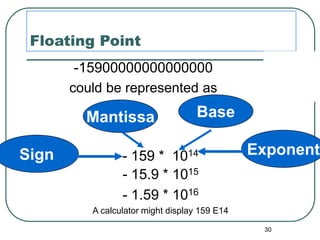
Floating Point
-15900000000000000
could be represented as
- 15.9 * 1015
- 1.59 * 1016
A calculator might display 159 E14
- 159 * 1014
Sign Exponent
Base
Mantissa
31
 M  B E
Sign mantissa or base exponent
significand
Floating point format
Sign Exponent Mantissa
32
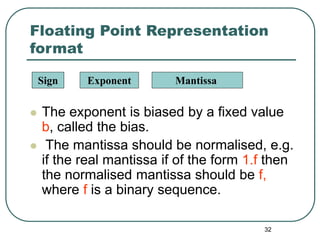
Floating Point Representation
format
 The exponent is biased by a fixed value
b, called the bias.
 The mantissa should be normalised, e.g.
if the real mantissa if of the form 1.f then
the normalised mantissa should be f,
where f is a binary sequence.
Sign Exponent Mantissa
33
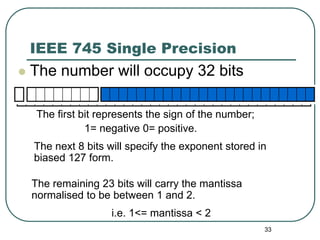
IEEE 745 Single Precision
 The number will occupy 32 bits
The first bit represents the sign of the number;
1= negative 0= positive.
The next 8 bits will specify the exponent stored in
biased 127 form.
The remaining 23 bits will carry the mantissa
normalised to be between 1 and 2.
i.e. 1<= mantissa < 2
34
Representation in IEEE 754
single precision
 sign bit:
• 0 for positive and,
• 1 for negative numbers
 8 bit biased exponent by 127
 23 bit normalised mantissa
Sign Exponent Mantissa
35
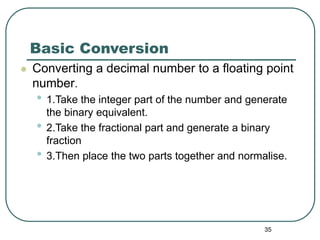
Basic Conversion
 Converting a decimal number to a floating point
number.
• 1.Take the integer part of the number and generate
the binary equivalent.
• 2.Take the fractional part and generate a binary
fraction
• 3.Then place the two parts together and normalise.
36
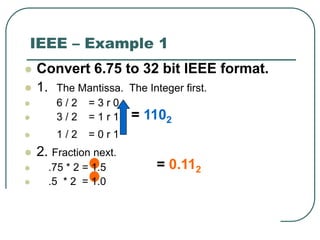
IEEE – Example 1
 Convert 6.75 to 32 bit IEEE format.
 1. The Mantissa. The Integer first.
 6 / 2 = 3 rem 0
 3 / 2 = 1 rem 1
 1 / 2 = 0 rem 1
 2. Fraction next.
 .75 * 2 = 1.5
 .5 * 2 = 1.0
 3. put the two parts together… 110.11
 Now normalise 1.1011 * 22
= 1102
= 0.112
37
= 0.112
IEEE – Example 1
 Convert 6.75 to 32 bit IEEE format.
 1. The Mantissa. The Integer first.
 6 / 2 = 3 r 0
 3 / 2 = 1 r 1
 1 / 2 = 0 r 1
 2. Fraction next.
 .75 * 2 = 1.5
 .5 * 2 = 1.0
 3. put the two parts together… 110.11
 Now normalise 1.1011 * 22
= 1102
38
IEEE – Example 1
 Convert 6.75 to 32 bit IEEE format.
 1. The Mantissa. The Integer first.
 6 / 2 = 3 r 0
 3 / 2 = 1 r 1
 1 / 2 = 0 r 1
 2. Fraction next.
 .75 * 2 = 1.5
 .5 * 2 = 1.0
 3. put the two parts together… 110.11
 Now normalise 1.1011 * 22
= 1102
= 0.112
39
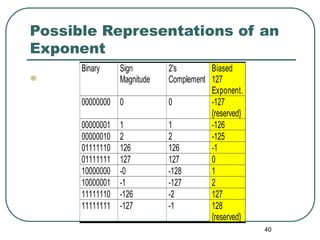
IEEE Biased 127 Exponent
 To generate a biased 127 exponent
 Take the value of the signed exponent and add 127.
 Example.
 216 then 2127+16 = 2143 and my value for the
exponent would be 143 = 100011112
 So it is simply now an unsigned value ....
40
Possible Representations of an
Exponent

Binary Sign
Magnitude
2's
Complement
Biased
127
Exponent.
00000000 0 0 -127
{reserved}
00000001 1 1 -126
00000010 2 2 -125
01111110 126 126 -1
01111111 127 127 0
10000000 -0 -128 1
10000001 -1 -127 2
11111110 -126 -2 127
11111111 -127 -1 128
{reserved}
41
Why Biased ?
 The smallest exponent 00000000
 Only one exponent zero 01111111
 The highest exponent is 11111111
 To increase the exponent by one simply add 1 to the
present pattern.
42
Back to the example
 Our original example revisited…. 1.1011 * 22
 Exponent is 2+127 =129 or 10000001 in binary.
 NOTE: Mantissa always ends up with a value of ‘1’
before the Dot. This is a waste of storage therefore it
is implied but not actually stored. 1.1000 is
stored .1000
 6.75 in 32 bit floating point IEEE representation:-
 0 10000001 10110000000000000000000
 sign(1) exponent(8) mantissa(23)
43
Representation in IEEE 754
single precision
 sign bit:
• 0 for positive and,
• 1 for negative numbers
 8 biased exponent by 127
 23 bit normalised mantissa
Sign Exponent Mantissa
44
Example (2)
 which number does the following IEEE single
precision notation represent?
 The sign bit is 1, hence it is a negative number.
 The exponent is 1000 0000 = 12810
 It is biased by 127, hence the real exponent is
128 –127 = 1.
 The mantissa: 0100 0000 0000 0000 0000 000.
 It is normalised, hence the true mantissa is
1.01 = 1.2510
 Finally, the number represented is: -1.25 x 21 = -2.50
1 1000 0000 0100 0000 0000 0000 0000 000
45
Single Precision Format
 The exponent is formatted using excess-127 notation, with an
implied base of 2
• Example:
• Exponent: 10000111
• Representation: 135 – 127 = 8
 The stored values 0 and 255 of the exponent are used to
indicate special values, the exponential range is restricted to
 2-126 to 2127
 The number 0.0 is defined by a mantissa of 0 together with the
special exponential value 0
 The standard allows also values +/-∞ (represented as mantissa
+/-0 and exponent 255
 Allows various other special conditions
46
In comparison
 The smallest and largest possible 32-bit
integers in two’s complement are only -232
and
231
- 1
2023/5/19 PITT CS 1621 46
47
Range of numbers
 Normalized (positive range; negative is
symmetric)
00000000100000000000000000000000 +2-126× (1+0) = 2-126
01111111011111111111111111111111 +2127× (2-2-23)
smallest
largest
0 2-126 2127(2-2-23)
Positive underflow Positive overflow
2023/5/19 PITT CS 1621 47
48
Representation in IEEE 754
double precision format
 It uses 64 bits
• 1 bit sign
• 11 bit biased exponent
• 52 bit mantissa
Sign Exponent Mantissa
49
IEEE 754 double precision
Biased = 1023
 11-bit exponent with an excess of 1023.
 For example:
• If the exponent is -1
• we then add 1023 to it. -1+1023 = 1022
• We then find the binary representation of 1022
• Which is 0111 1111 110
• The exponent field will now hold 0111 1111 110
• This means that we just represent -1 with an excess of
1023.
50 50
IEEE 754 Encoding
Single Precision Double Precision Represented Object
Exponent Fraction Exponent Fraction
0 0 0 0 0
0 non-zero 0 non-zero
+/- denormalized
number
1~254 anything 1~2046 anything
+/- floating-point
numbers
255 0 2047 0 +/- infinity
255 non-zero 2047 non-zero NaN (Not a Number)
51
Floating Point Representation
format (summary)
 the sign bit represents the sign
• 0 for positive numbers
• 1 for negative numbers
 The exponent is biased by a fixed value b, called the bias.
 The mantissa should be normalised, e.g. if the real
mantissa if of the form 1.f then the normalised mantissa
should be f, where f is a binary sequence.
Sign Exponent Mantissa
52
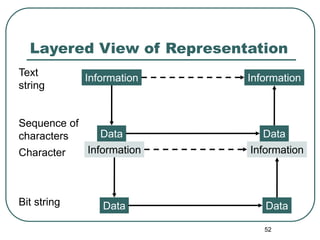
Layered View of Representation
Text
string
Sequence of
characters
Character
Bit string
Information
Data
Information
Data
Information
Data
Information
Data
53
Working With A Layered
View of Representation
 Represent “SI” at the two layers shown on the
previous slide.
 Representation schemes:
• Top layer - Character string to character sequence:
Write each letter separately, enclosed in quotes. End
string with ‘0’.
• Bottom layer - Character to bit-string:
Represent a character using the binary equivalent
according to the ASCII table provided.
54
Solution
 SI
 ‘S’ ‘I’ ‘0’
 010100110100100000000000
• The colors are intended to help you read it; computers don’t care that all the bits
run together.
55
exercise
 Use the ASCII table to write the ASCII
code for the following:
• CIS110
• 6=2*3
56
Unicode - representation
 ASCII code can represent only 128 = 27 characters.
 It only represents the English Alphabet plus some control
characters.
 Unicode is designed to represent the worldwide
interchange.
 It uses 16 bits and can represents 32,768 characters.
 For compatibility, the first 128 Unicode are the same as
the one of the ASCII.
57
Colour representation
 Colours can represented using a sequence of bits.
 256 colours – how many bits?
• Hint for calculating
• To figure out how many bits are needed to represent a range
of values, figure out the smallest power of 2 that is equal to or
bigger than the size of the range.
• That is, find x for 2 x => 256
 24-bit colour – how many possible colors can be
represented?
• Hints
• 16 million possible colours (why 16 millions?)
58
24-bits -- the True colour
• 24-bit color is often referred to as the true
colour.
• Any real-life shade, detected by the naked
eye, will be among the 16 million possible
colours.
59
Example: 2-bit per pixel
 4=22 choices
• 00 (off, off)=white
• 01 (off, on)=light
grey
• 10 (on, off)=dark
grey
• 11 (on, on)=black
0
0
= (white)
1
0
= (dark grey)
1
0
= (light grey)
1
1
= (black)
60
Image representation
 An image can be divided into many tiny squares, called
pixels.
 Each pixel has a particular colour.
 The quality of the picture depends on two factors:
• the density of pixels.
• The length of the word representing colours.
 The resolution of an image is the density of pixels.
 The higher the resolution the more information
information the image contains.
61
Bitmap Images
 Each individual pixel (pi(x)cture element) in a
graphic stored as a binary number
• Pixel: A small area with associated coordinate location
• Example: each point below is represented by a 4-bit
code corresponding to 1 of 16 shades of gray
62
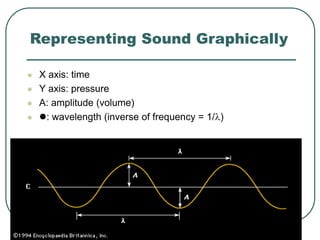
Representing Sound Graphically
 X axis: time
 Y axis: pressure
 A: amplitude (volume)
 : wavelength (inverse of frequency = 1/)
63
Sampling
 Sampling is a method used to digitise
sound waves.
 A sample is the measurement of the
amplitude at a point in time.
 The quality of the sound depends on:
• The sampling rate, the faster the better
• The size of the word used to represent a
sample.
64
Digitizing Sound
Zoomed Low Frequency Signal
Capture amplitude at
these points
Lose all variation
between data points
65
Summary
 Integer representation
• Unsigned,
• Signed,
• Excess notation, and
• Two’s complement.
 Fraction representation
• Floating point (IEEE 754 format )
• Single and double precision
 Character representation
 Colour representation
 Sound representation
66
Exercise
1. Represent +0.8 in the following floating-point
representation:
• 1-bit sign
• 4-bit exponent
• 6-bit normalised mantissa (significand).
2. Convert the value represented back to
decimal.
3. Calculate the relative error of the
representation.

3.Fixed-Floating Point.ppt

  • 1.
  • 2.
    2 Binary numbers  Binarynumber is simply a number comprised of only 0's and 1's.  Computers use binary numbers because it's easy for them to communicate using electrical current -- 0 is off, 1 is on.  You can express any base 10 (our number system -- where each digit is between 0 and 9) with binary numbers.  The need to translate decimal number to binary and binary to decimal.  There are many ways in representing decimal number in binary numbers. (later)
  • 3.
    3 How does thebinary system work?  It is just like any other system  In decimal system the base is 10 • We have 10 possible values 0-9  In binary system the base is 2 • We have only two possible values 0 or 1. • The same as in any base, 0 digit has non contribution, where 1’s has contribution which depends at there position.
  • 4.
    4 Example  3040510 =30000 + 400 + 5 = 3*104+4*102+5*100  101012 =10000+100+1 =1*24+1*22+1*20
  • 5.
    5 Examples: decimal --binary  Find the binary representation of 12910.  Find the decimal value represented by the following binary representations: • 10000011 • 10101010
  • 6.
    6 Examples: Representing fractional numbers Find the binary representations of: • 0.510 = 0.1 • 0.7510 = 0.11  Using only 8 binary digits find the binary representations of: • 0.210 • 0.810
  • 7.
    7 Number representation  Representingwhole numbers  Representing fractional numbers
  • 8.
    8 Integer Representations • Unsignednotation • Signed magnitude notion • Two’s complement notation.
  • 9.
    9 Unsigned Representation  Representspositive integers.  Unsigned representation of 157:  Addition is simple: 1 0 0 1 + 0 1 0 1 = 1 1 1 0. position 7 6 5 4 3 2 1 0 Bit pattern 1 0 0 1 1 1 0 1 contribution 27 24 23 22 20
  • 10.
    10 Advantages and disadvantagesof unsigned notation  Advantages: • One representation of zero • Simple addition  Disadvantages • Negative numbers can not be represented. • The need of different notation to represent negative numbers.
  • 11.
    11 Representation of negative numbers Is a representation of negative numbers possible?  Unfortunately: • you can not just stick a negative sign in front of a binary number. (it does not work like that)  There are three methods used to represent negative numbers. • Signed magnitude notation • Excess notation notation • Two’s complement notation
  • 12.
    12 Signed Magnitude Representation  Unsigned:- and + are the same.  In signed magnitude • the left-most bit represents the sign of the integer. • 0 for positive numbers. • 1 for negative numbers.  The remaining bits represent to magnitude of the numbers.
  • 13.
    13 Example  Suppose 10011101is a signed magnitude representation.  The sign bit is 1, then the number represented is negative  The magnitude is 0011101 with a value 24+23+22+20= 29  Then the number represented by 10011101 is –29. position 7 6 5 4 3 2 1 0 Bit pattern 1 0 0 1 1 1 0 1 contribution - 24 23 22 20
  • 14.
    14 Exercise 1 1. 3710has 0010 0101 in signed magnitude notation. Find the signed magnitude of –3710 ? 2. Using the signed magnitude notation find the 8-bit binary representation of the decimal value 2410 and - 2410. 3. Find the signed magnitude of –63 using 8-bit binary sequence?
  • 15.
    15 Disadvantage of Signed Magnitude Addition and subtractions are difficult.  Signs and magnitude, both have to carry out the required operation.  They are two representations of 0 • 00000000 = + 010 • 10000000 = - 010 • To test if a number is 0 or not, the CPU will need to see whether it is 00000000 or 10000000. • 0 is always performed in programs. • Therefore, having two representations of 0 is inconvenient.
  • 16.
    16 Signed-Summary  In signedmagnitude notation, • The most significant bit is used to represent the sign. • 1 represents negative numbers • 0 represents positive numbers. • The unsigned value of the remaining bits represent The magnitude.  Advantages: • Represents positive and negative numbers  Disadvantages: • two representations of zero, • Arithmetic operations are difficult.
  • 17.
    17 Two’s Complement Notation The most used representation for integers. • All positive numbers begin with 0. • All negative numbers begin with 1. • One representation of zero • i.e. 0 is represented as 0000 using 4-bit binary sequence.
  • 18.
    18 Two’s Complement Notationwith 4-bits Binary pattern Value in 2’s complement. 0 1 1 1 7 0 1 1 0 6 0 1 0 1 5 0 1 0 0 4 0 0 1 1 3 0 0 1 0 2 0 0 0 1 1 0 0 0 0 0 1 1 1 1 -1 1 1 1 0 -2 1 1 0 1 -3 1 1 0 0 -4 1 0 1 1 -5 1 0 1 0 -6 1 0 0 1 -7 1 0 0 0 -8
  • 19.
    19 Properties of Two’sComplement Notation  Positive numbers begin with 0  Negative numbers begin with 1  Only one representation of 0, i.e. 0000  Relationship between +n and –n. • 0 1 0 0 +4 0 0 0 1 0 0 1 0 +18 • 1 1 0 0 -4 1 1 1 0 1 1 1 0 -18
  • 20.
    20 Advantages of Two’s ComplementNotation  It is easy to add two numbers. 0 0 0 1 +1 1 0 0 0 -8 0 1 0 1 +5 0 1 0 1 +5 + + 0 1 1 0 +6 1 1 0 1 -3 • Subtraction can be easily performed. • Multiplication is just a repeated addition. • Division is just a repeated subtraction • Two’s complement is widely used in ALU
  • 21.
    21 Evaluating numbers intwo’s complement notation  Sign bit = 0, the number is positive. The value is determined in the usual way.  Sign bit = 1, the number is negative. three methods can be used: Method 1 decimal value of (n-1) bits, then subtract 2n-1 Method 2 - 2n-1 is the contribution of the sign bit. Method 3  Binary rep. of the corresponding positive number.  Let V be its decimal value.  - V is the required value.
  • 22.
    22 Example- 10101 inTwo’s Complement  The most significant bit is 1, hence it is a negative number.  Method 1 • 0101 = +5 (+5 – 25-1 = 5 – 24 = 5-16 = -11)  Method 2 4 3 2 1 0 1 0 1 0 1 -24 22 20 = -11  Method 3 • Corresponding + number is 01011 = 8 + 2+1 = 11 the result is then –11.
  • 23.
    23 Two’s complement-summary  Intwo’s complement the most significant for an n-bit number has a contribution of –2(n-1).  One representation of zero  All arithmetic operations can be performed by using addition and inversion.  The most significant bit: 0 for positive and 1 for negative.  Three methods can the decimal value of a negative number: Method 1 decimal value of (n-1) bits, then subtract 2n-1 Method 2 - 2n-1 is the contribution of the sign bit. Method 3  Binary rep. of the corresponding positive number.  Let V be its decimal value.  - V is the required value.
  • 24.
    24 Exercise - 10001011 Determine the decimal value represented by 10001011 in each of the following four systems. 1. Unsigned notation? 2. Signed magnitude notation? 3. Two’s complements?
  • 26.
    26 Fraction Representation  Torepresent fraction we need other representations: • Fixed point representation • Floating point representation.
  • 27.
    27 Fixed-Point Representation old position7 6 5 4 3 2 1 0 New position 4 3 2 1 0 -1 -2 -3 Bit pattern 1 0 0 1 1 . 1 0 1 Contribution 24 21 20 2-1 2-3 =19.625 Radix-point
  • 28.
    28 Limitation of Fixed-Point Representation To represent large numbers or very small numbers we need a very long sequences of bits.  This is because we have to give bits to both the integer part and the fraction part.
  • 29.
    29 Floating Point Representation Indecimal notation we can get around this problem using scientific notation or floating point notation. Number Scientific notation Floating-point notation 1,245,000,000,000 1.245 1012 0.1245 1013 0.0000001245 1.245 10-7 0.1245 10-6 -0.0000001245 -1.245 10-7 -0.1245 10-6
  • 30.
    30 Floating Point -15900000000000000 could berepresented as - 15.9 * 1015 - 1.59 * 1016 A calculator might display 159 E14 - 159 * 1014 Sign Exponent Base Mantissa
  • 31.
    31  M B E Sign mantissa or base exponent significand Floating point format Sign Exponent Mantissa
  • 32.
    32 Floating Point Representation format The exponent is biased by a fixed value b, called the bias.  The mantissa should be normalised, e.g. if the real mantissa if of the form 1.f then the normalised mantissa should be f, where f is a binary sequence. Sign Exponent Mantissa
  • 33.
    33 IEEE 745 SinglePrecision  The number will occupy 32 bits The first bit represents the sign of the number; 1= negative 0= positive. The next 8 bits will specify the exponent stored in biased 127 form. The remaining 23 bits will carry the mantissa normalised to be between 1 and 2. i.e. 1<= mantissa < 2
  • 34.
    34 Representation in IEEE754 single precision  sign bit: • 0 for positive and, • 1 for negative numbers  8 bit biased exponent by 127  23 bit normalised mantissa Sign Exponent Mantissa
  • 35.
    35 Basic Conversion  Convertinga decimal number to a floating point number. • 1.Take the integer part of the number and generate the binary equivalent. • 2.Take the fractional part and generate a binary fraction • 3.Then place the two parts together and normalise.
  • 36.
    36 IEEE – Example1  Convert 6.75 to 32 bit IEEE format.  1. The Mantissa. The Integer first.  6 / 2 = 3 rem 0  3 / 2 = 1 rem 1  1 / 2 = 0 rem 1  2. Fraction next.  .75 * 2 = 1.5  .5 * 2 = 1.0  3. put the two parts together… 110.11  Now normalise 1.1011 * 22 = 1102 = 0.112
  • 37.
    37 = 0.112 IEEE –Example 1  Convert 6.75 to 32 bit IEEE format.  1. The Mantissa. The Integer first.  6 / 2 = 3 r 0  3 / 2 = 1 r 1  1 / 2 = 0 r 1  2. Fraction next.  .75 * 2 = 1.5  .5 * 2 = 1.0  3. put the two parts together… 110.11  Now normalise 1.1011 * 22 = 1102
  • 38.
    38 IEEE – Example1  Convert 6.75 to 32 bit IEEE format.  1. The Mantissa. The Integer first.  6 / 2 = 3 r 0  3 / 2 = 1 r 1  1 / 2 = 0 r 1  2. Fraction next.  .75 * 2 = 1.5  .5 * 2 = 1.0  3. put the two parts together… 110.11  Now normalise 1.1011 * 22 = 1102 = 0.112
  • 39.
    39 IEEE Biased 127Exponent  To generate a biased 127 exponent  Take the value of the signed exponent and add 127.  Example.  216 then 2127+16 = 2143 and my value for the exponent would be 143 = 100011112  So it is simply now an unsigned value ....
  • 40.
    40 Possible Representations ofan Exponent  Binary Sign Magnitude 2's Complement Biased 127 Exponent. 00000000 0 0 -127 {reserved} 00000001 1 1 -126 00000010 2 2 -125 01111110 126 126 -1 01111111 127 127 0 10000000 -0 -128 1 10000001 -1 -127 2 11111110 -126 -2 127 11111111 -127 -1 128 {reserved}
  • 41.
    41 Why Biased ? The smallest exponent 00000000  Only one exponent zero 01111111  The highest exponent is 11111111  To increase the exponent by one simply add 1 to the present pattern.
  • 42.
    42 Back to theexample  Our original example revisited…. 1.1011 * 22  Exponent is 2+127 =129 or 10000001 in binary.  NOTE: Mantissa always ends up with a value of ‘1’ before the Dot. This is a waste of storage therefore it is implied but not actually stored. 1.1000 is stored .1000  6.75 in 32 bit floating point IEEE representation:-  0 10000001 10110000000000000000000  sign(1) exponent(8) mantissa(23)
  • 43.
    43 Representation in IEEE754 single precision  sign bit: • 0 for positive and, • 1 for negative numbers  8 biased exponent by 127  23 bit normalised mantissa Sign Exponent Mantissa
  • 44.
    44 Example (2)  whichnumber does the following IEEE single precision notation represent?  The sign bit is 1, hence it is a negative number.  The exponent is 1000 0000 = 12810  It is biased by 127, hence the real exponent is 128 –127 = 1.  The mantissa: 0100 0000 0000 0000 0000 000.  It is normalised, hence the true mantissa is 1.01 = 1.2510  Finally, the number represented is: -1.25 x 21 = -2.50 1 1000 0000 0100 0000 0000 0000 0000 000
  • 45.
    45 Single Precision Format The exponent is formatted using excess-127 notation, with an implied base of 2 • Example: • Exponent: 10000111 • Representation: 135 – 127 = 8  The stored values 0 and 255 of the exponent are used to indicate special values, the exponential range is restricted to  2-126 to 2127  The number 0.0 is defined by a mantissa of 0 together with the special exponential value 0  The standard allows also values +/-∞ (represented as mantissa +/-0 and exponent 255  Allows various other special conditions
  • 46.
    46 In comparison  Thesmallest and largest possible 32-bit integers in two’s complement are only -232 and 231 - 1 2023/5/19 PITT CS 1621 46
  • 47.
    47 Range of numbers Normalized (positive range; negative is symmetric) 00000000100000000000000000000000 +2-126× (1+0) = 2-126 01111111011111111111111111111111 +2127× (2-2-23) smallest largest 0 2-126 2127(2-2-23) Positive underflow Positive overflow 2023/5/19 PITT CS 1621 47
  • 48.
    48 Representation in IEEE754 double precision format  It uses 64 bits • 1 bit sign • 11 bit biased exponent • 52 bit mantissa Sign Exponent Mantissa
  • 49.
    49 IEEE 754 doubleprecision Biased = 1023  11-bit exponent with an excess of 1023.  For example: • If the exponent is -1 • we then add 1023 to it. -1+1023 = 1022 • We then find the binary representation of 1022 • Which is 0111 1111 110 • The exponent field will now hold 0111 1111 110 • This means that we just represent -1 with an excess of 1023.
  • 50.
    50 50 IEEE 754Encoding Single Precision Double Precision Represented Object Exponent Fraction Exponent Fraction 0 0 0 0 0 0 non-zero 0 non-zero +/- denormalized number 1~254 anything 1~2046 anything +/- floating-point numbers 255 0 2047 0 +/- infinity 255 non-zero 2047 non-zero NaN (Not a Number)
  • 51.
    51 Floating Point Representation format(summary)  the sign bit represents the sign • 0 for positive numbers • 1 for negative numbers  The exponent is biased by a fixed value b, called the bias.  The mantissa should be normalised, e.g. if the real mantissa if of the form 1.f then the normalised mantissa should be f, where f is a binary sequence. Sign Exponent Mantissa
  • 52.
    52 Layered View ofRepresentation Text string Sequence of characters Character Bit string Information Data Information Data Information Data Information Data
  • 53.
    53 Working With ALayered View of Representation  Represent “SI” at the two layers shown on the previous slide.  Representation schemes: • Top layer - Character string to character sequence: Write each letter separately, enclosed in quotes. End string with ‘0’. • Bottom layer - Character to bit-string: Represent a character using the binary equivalent according to the ASCII table provided.
  • 54.
    54 Solution  SI  ‘S’‘I’ ‘0’  010100110100100000000000 • The colors are intended to help you read it; computers don’t care that all the bits run together.
  • 55.
    55 exercise  Use theASCII table to write the ASCII code for the following: • CIS110 • 6=2*3
  • 56.
    56 Unicode - representation ASCII code can represent only 128 = 27 characters.  It only represents the English Alphabet plus some control characters.  Unicode is designed to represent the worldwide interchange.  It uses 16 bits and can represents 32,768 characters.  For compatibility, the first 128 Unicode are the same as the one of the ASCII.
  • 57.
    57 Colour representation  Colourscan represented using a sequence of bits.  256 colours – how many bits? • Hint for calculating • To figure out how many bits are needed to represent a range of values, figure out the smallest power of 2 that is equal to or bigger than the size of the range. • That is, find x for 2 x => 256  24-bit colour – how many possible colors can be represented? • Hints • 16 million possible colours (why 16 millions?)
  • 58.
    58 24-bits -- theTrue colour • 24-bit color is often referred to as the true colour. • Any real-life shade, detected by the naked eye, will be among the 16 million possible colours.
  • 59.
    59 Example: 2-bit perpixel  4=22 choices • 00 (off, off)=white • 01 (off, on)=light grey • 10 (on, off)=dark grey • 11 (on, on)=black 0 0 = (white) 1 0 = (dark grey) 1 0 = (light grey) 1 1 = (black)
  • 60.
    60 Image representation  Animage can be divided into many tiny squares, called pixels.  Each pixel has a particular colour.  The quality of the picture depends on two factors: • the density of pixels. • The length of the word representing colours.  The resolution of an image is the density of pixels.  The higher the resolution the more information information the image contains.
  • 61.
    61 Bitmap Images  Eachindividual pixel (pi(x)cture element) in a graphic stored as a binary number • Pixel: A small area with associated coordinate location • Example: each point below is represented by a 4-bit code corresponding to 1 of 16 shades of gray
  • 62.
    62 Representing Sound Graphically X axis: time  Y axis: pressure  A: amplitude (volume)  : wavelength (inverse of frequency = 1/)
  • 63.
    63 Sampling  Sampling isa method used to digitise sound waves.  A sample is the measurement of the amplitude at a point in time.  The quality of the sound depends on: • The sampling rate, the faster the better • The size of the word used to represent a sample.
  • 64.
    64 Digitizing Sound Zoomed LowFrequency Signal Capture amplitude at these points Lose all variation between data points
  • 65.
    65 Summary  Integer representation •Unsigned, • Signed, • Excess notation, and • Two’s complement.  Fraction representation • Floating point (IEEE 754 format ) • Single and double precision  Character representation  Colour representation  Sound representation
  • 66.
    66 Exercise 1. Represent +0.8in the following floating-point representation: • 1-bit sign • 4-bit exponent • 6-bit normalised mantissa (significand). 2. Convert the value represented back to decimal. 3. Calculate the relative error of the representation.