Prepared by,
V.Santhi,
Assistant Professor
Department of Computer Applications
Bon Secours College for Women
Thanjavur
Introduction
Data versus Information
File Processing
Data Processing
Data processing:
Data processing is the conversion of data into usable
and desired form.
This conversion or “processing” is carried out using a
predefined sequence of operations either manually or
automatically.
 Most of the data processing is done by using
computers and thus done automatically.
 The output or “processed” data can be obtained in
different forms like image, graph, table, vector file,
audio, charts or any other desired format depending on
the software or method of data processing used.
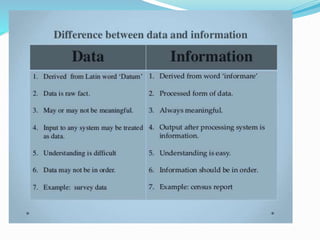
Data versus information
The collection of data, which plays a significant role
in the statistical analysis. We quite commonly use the
term ‘data’ in the different context.
However, in general, it indicates the facts or statistics
gathered by the researcher for analysis in their
original form.
When the data is processed and transformed in such
a way that it becomes useful to the users, it is known
as ‘information’
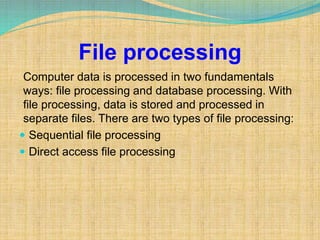
File processing
Computer data is processed in two fundamentals
ways: file processing and database processing. With
file processing, data is stored and processed in
separate files. There are two types of file processing:
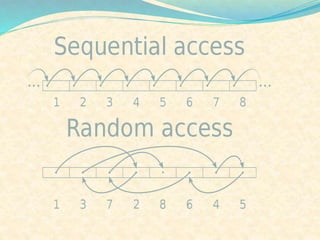
 Sequential file processing
 Direct access file processing
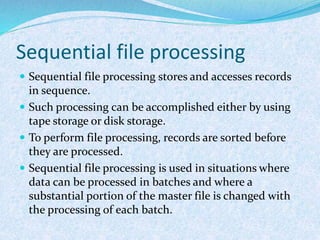
Sequential file processing
 Sequential file processing stores and accesses records
in sequence.
 Such processing can be accomplished either by using
tape storage or disk storage.
 To perform file processing, records are sorted before
they are processed.
 Sequential file processing is used in situations where
data can be processed in batches and where a
substantial portion of the master file is changed with
the processing of each batch.
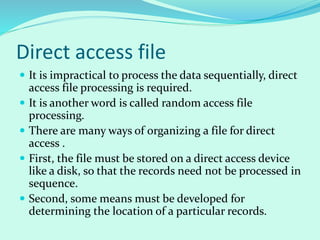
Direct access file
 It is impractical to process the data sequentially, direct
access file processing is required.
 It is another word is called random access file
processing.
 There are many ways of organizing a file for direct
access .
 First, the file must be stored on a direct access device
like a disk, so that the records need not be processed in
sequence.
 Second, some means must be developed for
determining the location of a particular records.
Problems of file processing
Program-Data Dependence.
Duplication of Data.
Limited data sharing.
Lengthy Development Times.
Excessive Program Maintenance.
 3. Limited data sharing. Each application has its
own private files with little opportunity to share
data outside their own applications. A requested
report may require data from several incompatible
files in separate systems.
 4. Lengthy Development Times. There is little
opportunity to leverage previous development
efforts. Each new application requires the
developer to start from scratch by designing new
file formats and descriptions
 5. Excessive Program Maintenance. The preceding
factors create a heavy program maintenance load.
Database processing
 Data processing refers to the process of performing
specific operations on a set of data or a database.
 Data processing primarily is performed on
information systems, a broad concept that
encompasses computer systems and related devices.
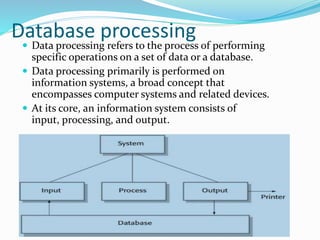
 At its core, an information system consists of
input, processing, and output.
History of information
Quality of information
Database
Why database
Characteristics of database
Database management system
Types of database management system
History of information
 The history of print and written culture, including relatively
long-established areas such as the histories of libraries and
librarianship, book history, publishing history, and the history of
reading.
 The history of more recent information disciplines and practice,
that is to say, the history of information management,
information systems, and information science.
 The history of contiguous areas, such as the history of the
information society and information infrastructure, necessarily
enveloping communication history (including
telecommunications history) and the history of information
policy.
 The history of information as social history, with emphasis on
the importance of informal information networks."
Quality of information
Quality of information is an important concept. Information
quality is a multi-attribute concept. If the attributes that define
quality of information are of good quality or of high value then the
information is said to have good quality. The attributes of quality
of information are:
 Timeliness- The speed at which the information is received.
Normally, faster the information better is its quality.
 Reliability - the reliability of information is a key attribute of
quality. Only if the information is reliable is it of any use. The
understanding of reliability comes from past experience, the
standing/reliability of the source, the methodology adopted to
acquire and process the information and the channel of delivery.
 Accuracy - is the correctness of the information. Normally, the
higher the accuracy of the information, the better is its quality.
Database
 Database is a collection of inter-related data which
helps in efficient retrieval, insertion and deletion of
data from database and organizes the data in the form
of tables, views, schemas, reports etc.
 For Example, university database organizes the data
about students, faculty, and admin staff etc. which
helps in efficient retrieval, insertion and deletion of
data from it.
Why database
 Redundancy of data: Data is said to be redundant if same data is
copied at many places. If a student wants to change Phone number, he
has to get it updated at various sections. Similarly, old records must be
deleted from all sections representing that student.
 Inconsistency of Data: Data is said to be inconsistent if multiple copies
of same data does not match with each other. If Phone number is
different in Accounts Section and Academics Section, it will be
inconsistent. Inconsistency may be because of typing errors or not
updating all copies of same data.
 Difficult Data Access: A user should know the exact location of file to
access data, so the process is very cumbersome and tedious. If user wants
to search student hostel allotment number of a student from 10000
unsorted students’ records, how difficult it can be.
 Unauthorized Access: File System may lead to unauthorized access to
data. If a student gets access to file having his marks, he can change it in
unauthorized way.
 No Concurrent Access: The access of same data by multiple users at
same time is known as concurrency. File system does not allow
concurrency as data can be accessed by only one user at a time.
 No Backup and Recovery: File system does not incorporate any backup
and recovery of data if a file is lost or corrupted.
Characteristics of data in database
 Shared: data in database and shared among different users and
applications
 Persistence: data in database exist permanently in the sense, the be
data can live beyond the scope of the process that created it.
 Integrity: data should be correct with respect to the real world entity
that they represent.
 Security: data should be protected from unauthorized access.
 Consistency: whenever more than one data element in a database
represents related real world values the values should be consistent
with respect to the relationship.
 Non redundancy: no two data items in a database should represent
the same real world entity.
 Independence: the three levels in the schema should be independent
of each other so that the changes in the schema at one level should not
affect the other levels.
Database management system
 The software which is used to manage database is
called Database Management System (DBMS). For
Example, MySQL, Oracle etc. are popular commercial
DBMS used in different applications. DBMS allows
users the following tasks:
 Data Definition: It helps in creation, modification
and removal of definitions that define the
organization of data in database.
 Data Updating: It helps in insertion, modification
and deletion of the actual data in the database.
Types of Database Management
Systems
There are four structural types of database management
systems:
 Hierarchical databases
 Network databases
 Relational databases
 Object-oriented databases
 Deductive databases
Hierarchical database
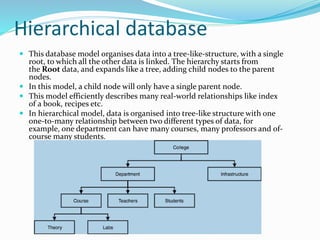
 This database model organises data into a tree-like-structure, with a single
root, to which all the other data is linked. The hierarchy starts from
the Root data, and expands like a tree, adding child nodes to the parent
nodes.
 In this model, a child node will only have a single parent node.
 This model efficiently describes many real-world relationships like index
of a book, recipes etc.
 In hierarchical model, data is organised into tree-like structure with one
one-to-many relationship between two different types of data, for
example, one department can have many courses, many professors and of-
course many students.
Network databases
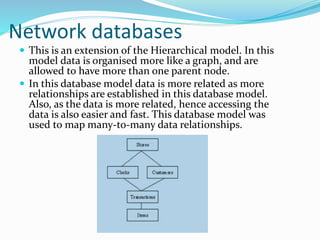
 This is an extension of the Hierarchical model. In this
model data is organised more like a graph, and are
allowed to have more than one parent node.
 In this database model data is more related as more
relationships are established in this database model.
Also, as the data is more related, hence accessing the
data is also easier and fast. This database model was
used to map many-to-many data relationships.
Relational model
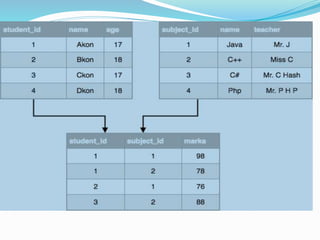
 In this model, data is organised in two-
dimensional tables and the relationship is
maintained by storing a common field.
 This model was introduced by E.F Cod in 1970, and
since then it has been the most widely used database
model, infect, we can say the only database model
used around the world.
 The basic structure of data in the relational model is
tables. All the information related to a particular
type is stored in rows of that table.
 Hence, tables are also known as relations in
relational model.
Object-oriented databases
Object-oriented databases use small, reusable chunks of
software called objects. The objects themselves are stored in
the object-oriented database.
Each object consists of two elements:
 1) a piece of data (e.g., sound, video, text, or graphics), and
 2) the instructions, or software programs called methods,
for what to do with the data.
Part two of this definition requires a little more explanation
The instructions contained within the object are used to do
something with the data in the object. For example, test
scores would be within the object as would the instructions
for calculating average test score.
Deductive database
 A deductive database is a database system that can
make conclusions about its data based on a set of well-
defined rules and facts.
 This type of database was developed to combine logic
programming with relational database management
systems. Usually, the language used to define the rules
and facts is the logical programming language Data
log.
Database design
Data normalization
Keys
Relationships
First normal form
Second normal form
Third normal form
Database design
 Database Design is a collection of processes that facilitate
the designing, development, implementation and
maintenance of enterprise data management systems
 It helps produce database systems
 That meet the requirements of the users
 Have high performance.
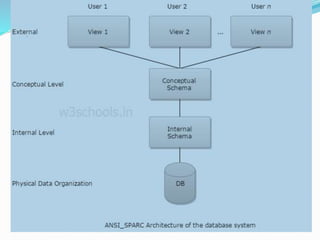
Levels of database service:
 Physical level
 Conceptual level
 External level
Physical Level
Physical level describes the physical storage structure
of data in database.
 It is also known as Internal Level.
 This level is very close to physical storage of data.
 At lowest level, it is stored in the form of bits with the
physical addresses on the secondary storage device.
 At highest level, it can be viewed in the form of files.
 The internal schema defines the various stored data
types. It uses a physical data model.
Conceptual Level
 Conceptual level describes the structure of the whole
database for a group of users.
 It is also called as the data model.
 Conceptual schema is a representation of the entire
content of the database.
 These schema contains all the information to build
relevant external records.
 It hides the internal details of physical storage.
External Level
 External level is related to the data which is viewed by
individual end users.
 This level includes a no. of user views or external
schemas.
 This level is closest to the user.
 External view describes the segment of the database
that is required for a particular user group and hides
the rest of the database from that user group.

Keys
A KEY is a value used to identify a record in a table uniquely.
A KEY could be a single column or combination of multiple
columns.
Primary key:
 A primary is a single column value used to identify a database
record uniquely.
It has following attributes
 A primary key cannot be NULL
 A primary key value must be unique
 The primary key values cannot be changed
 The primary key must be given a value when a new record is
inserted.
Composite key:
 A composite key is a primary key composed of
multiple columns used to identify a record uniquely
 In our database, we have two people with the same
name Robert Phil, but they live in different places.
Foreign key:
 Foreign Key references the primary key of another
Table! It helps connect your Tables
 A foreign key can have a different name from its
primary key
 It ensures rows in one table have corresponding rows
in another
 Unlike the Primary key, they do not have to be unique.
Most often they aren't
 Foreign keys can be null even though primary keys can
not
Relationship
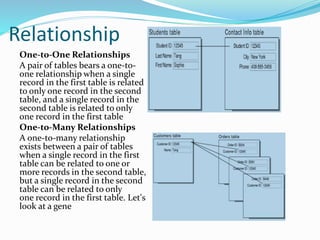
One-to-One Relationships
A pair of tables bears a one-to-
one relationship when a single
record in the first table is related
to only one record in the second
table, and a single record in the
second table is related to only
one record in the first table
One-to-Many Relationships
A one-to-many relationship
exists between a pair of tables
when a single record in the first
table can be related to one or
more records in the second table,
but a single record in the second
table can be related to only
one record in the first table. Let's
look at a gene
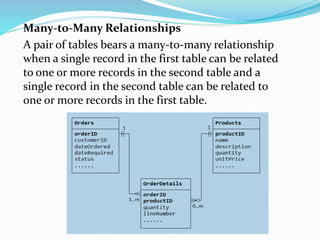
Many-to-Many Relationships
A pair of tables bears a many-to-many relationship
when a single record in the first table can be related
to one or more records in the second table and a
single record in the second table can be related to
one or more records in the first table.
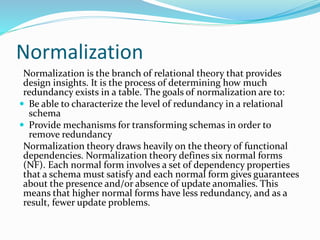
Normalization
Normalization is the branch of relational theory that provides
design insights. It is the process of determining how much
redundancy exists in a table. The goals of normalization are to:
 Be able to characterize the level of redundancy in a relational
schema
 Provide mechanisms for transforming schemas in order to
remove redundancy
Normalization theory draws heavily on the theory of functional
dependencies. Normalization theory defines six normal forms
(NF). Each normal form involves a set of dependency properties
that a schema must satisfy and each normal form gives guarantees
about the presence and/or absence of update anomalies. This
means that higher normal forms have less redundancy, and as a
result, fewer update problems.
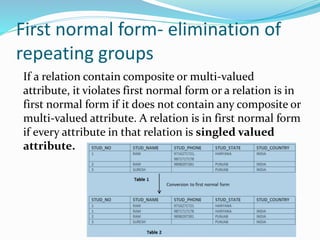
First normal form- elimination of
repeating groups
If a relation contain composite or multi-valued
attribute, it violates first normal form or a relation is in
first normal form if it does not contain any composite or
multi-valued attribute. A relation is in first normal form
if every attribute in that relation is singled valued
attribute.
Second normal form- elimination
of redundant data
 To be in second normal form, a relation must be in first normal form
and relation must not contain any partial dependency. A relation is in
2NF if it has No Partial Dependency, i.e., no non-prime attribute
(attributes which are not part of any candidate key) is dependent on
any proper subset of any candidate key of the table.
 Partial Dependency – If proper subset of candidate key determines
non-prime attribute, it is called partial dependency.
 Example 1 – In relation STUDENT_COURSE given in Table 3,FD set:
{COURSE_NO->COURSE_NAME} Candidate Key: {STUD_NO,
COURSE_NO} In FD COURSE_NO->COURSE_NAME, COURSE_NO
(proper subset of candidate key) is determining COURSE_NAME (non-
prime attribute). Hence, it is partial dependency and relation is not in
second normal form.
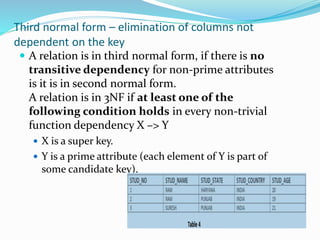
Third normal form – elimination of columns not
dependent on the key
 A relation is in third normal form, if there is no
transitive dependency for non-prime attributes
is it is in second normal form.
A relation is in 3NF if at least one of the
following condition holds in every non-trivial
function dependency X –> Y
 X is a super key.
 Y is a prime attribute (each element of Y is part of
some candidate key).

Data Processing in Fundamentals of IT

  • 1.
    Prepared by, V.Santhi, Assistant Professor Departmentof Computer Applications Bon Secours College for Women Thanjavur
  • 2.
  • 3.
    Data processing: Data processingis the conversion of data into usable and desired form. This conversion or “processing” is carried out using a predefined sequence of operations either manually or automatically.  Most of the data processing is done by using computers and thus done automatically.  The output or “processed” data can be obtained in different forms like image, graph, table, vector file, audio, charts or any other desired format depending on the software or method of data processing used.
  • 4.
    Data versus information Thecollection of data, which plays a significant role in the statistical analysis. We quite commonly use the term ‘data’ in the different context. However, in general, it indicates the facts or statistics gathered by the researcher for analysis in their original form. When the data is processed and transformed in such a way that it becomes useful to the users, it is known as ‘information’
  • 6.
    File processing Computer datais processed in two fundamentals ways: file processing and database processing. With file processing, data is stored and processed in separate files. There are two types of file processing:  Sequential file processing  Direct access file processing
  • 7.
    Sequential file processing Sequential file processing stores and accesses records in sequence.  Such processing can be accomplished either by using tape storage or disk storage.  To perform file processing, records are sorted before they are processed.  Sequential file processing is used in situations where data can be processed in batches and where a substantial portion of the master file is changed with the processing of each batch.
  • 8.
    Direct access file It is impractical to process the data sequentially, direct access file processing is required.  It is another word is called random access file processing.  There are many ways of organizing a file for direct access .  First, the file must be stored on a direct access device like a disk, so that the records need not be processed in sequence.  Second, some means must be developed for determining the location of a particular records.
  • 10.
    Problems of fileprocessing Program-Data Dependence. Duplication of Data. Limited data sharing. Lengthy Development Times. Excessive Program Maintenance.
  • 11.
     3. Limiteddata sharing. Each application has its own private files with little opportunity to share data outside their own applications. A requested report may require data from several incompatible files in separate systems.  4. Lengthy Development Times. There is little opportunity to leverage previous development efforts. Each new application requires the developer to start from scratch by designing new file formats and descriptions  5. Excessive Program Maintenance. The preceding factors create a heavy program maintenance load.
  • 12.
    Database processing  Dataprocessing refers to the process of performing specific operations on a set of data or a database.  Data processing primarily is performed on information systems, a broad concept that encompasses computer systems and related devices.  At its core, an information system consists of input, processing, and output.
  • 13.
    History of information Qualityof information Database Why database Characteristics of database Database management system Types of database management system
  • 14.
    History of information The history of print and written culture, including relatively long-established areas such as the histories of libraries and librarianship, book history, publishing history, and the history of reading.  The history of more recent information disciplines and practice, that is to say, the history of information management, information systems, and information science.  The history of contiguous areas, such as the history of the information society and information infrastructure, necessarily enveloping communication history (including telecommunications history) and the history of information policy.  The history of information as social history, with emphasis on the importance of informal information networks."
  • 15.
    Quality of information Qualityof information is an important concept. Information quality is a multi-attribute concept. If the attributes that define quality of information are of good quality or of high value then the information is said to have good quality. The attributes of quality of information are:  Timeliness- The speed at which the information is received. Normally, faster the information better is its quality.  Reliability - the reliability of information is a key attribute of quality. Only if the information is reliable is it of any use. The understanding of reliability comes from past experience, the standing/reliability of the source, the methodology adopted to acquire and process the information and the channel of delivery.  Accuracy - is the correctness of the information. Normally, the higher the accuracy of the information, the better is its quality.
  • 16.
    Database  Database isa collection of inter-related data which helps in efficient retrieval, insertion and deletion of data from database and organizes the data in the form of tables, views, schemas, reports etc.  For Example, university database organizes the data about students, faculty, and admin staff etc. which helps in efficient retrieval, insertion and deletion of data from it.
  • 17.
    Why database  Redundancyof data: Data is said to be redundant if same data is copied at many places. If a student wants to change Phone number, he has to get it updated at various sections. Similarly, old records must be deleted from all sections representing that student.  Inconsistency of Data: Data is said to be inconsistent if multiple copies of same data does not match with each other. If Phone number is different in Accounts Section and Academics Section, it will be inconsistent. Inconsistency may be because of typing errors or not updating all copies of same data.  Difficult Data Access: A user should know the exact location of file to access data, so the process is very cumbersome and tedious. If user wants to search student hostel allotment number of a student from 10000 unsorted students’ records, how difficult it can be.  Unauthorized Access: File System may lead to unauthorized access to data. If a student gets access to file having his marks, he can change it in unauthorized way.  No Concurrent Access: The access of same data by multiple users at same time is known as concurrency. File system does not allow concurrency as data can be accessed by only one user at a time.  No Backup and Recovery: File system does not incorporate any backup and recovery of data if a file is lost or corrupted.
  • 18.
    Characteristics of datain database  Shared: data in database and shared among different users and applications  Persistence: data in database exist permanently in the sense, the be data can live beyond the scope of the process that created it.  Integrity: data should be correct with respect to the real world entity that they represent.  Security: data should be protected from unauthorized access.  Consistency: whenever more than one data element in a database represents related real world values the values should be consistent with respect to the relationship.  Non redundancy: no two data items in a database should represent the same real world entity.  Independence: the three levels in the schema should be independent of each other so that the changes in the schema at one level should not affect the other levels.
  • 19.
    Database management system The software which is used to manage database is called Database Management System (DBMS). For Example, MySQL, Oracle etc. are popular commercial DBMS used in different applications. DBMS allows users the following tasks:  Data Definition: It helps in creation, modification and removal of definitions that define the organization of data in database.  Data Updating: It helps in insertion, modification and deletion of the actual data in the database.
  • 20.
    Types of DatabaseManagement Systems There are four structural types of database management systems:  Hierarchical databases  Network databases  Relational databases  Object-oriented databases  Deductive databases
  • 21.
    Hierarchical database  Thisdatabase model organises data into a tree-like-structure, with a single root, to which all the other data is linked. The hierarchy starts from the Root data, and expands like a tree, adding child nodes to the parent nodes.  In this model, a child node will only have a single parent node.  This model efficiently describes many real-world relationships like index of a book, recipes etc.  In hierarchical model, data is organised into tree-like structure with one one-to-many relationship between two different types of data, for example, one department can have many courses, many professors and of- course many students.
  • 22.
    Network databases  Thisis an extension of the Hierarchical model. In this model data is organised more like a graph, and are allowed to have more than one parent node.  In this database model data is more related as more relationships are established in this database model. Also, as the data is more related, hence accessing the data is also easier and fast. This database model was used to map many-to-many data relationships.
  • 23.
    Relational model  Inthis model, data is organised in two- dimensional tables and the relationship is maintained by storing a common field.  This model was introduced by E.F Cod in 1970, and since then it has been the most widely used database model, infect, we can say the only database model used around the world.  The basic structure of data in the relational model is tables. All the information related to a particular type is stored in rows of that table.  Hence, tables are also known as relations in relational model.
  • 25.
    Object-oriented databases Object-oriented databasesuse small, reusable chunks of software called objects. The objects themselves are stored in the object-oriented database. Each object consists of two elements:  1) a piece of data (e.g., sound, video, text, or graphics), and  2) the instructions, or software programs called methods, for what to do with the data. Part two of this definition requires a little more explanation The instructions contained within the object are used to do something with the data in the object. For example, test scores would be within the object as would the instructions for calculating average test score.
  • 26.
    Deductive database  Adeductive database is a database system that can make conclusions about its data based on a set of well- defined rules and facts.  This type of database was developed to combine logic programming with relational database management systems. Usually, the language used to define the rules and facts is the logical programming language Data log.
  • 27.
    Database design Data normalization Keys Relationships Firstnormal form Second normal form Third normal form
  • 28.
    Database design  DatabaseDesign is a collection of processes that facilitate the designing, development, implementation and maintenance of enterprise data management systems  It helps produce database systems  That meet the requirements of the users  Have high performance. Levels of database service:  Physical level  Conceptual level  External level
  • 30.
    Physical Level Physical leveldescribes the physical storage structure of data in database.  It is also known as Internal Level.  This level is very close to physical storage of data.  At lowest level, it is stored in the form of bits with the physical addresses on the secondary storage device.  At highest level, it can be viewed in the form of files.  The internal schema defines the various stored data types. It uses a physical data model.
  • 31.
    Conceptual Level  Conceptuallevel describes the structure of the whole database for a group of users.  It is also called as the data model.  Conceptual schema is a representation of the entire content of the database.  These schema contains all the information to build relevant external records.  It hides the internal details of physical storage.
  • 32.
    External Level  Externallevel is related to the data which is viewed by individual end users.  This level includes a no. of user views or external schemas.  This level is closest to the user.  External view describes the segment of the database that is required for a particular user group and hides the rest of the database from that user group. 
  • 33.
    Keys A KEY isa value used to identify a record in a table uniquely. A KEY could be a single column or combination of multiple columns. Primary key:  A primary is a single column value used to identify a database record uniquely. It has following attributes  A primary key cannot be NULL  A primary key value must be unique  The primary key values cannot be changed  The primary key must be given a value when a new record is inserted.
  • 34.
    Composite key:  Acomposite key is a primary key composed of multiple columns used to identify a record uniquely  In our database, we have two people with the same name Robert Phil, but they live in different places. Foreign key:  Foreign Key references the primary key of another Table! It helps connect your Tables  A foreign key can have a different name from its primary key  It ensures rows in one table have corresponding rows in another  Unlike the Primary key, they do not have to be unique. Most often they aren't  Foreign keys can be null even though primary keys can not
  • 35.
    Relationship One-to-One Relationships A pairof tables bears a one-to- one relationship when a single record in the first table is related to only one record in the second table, and a single record in the second table is related to only one record in the first table One-to-Many Relationships A one-to-many relationship exists between a pair of tables when a single record in the first table can be related to one or more records in the second table, but a single record in the second table can be related to only one record in the first table. Let's look at a gene
  • 36.
    Many-to-Many Relationships A pairof tables bears a many-to-many relationship when a single record in the first table can be related to one or more records in the second table and a single record in the second table can be related to one or more records in the first table.
  • 37.
    Normalization Normalization is thebranch of relational theory that provides design insights. It is the process of determining how much redundancy exists in a table. The goals of normalization are to:  Be able to characterize the level of redundancy in a relational schema  Provide mechanisms for transforming schemas in order to remove redundancy Normalization theory draws heavily on the theory of functional dependencies. Normalization theory defines six normal forms (NF). Each normal form involves a set of dependency properties that a schema must satisfy and each normal form gives guarantees about the presence and/or absence of update anomalies. This means that higher normal forms have less redundancy, and as a result, fewer update problems.
  • 38.
    First normal form-elimination of repeating groups If a relation contain composite or multi-valued attribute, it violates first normal form or a relation is in first normal form if it does not contain any composite or multi-valued attribute. A relation is in first normal form if every attribute in that relation is singled valued attribute.
  • 39.
    Second normal form-elimination of redundant data  To be in second normal form, a relation must be in first normal form and relation must not contain any partial dependency. A relation is in 2NF if it has No Partial Dependency, i.e., no non-prime attribute (attributes which are not part of any candidate key) is dependent on any proper subset of any candidate key of the table.  Partial Dependency – If proper subset of candidate key determines non-prime attribute, it is called partial dependency.  Example 1 – In relation STUDENT_COURSE given in Table 3,FD set: {COURSE_NO->COURSE_NAME} Candidate Key: {STUD_NO, COURSE_NO} In FD COURSE_NO->COURSE_NAME, COURSE_NO (proper subset of candidate key) is determining COURSE_NAME (non- prime attribute). Hence, it is partial dependency and relation is not in second normal form.
  • 40.
    Third normal form– elimination of columns not dependent on the key  A relation is in third normal form, if there is no transitive dependency for non-prime attributes is it is in second normal form. A relation is in 3NF if at least one of the following condition holds in every non-trivial function dependency X –> Y  X is a super key.  Y is a prime attribute (each element of Y is part of some candidate key).