INPUT AND OUTPUT DEVICES
Prepared by
V.SANTHI
Assistant Professor,
Department of Computer Applications,
Thanjavur
1
In computing an input device is a piece of
equipment used to provide data and control
signals to an information processing
system,such as a computer or information
appliance.
Input Devices
Examples of input device
► Keyboard
► Mouse
► Joystick
► Light pen
► Track ball
3
1. KEYBOARD
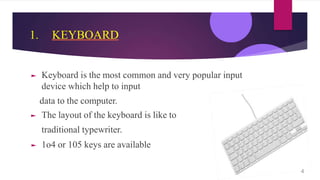
► Keyboard is the most common and very popular input
device which help to input
data to the computer.
► The layout of the keyboard is like to
traditional typewriter.
► 1o4 or 105 keys are available
4
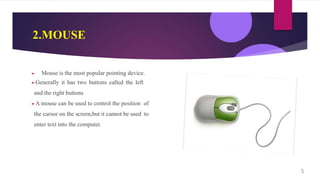
2.MOUSE
► Mouse is the most popular pointing device.
►Generally it has two buttons called the left
and the right buttons
►A mouse can be used to control the position of
the cursor on the screen,but it cannot be used to
enter text into the computer.
5
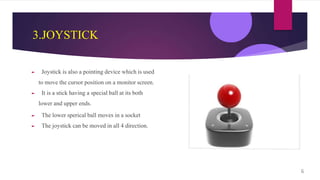
3.JOYSTICK
► Joystick is also a pointing device which is used
to move the cursor position on a monitor screen.
► It is a stick having a special ball at its both
lower and upper ends.
► The lower sperical ball moves in a socket
► The joystick can be moved in all 4 direction.
6
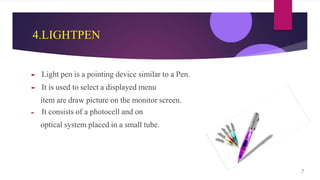
4.LIGHTPEN
► Light pen is a pointing device similar to a Pen.
► It is used to select a displayed menu
item are draw picture on the monitor screen.
► It consists of a photocell and on
optical system placed in a small tube.
7
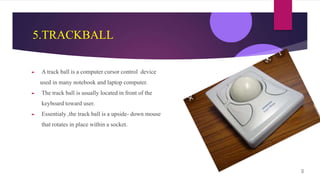
5.TRACKBALL
► A track ball is a computer cursor control device
used in many notebook and laptop computer.
► The track ball is usually located in front of the
keyboard toward user.
► Essentialy ,the track ball is a upside- down mouse
that rotates in place within a socket.
8
Output devices:
► An output devices is a piece of computer
hardware that receive data from a computer and
then translate that data into another form.than
form may be audio , visual,textual,or hardcopy
such as a printed document
9
Examples of output devices
► Monitor
► Printer
► Projector
10
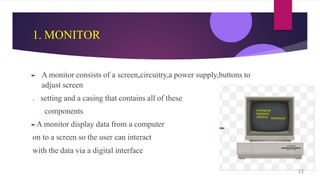
1. MONITOR
► A monitor consists of a screen,circuitry,a power supply,buttons to
adjust screen
. setting and a casing that contains all of these
components
►A monitor display data from a computer
on to a screen so the user can interact
with the data via a digital interface
11
2.PRINTER
► The function of a printer is to create a
copy of whatever is sent from the computer to the printer.
► Printers take electronic data sent
from a computer and generate a hard copy.
12
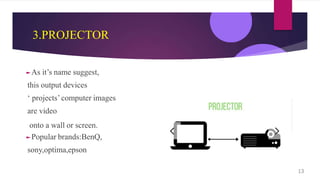
3.PROJECTOR
►As it’s name suggest,
this output devices
‘ projects’computer images
are video
onto a wall or screen.
►Popular brands:BenQ,
sony,optima,epson
13

Input and Output Devices

  • 1.
    INPUT AND OUTPUTDEVICES Prepared by V.SANTHI Assistant Professor, Department of Computer Applications, Thanjavur 1
  • 2.
    In computing aninput device is a piece of equipment used to provide data and control signals to an information processing system,such as a computer or information appliance. Input Devices
  • 3.
    Examples of inputdevice ► Keyboard ► Mouse ► Joystick ► Light pen ► Track ball 3
  • 4.
    1. KEYBOARD ► Keyboardis the most common and very popular input device which help to input data to the computer. ► The layout of the keyboard is like to traditional typewriter. ► 1o4 or 105 keys are available 4
  • 5.
    2.MOUSE ► Mouse isthe most popular pointing device. ►Generally it has two buttons called the left and the right buttons ►A mouse can be used to control the position of the cursor on the screen,but it cannot be used to enter text into the computer. 5
  • 6.
    3.JOYSTICK ► Joystick isalso a pointing device which is used to move the cursor position on a monitor screen. ► It is a stick having a special ball at its both lower and upper ends. ► The lower sperical ball moves in a socket ► The joystick can be moved in all 4 direction. 6
  • 7.
    4.LIGHTPEN ► Light penis a pointing device similar to a Pen. ► It is used to select a displayed menu item are draw picture on the monitor screen. ► It consists of a photocell and on optical system placed in a small tube. 7
  • 8.
    5.TRACKBALL ► A trackball is a computer cursor control device used in many notebook and laptop computer. ► The track ball is usually located in front of the keyboard toward user. ► Essentialy ,the track ball is a upside- down mouse that rotates in place within a socket. 8
  • 9.
    Output devices: ► Anoutput devices is a piece of computer hardware that receive data from a computer and then translate that data into another form.than form may be audio , visual,textual,or hardcopy such as a printed document 9
  • 10.
    Examples of outputdevices ► Monitor ► Printer ► Projector 10
  • 11.
    1. MONITOR ► Amonitor consists of a screen,circuitry,a power supply,buttons to adjust screen . setting and a casing that contains all of these components ►A monitor display data from a computer on to a screen so the user can interact with the data via a digital interface 11
  • 12.
    2.PRINTER ► The functionof a printer is to create a copy of whatever is sent from the computer to the printer. ► Printers take electronic data sent from a computer and generate a hard copy. 12
  • 13.
    3.PROJECTOR ►As it’s namesuggest, this output devices ‘ projects’computer images are video onto a wall or screen. ►Popular brands:BenQ, sony,optima,epson 13