Network Topologies
Prepared by
V.SANTHI
Assistant Professor,
Department of Computer Applications
Bon Secours College for Women,
Thanjavur
Topology
 Computer network topology is the way
various components of a network (like
nodes, links, peripherals, etc) are
arranged. Network topologies define
the layout, virtual shape or structure of
network, not only physically but also
logically. The way in which different
systems and nodes are connected
and communicate with each other is
determined by topology of the
network.
Simple Physical Topologies
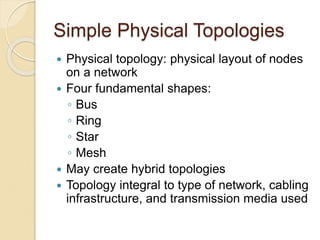
 Physical topology: physical layout of nodes
on a network
 Four fundamental shapes:
◦ Bus
◦ Ring
◦ Star
◦ Mesh
 May create hybrid topologies
 Topology integral to type of network, cabling
infrastructure, and transmission media used
Why we need a topology
Choosing one topology over another
can impact :
◦ type of equipment the network needs
◦ capabilities of the equipment
◦ network’s growth
◦ way a network is managed
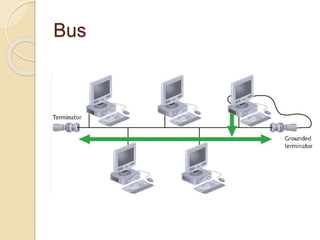
Bus
Types of Physical Network
Topologies
 Bus Topology
 Star Topology
 Ring Topology
 Mesh Topology
 Tree Topology
 Hybrid Topology
Simple Physical Topologies
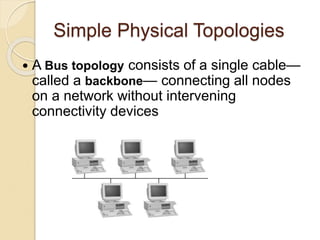
 A Bus topology consists of a single cable—
called a backbone— connecting all nodes
on a network without intervening
connectivity devices
Bus (continued)
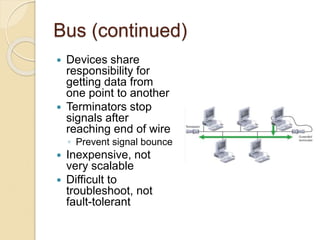
 Devices share
responsibility for
getting data from
one point to another
 Terminators stop
signals after
reaching end of wire
◦ Prevent signal bounce
 Inexpensive, not
very scalable
 Difficult to
troubleshoot, not
fault-tolerant
Advantages Disadvantage
 Works well for
small networks
 Easy to install
 Relatively
inexpensive to
implement
 Management costs
can be high
 Network disruption
when computers are
added or removed
 A break in the cable
will prevent all
systems from
accessing the
network.
 Difficult to
Ring
Simple Physical Topologies
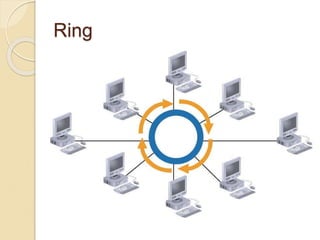
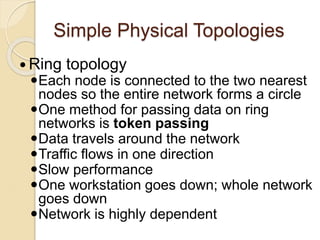
 Ring topology
Each node is connected to the two nearest
nodes so the entire network forms a circle
One method for passing data on ring
networks is token passing
Data travels around the network
Traffic flows in one direction
Slow performance
One workstation goes down; whole network
goes down
Network is highly dependent
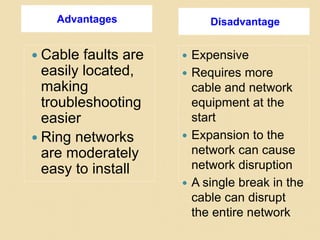
Advantages Disadvantage
 Cable faults are
easily located,
making
troubleshooting
easier
 Ring networks
are moderately
easy to install
 Expensive
 Requires more
cable and network
equipment at the
start
 Expansion to the
network can cause
network disruption
 A single break in the
cable can disrupt
the entire network
Star
Simple Physical Topologies
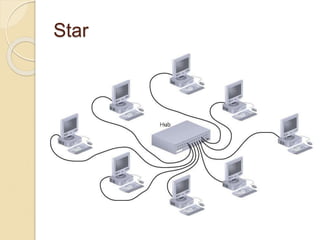
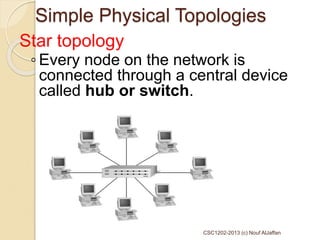
Star topology
◦ Every node on the network is
connected through a central device
called hub or switch.
CSC1202-2013 (c) Nouf AlJaffan
Star (continued)
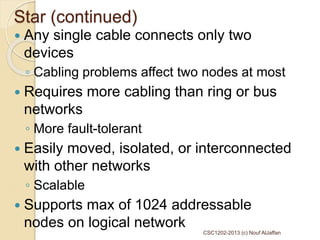
 Any single cable connects only two
devices
◦ Cabling problems affect two nodes at most
 Requires more cabling than ring or bus
networks
◦ More fault-tolerant
 Easily moved, isolated, or interconnected
with other networks
◦ Scalable
 Supports max of 1024 addressable
nodes on logical network
CSC1202-2013 (c) Nouf AlJaffan
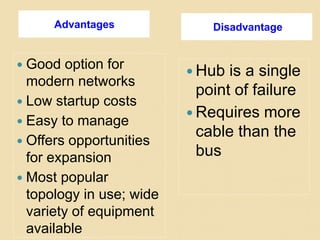
Advantages Disadvantage
 Good option for
modern networks
 Low startup costs
 Easy to manage
 Offers opportunities
for expansion
 Most popular
topology in use; wide
variety of equipment
available
 Hub is a single
point of failure
 Requires more
cable than the
bus
Mesh
Simple Physical Topologies
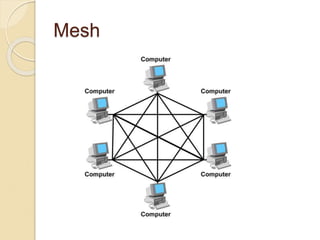
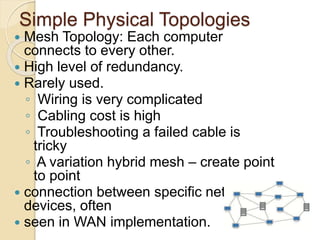
 Mesh Topology: Each computer
connects to every other.
 High level of redundancy.
 Rarely used.
◦ Wiring is very complicated
◦ Cabling cost is high
◦ Troubleshooting a failed cable is
tricky
◦ A variation hybrid mesh – create point
to point
 connection between specific network
devices, often
 seen in WAN implementation.
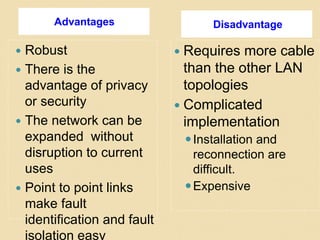
Advantages Disadvantage
 Robust
 There is the
advantage of privacy
or security
 The network can be
expanded without
disruption to current
uses
 Point to point links
make fault
identification and fault
isolation easy
 Requires more cable
than the other LAN
topologies
 Complicated
implementation
Installation and
reconnection are
difficult.
Expensive
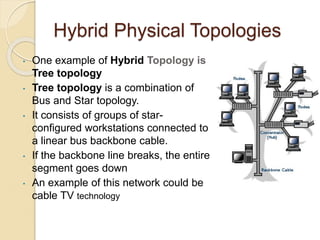
Hybrid Physical Topologies
• One example of Hybrid Topology is
Tree topology
• Tree topology is a combination of
Bus and Star topology.
• It consists of groups of star-
configured workstations connected to
a linear bus backbone cable.
• If the backbone line breaks, the entire
segment goes down
• An example of this network could be
cable TV technology

Topologies.ppt

  • 1.
    Network Topologies Prepared by V.SANTHI AssistantProfessor, Department of Computer Applications Bon Secours College for Women, Thanjavur
  • 2.
    Topology  Computer networktopology is the way various components of a network (like nodes, links, peripherals, etc) are arranged. Network topologies define the layout, virtual shape or structure of network, not only physically but also logically. The way in which different systems and nodes are connected and communicate with each other is determined by topology of the network.
  • 3.
    Simple Physical Topologies Physical topology: physical layout of nodes on a network  Four fundamental shapes: ◦ Bus ◦ Ring ◦ Star ◦ Mesh  May create hybrid topologies  Topology integral to type of network, cabling infrastructure, and transmission media used
  • 4.
    Why we needa topology Choosing one topology over another can impact : ◦ type of equipment the network needs ◦ capabilities of the equipment ◦ network’s growth ◦ way a network is managed
  • 5.
  • 6.
    Types of PhysicalNetwork Topologies  Bus Topology  Star Topology  Ring Topology  Mesh Topology  Tree Topology  Hybrid Topology
  • 7.
    Simple Physical Topologies A Bus topology consists of a single cable— called a backbone— connecting all nodes on a network without intervening connectivity devices
  • 8.
    Bus (continued)  Devicesshare responsibility for getting data from one point to another  Terminators stop signals after reaching end of wire ◦ Prevent signal bounce  Inexpensive, not very scalable  Difficult to troubleshoot, not fault-tolerant
  • 9.
    Advantages Disadvantage  Workswell for small networks  Easy to install  Relatively inexpensive to implement  Management costs can be high  Network disruption when computers are added or removed  A break in the cable will prevent all systems from accessing the network.  Difficult to
  • 10.
  • 11.
    Simple Physical Topologies Ring topology Each node is connected to the two nearest nodes so the entire network forms a circle One method for passing data on ring networks is token passing Data travels around the network Traffic flows in one direction Slow performance One workstation goes down; whole network goes down Network is highly dependent
  • 12.
    Advantages Disadvantage  Cablefaults are easily located, making troubleshooting easier  Ring networks are moderately easy to install  Expensive  Requires more cable and network equipment at the start  Expansion to the network can cause network disruption  A single break in the cable can disrupt the entire network
  • 13.
  • 14.
    Simple Physical Topologies Startopology ◦ Every node on the network is connected through a central device called hub or switch. CSC1202-2013 (c) Nouf AlJaffan
  • 15.
    Star (continued)  Anysingle cable connects only two devices ◦ Cabling problems affect two nodes at most  Requires more cabling than ring or bus networks ◦ More fault-tolerant  Easily moved, isolated, or interconnected with other networks ◦ Scalable  Supports max of 1024 addressable nodes on logical network CSC1202-2013 (c) Nouf AlJaffan
  • 16.
    Advantages Disadvantage  Goodoption for modern networks  Low startup costs  Easy to manage  Offers opportunities for expansion  Most popular topology in use; wide variety of equipment available  Hub is a single point of failure  Requires more cable than the bus
  • 17.
  • 18.
    Simple Physical Topologies Mesh Topology: Each computer connects to every other.  High level of redundancy.  Rarely used. ◦ Wiring is very complicated ◦ Cabling cost is high ◦ Troubleshooting a failed cable is tricky ◦ A variation hybrid mesh – create point to point  connection between specific network devices, often  seen in WAN implementation.
  • 19.
    Advantages Disadvantage  Robust There is the advantage of privacy or security  The network can be expanded without disruption to current uses  Point to point links make fault identification and fault isolation easy  Requires more cable than the other LAN topologies  Complicated implementation Installation and reconnection are difficult. Expensive
  • 20.
    Hybrid Physical Topologies •One example of Hybrid Topology is Tree topology • Tree topology is a combination of Bus and Star topology. • It consists of groups of star- configured workstations connected to a linear bus backbone cable. • If the backbone line breaks, the entire segment goes down • An example of this network could be cable TV technology