MS Word
Designed by:
Vaishnavi Dixit
 Microsoft Word 2010 is a word-
processing program, designed to help you
create professional-quality documents.
With the finest document-formatting tools,
Word helps you organize and write your
documents more efficiently.
What is MS Word?
Templates
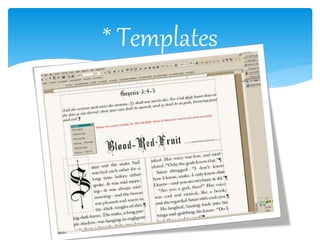
Several later versions of Word include the ability for users to create their own formatting
templates, allowing them to define a file in which the title, heading, paragraph, and other
element designs that are unique from the standard Word templates. Users can find how to do
this under the Help section located near the top right corner (Word 2013 on Windows 8).
For example, Normal.dot is the master template from which all Word documents are created. It
determines the margin defaults as well as the layout of the text and font defaults. Although
normal.dot is already set with certain defaults, the user can change normal.dot to new defaults.
This will change other documents which were created using the template, usually in unexpected
ways.
WordArt
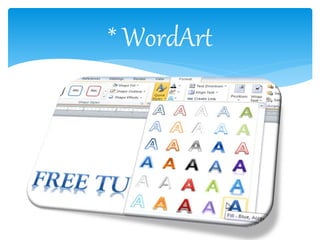
WordArt enables drawing text in a Microsoft Word document such as a title, watermark, or
other text, with graphical effects such as skewing, shadowing, rotating, stretching in a variety of
shapes and colors and even including three-dimensional effects. Users can apply formatting
effects such as shadow, bevel, glow, and reflection to their document text as easily as applying
bold or underline. Users can also spell-check text that uses visual effects, and add text effects to
paragraph styles.
Features of MS Word…
* WordArt
* Templates
Bullets and numbering
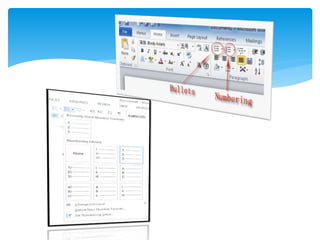
Microsoft Word supports bullet lists and numbered lists. It also features a
numbering system that helps add correct numbers to pages, chapters, headers,
footnotes, and entries of tables of content; these numbers automatically change
to correct ones as new items are added or existing items are deleted. Bullets
and numbering can be applied directly to paragraphs and convert them to lists.
Word 97 through 2003, however, had problems adding correct numbers to
numbered lists. In particular, a second irrelevant numbered list might have not
started with number one, but instead resumed numbering after the last
numbered list. Although Word 97 supported a hidden marker that said the list
numbering must restart afterwards, the command to insert this marker (Restart
Numbering command) was only added in Word 2003. However, if one cut the
first item of the listed and pasted it as another item, e.g. fifth, the restart
marker would have moved with it and the list would have restarted in the
middle instead of at the top.
 Discover an improved search and navigation
experience.
 Work with others without having to wait your
turn. ...
 Access and share your documents from virtually
anywhere. ...
 Add visual effects to your text. ...
 Turn your text into compelling diagrams. ...
 Add visual impact to your document.
Advantages of MS Word …
 Typing is impossible when there is a black out or laptops run out of
batteries ,The plagiarism is easy to do because it is very easy to just
copy and paste and the thesaurus has very limited vocabulary .
 Some symbols aren’t easily accessible which makes the typing in
different languages that use a different alphabet is difficult and
some complex mathematical equations would be easier to hand
write .
 While sharing and collaboration of the documents within a small
group , only one person can make corrections at any given time ,
The shared documents can not be edited in real time and restarting
numbering & bullets is problematic.
 The people tend to become careless because they know they can
easily correct the mistakes ,Spelling and grammar checker can not
spot all the mistakes and the people can become dependent on
Disadvantages of MS Word
Word Processing
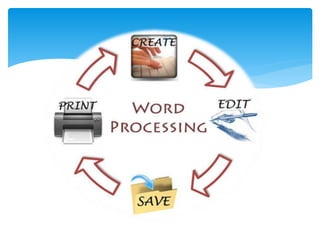
The primary objective of MS Word is to enable you, the user, to create and edit
documents. This is the word processing component, and it allows you to type
whatever you want and save it to view or edit later. These saved files can also be
sent to another person, who can view it with her own word processing software.
Editing
Word features numerous editing tools for your documents. You can change
margins, font, text size and other features. The size of the line breaks can be
adjusted, as can the color of the text. The text can also be cut and pasted
anywhere in the document by manipulating the many editing options in Word.
Objectives of MS Word..
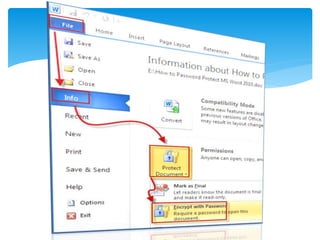
Protecting Your Documents
Word allows "Read Only" documents to be produced that cannot be edited
later or can only be edited in certain spaces. This is useful when creating
official documents that need to be reviewed and digitally signed. By
allowing only the signature line to be editable, the rest of the document
can be guaranteed safe from any changes made by the signer.
Easy to Use
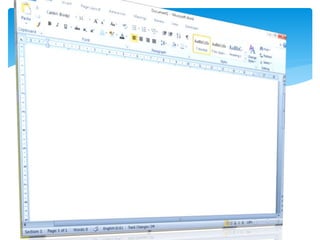
Word is designed for ease of use. When opening the program, you are
presented with a blank document upon which you can immediately begin
placing text. All of the most basic editing options, like bold, italics,
underlining and font size, are readily available in the default toolbar, with
the more advanced options inside sub-menus and various other toolbars.
Any user can easily hammer out a letter or a shopping list, while more
advanced users can dig deep to uncover more powerful options.
Styles
Word offers several options designed to be more stylistic than a plain text
document. Word allows the addition of text borders, as well as clip art and other
images. Styles you like can even be saved in the "Quick Styles" section for easier
use. By using these, you can click a button and any font choices, like color and text
effects, will be all applied at once.
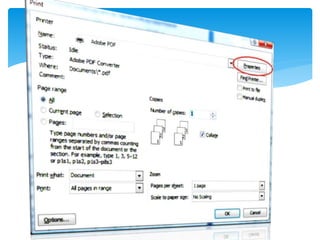
Printing
Of course, a word processor wouldn't be very useful if it weren't able to print
documents. Word enables the printing of any document it can open. It will even
allow you to manipulate printing options in accordance with your specific model of
printer. These include the quality of the printing job and orientation of the paper.
Multiple Word pages can even be printed on a single sheet of paper.
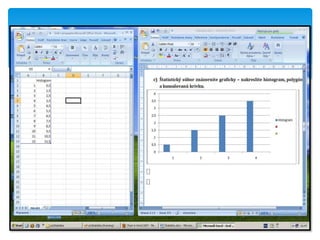
Tables/Graphs/Charts
Another option present in Word is the ability to generate
productivity-related images like charts and graphs. Bar graphs, pie
charts, line graphs and other related types of images can be
generated. Open the chart options, input your data, select your graph
or chart style, and Word will generate it for you. It can then be
resized and placed anywhere within the document.
Presentation of ms word

Presentation of ms word

  • 1.
  • 3.
     Microsoft Word2010 is a word- processing program, designed to help you create professional-quality documents. With the finest document-formatting tools, Word helps you organize and write your documents more efficiently. What is MS Word?
  • 4.
    Templates Several later versionsof Word include the ability for users to create their own formatting templates, allowing them to define a file in which the title, heading, paragraph, and other element designs that are unique from the standard Word templates. Users can find how to do this under the Help section located near the top right corner (Word 2013 on Windows 8). For example, Normal.dot is the master template from which all Word documents are created. It determines the margin defaults as well as the layout of the text and font defaults. Although normal.dot is already set with certain defaults, the user can change normal.dot to new defaults. This will change other documents which were created using the template, usually in unexpected ways. WordArt WordArt enables drawing text in a Microsoft Word document such as a title, watermark, or other text, with graphical effects such as skewing, shadowing, rotating, stretching in a variety of shapes and colors and even including three-dimensional effects. Users can apply formatting effects such as shadow, bevel, glow, and reflection to their document text as easily as applying bold or underline. Users can also spell-check text that uses visual effects, and add text effects to paragraph styles. Features of MS Word…
  • 5.
  • 6.
  • 7.
    Bullets and numbering MicrosoftWord supports bullet lists and numbered lists. It also features a numbering system that helps add correct numbers to pages, chapters, headers, footnotes, and entries of tables of content; these numbers automatically change to correct ones as new items are added or existing items are deleted. Bullets and numbering can be applied directly to paragraphs and convert them to lists. Word 97 through 2003, however, had problems adding correct numbers to numbered lists. In particular, a second irrelevant numbered list might have not started with number one, but instead resumed numbering after the last numbered list. Although Word 97 supported a hidden marker that said the list numbering must restart afterwards, the command to insert this marker (Restart Numbering command) was only added in Word 2003. However, if one cut the first item of the listed and pasted it as another item, e.g. fifth, the restart marker would have moved with it and the list would have restarted in the middle instead of at the top.
  • 9.
     Discover animproved search and navigation experience.  Work with others without having to wait your turn. ...  Access and share your documents from virtually anywhere. ...  Add visual effects to your text. ...  Turn your text into compelling diagrams. ...  Add visual impact to your document. Advantages of MS Word …
  • 11.
     Typing isimpossible when there is a black out or laptops run out of batteries ,The plagiarism is easy to do because it is very easy to just copy and paste and the thesaurus has very limited vocabulary .  Some symbols aren’t easily accessible which makes the typing in different languages that use a different alphabet is difficult and some complex mathematical equations would be easier to hand write .  While sharing and collaboration of the documents within a small group , only one person can make corrections at any given time , The shared documents can not be edited in real time and restarting numbering & bullets is problematic.  The people tend to become careless because they know they can easily correct the mistakes ,Spelling and grammar checker can not spot all the mistakes and the people can become dependent on Disadvantages of MS Word
  • 13.
    Word Processing The primaryobjective of MS Word is to enable you, the user, to create and edit documents. This is the word processing component, and it allows you to type whatever you want and save it to view or edit later. These saved files can also be sent to another person, who can view it with her own word processing software. Editing Word features numerous editing tools for your documents. You can change margins, font, text size and other features. The size of the line breaks can be adjusted, as can the color of the text. The text can also be cut and pasted anywhere in the document by manipulating the many editing options in Word. Objectives of MS Word..
  • 15.
    Protecting Your Documents Wordallows "Read Only" documents to be produced that cannot be edited later or can only be edited in certain spaces. This is useful when creating official documents that need to be reviewed and digitally signed. By allowing only the signature line to be editable, the rest of the document can be guaranteed safe from any changes made by the signer. Easy to Use Word is designed for ease of use. When opening the program, you are presented with a blank document upon which you can immediately begin placing text. All of the most basic editing options, like bold, italics, underlining and font size, are readily available in the default toolbar, with the more advanced options inside sub-menus and various other toolbars. Any user can easily hammer out a letter or a shopping list, while more advanced users can dig deep to uncover more powerful options.
  • 17.
    Styles Word offers severaloptions designed to be more stylistic than a plain text document. Word allows the addition of text borders, as well as clip art and other images. Styles you like can even be saved in the "Quick Styles" section for easier use. By using these, you can click a button and any font choices, like color and text effects, will be all applied at once. Printing Of course, a word processor wouldn't be very useful if it weren't able to print documents. Word enables the printing of any document it can open. It will even allow you to manipulate printing options in accordance with your specific model of printer. These include the quality of the printing job and orientation of the paper. Multiple Word pages can even be printed on a single sheet of paper.
  • 19.
    Tables/Graphs/Charts Another option presentin Word is the ability to generate productivity-related images like charts and graphs. Bar graphs, pie charts, line graphs and other related types of images can be generated. Open the chart options, input your data, select your graph or chart style, and Word will generate it for you. It can then be resized and placed anywhere within the document.