Data and its 
representation 
Ruhulla Abdul 
1st year IFF student 
Financial University under the Government of 
the Russian Federation 
Moscow 
2014
Content 
 Database 
 DBMS 
 Database model 
 Relational database 
 Ensuring Data Integrity 
 Understanding data and data-gathering 
 Different parts of a database 
 The database planning process 
 Post-relational database
What is a database? 
A database is a storage space for content / information (data) 
Data is factual information about objects and concepts, such as: 
• measurements 
• statistics 
You can find it in: 
 filing cabinets 
 spreadsheets 
 folders 
 ledgers 
 lists 
 colleagues’ memories 
 piles of papers on your desk
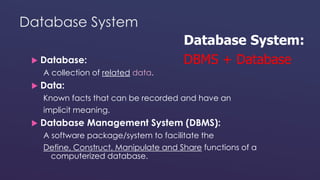
Database System 
 Database: 
A collection of related data. 
 Data: 
Database System: 
DBMS + Database 
Known facts that can be recorded and have an 
implicit meaning. 
 Database Management System (DBMS): 
A software package/system to facilitate the 
Define, Construct, Manipulate and Share functions of a 
computerized database.
DBMS 
 Software package for defining and managing a database. 
 Examples: 
 Proprietary: MS Access, MS SQL Server, DB2, Oracle, Sybase 
 Open source: MySql, PostgreSQL
DBMS Advantages 
 Program-data independence 
 Minimal data redundancy 
 Improved data consistency & quality 
 Access control 
 Transaction control 
 Improved accessibility & data sharing 
 Increased productivity of application development 
 Enforced standards
Typical DBMS Functionality 
 Define a particular database in terms of its data types, structures, 
and constraints 
 Construct or Load the initial database contents on a secondary 
storage medium 
 Manipulate the database: 
 Retrieval: Querying, generating reports 
 Modification: Insertions, deletions and updates to its content 
 Accessing the database through Web applications 
 Share a database allows multiple users and programs to access the 
database simultaneously
Database model 
A database model is a type of data model that determines the logical structure of a database and 
fundamentally determines in which manner data can be stored, organized, and manipulated. 
Common logical data models for databases include: 
 Hierarchical database model 
 Network model 
 Relational model 
 Entity–relationship model 
 Enhanced entity–relationship model 
 Object model 
 Document model 
 Entity–attribute–value model 
 Star schema 
An object-relational database combines the two related structures. 
Physical data models include: 
 Inverted index 
 Flat file 
Other models include: Associative, Multidimensional, Multivalue l, Semantic, XML database Named 
graph, Triplestore
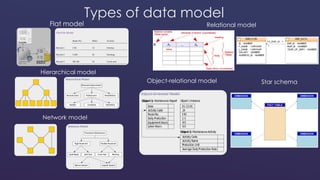
Common types of data models 
A database model is a specification describing how a database is structured and used. 
Several such models have been suggested. Common models include: 
 Flat model - This may not strictly qualify as a data model. The flat (or table) model consists of a 
single, two-dimensional array of data elements, where all members of a given column are 
assumed to be similar values, and all members of a row are assumed to be related to one 
another. 
 Hierarchical model - In this model data is organized into a tree-like structure, implying a single 
upward link in each record to describe the nesting, and a sort field to keep the records in a 
particular order in each same-level list. 
 Network model - This model organizes data using two fundamental constructs, called records and 
sets. Records contain fields, and sets define one-to-many relationships between records: one 
owner, many members. 
 Relational model - is a database model based on first-order predicate logic. Its core idea is to 
describe a database as a collection of predicates over a finite set of predicate variables, 
describing constraints on the possible values and combinations of values. 
 Object-relational model - Similar to a relational database model, but objects, classes and 
inheritance are directly supported in database schemas and in the query language. 
 Star schema - The simplest style of data warehouse schema. The star schema consists of a few 
"fact tables" (possibly only one, justifying the name) referencing any number of "dimension tables". 
The star schema is considered an important special case of the snowflake schema.
Types of data model 
Flat model 
Hierarchical model 
Network model 
Relational model 
Object-relational model Star schema
Relational database 
A relational database is a collection of data items organized as a set of 
formally-described tables from which data can be accessed or reassembled 
in many different ways without having to reorganize the database tables. It is 
the most popular example of a database model, which uses a table-based 
format. 
The relational database was invented by E. F. Codd at IBM in 1970. 
The standard user and application program interface to a relational database 
is the structured query language (SQL). SQL statements are used both for 
interactive queries for information from a relational database and for 
gathering data for reports. 
In addition to being relatively easy to create and access, a relational 
database has the important advantage of being easy to extend. After the 
original database creation, a new data category can be added without 
requiring that all existing applications be modified. 
SQL statements are used to retrieve and update data in a database.
Structure of relational model 
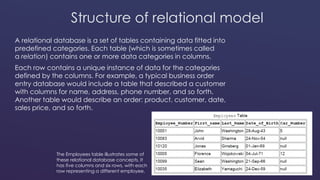
A relational database is a set of tables containing data fitted into 
predefined categories. Each table (which is sometimes called 
a relation) contains one or more data categories in columns. 
Each row contains a unique instance of data for the categories 
defined by the columns. For example, a typical business order 
entry database would include a table that described a customer 
with columns for name, address, phone number, and so forth. 
Another table would describe an order: product, customer, date, 
sales price, and so forth. 
The Employees table illustrates some of 
these relational database concepts. It 
has five columns and six rows, with each 
row representing a different employee.
Structure of relational model 
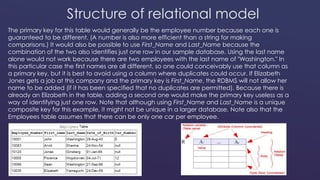
The primary key for this table would generally be the employee number because each one is 
guaranteed to be different. (A number is also more efficient than a string for making 
comparisons.) It would also be possible to use First_Name and Last_Name because the 
combination of the two also identifies just one row in our sample database. Using the last name 
alone would not work because there are two employees with the last name of "Washington." In 
this particular case the first names are all different, so one could conceivably use that column as 
a primary key, but it is best to avoid using a column where duplicates could occur. If Elizabeth 
Jones gets a job at this company and the primary key is First_Name, the RDBMS will not allow her 
name to be added (if it has been specified that no duplicates are permitted). Because there is 
already an Elizabeth in the table, adding a second one would make the primary key useless as a 
way of identifying just one row. Note that although using First_Name and Last_Name is a unique 
composite key for this example, it might not be unique in a larger database. Note also that the 
Employees table assumes that there can be only one car per employee.
Databases everywhere 
Because of the versatility of databases, we find them powering all sorts 
of projects: 
 A web site that is capturing registered users 
 A client tracking application for social service organisations 
 A medical record system for a health care facility 
 Your personal address book in your e-mail client 
 A collection of word processed documents 
 A system that issues airline reservations
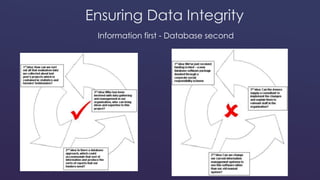
Ensuring Data Integrity 
Information first - Database second
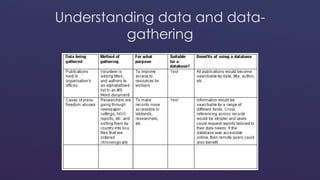
Understanding data and data-gathering
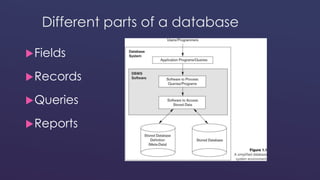
Different parts of a database 
Fields 
Records 
Queries 
Reports
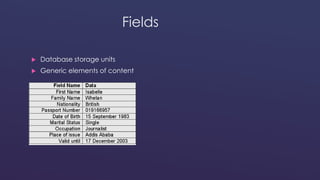
Fields 
 Database storage units 
 Generic elements of content
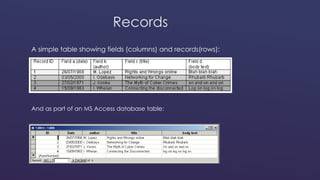
Records 
A simple table showing fields (columns) and records(rows): 
And as part of an MS Access database table:
Queries 
 Queries are the information retrieval requests you make to the 
database 
 Your queries are all about the information you are trying to gather
Reports 
 If the query is a question... 
...then the report is its answer 
 Reports can be tailored to the needs of the data-user, making the 
information they extract much more useful
The database planning process 
What kind of database are you working on? 
 Information and referral database 
 Contact/client database 
 Donation database (donorbase) 
 Other
Information and referral databases 
 Store information about service providers 
 Track and match requests for referral 
 Use a simple design 
 Need to be maintained with up-to-date and complete information
Contact/client databases 
 Store contact information for client base 
 Sortable by criteria like: 
 Client interests 
 Services provided 
 Subscription expiry dates 
 Last contacted date
Donation databases (donorbases) 
 Generate reports of donations 
 Order or sort donors according to different conditions 
 Record the various donation details of each donor 
 Create and sort lists of potential and current donors 
 Print letters, labels and reports
Post-relational database 
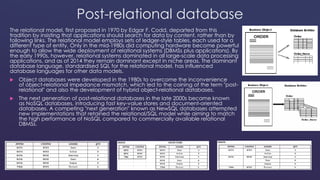
The relational model, first proposed in 1970 by Edgar F. Codd, departed from this 
tradition by insisting that applications should search for data by content, rather than by 
following links. The relational model employs sets of ledger-style tables, each used for a 
different type of entity. Only in the mid-1980s did computing hardware become powerful 
enough to allow the wide deployment of relational systems (DBMSs plus applications). By 
the early 1990s, however, relational systems dominated in all large-scale data processing 
applications, and as of 2014 they remain dominant except in niche areas. The dominant 
database language, standardised SQL for the relational model, has influenced 
database languages for other data models. 
 Object databases were developed in the 1980s to overcome the inconvenience 
of object-relational impedance mismatch, which led to the coining of the term "post-relational" 
and also the development of hybrid object-relational databases. 
 The next generation of post-relational databases in the late 2000s became known 
as NoSQL databases, introducing fast key-value stores and document-oriented 
databases. A competing "next generation" known as NewSQL databases attempted 
new implementations that retained the relational/SQL model while aiming to match 
the high performance of NoSQL compared to commercially available relational 
DBMSs.
Questions 
1) What is a database? Give an example of everyday life database 
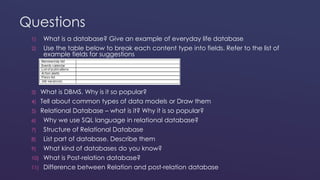
2) Use the table below to break each content type into fields. Refer to the list of 
example fields for suggestions 
3) What is DBMS. Why is it so popular? 
4) Tell about common types of data models or Draw them 
5) Relational Database – what is it? Why it is so popular? 
6) Why we use SQL language in relational database? 
7) Structure of Relational Database 
8) List part of database. Describe them 
9) What kind of databases do you know? 
10) What is Post-relation database? 
11) Difference between Relation and post-relation database
References 
 http://fakit.narod.ru/uch2003/p4_6_2_3.html 
 http://habrahabr.ru/post/152477/ 
 http://citforum.ru/seminars/cbd99/ardent_1.shtml 
 http://en.wikipedia.org/wiki/Database 
 https://en.wikipedia.org/wiki/Relational_model 
 http://www.webopedia.com/TERM/D/database.html 
 http://www.databasejournal.com/ 
 http://en.wikipedia.org/wiki/Database_model

Databases and its representation

  • 1.
    Data and its representation Ruhulla Abdul 1st year IFF student Financial University under the Government of the Russian Federation Moscow 2014
  • 2.
    Content  Database  DBMS  Database model  Relational database  Ensuring Data Integrity  Understanding data and data-gathering  Different parts of a database  The database planning process  Post-relational database
  • 3.
    What is adatabase? A database is a storage space for content / information (data) Data is factual information about objects and concepts, such as: • measurements • statistics You can find it in:  filing cabinets  spreadsheets  folders  ledgers  lists  colleagues’ memories  piles of papers on your desk
  • 4.
    Database System Database: A collection of related data.  Data: Database System: DBMS + Database Known facts that can be recorded and have an implicit meaning.  Database Management System (DBMS): A software package/system to facilitate the Define, Construct, Manipulate and Share functions of a computerized database.
  • 5.
    DBMS  Softwarepackage for defining and managing a database.  Examples:  Proprietary: MS Access, MS SQL Server, DB2, Oracle, Sybase  Open source: MySql, PostgreSQL
  • 6.
    DBMS Advantages Program-data independence  Minimal data redundancy  Improved data consistency & quality  Access control  Transaction control  Improved accessibility & data sharing  Increased productivity of application development  Enforced standards
  • 7.
    Typical DBMS Functionality  Define a particular database in terms of its data types, structures, and constraints  Construct or Load the initial database contents on a secondary storage medium  Manipulate the database:  Retrieval: Querying, generating reports  Modification: Insertions, deletions and updates to its content  Accessing the database through Web applications  Share a database allows multiple users and programs to access the database simultaneously
  • 8.
    Database model Adatabase model is a type of data model that determines the logical structure of a database and fundamentally determines in which manner data can be stored, organized, and manipulated. Common logical data models for databases include:  Hierarchical database model  Network model  Relational model  Entity–relationship model  Enhanced entity–relationship model  Object model  Document model  Entity–attribute–value model  Star schema An object-relational database combines the two related structures. Physical data models include:  Inverted index  Flat file Other models include: Associative, Multidimensional, Multivalue l, Semantic, XML database Named graph, Triplestore
  • 9.
    Common types ofdata models A database model is a specification describing how a database is structured and used. Several such models have been suggested. Common models include:  Flat model - This may not strictly qualify as a data model. The flat (or table) model consists of a single, two-dimensional array of data elements, where all members of a given column are assumed to be similar values, and all members of a row are assumed to be related to one another.  Hierarchical model - In this model data is organized into a tree-like structure, implying a single upward link in each record to describe the nesting, and a sort field to keep the records in a particular order in each same-level list.  Network model - This model organizes data using two fundamental constructs, called records and sets. Records contain fields, and sets define one-to-many relationships between records: one owner, many members.  Relational model - is a database model based on first-order predicate logic. Its core idea is to describe a database as a collection of predicates over a finite set of predicate variables, describing constraints on the possible values and combinations of values.  Object-relational model - Similar to a relational database model, but objects, classes and inheritance are directly supported in database schemas and in the query language.  Star schema - The simplest style of data warehouse schema. The star schema consists of a few "fact tables" (possibly only one, justifying the name) referencing any number of "dimension tables". The star schema is considered an important special case of the snowflake schema.
  • 10.
    Types of datamodel Flat model Hierarchical model Network model Relational model Object-relational model Star schema
  • 11.
    Relational database Arelational database is a collection of data items organized as a set of formally-described tables from which data can be accessed or reassembled in many different ways without having to reorganize the database tables. It is the most popular example of a database model, which uses a table-based format. The relational database was invented by E. F. Codd at IBM in 1970. The standard user and application program interface to a relational database is the structured query language (SQL). SQL statements are used both for interactive queries for information from a relational database and for gathering data for reports. In addition to being relatively easy to create and access, a relational database has the important advantage of being easy to extend. After the original database creation, a new data category can be added without requiring that all existing applications be modified. SQL statements are used to retrieve and update data in a database.
  • 12.
    Structure of relationalmodel A relational database is a set of tables containing data fitted into predefined categories. Each table (which is sometimes called a relation) contains one or more data categories in columns. Each row contains a unique instance of data for the categories defined by the columns. For example, a typical business order entry database would include a table that described a customer with columns for name, address, phone number, and so forth. Another table would describe an order: product, customer, date, sales price, and so forth. The Employees table illustrates some of these relational database concepts. It has five columns and six rows, with each row representing a different employee.
  • 13.
    Structure of relationalmodel The primary key for this table would generally be the employee number because each one is guaranteed to be different. (A number is also more efficient than a string for making comparisons.) It would also be possible to use First_Name and Last_Name because the combination of the two also identifies just one row in our sample database. Using the last name alone would not work because there are two employees with the last name of "Washington." In this particular case the first names are all different, so one could conceivably use that column as a primary key, but it is best to avoid using a column where duplicates could occur. If Elizabeth Jones gets a job at this company and the primary key is First_Name, the RDBMS will not allow her name to be added (if it has been specified that no duplicates are permitted). Because there is already an Elizabeth in the table, adding a second one would make the primary key useless as a way of identifying just one row. Note that although using First_Name and Last_Name is a unique composite key for this example, it might not be unique in a larger database. Note also that the Employees table assumes that there can be only one car per employee.
  • 14.
    Databases everywhere Becauseof the versatility of databases, we find them powering all sorts of projects:  A web site that is capturing registered users  A client tracking application for social service organisations  A medical record system for a health care facility  Your personal address book in your e-mail client  A collection of word processed documents  A system that issues airline reservations
  • 15.
    Ensuring Data Integrity Information first - Database second
  • 16.
    Understanding data anddata-gathering
  • 17.
    Different parts ofa database Fields Records Queries Reports
  • 18.
    Fields  Databasestorage units  Generic elements of content
  • 19.
    Records A simpletable showing fields (columns) and records(rows): And as part of an MS Access database table:
  • 20.
    Queries  Queriesare the information retrieval requests you make to the database  Your queries are all about the information you are trying to gather
  • 21.
    Reports  Ifthe query is a question... ...then the report is its answer  Reports can be tailored to the needs of the data-user, making the information they extract much more useful
  • 22.
    The database planningprocess What kind of database are you working on?  Information and referral database  Contact/client database  Donation database (donorbase)  Other
  • 23.
    Information and referraldatabases  Store information about service providers  Track and match requests for referral  Use a simple design  Need to be maintained with up-to-date and complete information
  • 24.
    Contact/client databases Store contact information for client base  Sortable by criteria like:  Client interests  Services provided  Subscription expiry dates  Last contacted date
  • 25.
    Donation databases (donorbases)  Generate reports of donations  Order or sort donors according to different conditions  Record the various donation details of each donor  Create and sort lists of potential and current donors  Print letters, labels and reports
  • 26.
    Post-relational database Therelational model, first proposed in 1970 by Edgar F. Codd, departed from this tradition by insisting that applications should search for data by content, rather than by following links. The relational model employs sets of ledger-style tables, each used for a different type of entity. Only in the mid-1980s did computing hardware become powerful enough to allow the wide deployment of relational systems (DBMSs plus applications). By the early 1990s, however, relational systems dominated in all large-scale data processing applications, and as of 2014 they remain dominant except in niche areas. The dominant database language, standardised SQL for the relational model, has influenced database languages for other data models.  Object databases were developed in the 1980s to overcome the inconvenience of object-relational impedance mismatch, which led to the coining of the term "post-relational" and also the development of hybrid object-relational databases.  The next generation of post-relational databases in the late 2000s became known as NoSQL databases, introducing fast key-value stores and document-oriented databases. A competing "next generation" known as NewSQL databases attempted new implementations that retained the relational/SQL model while aiming to match the high performance of NoSQL compared to commercially available relational DBMSs.
  • 27.
    Questions 1) Whatis a database? Give an example of everyday life database 2) Use the table below to break each content type into fields. Refer to the list of example fields for suggestions 3) What is DBMS. Why is it so popular? 4) Tell about common types of data models or Draw them 5) Relational Database – what is it? Why it is so popular? 6) Why we use SQL language in relational database? 7) Structure of Relational Database 8) List part of database. Describe them 9) What kind of databases do you know? 10) What is Post-relation database? 11) Difference between Relation and post-relation database
  • 28.
    References  http://fakit.narod.ru/uch2003/p4_6_2_3.html  http://habrahabr.ru/post/152477/  http://citforum.ru/seminars/cbd99/ardent_1.shtml  http://en.wikipedia.org/wiki/Database  https://en.wikipedia.org/wiki/Relational_model  http://www.webopedia.com/TERM/D/database.html  http://www.databasejournal.com/  http://en.wikipedia.org/wiki/Database_model