DATABASEManagement
FINALReport
Groupmembers:
 Raja Muhammad noman
 Muhammad aqib
 Farhad abbas
 Haider abbas
 Shahid ashraf
18-1-2019
Contents
Section Heading Page
Number
DATABASE
DATA, INFORMATION
DATABASE
The hierarchy of data Maintaining data
Adding records
Changing records
Deleting records
Validating data  ALPHABETIC/NUMBERIC CHECK
 RANGE CHECK
 CONSISTENCY CHECK
 COMPLETENESS CHECK
 CHECK DIGIT
File processing versus
data base
 The Database approach
 File processing system
Data base
management system
Data Security
RELATIONAL, OBJECT-ORIENTED, AND
MULTIDIMENSIONAL DATABASE
WEB DATABASE
DATABASE ADMINISTRATION
Appendices A Discovering Computers
Fundamentals
Fourth edition
DATABASES, DATA, AND INFORMATION
A database is a collection of data organized in a manner that allows
access, retrieval, and use of that data. Data is a collection of
unprocessed items, which can include text, numbers, images, audio,
and video. Information is processed data; that is, it is organized,
meaningful, and useful. Computers process data in a database into
information. A database at a members-only discount warehouse, for
example, contains data about members, e.g., member data, purchase.
A computer at the warehouse processes new member data and then
sends receipt and ID card information to the printers. With database
software, often called a database management system (DBMS), users
create a computerized database; add, change, and delete data in the
database; sort and retrieve data from the database; and create forms
and reports from the data in the database. Database software includes
many powerful features.
Data Integrity
Most companies realize that data is one of their more valuable assets
— because data is used to generate information. Many business
transactions take less time when employees have instant access to
information. To ensure that data is accessible on demand, a company
must manage and protect its data just as it would any other resource.
Thus, it is vital that the data has integrity and is kept secure.
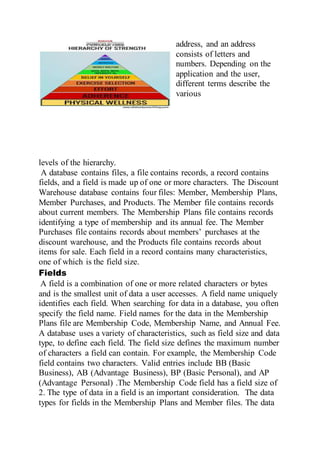
THE HIERARCHY OF DATA
Data is organized in layers. In the computer profession, data is
classified in a hierarchy. Each higher level of data consists of one or
more items from the lower level. For example, a member has an
address, and an address
consists of letters and
numbers. Depending on the
application and the user,
different terms describe the
various
levels of the hierarchy.
A database contains files, a file contains records, a record contains
fields, and a field is made up of one or more characters. The Discount
Warehouse database contains four files: Member, Membership Plans,
Member Purchases, and Products. The Member file contains records
about current members. The Membership Plans file contains records
identifying a type of membership and its annual fee. The Member
Purchases file contains records about members’ purchases at the
discount warehouse, and the Products file contains records about
items for sale. Each field in a record contains many characteristics,
one of which is the field size.
Fields
A field is a combination of one or more related characters or bytes
and is the smallest unit of data a user accesses. A field name uniquely
identifies each field. When searching for data in a database, you often
specify the field name. Field names for the data in the Membership
Plans file are Membership Code, Membership Name, and Annual Fee.
A database uses a variety of characteristics, such as field size and data
type, to define each field. The field size defines the maximum number
of characters a field can contain. For example, the Membership Code
field contains two characters. Valid entries include BB (Basic
Business), AB (Advantage Business), BP (Basic Personal), and AP
(Advantage Personal) .The Membership Code field has a field size of
2. The type of data in a field is an important consideration. The data
types for fields in the Membership Plans and Member files. The data
type specifies the kind of data a field can contain and how the field is
used. Common data types include: • Text (also called alphanumeric)
— letters, numbers, or special characters • Numeric — numbers only
• AutoNumber — unique number automatically assigned by the
DBMS to each added record • Currency — dollar and cent amounts or
numbers containing decimal values • Date — month, day, year, and
sometimes time information • Memo — lengthy text entries • Yes/No
— only the values Yes or No (or True or False) • Hyperlink — Web
address that links to a document or a Web page • Object —
photograph, audio, video, or a document created in other program.
MAINTAINING DATA
File maintenance refers to the procedures that keep data current. File
maintenance procedures include adding records to, changing records
in, and deleting records from a file.
Validating Data
Validation is the process of comparing data with a set of rules or
values to find out if the data is correct. Many programs perform a
validity check that analyses entered data to help ensure that it is
correct. For instance, when a membership services associate adds or
changes data in a member record, the DBMS tests the entered data.
With an annual membership fee, you would expect to see numbers
before and after a decimal point. For example, a valid annual
membership fee is 30.00. An entry of XR.WP clearly is not correct. If
the entered data fails a validity check, the computer should display an
error message that instructs the user to enter the data again. Validity
checks reduce data entry errors. Various types of validity checks
include alphabetic checks, numeric checks, range checks, consistency
checks, and completeness checks. Check digits also validate data
accuracy. The following paragraphs describe the purpose of these
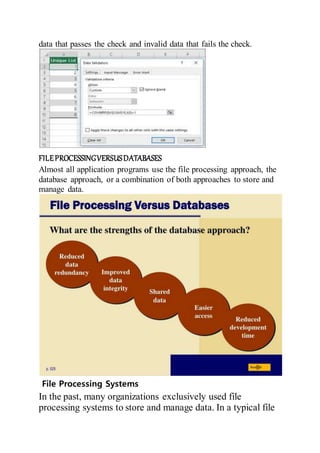
validity checks. The several of these validity checks and shows valid
data that passes the check and invalid data that fails the check.
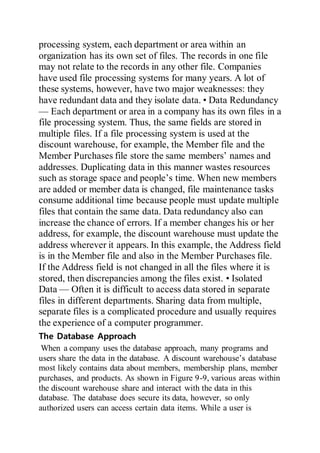
FILEPROCESSINGVERSUSDATABASES
Almost all application programs use the file processing approach, the
database approach, or a combination of both approaches to store and
manage data.
File Processing Systems
In the past, many organizations exclusively used file
processing systems to store and manage data. In a typical file
processing system, each department or area within an
organization has its own set of files. The records in one file
may not relate to the records in any other file. Companies
have used file processing systems for many years. A lot of
these systems, however, have two major weaknesses: they
have redundant data and they isolate data. • Data Redundancy
— Each department or area in a company has its own files in a
file processing system. Thus, the same fields are stored in
multiple files. If a file processing system is used at the
discount warehouse, for example, the Member file and the
Member Purchases file store the same members’ names and
addresses. Duplicating data in this manner wastes resources
such as storage space and people’s time. When new members
are added or member data is changed, file maintenance tasks
consume additional time because people must update multiple
files that contain the same data. Data redundancy also can
increase the chance of errors. If a member changes his or her
address, for example, the discount warehouse must update the
address wherever it appears. In this example, the Address field
is in the Member file and also in the Member Purchases file.
If the Address field is not changed in all the files where it is
stored, then discrepancies among the files exist. • Isolated
Data — Often it is difficult to access data stored in separate
files in different departments. Sharing data from multiple,
separate files is a complicated procedure and usually requires
the experience of a computer programmer.
The Database Approach
When a company uses the database approach, many programs and
users share the data in the database. A discount warehouse’s database
most likely contains data about members, membership plans, member
purchases, and products. As shown in Figure 9-9, various areas within
the discount warehouse share and interact with the data in this
database. The database does secure its data, however, so only
authorized users can access certain data items. While a user is
working with the database, the DBMS resides in the memory of the
compute
Databasemanagementsystem
A database management system (DBMS), or database program, is
software that allows you to create, access, and manage a database.
DBMSs are available for many sizes and types of computers .
Whether designed for a small or large computer, most DBMSs
perform common functions.
RELATIONAL,OBJECT-ORIENTED,ANDMULTIDIMENSIONAL
DATABASES
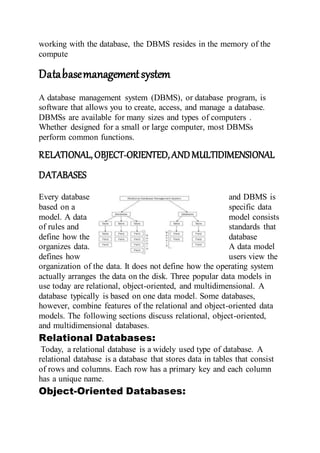
Every database and DBMS is
based on a specific data
model. A data model consists
of rules and standards that
define how the database
organizes data. A data model
defines how users view the
organization of the data. It does not define how the operating system
actually arranges the data on the disk. Three popular data models in
use today are relational, object-oriented, and multidimensional. A
database typically is based on one data model. Some databases,
however, combine features of the relational and object-oriented data
models. The following sections discuss relational, object-oriented,
and multidimensional databases.
Relational Databases:
Today, a relational database is a widely used type of database. A
relational database is a database that stores data in tables that consist
of rows and columns. Each row has a primary key and each column
has a unique name.
Object-Oriented Databases:
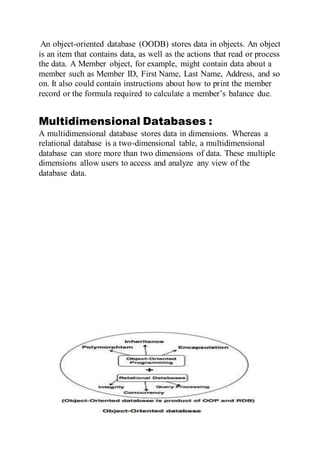
An object-oriented database (OODB) stores data in objects. An object
is an item that contains data, as well as the actions that read or process
the data. A Member object, for example, might contain data about a
member such as Member ID, First Name, Last Name, Address, and so
on. It also could contain instructions about how to print the member
record or the formula required to calculate a member’s balance due.
Multidimensional Databases :
A multidimensional database stores data in dimensions. Whereas a
relational database is a two-dimensional table, a multidimensional
database can store more than two dimensions of data. These multiple
dimensions allow users to access and analyze any view of the
database data.
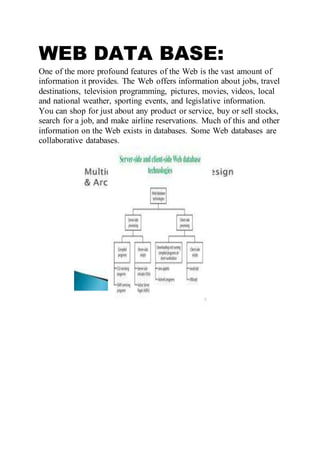
WEB DATA BASE:
One of the more profound features of the Web is the vast amount of
information it provides. The Web offers information about jobs, travel
destinations, television programming, pictures, movies, videos, local
and national weather, sporting events, and legislative information.
You can shop for just about any product or service, buy or sell stocks,
search for a job, and make airline reservations. Much of this and other
information on the Web exists in databases. Some Web databases are
collaborative databases.

Data base management

  • 1.
    DATABASEManagement FINALReport Groupmembers:  Raja Muhammadnoman  Muhammad aqib  Farhad abbas  Haider abbas  Shahid ashraf
  • 2.
    18-1-2019 Contents Section Heading Page Number DATABASE DATA,INFORMATION DATABASE The hierarchy of data Maintaining data Adding records Changing records Deleting records Validating data  ALPHABETIC/NUMBERIC CHECK  RANGE CHECK  CONSISTENCY CHECK  COMPLETENESS CHECK  CHECK DIGIT File processing versus data base  The Database approach  File processing system Data base management system Data Security RELATIONAL, OBJECT-ORIENTED, AND MULTIDIMENSIONAL DATABASE WEB DATABASE DATABASE ADMINISTRATION Appendices A Discovering Computers
  • 3.
    Fundamentals Fourth edition DATABASES, DATA,AND INFORMATION A database is a collection of data organized in a manner that allows access, retrieval, and use of that data. Data is a collection of unprocessed items, which can include text, numbers, images, audio, and video. Information is processed data; that is, it is organized, meaningful, and useful. Computers process data in a database into information. A database at a members-only discount warehouse, for example, contains data about members, e.g., member data, purchase. A computer at the warehouse processes new member data and then sends receipt and ID card information to the printers. With database software, often called a database management system (DBMS), users create a computerized database; add, change, and delete data in the database; sort and retrieve data from the database; and create forms and reports from the data in the database. Database software includes many powerful features. Data Integrity Most companies realize that data is one of their more valuable assets — because data is used to generate information. Many business transactions take less time when employees have instant access to information. To ensure that data is accessible on demand, a company must manage and protect its data just as it would any other resource. Thus, it is vital that the data has integrity and is kept secure. THE HIERARCHY OF DATA Data is organized in layers. In the computer profession, data is classified in a hierarchy. Each higher level of data consists of one or more items from the lower level. For example, a member has an
  • 4.
    address, and anaddress consists of letters and numbers. Depending on the application and the user, different terms describe the various levels of the hierarchy. A database contains files, a file contains records, a record contains fields, and a field is made up of one or more characters. The Discount Warehouse database contains four files: Member, Membership Plans, Member Purchases, and Products. The Member file contains records about current members. The Membership Plans file contains records identifying a type of membership and its annual fee. The Member Purchases file contains records about members’ purchases at the discount warehouse, and the Products file contains records about items for sale. Each field in a record contains many characteristics, one of which is the field size. Fields A field is a combination of one or more related characters or bytes and is the smallest unit of data a user accesses. A field name uniquely identifies each field. When searching for data in a database, you often specify the field name. Field names for the data in the Membership Plans file are Membership Code, Membership Name, and Annual Fee. A database uses a variety of characteristics, such as field size and data type, to define each field. The field size defines the maximum number of characters a field can contain. For example, the Membership Code field contains two characters. Valid entries include BB (Basic Business), AB (Advantage Business), BP (Basic Personal), and AP (Advantage Personal) .The Membership Code field has a field size of 2. The type of data in a field is an important consideration. The data types for fields in the Membership Plans and Member files. The data
  • 5.
    type specifies thekind of data a field can contain and how the field is used. Common data types include: • Text (also called alphanumeric) — letters, numbers, or special characters • Numeric — numbers only • AutoNumber — unique number automatically assigned by the DBMS to each added record • Currency — dollar and cent amounts or numbers containing decimal values • Date — month, day, year, and sometimes time information • Memo — lengthy text entries • Yes/No — only the values Yes or No (or True or False) • Hyperlink — Web address that links to a document or a Web page • Object — photograph, audio, video, or a document created in other program. MAINTAINING DATA File maintenance refers to the procedures that keep data current. File maintenance procedures include adding records to, changing records in, and deleting records from a file. Validating Data Validation is the process of comparing data with a set of rules or values to find out if the data is correct. Many programs perform a validity check that analyses entered data to help ensure that it is correct. For instance, when a membership services associate adds or changes data in a member record, the DBMS tests the entered data. With an annual membership fee, you would expect to see numbers before and after a decimal point. For example, a valid annual membership fee is 30.00. An entry of XR.WP clearly is not correct. If the entered data fails a validity check, the computer should display an error message that instructs the user to enter the data again. Validity checks reduce data entry errors. Various types of validity checks include alphabetic checks, numeric checks, range checks, consistency checks, and completeness checks. Check digits also validate data accuracy. The following paragraphs describe the purpose of these validity checks. The several of these validity checks and shows valid
  • 6.
    data that passesthe check and invalid data that fails the check. FILEPROCESSINGVERSUSDATABASES Almost all application programs use the file processing approach, the database approach, or a combination of both approaches to store and manage data. File Processing Systems In the past, many organizations exclusively used file processing systems to store and manage data. In a typical file
  • 7.
    processing system, eachdepartment or area within an organization has its own set of files. The records in one file may not relate to the records in any other file. Companies have used file processing systems for many years. A lot of these systems, however, have two major weaknesses: they have redundant data and they isolate data. • Data Redundancy — Each department or area in a company has its own files in a file processing system. Thus, the same fields are stored in multiple files. If a file processing system is used at the discount warehouse, for example, the Member file and the Member Purchases file store the same members’ names and addresses. Duplicating data in this manner wastes resources such as storage space and people’s time. When new members are added or member data is changed, file maintenance tasks consume additional time because people must update multiple files that contain the same data. Data redundancy also can increase the chance of errors. If a member changes his or her address, for example, the discount warehouse must update the address wherever it appears. In this example, the Address field is in the Member file and also in the Member Purchases file. If the Address field is not changed in all the files where it is stored, then discrepancies among the files exist. • Isolated Data — Often it is difficult to access data stored in separate files in different departments. Sharing data from multiple, separate files is a complicated procedure and usually requires the experience of a computer programmer. The Database Approach When a company uses the database approach, many programs and users share the data in the database. A discount warehouse’s database most likely contains data about members, membership plans, member purchases, and products. As shown in Figure 9-9, various areas within the discount warehouse share and interact with the data in this database. The database does secure its data, however, so only authorized users can access certain data items. While a user is
  • 8.
    working with thedatabase, the DBMS resides in the memory of the compute Databasemanagementsystem A database management system (DBMS), or database program, is software that allows you to create, access, and manage a database. DBMSs are available for many sizes and types of computers . Whether designed for a small or large computer, most DBMSs perform common functions. RELATIONAL,OBJECT-ORIENTED,ANDMULTIDIMENSIONAL DATABASES Every database and DBMS is based on a specific data model. A data model consists of rules and standards that define how the database organizes data. A data model defines how users view the organization of the data. It does not define how the operating system actually arranges the data on the disk. Three popular data models in use today are relational, object-oriented, and multidimensional. A database typically is based on one data model. Some databases, however, combine features of the relational and object-oriented data models. The following sections discuss relational, object-oriented, and multidimensional databases. Relational Databases: Today, a relational database is a widely used type of database. A relational database is a database that stores data in tables that consist of rows and columns. Each row has a primary key and each column has a unique name. Object-Oriented Databases:
  • 9.
    An object-oriented database(OODB) stores data in objects. An object is an item that contains data, as well as the actions that read or process the data. A Member object, for example, might contain data about a member such as Member ID, First Name, Last Name, Address, and so on. It also could contain instructions about how to print the member record or the formula required to calculate a member’s balance due. Multidimensional Databases : A multidimensional database stores data in dimensions. Whereas a relational database is a two-dimensional table, a multidimensional database can store more than two dimensions of data. These multiple dimensions allow users to access and analyze any view of the database data.
  • 10.
    WEB DATA BASE: Oneof the more profound features of the Web is the vast amount of information it provides. The Web offers information about jobs, travel destinations, television programming, pictures, movies, videos, local and national weather, sporting events, and legislative information. You can shop for just about any product or service, buy or sell stocks, search for a job, and make airline reservations. Much of this and other information on the Web exists in databases. Some Web databases are collaborative databases.