Filmon Habtemichael
Introduction
 We are navigating across the technological dimension
of MIS
 Previously we have seen Hardware and Software
technologies in relation to MIS
 Since you are studying Database courses in detail, this
lecture will focus less in the technical details
Introduction
 The information systems we have been discussing in
previous chapters are all databases
 DSS
 MIS
 ESS
 A well-designed and well-managed database is an
extremely valuable tool in supporting decision
making.
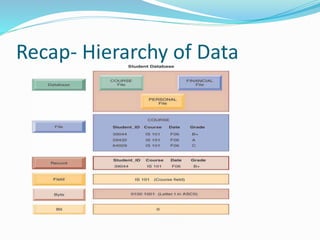
Recap- Hierarchy of Data
The database Approach
Traditional approach to data management
 An approach whereby separate data files are created and
stored for each application program.
Database approach to data management
 An approach whereby a pool of related data is shared by
multiple application programs
Traditional Approach
Problems with Traditional approach
 The resulting problems are
 Data redundancy and inconsistency,
 Program-data dependence,
 Inflexibility,
 Poor data security, and
 Inability to share data among applications.
Problems with Traditional approach
 Data redundancy is the presence of duplicate data in
multiple data files so that the same data are stored in
more than one place or location.
 Occurs when different groups in an organization
independently collect the same piece of data and store it
independently of each other
 wastes storage resources and also leads to data
inconsistency
Problems with Traditional approach
 Data Inconsistency: The same attribute may have
different values
 E.g. Change in Student ID, Change in Date etc
 E.g 2 Different coding system (like cloth retailers and
others
Problems with Traditional approach
 Program-Data Dependence
 Changes in programs require changes to the data.
 One program might be modified from a five-digit to a nine-digit zip
code. If the original data file were changed from five-digit to nine-digit
zip codes, then other programs that required the five-digit zip code
would no longer work properly
 Lack of Flexibility
 can deliver routine scheduled reports, but it cannot deliver ad hoc
reports or respond to unanticipated information requirements in a
timely fashion
 Poor Security
 Management may have no way of knowing who is accessing or even
making changes to the organization’s data.
 Lack of Data Sharing and Availability
 Information cannot flow freely across different functional areas or
different parts of the organization.
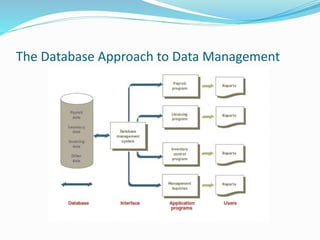
The Database Approach to Data Management
Database management system
 A DBMS is software that permits an organization to
centralize data, manage them efficiently, and provide
access to the stored data by application programs.
 End user doesn’t need where and how the data are
actually stored.
 This is done by separating the logical and physical views
of the data.
 The logical view presents data as they would be
perceived by end users or business specialists,
 whereas the physical view shows how data are actually
organized and structured on physical storage media.
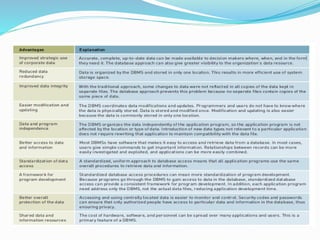
Advantages
Disadvantages
Data Modeling
 Is one of the tools database designers use to show the
logical relationships among data
 A data model is a diagram of entities and their
relationships.
 Data modeling usually involves understanding a
specific business problem and analyzing the data and
information needed to deliver a solution.
 Enterprise data modeling is data modeling done at
the level of the entire enterprise.
 E.g. Entity-relationship (ER) diagrams
The Relational Database Model
 The most popular type of DBMS today
 There are other models too (flat files, hierarchical, and
network models)
 Data represented as two-dimensional tables
 Examples of Relational models are
 Oracle (current market leader)
 IBM DB2 (second market leader)
 Microsoft SQL Server (third market leader)
 Sybase,
 Microsoft Access, and
 MySQL.
Relational DB terms
 Projecting
 Manipulating data to eliminate columns in a table.
 Joining
 Manipulating data to combine two or more tables.
 Linking
 Data manipulation that combines two or more tables
using common data attributes to form a new table with
only the unique data attributes.
Non relational databases
 For over 30 years, relational database technology has been the
gold standard
 Relational DBMS and data warehouse products are not well-
suited for organizing and analyzing big data or data that do not
easily fit into columns and rows used in their data models.
 Non-relational database management systems use a more
flexible data model and are designed for managing large data
sets across many distributed machines
 Companies are turning to “NoSQL” non-relational database
services for
 Cloud computing,
 unprecedented data volumes,
 massive workloads for Web
 Oracle NoSQL Database is an example
Data Cleanup
Name Phone Gender Dues paid Date paid
Rahel K 07111213 Female 250 Nakfa 15 October
Nahom
H/mariam
07122332 Male 300 nalfa 15 October
Nahom
H/mariam
07603476 Male 300 nakfa 25 october
• The process of looking for and fixing inconsistencies to ensure that data is
accurate and complete.
• Consider below the database of sport’s gym
Finding the Anomalies
 Nahom paid his dues twice in October, hence the data
is redundant
 Notice that the data in the database is also
inconsistent: Nahom has changed his phone number,
but only one of the records reflects this change
• Reducing this database’s reliability is the lack of a
primary key to uniquely identify Nahom H/mariam’s
record. The first Nahom could Nahom Hailemariam ,
but the second might be Nahom Habtemariam
• These problems and irregularities in data are called
anomalies.
Overview of database files- Flat File
 Simple database program whose records have no
relationship to one another.
 do not use any of the database models
 Many spreadsheet and word processing programs have
flat file capabilities.
 Microsoft OneNote is designed to let people put ideas,
thoughts, and notes into a computer file.
One note
Single User
 A database installed on a personal computer
 E.g. Microsoft Office Access and FileMaker Pro
 InfoPath has built-in forms that can be used to enter
expense information, timesheet data, and a variety of
other information.
Multiple Users
 Small, midsize, and large businesses need multiuser
DBMSs to share information throughout the
organization over a network.
 These more powerful, expensive systems allow dozens
or hundreds of people to access the same database
system at the same time
Providing a User View
 DBMS is responsible for access to a database
 One of the first steps in installing and using a large
database involves telling the DBMS the logical and
physical structure of the data and relationships among
the data in the database for each user.
 This description is called a schema (as in schematic
diagram).
cont
 A schema can be part of the database or a separate
schema file.
 Schemas are entered into the DBMS via a data
definition language (DDL) which is a collection of
instructions and commands used to define and
describe data and relationships in a specific database.
cont
 Another important step in creating a database is to
establish a data dictionary, a detailed description of all
data used in the database. The data dictionary contains the
following data
 Name of the data item
 Aliases or other names that may be used to describe the item
 Range of values that can be used
 Type of data (such as alphanumeric or numeric)
 Amount of storage needed for the item
 Notation of the person responsible for updating it and the
various users who can access it
 List of reports that use the data item
Storing and Retrieving Data
 One function of a DBMS is to be an interface between an
application program and the database.
 When an application program needs data, it requests the
data through the DBMS.
 Two or more people or programs attempting to access the
same record in the same database at the same time can
cause a problem
 Concurrency control can be used to avoid this potential
problem.
 One approach is to lock out all other application programs
from access to a record if the record is being updated or used
by another program.
Manipulating Data and Generating Reports
 Some databases use Query-by-Example (QBE), which
is a visual approach to developing database queries or
requests.
cont
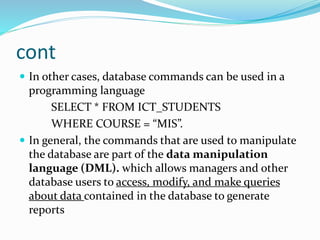
 In other cases, database commands can be used in a
programming language
SELECT * FROM ICT_STUDENTS
WHERE COURSE = “MIS”.
 In general, the commands that are used to manipulate
the database are part of the data manipulation
language (DML). which allows managers and other
database users to access, modify, and make queries
about data contained in the database to generate
reports
Database Administration
 A DBA is expected to have a clear understanding of the
fundamental business of the organization,
 Be proficient in the use of selected database
management systems and
 Stay abreast of emerging technologies and new design
approaches.
cont
 The role of the DBA is to plan, design, create, operate,
secure, monitor, and maintain databases.
 Typically, a DBA has a degree in computer science or
management information systems and some on-the-
job training with a particular database product
 The DBA also works with programmers as they build
applications
Popular Database Management Systems
 The popular DB2 relational database from IBM and
The Sybase IQ database are available on the Linux
operating system.
 A new form of database system is emerging that some
refer to as Database as a Service (DaaS) and others as
Database 2.0
 Popular companies like Google and Microsft are moving
in the DaaS direction.
Special-Purpose Database Systems
 Israeli Holocaust Database (www.yadvashem.org)
 contains information on about three million people in 14
languages
 iTunes
 store music and video catalog is a special-purpose
database system.
 Morphbank (www.morphbank.net)
 allows scientists from around the world to upload and
share biological and microscopic photographs and
descriptions that support research in many areas.
Selecting a Database Management System
 Database size: The number of records in the database
 Database cost: The purchase or lease costs of the database
 Concurrent users: The number of people who need to use
the database at the same time (the number of concurrent
users)
 Performance: How fast the database is able to update
records
 Integration: The ability to be integrated with other
applications and databases
 Vendor: The reputation and financial stability of the
database vendor
Using Databases with Other Software
 Front-end application is one that directly interacts with
people or users.
 Marketing researchers often use a database as a front
end to a statistical analysis program.
 Back-end application interacts with other programs or
applications; it only indirectly interacts with people or
users.
Linking the Company Database to the Internet
 Developing a seamless integration of traditional databases
with the Internet is often called a semantic Web.
 Good side: convenient for individual users, and increases
effectiveness and efficiency for businesses and organizations.
E,g eBay, amazon.com, Apple’s itunes
 Bad side: half a million database servers were vulnerable to
attack
 Google is rolling out a DBMS that will provide patients and
physicians with one storage location for all medical
records, accessed through a Web browser
 Google plans to encrypt the data and ask authentication
 But can reduce the number of paper forms and clerical errors
Linking the Company Database to the Internet
Users access an organization’s internal database through the Web using their desktop
PCs and Web browser software.
Data Warehouses, Data Marts, and Data Mining
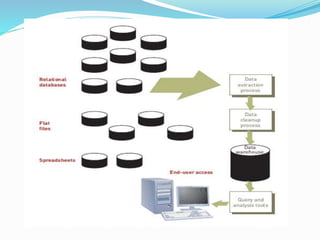
 A data warehouse is a database that holds business
information from many sources in the enterprise,
covering all aspects of the company’s processes,
products, and customers
 A data warehouse stores historical data that has been
extracted from operational systems and external data
sources
 This data is “cleaned up” to remove inconsistencies
and integrated to create a new information database
that is more suitable for business analysis.
Online Transaction Processing VS Data Warehousing
THE CHALLENGE OF BIG DATA
 Big data doesn’t refer to any specific quantity, but
usually refers to data in the petabyte and exabyte range
 A single jet engine is capable of generating 10 terabytes
of data in just 30 minutes there are more than 25,000
airline flights each day.
 Even though “tweets” are limited to 140 characters each,
Twitter generates over 8 terabytes of data daily
Data Marts
 A subset of a data warehouse.
 Used to small and medium-sized businesses and to
departments within larger companies.
 Instead of storing all enterprise data in one huge
database, data marts contain a subset of the data for a
single aspect of a company’s business
Data Mining
 Data mining is an information-analysis tool that
involves the automated discovery of patterns and
relationships in a data warehouse.
 The University of Maryland- “forecast terrorist behavior
based on past actions”
 Extensively in marketing to improve
 customer retention;
 Pricing analysis; and customer segmentation analysis
 E-commerce presents another major opportunity for
effective use of data mining.
cont
 Predictive analysis is a form of data mining that
combines historical data with assumptions about
future conditions to predict outcomes of events
 My space, Facebook and others mines the data of all of
its members to determine which ads should be displayed
for each member to attract the maximum attention and
hits.
 Police Departments uses predictive analysis to predict
“when and where crimes were likely to occur, so officers
can be on hand to prevent their occurrence
Business Intelligence
 Closely linked to the concept of data mining
 Involves gathering enough of the right information in
a timely manner and usable form and analyzing it so
that it can have a positive effect on business strategy,
tactics, or operations.
 Business intelligence turns data into useful
information that is then distributed throughout an
enterprise.
cont
 Competitive intelligence is one aspect of business
intelligence limited to information about competitors
and the ways that knowledge affects strategy, tactics,
and operations.
 Competitive intelligence is not spying. Information
should be collected by examining published
information sources, conducting interviews, and using
other legal, ethical methods
 Counterintelligence: The steps an organization takes
to protect information sought by “hostile” intelligence
gatherers. E.g trade secrets
Thanks!
Any Question?

Mis chapter 7 database systems

  • 1.
  • 2.
    Introduction  We arenavigating across the technological dimension of MIS  Previously we have seen Hardware and Software technologies in relation to MIS  Since you are studying Database courses in detail, this lecture will focus less in the technical details
  • 3.
    Introduction  The informationsystems we have been discussing in previous chapters are all databases  DSS  MIS  ESS  A well-designed and well-managed database is an extremely valuable tool in supporting decision making.
  • 4.
  • 5.
    The database Approach Traditionalapproach to data management  An approach whereby separate data files are created and stored for each application program. Database approach to data management  An approach whereby a pool of related data is shared by multiple application programs
  • 6.
  • 7.
    Problems with Traditionalapproach  The resulting problems are  Data redundancy and inconsistency,  Program-data dependence,  Inflexibility,  Poor data security, and  Inability to share data among applications.
  • 8.
    Problems with Traditionalapproach  Data redundancy is the presence of duplicate data in multiple data files so that the same data are stored in more than one place or location.  Occurs when different groups in an organization independently collect the same piece of data and store it independently of each other  wastes storage resources and also leads to data inconsistency
  • 9.
    Problems with Traditionalapproach  Data Inconsistency: The same attribute may have different values  E.g. Change in Student ID, Change in Date etc  E.g 2 Different coding system (like cloth retailers and others
  • 10.
    Problems with Traditionalapproach  Program-Data Dependence  Changes in programs require changes to the data.  One program might be modified from a five-digit to a nine-digit zip code. If the original data file were changed from five-digit to nine-digit zip codes, then other programs that required the five-digit zip code would no longer work properly  Lack of Flexibility  can deliver routine scheduled reports, but it cannot deliver ad hoc reports or respond to unanticipated information requirements in a timely fashion  Poor Security  Management may have no way of knowing who is accessing or even making changes to the organization’s data.  Lack of Data Sharing and Availability  Information cannot flow freely across different functional areas or different parts of the organization.
  • 11.
    The Database Approachto Data Management
  • 12.
    Database management system A DBMS is software that permits an organization to centralize data, manage them efficiently, and provide access to the stored data by application programs.  End user doesn’t need where and how the data are actually stored.  This is done by separating the logical and physical views of the data.  The logical view presents data as they would be perceived by end users or business specialists,  whereas the physical view shows how data are actually organized and structured on physical storage media.
  • 14.
  • 15.
  • 16.
    Data Modeling  Isone of the tools database designers use to show the logical relationships among data  A data model is a diagram of entities and their relationships.  Data modeling usually involves understanding a specific business problem and analyzing the data and information needed to deliver a solution.  Enterprise data modeling is data modeling done at the level of the entire enterprise.  E.g. Entity-relationship (ER) diagrams
  • 17.
    The Relational DatabaseModel  The most popular type of DBMS today  There are other models too (flat files, hierarchical, and network models)  Data represented as two-dimensional tables  Examples of Relational models are  Oracle (current market leader)  IBM DB2 (second market leader)  Microsoft SQL Server (third market leader)  Sybase,  Microsoft Access, and  MySQL.
  • 18.
    Relational DB terms Projecting  Manipulating data to eliminate columns in a table.  Joining  Manipulating data to combine two or more tables.  Linking  Data manipulation that combines two or more tables using common data attributes to form a new table with only the unique data attributes.
  • 19.
    Non relational databases For over 30 years, relational database technology has been the gold standard  Relational DBMS and data warehouse products are not well- suited for organizing and analyzing big data or data that do not easily fit into columns and rows used in their data models.  Non-relational database management systems use a more flexible data model and are designed for managing large data sets across many distributed machines  Companies are turning to “NoSQL” non-relational database services for  Cloud computing,  unprecedented data volumes,  massive workloads for Web  Oracle NoSQL Database is an example
  • 20.
    Data Cleanup Name PhoneGender Dues paid Date paid Rahel K 07111213 Female 250 Nakfa 15 October Nahom H/mariam 07122332 Male 300 nalfa 15 October Nahom H/mariam 07603476 Male 300 nakfa 25 october • The process of looking for and fixing inconsistencies to ensure that data is accurate and complete. • Consider below the database of sport’s gym
  • 21.
    Finding the Anomalies Nahom paid his dues twice in October, hence the data is redundant  Notice that the data in the database is also inconsistent: Nahom has changed his phone number, but only one of the records reflects this change • Reducing this database’s reliability is the lack of a primary key to uniquely identify Nahom H/mariam’s record. The first Nahom could Nahom Hailemariam , but the second might be Nahom Habtemariam • These problems and irregularities in data are called anomalies.
  • 22.
    Overview of databasefiles- Flat File  Simple database program whose records have no relationship to one another.  do not use any of the database models  Many spreadsheet and word processing programs have flat file capabilities.  Microsoft OneNote is designed to let people put ideas, thoughts, and notes into a computer file.
  • 23.
  • 24.
    Single User  Adatabase installed on a personal computer  E.g. Microsoft Office Access and FileMaker Pro  InfoPath has built-in forms that can be used to enter expense information, timesheet data, and a variety of other information.
  • 25.
    Multiple Users  Small,midsize, and large businesses need multiuser DBMSs to share information throughout the organization over a network.  These more powerful, expensive systems allow dozens or hundreds of people to access the same database system at the same time
  • 26.
    Providing a UserView  DBMS is responsible for access to a database  One of the first steps in installing and using a large database involves telling the DBMS the logical and physical structure of the data and relationships among the data in the database for each user.  This description is called a schema (as in schematic diagram).
  • 27.
    cont  A schemacan be part of the database or a separate schema file.  Schemas are entered into the DBMS via a data definition language (DDL) which is a collection of instructions and commands used to define and describe data and relationships in a specific database.
  • 28.
    cont  Another importantstep in creating a database is to establish a data dictionary, a detailed description of all data used in the database. The data dictionary contains the following data  Name of the data item  Aliases or other names that may be used to describe the item  Range of values that can be used  Type of data (such as alphanumeric or numeric)  Amount of storage needed for the item  Notation of the person responsible for updating it and the various users who can access it  List of reports that use the data item
  • 29.
    Storing and RetrievingData  One function of a DBMS is to be an interface between an application program and the database.  When an application program needs data, it requests the data through the DBMS.  Two or more people or programs attempting to access the same record in the same database at the same time can cause a problem  Concurrency control can be used to avoid this potential problem.  One approach is to lock out all other application programs from access to a record if the record is being updated or used by another program.
  • 30.
    Manipulating Data andGenerating Reports  Some databases use Query-by-Example (QBE), which is a visual approach to developing database queries or requests.
  • 31.
    cont  In othercases, database commands can be used in a programming language SELECT * FROM ICT_STUDENTS WHERE COURSE = “MIS”.  In general, the commands that are used to manipulate the database are part of the data manipulation language (DML). which allows managers and other database users to access, modify, and make queries about data contained in the database to generate reports
  • 32.
    Database Administration  ADBA is expected to have a clear understanding of the fundamental business of the organization,  Be proficient in the use of selected database management systems and  Stay abreast of emerging technologies and new design approaches.
  • 33.
    cont  The roleof the DBA is to plan, design, create, operate, secure, monitor, and maintain databases.  Typically, a DBA has a degree in computer science or management information systems and some on-the- job training with a particular database product  The DBA also works with programmers as they build applications
  • 34.
    Popular Database ManagementSystems  The popular DB2 relational database from IBM and The Sybase IQ database are available on the Linux operating system.  A new form of database system is emerging that some refer to as Database as a Service (DaaS) and others as Database 2.0  Popular companies like Google and Microsft are moving in the DaaS direction.
  • 35.
    Special-Purpose Database Systems Israeli Holocaust Database (www.yadvashem.org)  contains information on about three million people in 14 languages  iTunes  store music and video catalog is a special-purpose database system.  Morphbank (www.morphbank.net)  allows scientists from around the world to upload and share biological and microscopic photographs and descriptions that support research in many areas.
  • 36.
    Selecting a DatabaseManagement System  Database size: The number of records in the database  Database cost: The purchase or lease costs of the database  Concurrent users: The number of people who need to use the database at the same time (the number of concurrent users)  Performance: How fast the database is able to update records  Integration: The ability to be integrated with other applications and databases  Vendor: The reputation and financial stability of the database vendor
  • 37.
    Using Databases withOther Software  Front-end application is one that directly interacts with people or users.  Marketing researchers often use a database as a front end to a statistical analysis program.  Back-end application interacts with other programs or applications; it only indirectly interacts with people or users.
  • 38.
    Linking the CompanyDatabase to the Internet  Developing a seamless integration of traditional databases with the Internet is often called a semantic Web.  Good side: convenient for individual users, and increases effectiveness and efficiency for businesses and organizations. E,g eBay, amazon.com, Apple’s itunes  Bad side: half a million database servers were vulnerable to attack  Google is rolling out a DBMS that will provide patients and physicians with one storage location for all medical records, accessed through a Web browser  Google plans to encrypt the data and ask authentication  But can reduce the number of paper forms and clerical errors
  • 39.
    Linking the CompanyDatabase to the Internet Users access an organization’s internal database through the Web using their desktop PCs and Web browser software.
  • 40.
    Data Warehouses, DataMarts, and Data Mining  A data warehouse is a database that holds business information from many sources in the enterprise, covering all aspects of the company’s processes, products, and customers  A data warehouse stores historical data that has been extracted from operational systems and external data sources  This data is “cleaned up” to remove inconsistencies and integrated to create a new information database that is more suitable for business analysis.
  • 42.
    Online Transaction ProcessingVS Data Warehousing
  • 43.
    THE CHALLENGE OFBIG DATA  Big data doesn’t refer to any specific quantity, but usually refers to data in the petabyte and exabyte range  A single jet engine is capable of generating 10 terabytes of data in just 30 minutes there are more than 25,000 airline flights each day.  Even though “tweets” are limited to 140 characters each, Twitter generates over 8 terabytes of data daily
  • 44.
    Data Marts  Asubset of a data warehouse.  Used to small and medium-sized businesses and to departments within larger companies.  Instead of storing all enterprise data in one huge database, data marts contain a subset of the data for a single aspect of a company’s business
  • 45.
    Data Mining  Datamining is an information-analysis tool that involves the automated discovery of patterns and relationships in a data warehouse.  The University of Maryland- “forecast terrorist behavior based on past actions”  Extensively in marketing to improve  customer retention;  Pricing analysis; and customer segmentation analysis  E-commerce presents another major opportunity for effective use of data mining.
  • 46.
    cont  Predictive analysisis a form of data mining that combines historical data with assumptions about future conditions to predict outcomes of events  My space, Facebook and others mines the data of all of its members to determine which ads should be displayed for each member to attract the maximum attention and hits.  Police Departments uses predictive analysis to predict “when and where crimes were likely to occur, so officers can be on hand to prevent their occurrence
  • 47.
    Business Intelligence  Closelylinked to the concept of data mining  Involves gathering enough of the right information in a timely manner and usable form and analyzing it so that it can have a positive effect on business strategy, tactics, or operations.  Business intelligence turns data into useful information that is then distributed throughout an enterprise.
  • 48.
    cont  Competitive intelligenceis one aspect of business intelligence limited to information about competitors and the ways that knowledge affects strategy, tactics, and operations.  Competitive intelligence is not spying. Information should be collected by examining published information sources, conducting interviews, and using other legal, ethical methods  Counterintelligence: The steps an organization takes to protect information sought by “hostile” intelligence gatherers. E.g trade secrets
  • 49.