L E C T U R E 4
O C T O B E R , 2 0 1 8
IT in Business - I
Microprocessor
Microprocessors
 A microprocessor is a tiny electronic chip found inside a computer's central processing unit and
other electronic devices. Its basic function is to take input, process it and then provide
appropriate output.
 A microprocessor is a CPU on a single chip.
 The microprocessor contains all, or most of, the central processing unit (CPU) functions and is
the "engine" that goes into motion when you turn your computer on.
 A microprocessor is designed to perform arithmetic and logic operations operations include
adding, subtracting, comparing two numbers, and fetching numbers from one area to another.
Single Core
The single-core has only one processor mounted in a chip that is connected
to the motherboard.
• In a single-core or traditional processor the CPU is fed strings of instructions
it must order, execute, then selectively store in its cache for quick retrieval.
• When data outside the cache is required, it is retrieved through the system
bus from random access memory (RAM) or from storage devices.
• Accessing these slows down performance to the maximum speed the bus,
RAM or storage device will allow, which is far slower than the speed of the
CPU.
Dual Core
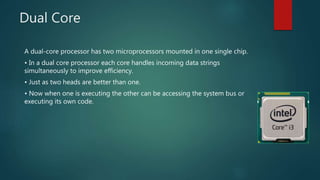
A dual-core processor has two microprocessors mounted in one single chip.
• In a dual core processor each core handles incoming data strings
simultaneously to improve efficiency.
• Just as two heads are better than one.
• Now when one is executing the other can be accessing the system bus or
executing its own code.
Benefits of Dual Core
Dual-core processors can be highly appreciated in heavy gaming or in
intensive data transfers using a single computer.
• For example, when you are downloading huge files and you are just using a
single-core, you would surely experience lagging of the data transfer.
However, dual-cores would not give you such scenario since the task is
divided.
• This makes your time to be used more wisely. It's like falling in line in a store
where there are two cashiers. You would surely pay your goods faster having
two cashiers than just having one.
Difference Between Dual Core & Core
2 Duo
Core2duo started before dual core.
• Core2duo is under the core2 brand, dual core is under the Pentium brand.
• Core2duo limits processor speed to 3.3 GHz, dual core limits it to 2.5 GHz.
• Core2duo offers cache size of up to 6MB L2 cache with scope for L3 cache
as well, dual core limits it to around 2 MB.
• Both are based on the core micro architecture.
• Core2duo comes for higher prices, and is simply better than dual core.
Difference Between Dual Core &
Multiprocessor
In dual core, resources are shared and the cores reside on the same chip.
• In multi-processor system, there are two separate CPUs with their own
resources.
• A multi-processor system is faster than a system with a dual core processor.
• while a dual core system is faster than a single-core system, all else being
equal.
Quad Core
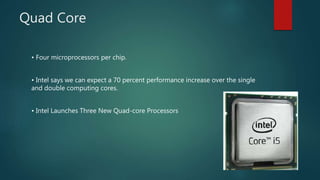
• Four microprocessors per chip.
• Intel says we can expect a 70 percent performance increase over the single
and double computing cores.
• Intel Launches Three New Quad-core Processors
Motherboard
The Motherboard
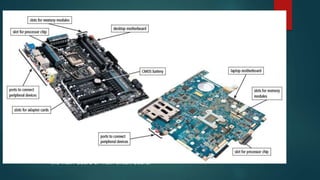
 A motherboard is one of the most essential parts of a computer system. It holds
together many of the crucial components of a computer, including the central
processing unit (CPU), memory and connectors for input and output devices.
 The most important part of a PC is the motherboard. It holds:
 the processor chip
 memory chips
 chips that handle input/output (I/O)
 the expansion slots for connecting peripherals
 Some chips are soldered onto the motherboard(permanent), and some are
removable (so they can be upgraded).
11
A computer motherboard may also be called
the main-board or main circuit board.
Purpose of Motherboard
 A motherboard provides the connection between all other computer parts.
 Processors are attached directly to the motherboard, and the RAM, peripherals and
storage devices are attached as well.
 Motherboards themselves, however, perform no computation and do not store
information
Thank you!

Microprocessor

  • 1.
    L E CT U R E 4 O C T O B E R , 2 0 1 8 IT in Business - I
  • 2.
  • 3.
    Microprocessors  A microprocessoris a tiny electronic chip found inside a computer's central processing unit and other electronic devices. Its basic function is to take input, process it and then provide appropriate output.  A microprocessor is a CPU on a single chip.  The microprocessor contains all, or most of, the central processing unit (CPU) functions and is the "engine" that goes into motion when you turn your computer on.  A microprocessor is designed to perform arithmetic and logic operations operations include adding, subtracting, comparing two numbers, and fetching numbers from one area to another.
  • 4.
    Single Core The single-corehas only one processor mounted in a chip that is connected to the motherboard. • In a single-core or traditional processor the CPU is fed strings of instructions it must order, execute, then selectively store in its cache for quick retrieval. • When data outside the cache is required, it is retrieved through the system bus from random access memory (RAM) or from storage devices. • Accessing these slows down performance to the maximum speed the bus, RAM or storage device will allow, which is far slower than the speed of the CPU.
  • 5.
    Dual Core A dual-coreprocessor has two microprocessors mounted in one single chip. • In a dual core processor each core handles incoming data strings simultaneously to improve efficiency. • Just as two heads are better than one. • Now when one is executing the other can be accessing the system bus or executing its own code.
  • 6.
    Benefits of DualCore Dual-core processors can be highly appreciated in heavy gaming or in intensive data transfers using a single computer. • For example, when you are downloading huge files and you are just using a single-core, you would surely experience lagging of the data transfer. However, dual-cores would not give you such scenario since the task is divided. • This makes your time to be used more wisely. It's like falling in line in a store where there are two cashiers. You would surely pay your goods faster having two cashiers than just having one.
  • 7.
    Difference Between DualCore & Core 2 Duo Core2duo started before dual core. • Core2duo is under the core2 brand, dual core is under the Pentium brand. • Core2duo limits processor speed to 3.3 GHz, dual core limits it to 2.5 GHz. • Core2duo offers cache size of up to 6MB L2 cache with scope for L3 cache as well, dual core limits it to around 2 MB. • Both are based on the core micro architecture. • Core2duo comes for higher prices, and is simply better than dual core.
  • 8.
    Difference Between DualCore & Multiprocessor In dual core, resources are shared and the cores reside on the same chip. • In multi-processor system, there are two separate CPUs with their own resources. • A multi-processor system is faster than a system with a dual core processor. • while a dual core system is faster than a single-core system, all else being equal.
  • 9.
    Quad Core • Fourmicroprocessors per chip. • Intel says we can expect a 70 percent performance increase over the single and double computing cores. • Intel Launches Three New Quad-core Processors
  • 10.
  • 11.
    The Motherboard  Amotherboard is one of the most essential parts of a computer system. It holds together many of the crucial components of a computer, including the central processing unit (CPU), memory and connectors for input and output devices.  The most important part of a PC is the motherboard. It holds:  the processor chip  memory chips  chips that handle input/output (I/O)  the expansion slots for connecting peripherals  Some chips are soldered onto the motherboard(permanent), and some are removable (so they can be upgraded). 11
  • 12.
    A computer motherboardmay also be called the main-board or main circuit board.
  • 13.
    Purpose of Motherboard A motherboard provides the connection between all other computer parts.  Processors are attached directly to the motherboard, and the RAM, peripherals and storage devices are attached as well.  Motherboards themselves, however, perform no computation and do not store information
  • 14.