Database Management
Systems
Introduction
Introduction
Database
A database is a collection of related data.
By data, we mean known facts that can be recorded and have implicit
meaning.
This definition is quite general. The common use of the term
database is usually more restricted.
Implicit Properties of Databases
■ A database represents some aspect of the real world, sometimes
called the miniworld or the universe of discourse (UoD). Changes to
the miniworld are reflected in the database.
■ A database is a logically coherent collection of data with some
inherent meaning. A random assortment of data cannot correctly be
referred to as a database.
■ A database is designed, built, and populated with data for a specific
purpose. It has an intended group of users and some preconceived
applications in which these users are interested.
More on Database
-A database has some source from which data is derived, some degree
of interaction with events in the real world and an audience that is
actively interested in its contents.
-A database can be of any size and complexity (e.g. Address book &
Library records)
-A database may be generated and maintained manually or it may be
computerized.
Database Management System
DBMS is a collection of programs that enables users to create and
maintain a database.
The DBMS is a general-purpose software system that facilitates the
processes of defining, constructing, manipulating, and sharing
databases among various users and applications.
Database Management System
-Defining a database involves specifying the data types, structures,
and constraints of the data to be stored in the database. The
database definition or descriptive information is also stored by the
DBMS in the form of a database catalog or dictionary; it is called
meta-data.
- Constructing the database is the process of storing the data on
some storage medium that is controlled by the DBMS
Database Management System
- Manipulating a database includes functions such as querying the
database to retrieve specific data, updating the database to reflect
changes in the miniworld and generating reports from the data
- Sharing a database allows multiple
users and programs to access the database simultaneously.
Database Management Systems
An application program accesses the database by sending queries or
requests for data to the DBMS.
A query typically causes some data to be retrieved; a
transaction may cause some data to be read and some data to be
written into the database.
Database Management Systems
Other important functions provided by the DBMS include protecting
the database
and maintaining it over a long period of time.
Protection includes system protection
against hardware or software malfunction (or crashes) and security
protection against unauthorized or malicious access.
Database Management Systems
A typical large database may have a life cycle of many years, so the
DBMS must be able to maintain the database system by allowing the
system to evolve as requirements change over time.
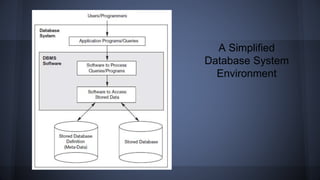
We will call the database and DBMS software together a database
system.
A Simplified
Database System
Environment
An Example
Let us consider a simple example that most readers may be familiar
with: a UNIVERSITY database for maintaining information concerning
students, courses, and grades in a university environment:
• STUDENT
• COURSE
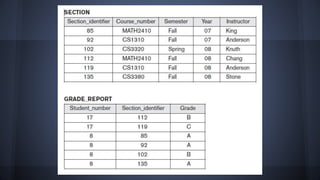
• SECTION
• GRADE_REPORT
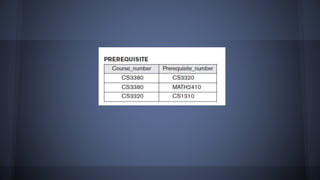
• PREREQUISITE
To define this database:
1. We must specify the structure of the records of each file by
specifying the different types of data elements to be stored in
each record.
2. We must also specify a data type for each data element within a
record.
To construct the database:
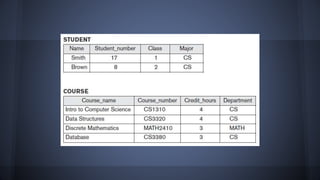
We store data to represent each student, course, section, grade
report and prerequisite as a record in the appropriate file.
Database manipulation involves querying and updating. Examples of
queries are as follows:
■ Retrieve the transcript—a list of all courses and grades—of ‘Smith’
■ List the names of students who took the section of the ‘Database’
course
offered in fall 2008 and their grades in that section
■ List the prerequisites of the ‘Database’ course
Examples of updates include the following:
■ Change the class of ‘Smith’ to sophomore
■ Create a new section for the ‘Database’ course for this semester
■ Enter a grade of ‘A’ for ‘Smith’ in the ‘Database’ section of last
semester
Requirements Specification and Analysis
-the phase wherein the design of new application for an existing
database or design of a brand new database starts off.
These requirements are documented in detail and transformed into a
conceptual design that can be represented and manipulated using
some computerized tools so that it can be easily maintained, modified,
and transformed into a database implementation.
The design is then translated to a logical design that can be expressed
in a data model implemented in a commercial DBMS.
Characteristics of the Database Approach
The main characteristics of the database approach versus the file-
processing approach:
1. Self-describing nature of a database system
2. Insulation between programs and data, and data abstraction
3. Support of multiple views of data
4. Sharing of data and multiuser transaction processing
Actors on the Scene
1. Database Administrator (DBA)
2. Database Designers
3. End Users
4. System Analysts and Application Programmers
Workers behind the Scene
1. DBMS system designers and implementers
2. Tool developers
3. Operators and Maintenance personnel
Advantages of Using the DBMS Approach
1. Controlling redundancy
2. Restricting unauthorized access
3. Providing persistent storage for program objects
4. Providing storage structures and search techniques for effecient
query processing
5. Providing backup and recovery
6. Providing multiple user interfaces
7. Presenting complext relationships among data
8. Enforcing integrity constraints
9. Permitting inferencing and actions using rules
Additional Implications
1. Potential for enforcing standards
2. Reduced application development time
3. Flexibility
4. Availability of up-to-date information
5. Economies of Scale
Database System Concepts
and Architecture
Evolution of Database Systems
Monolithic Systems vs. Client/Server Systems
Two types of modules of Client/Server DBMS Architecture:
Client Module – typically designed so that it will run on a
user workstation or personal computer.
Server Module – typically handles data storage, access,
search and other functions.
Data Abstraction
One fundamental characteristic of the database approach
is that it provides some level of data abstraction
Data Abstraction – generally refers to the suppression of
details of data organization and storage, and the
highlighting of the essential features for an improved
understanding of data.
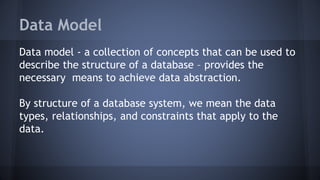
Data Model
Data model - a collection of concepts that can be used to
describe the structure of a database – provides the
necessary means to achieve data abstraction.
By structure of a database system, we mean the data
types, relationships, and constraints that apply to the
data.
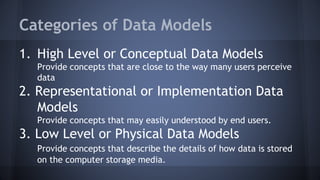
Categories of Data Models
1. High Level or Conceptual Data Models
Provide concepts that are close to the way many users perceive
data
2. Representational or Implementation Data
Models
Provide concepts that may easily understood by end users.
3. Low Level or Physical Data Models
Provide concepts that describe the details of how data is stored
on the computer storage media.
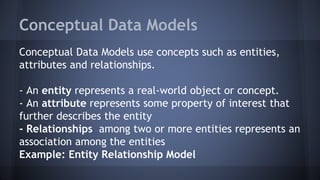
Conceptual Data Models
Conceptual Data Models use concepts such as entities,
attributes and relationships.
- An entity represents a real-world object or concept.
- An attribute represents some property of interest that
further describes the entity
- Relationships among two or more entities represents an
association among the entities
Example: Entity Relationship Model
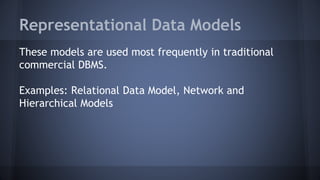
Representational Data Models
These models are used most frequently in traditional
commercial DBMS.
Examples: Relational Data Model, Network and
Hierarchical Models
Physical Data Models
Physical Data Models describe how data is stored as files
in the computer by representing information such as
record formats, record orderings and access paths.
An access path is a structure that makes the search for a
particular database records efficient.
An index is an example of an access path that allows
direct access to data using a keyword.
Database System Environment
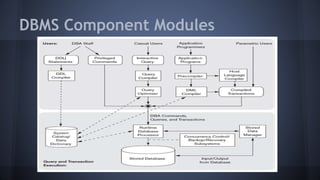
DBMS Component Modules
Database System Utilities
Database System Utilities help DBA manage the database
system
Common utilities have the following types of functions:
1. Loading
2. Backup
3. Database Storage Reorganization
4. Performance Monitoring
Loading
A loading utility is used to load existing data files
– such as text files or sequential files – into the
database.
Conversion Tools – products that generate the
appropriate loading programs given the existing
source and target database storage descriptions.
Backup
A backup utility creates a backup copy of the
database, usually by dumping the entire
database onto storage medium.
The backup copy can be used to restore the
database in case of catastrophic disk failure.
Database Storage Reorganization
This utility can be used to reorganize a set of
database files into different file organizations,
and create new access paths to improve
performance.
Perfomance Monitoring
Such a utility monitors database usage and
provices statistics to the DBA.
The DBA uses the statistics in making decisions
such as whether or not to reorganize files or
whether to add or drop indexes to improve
performance.
Tools, Application Environments and
Communication Facilities
-Data Dictionary
-Information Repository
-Application Development Environments
-Communications Software
Centralized and Client/Server
Architectures for DBMSs
Centralized Architecture
DBMS Architecture in which all the DBMS
functionality, application program execution,
and user interface processing were carried out
on one machine.
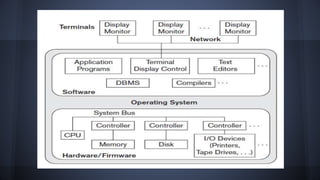
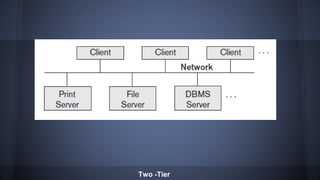
Basic Client/Server Architecture
The client/server architecture was developed
to deal with computing environments in which
a large number of PC’s, workstations, file
servers, printers, database servers, Web
servers, e-mail servers and other software and
equipment are connected via network.
Concept of Client/Server Framework
A client in this framework is typically a user
machine that provides user interface capabilities
and local processing.
A server is a system containing both hardware
and software that can provide services to the
client machines, such as file access, printing,
archiving, or database access.
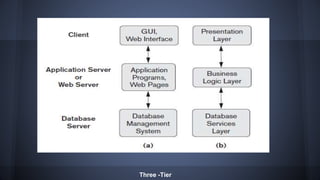
Two Main Types of DBMS Client/Server
Architecture
-Two-tier
-Three-tier
Two -Tier
Three -Tier
Relational Data Model
The relational data model was first introduced by Ted
Codd of IBM Research in 1970 in a classic paper (Codd
1970)
The first commercial implementations of the relational
model become available in the early 1980s such as the
SQL/DS system on the MVS operating system of IBM and
the Oracle DBMS.
Relational Model Concepts
The relational model represents the database as a
collection of relations. Each relation resembles a table of
values or to some extent, a flat file of records.
Each row in the table of values represents a collection of
related data values.
Database management systems

Database management systems

  • 1.
  • 2.
  • 3.
    Database A database isa collection of related data. By data, we mean known facts that can be recorded and have implicit meaning. This definition is quite general. The common use of the term database is usually more restricted.
  • 4.
    Implicit Properties ofDatabases ■ A database represents some aspect of the real world, sometimes called the miniworld or the universe of discourse (UoD). Changes to the miniworld are reflected in the database. ■ A database is a logically coherent collection of data with some inherent meaning. A random assortment of data cannot correctly be referred to as a database. ■ A database is designed, built, and populated with data for a specific purpose. It has an intended group of users and some preconceived applications in which these users are interested.
  • 5.
    More on Database -Adatabase has some source from which data is derived, some degree of interaction with events in the real world and an audience that is actively interested in its contents. -A database can be of any size and complexity (e.g. Address book & Library records) -A database may be generated and maintained manually or it may be computerized.
  • 6.
    Database Management System DBMSis a collection of programs that enables users to create and maintain a database. The DBMS is a general-purpose software system that facilitates the processes of defining, constructing, manipulating, and sharing databases among various users and applications.
  • 7.
    Database Management System -Defininga database involves specifying the data types, structures, and constraints of the data to be stored in the database. The database definition or descriptive information is also stored by the DBMS in the form of a database catalog or dictionary; it is called meta-data. - Constructing the database is the process of storing the data on some storage medium that is controlled by the DBMS
  • 8.
    Database Management System -Manipulating a database includes functions such as querying the database to retrieve specific data, updating the database to reflect changes in the miniworld and generating reports from the data - Sharing a database allows multiple users and programs to access the database simultaneously.
  • 9.
    Database Management Systems Anapplication program accesses the database by sending queries or requests for data to the DBMS. A query typically causes some data to be retrieved; a transaction may cause some data to be read and some data to be written into the database.
  • 10.
    Database Management Systems Otherimportant functions provided by the DBMS include protecting the database and maintaining it over a long period of time. Protection includes system protection against hardware or software malfunction (or crashes) and security protection against unauthorized or malicious access.
  • 11.
    Database Management Systems Atypical large database may have a life cycle of many years, so the DBMS must be able to maintain the database system by allowing the system to evolve as requirements change over time. We will call the database and DBMS software together a database system.
  • 12.
  • 13.
    An Example Let usconsider a simple example that most readers may be familiar with: a UNIVERSITY database for maintaining information concerning students, courses, and grades in a university environment: • STUDENT • COURSE • SECTION • GRADE_REPORT • PREREQUISITE
  • 14.
    To define thisdatabase: 1. We must specify the structure of the records of each file by specifying the different types of data elements to be stored in each record. 2. We must also specify a data type for each data element within a record. To construct the database: We store data to represent each student, course, section, grade report and prerequisite as a record in the appropriate file.
  • 18.
    Database manipulation involvesquerying and updating. Examples of queries are as follows: ■ Retrieve the transcript—a list of all courses and grades—of ‘Smith’ ■ List the names of students who took the section of the ‘Database’ course offered in fall 2008 and their grades in that section ■ List the prerequisites of the ‘Database’ course Examples of updates include the following: ■ Change the class of ‘Smith’ to sophomore ■ Create a new section for the ‘Database’ course for this semester ■ Enter a grade of ‘A’ for ‘Smith’ in the ‘Database’ section of last semester
  • 19.
    Requirements Specification andAnalysis -the phase wherein the design of new application for an existing database or design of a brand new database starts off. These requirements are documented in detail and transformed into a conceptual design that can be represented and manipulated using some computerized tools so that it can be easily maintained, modified, and transformed into a database implementation. The design is then translated to a logical design that can be expressed in a data model implemented in a commercial DBMS.
  • 20.
    Characteristics of theDatabase Approach The main characteristics of the database approach versus the file- processing approach: 1. Self-describing nature of a database system 2. Insulation between programs and data, and data abstraction 3. Support of multiple views of data 4. Sharing of data and multiuser transaction processing
  • 21.
    Actors on theScene 1. Database Administrator (DBA) 2. Database Designers 3. End Users 4. System Analysts and Application Programmers
  • 22.
    Workers behind theScene 1. DBMS system designers and implementers 2. Tool developers 3. Operators and Maintenance personnel
  • 23.
    Advantages of Usingthe DBMS Approach 1. Controlling redundancy 2. Restricting unauthorized access 3. Providing persistent storage for program objects 4. Providing storage structures and search techniques for effecient query processing 5. Providing backup and recovery 6. Providing multiple user interfaces 7. Presenting complext relationships among data 8. Enforcing integrity constraints 9. Permitting inferencing and actions using rules
  • 24.
    Additional Implications 1. Potentialfor enforcing standards 2. Reduced application development time 3. Flexibility 4. Availability of up-to-date information 5. Economies of Scale
  • 25.
  • 26.
    Evolution of DatabaseSystems Monolithic Systems vs. Client/Server Systems Two types of modules of Client/Server DBMS Architecture: Client Module – typically designed so that it will run on a user workstation or personal computer. Server Module – typically handles data storage, access, search and other functions.
  • 27.
    Data Abstraction One fundamentalcharacteristic of the database approach is that it provides some level of data abstraction Data Abstraction – generally refers to the suppression of details of data organization and storage, and the highlighting of the essential features for an improved understanding of data.
  • 28.
    Data Model Data model- a collection of concepts that can be used to describe the structure of a database – provides the necessary means to achieve data abstraction. By structure of a database system, we mean the data types, relationships, and constraints that apply to the data.
  • 29.
    Categories of DataModels 1. High Level or Conceptual Data Models Provide concepts that are close to the way many users perceive data 2. Representational or Implementation Data Models Provide concepts that may easily understood by end users. 3. Low Level or Physical Data Models Provide concepts that describe the details of how data is stored on the computer storage media.
  • 30.
    Conceptual Data Models ConceptualData Models use concepts such as entities, attributes and relationships. - An entity represents a real-world object or concept. - An attribute represents some property of interest that further describes the entity - Relationships among two or more entities represents an association among the entities Example: Entity Relationship Model
  • 31.
    Representational Data Models Thesemodels are used most frequently in traditional commercial DBMS. Examples: Relational Data Model, Network and Hierarchical Models
  • 32.
    Physical Data Models PhysicalData Models describe how data is stored as files in the computer by representing information such as record formats, record orderings and access paths. An access path is a structure that makes the search for a particular database records efficient. An index is an example of an access path that allows direct access to data using a keyword.
  • 33.
  • 34.
  • 35.
    Database System Utilities DatabaseSystem Utilities help DBA manage the database system Common utilities have the following types of functions: 1. Loading 2. Backup 3. Database Storage Reorganization 4. Performance Monitoring
  • 36.
    Loading A loading utilityis used to load existing data files – such as text files or sequential files – into the database. Conversion Tools – products that generate the appropriate loading programs given the existing source and target database storage descriptions.
  • 37.
    Backup A backup utilitycreates a backup copy of the database, usually by dumping the entire database onto storage medium. The backup copy can be used to restore the database in case of catastrophic disk failure.
  • 38.
    Database Storage Reorganization Thisutility can be used to reorganize a set of database files into different file organizations, and create new access paths to improve performance.
  • 39.
    Perfomance Monitoring Such autility monitors database usage and provices statistics to the DBA. The DBA uses the statistics in making decisions such as whether or not to reorganize files or whether to add or drop indexes to improve performance.
  • 40.
    Tools, Application Environmentsand Communication Facilities -Data Dictionary -Information Repository -Application Development Environments -Communications Software
  • 41.
  • 42.
    Centralized Architecture DBMS Architecturein which all the DBMS functionality, application program execution, and user interface processing were carried out on one machine.
  • 44.
    Basic Client/Server Architecture Theclient/server architecture was developed to deal with computing environments in which a large number of PC’s, workstations, file servers, printers, database servers, Web servers, e-mail servers and other software and equipment are connected via network.
  • 45.
    Concept of Client/ServerFramework A client in this framework is typically a user machine that provides user interface capabilities and local processing. A server is a system containing both hardware and software that can provide services to the client machines, such as file access, printing, archiving, or database access.
  • 46.
    Two Main Typesof DBMS Client/Server Architecture -Two-tier -Three-tier
  • 47.
  • 48.
  • 49.
  • 50.
    Relational Data Model Therelational data model was first introduced by Ted Codd of IBM Research in 1970 in a classic paper (Codd 1970) The first commercial implementations of the relational model become available in the early 1980s such as the SQL/DS system on the MVS operating system of IBM and the Oracle DBMS.
  • 51.
    Relational Model Concepts Therelational model represents the database as a collection of relations. Each relation resembles a table of values or to some extent, a flat file of records. Each row in the table of values represents a collection of related data values.

Editor's Notes

  • #35 The figure is divided into two parts: The top part refers to the various users of the database environment and their interfaces. The lower part shows the internals of the DBMS responsible for storage of data and data processing of transactions. The database and the DBMS catalog are usually stored on disk. Access to the disk is controlled primarily by the operating system (OS), which schedules disk read/write. Many DBMSs have their own buffer management module to schedule disk read/write, because this has a considerable effect on performance. Reducing disk read/write improves performance considerably. A higher-level stored data manager module of the DBMS controls access to DBMS information that is stored on disk, whether it is part of the database or the catalog.