L E C T U R E 8
J a n u a r y , 2 0 1 8
IT in Business - I
Data Communication
& Networks
Data Communication
Data Communication
Communication Protocol
Forms of data Transmission
Data Transmission Mode
Types of data Transmission
Transmission Media
Uses of Communication Technologies
Data Communication & Networks
Agenda
Data Communication
 Data communication is a process of transferring data electronically from
one place to another.
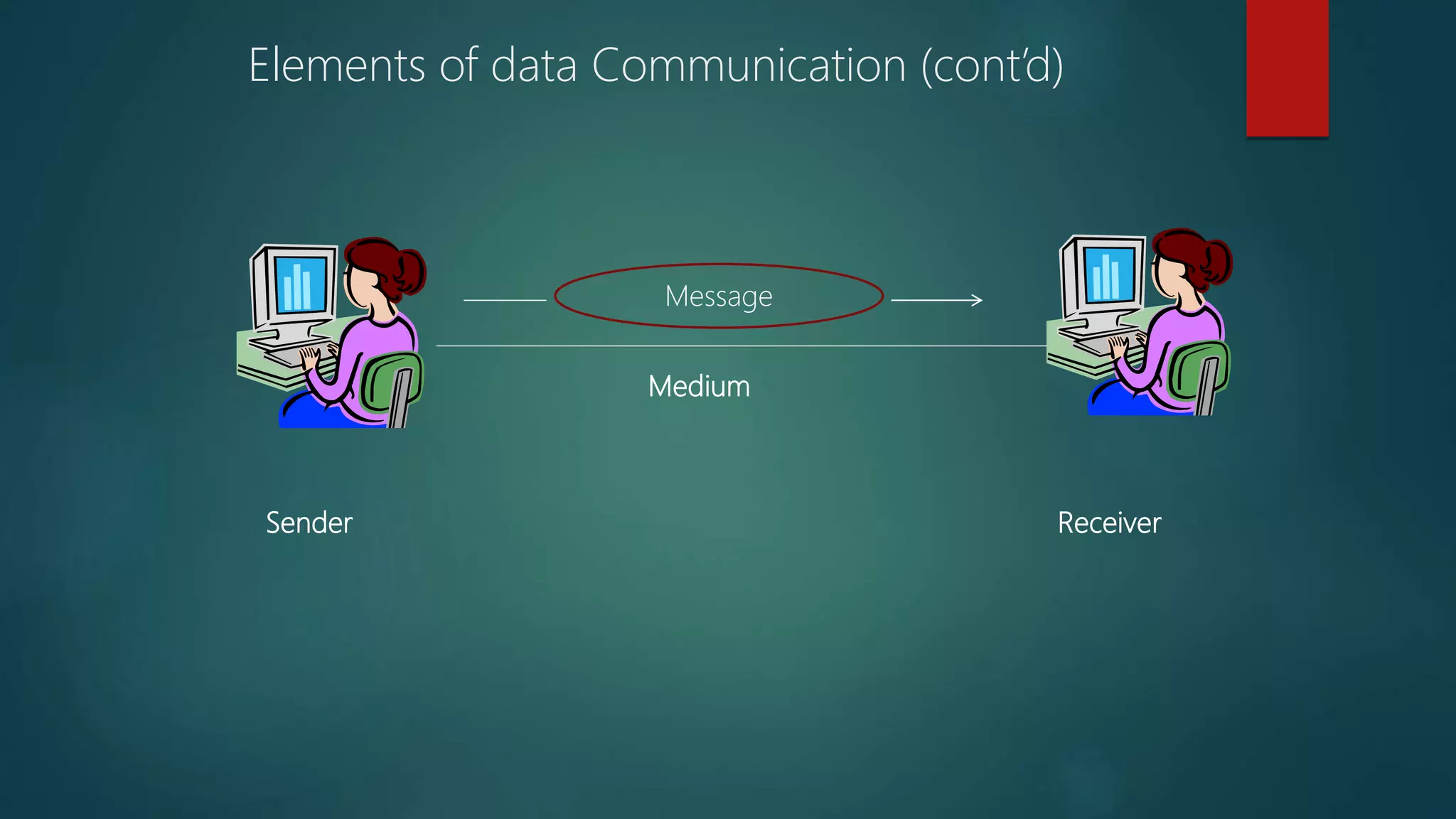
 Basic elements of data communication are
 Sender
 Receiver
 medium
Elements of data Communication (cont’d)
 Sender
 Sender is a device that sends message. The message may be consist of
text, numbers, pictures etc. It is also called source or transmitter.
 Medium
 Medium is the path that connects sender and receiver. It is used to
transmit data. The medium can be a copper wire, a fiber optic cable,
microwave etc
 Receiver
 Receiver is a device that receives message. It is also called Sink. The
receiver can be computer, printer, or another computer related device.
The receiver must be capable of accepting the message.
Sender Receiver
Medium
Message
Elements of data Communication (cont’d)
Communication Protocol
 Protocol:
 The procedure of data transformation in the form of software is
commonly called protocol.
 This protocol is a set of rules for exchanging information among
computer.
 These protocols define:
 How the communication channel is established
 How information is transmitted
 How errors are detected and corrected
Functions of Communication Protocols
 The main functions of communication software protocols are as
follows
Data Sequencing
Data Routing
Data Flow
Error Control
Contd...
 Data Sequencing: The function of a protocol to divide the long message into
smaller packets of fixed size that are to be transmitted for error free data
transmission, is called Data Sequencing.
 Data Routing: The function of a protocol to find the most efficient path or route
between the sender and the receiver before sending the data is called Data
Routing.
 Flow Control: The function of a protocol to control the rate of data transmission
from the sender to the receiver is called Flow Control. It regulates the process
of sending data between fast sender and slow receiver.
 Error Control: The function of a protocol to detect and recover errors for
successful data communication between the sender and the receiver is called
Error Control. Successful data communication means that data is transmitted
without any error.
Forms of Data Transmission
 There are two forms of data transmission
Digital Data Transmission
Analog data Transmission
Digital Data Transmission
 Forms of Data Transmission Digital Data Transmission Digital signal
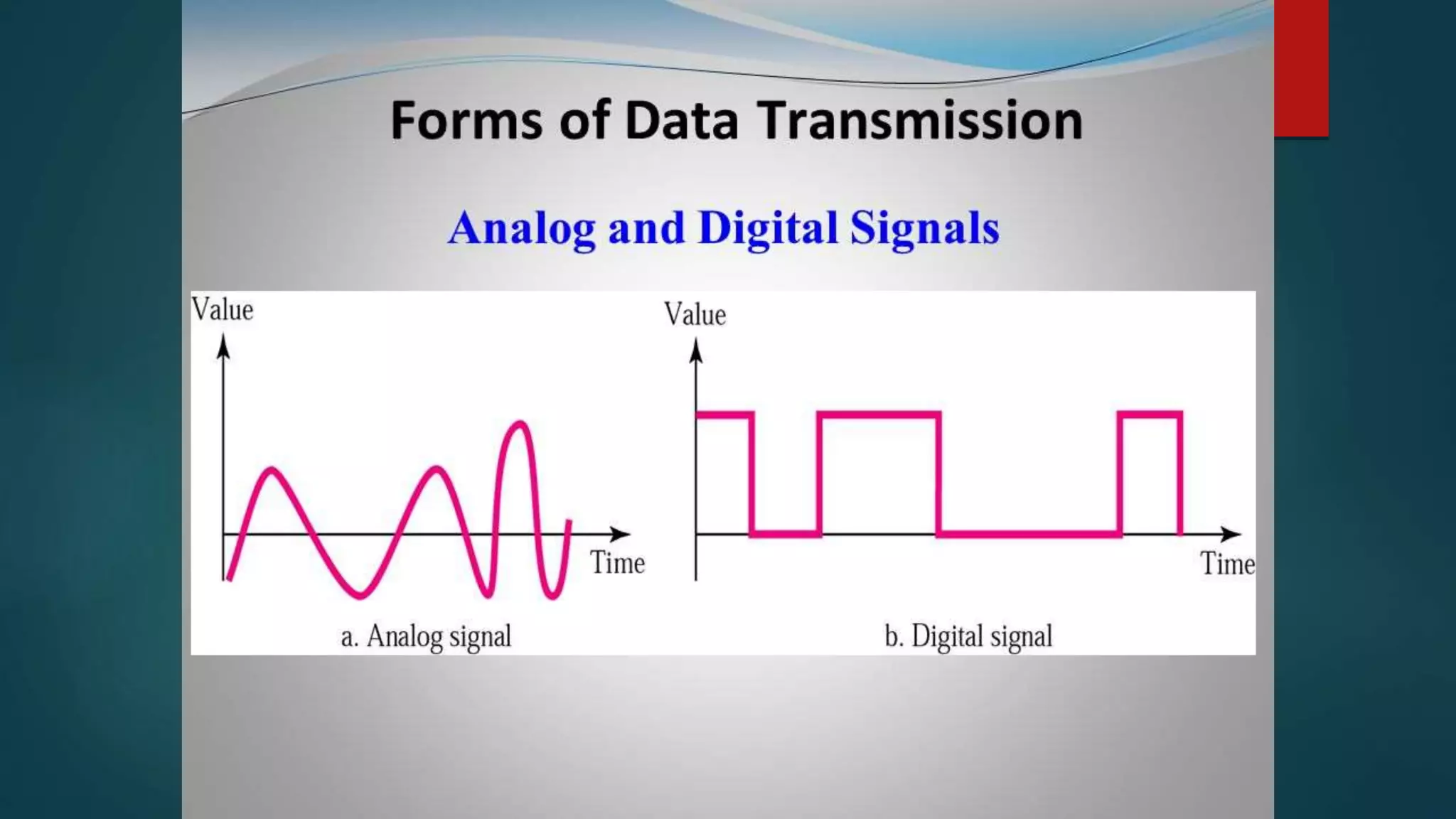
is a sequence of voltage represented in binary forms, these signals
are in the form of electrical pulses of ON and OFF.
 Digital signals are faster and efficient, they provide low error rates,
high transmission speed and high- quality voice transmission.
 All data communication between the computers is in digital form.
 In digital signals high voltage is represented by 1 and low voltage is
represented by 0.
Analog data Transmission
 Analog Data Transmission Analog signal is a continuous electrical signal in
the form of wave, which is known as Carrier wave.
 Telephone line is the most commonly used media for analog transmission
of data. Light, sound, radio and microwave are also examples of analog
signals.
Data Transmission Modes
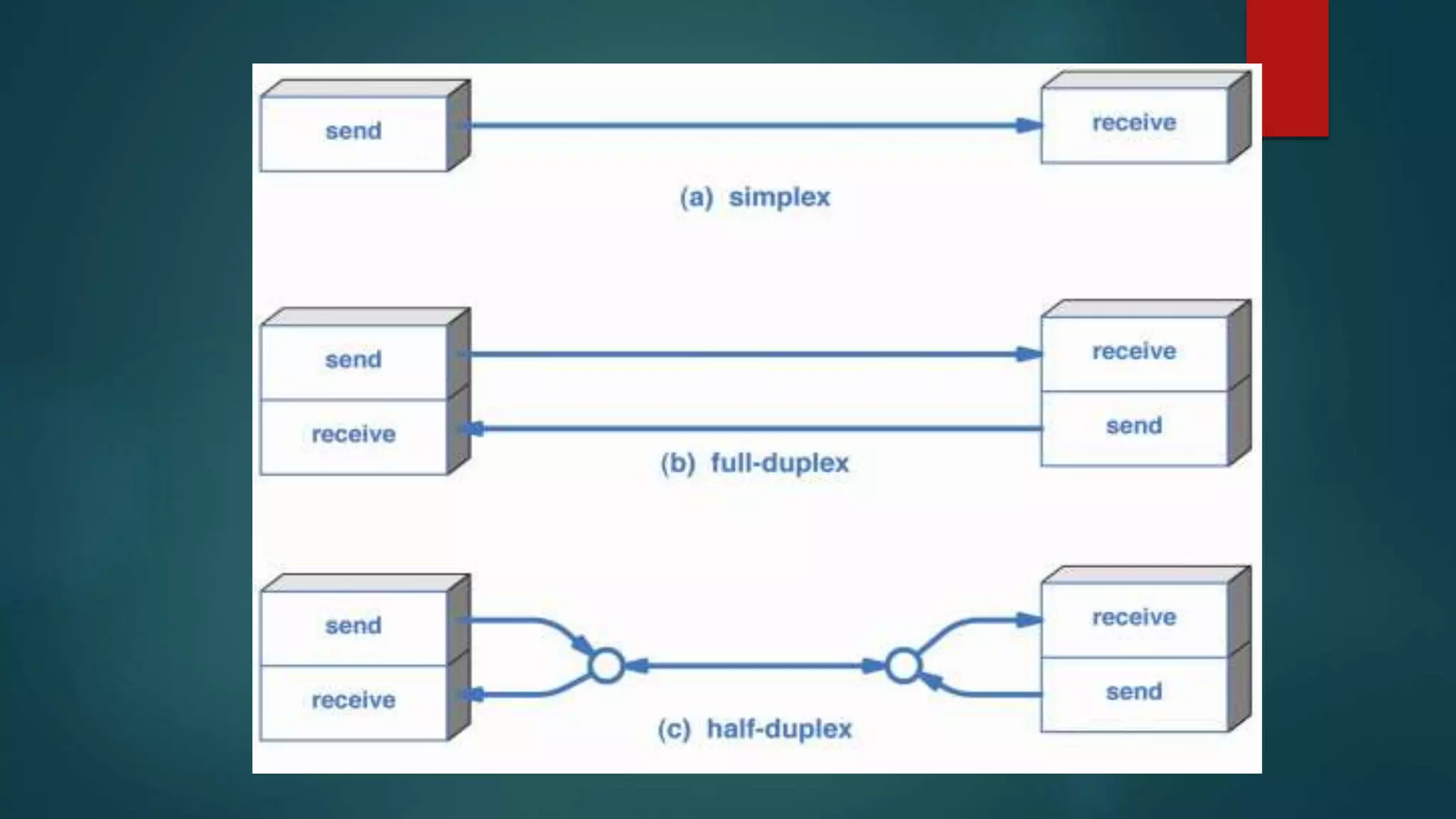
 Transmission mode means transferring of data between two
devices. It is also called communication mode. These modes direct
the direction of flow of information. There are three types
of transmission mode.
 Simplex mode
 Half Duplex mode
 Full Duplex mode
Simplex mode
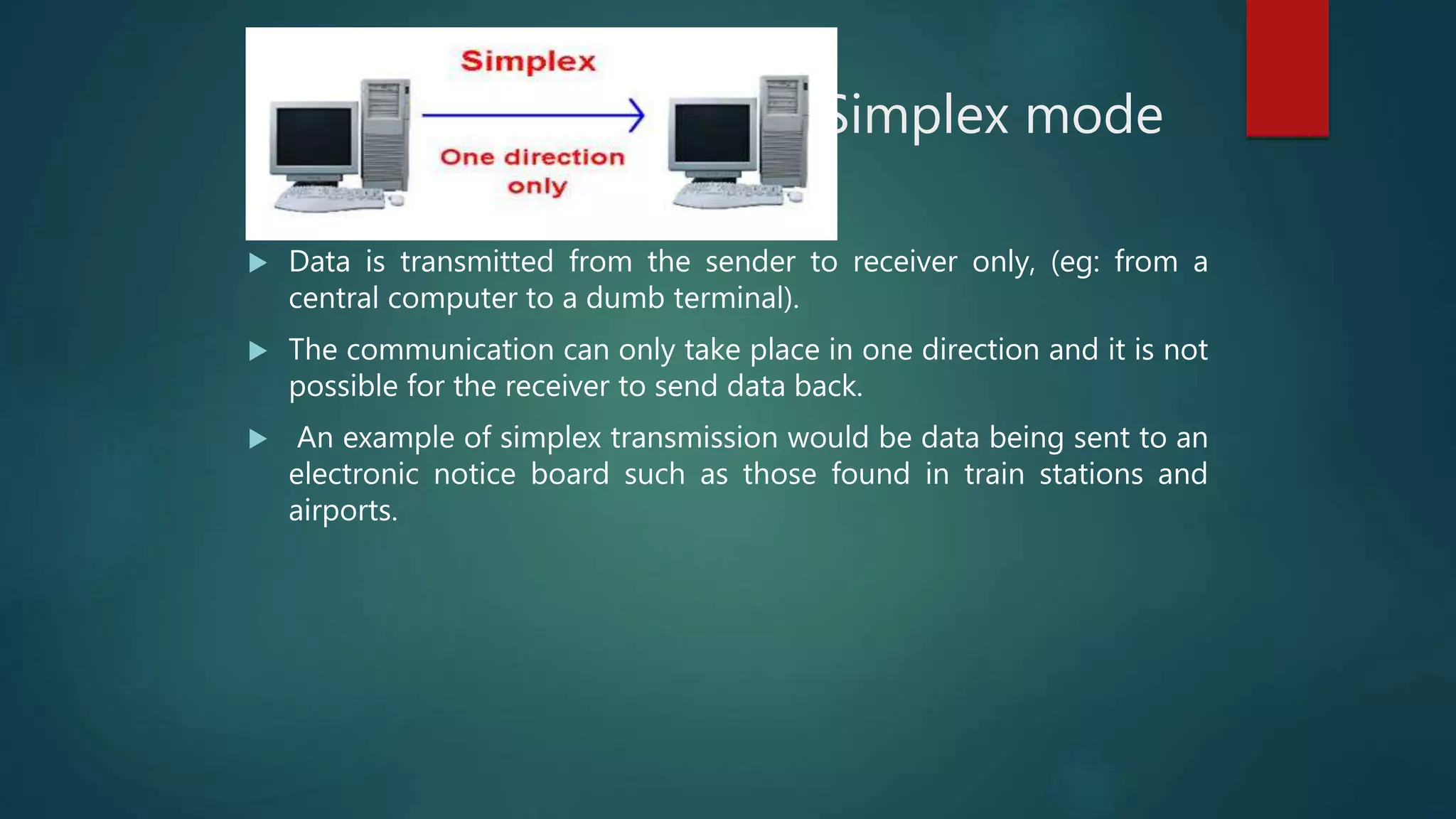
 Data is transmitted from the sender to receiver only, (eg: from a
central computer to a dumb terminal).
 The communication can only take place in one direction and it is not
possible for the receiver to send data back.
 An example of simplex transmission would be data being sent to an
electronic notice board such as those found in train stations and
airports.
Half Duplex mode
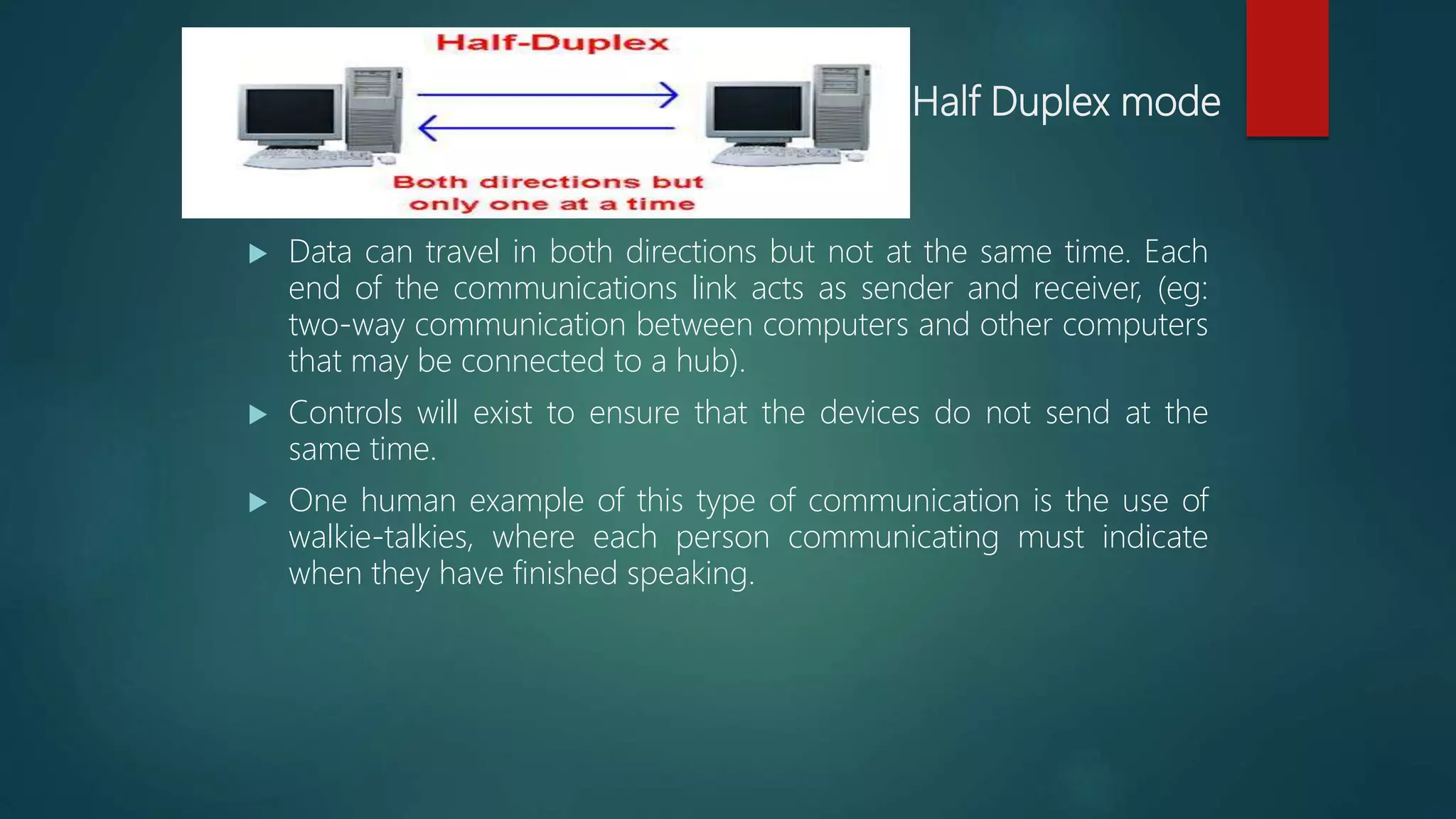
 Data can travel in both directions but not at the same time. Each
end of the communications link acts as sender and receiver, (eg:
two-way communication between computers and other computers
that may be connected to a hub).
 Controls will exist to ensure that the devices do not send at the
same time.
 One human example of this type of communication is the use of
walkie-talkies, where each person communicating must indicate
when they have finished speaking.
Full duplex mode
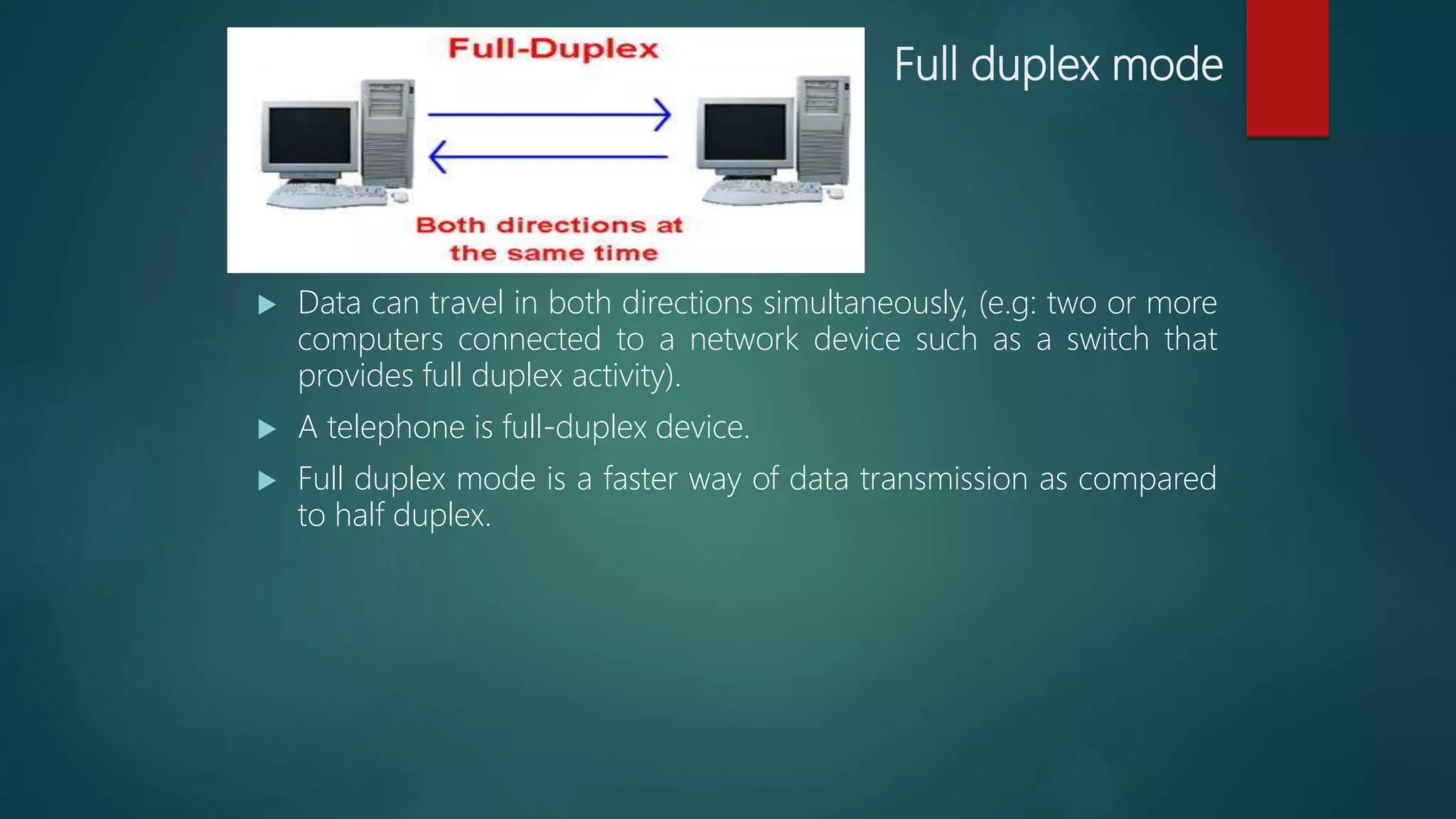
 Data can travel in both directions simultaneously, (e.g: two or more
computers connected to a network device such as a switch that
provides full duplex activity).
 A telephone is full-duplex device.
 Full duplex mode is a faster way of data transmission as compared
to half duplex.
Types of Data Transmission
Asynchronous Transmission
Analogy of Letters by Post
Synchronous Transmission
Analogy of Telephone calls
Asynchronous Transmission
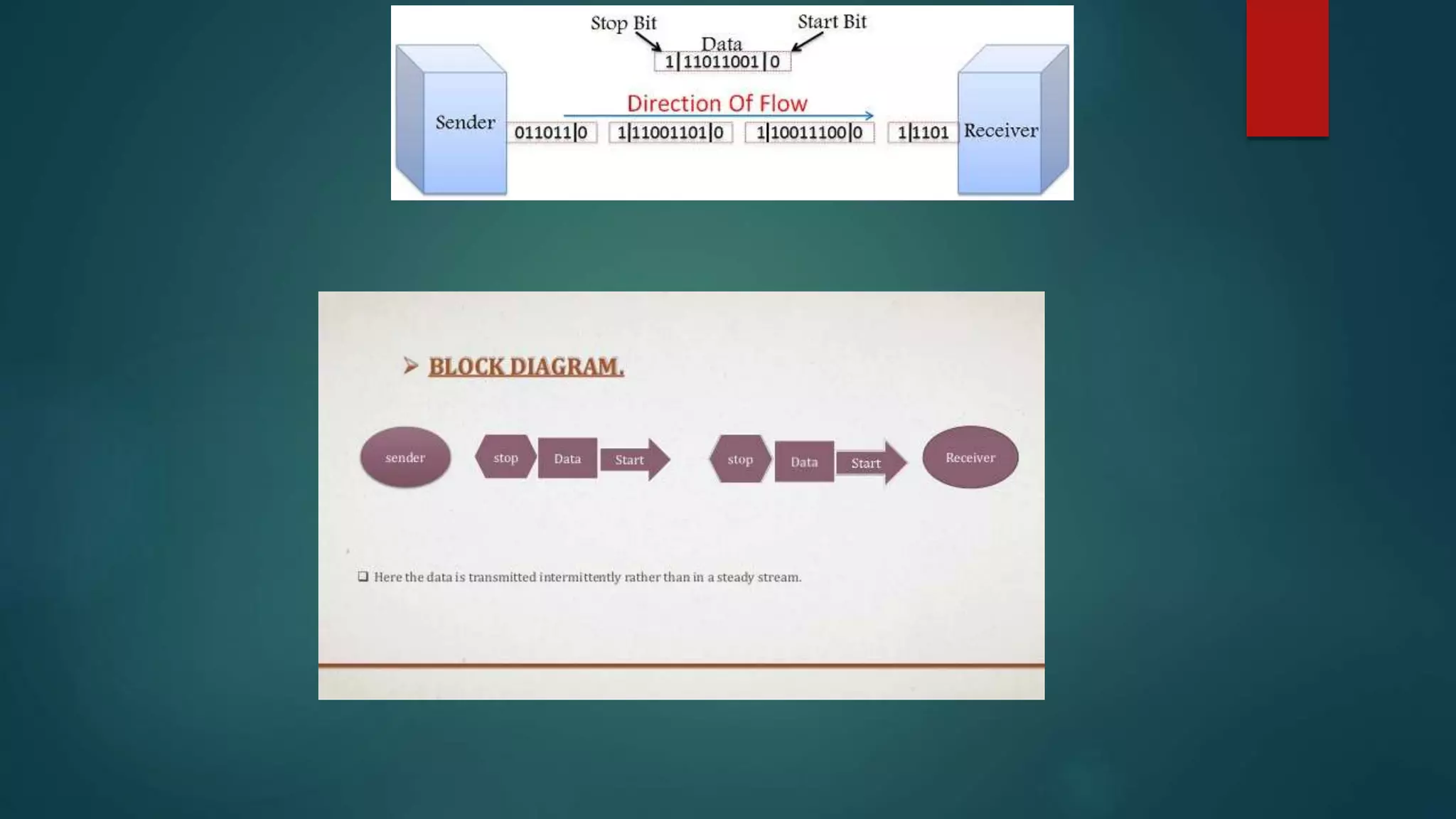
 In asynchronous the transmission of data is generally without the
use of an external clock signal, where data can be transmitted
intermittently rather than in a steady stream.
 Any timing required to recover data from the communication
symbols is encoded within the symbols.
 The most significant aspect of asynchronous communications is
that data is not transmitted at regular intervals, thus making
possible variable bit rate.
 And that the transmitter and receiver clock generators do not have
to be exactly synchronized all the time.
Application
 Asynchronous activities take place outside of real time system.
 As asynchronous does not require a constant bit rate.
 simple, fast, economical not requiring a 2-way communication
 For examples file transfer or email
Drawback
• Overhead of start and stop bits.
• Asynchronous transmission is relatively slow due to
the increased number of bits and gaps.
Synchronous Transmission
 In Synchronous the transmission of data is sent in a continuous
stream at a constant rate.
 Full Duplex with blocks/frames transfer
 Synchronous communication requires that the clocks in the
transmitting and receiving devices are synchronized running at the
same rate.
 so the receiver can sample the signal at the same time intervals used
by the transmitter. No start or stop bits are required.
 For this reason synchronous communication permits more
information to be passed over a circuit per unit time.
 Over time the transmitting and receiving clocks will tend to drift
apart, requiring resynchronization.
 Synchronous communication is direct communication that occurs in
real time.
 That takes place face-to-face, and as technology has evolved, can
take place irrespective of distance
 (ex. telephone conversations, video conferencing and instant
messaging)
Application
 Most common use is in the ASCII terminals for efficient, reliable
transmission.
 High speeds communication links established using synchronous
modems.
Drawback
• The clock frequency should be same at both the
sending and receiving ends.
• No tolerance in clock frequency is allowed.
Transmission Media
 Guided Media
 Unguided Media
 Guided Media (Wired)
Guided media, which are those that provide a conduct from one
device to another, includes
 Twisted pair Cable
 Coaxial Cable
 Fiber Optics
Guided
Media
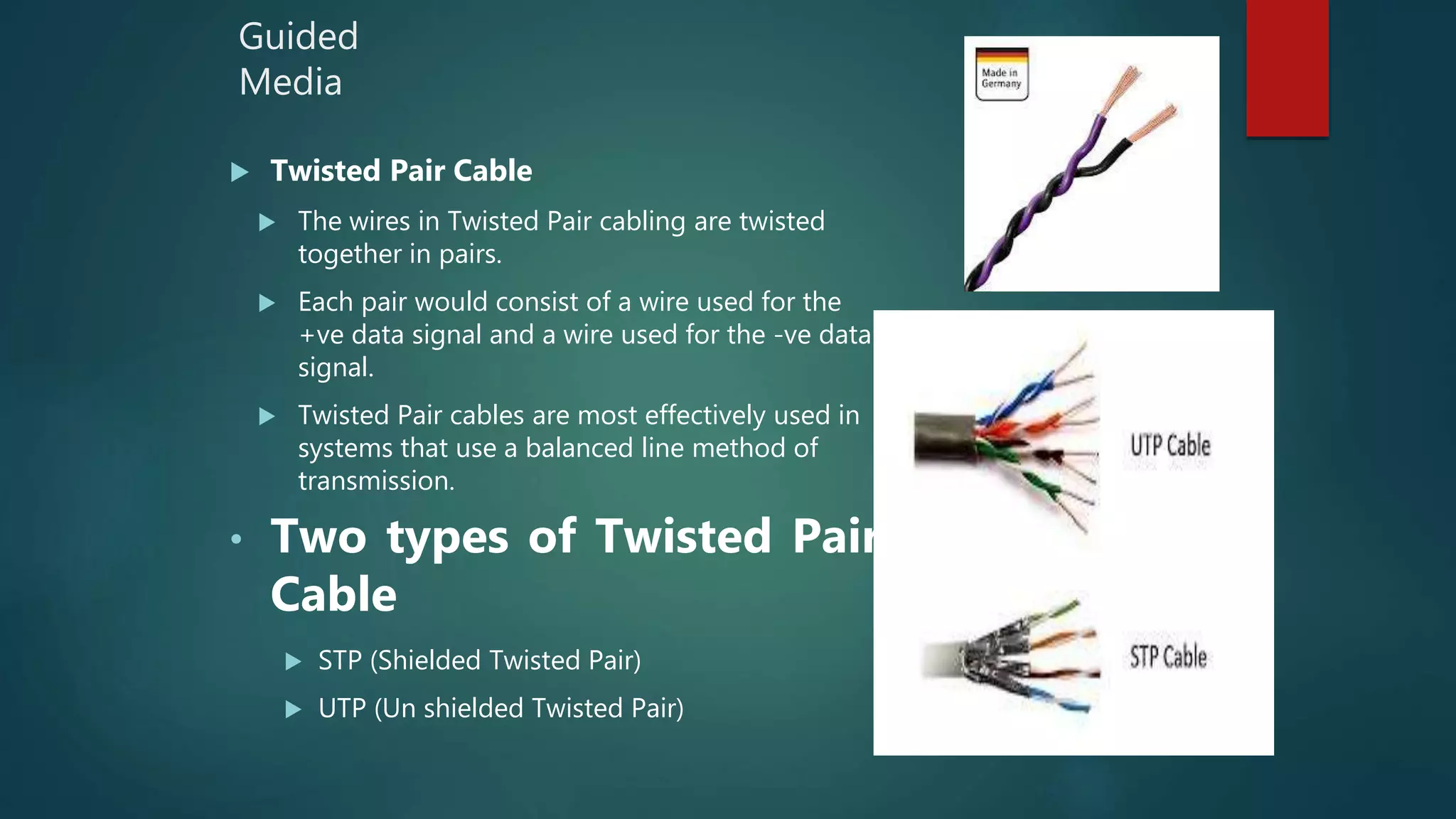
 Twisted Pair Cable
 The wires in Twisted Pair cabling are twisted
together in pairs.
 Each pair would consist of a wire used for the
+ve data signal and a wire used for the -ve data
signal.
 Twisted Pair cables are most effectively used in
systems that use a balanced line method of
transmission.
• Two types of Twisted Pair
Cable
 STP (Shielded Twisted Pair)
 UTP (Un shielded Twisted Pair)
Guided
Media
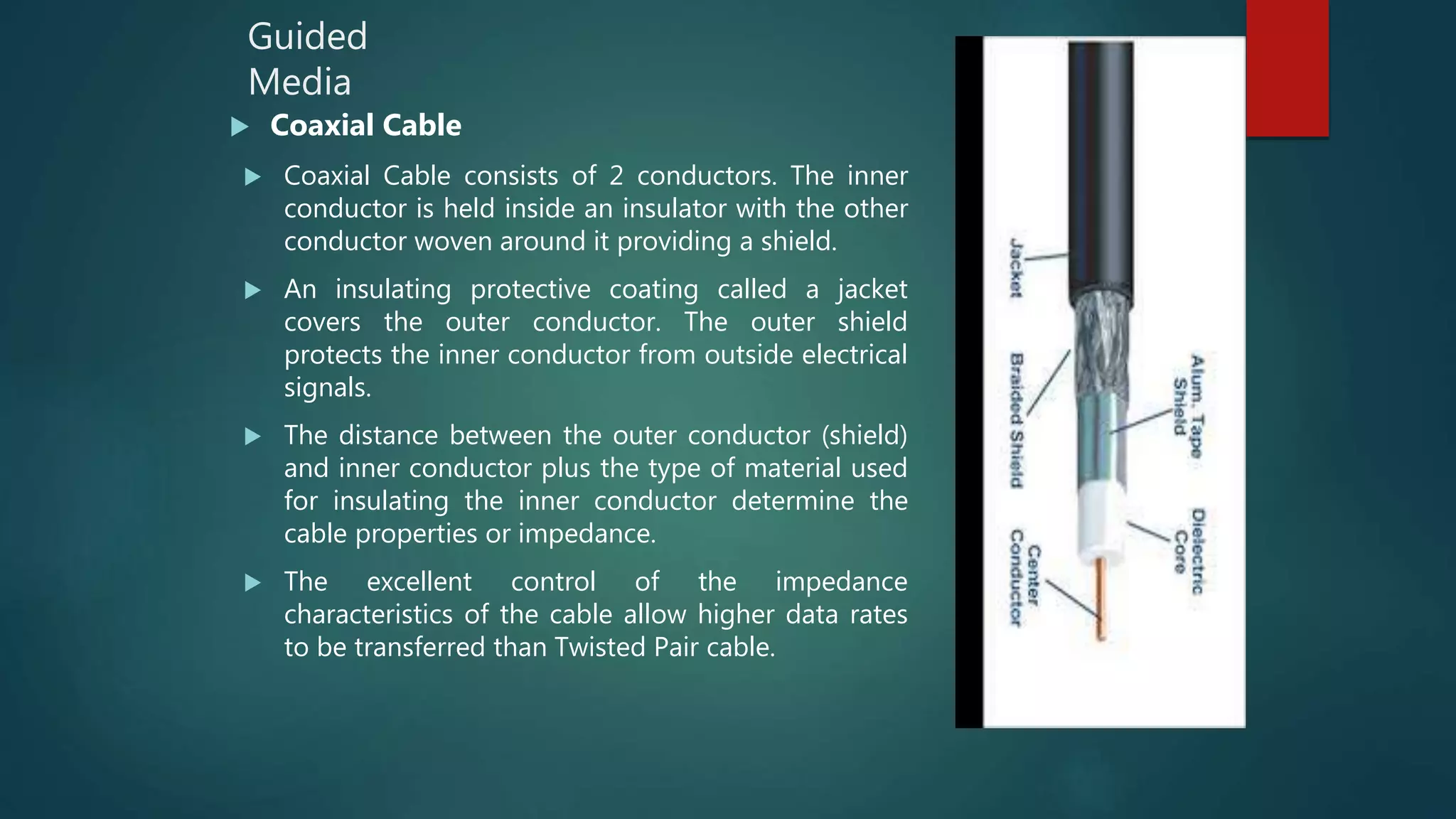
 Coaxial Cable
 Coaxial Cable consists of 2 conductors. The inner
conductor is held inside an insulator with the other
conductor woven around it providing a shield.
 An insulating protective coating called a jacket
covers the outer conductor. The outer shield
protects the inner conductor from outside electrical
signals.
 The distance between the outer conductor (shield)
and inner conductor plus the type of material used
for insulating the inner conductor determine the
cable properties or impedance.
 The excellent control of the impedance
characteristics of the cable allow higher data rates
to be transferred than Twisted Pair cable.
Guided Media
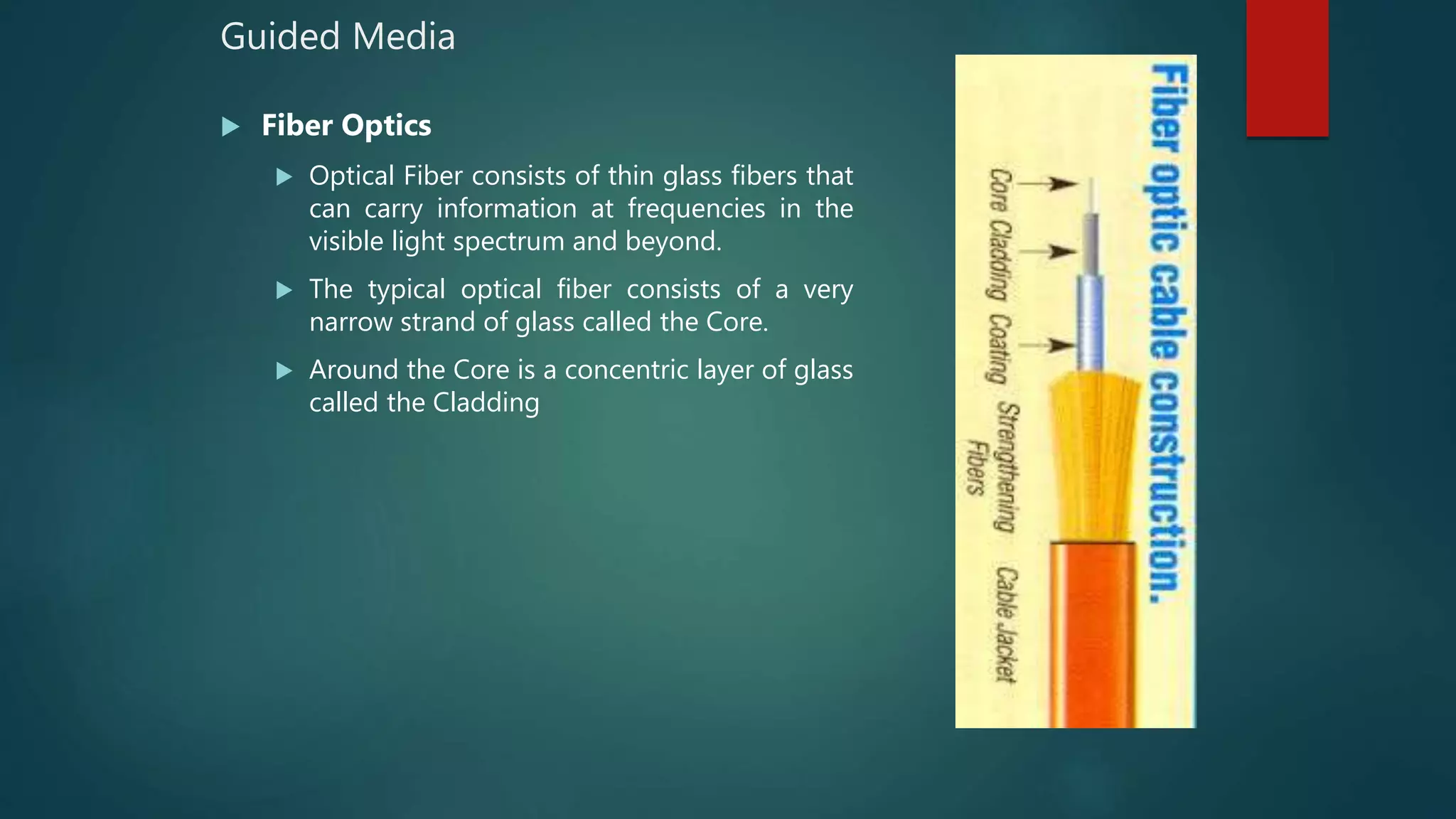
 Fiber Optics
 Optical Fiber consists of thin glass fibers that
can carry information at frequencies in the
visible light spectrum and beyond.
 The typical optical fiber consists of a very
narrow strand of glass called the Core.
 Around the Core is a concentric layer of glass
called the Cladding
Unguided Media
 Unguided media transport electromagnetic waves without using a
physical conductor.
 This type of communication is often referred to as wireless
communication
 Types are
 Radio Wave
 Microwave
 Infrared
Unguided
Media
 Radio Waves:
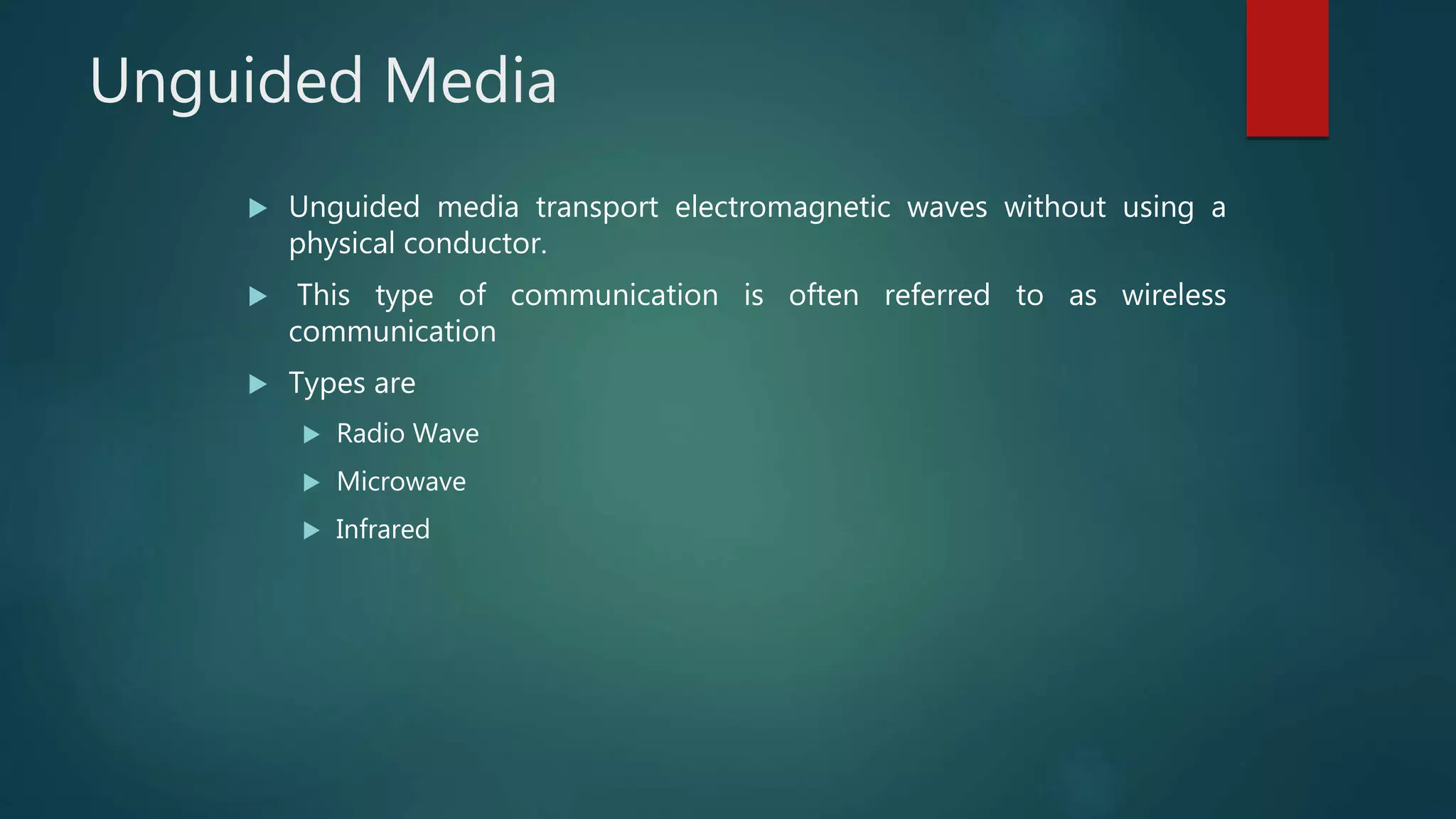
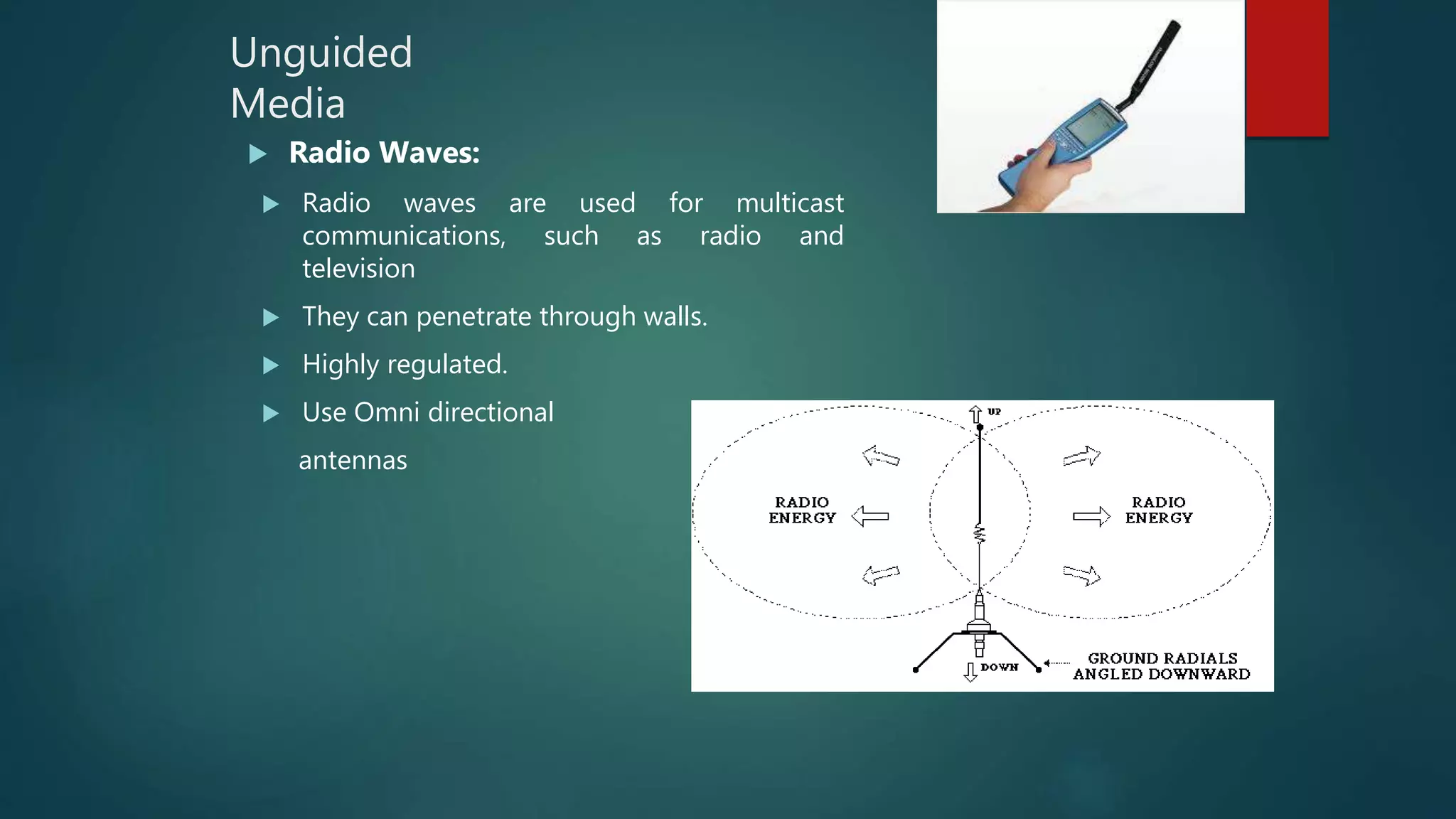
 Radio waves are used for multicast
communications, such as radio and
television
 They can penetrate through walls.
 Highly regulated.
 Use Omni directional
antennas
Unguided
Media
 Microwaves
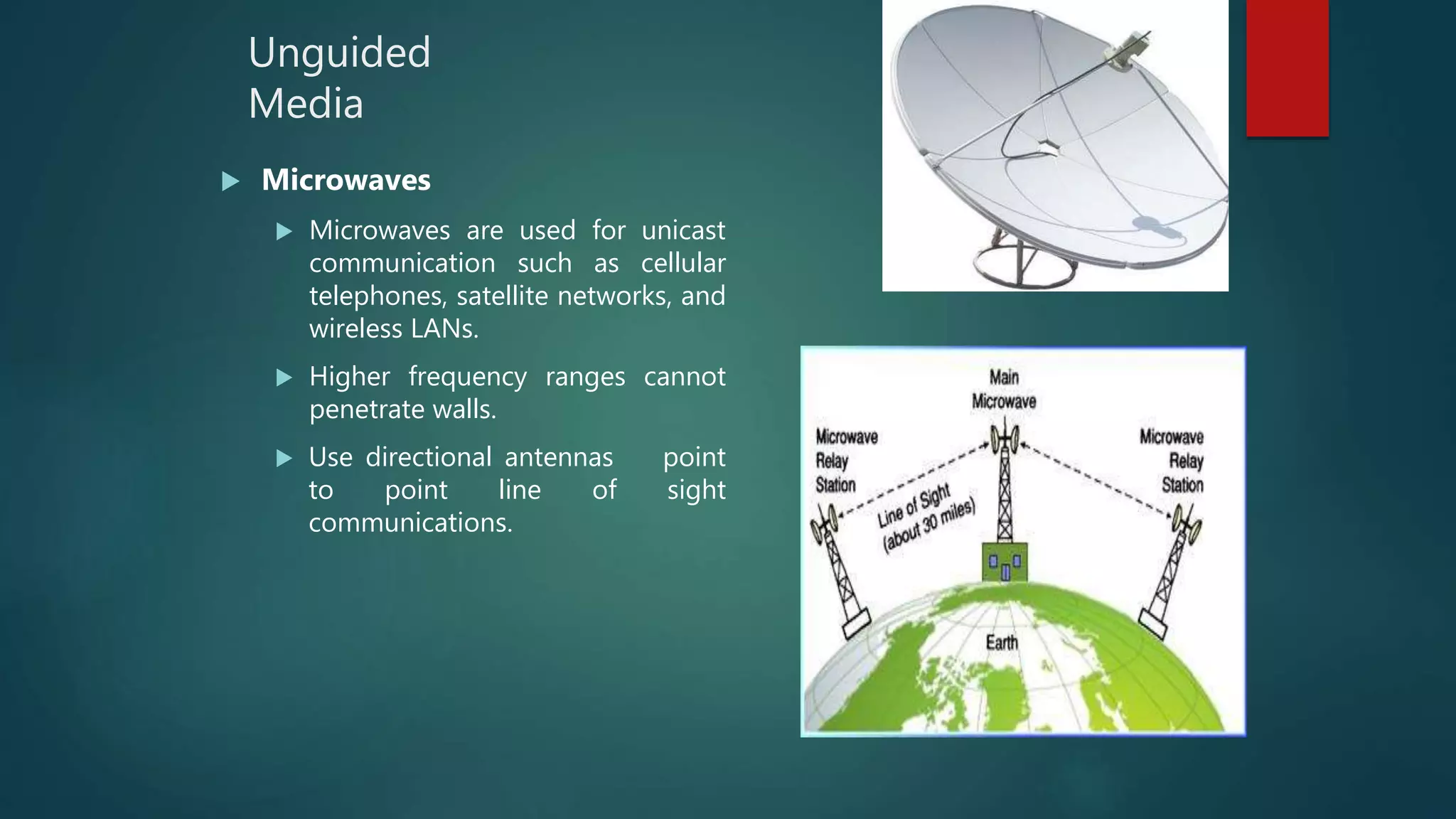
 Microwaves are used for unicast
communication such as cellular
telephones, satellite networks, and
wireless LANs.
 Higher frequency ranges cannot
penetrate walls.
 Use directional antennas point
to point line of sight
communications.
Unguided
media
 Infrared
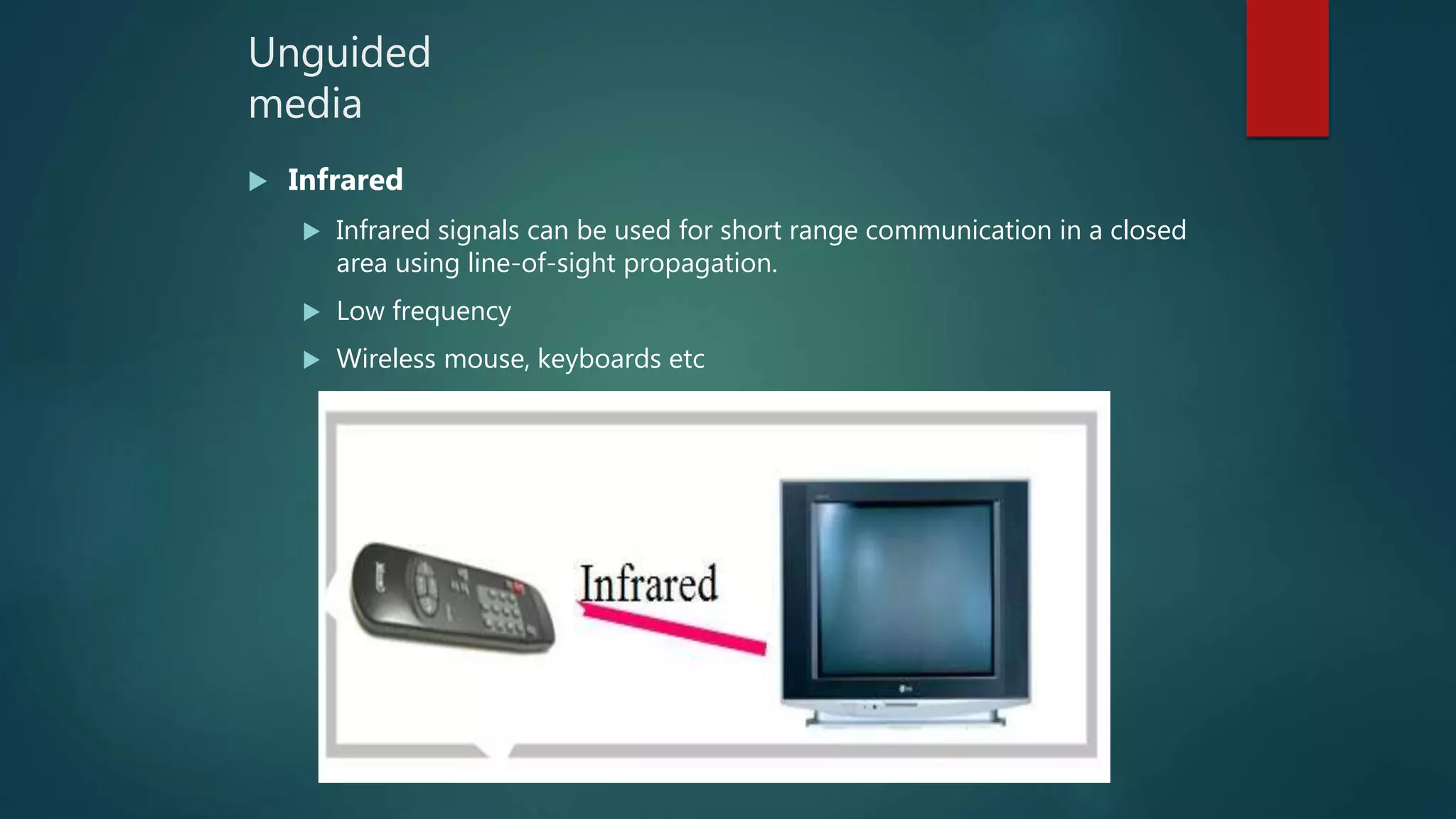
 Infrared signals can be used for short range communication in a closed
area using line-of-sight propagation.
 Low frequency
 Wireless mouse, keyboards etc
Data Communication & Networks

Data Communication & Networks

  • 1.
    L E CT U R E 8 J a n u a r y , 2 0 1 8 IT in Business - I
  • 2.
  • 3.
    Data Communication Data Communication CommunicationProtocol Forms of data Transmission Data Transmission Mode Types of data Transmission Transmission Media Uses of Communication Technologies Data Communication & Networks Agenda
  • 4.
    Data Communication  Datacommunication is a process of transferring data electronically from one place to another.  Basic elements of data communication are  Sender  Receiver  medium
  • 5.
    Elements of dataCommunication (cont’d)  Sender  Sender is a device that sends message. The message may be consist of text, numbers, pictures etc. It is also called source or transmitter.  Medium  Medium is the path that connects sender and receiver. It is used to transmit data. The medium can be a copper wire, a fiber optic cable, microwave etc  Receiver  Receiver is a device that receives message. It is also called Sink. The receiver can be computer, printer, or another computer related device. The receiver must be capable of accepting the message.
  • 6.
    Sender Receiver Medium Message Elements ofdata Communication (cont’d)
  • 7.
    Communication Protocol  Protocol: The procedure of data transformation in the form of software is commonly called protocol.  This protocol is a set of rules for exchanging information among computer.  These protocols define:  How the communication channel is established  How information is transmitted  How errors are detected and corrected
  • 8.
    Functions of CommunicationProtocols  The main functions of communication software protocols are as follows Data Sequencing Data Routing Data Flow Error Control
  • 9.
    Contd...  Data Sequencing:The function of a protocol to divide the long message into smaller packets of fixed size that are to be transmitted for error free data transmission, is called Data Sequencing.  Data Routing: The function of a protocol to find the most efficient path or route between the sender and the receiver before sending the data is called Data Routing.  Flow Control: The function of a protocol to control the rate of data transmission from the sender to the receiver is called Flow Control. It regulates the process of sending data between fast sender and slow receiver.  Error Control: The function of a protocol to detect and recover errors for successful data communication between the sender and the receiver is called Error Control. Successful data communication means that data is transmitted without any error.
  • 10.
    Forms of DataTransmission  There are two forms of data transmission Digital Data Transmission Analog data Transmission
  • 11.
    Digital Data Transmission Forms of Data Transmission Digital Data Transmission Digital signal is a sequence of voltage represented in binary forms, these signals are in the form of electrical pulses of ON and OFF.  Digital signals are faster and efficient, they provide low error rates, high transmission speed and high- quality voice transmission.  All data communication between the computers is in digital form.  In digital signals high voltage is represented by 1 and low voltage is represented by 0.
  • 12.
    Analog data Transmission Analog Data Transmission Analog signal is a continuous electrical signal in the form of wave, which is known as Carrier wave.  Telephone line is the most commonly used media for analog transmission of data. Light, sound, radio and microwave are also examples of analog signals.
  • 14.
    Data Transmission Modes Transmission mode means transferring of data between two devices. It is also called communication mode. These modes direct the direction of flow of information. There are three types of transmission mode.  Simplex mode  Half Duplex mode  Full Duplex mode
  • 15.
    Simplex mode  Datais transmitted from the sender to receiver only, (eg: from a central computer to a dumb terminal).  The communication can only take place in one direction and it is not possible for the receiver to send data back.  An example of simplex transmission would be data being sent to an electronic notice board such as those found in train stations and airports.
  • 16.
    Half Duplex mode Data can travel in both directions but not at the same time. Each end of the communications link acts as sender and receiver, (eg: two-way communication between computers and other computers that may be connected to a hub).  Controls will exist to ensure that the devices do not send at the same time.  One human example of this type of communication is the use of walkie-talkies, where each person communicating must indicate when they have finished speaking.
  • 17.
    Full duplex mode Data can travel in both directions simultaneously, (e.g: two or more computers connected to a network device such as a switch that provides full duplex activity).  A telephone is full-duplex device.  Full duplex mode is a faster way of data transmission as compared to half duplex.
  • 19.
    Types of DataTransmission Asynchronous Transmission Analogy of Letters by Post Synchronous Transmission Analogy of Telephone calls
  • 20.
    Asynchronous Transmission  Inasynchronous the transmission of data is generally without the use of an external clock signal, where data can be transmitted intermittently rather than in a steady stream.  Any timing required to recover data from the communication symbols is encoded within the symbols.  The most significant aspect of asynchronous communications is that data is not transmitted at regular intervals, thus making possible variable bit rate.  And that the transmitter and receiver clock generators do not have to be exactly synchronized all the time.
  • 22.
    Application  Asynchronous activitiestake place outside of real time system.  As asynchronous does not require a constant bit rate.  simple, fast, economical not requiring a 2-way communication  For examples file transfer or email Drawback • Overhead of start and stop bits. • Asynchronous transmission is relatively slow due to the increased number of bits and gaps.
  • 23.
    Synchronous Transmission  InSynchronous the transmission of data is sent in a continuous stream at a constant rate.  Full Duplex with blocks/frames transfer  Synchronous communication requires that the clocks in the transmitting and receiving devices are synchronized running at the same rate.  so the receiver can sample the signal at the same time intervals used by the transmitter. No start or stop bits are required.  For this reason synchronous communication permits more information to be passed over a circuit per unit time.
  • 24.
     Over timethe transmitting and receiving clocks will tend to drift apart, requiring resynchronization.  Synchronous communication is direct communication that occurs in real time.  That takes place face-to-face, and as technology has evolved, can take place irrespective of distance  (ex. telephone conversations, video conferencing and instant messaging)
  • 26.
    Application  Most commonuse is in the ASCII terminals for efficient, reliable transmission.  High speeds communication links established using synchronous modems. Drawback • The clock frequency should be same at both the sending and receiving ends. • No tolerance in clock frequency is allowed.
  • 27.
    Transmission Media  GuidedMedia  Unguided Media  Guided Media (Wired) Guided media, which are those that provide a conduct from one device to another, includes  Twisted pair Cable  Coaxial Cable  Fiber Optics
  • 28.
    Guided Media  Twisted PairCable  The wires in Twisted Pair cabling are twisted together in pairs.  Each pair would consist of a wire used for the +ve data signal and a wire used for the -ve data signal.  Twisted Pair cables are most effectively used in systems that use a balanced line method of transmission. • Two types of Twisted Pair Cable  STP (Shielded Twisted Pair)  UTP (Un shielded Twisted Pair)
  • 29.
    Guided Media  Coaxial Cable Coaxial Cable consists of 2 conductors. The inner conductor is held inside an insulator with the other conductor woven around it providing a shield.  An insulating protective coating called a jacket covers the outer conductor. The outer shield protects the inner conductor from outside electrical signals.  The distance between the outer conductor (shield) and inner conductor plus the type of material used for insulating the inner conductor determine the cable properties or impedance.  The excellent control of the impedance characteristics of the cable allow higher data rates to be transferred than Twisted Pair cable.
  • 30.
    Guided Media  FiberOptics  Optical Fiber consists of thin glass fibers that can carry information at frequencies in the visible light spectrum and beyond.  The typical optical fiber consists of a very narrow strand of glass called the Core.  Around the Core is a concentric layer of glass called the Cladding
  • 31.
    Unguided Media  Unguidedmedia transport electromagnetic waves without using a physical conductor.  This type of communication is often referred to as wireless communication  Types are  Radio Wave  Microwave  Infrared
  • 32.
    Unguided Media  Radio Waves: Radio waves are used for multicast communications, such as radio and television  They can penetrate through walls.  Highly regulated.  Use Omni directional antennas
  • 33.
    Unguided Media  Microwaves  Microwavesare used for unicast communication such as cellular telephones, satellite networks, and wireless LANs.  Higher frequency ranges cannot penetrate walls.  Use directional antennas point to point line of sight communications.
  • 34.
    Unguided media  Infrared  Infraredsignals can be used for short range communication in a closed area using line-of-sight propagation.  Low frequency  Wireless mouse, keyboards etc

Editor's Notes

  • #20 Synchronous data transfer: sender and receiver use the same clock signal supports high data transfer rate needs clock signal between the sender and the receiver requires master/slave configuration Asynchronous data transfer: sender provides a synchronization signal to the receiver before starting the transfer of each message does not need clock signal between the sender and the receiver slower data transfer rate For asynchronous data transfer, there is no common clock signal between the sender and receivers. Therefore, the sender and the receiver first need to agree on a data transfer speed. This speed usually does not change after the data transfer starts. Both the sender and receiver set up their own internal circuits to make sure that the data accessing is follows that agreement. However, just like some watches run faster than others, computer clocks also differ in accuracy. Although the difference is very small, it can accumulate fast and eventually cause errors in data transfer. This problem is solved by adding synchronization bits at the front, middle or end of the data. Since the synchronization is done periodically, the receiver can correct the clock accumulation error. The synchronization information may be added to every byte of data or to every frame of data. Sending these extra synchronization bits may account for up to 50% data transfer overhead and hence slows down the actual data transfer rate. 
  • #21 a clock signal is a particular type of signal that oscillates between a high and a low state and is utilized like a metronome to coordinate actions of digital circuits.