Discovering
Computers 2009
Chapter 01
Database
Management
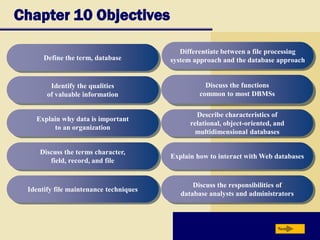
Chapter 10 Objectives
Discuss the functions
common to most DBMSs
Identify the qualities
of valuable information
Explain why data is important
to an organization
Discuss the terms character,
field, record, and file
Identify file maintenance techniques
Differentiate between a file processing
system approach and the database approach
Describe characteristics of
relational, object-oriented, and
multidimensional databases
Explain how to interact with Web databases
Discuss the responsibilities of
database analysts and administrators
Next
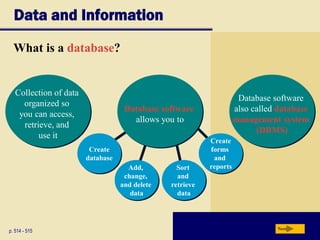
Define the term, database
Add,
change,
and delete
data
Create
database
Sort
and
retrieve
data
Create
forms
and
reports
Data and Information
What is a database?
p. 514 - 515 Next
Database software
allows you to
Collection of data
organized so
you can access,
retrieve, and
use it
Database software
also called database
management system
(DBMS)
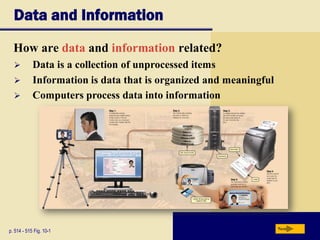
Data and Information
How are data and information related?
p. 514 - 515 Fig. 10-1 Next
 Data is a collection of unprocessed items
 Information is data that is organized and meaningful
 Computers process data into information
Data and Information
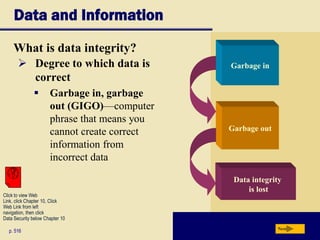
What is data integrity?
p. 516 Next
 Degree to which data is
correct
 Garbage in, garbage
out (GIGO)—computer
phrase that means you
cannot create correct
information from
incorrect data
Garbage out
Garbage in
Data integrity
is lost
Click to view Web
Link, click Chapter 10, Click
Web Link from left
navigation, then click
Data Security below Chapter 10
Data and Information
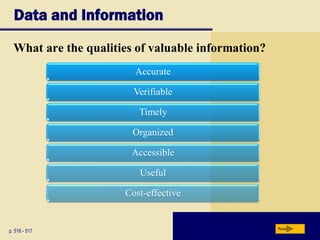
What are the qualities of valuable information?
p. 516 - 517 Next
Accurate
Verifiable
Timely
Organized
Accessible
Useful
Cost-effective
The Hierarchy of Data
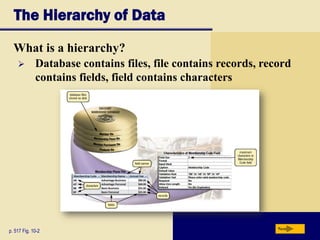
What is a hierarchy?
p. 517 Fig. 10-2 Next
 Database contains files, file contains records, record
contains fields, field contains characters
The Hierarchy of Data
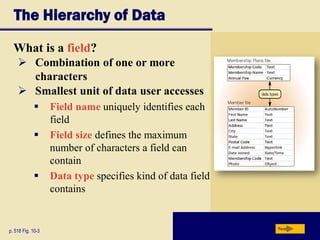
What is a field?
p. 518 Fig. 10-3 Next
 Combination of one or more
characters
 Smallest unit of data user accesses
 Field name uniquely identifies each
field
 Field size defines the maximum
number of characters a field can
contain
 Data type specifies kind of data field
contains
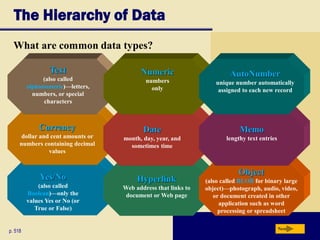
Yes/No
(also called
Boolean)—only the
values Yes or No (or
True or False)
Hyperlink
Web address that links to
document or Web page
Object
(also called BLOB for binary large
object)—photograph, audio, video,
or document created in other
application such as word
processing or spreadsheet
The Hierarchy of Data
What are common data types?
p. 518 Next
Currency
dollar and cent amounts or
numbers containing decimal
values
Date
month, day, year, and
sometimes time
Memo
lengthy text entries
Text
(also called
alphanumeric)—letters,
numbers, or special
characters
Numeric
numbers
only
AutoNumber
unique number automatically
assigned to each new record
The Hierarchy of Data
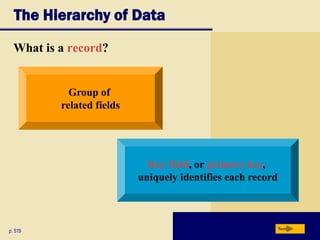
What is a record?
p. 519 Next
Group of
related fields
Key field, or primary key,
uniquely identifies each record
The Hierarchy of Data
What is a data file?
p. 518 Next
 Collection of related records stored on disk
Maintaining Data
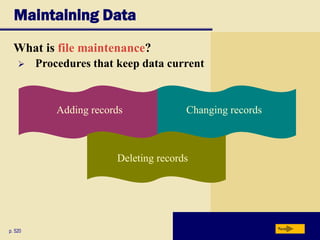
What is file maintenance?
p. 520 Next
Changing recordsAdding records
Deleting records
 Procedures that keep data current
Maintaining Data
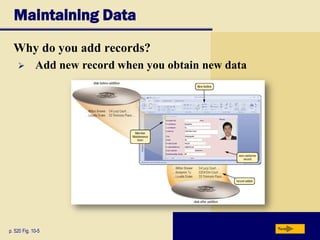
Why do you add records?
p. 520 Fig. 10-5 Next
 Add new record when you obtain new data
Maintaining Data
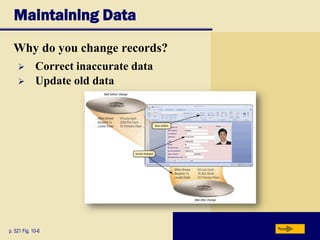
Why do you change records?
p. 521 Fig. 10-6 Next
 Correct inaccurate data
 Update old data
Maintaining Data
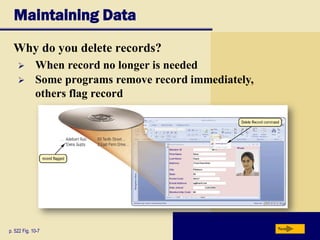
Why do you delete records?
p. 522 Fig. 10-7 Next
 When record no longer is needed
 Some programs remove record immediately,
others flag record
Maintaining Data
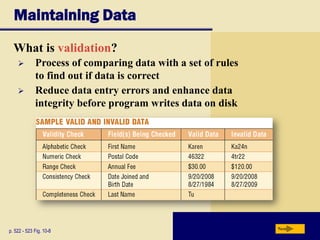
What is validation?
p. 522 - 523 Fig. 10-8 Next
 Process of comparing data with a set of rules
to find out if data is correct
 Reduce data entry errors and enhance data
integrity before program writes data on disk
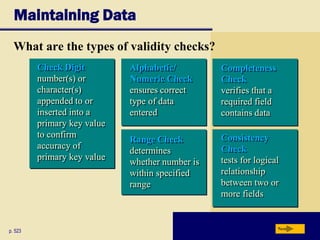
Consistency
Check
tests for logical
relationship
between two or
more fields
Maintaining Data
p. 523 Next
What are the types of validity checks?
Range Check
determines
whether number is
within specified
range
Completeness
Check
verifies that a
required field
contains data
Check Digit
number(s) or
character(s)
appended to or
inserted into a
primary key value
to confirm
accuracy of
primary key value
Alphabetic/
Numeric Check
ensures correct
type of data
entered
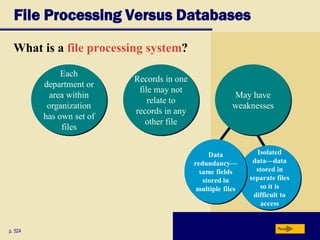
Isolated
data—data
stored in
separate files
so it is
difficult to
access
File Processing Versus Databases
What is a file processing system?
p. 524 Next
Data
redundancy—
same fields
stored in
multiple files
Each
department or
area within
organization
has own set of
files
May have
weaknesses
Records in one
file may not
relate to
records in any
other file
File Processing Versus Databases
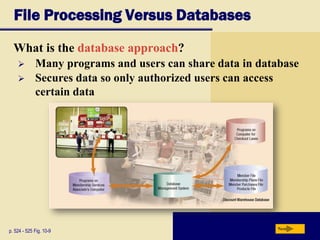
What is the database approach?
p. 524 - 525 Fig. 10-9 Next
 Many programs and users can share data in database
 Secures data so only authorized users can access
certain data
File Processing Versus Databases
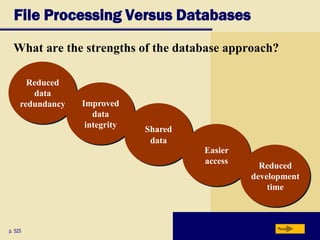
What are the strengths of the database approach?
p. 525 Next
Reduced
data
redundancy Improved
data
integrity
Shared
data
Easier
access
Reduced
development
time
File Processing Versus Databases
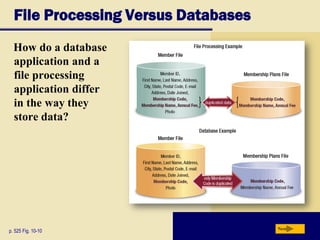
How do a database
application and a
file processing
application differ
in the way they
store data?
p. 525 Fig. 10-10 Next
Database Management Systems
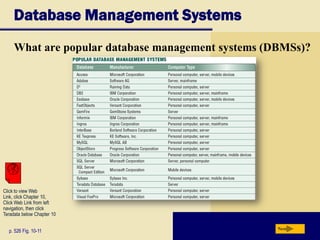
What are popular database management systems (DBMSs)?
p. 526 Fig. 10-11 Next
Click to view Web
Link, click Chapter 10,
Click Web Link from left
navigation, then click
Teradata below Chapter 10
Database Management Systems
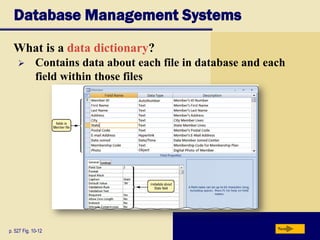
What is a data dictionary?
p. 527 Fig. 10-12 Next
 Contains data about each file in database and each
field within those files
Database Management Systems
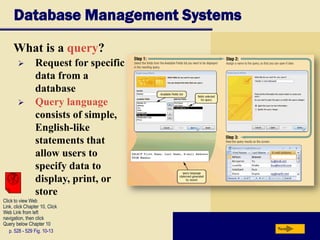
What is a query?
p. 528 - 529 Fig. 10-13 Next
 Request for specific
data from a
database
 Query language
consists of simple,
English-like
statements that
allow users to
specify data to
display, print, or
store
Click to view Web
Link, click Chapter 10, Click
Web Link from left
navigation, then click
Query below Chapter 10
Database Management Systems
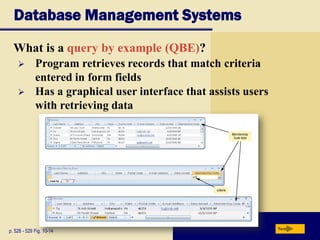
What is a query by example (QBE)?
p. 528 - 529 Fig. 10-14 Next
 Program retrieves records that match criteria
entered in form fields
 Has a graphical user interface that assists users
with retrieving data
Database Management Systems
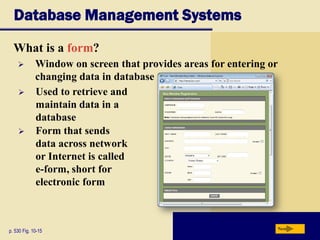
What is a form?
p. 530 Fig. 10-15 Next
 Window on screen that provides areas for entering or
changing data in database
 Used to retrieve and
maintain data in a
database
 Form that sends
data across network
or Internet is called
e-form, short for
electronic form
Database Management Systems
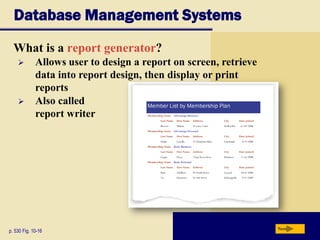
What is a report generator?
p. 530 Fig. 10-16 Next
 Allows user to design a report on screen, retrieve
data into report design, then display or print
reports
 Also called
report writer
Database Management Systems
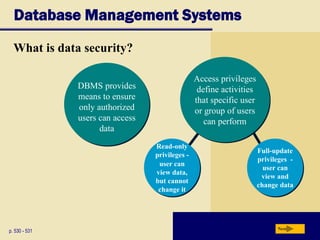
What is data security?
p. 530 - 531 Next
Read-only
privileges -
user can
view data,
but cannot
change it
DBMS provides
means to ensure
only authorized
users can access
data
Access privileges
define activities
that specific user
or group of users
can perform
Full-update
privileges -
user can
view and
change data
Database Management Systems
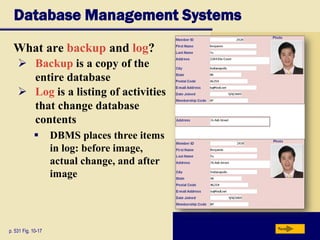
What are backup and log?
p. 531 Fig. 10-17 Next
 Backup is a copy of the
entire database
 Log is a listing of activities
that change database
contents
 DBMS places three items
in log: before image,
actual change, and after
image
Database Management Systems
Video: How A Photo Sharing Site Keeps its Data
Next
CLICK TO START
Database Management Systems
What is a recovery utility?
p. 531 - 532 Next
Uses logs and/or
backups to restore
database when it is
damaged or destroyed
Rollforward—DBMS
uses log to re-enter
changes made to data-
base since last save or
backup
Also called forward
recovery
Rollback—DBMS uses
log to undo any changes
made to database during a
certain period of time
Also called backward
recoveryClick to view Web
Link, click Chapter 10, Click
Web Link from left
navigation, then click
Continuous Backup
below Chapter 10
Relational, Object-Oriented, and Multidimensional Databases
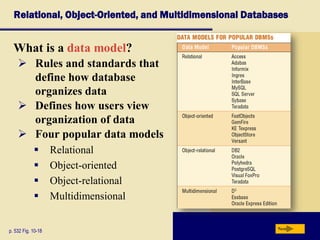
What is a data model?
p. 532 Fig. 10-18 Next
 Rules and standards that
define how database
organizes data
 Defines how users view
organization of data
 Four popular data models
 Relational
 Object-oriented
 Object-relational
 Multidimensional
Relational, Object-Oriented, and Multidimensional Databases
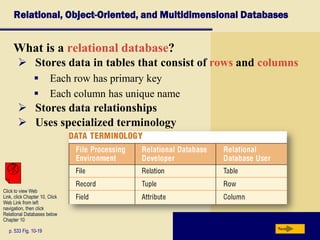
What is a relational database?
p. 533 Fig. 10-19 Next
 Stores data in tables that consist of rows and columns
 Each row has primary key
 Each column has unique name
 Stores data relationships
 Uses specialized terminology
Click to view Web
Link, click Chapter 10, Click
Web Link from left
navigation, then click
Relational Databases below
Chapter 10
Relational, Object-Oriented, and Multidimensional Databases
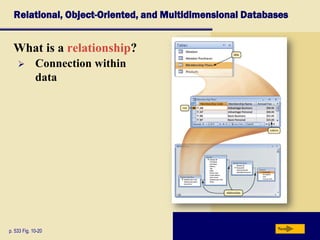
What is a relationship?
p. 533 Fig. 10-20 Next
 Connection within
data
Relational, Object-Oriented, and Multidimensional Databases
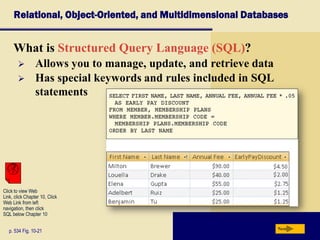
What is Structured Query Language (SQL)?
p. 534 Fig. 10-21 Next
 Allows you to manage, update, and retrieve data
 Has special keywords and rules included in SQL
statements
Click to view Web
Link, click Chapter 10, Click
Web Link from left
navigation, then click
SQL below Chapter 10
Relational, Object-Oriented, and Multidimensional Databases
What is an object-oriented database (OODB)?
p. 534 - 535 Next
Advantages
Often uses object query language (OQL)
Stores data in objects
Object is item that contains data,
as well as actions that read or
process data
 Can store more types of data
 Can access data faster
 Programmers can reuse objects
Click to view Web
Link, click Chapter 10, Click
Web Link from left
navigation, then click
Object-Oriented Databases
below Chapter 10
Relational, Object-Oriented, and Multidimensional Databases
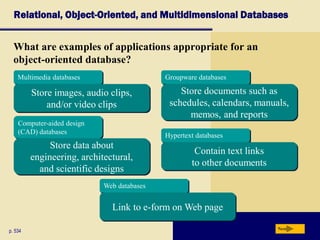
What are examples of applications appropriate for an
object-oriented database?
p. 534 Next
Multimedia databases
Store images, audio clips,
and/or video clips
Groupware databases
Store documents such as
schedules, calendars, manuals,
memos, and reports
Computer-aided design
(CAD) databases
Store data about
engineering, architectural,
and scientific designs
Hypertext databases
Contain text links
to other documents
Web databases
Link to e-form on Web page
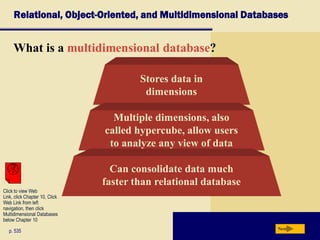
What is a multidimensional database?
Relational, Object-Oriented, and Multidimensional Databases
p. 535 Next
Stores data in
dimensions
Multiple dimensions, also
called hypercube, allow users
to analyze any view of data
Can consolidate data much
faster than relational database
Click to view Web
Link, click Chapter 10, Click
Web Link from left
navigation, then click
Multidimensional Databases
below Chapter 10
Relational, Object-Oriented, and Multidimensional Databases
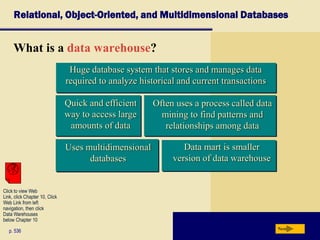
What is a data warehouse?
p. 536 Next
Data mart is smaller
version of data warehouse
Uses multidimensional
databases
Often uses a process called data
mining to find patterns and
relationships among data
Huge database system that stores and manages data
required to analyze historical and current transactions
Quick and efficient
way to access large
amounts of data
Click to view Web
Link, click Chapter 10, Click
Web Link from left
navigation, then click
Data Warehouses
below Chapter 10
Web Databases
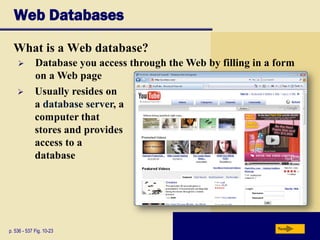
What is a Web database?
p. 536 - 537 Fig. 10-23 Next
 Database you access through the Web by filling in a form
on a Web page
 Usually resides on
a database server, a
computer that
stores and provides
access to a
database
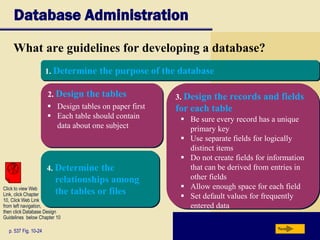
3. Design the records and fields
for each table
2. Design the tables
1. Determine the purpose of the database
4. Determine the
relationships among
the tables or files
 Design tables on paper first
 Each table should contain
data about one subject
Database Administration
What are guidelines for developing a database?
p. 537 Fig. 10-24 Next
 Be sure every record has a unique
primary key
 Use separate fields for logically
distinct items
 Do not create fields for information
that can be derived from entries in
other fields
 Allow enough space for each field
 Set default values for frequently
entered data
Click to view Web
Link, click Chapter
10, Click Web Link
from left navigation,
then click Database Design
Guidelines below Chapter 10
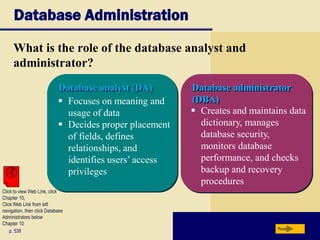
Database Administration
What is the role of the database analyst and
administrator?
p. 538 Next
Database analyst (DA) Database administrator
(DBA) Focuses on meaning and
usage of data
 Decides proper placement
of fields, defines
relationships, and
identifies users’ access
privileges
 Creates and maintains data
dictionary, manages
database security,
monitors database
performance, and checks
backup and recovery
procedures
Click to view Web Link, click
Chapter 10,
Click Web Link from left
navigation, then click Database
Administrators below
Chapter 10
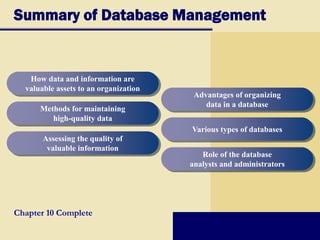
Summary of Database Management
Chapter 10 Complete
How data and information are
valuable assets to an organization
Methods for maintaining
high-quality data
Assessing the quality of
valuable information
Advantages of organizing
data in a database
Various types of databases
Role of the database
analysts and administrators

Chapter1.0 database management system

  • 1.
  • 2.
    Chapter 10 Objectives Discussthe functions common to most DBMSs Identify the qualities of valuable information Explain why data is important to an organization Discuss the terms character, field, record, and file Identify file maintenance techniques Differentiate between a file processing system approach and the database approach Describe characteristics of relational, object-oriented, and multidimensional databases Explain how to interact with Web databases Discuss the responsibilities of database analysts and administrators Next Define the term, database
  • 3.
    Add, change, and delete data Create database Sort and retrieve data Create forms and reports Data andInformation What is a database? p. 514 - 515 Next Database software allows you to Collection of data organized so you can access, retrieve, and use it Database software also called database management system (DBMS)
  • 4.
    Data and Information Howare data and information related? p. 514 - 515 Fig. 10-1 Next  Data is a collection of unprocessed items  Information is data that is organized and meaningful  Computers process data into information
  • 5.
    Data and Information Whatis data integrity? p. 516 Next  Degree to which data is correct  Garbage in, garbage out (GIGO)—computer phrase that means you cannot create correct information from incorrect data Garbage out Garbage in Data integrity is lost Click to view Web Link, click Chapter 10, Click Web Link from left navigation, then click Data Security below Chapter 10
  • 6.
    Data and Information Whatare the qualities of valuable information? p. 516 - 517 Next Accurate Verifiable Timely Organized Accessible Useful Cost-effective
  • 7.
    The Hierarchy ofData What is a hierarchy? p. 517 Fig. 10-2 Next  Database contains files, file contains records, record contains fields, field contains characters
  • 8.
    The Hierarchy ofData What is a field? p. 518 Fig. 10-3 Next  Combination of one or more characters  Smallest unit of data user accesses  Field name uniquely identifies each field  Field size defines the maximum number of characters a field can contain  Data type specifies kind of data field contains
  • 9.
    Yes/No (also called Boolean)—only the valuesYes or No (or True or False) Hyperlink Web address that links to document or Web page Object (also called BLOB for binary large object)—photograph, audio, video, or document created in other application such as word processing or spreadsheet The Hierarchy of Data What are common data types? p. 518 Next Currency dollar and cent amounts or numbers containing decimal values Date month, day, year, and sometimes time Memo lengthy text entries Text (also called alphanumeric)—letters, numbers, or special characters Numeric numbers only AutoNumber unique number automatically assigned to each new record
  • 10.
    The Hierarchy ofData What is a record? p. 519 Next Group of related fields Key field, or primary key, uniquely identifies each record
  • 11.
    The Hierarchy ofData What is a data file? p. 518 Next  Collection of related records stored on disk
  • 12.
    Maintaining Data What isfile maintenance? p. 520 Next Changing recordsAdding records Deleting records  Procedures that keep data current
  • 13.
    Maintaining Data Why doyou add records? p. 520 Fig. 10-5 Next  Add new record when you obtain new data
  • 14.
    Maintaining Data Why doyou change records? p. 521 Fig. 10-6 Next  Correct inaccurate data  Update old data
  • 15.
    Maintaining Data Why doyou delete records? p. 522 Fig. 10-7 Next  When record no longer is needed  Some programs remove record immediately, others flag record
  • 16.
    Maintaining Data What isvalidation? p. 522 - 523 Fig. 10-8 Next  Process of comparing data with a set of rules to find out if data is correct  Reduce data entry errors and enhance data integrity before program writes data on disk
  • 17.
    Consistency Check tests for logical relationship betweentwo or more fields Maintaining Data p. 523 Next What are the types of validity checks? Range Check determines whether number is within specified range Completeness Check verifies that a required field contains data Check Digit number(s) or character(s) appended to or inserted into a primary key value to confirm accuracy of primary key value Alphabetic/ Numeric Check ensures correct type of data entered
  • 18.
    Isolated data—data stored in separate files soit is difficult to access File Processing Versus Databases What is a file processing system? p. 524 Next Data redundancy— same fields stored in multiple files Each department or area within organization has own set of files May have weaknesses Records in one file may not relate to records in any other file
  • 19.
    File Processing VersusDatabases What is the database approach? p. 524 - 525 Fig. 10-9 Next  Many programs and users can share data in database  Secures data so only authorized users can access certain data
  • 20.
    File Processing VersusDatabases What are the strengths of the database approach? p. 525 Next Reduced data redundancy Improved data integrity Shared data Easier access Reduced development time
  • 21.
    File Processing VersusDatabases How do a database application and a file processing application differ in the way they store data? p. 525 Fig. 10-10 Next
  • 22.
    Database Management Systems Whatare popular database management systems (DBMSs)? p. 526 Fig. 10-11 Next Click to view Web Link, click Chapter 10, Click Web Link from left navigation, then click Teradata below Chapter 10
  • 23.
    Database Management Systems Whatis a data dictionary? p. 527 Fig. 10-12 Next  Contains data about each file in database and each field within those files
  • 24.
    Database Management Systems Whatis a query? p. 528 - 529 Fig. 10-13 Next  Request for specific data from a database  Query language consists of simple, English-like statements that allow users to specify data to display, print, or store Click to view Web Link, click Chapter 10, Click Web Link from left navigation, then click Query below Chapter 10
  • 25.
    Database Management Systems Whatis a query by example (QBE)? p. 528 - 529 Fig. 10-14 Next  Program retrieves records that match criteria entered in form fields  Has a graphical user interface that assists users with retrieving data
  • 26.
    Database Management Systems Whatis a form? p. 530 Fig. 10-15 Next  Window on screen that provides areas for entering or changing data in database  Used to retrieve and maintain data in a database  Form that sends data across network or Internet is called e-form, short for electronic form
  • 27.
    Database Management Systems Whatis a report generator? p. 530 Fig. 10-16 Next  Allows user to design a report on screen, retrieve data into report design, then display or print reports  Also called report writer
  • 28.
    Database Management Systems Whatis data security? p. 530 - 531 Next Read-only privileges - user can view data, but cannot change it DBMS provides means to ensure only authorized users can access data Access privileges define activities that specific user or group of users can perform Full-update privileges - user can view and change data
  • 29.
    Database Management Systems Whatare backup and log? p. 531 Fig. 10-17 Next  Backup is a copy of the entire database  Log is a listing of activities that change database contents  DBMS places three items in log: before image, actual change, and after image
  • 30.
    Database Management Systems Video:How A Photo Sharing Site Keeps its Data Next CLICK TO START
  • 31.
    Database Management Systems Whatis a recovery utility? p. 531 - 532 Next Uses logs and/or backups to restore database when it is damaged or destroyed Rollforward—DBMS uses log to re-enter changes made to data- base since last save or backup Also called forward recovery Rollback—DBMS uses log to undo any changes made to database during a certain period of time Also called backward recoveryClick to view Web Link, click Chapter 10, Click Web Link from left navigation, then click Continuous Backup below Chapter 10
  • 32.
    Relational, Object-Oriented, andMultidimensional Databases What is a data model? p. 532 Fig. 10-18 Next  Rules and standards that define how database organizes data  Defines how users view organization of data  Four popular data models  Relational  Object-oriented  Object-relational  Multidimensional
  • 33.
    Relational, Object-Oriented, andMultidimensional Databases What is a relational database? p. 533 Fig. 10-19 Next  Stores data in tables that consist of rows and columns  Each row has primary key  Each column has unique name  Stores data relationships  Uses specialized terminology Click to view Web Link, click Chapter 10, Click Web Link from left navigation, then click Relational Databases below Chapter 10
  • 34.
    Relational, Object-Oriented, andMultidimensional Databases What is a relationship? p. 533 Fig. 10-20 Next  Connection within data
  • 35.
    Relational, Object-Oriented, andMultidimensional Databases What is Structured Query Language (SQL)? p. 534 Fig. 10-21 Next  Allows you to manage, update, and retrieve data  Has special keywords and rules included in SQL statements Click to view Web Link, click Chapter 10, Click Web Link from left navigation, then click SQL below Chapter 10
  • 36.
    Relational, Object-Oriented, andMultidimensional Databases What is an object-oriented database (OODB)? p. 534 - 535 Next Advantages Often uses object query language (OQL) Stores data in objects Object is item that contains data, as well as actions that read or process data  Can store more types of data  Can access data faster  Programmers can reuse objects Click to view Web Link, click Chapter 10, Click Web Link from left navigation, then click Object-Oriented Databases below Chapter 10
  • 37.
    Relational, Object-Oriented, andMultidimensional Databases What are examples of applications appropriate for an object-oriented database? p. 534 Next Multimedia databases Store images, audio clips, and/or video clips Groupware databases Store documents such as schedules, calendars, manuals, memos, and reports Computer-aided design (CAD) databases Store data about engineering, architectural, and scientific designs Hypertext databases Contain text links to other documents Web databases Link to e-form on Web page
  • 38.
    What is amultidimensional database? Relational, Object-Oriented, and Multidimensional Databases p. 535 Next Stores data in dimensions Multiple dimensions, also called hypercube, allow users to analyze any view of data Can consolidate data much faster than relational database Click to view Web Link, click Chapter 10, Click Web Link from left navigation, then click Multidimensional Databases below Chapter 10
  • 39.
    Relational, Object-Oriented, andMultidimensional Databases What is a data warehouse? p. 536 Next Data mart is smaller version of data warehouse Uses multidimensional databases Often uses a process called data mining to find patterns and relationships among data Huge database system that stores and manages data required to analyze historical and current transactions Quick and efficient way to access large amounts of data Click to view Web Link, click Chapter 10, Click Web Link from left navigation, then click Data Warehouses below Chapter 10
  • 40.
    Web Databases What isa Web database? p. 536 - 537 Fig. 10-23 Next  Database you access through the Web by filling in a form on a Web page  Usually resides on a database server, a computer that stores and provides access to a database
  • 41.
    3. Design therecords and fields for each table 2. Design the tables 1. Determine the purpose of the database 4. Determine the relationships among the tables or files  Design tables on paper first  Each table should contain data about one subject Database Administration What are guidelines for developing a database? p. 537 Fig. 10-24 Next  Be sure every record has a unique primary key  Use separate fields for logically distinct items  Do not create fields for information that can be derived from entries in other fields  Allow enough space for each field  Set default values for frequently entered data Click to view Web Link, click Chapter 10, Click Web Link from left navigation, then click Database Design Guidelines below Chapter 10
  • 42.
    Database Administration What isthe role of the database analyst and administrator? p. 538 Next Database analyst (DA) Database administrator (DBA) Focuses on meaning and usage of data  Decides proper placement of fields, defines relationships, and identifies users’ access privileges  Creates and maintains data dictionary, manages database security, monitors database performance, and checks backup and recovery procedures Click to view Web Link, click Chapter 10, Click Web Link from left navigation, then click Database Administrators below Chapter 10
  • 43.
    Summary of DatabaseManagement Chapter 10 Complete How data and information are valuable assets to an organization Methods for maintaining high-quality data Assessing the quality of valuable information Advantages of organizing data in a database Various types of databases Role of the database analysts and administrators