CSS Introduction
 CSS stands for Cascading Style Sheets
 CSS describes how HTML elements are to be displayed on
screen, paper, or in other media
 CSS saves a lot of work. It can control the layout of multiple
web pages all at once
 External style sheets are stored in CSS files
• HTML was NEVER intended to contain tags for
formatting a web page!
• HTML was created to describe the content of a web
page, like:
• <h1>This is a heading</h1>
• <p>This is a paragraph.</p>
• When tags like <font>, and color attributes were added to
the HTML 3.2 specification, it started a nightmare for
web developers. Development of large websites, where
fonts and color information were added to every single
page, became a long and expensive process.
• To solve this problem, the World Wide Web Consortium
(W3C) created CSS.
• CSS removed the style formatting from the HTML page!
CSS Saves a Lot of Work!
The style definitions are normally saved in external .css
files. With an external styles sheet file, you can change the
look of an entire website by changing just one file!
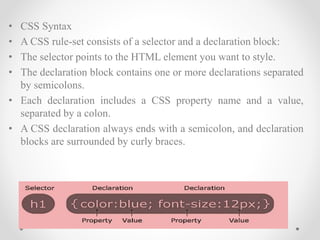
• CSS Syntax
• A CSS rule-set consists of a selector and a declaration
block:
• The selector points to the HTML element you want to
style.
• The declaration block contains one or more declarations
separated by semicolons.
• Each declaration includes a CSS property name and a
value, separated by a colon.
• A CSS declaration always ends with a semicolon, and
declaration blocks are surrounded by curly braces.
• CSS Syntax
• A CSS rule-set consists of a selector and a declaration block:
• The selector points to the HTML element you want to style.
• The declaration block contains one or more declarations separated
by semicolons.
• Each declaration includes a CSS property name and a value,
separated by a colon.
• A CSS declaration always ends with a semicolon, and declaration
blocks are surrounded by curly braces.
CSS SELECTORS
• CSS Selectors
• CSS selectors are used to "find" (or select) HTML elements
based on their element name, id, class, attribute, and more.
• The element Selector
• The element selector selects elements based on the element
name.
Id Selector
• The id Selector
• The id selector uses the id attribute of an HTML element
to select a specific element.
• The id of an element should be unique within a page, so
the id selector is used to select one unique element!
• To select an element with a specific id, write a hash (#)
character, followed by the id of the element.
The class Selector
• The class selector selects elements with a specific class
attribute.
• To select elements with a specific class, write a period (.)
character, followed by the name of the class.
Inserting a Style Sheet
• There are three ways of inserting a style sheet:
• External style sheet
• Internal style sheet
• Inline style
• External Style Sheet
• With an external style sheet, you can change the look of
an entire website by changing just one file!
• Each page must include a reference to the external style
sheet file inside the <link> element. The <link> element
goes inside the <head> section
• An external style sheet can be written in any text editor. The file
should not contain any html tags. The style sheet file must be saved
with a .css extension.
nternal Style Sheet
• An internal style sheet may be used if one single page
has a unique style.
• Internal styles are defined within the <style> element,
inside the <head> section of an HTML page:
Inline Styles
• An inline style may be used to apply a unique style for a
single element.
• To use inline styles, add the style attribute to the relevant
element. The style attribute can contain any CSS
property.
• The example below shows how to change the color and
the left margin of a <h1> element:
Multiple Style Sheets
• If some properties have been defined for the same
selector (element) in different style sheets, the value
from the last read style sheet will be used.
Cascading Order
• What style will be used when there is more than one
style specified for an HTML element?
• Generally speaking we can say that all the styles will
"cascade" into a new "virtual" style sheet by the following
rules, where number one has the highest priority:
• Inline style (inside an HTML element)
• External and internal style sheets (in the head section)
• Browser default
• So, an inline style (inside a specific HTML element) has
the highest priority, which means that it will override a
style defined inside the <head> tag, or in an external
style sheet, or a browser default value.

Css

  • 2.
    CSS Introduction  CSSstands for Cascading Style Sheets  CSS describes how HTML elements are to be displayed on screen, paper, or in other media  CSS saves a lot of work. It can control the layout of multiple web pages all at once  External style sheets are stored in CSS files
  • 3.
    • HTML wasNEVER intended to contain tags for formatting a web page! • HTML was created to describe the content of a web page, like: • <h1>This is a heading</h1> • <p>This is a paragraph.</p> • When tags like <font>, and color attributes were added to the HTML 3.2 specification, it started a nightmare for web developers. Development of large websites, where fonts and color information were added to every single page, became a long and expensive process. • To solve this problem, the World Wide Web Consortium (W3C) created CSS. • CSS removed the style formatting from the HTML page!
  • 4.
    CSS Saves aLot of Work! The style definitions are normally saved in external .css files. With an external styles sheet file, you can change the look of an entire website by changing just one file! • CSS Syntax • A CSS rule-set consists of a selector and a declaration block: • The selector points to the HTML element you want to style. • The declaration block contains one or more declarations separated by semicolons. • Each declaration includes a CSS property name and a value, separated by a colon. • A CSS declaration always ends with a semicolon, and declaration blocks are surrounded by curly braces.
  • 5.
    • CSS Syntax •A CSS rule-set consists of a selector and a declaration block: • The selector points to the HTML element you want to style. • The declaration block contains one or more declarations separated by semicolons. • Each declaration includes a CSS property name and a value, separated by a colon. • A CSS declaration always ends with a semicolon, and declaration blocks are surrounded by curly braces.
  • 6.
    CSS SELECTORS • CSSSelectors • CSS selectors are used to "find" (or select) HTML elements based on their element name, id, class, attribute, and more. • The element Selector • The element selector selects elements based on the element name.
  • 7.
    Id Selector • Theid Selector • The id selector uses the id attribute of an HTML element to select a specific element. • The id of an element should be unique within a page, so the id selector is used to select one unique element! • To select an element with a specific id, write a hash (#) character, followed by the id of the element.
  • 8.
    The class Selector •The class selector selects elements with a specific class attribute. • To select elements with a specific class, write a period (.) character, followed by the name of the class.
  • 9.
    Inserting a StyleSheet • There are three ways of inserting a style sheet: • External style sheet • Internal style sheet • Inline style • External Style Sheet • With an external style sheet, you can change the look of an entire website by changing just one file! • Each page must include a reference to the external style sheet file inside the <link> element. The <link> element goes inside the <head> section • An external style sheet can be written in any text editor. The file should not contain any html tags. The style sheet file must be saved with a .css extension.
  • 10.
    nternal Style Sheet •An internal style sheet may be used if one single page has a unique style. • Internal styles are defined within the <style> element, inside the <head> section of an HTML page: Inline Styles • An inline style may be used to apply a unique style for a single element. • To use inline styles, add the style attribute to the relevant element. The style attribute can contain any CSS property. • The example below shows how to change the color and the left margin of a <h1> element:
  • 11.
    Multiple Style Sheets •If some properties have been defined for the same selector (element) in different style sheets, the value from the last read style sheet will be used.
  • 12.
    Cascading Order • Whatstyle will be used when there is more than one style specified for an HTML element? • Generally speaking we can say that all the styles will "cascade" into a new "virtual" style sheet by the following rules, where number one has the highest priority: • Inline style (inside an HTML element) • External and internal style sheets (in the head section) • Browser default • So, an inline style (inside a specific HTML element) has the highest priority, which means that it will override a style defined inside the <head> tag, or in an external style sheet, or a browser default value.