
CascadingCascading
Style SheetsStyle Sheets
(CSS)(CSS)
MSA TechnosoftMSA Technosoft
MotivationMotivation
 HTML markup can be used to representHTML markup can be used to represent
 SemanticsSemantics:: h1h1 meansmeans that an element is a top-level headingthat an element is a top-level heading
 PresentationPresentation:: h1h1 elementselements looklook a certain waya certain way
 It’s advisable to separate semantics from presentationIt’s advisable to separate semantics from presentation
because:because:
 It’s easier to present documents onIt’s easier to present documents on multiple platformsmultiple platforms
(browser, cell phone, spoken, …)(browser, cell phone, spoken, …)
 It’s easier to generate documents withIt’s easier to generate documents with consistent lookconsistent look
 Semantic and presentation changes can be madeSemantic and presentation changes can be made
independently of one another (independently of one another (division of labordivision of labor))
 User controlUser control of presentation is facilitatedof presentation is facilitated
Style Sheet LanguagesStyle Sheet Languages
 Cascading Style Sheets (Cascading Style Sheets (CSSCSS))
 Applies to (X)HTML as well as XML documents inApplies to (X)HTML as well as XML documents in
generalgeneral
 Focus of this chapterFocus of this chapter
 Extensible Stylesheet Language (Extensible Stylesheet Language (XSLXSL))
 Often used to transform one XML document toOften used to transform one XML document to
another form, but can also add styleanother form, but can also add style
 XSL Transformations covered in later chapterXSL Transformations covered in later chapter
CSS IntroductionCSS Introduction
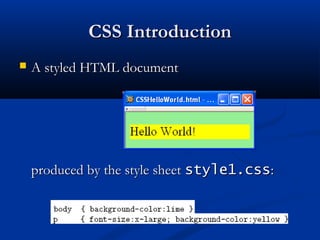
 A styled HTML documentA styled HTML document
produced by the style sheetproduced by the style sheet style1.cssstyle1.css::
CSS IntroductionCSS Introduction
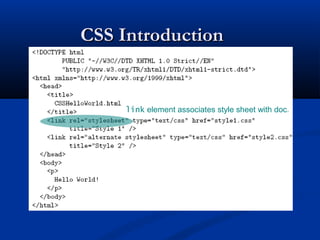
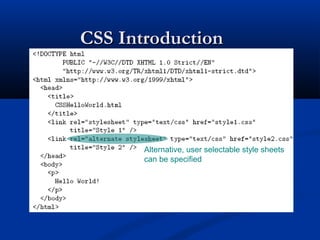
link element associates style sheet with doc.
CSS IntroductionCSS Introduction
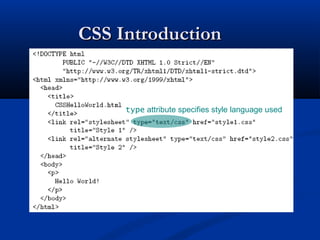
type attribute specifies style language used
CSS IntroductionCSS Introduction
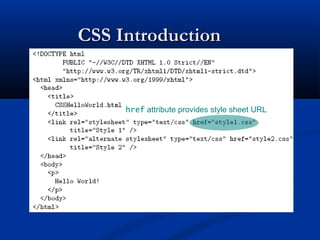
href attribute provides style sheet URL
CSS IntroductionCSS Introduction
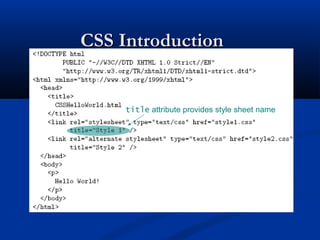
title attribute provides style sheet name
CSS IntroductionCSS Introduction
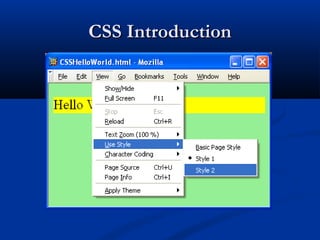
Alternative, user selectable style sheets
can be specified
CSS IntroductionCSS Introduction
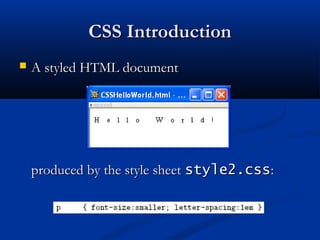
 A styled HTML documentA styled HTML document
produced by the style sheetproduced by the style sheet style2.cssstyle2.css::
CSS IntroductionCSS Introduction
Note that alternate, user selectable style is notNote that alternate, user selectable style is not
widely supported: firefox 3 and IE 8 do, but IEwidely supported: firefox 3 and IE 8 do, but IE
6, IE 7 and Chrome don’t.6, IE 7 and Chrome don’t.
CSS IntroductionCSS Introduction
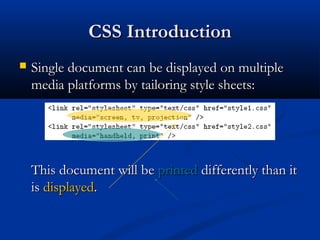
 Single document can be displayed on multipleSingle document can be displayed on multiple
media platforms by tailoring style sheets:media platforms by tailoring style sheets:
This document will beThis document will be printedprinted differently than itdifferently than it
isis displayeddisplayed..
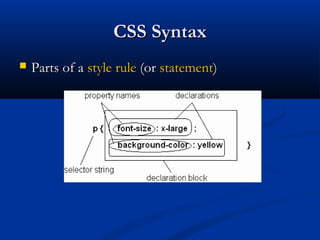
CSS SyntaxCSS Syntax
 Parts of aParts of a style rulestyle rule (or(or statementstatement))
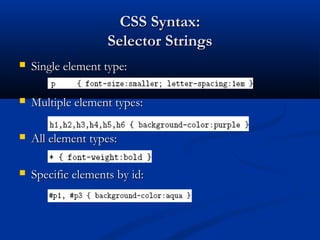
CSS Syntax:CSS Syntax:
Selector StringsSelector Strings
 Single element type:Single element type:
 Multiple element types:Multiple element types:
 All element types:All element types:
 Specific elements by id:Specific elements by id:
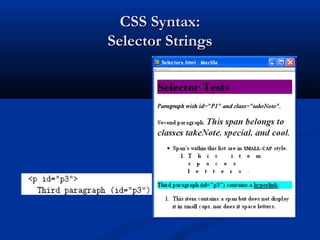
CSS Syntax:CSS Syntax:
Selector StringsSelector Strings
CSS Syntax:CSS Syntax:
Selector StringsSelector Strings
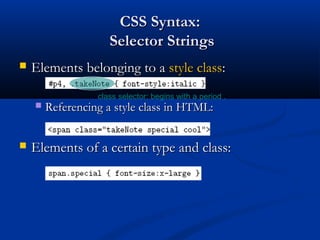
 Elements belonging to aElements belonging to a style classstyle class::
 Referencing a style class in HTML:Referencing a style class in HTML:
 Elements of a certain type and class:Elements of a certain type and class:
class selector: begins with a period .
CSS Syntax:CSS Syntax:
Selector StringsSelector Strings
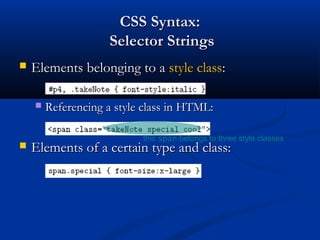
 Elements belonging to aElements belonging to a style classstyle class::
 Referencing a style class in HTML:Referencing a style class in HTML:
 Elements of a certain type and class:Elements of a certain type and class:
this span belongs to three style classes
CSS Syntax:CSS Syntax:
Selector StringsSelector Strings
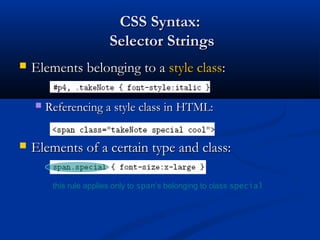
 Elements belonging to aElements belonging to a style classstyle class::
 Referencing a style class in HTML:Referencing a style class in HTML:
 Elements of a certain type and class:Elements of a certain type and class:
this rule applies only to span’s belonging to class special
CSS Syntax:CSS Syntax:
Selector StringsSelector Strings
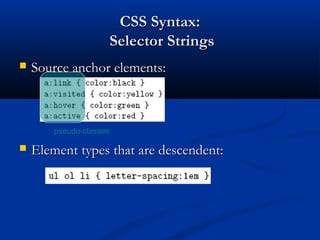
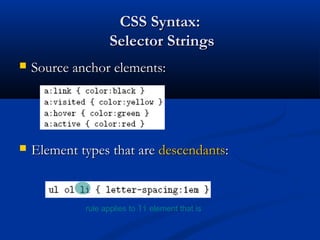
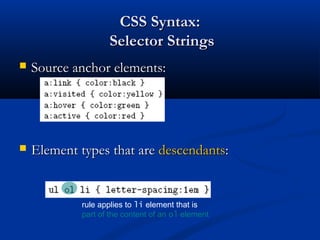
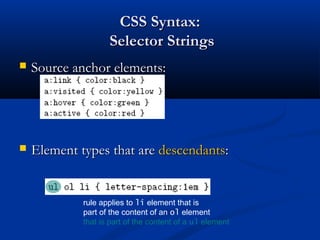
 Source anchor elements:Source anchor elements:
 Element types that are descendent:Element types that are descendent:
pseudo-classes
CSS Syntax:CSS Syntax:
Selector StringsSelector Strings
 Source anchor elements:Source anchor elements:
 Element types that areElement types that are descendantsdescendants::
rule applies to li element that is
CSS Syntax:CSS Syntax:
Selector StringsSelector Strings
 Source anchor elements:Source anchor elements:
 Element types that areElement types that are descendantsdescendants::
rule applies to li element that is
part of the content of an ol element
CSS Syntax:CSS Syntax:
Selector StringsSelector Strings
 Source anchor elements:Source anchor elements:
 Element types that areElement types that are descendantsdescendants::
rule applies to li element that is
part of the content of an ol element
that is part of the content of a ul element
CSS SyntaxCSS Syntax
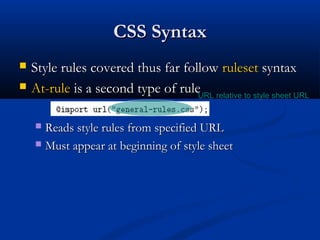
 Style rules covered thus far followStyle rules covered thus far follow rulesetruleset syntaxsyntax
 At-ruleAt-rule is a second type of ruleis a second type of rule
 Reads style rules from specified URLReads style rules from specified URL
 Must appear at beginning of style sheetMust appear at beginning of style sheet
URL relative to style sheet URL
Style Sheets and HTMLStyle Sheets and HTML
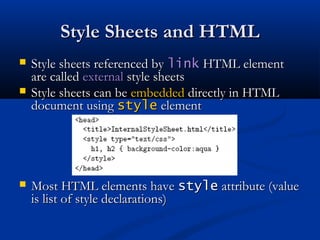
 Style sheets referenced byStyle sheets referenced by linklink HTML elementHTML element
are calledare called externalexternal style sheetsstyle sheets
 Style sheets can beStyle sheets can be embeddedembedded directly in HTMLdirectly in HTML
document usingdocument using stylestyle elementelement
 Most HTML elements haveMost HTML elements have stylestyle attribute (valueattribute (value
is list of style declarations)is list of style declarations)
Style Sheets and HTMLStyle Sheets and HTML
 Rules of thumb:Rules of thumb:
 Use external style sheets to define site-wide styleUse external style sheets to define site-wide style
 Prefer style sheets (either external or embedded) toPrefer style sheets (either external or embedded) to
stylestyle attributesattributes
 XMLXML special charactersspecial characters
 Must use references in embedded style sheets andMust use references in embedded style sheets and stylestyle
attributeattribute
 MustMust notnot use references in external style sheetsuse references in external style sheets
CSS Rule CascadeCSS Rule Cascade
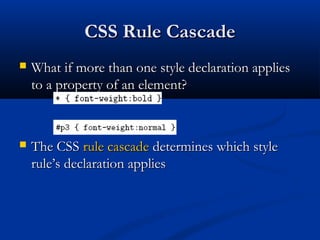
 What if more than one style declaration appliesWhat if more than one style declaration applies
to a property of an element?to a property of an element?
 The CSSThe CSS rule cascaderule cascade determines which styledetermines which style
rule’s declaration appliesrule’s declaration applies
CSS Rule CascadeCSS Rule Cascade
To find the value for an element/propertyTo find the value for an element/property
combination, user agents must apply thecombination, user agents must apply the
following sorting order:following sorting order:
1- Find all declarations that apply to the element1- Find all declarations that apply to the element
and property in question, for the targetand property in question, for the target
media typemedia type. Declarations apply if the associated. Declarations apply if the associated
selectorselector matchesmatches the element in question.the element in question.
CSS Rule CascadeCSS Rule Cascade
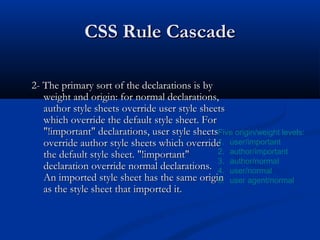
2- The primary sort of the declarations is by2- The primary sort of the declarations is by
weight and origin: for normal declarations,weight and origin: for normal declarations,
author style sheets override user style sheetsauthor style sheets override user style sheets
which override the default style sheet. Forwhich override the default style sheet. For
"!important" declarations, user style sheets"!important" declarations, user style sheets
override author style sheets which overrideoverride author style sheets which override
the default style sheet. "!important"the default style sheet. "!important"
declaration override normal declarations.declaration override normal declarations.
An imported style sheet has the same originAn imported style sheet has the same origin
as the style sheet that imported it.as the style sheet that imported it.
Five origin/weight levels:
1. user/important
2. author/important
3. author/normal
4. user/normal
5. user agent/normal
CSS Rule CascadeCSS Rule Cascade
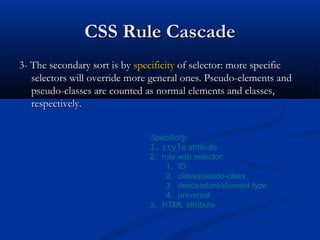
3- The secondary sort is by3- The secondary sort is by specificityspecificity of selector: more specificof selector: more specific
selectors will override more general ones. Pseudo-elements andselectors will override more general ones. Pseudo-elements and
pseudo-classes are counted as normal elements and classes,pseudo-classes are counted as normal elements and classes,
respectively.respectively.
Specificity:
1. style attribute
2. rule with selector:
1. ID
2. class/pseudo-class
3. descendant/element type
4. universal
3. HTML attribute
CSS Rule CascadeCSS Rule Cascade
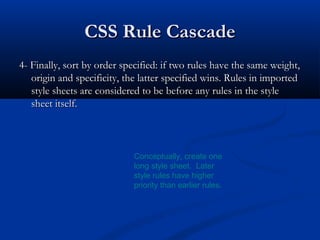
4- Finally, sort by order specified: if two rules have the same weight,4- Finally, sort by order specified: if two rules have the same weight,
origin and specificity, the latter specified wins. Rules in importedorigin and specificity, the latter specified wins. Rules in imported
style sheets are considered to be before any rules in the stylestyle sheets are considered to be before any rules in the style
sheet itself.sheet itself.
Conceptually, create one
long style sheet. Later
style rules have higher
priority than earlier rules.
CSS InheritanceCSS Inheritance
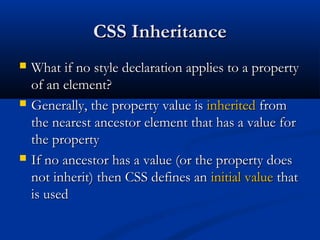
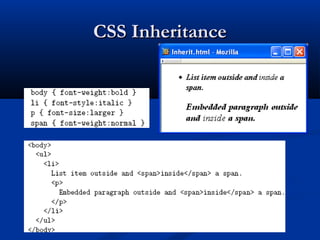
 What if no style declaration applies to a propertyWhat if no style declaration applies to a property
of an element?of an element?
 Generally, the property value isGenerally, the property value is inheritedinherited fromfrom
the nearest ancestor element that has a value forthe nearest ancestor element that has a value for
the propertythe property
 If no ancestor has a value (or the property doesIf no ancestor has a value (or the property does
not inherit) then CSS defines annot inherit) then CSS defines an initial valueinitial value thatthat
is usedis used
CSS InheritanceCSS Inheritance
 Property values:Property values:
 SpecifiedSpecified: value contained in declaration: value contained in declaration
 Absolute: value can be determined without reference toAbsolute: value can be determined without reference to
context (context (e.g.e.g.,, 2cm2cm))
 Relative: value depends on context (Relative: value depends on context (e.g.e.g.,, largerlarger))
 ComputedComputed: absolute representation of relative value: absolute representation of relative value
((e.g.e.g.,, largerlarger might be 1.2 x parent font size)might be 1.2 x parent font size)
 ActualActual: value actually used by browser (: value actually used by browser (e.g.e.g.,,
computed value might be rounded)computed value might be rounded)
CSS InheritanceCSS Inheritance
 Most properties inheritMost properties inherit computed valuecomputed value
 Exception discussed later:Exception discussed later: line-heightline-height
 A little thought can usually tell you whether aA little thought can usually tell you whether a
property inherits or notproperty inherits or not
 Example:Example: heightheight does not inheritdoes not inherit
CSS Font PropertiesCSS Font Properties
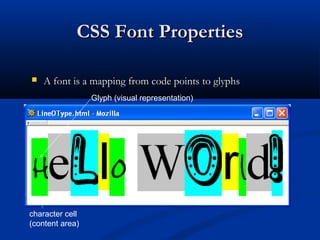
 A font is a mapping from code points to glyphsA font is a mapping from code points to glyphs
Glyph (visual representation)
character cell
(content area)
CSS Font PropertiesCSS Font Properties
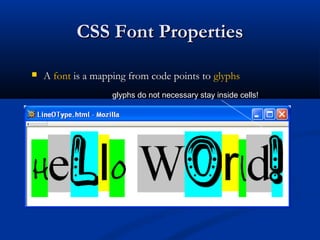
 AA fontfont is a mapping from code points tois a mapping from code points to glyphsglyphs
glyphs do not necessary stay inside cells!
CSS Font PropertiesCSS Font Properties
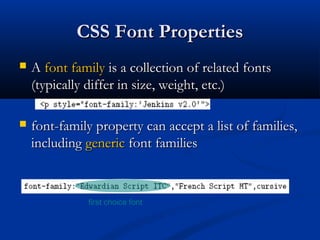
 AA font familyfont family is a collection of related fontsis a collection of related fonts
(typically differ in size, weight, etc.)(typically differ in size, weight, etc.)
 font-family property can accept a list of families,font-family property can accept a list of families,
includingincluding genericgeneric font familiesfont families
first choice font
CSS Font PropertiesCSS Font Properties
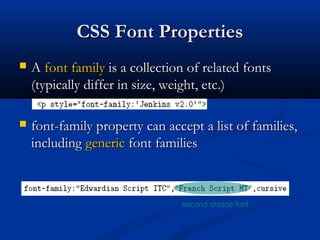
 AA font familyfont family is a collection of related fontsis a collection of related fonts
(typically differ in size, weight, etc.)(typically differ in size, weight, etc.)
 font-family property can accept a list of families,font-family property can accept a list of families,
includingincluding genericgeneric font familiesfont families
second choice font
CSS Font PropertiesCSS Font Properties
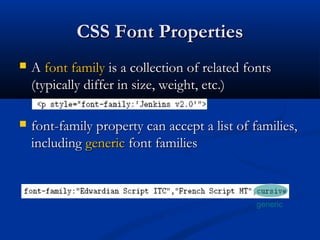
 AA font familyfont family is a collection of related fontsis a collection of related fonts
(typically differ in size, weight, etc.)(typically differ in size, weight, etc.)
 font-family property can accept a list of families,font-family property can accept a list of families,
includingincluding genericgeneric font familiesfont families
generic
CSS Font PropertiesCSS Font Properties
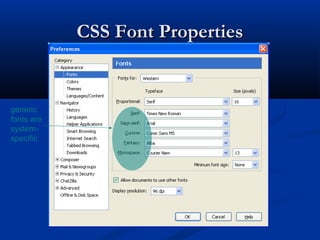
generic
fonts are
system-
specific
CSS Font PropertiesCSS Font Properties
 Note that most generic font can be easily set onNote that most generic font can be easily set on
Firefox and Chrome, but such option doesn’tFirefox and Chrome, but such option doesn’t
seem to be available on IE 7 and 8. IE will stillseem to be available on IE 7 and 8. IE will still
default to something although maybe not whatdefault to something although maybe not what
you had hoped for!you had hoped for!
CSS Font PropertiesCSS Font Properties
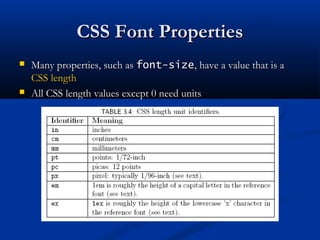
 Many properties, such asMany properties, such as font-sizefont-size, have a value that is a, have a value that is a
CSS lengthCSS length
 All CSS length values except 0 need unitsAll CSS length values except 0 need units
CSS Font PropertiesCSS Font Properties
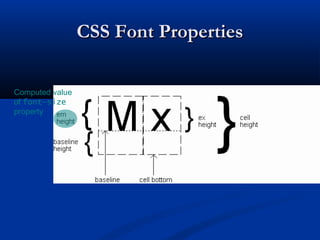
Computed value
of font-size
property
CSS Font PropertiesCSS Font Properties
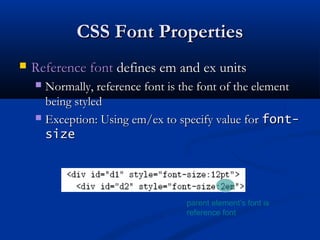
 Reference fontReference font defines em and ex unitsdefines em and ex units
 Normally, reference font is the font of the elementNormally, reference font is the font of the element
being styledbeing styled
 Exception: Using em/ex to specify value forException: Using em/ex to specify value for font-font-
sizesize
parent element’s font is
reference font
CSS Font PropertiesCSS Font Properties
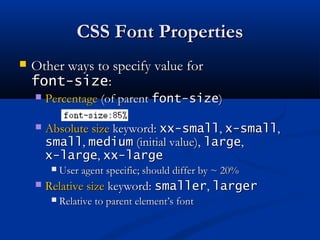
 Other ways to specify value forOther ways to specify value for
font-sizefont-size::
 PercentagePercentage (of parent(of parent font-sizefont-size))
 Absolute sizeAbsolute size keyword:keyword: xx-smallxx-small,, x-smallx-small,,
smallsmall,, mediummedium (initial value),(initial value), largelarge,,
x-largex-large,, xx-largexx-large
 User agent specific; should differ by ~ 20%User agent specific; should differ by ~ 20%
 Relative sizeRelative size keyword:keyword: smallersmaller,, largerlarger
 Relative to parent element’s fontRelative to parent element’s font
CSS Font PropertiesCSS Font Properties
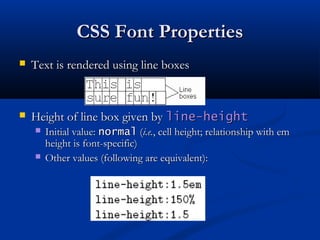
 Text is rendered using line boxesText is rendered using line boxes
 Height of line box given byHeight of line box given by line-heightline-height
 Initial value:Initial value: normalnormal ((i.e.i.e., cell height; relationship with em, cell height; relationship with em
height is font-specific)height is font-specific)
 Other values (following are equivalent):Other values (following are equivalent):
CSS Font PropertiesCSS Font Properties
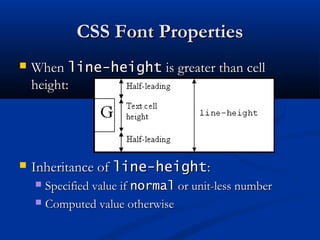
 WhenWhen line-heightline-height is greater than cellis greater than cell
height:height:
 Inheritance ofInheritance of line-heightline-height::
 Specified value ifSpecified value if normalnormal or unit-less numberor unit-less number
 Computed value otherwiseComputed value otherwise
CSS Font PropertiesCSS Font Properties
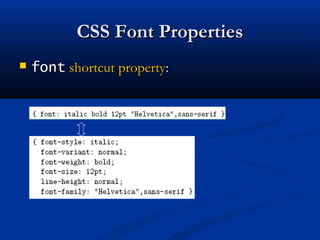
 fontfont shortcut propertyshortcut property::
CSS Font PropertiesCSS Font Properties
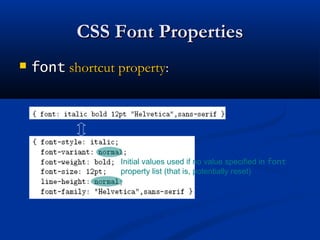
 fontfont shortcut propertyshortcut property::
Initial values used if no value specified in font
property list (that is, potentially reset)
CSS Font PropertiesCSS Font Properties
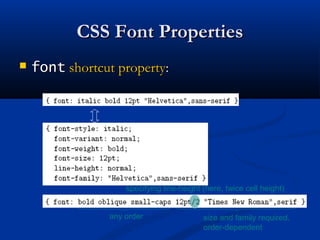
 fontfont shortcut propertyshortcut property::
specifying line-height (here, twice cell height)
any order size and family required,
order-dependent
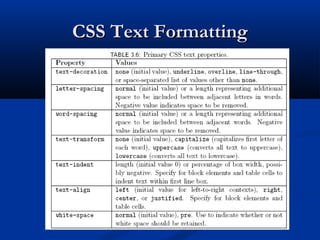
CSS Text FormattingCSS Text Formatting
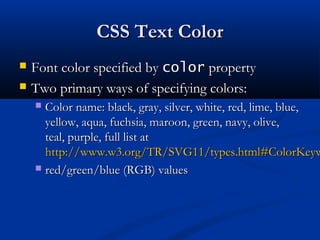
CSS Text ColorCSS Text Color
 Font color specified byFont color specified by colorcolor propertyproperty
 Two primary ways of specifying colors:Two primary ways of specifying colors:
 Color name: black, gray, silver, white, red, lime, blue,Color name: black, gray, silver, white, red, lime, blue,
yellow, aqua, fuchsia, maroon, green, navy, olive,yellow, aqua, fuchsia, maroon, green, navy, olive,
teal, purple, full list atteal, purple, full list at
http://www.w3.org/TR/SVG11/types.html#ColorKeywhttp://www.w3.org/TR/SVG11/types.html#ColorKeyw
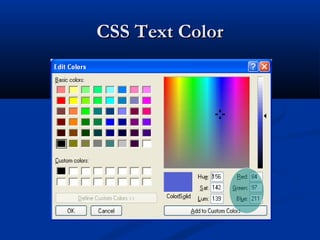
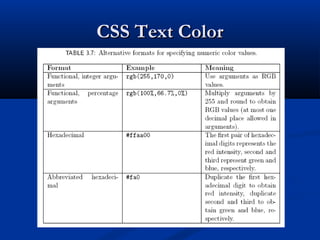
 red/green/blue (RGB) valuesred/green/blue (RGB) values
CSS Text ColorCSS Text Color
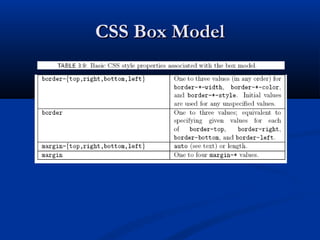
CSS Box ModelCSS Box Model
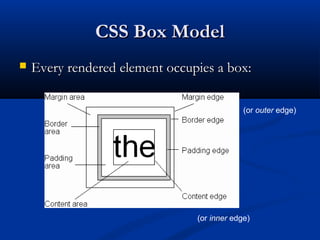
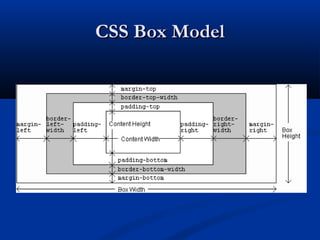
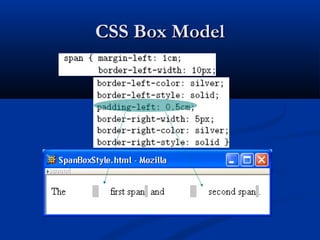
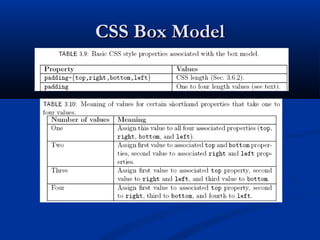
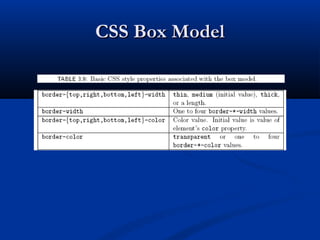
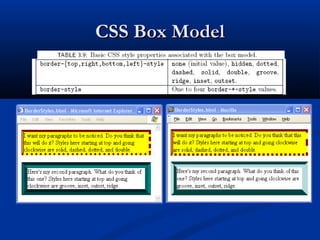
 Every rendered element occupies a box:Every rendered element occupies a box:
(or inner edge)
(or outer edge)
CSS Box ModelCSS Box Model
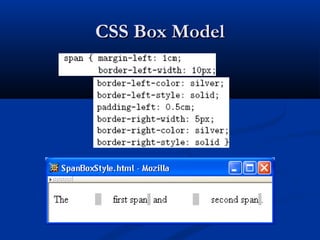
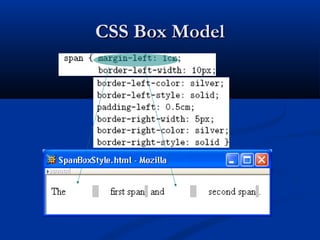
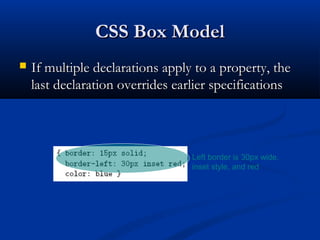
 If multiple declarations apply to a property, theIf multiple declarations apply to a property, the
last declaration overrides earlier specificationslast declaration overrides earlier specifications
Left border is 30px wide,
inset style, and red
BackgroundsBackgrounds
 background-colorbackground-color
 Specifies background color for content, padding, andSpecifies background color for content, padding, and
border areasborder areas
 Margin area is always transparentMargin area is always transparent
 Not inherited; initial valueNot inherited; initial value transparenttransparent
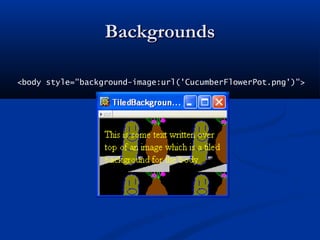
 background-imagebackground-image
 Specifies (usingSpecifies (using url()url() function) image that will befunction) image that will be
tiledtiled over an elementover an element
BackgroundsBackgrounds
<body style="background-image:url('CucumberFlowerPot.png')">
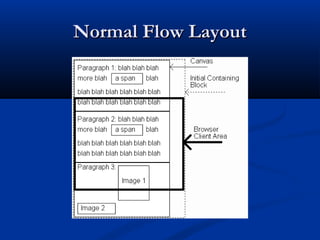
Normal Flow LayoutNormal Flow Layout
 InIn normal flow processingnormal flow processing, each displayed, each displayed
element has a corresponding boxelement has a corresponding box
 html element box is calledhtml element box is called initial containing blockinitial containing block
and corresponds to entire documentand corresponds to entire document
 Boxes of child elements are contained in boxes ofBoxes of child elements are contained in boxes of
parentparent
 SiblingSibling block elementsblock elements are laid out one on top of theare laid out one on top of the
otherother
 SiblingSibling inline elementsinline elements are one after the otherare one after the other
Normal Flow LayoutNormal Flow Layout
(body)
(html)
Normal Flow LayoutNormal Flow Layout
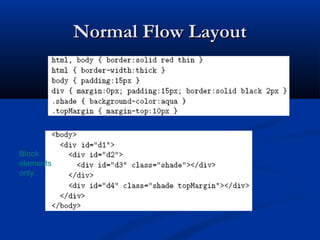
Block
elements
only
Normal Flow LayoutNormal Flow Layout
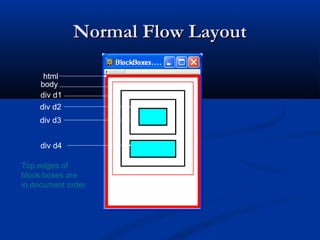
html
body
div d1
div d2
div d3
div d4
Top edges of
block boxes are
in document order
Normal Flow LayoutNormal Flow Layout
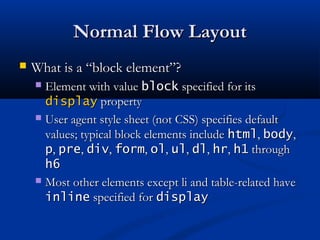
 What is a “block element”?What is a “block element”?
 Element with valueElement with value blockblock specified for itsspecified for its
displaydisplay propertyproperty
 User agent style sheet (not CSS) specifies defaultUser agent style sheet (not CSS) specifies default
values; typical block elements includevalues; typical block elements include htmlhtml,, bodybody,,
pp,, prepre,, divdiv,, formform,, olol,, ulul,, dldl,, hrhr,, h1h1 throughthrough
h6h6
 Most other elements except li and table-related haveMost other elements except li and table-related have
inlineinline specified forspecified for displaydisplay
Normal Flow LayoutNormal Flow Layout
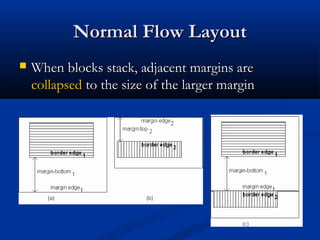
 When blocks stack, adjacent margins areWhen blocks stack, adjacent margins are
collapsedcollapsed to the size of the larger marginto the size of the larger margin
Normal Flow LayoutNormal Flow Layout
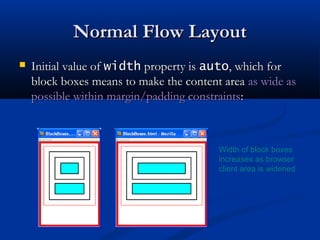
 Initial value ofInitial value of widthwidth property isproperty is autoauto, which for, which for
block boxes means to make the content areablock boxes means to make the content area as wide asas wide as
possible within margin/padding constraintspossible within margin/padding constraints::
Width of block boxes
increases as browser
client area is widened
Normal Flow LayoutNormal Flow Layout
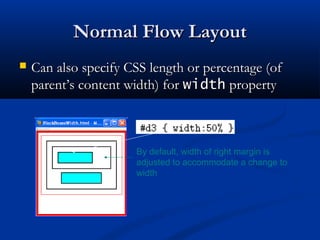
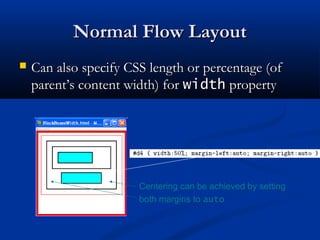
 Can also specify CSS length or percentage (ofCan also specify CSS length or percentage (of
parent’s content width) forparent’s content width) for widthwidth propertyproperty
By default, width of right margin is
adjusted to accommodate a change to
width
Normal Flow LayoutNormal Flow Layout
 Can also specify CSS length or percentage (ofCan also specify CSS length or percentage (of
parent’s content width) forparent’s content width) for widthwidth propertyproperty
Centering can be achieved by setting
both margins to auto
Normal Flow LayoutNormal Flow Layout
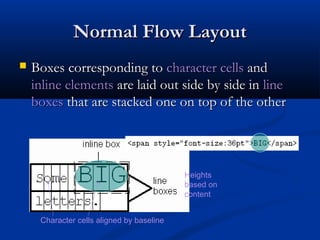
 Boxes corresponding toBoxes corresponding to character cellscharacter cells andand
inline elementsinline elements are laid out side by side inare laid out side by side in lineline
boxesboxes that are stacked one on top of the otherthat are stacked one on top of the other
Character cells aligned by baseline
Heights
based on
content
Normal Flow LayoutNormal Flow Layout
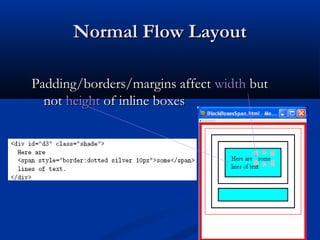
Padding/borders/margins affectPadding/borders/margins affect widthwidth butbut
notnot heightheight of inline boxesof inline boxes
Normal Flow LayoutNormal Flow Layout
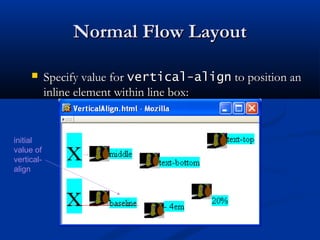
 Specify value forSpecify value for vertical-alignvertical-align to position anto position an
inline element within line box:inline element within line box:
initial
value of
vertical-
align
Beyond Normal FlowBeyond Normal Flow
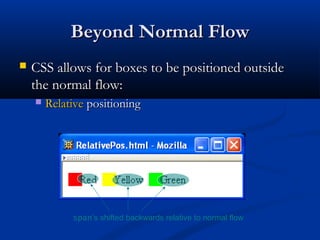
 CSS allows for boxes to be positioned outsideCSS allows for boxes to be positioned outside
the normal flow:the normal flow:
 RelativeRelative positioningpositioning
span’s shifted backwards relative to normal flow
Beyond Normal FlowBeyond Normal Flow
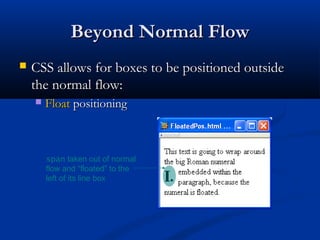
 CSS allows for boxes to be positioned outsideCSS allows for boxes to be positioned outside
the normal flow:the normal flow:
 FloatFloat positioningpositioning
span taken out of normal
flow and “floated” to the
left of its line box
Beyond Normal FlowBeyond Normal Flow
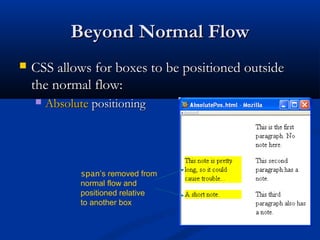
 CSS allows for boxes to be positioned outsideCSS allows for boxes to be positioned outside
the normal flow:the normal flow:
 AbsoluteAbsolute positioningpositioning
span’s removed from
normal flow and
positioned relative
to another box
Beyond Normal FlowBeyond Normal Flow
 Properties used to specify positioning:Properties used to specify positioning:
 positionposition:: staticstatic (initial value),(initial value), relativerelative,,
oror absoluteabsolute
 Element isElement is positionedpositioned if this property notif this property not staticstatic
 PropertiesProperties leftleft,, rightright,, toptop,, bottombottom apply toapply to
positioned elementspositioned elements
 Primary values arePrimary values are autoauto (initial value) or CSS length(initial value) or CSS length
 floatfloat:: nonenone,, leftleft, or, or rightright
 Applies to elements withApplies to elements with staticstatic andand relativerelative
positioning onlypositioning only
Beyond Normal FlowBeyond Normal Flow
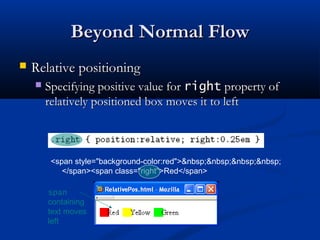
 Relative positioningRelative positioning
 Specifying positive value forSpecifying positive value for rightright property ofproperty of
relatively positioned box moves it to leftrelatively positioned box moves it to left
<span style="background-color:red">&nbsp;&nbsp;&nbsp;&nbsp;
</span><span class="right">Red</span>
span
containing
text moves
left
Beyond Normal FlowBeyond Normal Flow
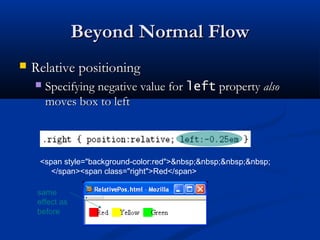
 Relative positioningRelative positioning
 Specifying negative value forSpecifying negative value for leftleft propertyproperty alsoalso
moves box to leftmoves box to left
<span style="background-color:red">&nbsp;&nbsp;&nbsp;&nbsp;
</span><span class="right">Red</span>
same
effect as
before
Beyond Normal FlowBeyond Normal Flow
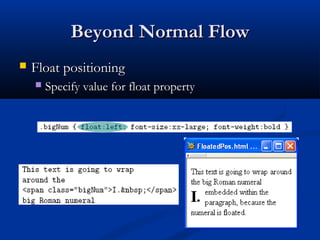
 Float positioningFloat positioning
 Specify value for float propertySpecify value for float property
Beyond Normal FlowBeyond Normal Flow
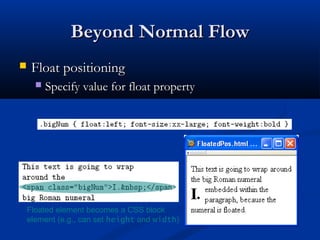
 Float positioningFloat positioning
 Specify value for float propertySpecify value for float property
Floated element becomes a CSS block
element (e.g., can set height and width)
Beyond Normal FlowBeyond Normal Flow
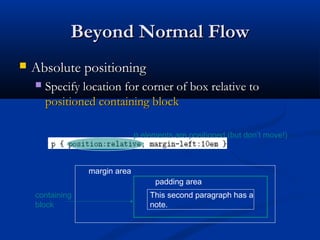
 Absolute positioningAbsolute positioning
 Specify location for corner of box relative toSpecify location for corner of box relative to
positioned containing blockpositioned containing block
margin area
padding area
containing
block
This second paragraph has a
note.
p elements are positioned (but don’t move!)
Beyond Normal FlowBeyond Normal Flow
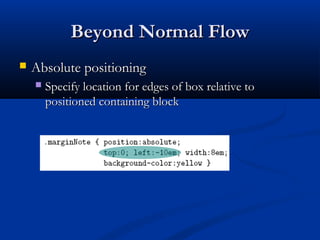
 Absolute positioningAbsolute positioning
 Specify location for edges of box relative toSpecify location for edges of box relative to
positioned containing blockpositioned containing block
Beyond Normal FlowBeyond Normal Flow
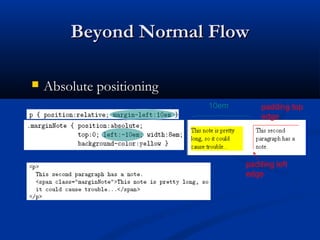
 Absolute positioningAbsolute positioning
10em padding top
edge
padding left
edge
Beyond Normal FlowBeyond Normal Flow
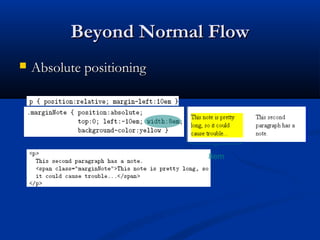
 Absolute positioningAbsolute positioning
8em
Beyond Normal FlowBeyond Normal Flow
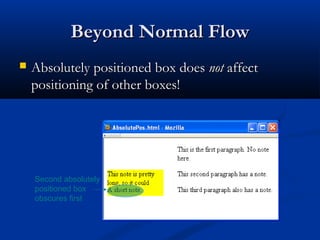
 Absolutely positioned box doesAbsolutely positioned box does notnot affectaffect
positioning of other boxes!positioning of other boxes!
Second absolutely
positioned box
obscures first
CSS Position-Related PropertiesCSS Position-Related Properties
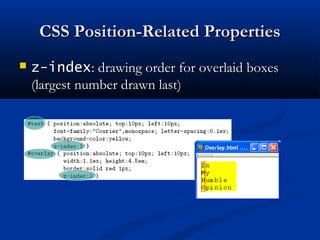
 z-indexz-index: drawing order for overlaid boxes: drawing order for overlaid boxes
(largest number drawn last)(largest number drawn last)
CSS Position-Related PropertiesCSS Position-Related Properties
 displaydisplay: value: value nonenone means that element andmeans that element and
its descendants are not rendered andits descendants are not rendered and do notdo not affectaffect
normal flownormal flow
 visibilityvisibility: value: value hiddenhidden (initial value is(initial value is
visiblevisible) means that element and its) means that element and its
descendants are not rendered but stilldescendants are not rendered but still dodo affectaffect
normal flownormal flow
https://msatechnosoft.in/

Cascading Style Sheet | CSS

  • 1.
  • 2.
    MotivationMotivation  HTML markupcan be used to representHTML markup can be used to represent  SemanticsSemantics:: h1h1 meansmeans that an element is a top-level headingthat an element is a top-level heading  PresentationPresentation:: h1h1 elementselements looklook a certain waya certain way  It’s advisable to separate semantics from presentationIt’s advisable to separate semantics from presentation because:because:  It’s easier to present documents onIt’s easier to present documents on multiple platformsmultiple platforms (browser, cell phone, spoken, …)(browser, cell phone, spoken, …)  It’s easier to generate documents withIt’s easier to generate documents with consistent lookconsistent look  Semantic and presentation changes can be madeSemantic and presentation changes can be made independently of one another (independently of one another (division of labordivision of labor))  User controlUser control of presentation is facilitatedof presentation is facilitated
  • 3.
    Style Sheet LanguagesStyleSheet Languages  Cascading Style Sheets (Cascading Style Sheets (CSSCSS))  Applies to (X)HTML as well as XML documents inApplies to (X)HTML as well as XML documents in generalgeneral  Focus of this chapterFocus of this chapter  Extensible Stylesheet Language (Extensible Stylesheet Language (XSLXSL))  Often used to transform one XML document toOften used to transform one XML document to another form, but can also add styleanother form, but can also add style  XSL Transformations covered in later chapterXSL Transformations covered in later chapter
  • 4.
    CSS IntroductionCSS Introduction A styled HTML documentA styled HTML document produced by the style sheetproduced by the style sheet style1.cssstyle1.css::
  • 5.
    CSS IntroductionCSS Introduction linkelement associates style sheet with doc.
  • 6.
    CSS IntroductionCSS Introduction typeattribute specifies style language used
  • 7.
    CSS IntroductionCSS Introduction hrefattribute provides style sheet URL
  • 8.
    CSS IntroductionCSS Introduction titleattribute provides style sheet name
  • 9.
    CSS IntroductionCSS Introduction Alternative,user selectable style sheets can be specified
  • 10.
  • 11.
    CSS IntroductionCSS Introduction A styled HTML documentA styled HTML document produced by the style sheetproduced by the style sheet style2.cssstyle2.css::
  • 12.
    CSS IntroductionCSS Introduction Notethat alternate, user selectable style is notNote that alternate, user selectable style is not widely supported: firefox 3 and IE 8 do, but IEwidely supported: firefox 3 and IE 8 do, but IE 6, IE 7 and Chrome don’t.6, IE 7 and Chrome don’t.
  • 13.
    CSS IntroductionCSS Introduction Single document can be displayed on multipleSingle document can be displayed on multiple media platforms by tailoring style sheets:media platforms by tailoring style sheets: This document will beThis document will be printedprinted differently than itdifferently than it isis displayeddisplayed..
  • 14.
    CSS SyntaxCSS Syntax Parts of aParts of a style rulestyle rule (or(or statementstatement))
  • 15.
    CSS Syntax:CSS Syntax: SelectorStringsSelector Strings  Single element type:Single element type:  Multiple element types:Multiple element types:  All element types:All element types:  Specific elements by id:Specific elements by id:
  • 16.
    CSS Syntax:CSS Syntax: SelectorStringsSelector Strings
  • 17.
    CSS Syntax:CSS Syntax: SelectorStringsSelector Strings  Elements belonging to aElements belonging to a style classstyle class::  Referencing a style class in HTML:Referencing a style class in HTML:  Elements of a certain type and class:Elements of a certain type and class: class selector: begins with a period .
  • 18.
    CSS Syntax:CSS Syntax: SelectorStringsSelector Strings  Elements belonging to aElements belonging to a style classstyle class::  Referencing a style class in HTML:Referencing a style class in HTML:  Elements of a certain type and class:Elements of a certain type and class: this span belongs to three style classes
  • 19.
    CSS Syntax:CSS Syntax: SelectorStringsSelector Strings  Elements belonging to aElements belonging to a style classstyle class::  Referencing a style class in HTML:Referencing a style class in HTML:  Elements of a certain type and class:Elements of a certain type and class: this rule applies only to span’s belonging to class special
  • 20.
    CSS Syntax:CSS Syntax: SelectorStringsSelector Strings  Source anchor elements:Source anchor elements:  Element types that are descendent:Element types that are descendent: pseudo-classes
  • 21.
    CSS Syntax:CSS Syntax: SelectorStringsSelector Strings  Source anchor elements:Source anchor elements:  Element types that areElement types that are descendantsdescendants:: rule applies to li element that is
  • 22.
    CSS Syntax:CSS Syntax: SelectorStringsSelector Strings  Source anchor elements:Source anchor elements:  Element types that areElement types that are descendantsdescendants:: rule applies to li element that is part of the content of an ol element
  • 23.
    CSS Syntax:CSS Syntax: SelectorStringsSelector Strings  Source anchor elements:Source anchor elements:  Element types that areElement types that are descendantsdescendants:: rule applies to li element that is part of the content of an ol element that is part of the content of a ul element
  • 24.
    CSS SyntaxCSS Syntax Style rules covered thus far followStyle rules covered thus far follow rulesetruleset syntaxsyntax  At-ruleAt-rule is a second type of ruleis a second type of rule  Reads style rules from specified URLReads style rules from specified URL  Must appear at beginning of style sheetMust appear at beginning of style sheet URL relative to style sheet URL
  • 25.
    Style Sheets andHTMLStyle Sheets and HTML  Style sheets referenced byStyle sheets referenced by linklink HTML elementHTML element are calledare called externalexternal style sheetsstyle sheets  Style sheets can beStyle sheets can be embeddedembedded directly in HTMLdirectly in HTML document usingdocument using stylestyle elementelement  Most HTML elements haveMost HTML elements have stylestyle attribute (valueattribute (value is list of style declarations)is list of style declarations)
  • 26.
    Style Sheets andHTMLStyle Sheets and HTML  Rules of thumb:Rules of thumb:  Use external style sheets to define site-wide styleUse external style sheets to define site-wide style  Prefer style sheets (either external or embedded) toPrefer style sheets (either external or embedded) to stylestyle attributesattributes  XMLXML special charactersspecial characters  Must use references in embedded style sheets andMust use references in embedded style sheets and stylestyle attributeattribute  MustMust notnot use references in external style sheetsuse references in external style sheets
  • 27.
    CSS Rule CascadeCSSRule Cascade  What if more than one style declaration appliesWhat if more than one style declaration applies to a property of an element?to a property of an element?  The CSSThe CSS rule cascaderule cascade determines which styledetermines which style rule’s declaration appliesrule’s declaration applies
  • 28.
    CSS Rule CascadeCSSRule Cascade To find the value for an element/propertyTo find the value for an element/property combination, user agents must apply thecombination, user agents must apply the following sorting order:following sorting order: 1- Find all declarations that apply to the element1- Find all declarations that apply to the element and property in question, for the targetand property in question, for the target media typemedia type. Declarations apply if the associated. Declarations apply if the associated selectorselector matchesmatches the element in question.the element in question.
  • 29.
    CSS Rule CascadeCSSRule Cascade 2- The primary sort of the declarations is by2- The primary sort of the declarations is by weight and origin: for normal declarations,weight and origin: for normal declarations, author style sheets override user style sheetsauthor style sheets override user style sheets which override the default style sheet. Forwhich override the default style sheet. For "!important" declarations, user style sheets"!important" declarations, user style sheets override author style sheets which overrideoverride author style sheets which override the default style sheet. "!important"the default style sheet. "!important" declaration override normal declarations.declaration override normal declarations. An imported style sheet has the same originAn imported style sheet has the same origin as the style sheet that imported it.as the style sheet that imported it. Five origin/weight levels: 1. user/important 2. author/important 3. author/normal 4. user/normal 5. user agent/normal
  • 30.
    CSS Rule CascadeCSSRule Cascade 3- The secondary sort is by3- The secondary sort is by specificityspecificity of selector: more specificof selector: more specific selectors will override more general ones. Pseudo-elements andselectors will override more general ones. Pseudo-elements and pseudo-classes are counted as normal elements and classes,pseudo-classes are counted as normal elements and classes, respectively.respectively. Specificity: 1. style attribute 2. rule with selector: 1. ID 2. class/pseudo-class 3. descendant/element type 4. universal 3. HTML attribute
  • 31.
    CSS Rule CascadeCSSRule Cascade 4- Finally, sort by order specified: if two rules have the same weight,4- Finally, sort by order specified: if two rules have the same weight, origin and specificity, the latter specified wins. Rules in importedorigin and specificity, the latter specified wins. Rules in imported style sheets are considered to be before any rules in the stylestyle sheets are considered to be before any rules in the style sheet itself.sheet itself. Conceptually, create one long style sheet. Later style rules have higher priority than earlier rules.
  • 32.
    CSS InheritanceCSS Inheritance What if no style declaration applies to a propertyWhat if no style declaration applies to a property of an element?of an element?  Generally, the property value isGenerally, the property value is inheritedinherited fromfrom the nearest ancestor element that has a value forthe nearest ancestor element that has a value for the propertythe property  If no ancestor has a value (or the property doesIf no ancestor has a value (or the property does not inherit) then CSS defines annot inherit) then CSS defines an initial valueinitial value thatthat is usedis used
  • 33.
  • 34.
    CSS InheritanceCSS Inheritance Property values:Property values:  SpecifiedSpecified: value contained in declaration: value contained in declaration  Absolute: value can be determined without reference toAbsolute: value can be determined without reference to context (context (e.g.e.g.,, 2cm2cm))  Relative: value depends on context (Relative: value depends on context (e.g.e.g.,, largerlarger))  ComputedComputed: absolute representation of relative value: absolute representation of relative value ((e.g.e.g.,, largerlarger might be 1.2 x parent font size)might be 1.2 x parent font size)  ActualActual: value actually used by browser (: value actually used by browser (e.g.e.g.,, computed value might be rounded)computed value might be rounded)
  • 35.
    CSS InheritanceCSS Inheritance Most properties inheritMost properties inherit computed valuecomputed value  Exception discussed later:Exception discussed later: line-heightline-height  A little thought can usually tell you whether aA little thought can usually tell you whether a property inherits or notproperty inherits or not  Example:Example: heightheight does not inheritdoes not inherit
  • 36.
    CSS Font PropertiesCSSFont Properties  A font is a mapping from code points to glyphsA font is a mapping from code points to glyphs Glyph (visual representation) character cell (content area)
  • 37.
    CSS Font PropertiesCSSFont Properties  AA fontfont is a mapping from code points tois a mapping from code points to glyphsglyphs glyphs do not necessary stay inside cells!
  • 38.
    CSS Font PropertiesCSSFont Properties  AA font familyfont family is a collection of related fontsis a collection of related fonts (typically differ in size, weight, etc.)(typically differ in size, weight, etc.)  font-family property can accept a list of families,font-family property can accept a list of families, includingincluding genericgeneric font familiesfont families first choice font
  • 39.
    CSS Font PropertiesCSSFont Properties  AA font familyfont family is a collection of related fontsis a collection of related fonts (typically differ in size, weight, etc.)(typically differ in size, weight, etc.)  font-family property can accept a list of families,font-family property can accept a list of families, includingincluding genericgeneric font familiesfont families second choice font
  • 40.
    CSS Font PropertiesCSSFont Properties  AA font familyfont family is a collection of related fontsis a collection of related fonts (typically differ in size, weight, etc.)(typically differ in size, weight, etc.)  font-family property can accept a list of families,font-family property can accept a list of families, includingincluding genericgeneric font familiesfont families generic
  • 41.
    CSS Font PropertiesCSSFont Properties generic fonts are system- specific
  • 42.
    CSS Font PropertiesCSSFont Properties  Note that most generic font can be easily set onNote that most generic font can be easily set on Firefox and Chrome, but such option doesn’tFirefox and Chrome, but such option doesn’t seem to be available on IE 7 and 8. IE will stillseem to be available on IE 7 and 8. IE will still default to something although maybe not whatdefault to something although maybe not what you had hoped for!you had hoped for!
  • 43.
    CSS Font PropertiesCSSFont Properties  Many properties, such asMany properties, such as font-sizefont-size, have a value that is a, have a value that is a CSS lengthCSS length  All CSS length values except 0 need unitsAll CSS length values except 0 need units
  • 44.
    CSS Font PropertiesCSSFont Properties Computed value of font-size property
  • 45.
    CSS Font PropertiesCSSFont Properties  Reference fontReference font defines em and ex unitsdefines em and ex units  Normally, reference font is the font of the elementNormally, reference font is the font of the element being styledbeing styled  Exception: Using em/ex to specify value forException: Using em/ex to specify value for font-font- sizesize parent element’s font is reference font
  • 46.
    CSS Font PropertiesCSSFont Properties  Other ways to specify value forOther ways to specify value for font-sizefont-size::  PercentagePercentage (of parent(of parent font-sizefont-size))  Absolute sizeAbsolute size keyword:keyword: xx-smallxx-small,, x-smallx-small,, smallsmall,, mediummedium (initial value),(initial value), largelarge,, x-largex-large,, xx-largexx-large  User agent specific; should differ by ~ 20%User agent specific; should differ by ~ 20%  Relative sizeRelative size keyword:keyword: smallersmaller,, largerlarger  Relative to parent element’s fontRelative to parent element’s font
  • 47.
    CSS Font PropertiesCSSFont Properties
  • 48.
    CSS Font PropertiesCSSFont Properties  Text is rendered using line boxesText is rendered using line boxes  Height of line box given byHeight of line box given by line-heightline-height  Initial value:Initial value: normalnormal ((i.e.i.e., cell height; relationship with em, cell height; relationship with em height is font-specific)height is font-specific)  Other values (following are equivalent):Other values (following are equivalent):
  • 49.
    CSS Font PropertiesCSSFont Properties  WhenWhen line-heightline-height is greater than cellis greater than cell height:height:  Inheritance ofInheritance of line-heightline-height::  Specified value ifSpecified value if normalnormal or unit-less numberor unit-less number  Computed value otherwiseComputed value otherwise
  • 50.
    CSS Font PropertiesCSSFont Properties  fontfont shortcut propertyshortcut property::
  • 51.
    CSS Font PropertiesCSSFont Properties  fontfont shortcut propertyshortcut property:: Initial values used if no value specified in font property list (that is, potentially reset)
  • 52.
    CSS Font PropertiesCSSFont Properties  fontfont shortcut propertyshortcut property:: specifying line-height (here, twice cell height) any order size and family required, order-dependent
  • 53.
    CSS Text FormattingCSSText Formatting
  • 54.
    CSS Text ColorCSSText Color  Font color specified byFont color specified by colorcolor propertyproperty  Two primary ways of specifying colors:Two primary ways of specifying colors:  Color name: black, gray, silver, white, red, lime, blue,Color name: black, gray, silver, white, red, lime, blue, yellow, aqua, fuchsia, maroon, green, navy, olive,yellow, aqua, fuchsia, maroon, green, navy, olive, teal, purple, full list atteal, purple, full list at http://www.w3.org/TR/SVG11/types.html#ColorKeywhttp://www.w3.org/TR/SVG11/types.html#ColorKeyw  red/green/blue (RGB) valuesred/green/blue (RGB) values
  • 55.
  • 56.
  • 57.
    CSS Box ModelCSSBox Model  Every rendered element occupies a box:Every rendered element occupies a box: (or inner edge) (or outer edge)
  • 58.
  • 59.
  • 60.
  • 61.
  • 62.
  • 63.
  • 64.
  • 65.
  • 66.
    CSS Box ModelCSSBox Model  If multiple declarations apply to a property, theIf multiple declarations apply to a property, the last declaration overrides earlier specificationslast declaration overrides earlier specifications Left border is 30px wide, inset style, and red
  • 67.
    BackgroundsBackgrounds  background-colorbackground-color  Specifiesbackground color for content, padding, andSpecifies background color for content, padding, and border areasborder areas  Margin area is always transparentMargin area is always transparent  Not inherited; initial valueNot inherited; initial value transparenttransparent  background-imagebackground-image  Specifies (usingSpecifies (using url()url() function) image that will befunction) image that will be tiledtiled over an elementover an element
  • 68.
  • 69.
    Normal Flow LayoutNormalFlow Layout  InIn normal flow processingnormal flow processing, each displayed, each displayed element has a corresponding boxelement has a corresponding box  html element box is calledhtml element box is called initial containing blockinitial containing block and corresponds to entire documentand corresponds to entire document  Boxes of child elements are contained in boxes ofBoxes of child elements are contained in boxes of parentparent  SiblingSibling block elementsblock elements are laid out one on top of theare laid out one on top of the otherother  SiblingSibling inline elementsinline elements are one after the otherare one after the other
  • 70.
    Normal Flow LayoutNormalFlow Layout (body) (html)
  • 71.
    Normal Flow LayoutNormalFlow Layout Block elements only
  • 72.
    Normal Flow LayoutNormalFlow Layout html body div d1 div d2 div d3 div d4 Top edges of block boxes are in document order
  • 73.
    Normal Flow LayoutNormalFlow Layout  What is a “block element”?What is a “block element”?  Element with valueElement with value blockblock specified for itsspecified for its displaydisplay propertyproperty  User agent style sheet (not CSS) specifies defaultUser agent style sheet (not CSS) specifies default values; typical block elements includevalues; typical block elements include htmlhtml,, bodybody,, pp,, prepre,, divdiv,, formform,, olol,, ulul,, dldl,, hrhr,, h1h1 throughthrough h6h6  Most other elements except li and table-related haveMost other elements except li and table-related have inlineinline specified forspecified for displaydisplay
  • 74.
    Normal Flow LayoutNormalFlow Layout  When blocks stack, adjacent margins areWhen blocks stack, adjacent margins are collapsedcollapsed to the size of the larger marginto the size of the larger margin
  • 75.
    Normal Flow LayoutNormalFlow Layout  Initial value ofInitial value of widthwidth property isproperty is autoauto, which for, which for block boxes means to make the content areablock boxes means to make the content area as wide asas wide as possible within margin/padding constraintspossible within margin/padding constraints:: Width of block boxes increases as browser client area is widened
  • 76.
    Normal Flow LayoutNormalFlow Layout  Can also specify CSS length or percentage (ofCan also specify CSS length or percentage (of parent’s content width) forparent’s content width) for widthwidth propertyproperty By default, width of right margin is adjusted to accommodate a change to width
  • 77.
    Normal Flow LayoutNormalFlow Layout  Can also specify CSS length or percentage (ofCan also specify CSS length or percentage (of parent’s content width) forparent’s content width) for widthwidth propertyproperty Centering can be achieved by setting both margins to auto
  • 78.
    Normal Flow LayoutNormalFlow Layout  Boxes corresponding toBoxes corresponding to character cellscharacter cells andand inline elementsinline elements are laid out side by side inare laid out side by side in lineline boxesboxes that are stacked one on top of the otherthat are stacked one on top of the other Character cells aligned by baseline Heights based on content
  • 79.
    Normal Flow LayoutNormalFlow Layout Padding/borders/margins affectPadding/borders/margins affect widthwidth butbut notnot heightheight of inline boxesof inline boxes
  • 80.
    Normal Flow LayoutNormalFlow Layout  Specify value forSpecify value for vertical-alignvertical-align to position anto position an inline element within line box:inline element within line box: initial value of vertical- align
  • 81.
    Beyond Normal FlowBeyondNormal Flow  CSS allows for boxes to be positioned outsideCSS allows for boxes to be positioned outside the normal flow:the normal flow:  RelativeRelative positioningpositioning span’s shifted backwards relative to normal flow
  • 82.
    Beyond Normal FlowBeyondNormal Flow  CSS allows for boxes to be positioned outsideCSS allows for boxes to be positioned outside the normal flow:the normal flow:  FloatFloat positioningpositioning span taken out of normal flow and “floated” to the left of its line box
  • 83.
    Beyond Normal FlowBeyondNormal Flow  CSS allows for boxes to be positioned outsideCSS allows for boxes to be positioned outside the normal flow:the normal flow:  AbsoluteAbsolute positioningpositioning span’s removed from normal flow and positioned relative to another box
  • 84.
    Beyond Normal FlowBeyondNormal Flow  Properties used to specify positioning:Properties used to specify positioning:  positionposition:: staticstatic (initial value),(initial value), relativerelative,, oror absoluteabsolute  Element isElement is positionedpositioned if this property notif this property not staticstatic  PropertiesProperties leftleft,, rightright,, toptop,, bottombottom apply toapply to positioned elementspositioned elements  Primary values arePrimary values are autoauto (initial value) or CSS length(initial value) or CSS length  floatfloat:: nonenone,, leftleft, or, or rightright  Applies to elements withApplies to elements with staticstatic andand relativerelative positioning onlypositioning only
  • 85.
    Beyond Normal FlowBeyondNormal Flow  Relative positioningRelative positioning  Specifying positive value forSpecifying positive value for rightright property ofproperty of relatively positioned box moves it to leftrelatively positioned box moves it to left <span style="background-color:red">&nbsp;&nbsp;&nbsp;&nbsp; </span><span class="right">Red</span> span containing text moves left
  • 86.
    Beyond Normal FlowBeyondNormal Flow  Relative positioningRelative positioning  Specifying negative value forSpecifying negative value for leftleft propertyproperty alsoalso moves box to leftmoves box to left <span style="background-color:red">&nbsp;&nbsp;&nbsp;&nbsp; </span><span class="right">Red</span> same effect as before
  • 87.
    Beyond Normal FlowBeyondNormal Flow  Float positioningFloat positioning  Specify value for float propertySpecify value for float property
  • 88.
    Beyond Normal FlowBeyondNormal Flow  Float positioningFloat positioning  Specify value for float propertySpecify value for float property Floated element becomes a CSS block element (e.g., can set height and width)
  • 89.
    Beyond Normal FlowBeyondNormal Flow  Absolute positioningAbsolute positioning  Specify location for corner of box relative toSpecify location for corner of box relative to positioned containing blockpositioned containing block margin area padding area containing block This second paragraph has a note. p elements are positioned (but don’t move!)
  • 90.
    Beyond Normal FlowBeyondNormal Flow  Absolute positioningAbsolute positioning  Specify location for edges of box relative toSpecify location for edges of box relative to positioned containing blockpositioned containing block
  • 91.
    Beyond Normal FlowBeyondNormal Flow  Absolute positioningAbsolute positioning 10em padding top edge padding left edge
  • 92.
    Beyond Normal FlowBeyondNormal Flow  Absolute positioningAbsolute positioning 8em
  • 93.
    Beyond Normal FlowBeyondNormal Flow  Absolutely positioned box doesAbsolutely positioned box does notnot affectaffect positioning of other boxes!positioning of other boxes! Second absolutely positioned box obscures first
  • 94.
    CSS Position-Related PropertiesCSSPosition-Related Properties  z-indexz-index: drawing order for overlaid boxes: drawing order for overlaid boxes (largest number drawn last)(largest number drawn last)
  • 95.
    CSS Position-Related PropertiesCSSPosition-Related Properties  displaydisplay: value: value nonenone means that element andmeans that element and its descendants are not rendered andits descendants are not rendered and do notdo not affectaffect normal flownormal flow  visibilityvisibility: value: value hiddenhidden (initial value is(initial value is visiblevisible) means that element and its) means that element and its descendants are not rendered but stilldescendants are not rendered but still dodo affectaffect normal flownormal flow
  • 96.